
Apple USB-C to Lightning Cable (1m) - With Apple Warranty Apple USB-C to Lightning Cable (1m) – With Apple Warranty Connect your iPhone, iPad or iPod with Lightning connector to your USB-C– or Thunderbolt 3 (USB-C)–enabled Mac for syncing and charging, or to your USB-C–enabled iPad for charging. You can also use this cable with your Apple 18W, 20W, 29W, 30W, 61W, 87W or 96W USB‑C Power Adapter to charge your iOS device and even take advantage of the fast-charging feature on selected iPhone and iPad models.

The Royal Kludge RK61 is an ultra-compact 60% mechanical gaming keyboard featuring brilliant RGB backlighting and smooth, linear RK Red switches. Equipped with versatile triple-mode connectivity (Bluetooth, 2.4GHz wireless, and USB-C wired), it offers maximum flexibility and a clean, cable-free desktop layout optimized for both competitive gaming and office productivity. ✅ Full Specifications: Model: Royal Kludge RK61 (61 Keys) — Black Edition Interface / Connection: Triple Mode Connection (3C): Wireless 2.4GHz (via included USB dongle) Bluetooth 5.1 (Pairs with up to 3 devices simultaneously) Wired USB Type-C (Detachable cable included) Interface / Connection: Triple Mode Connection (3C): Wireless 2.4GHz (via included USB dongle) Bluetooth 5.1 (Pairs with up to 3 devices simultaneously) Wired USB Type-C (Detachable cable included) Switch Type: RK Red Mechanical Switches (Linear feel, smooth and quiet keystrokes, ideal for fast-paced gaming and quiet office typing) Hot-Swappable PCB: Yes (Supports easy replacement of 3-pin or 5-pin switches without soldering) Layout: Compact 60% Minimalism Layout, 61 Keys (US QWERTY / Arabic-English dual print variants supported) Backlighting: Full dynamic RGB Backlight with 18 customizable lighting modes, 8 monochrome modes, and adjustable brightness/speed Material & Build: Durable ABS polymer housing with high-quality ergonomically curved keycaps to reduce hand fatigue Design & Form Factor: Compact, space-saving design with a built-in 8° ergonomic typing angle for optimal comfort Battery Capacity: 1450mAh rechargeable battery built-in (Up to 13 hours of continuous use with backlighting active, high standby efficiency) Compatibility: Windows, macOS, Android, iOS, Linux, and major gaming consoles Dimensions: Approx. 289 x 103 x 39 mm (11.4 x 4 x 1.6 inches) Weight: Approx. 0.50 kg (1.1 lbs)

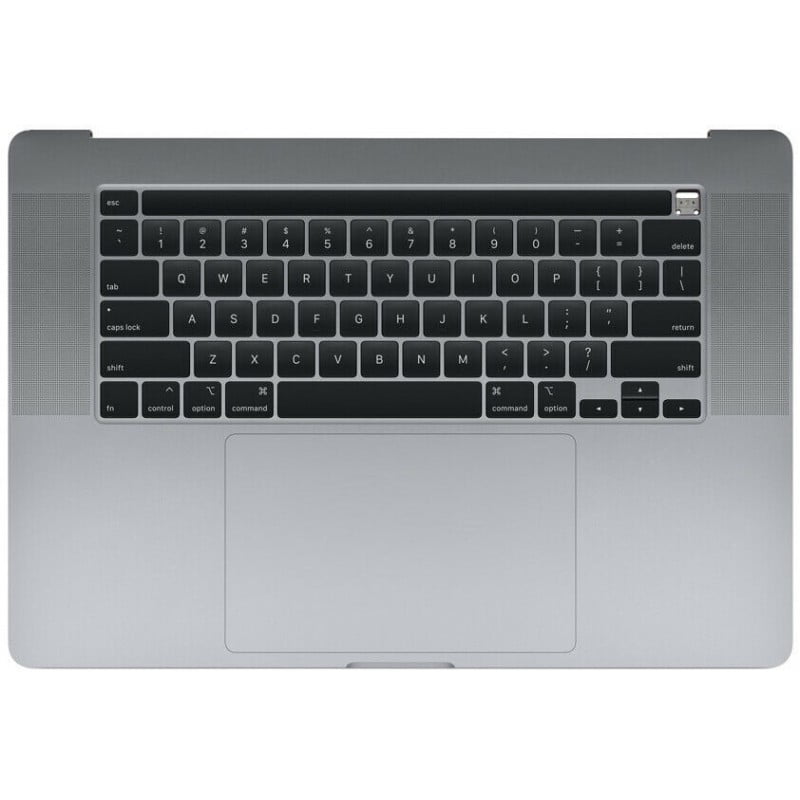
Genuine-spec US layout keyboard replacement for MacBook Pro 15″ (2018–2019, Models A1989/A1990)—designed for reliable typing, full compatibility, and seamless integration with original top case assemblies. Compatible With: MacBook Pro 15-inch (2018 A1989 and 2019 A1990 models) with Touch Bar. Layout: Standard US English (QWERTY) with full-size keys, including inverted-T arrow keys and dedicated function row. Integrated Features: Includes built-in backlighting, scissor-switch mechanism (3rd-gen Butterfly or revised Butterfly mechanism, depending on original model year), and ribbon cable connector matching Apple’s OEM design. Functionality: Supports all native keyboard features, including brightness, volume, media controls, and Touch ID power button (note: Touch ID sensor is not included—this is the keyboard only). Build Quality: Precision-engineered to match Apple’s original fit, feel, and durability—ideal for professional repairs or top case refurbishment. Installation Note: Requires full top case disassembly. Keyboard is adhered to the top case and must be carefully removed and replaced using proper tools and techniques. Recommended for experienced technicians. Model Verification: Ensure your MacBook is A1989 (2018) or A1990 (2019) before purchase—keycaps and connectors differ from other MacBook generations.

Compatible With: MacBook Pro 15.4-inch (Mid 2012, Model A1398, Model Identifier MacBookPro10,1) — the first Retina MacBook Pro. Includes: Complete left and right speaker units with pre-attached connector cables and mounting brackets, ready for direct installation. Audio Performance: Engineered to match Apple’s original acoustic design—delivers clear mid-range, balanced stereo separation, and consistent volume levels across system audio, video calls, and media playback. OEM Build Quality: Precision-molded housing, original grille pattern, and correct wiring length ensure seamless integration into the MacBook’s chassis without rattling or interference. Common Use Cases: Replaces speakers damaged by liquid spills, physical impact, or aging (e.g., crackling, no sound, or distorted audio). Installation Note: Requires full bottom case and logic board access. Speakers are secured with screws and adhesive tape. Recommended for experienced technicians due to tight internal layout and delicate connectors.

Logitech G403 HERO – Ergonomic wired gaming mouse with HERO 25K sensor and ultra-precise 25,600 DPI tracking.Delivers pro-grade performance with customizable RGB, 6 buttons, and optional weight tuning. ✅ Full Specifications: Model: Logitech G403 HERO Sensor: HERO 25K Optical Sensor DPI: 100 – 25,600 DPI (adjustable with no smoothing, acceleration, or filtering) Polling Rate: 1000 Hz (1ms response time) Tracking Speed: >400 IPS Acceleration: >40G Buttons: 6 programmable buttons (including 2 side buttons) Switches: Mechanical with metal spring button tensioning (rated for 20M+ clicks) Lighting: RGB Lighting (logo and scroll wheel, customizable via G HUB) Weight: Approx. 87g (mouse only) + 10g optional weight Grip Style: Palm and claw grip support Cable: 2.1 meters (standard rubber cable) Build: Ergonomic right-handed design with rubber side grips Software: Logitech G HUB (for DPI, lighting, macros, and profiles) Compatibility: Windows 7 or later, macOS 10.11 or later, Chrome OS Onboard Memory: Yes (save DPI and button settings directly to the mouse)

Genuine-spec touchpad flex cable for MacBook Pro 15″ (Model A1706 – 2017 and A1989 – 2018/2019)—restores full Force Touch functionality, haptic feedback, and precise multi-touch gesture control during trackpad repair or replacement. Compatible With: MacBook Pro 15″ (2017) – Model A1706 (Model Identifier: MacBookPro14,3) MacBook Pro 15″ (2018–2019) – Model A1989 (Model Identifier: MacBookPro15,2) ✅ Note: Apple used the same trackpad assembly and flex cable across both A1706 and A1989 15″ models—making this part interchangeable between them. MacBook Pro 15″ (2017) – Model A1706 (Model Identifier: MacBookPro14,3) MacBook Pro 15″ (2018–2019) – Model A1989 (Model Identifier: MacBookPro15,2) ✅ Note: Apple used the same trackpad assembly and flex cable across both A1706 and A1989 15″ models—making this part interchangeable between them. ✅ Note: Apple used the same trackpad assembly and flex cable across both A1706 and A1989 15″ models—making this part interchangeable between them. Part Type: Touchpad flex cable only — does not include the trackpad housing, Taptic Engine, or mounting hardware. This is the OEM-style ribbon cable connecting the trackpad to the logic board. Function: Transmits: Touch input coordinates Force Touch pressure data Haptic feedback signals to the Taptic Engine Enables full macOS gesture support: Force Click, three-finger lookup, swipe navigation, pinch-to-zoom, and smooth cursor tracking. Touch input coordinates Force Touch pressure data Haptic feedback signals to the Taptic Engine Enables full macOS gesture support: Force Click, three-finger lookup, swipe navigation, pinch-to-zoom, and smooth cursor tracking. OEM-Quality Build: Matches Apple’s original in: Cable length and routing Connector pitch and ZIF latch design EMI shielding and flex durability Cable length and routing Connector pitch and ZIF latch design EMI shielding and flex durability Common Use Cases: Replacing a torn, creased, or liquid-damaged original flex cable Completing a trackpad replacement when the original cable is compromised Fixing intermittent trackpad behavior, loss of Force Touch, or complete unresponsiveness Replacing a torn, creased, or liquid-damaged original flex cable Completing a trackpad replacement when the original cable is compromised Fixing intermittent trackpad behavior, loss of Force Touch, or complete unresponsiveness Installation Note: Requires full bottom case removal and battery disconnection. Cable routes under internal components near the right speaker and logic board. Connects via a ZIF (Zero Insertion Force) socket—must be aligned carefully and latched gently. Recommended for experienced or certified technicians only. Requires full bottom case removal and battery disconnection. Cable routes under internal components near the right speaker and logic board. Connects via a ZIF (Zero Insertion Force) socket—must be aligned carefully and latched gently. Recommended for experienced or certified technicians only.

Genuine-spec touchpad flex cable for MacBook Pro 13″ with Touch Bar (Model A1708, 2016–2017)—restores full Force Touch functionality, haptic feedback, and precise multi-touch gesture control during trackpad repair or replacement. Compatible With: MacBook Pro 13″ (2016) – Model A1708 (Model Identifier: MacBookPro13,1) MacBook Pro 13″ (2017) – Model A1708 (Model Identifier: MacBookPro14,1) (Both years share the same internal trackpad assembly and flex cable.) MacBook Pro 13″ (2016) – Model A1708 (Model Identifier: MacBookPro13,1) MacBook Pro 13″ (2017) – Model A1708 (Model Identifier: MacBookPro14,1) (Both years share the same internal trackpad assembly and flex cable.) Part Type: Touchpad flex cable only — does not include the trackpad housing, Taptic Engine, or mounting hardware. This is the OEM-style ribbon cable that connects the trackpad to the logic board. Function: Transmits: Touch input coordinates Force Touch pressure data Haptic feedback signals to the Taptic Engine Enables full macOS gesture support: Force Click, three-finger lookup, swipe navigation, pinch-to-zoom, and smooth cursor tracking. Touch input coordinates Force Touch pressure data Haptic feedback signals to the Taptic Engine Enables full macOS gesture support: Force Click, three-finger lookup, swipe navigation, pinch-to-zoom, and smooth cursor tracking. OEM-Quality Build: Matches Apple’s original specifications in: Cable length and routing path Connector pitch and ZIF latch design EMI shielding and flex durability Cable length and routing path Connector pitch and ZIF latch design EMI shielding and flex durability Common Use Cases: Replacing a torn, creased, or liquid-damaged original flex cable Completing a trackpad replacement when the original cable is compromised Fixing intermittent trackpad behavior, loss of Force Touch, or complete unresponsiveness Replacing a torn, creased, or liquid-damaged original flex cable Completing a trackpad replacement when the original cable is compromised Fixing intermittent trackpad behavior, loss of Force Touch, or complete unresponsiveness Installation Note: Requires full bottom case removal and battery disconnection. Cable routes under internal components near the right speaker and logic board. Connects via a ZIF (Zero Insertion Force) socket—must be aligned carefully and latched gently. Recommended for experienced or certified technicians only. Requires full bottom case removal and battery disconnection. Cable routes under internal components near the right speaker and logic board. Connects via a ZIF (Zero Insertion Force) socket—must be aligned carefully and latched gently. Recommended for experienced or certified technicians only.

Reliable, secure, and built for productivity—the Lenovo ThinkPad T14 features a 10th Gen Intel Core i5 processor, 16GB RAM, and a fast 256GB SSD in a durable,14-inch business laptop.

A well-equipped pre-owned Dell Latitude 5410 with 14" display, 10th Gen Core i5, 16GB RAM, and 512GB SSD—delivering strong performance, security, and portability for business and professional use.

This 1.8-meter DisplayPort to HDMI cable lets you connect a DisplayPort-enabled PC or laptop to an HDMI monitor, TV, or projector. It delivers clear high-definition video and reliable signal transmission, making it perfect for office work, presentations, and home entertainment. The DisplayPort to HDMI cable (1.8M) is a simple and reliable solution for connecting modern computers and laptops with a DisplayPort output to HDMI displays. Ideal for upgrading your setup, it supports high-quality video output for monitors, HDTVs, and projectors. With plug-and-play functionality and a durable build, it ensures stable performance for both professional and home use. DisplayPort to HDMI Connection for easy compatibility with HDMI screens 1.8M Cable Length ideal for desk and office setups High-Definition Video Output for clear and sharp visuals Plug & Play no drivers required Durable Connectors & Cable Build for long-term reliability Perfect for Work & Entertainment supports monitors, TVs, and projectors Works with devices that have a DisplayPort output and displays with an HDMI input, including monitors, TVs, projectors, and display systems. Ideal for workstations, presentations, and dual-screen setups.

WiWU T22 Earbuds – Stylish TWS earbuds with TFT display case, Bluetooth 6.0, ANC (-23 dB), 4 hrs playback, and in-ear detection.Sleek, feature-rich, and comfortable — ideal for mobile users who want touch control and immersive sound. Model: WiWU T22 Display & Controls: Charging case includes vibrant TFT/LCD screen with touch controls for playback, ANC toggle, and battery levels Bluetooth: JL 7003D8 chipset, Bluetooth 6.0 (alias V6 or 5.4) for stable, low-latency connection up to 10 m Noise Reduction: Active Noise Cancellation at –23 dB Battery: Earbuds: 30 mAh each; Charging case: 300 mAh; ~4 hrs music, ~3 hrs talk (at ~80% volume); ~50 hrs standby Charging: USB‑C, ~1 hr to full charge Other Features: In-ear detection (auto play/pause), Hi-Fi audio, ergonomic fit, compact design

TP-Link AC1200 Archer C50 Wireless Dual Band Router Support smooth 4K streaming with AC1200 Wi-Fi 4 external antennas provide stable wireless connections and optimal coverage Easy network management at your fingertips with TP-Link Tether Supports IGMP Proxy/Snooping, Bridge, and Tag VLAN to optimize IPTV streaming Supports Access Point mode to create a new Wi-Fi access point TP-Link AC1200 Archer C50 Wireless Dual Band Router Support smooth 4K streaming with AC1200 Wi-Fi 4 external antennas provide stable wireless connections and optimal coverage Easy network management at your fingertips with TP-Link Tether Supports IGMP Proxy/Snooping, Bridge, and Tag VLAN to optimize IPTV streaming Supports Access Point mode to create a new Wi-Fi access point TP-Link Archer C50 – AC1200 Wireless Dual Band Router Wireless Speed: Up to 1200 Mbps (300 Mbps on 2.4GHz + 867 Mbps on 5GHz) Wi-Fi Standard: 802.11ac – 3x faster than wireless N speeds Bands: Dual Band (2.4GHz & 5GHz) for reduced interference and better performance Antenna: 4 External Antennas for strong and stable wireless coverage Ports: 4× LAN, 1× WAN (10/100 Mbps) Advanced Features: Parental Controls, Guest Network, IPv6 Support, Access Control Security: WPA/WPA2 encryption for secure wireless connections Ease of Use: Easy setup with TP-Link Tether App Ideal For: HD streaming, online gaming, and high-speed downloads in homes and small offices

Experience professional-grade power with this pre-owned ThinkPad E14 Gen 2. Featuring a robust AMD Ryzen 7 4700U 8-core processor, 16GB RAM, and a 256GB NVMe SSD, this 14-inch laptop is built for high-speed productivity, secure data management, and long-lasting durability.

Used, original 35 W USB-C charger for Mac — reliable Apple power adapter (dual USB-C) for charging your Mac and other devices. This is an authentic Apple 35 W USB-C power adapter (dual-port) — used but tested. It’s built to charge MacBooks, iPhones, iPads, and other USB-C devices. Though lower wattage than larger Mac adapters, it works well for light use or supplemental charging. Features & Behavior Dual USB-C ports: can charge two devices simultaneously Intelligent power distribution: if both ports are used, the output splits evenly (~17.5 W each) USB Power Delivery support across standard profiles (5V, 9V, 15V, 20V) Accepts input 100-240V AC, so usable worldwide (with correct plug) Compact form factor in one variant, or standard “duckhead” plug style in another Specifications Strengths & Limitations Pros Authentic Apple unit — safer and more reliable than generic chargers Dual ports give flexibility — charge phone + Mac concurrently Portable and suitable for travel (universal voltage) Cons 35 W is low for MacBook Pro under load — might not maintain charging during heavy use When both ports used, power is halved (~17.5 W each) Used condition may include wear, scuffs, or reduced efficiency

WiWU WI‑C052 Converter – Compact aluminum adapter enables OTG and fast PD-style charging (≈27 W) with USB‑C/Lightning on USB‑A ports.Supports high-speed 10 Gbps data transfer, is plug‑and‑play, and works across phones, tablets, and laptops. Functionality: OTG-capable USB-A to USB-C (A→C) Data Transfer: Supports USB 3.2 (up to 10 Gbps) and backward compatible with USB 3.0/2.0 Fast Charging: Supports PD profile fast charging (up to ~27W Apple PD equivalent) without triggering charge pop-ups Build: Durable aluminum-alloy shell with silicone lanyard design for portability and heat dissipation Compatibility: Works with smartphones, tablets, laptops—enabling USB-A peripherals, USB-C or Lightning cables Plug & Play: No drivers required; reversible connector design Portability: Lightweight, compact—easy to carry

The Lenovo ThinkPad T460 features an Intel Core i5 6th Gen processor, 8GB RAM, and a fast 256GB SSD for smooth everyday performance. With a responsive 14-inch touchscreen display and the legendary ThinkPad keyboard, it’s ideal for work, study, and productivity on the go.

Genuine-spec battery flex cable for MacBook Pro models A2159 (16", 2019), A1708 (13", 2016–2017), and A2338 (13", 2020 M1)—restores critical communication between the battery and logic board for proper power-on, charging, and macOS battery status. Genuine-spec battery flex cable for MacBook Pro models A2159 (16″, 2019), A1708 (13″, 2016–2017), and A2338 (13″, 2020 M1)—restores critical communication between the battery and logic board for proper power-on, charging, and macOS battery status. Carries SMBus (System Management Bus) signals from the battery to the logic board Enables: Accurate battery percentage and health reporting in macOS Proper charging control (start/stop, thermal throttling) Power-on capability (MacBooks will not boot without this connection) Prevention of “Battery Not Charging” or “Service Battery” errors Accurate battery percentage and health reporting in macOS Proper charging control (start/stop, thermal throttling) Power-on capability (MacBooks will not boot without this connection) Prevention of “Battery Not Charging” or “Service Battery” errors MacBook won’t turn on (even with a good battery) Battery shows “–%”, 0%, or “Not Charging” Random shutdowns under load macOS displays “No Battery Available” Logic board powers fans or lights but no display output Battery flex cable only (with OEM-style connector and strain relief) ❌ Does not include: battery, logic board, or trackpad Requires full bottom case removal and battery disconnection Connects via a ZIF or press-fit socket on the logic board Must be routed precisely to avoid tension or micro-tears Highly recommended for experienced or certified technicians—improper installation can cause permanent power or battery communication failure

WiWU Linker 721HD Hub – Compact USB-C hub with 7 ports including 100W PD, dual USB-A, USB-C data, HDMI 4K60, and dual SD/TF slots.Aluminum body, plug‑and‑play compatibility with MacBooks and modern USB‑C devices—ideal for laptop expansion. Model: Linker 721HD (WiWU) Material: Aluminum-alloy shell Ports: 2 × USB‑A 3.1 1 × USB‑C 3.1 (data) 1 × USB‑C PD power delivery (up to 100 W) 1 × HDMI (4K @ 60 Hz) SD card slot + micro‑SD (TF) slot (USB 3.0 speed) Ports: 2 × USB‑A 3.1 1 × USB‑C 3.1 (data) 1 × USB‑C PD power delivery (up to 100 W) 1 × HDMI (4K @ 60 Hz) SD card slot + micro‑SD (TF) slot (USB 3.0 speed) Cable: Fixed USB‑C male cable (approx. 15 cm) Compatibility: Plug-and-play with USB-C/Thunderbolt 3/4 devices (MacBook, XPS, Chromebooks, mobile devices with DP-Alt Mode) Design: Compact, space gray finish optimized for travel/work setups Weight: ~150 g

WiWU Infinite USB‑C to HDMI Adapter (HB004) – Sleek aluminum dongle offering 4K@60Hz output over USB‑C (DP Alt‑Mode), plug-and-play with no drivers needed.Compact, portable, and reliable—a must-have for mobile productivity, gaming, and media streaming. Model: WiWU Infinite USB‑C to HDMI Adapter (HB004) Video Output: HDMI 2.0, supports up to 4K @ 60 Hz resolution Material & Weight: Robust aluminum alloy body, compact, weighs ~69 g Compatibility: Plug-and-play connector works with USB‑C devices supporting DP Alt‑Mode—compatible with laptops, smartphones, tablets, consoles Design & Build: Slim, portable, durable—no driver/software required Use Cases: Ideal for mirroring/extending screens for presentations, streaming, gaming

