
TE03XL Battery TE03061XL for HP Omen 15-ax000:15-ax033dx 15-ax210nr 15-ax001ns;HP Pavilion 15-bc000:15-bc008tx and More 849910-850 849570-541 542 543 HSTNN-UB7A TPN-Q173-11.55V 61.6Wh 3-Cell About this item Specifications: – Battery type: Li-ion || Voltage: 11.55VV|| Capacity: 61.6Wh || Cells: 3-cell Compatible Models: – HP Omen 15-ax000:(15-ax000~15-ax099);HP Pavilion 15-BC000 Series (15-bc000~099;15-bc300~399) Replacement Part Number: – HP TE03XL HSTNN-UB7A TPN-Q173 TE03061XL 849910-850 849570-541 849570-542 849570-543 3ICP7/65/80Replacment Part Number: – HP TE03XL HSTNN-UB7A TPN-Q173 TE03061XL 849910-850 849570-541 849570-542 849570-543 3ICP7/65/80 Easy Installation: The replacement process is straightforward and provides our tools.

MacBook Pro 13″ Retina A1989 / A2159 (2018-2019) Display Assembly (Silver) MacBook Pro 13″ Touch Bar 2019z A1989 (EMC 3214 MacBookPro15,2) 2.3 GHz A1989 (EMC 3214 MacBookPro15,2) 2.7 GHz MacBook Pro 13″ Touch Bar 2019 A1989 (EMC 3358 MacBookPro15,2) 2.4 GHz A1989 (EMC 3358 MacBookPro15,2) 2.8 Ghz MacBook Pro 13″ Two Thunderbolt Ports 2019 A2159 (EMC 3301 MacBookPro15,4) 1.4 GHz A2159 (EMC 3301 MacBookPro15,4) 1.7 GHz

The Cudy M1200 AC1200 Mesh WiFi System provides seamless whole-home coverage with stable dual-band speeds up to 1200Mbps. Designed to eliminate dead zones, it delivers smooth roaming, strong signal performance, and reliable connectivity for homes and offices. AC1200 Dual Band WiFi – Combined speeds of up to 1200Mbps (300Mbps on 2.4GHz + 867Mbps on 5GHz) for streaming, browsing, and gaming. Whole-Home Mesh Coverage – Multiple units work together to create a single seamless network, eliminating WiFi dead zones. Seamless Roaming – Automatically connects your devices to the strongest signal as you move around your home. Gigabit Ethernet Ports – High-speed wired connections for smart TVs, gaming consoles, and PCs. Easy Setup & Management – Quick installation and control through a user-friendly interface or mobile app. Flexible Expansion – Easily add more mesh units to extend coverage anytime. Stable & Reliable Performance – Designed for multiple connected devices with consistent speed and signal strength. Gigabit Ethernet Ports (WAN/LAN) Dual Band WiFi (2.4GHz & 5GHz) Mesh Networking Technology WiFi Roaming Support Wireless Security (WPA/WPA2)

REMAX RT-E601 1200MAH TIME II SERIES EYE-CARING LED LAMP Function— Use the power key to turn on/ off the lamp. Tap the power key to adjust the brightness of the lamp (brightest-normal-dimmest-off) four steps are easy to use. When folding the design lamp holder and arm can rotate the angle within a range of 180 degrees up-down adjustment. Press and hold “Mode” Set” Up” Donkey enter normal time mode, alarm clock and snooze mode, birthday reminder mode timer mode, and temperature mode. Time changes 12 hours/24 hours mode and adjusting the hours, minutes, year, month,t,h, and day. Temperature can change to Celsius or Fahrenheit. The red light will be on when it starts charging, and the red light will go out when it is fully charged. Material—ABS+PC Rated voltage—DC5V /0.5A lighting Mode—Direct glow Key Type—Touch key Luminous flux—250m Color rendering index—>80 Rated power—4W Battery Capacity—1200mAh Weight—346g Charging port—Micro SIZE—87*87*263mmCharging time—4-4:30hour Working time—3:30hour

WiWU WM108 Wimice Dual‑Mode Mouse – Bluetooth 5.0 and 2.4 GHz wireless mouse with 800/1200/1600 DPI, silent clicks, and ergonomic ABS housing.Long battery life (~6 months standby), USB dongle & silent design—ideal for travel, office, and quiet environments. Model: WiWU Wimice WM108 Connection Modes: Bluetooth 5.0 2.4 GHz wireless via USB dongle Connection Modes: Bluetooth 5.0 2.4 GHz wireless via USB dongle DPI Settings: 800 / 1,200 / 1,600 DPI (adjustable) Buttons: 3 standard buttons + clickable scroll wheel (4 keys total) Range: Up to 10 m wireless connectivity Material/Design: Lightweight (67–130 g, depending on source), ergonomic ABS plastic body, magnetic base or “super magnetic absorption” design Operating Range: ≈10 m Silent Clicks: Quiet operation—silent key action Dimensions: Approx. 108 × 64 × 36 mm Weight: 67 g cited by Star Tech and 130 g by others—likely lighter in official spec Compatibility: Windows, macOS, Linux, Android, etc. Plug-and-play, no driver needed

90W AC Charger Replacement for HP EliteDesk 705 G1 G2 G4 705 800 G5 Desktop Mini ProOne 400 G4 G5 23.8-inch All-in-One ProOne 400 G2 G3 G4 G5 460 G2 G3 480 G2 G3 20-inch All-in-One

Dominate the battlefield with the Genius Scorpion M705, featuring a high-precision 7200 DPI sensor and striking 7-color breathing RGB lighting. Built with a durable braided cable and 6 programmable buttons, it’s the ultimate entry-level weapon for gamers seeking speed, style, and reliability. The Genius Scorpion M705 is designed to provide gamers with a competitive edge without compromising on comfort. Equipped with an optical sensor that reaches up to 7200 DPI, it ensures smooth and accurate tracking across various surfaces. Its ergonomic right-handed shape and lightweight build reduce wrist strain during marathon sessions, while the integrated 32K memory allows you to take your custom macros and profiles wherever you go. Adjustable 7200 DPI Sensor: Seamlessly switch between six sensitivity levels (800/1600/2400/3200/4800/7200 DPI) to match your game’s pace, from high-speed movement to pixel-perfect sniping. Dynamic RGB Breathing Effects: Enhance your gaming atmosphere with 7 dazzling LED colors that pulse with a “breathing” effect. You can easily adjust the lighting mode using the DPI + Forward/Backward shortcuts. 6 Programmable Buttons: Fully customize your controls. Assign macros, shortcut keys, or specific in-game commands to the 6 buttons to execute complex actions with a single click. Built-in 32K Memory: Save your settings directly on the mouse. Your custom profiles and button assignments stay with you, even when switching to a different PC. Professional Durability: Features a 1.8-meter braided USB cable that prevents tangling and increases the lifespan of the device, ensuring a stable, low-latency connection. Sensor Type: Optical Resolution: 800 – 7,200 DPI Number of Buttons: 6 (Programmable) Illumination: 7-Color RGB Breathing LED Interface: USB Wired Cable: 1.8m Braided Cable Internal Memory: 32K Dimensions: 120.2 x 72.7 x 39.6 mm Weight: Approx. 120g (including cable) Compatibility: Windows 8, 10, 11 or later What’s in the Box Compatibility: Windows 8, 10, 11 or later What’s in the Box Genius Scorpion M705 Gaming Mouse Multi-language Quick Guide
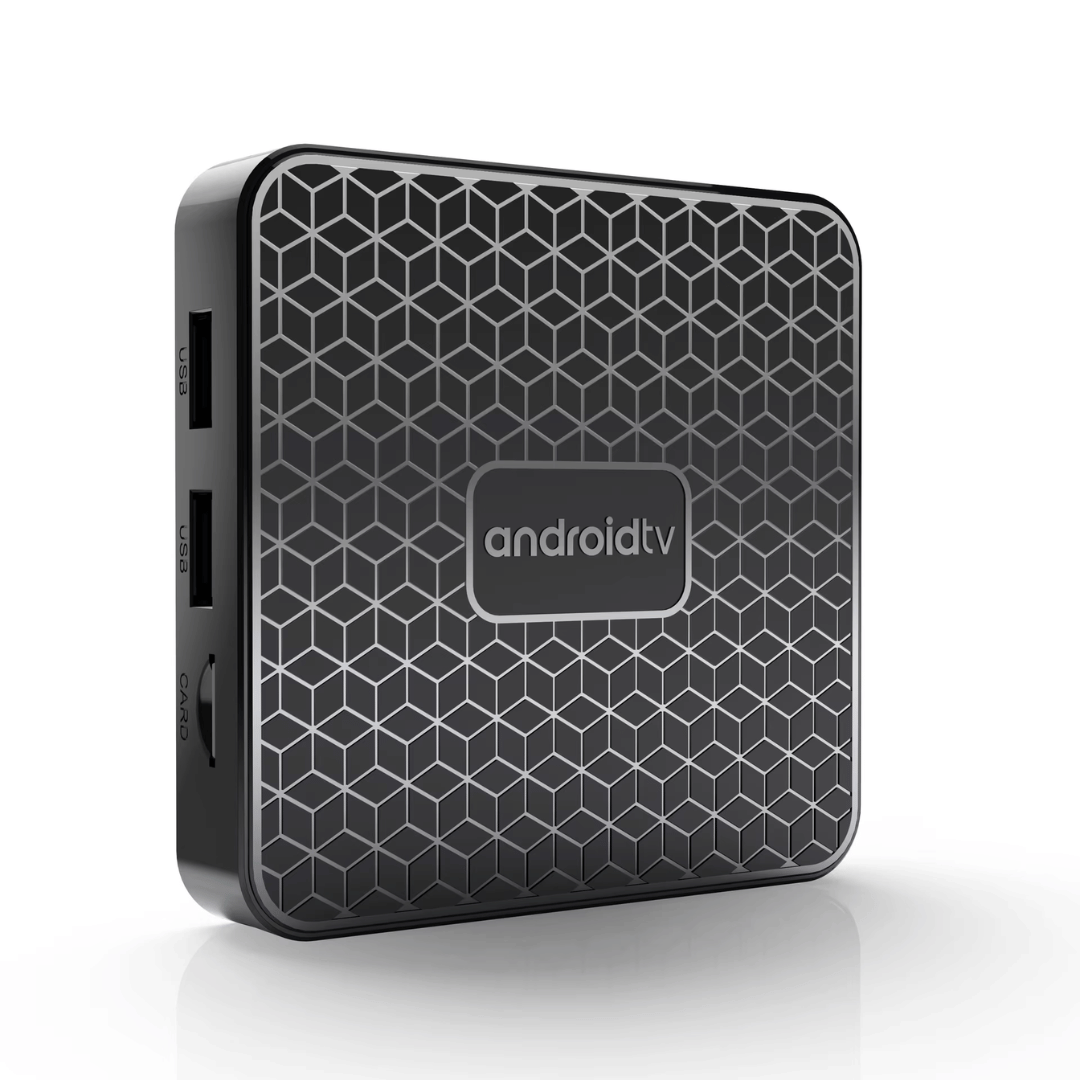
The Mortal T1 Mini is an ultra-compact, budget-friendly Android TV box designed to turn any standard HDMI television into a smart entertainment platform. It features 4K hardware decoding, dual-band Wi-Fi, and a voice-controlled remote, providing a smooth and responsive experience for local IPTV, YouTube, and mainstream streaming applications. ✅ Full Specifications: Model: Mortal T1 Mini 4K Smart Media Player Interface / Connection: Wi-Fi: Dual-Band (2.4GHz / 5GHz) 802.11n Bluetooth: BT 5.0 (Supports wireless remotes, headphones, and controllers) Wired Network: 1 x 10/100Mbps Ethernet LAN Port (Note: Available on standard mini casing configurations) Input/Output Ports: 1 x HDMI Out, USB Ports, 1 x TF/microSD Card Slot, 1 x DC 5V Power Interface / Connection: Wi-Fi: Dual-Band (2.4GHz / 5GHz) 802.11n Bluetooth: BT 5.0 (Supports wireless remotes, headphones, and controllers) Wired Network: 1 x 10/100Mbps Ethernet LAN Port (Note: Available on standard mini casing configurations) Input/Output Ports: 1 x HDMI Out, USB Ports, 1 x TF/microSD Card Slot, 1 x DC 5V Power Performance / Hardware: CPU: Allwinner H313 Quad-Core ARM Cortex-A53 (up to 1.5GHz) (Also distributed in select regional batches with Rockchip quad-core architectures) GPU: Mali-G31 MP2 / Mali-450MP Graphics Engine Resolution Output: Native HDMI 2.0 supporting up to 4K @ 60Hz Video Decode Formats: 4K Ultra HD hardware acceleration decoding including H.265 HEVC, H.264, VP9, and 3D video support High Dynamic Range (HDR): Supports HDR10+, HDR10, and HLG profiles Performance / Hardware: CPU: Allwinner H313 Quad-Core ARM Cortex-A53 (up to 1.5GHz) (Also distributed in select regional batches with Rockchip quad-core architectures) GPU: Mali-G31 MP2 / Mali-450MP Graphics Engine Resolution Output: Native HDMI 2.0 supporting up to 4K @ 60Hz Video Decode Formats: 4K Ultra HD hardware acceleration decoding including H.265 HEVC, H.264, VP9, and 3D video support High Dynamic Range (HDR): Supports HDR10+, HDR10, and HLG profiles Capacity / Memory Options: 2GB RAM + 16GB eMMC Internal Flash Storage (Storage expandable up to 256GB via TF card slot or external USB drive) Material & Build: Durable, matte plastic compact shell engineered with passive thermal management to maintain low operational temperatures Design & Form Factor: Pocket-sized, ultra-light mini layout designed to easily fit behind wall-mounted or desktop televisions Security & Software: Operating System variants run customized, stable Android TV distributions (Android 13 / Android 14) optimized for app longevity, security patch support, and easy layout control Voice Assistant: Includes an ergonomic voice remote control featuring an integrated microphone button for hands-free Google Assistant commands and quick navigation Compatibility: Fully compatible with major applications like YouTube, Netflix, Disney+, Prime Video, various IPTV clients, and Screen Mirroring Cast protocols Dimensions: Approx. 77 x 77 x 12 mm (May vary slightly up to 88 x 88 x 18 mm depending on exact regional shell style) Weight: Approx. 0.25 to 0.35 kg

Lexar NM620 1TB SSD, M.2 2280 PCIe Gen3x4 NVMe 1.4 Internal SSD, Up to 3500MB/s Read, 3000MB/s Write, 3D NAND Flash Internal Solid State Drive for PC Enthusiasts and Gamers (LNM620X001T-RNNNG) About this item High-speed PCIe Gen3x4 interface: Lexar 1TB SSD up to 3500MB/s read and 3000MB/s write – NVMe 1.4 is supported. Lexar Internal SSD M.2 2280 form factor with 3D NAND Lexar Solid state drive maintains 6x the speed of a SATA-based SSD. Lexar SSD is ideal for PC enthusiasts and gamers. Lexar Internal solid state drive is shock and vibration-resistant without moving parts.

About this item Noise-cancelling microphone reduces room noise for clearer Internet calls Full stereo sound for your music, movies and games Rotating microphone boom can be worn on your left or right side Adjustable headband gives you a customized fit Works with Windows 10 or later, Windows 8, Windows 7, Windows Vista, Mac OS X 10.5 or later, Chrome OS, Linux Kernel 2.6+ and iOS or Android devices

Premium bilingual keyboard replacement for MacBook Pro 13″ (A1278, 2009–2012) — choose US/Arabic or UK/Arabic layout. Features durable scissor-switch keys, OEM fit, and clear dual-language legends for seamless typing in English and Arabic. Compatible With: MacBook Pro 13-inch (Model A1278) from Late 2009, Mid 2010, Early 2011, and Mid 2012 (Model Identifiers: MacBookPro5,5, 6,2, 8,1) Layout Options (select at purchase): US/Arabic: Primary legends in Arabic, secondary (top-left) in US QWERTY — includes @, #, and standard US symbols. UK/Arabic: Primary legends in Arabic, secondary in UK QWERTY — includes £ symbol, taller Enter key, and UK-specific punctuation. Both versions feature full Arabic character set US/Arabic: Primary legends in Arabic, secondary (top-left) in US QWERTY — includes @, #, and standard US symbols. UK/Arabic: Primary legends in Arabic, secondary in UK QWERTY — includes £ symbol, taller Enter key, and UK-specific punctuation. Both versions feature full Arabic character set Keyboard Type: Traditional scissor-switch mechanism—reliable, tactile, and serviceable (pre-Butterfly design). Backlighting: Included on Early 2011 and Mid 2012 models only. Keycaps are translucent for even lighting. (Note: Late 2009 & Mid 2010 A1278 models did not support backlighting—keyboard will still function, but lighting requires compatible hardware.) Build & Fit: Precision-molded frame with correct screw mounts and alignment pegs—ensures flush, secure installation in the original top case with no rattling. Installation: Keyboard is screw-mounted (no adhesive)—one of the most DIY-friendly MacBook keyboards. Requires top case access and battery disconnect. Suitable for intermediate users or professionals.

Genuine-spec touchpad flex cable for MacBook Pro 14″ (Model A2442, 2021, M1 Pro/Max)—essential for restoring full Force Touch functionality, haptic feedback, and precise multi-touch gesture control. Compatible With: MacBook Pro 14-inch (2021, Model A2442) with Apple M1 Pro or M1 Max chip (Model Identifiers: MacBookPro18,3 / MacBookPro18,4). Part Type: Touchpad flex cable only—does not include the trackpad, Taptic Engine, or mounting brackets. This is the OEM-style ribbon cable that connects the trackpad to the logic board. Function: Carries touch input, Force Touch pressure data, and haptic feedback signals—critical for macOS trackpad gestures, Force Click, and Taptic Engine responsiveness. OEM-Quality Build: Matches Apple’s original flex circuit in length, connector pitch, shielding, and bend geometry—ensures reliable signal transmission and durability under repeated use. Common Use Cases: Replacing a damaged, torn, or corroded original flex cable Completing a trackpad replacement when the original cable is unusable Fixing intermittent trackpad issues, unresponsiveness, or loss of Force Touch Replacing a damaged, torn, or corroded original flex cable Completing a trackpad replacement when the original cable is unusable Fixing intermittent trackpad issues, unresponsiveness, or loss of Force Touch Installation Note: Requires full bottom case removal and careful routing beneath internal components. Connectors use ZIF (Zero Insertion Force) sockets—must be seated properly without force. Recommended for certified or highly experienced technicians only.

Genuine-spec touchpad flex cable for MacBook Pro 13″ with Touch Bar (Model A1708, 2016–2017)—restores full Force Touch functionality, haptic feedback, and precise multi-touch gesture control during trackpad repair or replacement. Compatible With: MacBook Pro 13″ (2016) – Model A1708 (Model Identifier: MacBookPro13,1) MacBook Pro 13″ (2017) – Model A1708 (Model Identifier: MacBookPro14,1) (Both years share the same internal trackpad assembly and flex cable.) MacBook Pro 13″ (2016) – Model A1708 (Model Identifier: MacBookPro13,1) MacBook Pro 13″ (2017) – Model A1708 (Model Identifier: MacBookPro14,1) (Both years share the same internal trackpad assembly and flex cable.) Part Type: Touchpad flex cable only — does not include the trackpad housing, Taptic Engine, or mounting hardware. This is the OEM-style ribbon cable that connects the trackpad to the logic board. Function: Transmits: Touch input coordinates Force Touch pressure data Haptic feedback signals to the Taptic Engine Enables full macOS gesture support: Force Click, three-finger lookup, swipe navigation, pinch-to-zoom, and smooth cursor tracking. Touch input coordinates Force Touch pressure data Haptic feedback signals to the Taptic Engine Enables full macOS gesture support: Force Click, three-finger lookup, swipe navigation, pinch-to-zoom, and smooth cursor tracking. OEM-Quality Build: Matches Apple’s original specifications in: Cable length and routing path Connector pitch and ZIF latch design EMI shielding and flex durability Cable length and routing path Connector pitch and ZIF latch design EMI shielding and flex durability Common Use Cases: Replacing a torn, creased, or liquid-damaged original flex cable Completing a trackpad replacement when the original cable is compromised Fixing intermittent trackpad behavior, loss of Force Touch, or complete unresponsiveness Replacing a torn, creased, or liquid-damaged original flex cable Completing a trackpad replacement when the original cable is compromised Fixing intermittent trackpad behavior, loss of Force Touch, or complete unresponsiveness Installation Note: Requires full bottom case removal and battery disconnection. Cable routes under internal components near the right speaker and logic board. Connects via a ZIF (Zero Insertion Force) socket—must be aligned carefully and latched gently. Recommended for experienced or certified technicians only. Requires full bottom case removal and battery disconnection. Cable routes under internal components near the right speaker and logic board. Connects via a ZIF (Zero Insertion Force) socket—must be aligned carefully and latched gently. Recommended for experienced or certified technicians only.

Genuine-spec touchpad flex cable for MacBook Pro 16″ (Model A2485, 2021, M1 Pro/Max)—critical for restoring full Force Touch functionality, haptic feedback, and precise multi-touch gesture control during trackpad repairs. Compatible With: MacBook Pro 16-inch (2021, Model A2485) with Apple M1 Pro or M1 Max chip (Model Identifiers: MacBookPro18,1 / MacBookPro18,2). Part Type: Touchpad flex cable only—does not include the trackpad, Taptic Engine, or mounting hardware. This is the OEM-style ribbon cable that connects the trackpad to the logic board. Function: Transmits touch coordinates, Force Touch pressure data, and haptic feedback signals—essential for macOS gestures (e.g., pinch-to-zoom, Force Click, three-finger lookup) and Taptic Engine operation. OEM-Quality Construction: Precisely replicated to Apple’s original specifications—including cable length, connector type, EMI shielding, and flex routing—ensuring signal integrity and long-term reliability. Common Use Cases: Replacing a torn, frayed, or liquid-damaged original flex cable Completing a trackpad replacement when the original cable is compromised Fixing intermittent trackpad behavior, lost Force Touch, or complete unresponsiveness Replacing a torn, frayed, or liquid-damaged original flex cable Completing a trackpad replacement when the original cable is compromised Fixing intermittent trackpad behavior, lost Force Touch, or complete unresponsiveness Installation Note: Requires full disassembly of the bottom case and careful routing around the battery and logic board. Connectors use ZIF (Zero Insertion Force) sockets—must be aligned and latched gently. Recommended for certified or professional repair technicians only.

The Cudy WR1200 AC1200 Router offers flexible networking with its 5-in-1 functionality and dual-band WiFi speeds up to 1200Mbps. Ideal for home and office use, it provides stable connectivity, wide coverage, and multiple operating modes to suit different network needs. AC1200 Dual Band WiFi – Combined speeds of up to 1200Mbps (300Mbps on 2.4GHz + 867Mbps on 5GHz) for smooth browsing, streaming, and gaming. 5-in-1 Multi-Mode Functionality – Works as Router, Access Point, Range Extender, WISP, and Client for maximum flexibility. Wide Coverage – High-gain antennas ensure strong and stable WiFi signal throughout your home or office. Fast Ethernet Ports – Reliable wired connections for computers, smart TVs, and other devices. Easy Setup & Management – Simple configuration through an intuitive web interface. Stable Multi-Device Performance – Designed to handle multiple connected devices efficiently. Secure Network – WPA/WPA2 encryption keeps your connection safe and private. 1 × WAN Port 4 × LAN Ports Dual Band WiFi (2.4GHz & 5GHz) Ethernet (RJ45) Wireless Security (WPA/WPA2)

A reliable pre-owned Dell Latitude 5410 with 14" display, 10th Gen Core i5, 8GB RAM, and 256GB SSD—ideal for business users and students seeking solid performance, security, and portability.

Genuine-spec touchpad flex cable for MacBook Pro 15″ (Model A1706 – 2017 and A1989 – 2018/2019)—restores full Force Touch functionality, haptic feedback, and precise multi-touch gesture control during trackpad repair or replacement. Compatible With: MacBook Pro 15″ (2017) – Model A1706 (Model Identifier: MacBookPro14,3) MacBook Pro 15″ (2018–2019) – Model A1989 (Model Identifier: MacBookPro15,2) ✅ Note: Apple used the same trackpad assembly and flex cable across both A1706 and A1989 15″ models—making this part interchangeable between them. MacBook Pro 15″ (2017) – Model A1706 (Model Identifier: MacBookPro14,3) MacBook Pro 15″ (2018–2019) – Model A1989 (Model Identifier: MacBookPro15,2) ✅ Note: Apple used the same trackpad assembly and flex cable across both A1706 and A1989 15″ models—making this part interchangeable between them. ✅ Note: Apple used the same trackpad assembly and flex cable across both A1706 and A1989 15″ models—making this part interchangeable between them. Part Type: Touchpad flex cable only — does not include the trackpad housing, Taptic Engine, or mounting hardware. This is the OEM-style ribbon cable connecting the trackpad to the logic board. Function: Transmits: Touch input coordinates Force Touch pressure data Haptic feedback signals to the Taptic Engine Enables full macOS gesture support: Force Click, three-finger lookup, swipe navigation, pinch-to-zoom, and smooth cursor tracking. Touch input coordinates Force Touch pressure data Haptic feedback signals to the Taptic Engine Enables full macOS gesture support: Force Click, three-finger lookup, swipe navigation, pinch-to-zoom, and smooth cursor tracking. OEM-Quality Build: Matches Apple’s original in: Cable length and routing Connector pitch and ZIF latch design EMI shielding and flex durability Cable length and routing Connector pitch and ZIF latch design EMI shielding and flex durability Common Use Cases: Replacing a torn, creased, or liquid-damaged original flex cable Completing a trackpad replacement when the original cable is compromised Fixing intermittent trackpad behavior, loss of Force Touch, or complete unresponsiveness Replacing a torn, creased, or liquid-damaged original flex cable Completing a trackpad replacement when the original cable is compromised Fixing intermittent trackpad behavior, loss of Force Touch, or complete unresponsiveness Installation Note: Requires full bottom case removal and battery disconnection. Cable routes under internal components near the right speaker and logic board. Connects via a ZIF (Zero Insertion Force) socket—must be aligned carefully and latched gently. Recommended for experienced or certified technicians only. Requires full bottom case removal and battery disconnection. Cable routes under internal components near the right speaker and logic board. Connects via a ZIF (Zero Insertion Force) socket—must be aligned carefully and latched gently. Recommended for experienced or certified technicians only.

Experience the perfect balance of performance and value with the Lenovo ThinkPad E14 Gen 1. Powered by a reliable 10th Gen Intel Core i5 processor, 16GB RAM, and a spacious 512GB NVMe SSD, this 14-inch laptop is built to handle professional multitasking with the signature durability of the ThinkPad line.

OEM-quality trackpad replacement (without flex cable) for MacBook Pro 14″ (Model A2442, 2021, M1 Pro/Max) in Space Gray finish—engineered for precise Force Touch response, smooth multi-touch gestures, and seamless integration with the original chassis. Compatible With: MacBook Pro 14-inch (2021, Model A2442) with Apple M1 Pro or M1 Max chip. Part Type: Trackpad only—does not include the flex cable, Taptic Engine, or mounting brackets. Designed for professional technicians who will reuse or transfer the original internal components. Finish: Space Gray—matches the Space Gray MacBook Pro 14″ for flawless aesthetic continuity. (Note: Apple uses color-matched trackpads, and Space Gray units require this specific finish.) Force Touch Support: Fully compatible with pressure-sensitive input and haptic feedback when paired with the original Taptic Engine and logic board—ensuring full macOS gesture functionality. Precision Engineering: Features the same glass surface texture, curvature, and micro-click mechanism as Apple’s original—delivering consistent tracking accuracy and tactile feel. Installation Requirements: Requires complete bottom case disassembly and careful transfer of the original flex cable and Taptic Engine. Proper adhesive application is critical to maintain structural integrity and sensor alignment. Recommended for certified or experienced repair technicians only.

