
Genuine-spec touchpad flex cable for MacBook Pro 13″ (Model A2289, 2020, Intel)—restores full Force Touch functionality, haptic feedback, and preci multi-touch gesture control. OEM-quality replacement for damaged or faulty original cables. Compatible With: MacBook Pro 13-inch (2020, Four Thunderbolt Ports, Model A2289, Model Identifier MacBookPro16,2) with Intel Core i5/i7 processors. Part Type: Touchpad flex cable only — does not include the trackpad housing, Taptic Engine, or mounting hardware. This is the OEM-style ribbon cable that connects the trackpad to the logic board. Function: Transmits: Touch input coordinates Force Touch pressure data Haptic feedback signals to the Taptic Engine Enables full macOS gesture support: Force Click, three-finger lookup, swipe navigation, pinch-to-zoom, and smooth cursor tracking. Touch input coordinates Force Touch pressure data Haptic feedback signals to the Taptic Engine Enables full macOS gesture support: Force Click, three-finger lookup, swipe navigation, pinch-to-zoom, and smooth cursor tracking. OEM-Quality Build: Matches Apple’s original specifications in: Cable length and routing path Connector pitch and ZIF latch design EMI shielding and flex durability Cable length and routing path Connector pitch and ZIF latch design EMI shielding and flex durability Common Use Cases: Replacing a torn, creased, or liquid-damaged original flex cable Completing a trackpad replacement when the original cable is unusable Fixing: Intermittent or erratic trackpad behavior Loss of Force Touch or haptic feedback Complete trackpad unresponsiveness Replacing a torn, creased, or liquid-damaged original flex cable Completing a trackpad replacement when the original cable is unusable Fixing: Intermittent or erratic trackpad behavior Loss of Force Touch or haptic feedback Complete trackpad unresponsiveness Intermittent or erratic trackpad behavior Loss of Force Touch or haptic feedback Complete trackpad unresponsiveness Installation Note: Requires full bottom case removal and battery disconnection. Cable routes under internal components (speaker, logic board)—must follow original path. Connects via ZIF (Zero Insertion Force) socket—align carefully, never force. Recommended for experienced or certified technicians only. Requires full bottom case removal and battery disconnection. Cable routes under internal components (speaker, logic board)—must follow original path. Connects via ZIF (Zero Insertion Force) socket—align carefully, never force. Recommended for experienced or certified technicians only. Important Compatibility Notes: ✅ Only for A2289 (13″, 4 Thunderbolt ports, 2020, Intel) ❌ Not compatible with: A2251 (2 Thunderbolt ports, 2020) A2338 (M1 MacBook Pro, 2020) Any MacBook Air or 14″/16″ MacBook Pro ✅ Only for A2289 (13″, 4 Thunderbolt ports, 2020, Intel) ❌ Not compatible with: A2251 (2 Thunderbolt ports, 2020) A2338 (M1 MacBook Pro, 2020) Any MacBook Air or 14″/16″ MacBook Pro A2251 (2 Thunderbolt ports, 2020) A2338 (M1 MacBook Pro, 2020) Any MacBook Air or 14″/16″ MacBook Pro

Reliable, secure, and built for productivity—the Lenovo ThinkPad T14 features a 10th Gen Intel Core i5 processor, 16GB RAM, and a fast 256GB SSD in a durable,14-inch business laptop.

VSTAR UA150 1500VA UPS | Simulated Sine Wave Output | 230V | 24VDC Battery System | 50/60Hz Auto Sensing | Compact Design | Black Color | Model UPS-UA150 Robust 1500VA Power CapacityThe VSTAR UA150 delivers 1500VA of reliable backup power to safeguard your essential electronics, including PCs, servers, routers, and security systems. Dual Voltage CompatibilitySupports 110/120V or 220/230/240V input, making it ideal for use in a variety of international voltage environments. Stable 230V Output with AVR FunctionalityMaintains a consistent 230VAC output, protecting connected devices from voltage fluctuations and surges. Simulated Sine Wave OutputProvides a simulated sine wave waveform suitable for most common electronics, especially during normal backup operations. Auto-Sensing FrequencyAutomatically detects 50Hz or 60Hz power sources, adapting to your electrical environment without manual adjustments. Compact, Space-Saving DesignMeasuring just 353 x 149.3 x 162 mm, the UA150 fits neatly on or under desks, in server cabinets, or against walls. Reliable 24VDC Battery SystemOperates on a 24VDC internal battery configuration, delivering longer runtimes and better reliability during outages. Universal Output SocketsEquipped with IEC-style or universal output sockets that are compatible with a wide range of devices. Sleek Black FinishA clean and modern black color allows it to blend seamlessly into professional or home environments. Ideal for Home or OfficeProtects critical electronics, telecom gear, and POS systems from data loss and downtime.

Foloda Wireless Number Pads, Numeric Keypad Numpad 22 Keys Portable 2.4 GHz Financial Accounting Number Keyboard Extensions 10 Key for Laptop, PC, Desktop, Surface Pro, Notebook

MacBook Air 13″ Retina A1932(2018-2019-2020) Display Assembly (Silver) MacBook Air 13″ Retina Display 2019 A1932 (EMC 3184 MacBookAir8,2) 1.6 GHz MacBook Air 13″ Retina Display 2020 A2179 (EMC 3302 MacBookAir9,1) 1.1 GHz Core i3 A2179 (EMC 3302 MacBookAir9,1) 1.1 GHz Core i5 A2179 (EMC 3302 MacBookAir9,1) 1.2 GHz Core i7 MacBook Air 13” Retina Display Late 2018 A1932 (EMC 3184 MacBookAir8,1) 1.6 GHz

A sleek and responsive pre-owned MacBook Pro 15" (2015) with a brilliant Retina display, upgraded 16GB RAM, fast 128GB SSD, and efficient Intel Iris Pro graphics—ideal for students, developers, and everyday productivity.

EarPods with Lightning Connector (Apple Original Product , White) Designed by Apple Deeper, richer bass tones Greater protection from sweat and water Control music and video playback Answer and end calls Works with all devices that have a Lightning connector and support iOS 10 or later, including iPod touch, iPad, and iPhone

The Apple 240W USB-C Charge Cable (2 m) is a durable, braided USB-C to USB-C cable that supports fast charging up to 240W and USB 2.0 data transfer—ideal for powering high-performance MacBooks and other USB-C devices. Length: 2 meters Connector: USB-C to USB-C Power Support: Up to 240W (48V/5A), compatible with the new USB-C PD 3.1 Extended Power Range standard Data Transfer: USB 2.0 speeds (up to 480 Mbps) — this cable prioritizes power delivery over high-speed data Ideal for charging MacBook Pro (2021 and later), MacBook Air (M2 and later), and other high-power laptops Backward-compatible with lower-wattage devices (iPad, iPhone 15 lineup, etc.) Works with any USB-C power adapter, but you’ll only get full 240W output when paired with a compatible high-wattage charger The standard USB-C Charge Cable (2 m, 60W/100W) only supports up to 100W. The Thunderbolt 4 Pro Cable (3 m) supports high-speed data (40 Gb/s) and video output, but maxes at 100W charging. This 240W version is the one to get if your priority is maximum charging power rather than data/video.

OEM-quality trackpad replacement (without flex cable) for MacBook Pro 14″ (Model A2442, 2021, M1 Pro/Max) in Space Gray finish—engineered for precise Force Touch response, smooth multi-touch gestures, and seamless integration with the original chassis. Compatible With: MacBook Pro 14-inch (2021, Model A2442) with Apple M1 Pro or M1 Max chip. Part Type: Trackpad only—does not include the flex cable, Taptic Engine, or mounting brackets. Designed for professional technicians who will reuse or transfer the original internal components. Finish: Space Gray—matches the Space Gray MacBook Pro 14″ for flawless aesthetic continuity. (Note: Apple uses color-matched trackpads, and Space Gray units require this specific finish.) Force Touch Support: Fully compatible with pressure-sensitive input and haptic feedback when paired with the original Taptic Engine and logic board—ensuring full macOS gesture functionality. Precision Engineering: Features the same glass surface texture, curvature, and micro-click mechanism as Apple’s original—delivering consistent tracking accuracy and tactile feel. Installation Requirements: Requires complete bottom case disassembly and careful transfer of the original flex cable and Taptic Engine. Proper adhesive application is critical to maintain structural integrity and sensor alignment. Recommended for certified or experienced repair technicians only.

Genuine Apple MacBook Pro 15″ (A1990) display assembly—carefully removed from original units and tested for quality. Perfect for repairs or replacements with full OEM clarity and color accuracy. Model Compatibility: Designed exclusively for MacBook Pro 15-inch (2018–2019 models, A1990). Original Apple Display: Not a third-party or replica—this is a genuine Apple Retina display assembly pulled from verified MacBook Pro units. Retina Quality: Features a 15.4-inch LED-backlit Retina display with 2880 x 1800 resolution, True Tone technology, and P3 wide color gamut for vibrant, accurate visuals. Includes Full Assembly: Complete with front glass, LCD panel, camera module, ambient light sensor, and bezel—ready for direct installation. Professionally Tested: Each unit undergoes visual and functional inspection to ensure no dead pixels, discoloration, or backlight bleeding. Condition: “Pulled” means it was removed from a working or used MacBook Pro—cosmetically clean with full functionality, but not brand new. Ideal for Repair Technicians: Perfect for screen replacements, device refurbishment, or parts resellers requiring OEM-level quality.

807956-001 807957-001 Replacement HS03 HS04 Laptop Battery for HP 240 G4, 245 G4, 250 G4, 255 G4, 256 G4 Series fits Notebook 14 14G 15 15G HP 807611-421 807611-131 HSTNN-LB6U HSTNN-LB6V About this item Battery Type: Li-ion Voltage: 14.8V Capacity: 2200MAH CELL: 4cell Color: Black. Compatible Models: HP 240 G4 Series, HP 245 246 G4 Series, HP 250 255 256 G4 Series, HP Notebook 14 14g 15 15g Series. Replacement For: HSO4, HSO3, HSTNN-LB6V, HSTNN-LB6U, 807957-001, 807956-001, 807611-421, 807612-421 TPN-C125 TPN-C126 TPN-I119 TPN-I120. 100% New from the Manufacturer, with About 500 recharge cycles over the life of the battery. Overcharger and Discharger Circuit Protection, CE-/FCC-/RoHS-Certified for safety.

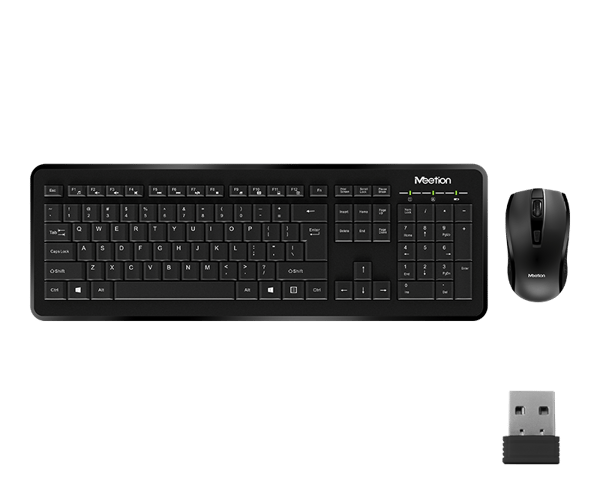
Wireless freedom with zero compromise. The A4Tech 3330N is a high-performance 2.4GHz wireless combo that combines the GK-3 full-size keyboard with the G3-330N optical mouse. Featuring a 10–15m operating range, 12-month battery life, and 12 multimedia hotkeys, it’s the perfect plug-and-play solution for a clean, cable-free workspace. The A4Tech 3330N Wireless Desktop is engineered for consistent stability and long-term durability. Utilizing advanced Smart Wireless SoC technology, this set minimizes circuit loss and interference, providing a reliable connection that feels as responsive as a wired setup. Key Features: Consistent Wireless Stability: Advanced 2.4GHz powerful wireless connection with a distance of up to 10–15 meters. Auto-channel stabilizing ensures essentially no delays or connection conflicts. Energy Efficient Design: Enjoy up to 12 months of battery life thanks to energy-efficient engineering. The set also features Auto Power Saving with a 4-level sleep mode that activates after just 0.2s of inactivity. Full-Size Multimedia Keyboard: The GK-3 keyboard includes 12 Fn hotkeys for quick access to media controls, along with laser-inscribed keys that never fade and adjustable legs for ergonomic comfort. Precision Optical Mouse: The included G3-330N mouse offers a 1200 DPI resolution for smooth and accurate tracking. Its symmetric design makes it comfortable for both right and left-handed users of all hand sizes. 16-in-One Gestures: The mouse supports 16 different gestures to perform selectable hotkey commands, enhancing your workflow and productivity. Spill-Resistant Durability: The keyboard is designed with built-in drain holes, ensuring that accidental liquid spills won’t end your workday. Specifications at a Glance: Connection: 2.4G Hz Wireless (Nano USB Receiver) Keyboard Model: GK-3 (Full-Size) Mouse Model: G3-330N (1200 DPI Optical) Operating Range: 10 to 15 Meters Hotkeys: 12 Fn Multimedia Hotkeys Battery: 1 AA for Keyboard, 1 AA for Mouse (Up to 12 months) Compatibility: Windows 7 / 8 / 8.1 / 10 / 11

Genuine-spec touchpad flex cable for MacBook Pro 15″ (Model A1707, 2016–2017)—restores full Force Touch functionality, haptic feedback, and precise multi-touch gesture control during trackpad repair or replacement. Compatible With: MacBook Pro 15″ (2016) – Model A1707 (Model Identifier: MacBookPro13,2) MacBook Pro 15″ (2017) – Model A1707 (Model Identifier: MacBookPro14,2) MacBook Pro 15″ (2016) – Model A1707 (Model Identifier: MacBookPro13,2) MacBook Pro 15″ (2017) – Model A1707 (Model Identifier: MacBookPro14,2) Part Type: Touchpad flex cable only — does not include the trackpad housing, Taptic Engine, or mounting hardware. This is the OEM-style ribbon cable that connects the trackpad to the logic board. Function: Transmits: Touch input coordinates Force Touch pressure data Haptic feedback signals to the Taptic Engine Enables full macOS gesture support: Force Click, three-finger lookup, swipe navigation, pinch-to-zoom, and smooth cursor tracking. Touch input coordinates Force Touch pressure data Haptic feedback signals to the Taptic Engine Enables full macOS gesture support: Force Click, three-finger lookup, swipe navigation, pinch-to-zoom, and smooth cursor tracking. OEM-Quality Build: Matches Apple’s original specifications in: Cable length and routing path Connector pitch and ZIF latch design EMI shielding and flex durability Cable length and routing path Connector pitch and ZIF latch design EMI shielding and flex durability Common Use Cases: Replacing a torn, creased, or liquid-damaged original flex cable Completing a trackpad replacement when the original cable is compromised Fixing intermittent trackpad behavior, loss of Force Touch, or complete unresponsiveness Replacing a torn, creased, or liquid-damaged original flex cable Completing a trackpad replacement when the original cable is compromised Fixing intermittent trackpad behavior, loss of Force Touch, or complete unresponsiveness Installation Note: Requires full bottom case removal and battery disconnection. Cable routes under internal components near the right speaker and logic board. Connects via a ZIF (Zero Insertion Force) socket—must be aligned carefully and latched gently. Recommended for experienced or certified technicians only. Requires full bottom case removal and battery disconnection. Cable routes under internal components near the right speaker and logic board. Connects via a ZIF (Zero Insertion Force) socket—must be aligned carefully and latched gently. Recommended for experienced or certified technicians only.

128GB SSD Apple Macbook Pro Air 2013 2014 2015 A1502 A1398 A1466 A1465 | Samsung MZ-JPU512T/A06 | 655-1805D ORIGINAL APPLE PART (Apple sources their SSD’s for MacBooks from Samsung) A1502 – A1398 – A1465 – A1466 100% TESTED WORKING Please check compatibility below before you make your purchase: COMPATIBILITY: MacBook Pro Retina Late 2013 – Mid-2015 MacBookPro11,1 (A1502) – ME864LL/A, ME866LL/A, ME867LL/A, MGX72LL/A, MGX92LL/A, & MGXD2LL/A MacBookPro11,2 (A1398) – ME293LL/A & MGXA2LL/A MacBookPro11,3 (A1398) – ME294LL/A, ME874LL/A, MGXC2LL/A, & MGXG2LL/A MacBookPro11,4 (A1398) – MJLQ2LL/A MacBookPro11,5 (A1398) – MJLT2LL/A & MJLU2LL/A MacBookPro12,1 (A1502) – MF839LL/A, MF841LL/A, & MF843LL/A MacBook Air Mid-2013 – Late 2015 MacBookAir6,1 (A1465) – MD711LL/A, MD760LL/A, MD711LL/B, & MF067LL/A MacBookAir6,2 (A1466) – MD760LL/A, MD760LL/B, & MF068LL/A MacBookAir7,1 (A1465) – MJMVM2LL/A MacBookAir7,2 (A1466) – MJVE2LL/A Model Identifier: Samsung Manufacturer Part# MZ-JPU512T/A06

The Transcend TS8XDVDS-K is an ultra-slim, lightweight external portable DVD writer designed for laptops, ultrabooks, and thin desktop computers lacking internal optical drives. Offering fast 8X DVD and 24X CD read/write speeds, it provides a seamless plug-and-play solution for burning media, backing up critical data, and playing movies on the go without requiring an external power adapter. ✅ Full Specifications: Model: Transcend Extra Slim Portable DVD Drive (TS8XDVDS-K) – Black Edition Interface / Connection: Mini-USB to USB Type-A interface (Includes a specialized USB double-headed power/data cable) Performance / Speed: * DVD±R Read/Write: Up to 8X DVD±R DL (Double Layer) Read/Write: Up to 6X DVD-RAM Read/Write: Up to 5X CD-R/RW Read/Write: Up to 24X Performance / Speed: * DVD±R Read/Write: Up to 8X DVD±R DL (Double Layer) Read/Write: Up to 6X DVD-RAM Read/Write: Up to 5X CD-R/RW Read/Write: Up to 24X Capacity / Media Compatibility: Supports standard CD-R/RW, DVD±R, DVD±RW, DVD±R DL, and M-DISC long-term archival media formats. Material & Build: Durable, premium hard plastic housing with a sleek, rounded-edge aesthetic. Design & Form Factor: Extra-slim layout measuring just 13.9mm in thickness. Top-loading tray mechanism with an emergency manual eject hole. Power Setup: Fully USB bus-powered (No external power wall adapter required; draws power directly from host computer USB ports). Security & Software: Includes a free download of CyberLink Media Suite 10 (Media Writer) data burning software via registration. Supports TV Connectivity (allows plugging into supported smart TVs to play media files directly). Compatibility: Windows 11 / 10 / 8 / 7, macOS (10.7 and above), and Linux Dimensions: Approx. 142.8 x 148.0 x 13.9 mm (5.62″ x 5.83″ x 0.55″) Weight: Approx. 264 grams (0.58 lbs)

The Apple Magic Mouse (USB-C version) is a sleek, minimalist multi-touch wireless mouse built for Mac users. It offers smooth gesture support, Bluetooth connectivity and a built-in rechargeable battery — a great choice if you prefer a clean desk setup and full compatibility with macOS and iPadOS. General Name: Magic Mouse (USB-C) — part of Apple’s pointing-device lineup. Wireless connectivity: Bluetooth. Rechargeable battery: built-in, no disposable AA cells. Charging / port: USB-C port (bottom of mouse) for pairing and charging. Compatibility: Requires a Mac with macOS 15.1 or later, or an iPad with iPadOS 18.1 or later. Size & Weight Height: ~0.85 inch (2.16 cm) Width: ~2.25 inch (5.71 cm) Depth: ~4.47 inch (11.35 cm) Weight: ~0.22 pound (0.099 kg) (varies slightly by manufacturing) Features Multi-Touch surface: supports gestures such as swiping between pages, scrolling through documents, zooming. Glide / foot design: optimized for smooth movement across desktop surfaces. Rechargeable battery life: about a month or more between charges (typical use) per Apple spec. Used Condition ConsiderationsSince you’re specifying a used unit: Check for wear on the bottom feet / skates — these degrade and affect glide. Verify battery capacity / health (rechargeable batteries age). Confirm the port is functioning (USB-C) and Bluetooth connectivity is stable. Look for signs of excessive surface scratches on the multi-touch top — may impair gestures. Ensure the firmware / Mac recognizes it fully (gestures working). Upgradability / Limitations Not user-upgradable: You cannot replace the internal battery or change internals easily. Design limitation: The USB-C port remains on the bottom of the mouse, meaning you cannot use it while charging unless you flip it. This design is still criticized. Ergonomics: The flat, low-profile design is stylish but may not suit extended-use comfort for some users.

BATTERY DELL M5Y1K Laptop Battery for Dell Inspiron 15 5000 5555 5558 5559 3552 3558 3567 14 3451 3452 3458 5458 17 5755 5758 Series Rechargeable 40WH li-ion Battery Replacement Fit GXVJ3 VN3N0 YU12005-13001D About this item 【Specification】Dell laptop Replacement Battery Type: Li-ion; Voltage: 14.8 V; Capacity 2600MAH/40WH; Cells:4-Cell 【Stability】M5Y1K Laptop Battery Replacement battery for Dell offers 500+ recharge cycles over life of battery 【COMPATIBLE MODEL】(Check description below for more models) Dell 40WH Standard Rechargeable Li-ion Battery Type M5Y1K 14.8V YU12005-13001D 453-BR GXVJ3 HD4J0 M5YIK MSY1K Dell Inspiron 14 15 3000 Laptop Replacement Battery 3558 3458 3567 3452 3565 3459 P60G Dell Inspiron 14 15 17 5000 Laptop Battery 5555 5558 5559 5755 5758 5458 Dell Vostro Laptop Battery 3558 3458 Dell Latitude Laptop Battery 3460 3560 【GUARANTEE】Our Dell M5Y1K replacement laptop battery is 100% Compatible with the originals. Complying with the CE/FCC/ROHS/UL Certified Standard

Apple MacBook Pro 15” (2018) — professional-grade performance for creative power users.• Intel Core i9 • 32 GB RAM • 500 GB SSD • 4 GB Dedicated GraphicsRetina Display | macOS |

MacBook Pro 13″ Retina A1989 / A2159 (2018-2019) Display Assembly (Silver) MacBook Pro 13″ Touch Bar 2019z A1989 (EMC 3214 MacBookPro15,2) 2.3 GHz A1989 (EMC 3214 MacBookPro15,2) 2.7 GHz MacBook Pro 13″ Touch Bar 2019 A1989 (EMC 3358 MacBookPro15,2) 2.4 GHz A1989 (EMC 3358 MacBookPro15,2) 2.8 Ghz MacBook Pro 13″ Two Thunderbolt Ports 2019 A2159 (EMC 3301 MacBookPro15,4) 1.4 GHz A2159 (EMC 3301 MacBookPro15,4) 1.7 GHz

Apple 60W MagSafe Power Adapter (for MacBook and 13-inch MacBook Pro) The 60 Watt MagSafe Power Adapter features a magnetic DC connector that ensures your power cable will disconnect if it experiences undue strain and helps prevent fraying or weakening of the cables over time. In addition, the magnetic DC helps guide the plug into the system for a quick and secure connection. When the connection is secure, an LED located at the head of the DC connector will light up; an amber light lets you know that your portable is charging, while a green light tells you that you have a full charge. An AC lead is provided with the adapter for maximum lead length, while the AC wall adapter (also provided) gives users an even easier and more compact way to travel. Designed to be the perfect travelling companion, the adapter has a clever design that allows the DC cable to be wound neatly around itself for easy cable storage. This power adapter recharges the lithium polymer battery while the system is off, on, or in sleep mode. It also powers the system if you choose to operate without a battery. Compatible with MacBook and 13-inch MacBook Pro. See this article for more details about choosing the right one. Knowing which specific Mac model you have is important. If you are running OS X Lion (10.7) or later, go to the “” menu at the top left of your screen, choose “About this Mac” then click the “More Info…” button. Your Mac model and generation will be displayed. If you are running an earlier version of OS X, you can enter your serial number here to find out which model you have.
