
Apple USB-C to Lightning Cable (1m) - With Apple Warranty Apple USB-C to Lightning Cable (1m) – With Apple Warranty Connect your iPhone, iPad or iPod with Lightning connector to your USB-C– or Thunderbolt 3 (USB-C)–enabled Mac for syncing and charging, or to your USB-C–enabled iPad for charging. You can also use this cable with your Apple 18W, 20W, 29W, 30W, 61W, 87W or 96W USB‑C Power Adapter to charge your iOS device and even take advantage of the fast-charging feature on selected iPhone and iPad models.

Xprinter XP-80T 80mm Thermal Receipt Printer Press to download driver: XPrinter Driver Setup V7.77 Press to download driver: XPrinter Driver Setup V7.77

MacBook Pro A1708 Battery A1713 for MacBook Pro 13 Inch A1708 Late 2016 Mid 2017 (EMC 2978 3164), A2171 Laptop Replacement Battery for MacBook Pro 13 Inch A2159 (2019) A2289 (2020) A2338 (2020) 【Macbook pro 13 Inch battery A1713 & A2171 Battery Specification】– Voltage: 11.4V. Capacity: 54.5Wh / 4781mAh, Battery Type: Li-ion 【Newest 4.0 upgraded OEM Battery for Apple macbook pro】– Japan High Performance Electric Core. Cobalt Proportion: >98%. Upgrade chip. Up to 1500+ recharge cycles over the life of the battery. Overcharger and Discharger Circuit Protection, Ensure fast charges and low power consumption, UL-/CE-/FCC-/RoHS-Certified for safety 【Replacement Battery A1713 for A1708 Macbook pro 13 inch】– A1708 Macbook pro 13” Late 2016: MacBook Pro 13-Inch “Core i5” 2.0 & MacBook Pro 13-Inch “Core i7” 2.4 (MacBookPro13,1, EMC2978, MLL42xx/A, MLUQ2xx/A). — A1708 Macbook pro 13” Mid 2017: MacBook Pro 13-Inch “Core i5” 2.3 & MacBook Pro 13-Inch “Core i7” 2.5 (MacBookPro14,1, EMC3164, MPXQ2xx/A, MPXR2xx/A, MPXT2xx/A, MPXU2xx/A) 【Replacement Battery A2171 for A2159 & A2289 & A2338 Macbook pro 13 inch】– A2159 Macbook pro 13” 2019: MacBook Pro 13-Inch “Core i5” 1.4 Touch & “Core i7” 1.7 Touch (MacBookPro15,4, EMC3301, MUHN2xx/A, MUHP2xx/A, MUHQ2xx/A, MUHR2xx/A, MUHR2xx/B). — A2289 Year 2020: MacBook Pro 13-Inch “Core i5” 1.4 & “Core i7” 1.7 (MacBookPro16,3, EMC 3456, MXK32xx/A, MXK52xx/A, MXK62xx/A, MXK72xx/A). — A2338 Year 2020: MacBook Pro 13-Inch “M1” 8-Core 3.2 (MacBookPro17,1, EMC3578, MYDA2LL/A*)

Genuine-spec battery flex cable for MacBook Pro models A2159 (16", 2019), A1708 (13", 2016–2017), and A2338 (13", 2020 M1)—restores critical communication between the battery and logic board for proper power-on, charging, and macOS battery status. Genuine-spec battery flex cable for MacBook Pro models A2159 (16″, 2019), A1708 (13″, 2016–2017), and A2338 (13″, 2020 M1)—restores critical communication between the battery and logic board for proper power-on, charging, and macOS battery status. Carries SMBus (System Management Bus) signals from the battery to the logic board Enables: Accurate battery percentage and health reporting in macOS Proper charging control (start/stop, thermal throttling) Power-on capability (MacBooks will not boot without this connection) Prevention of “Battery Not Charging” or “Service Battery” errors Accurate battery percentage and health reporting in macOS Proper charging control (start/stop, thermal throttling) Power-on capability (MacBooks will not boot without this connection) Prevention of “Battery Not Charging” or “Service Battery” errors MacBook won’t turn on (even with a good battery) Battery shows “–%”, 0%, or “Not Charging” Random shutdowns under load macOS displays “No Battery Available” Logic board powers fans or lights but no display output Battery flex cable only (with OEM-style connector and strain relief) ❌ Does not include: battery, logic board, or trackpad Requires full bottom case removal and battery disconnection Connects via a ZIF or press-fit socket on the logic board Must be routed precisely to avoid tension or micro-tears Highly recommended for experienced or certified technicians—improper installation can cause permanent power or battery communication failure

The Anyuse Portable Monitor 15.6″ FHD USB-C offers clear visuals in a slim and lightweight design. It provides sharp Full HD quality for work and entertainment. The screen shows bright colors and strong detail. This makes movies, games, and documents look smooth and clear. Moreover, the Anyuse Portable Monitor FHD USB-C connects easily through a single USB-C cable. This cable carries both power and video. It removes the need for extra chargers or adapters. This makes setup fast and simple for all users. In addition, the monitor works with laptops, tablets, phones, and gaming consoles. This wide compatibility helps you use the screen anywhere. You can work on the go, or play games during travel. It gives you more freedom and flexibility. Furthermore, the Anyuse Portable Monitor 15.6″ FHD USB-C features a slim frame with a modern look. It fits easily inside backpacks and travel bags. The lightweight build makes it comfortable to carry daily. This makes it ideal for students and professionals. Also, the monitor includes built-in speakers for better convenience. They provide clear sound for videos and calls. The screen also offers eye-care features that reduce strain. This helps you use the monitor for long hours with comfort. The stand cover of the Anyuse Portable Monitor FHD USB-C protects the screen during travel. It also works as a foldable stand. You can place the monitor at comfortable angles for work or play. This improves your overall experience. Overall, the Anyuse Portable Monitor 15.6″ FHD USB-C delivers portability, quality, and comfort in one device. It helps you stay productive anywhere. It also makes entertainment more enjoyable. This monitor is perfect for travel, work, study, and gaming. Specifications: Display : 15.6″ Resolution : FHD 1920×1080 Refresh Rate : 60Hz Response Time : 5ms

The MSI G2412F Gaming Monitor delivers smooth gameplay with a 180Hz refresh rate and Full HD resolution. It ensures fast and responsive performance for competitive gaming. Moreover, the Rapid IPS panel provides accurate colors and wide viewing angles. It maintains consistent image quality from different positions. The monitor features a 1ms response time to reduce motion blur in fast scenes. This improves clarity during intense gameplay. It also supports Adaptive Sync technology to eliminate screen tearing and stuttering. This ensures smooth and stable visuals. Additional features include Night Vision for better visibility in dark areas. Anti-flicker and low blue light help reduce eye strain during long sessions. The MSI G2412F Gaming Monitor is a strong choice for users who want speed, clarity, and reliable performance. Specifications: 24″ Full HD Rapid IPS panel with wide viewing angles 180Hz refresh rate for smooth and responsive gaming 1ms (GtG) response time for reduced motion blur Adaptive Sync to eliminate screen tearing Night Vision with anti-flicker and low blue light technology

For gamers who crave an exceptional gaming setup, the ViewSonic VX2728J-2K is your ticket to the ultimate gaming experience. This gaming monitor is designed to bring you into the heart of your games with stunning visuals and high-speed action. First and foremost, the ViewSonic VX2728J-2K features a generous 27-inch display. With this ample screen size, you can immerse yourself in your favorite games, enjoying vibrant graphics and crisp details. But that’s not all! This gaming monitor offers a 2K resolution, ensuring that your games come to life with exceptional clarity and detail, providing you with an edge in your gaming adventures. In addition to its visual prowess, the ViewSonic VX2728J-2K boasts a fast 165Hz refresh rate up to 180hz, delivering ultra-smooth gameplay with minimal motion blur, making it effortless to stay on top of in-game challenges. Furthermore, the monitor features Adaptive Sync technology, ensuring tear-free gaming. This means that your graphics card and monitor work together seamlessly, offering you an uninterrupted and smooth gaming experience. Setting up the ViewSonic VX2728J-2K is a breeze, thanks to its versatile connectivity options. Whether you’re using a PC, gaming console, or laptop, the HDMI and DisplayPort ports have you covered. Transitioning from work to play is made easy with the monitor’s ergonomic design. You can adjust the height, tilt, swivel, or pivot the screen to find the ideal viewing angle, ensuring your comfort during extended gaming sessions. Specifications: 27 Inch QHD (2560x1440p) IPS gaming monitor with thin bezels 165hz and 180Hz refresh rate and 0.5ms (MPRT) response time for ultimate gaming experience AMD FreeSync Premium technology enables fluid and tear-free gameplay Advanced ergonomics (tilt, swivel, rotate and height) for all-day comfort HDR10 content support for deep contrast, rich color, and vibrant details The VX2728J-2K supports laptops, PCs, Macs and more with HDMI, and DisplayPort inputs Specifications: 27 Inch QHD (2560x1440p) IPS gaming monitor with thin bezels 180Hz refresh rate and 0.5ms (MPRT) response time for ultimate gaming experience AMD FreeSync Premium technology enables fluid and tear-free gameplay Advanced ergonomics (tilt, swivel, rotate and height) for all-day comfort HDR10 content support for deep contrast, rich color, and vibrant details The VX2728J-2K supports laptops, PCs, Macs and more with HDMI, and DisplayPort inputs

The Lenovo ThinkPad T470s features an Intel Core i5 7th Gen processor, 8GB RAM, and a fast 256GB SSD for smooth everyday performance. With a durable business-grade build and non-touch 14″ display, it’s ideal for professionals, students, and productivity tasks.

Arabic Keyboard Cover Skin for MacBook Air 13'' (A1369/A1466, NO Touch ID) 2012 -2017 /MacBook Pro 13" 15'' 2013-2015 with or w/out Retina Display Ultra Thin Silicone Keyboard Protector (Black) Arabic Keyboard Cover Skin for MacBook Air 13” (A1369/A1466, NO Touch ID) 2012 -2017 /MacBook Pro 13″ 15” 2013-2015 with or w/out Retina Display Ultra Thin Silicone Keyboard Protector (Black) About this item COMPATIBLE WITH: 2015 and before 2015 version Macbook: 1) MacBook Air 13″ (Models: A1369 and A1466); 2) MacBook Pro 13.3″ (Model: A1278); 3) MacBook Pro 13.3″ with Retina Display (Models: A1502 and A1425, 2013-2012 released); 4) MacBook Pro 15″ with Retina Display (Model: A1398, 2013-2012 released); 5) MacBook Pro 15.4″ Model: A1286 [√] MORE PROTECTION for KEYBOARD: waterproof, dust-proof and dirt-proof design can prevent liquid, dust, cigarette ash, biscuit crumbs falling onto your keyboard to affect your keyboard’s life. [√] ACCURATE KEYS: every key is specially molded, manufactured to the quality available. Flexible, this cover is easy to apply and remove for cleaning [√] SOFT & ULTRA SKIN: ultra thin silicone keyboard cover skin, made it easier for typing. Soft keyboard protector can weaken the sound in typing [XX] ATTENTION!!: NOT FIT FOR: 2020-2016 Released Macbook Pro 13 inch 15 inch with Touch Bar/2020-2018 Released: Macbook Air 13-Inch. You can find the model number on the bottom of the laptop

Apple 60W MagSafe Power Adapter (for MacBook and 13-inch MacBook Pro) The 60 Watt MagSafe Power Adapter features a magnetic DC connector that ensures your power cable will disconnect if it experiences undue strain and helps prevent fraying or weakening of the cables over time. In addition, the magnetic DC helps guide the plug into the system for a quick and secure connection. When the connection is secure, an LED located at the head of the DC connector will light up; an amber light lets you know that your portable is charging, while a green light tells you that you have a full charge. An AC lead is provided with the adapter for maximum lead length, while the AC wall adapter (also provided) gives users an even easier and more compact way to travel. Designed to be the perfect travelling companion, the adapter has a clever design that allows the DC cable to be wound neatly around itself for easy cable storage. This power adapter recharges the lithium polymer battery while the system is off, on, or in sleep mode. It also powers the system if you choose to operate without a battery. Compatible with MacBook and 13-inch MacBook Pro. See this article for more details about choosing the right one. Knowing which specific Mac model you have is important. If you are running OS X Lion (10.7) or later, go to the “” menu at the top left of your screen, choose “About this Mac” then click the “More Info…” button. Your Mac model and generation will be displayed. If you are running an earlier version of OS X, you can enter your serial number here to find out which model you have.

Looking for a reliable monitor that combines performance and affordability? The BenQ GW2780 monitor might be your perfect choice, offering an array of features to enhance your visual experience. To begin with, the GW2780 boasts a sleek design that seamlessly blends with any workspace. Its slim bezels create a borderless display, providing an immersive viewing experience for work or entertainment. Equipped with a 27-inch Full HD display, the monitor delivers crisp and clear visuals. Whether you’re working on spreadsheets, watching videos, or gaming, the GW2780 ensures sharp images and vibrant colors. The In-Plane Switching (IPS) technology ensures wide viewing angles, allowing you to enjoy consistent colors and brightness from any angle. Say goodbye to distorted colors and limited viewing positions. Eye strain is a thing of the past with the BenQ GW2780. The Low Blue Light technology reduces harmful blue light emissions, and the flicker-free feature eliminates screen flickering, providing a comfortable viewing experience for extended periods. Connectivity is a breeze with the multiple ports, including HDMI and VGA. Easily link your monitor to various devices such as laptops, desktops, and gaming consoles. The user-friendly design ensures a hassle-free setup. The BenQ GW2780 monitor not only prioritizes performance but also energy efficiency. Energy Star certification reflects its commitment to reducing environmental impact, making it an eco-friendly choice. In summary, the BenQ GW2780 monitor offers a winning combination of affordability and top-notch features. Elevate your viewing experience with this reliable display solution that caters to your entertainment and productivity needs effortlessly. Specifications: Display : 27″ IPS Resolution : 1920×1080 IPS Response Time : 5ms Refresh Rate : 60hz

The Samsung 55″ OLED 4K S85F Vision AI Smart TV QA55S85FAEXTW delivers a premium home entertainment experience built on advanced OLED technology. It produces deep blacks, rich colors, and strong contrast, so movies, sports, and games look more realistic and immersive on the 55-inch screen. OLED technology controls each pixel individually, so every detail appears with high precision. This improves dark scenes by keeping blacks deep and detailed, while bright areas stay clean and accurate. As a result, the picture remains balanced in both bright and dark environments. Samsung Vision AI improves picture and sound in real time. It analyzes each scene and adjusts brightness, color, and sharpness automatically. Therefore, the Samsung 55 OLED S85F Vision AI Smart TV QA55S85FAEXTW always delivers optimized visuals without manual settings. In addition, AI upscaling improves lower-resolution content closer to 4K quality for better clarity and detail. HDR expands contrast and color depth, making visuals more lifelike and dynamic. Fast motion also appears smoother and clearer, which improves sports and action viewing. The Smart TV system gives access to streaming apps, games, and smart home features. It runs smoothly and is easy to navigate. In addition, the slim design with thin bezels gives the Samsung 55 OLED S85F Vision AI Smart TV QA55S85FAEXTW a modern and premium look. Overall, this Samsung OLED TV combines strong picture quality, AI optimization, and smart connectivity for a high-end viewing experience. Specifications: OLED display delivers deep blacks and strong contrast 55-inch 4K screen provides immersive viewing experience Vision AI optimizes picture and sound automatically HDR improves brightness, contrast, and color depth Smart TV system supports apps, streaming, and smart features

The ViewSonic VX3216-2KC-PRO-3 31.5″ 2K 240Hz Curved Gaming Monitor delivers smooth and sharp visuals for fast gaming. Its 2K resolution shows clear detail in games, videos, and creative work. The large 31.5-inch curved screen improves immersion and focus. This helps you feel closer to the action. Moreover, the ViewSonic VX3216-2KC-PRO-3 31.5″ 2K 240Hz Curved Gaming Monitor features a powerful 240 Hz refresh rate. This makes motion extremely smooth during fast scenes. As a result, gameplay looks fluid with less blur. This gives you a competitive edge in fast games. In addition, the monitor offers a very fast response time for quick screen changes. This reduces ghosting and keeps motion sharp. Controls feel more precise and responsive. This helps improve gaming accuracy. Furthermore, the ViewSonic VX3216-2KC-PRO-3 31.5″ 2K 240Hz Curved Gaming Monitor uses a high-contrast VA panel. Blacks appear deep and colors look rich. This makes games and movies more enjoyable. The curved design also improves side viewing comfort. Also, the monitor supports adaptive sync to reduce screen tearing and stuttering. This keeps frames smooth when your system speed changes. As a result, gameplay feels stable and clean. This enhances the overall gaming experience. In addition, the monitor includes modern connection options. It offers DisplayPort and HDMI for easy device setup. You can connect gaming PCs, consoles, and media devices with ease. This adds strong flexibility. Moreover, the stand offers tilt adjustment for viewing comfort. The slim design saves desk space while keeping a bold gaming look. The monitor also supports wall mounting for clean setups. Overall, the ViewSonic VX3216-2KC-PRO-3 31.5″ 2K 240Hz Curved Gaming Monitor delivers speed, clarity, and immersion in one strong display. It improves gaming performance and visual comfort. This monitor is ideal for gamers who want smooth action and large curved visuals. Specifications: Display : 31.5″ Fast VA Resolution : QHD 2560 x 1440 Refresh Rate : 240Hz Response Time : 1ms Curved

✅ Full Specifications: Model: HyperX Cloud II Headphone Type: Over-Ear, Closed-Back Gaming Headset Connection: Wired USB for PC/Mac 3.5mm jack for consoles & mobile Drivers: 53mm Neodymium Surround Sound: Virtual 7.1 Surround Sound (via USB sound card) Frequency Response: Headphones: 15Hz – 25kHz Microphone: 50Hz – 18kHz Impedance: 60 Ohms Sound Pressure Level: 98 ± 3 dB Microphone: Detachable noise-canceling mic TeamSpeak & Discord certified Build: Aluminum frame Memory foam ear cushions Leatherette or velour ear pads Cable Length: 1m headset cable 2m extension with USB control box Compatibility: PC, Mac, PS4, PS5, Xbox (via 3.5mm), Nintendo Switch, Mobile

The Samsung 85″ The Frame QLED 4K Smart TV QA85LS03FAUXTW uses an 85-inch 4K UHD LCD panel with 3840 × 2160 resolution. It is designed for both standard TV viewing and wall-mounted display use. The display uses a QLED layer with Quantum Dot technology to improve color reproduction. As a result, it produces wider color output and more consistent brightness across different content types. In addition, it supports 4K upscaling for lower-resolution video. The TV supports HDR formats for compatible content. This increases contrast between bright and dark areas and improves detail visibility. Also, motion processing reduces blur during fast-moving scenes such as sports and action content. Samsung runs this model on Tizen OS. Therefore, users access streaming apps, SmartThings integration, and smart features through a unified interface. It also supports Wi-Fi and Bluetooth for wireless device connections. Connectivity includes HDMI ports, USB ports, Ethernet LAN, and optical audio output. It supports external devices such as gaming consoles and sound systems. This model uses The Frame design concept, which allows the TV to function as both a display and a digital art screen when not in use. Specifications: 85-inch 4K UHD LCD panel (3840 × 2160 resolution) Quantum Dot (QLED layer) color enhancement 4K upscaling for lower-resolution content HDR support for compatible content Tizen OS with HDMI, USB, Wi-Fi, Bluetooth, Ethernet connectivity

The MSI MAG 255XFV 25″ FHD 250Hz Gaming Monitor is built for fast-paced competitive gaming. It features a 24.5-inch Full HD (1920×1080) Rapid VA panel with a 250Hz overclocked refresh rate for ultra-smooth motion. Additionally, it delivers a 0.5ms (GtG) response time, reducing motion blur in fast scenes. The monitor also uses Adaptive-Sync technology to reduce screen tearing and stuttering during gameplay. Therefore, the MSI MAG 255XFV 25″ FHD 250Hz Gaming Monitor is designed for responsiveness, speed, and smooth visual performance in competitive titles. Moreover, it includes MSI gaming features such as AI Vision, Less Blue Light, and Anti-Flicker technology for improved viewing comfort. Specifications: 24.5-inch Full HD (1920×1080) Rapid VA panel 250Hz (OC) refresh rate for ultra-smooth gameplay 0.5ms (GtG) fast response time for reduced blur Adaptive-Sync technology for tear-free visuals MSI AI Vision, Anti-Flicker, and Less Blue Light support

Specifications : Display Diagonal Viewing Size 86.27 cm 34.14 inches Preset Display Area (H x V) 799.80 mm x 344.80 mm 31.49″ x 13.18″ 267773.04 sq-mm (415.01 sq-inches) Panel Type In-Plane switching Technology Display Screen Coating Antiglare with hard-coating 3H Maximum Preset Resolution 3440 x 1440 at 60Hz Viewing Angles 178° vertical / 178° horizontal Pixel Pitch 0.233 mm x 0.233 mm Pixel Per Inch (PPI) 109 Contrast Ratio 1,000 to 1 (typical) Aspect Ratio 21:9 Backlight Technology LED edgelight system Brightness 300 cd/m² (typical) Response time 8 ms for NORMAL mode 5 ms for FAST mode Adjustability Height adjustable (115 mm), Tilt (-5° to 21°) Swivel (-30° to 30°) Pivot (N/A) PbP / PiP PbP (Yes) PiP (Yes) Daisy Chain Availability No Dell Display Manager Compatibility Yes, Easy Arrange and other key features Remote Asset Management Yes, via Dell Command Monitor Specifications – Service / Support Details 3-Year Advanced Exchange Service and Limited Hardware Warranty Color Support Color Gamut (typical): 99.9% sRGB, CIE1976 (90%), CIE1931 (75%) Color Depth: 1.074 Billion colors Color Calibration Accurancy Delta E < 3 (average) Color Calibration with X-rite colorimeter No Built-in Devices USB 3.0 super-speed hub (with 2 x USB 3.0 upstream port) 4 x USB 3.0 downstream ports Security Security lock slot (cable lock sold separately) Anti-theft stand lock slot (to panel) Compliant Standards BFR/PVC-free (Halogen-free) excluding external cables Meets NFPA 99 leakage current requirements Arsenic-Free glass and Mercury-Free for the panel only Product Safety, EMC and Environmental Datasheets Dell Regulatory Compliance Home Page Dell and the Environment Flat Panel Mount Interface VESA (100 mm) Audio Output 1 x Audio line-out Connectivity 2 x HDMI 2.0 (HDCP 2.2) 1 x DP 1.2 (HDCP 2.2) 2 x USB 3.0 Upstream port 2 x USB 3.0 Downstream port (side) 2 x USB 3.0 Downstream port (bottom) 1 x USB Type-C (DisplayPort DP1.2 Alternate Mode, Power Delivery up to 90W (Typical), and USB 2.0) Dimensions & Weight Height with stand (Compressed ~ Extended) 417.0 mm ~ 532.0 mm 16.42″ ~ 20.94″ Width 813.6 mm 32.03″ Depth 226.4 mm 8.91″ Height without stand 363.7 mm 14.32″ Width without stand 813.6 mm 32.03″ Depth without stand 58.4 mm 2.30″ Weight (panel only – for VESA mount) 8.2 kg 18.07 lb Weight (with packaging) 16.0 kg 35.27 lb Power Voltage Required 100 VAC to 240 VAC / 50 Hz or 60 Hz + 3 Hz / 3 A (typical) Power Consumption (Operational) 54 W (typical) 250 W (maximum)** Power Consumption Stand by / Sleep Less than 0.5W **Maximum power consumption with max luminance, and USB active. Environmental Operating Conditions Temperature Range Operating: 0°C to 40°C (32°F to 104°F) Non-operating: –20°C to 60°C (–4°F to 140°F) Humidity Range Operating: 10% to 80% (non-condensing) Non-Operating: 5% to 90% (non-condensing) Altitude Operating: 5,000 m (16,404 ft) max Non-Operating: 12,192 m (40,000 ft) max In The Box Monitor, Stand Riser, Stand Base 1 x Power cable 1 X DP Cable (DP to DP) 1 X USB Type-C Cable (C to C) 1 x HDMI Cable 1 x USB 3.0 upstream cable Quick setup guide Safety, Environmental, and Regulatory Information Factory Calibration Report 1 Year Warranty manufacturer link

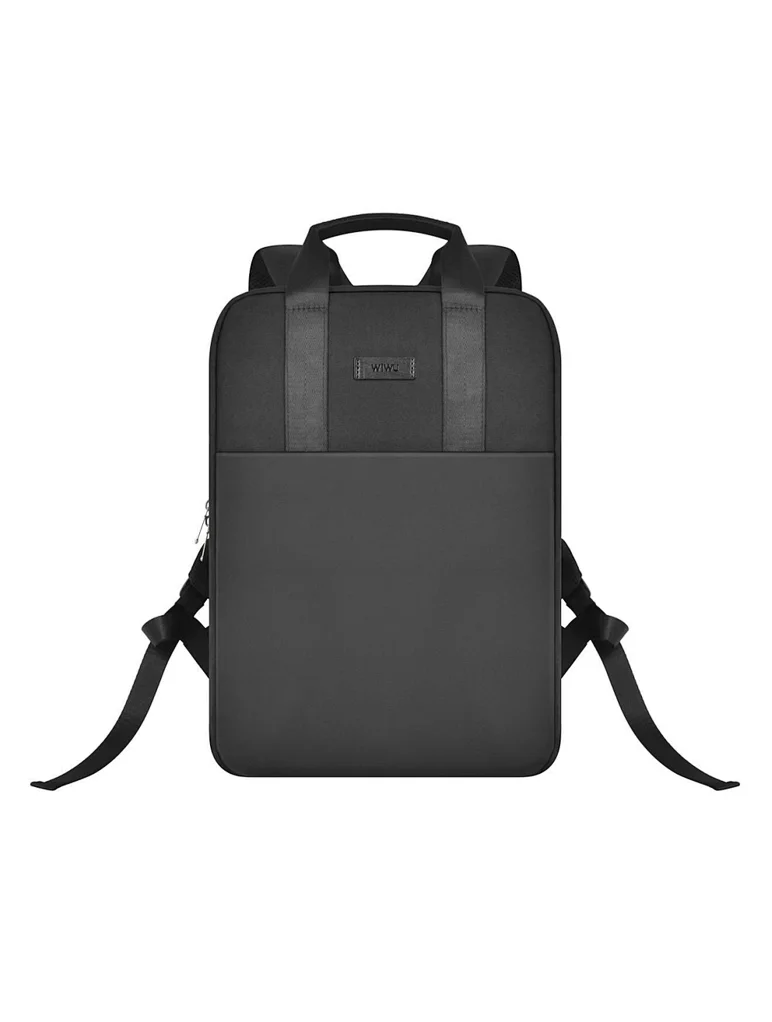
WiWU Minimalist Laptop Handbag – Lightweight, water-resistant bag with soft interior padding, shock protection, and dual compartments.Available in 14″ and 15.6″ sizes, perfect for secure and stylish daily laptop carry. Model: WiWU Minimalist Laptop Handbag Material: Water-resistant polyester exterior with a soft faux-fur padded interior Available Sizes: 14″ and 15.6″ versions to accommodate most laptops Protection: Built-in anti-collision padding and 360° all-around corner protection Compartments: Main laptop compartment (soft-lined) Front organizer section with inner pockets for cables, chargers, phone, and accessories Compartments: Main laptop compartment (soft-lined) Front organizer section with inner pockets for cables, chargers, phone, and accessories Carrying Options: Top handles for hand carry Detachable shoulder strap Luggage strap for trolley attachment Carrying Options: Top handles for hand carry Detachable shoulder strap Luggage strap for trolley attachment Design Features: Durable YKK zippers, reinforced corners, slim profile Weight: Approx. 703 g (14″), 884 g (15.6″) Use Case: Ideal for work, study, travel, and everyday protection of devices

The Apple Magic Mouse (USB-C version) is a sleek, minimalist multi-touch wireless mouse built for Mac users. It offers smooth gesture support, Bluetooth connectivity and a built-in rechargeable battery — a great choice if you prefer a clean desk setup and full compatibility with macOS and iPadOS. General Name: Magic Mouse (USB-C) — part of Apple’s pointing-device lineup. Wireless connectivity: Bluetooth. Rechargeable battery: built-in, no disposable AA cells. Charging / port: USB-C port (bottom of mouse) for pairing and charging. Compatibility: Requires a Mac with macOS 15.1 or later, or an iPad with iPadOS 18.1 or later. Size & Weight Height: ~0.85 inch (2.16 cm) Width: ~2.25 inch (5.71 cm) Depth: ~4.47 inch (11.35 cm) Weight: ~0.22 pound (0.099 kg) (varies slightly by manufacturing) Features Multi-Touch surface: supports gestures such as swiping between pages, scrolling through documents, zooming. Glide / foot design: optimized for smooth movement across desktop surfaces. Rechargeable battery life: about a month or more between charges (typical use) per Apple spec. Used Condition ConsiderationsSince you’re specifying a used unit: Check for wear on the bottom feet / skates — these degrade and affect glide. Verify battery capacity / health (rechargeable batteries age). Confirm the port is functioning (USB-C) and Bluetooth connectivity is stable. Look for signs of excessive surface scratches on the multi-touch top — may impair gestures. Ensure the firmware / Mac recognizes it fully (gestures working). Upgradability / Limitations Not user-upgradable: You cannot replace the internal battery or change internals easily. Design limitation: The USB-C port remains on the bottom of the mouse, meaning you cannot use it while charging unless you flip it. This design is still criticized. Ergonomics: The flat, low-profile design is stylish but may not suit extended-use comfort for some users.

A modern pre-owned Dell Latitude 5420 with 14" display, 11th Gen Core i5, 8GB RAM, and 256GB SSD—delivering reliable performance, enterprise security, and all-day productivity in a compact business laptop.
