
Genuine-spec touchpad flex cable compatible with both MacBook Air A2179 (Intel, 2020) and A2337 (M1, 2020)—restores full Force Touch functionality, haptic feedback, and precise multi-touch gesture control during trackpad repair or replacement. Compatible With: MacBook Air 13″ (2020, Intel) – Model A2179 (Model Identifier: MacBookAir9,1) MacBook Air 13″ (2020, Apple M1) – Model A2337 (Model Identifier: MacBookAir10,1) MacBook Air 13″ (2020, Intel) – Model A2179 (Model Identifier: MacBookAir9,1) MacBook Air 13″ (2020, Apple M1) – Model A2337 (Model Identifier: MacBookAir10,1) ✅ Important Note: Despite different processors (Intel vs. M1), Apple used the same trackpad assembly and flex cable in both A2179 and A2337. This makes the flex cable fully interchangeable between the two models. Part Type: Touchpad flex cable only — does not include the trackpad housing, Taptic Engine, or mounting hardware. This is the OEM-style ribbon cable that connects the trackpad to the logic board. Function: Transmits: Touch input coordinates Force Touch pressure data Haptic feedback signals to the Taptic Engine Enables full macOS gesture support: Force Click, three-finger lookup, swipe navigation, pinch-to-zoom, and smooth cursor tracking. Touch input coordinates Force Touch pressure data Haptic feedback signals to the Taptic Engine Enables full macOS gesture support: Force Click, three-finger lookup, swipe navigation, pinch-to-zoom, and smooth cursor tracking. OEM-Quality Build: Matches Apple’s original specifications in: Cable length and routing path Connector pitch and ZIF latch design EMI shielding and flex durability Cable length and routing path Connector pitch and ZIF latch design EMI shielding and flex durability Common Use Cases: Replacing a torn, creased, or liquid-damaged original flex cable Completing a trackpad replacement when the original cable is compromised Fixing intermittent trackpad behavior, loss of Force Touch, or complete unresponsiveness Replacing a torn, creased, or liquid-damaged original flex cable Completing a trackpad replacement when the original cable is compromised Fixing intermittent trackpad behavior, loss of Force Touch, or complete unresponsiveness Installation Note: Requires full bottom case removal and battery disconnection. Cable routes under the right side of the battery and logic board. Connects via a ZIF (Zero Insertion Force) socket—align carefully and latch gently. Recommended for experienced or certified technicians only. Requires full bottom case removal and battery disconnection. Cable routes under the right side of the battery and logic board. Connects via a ZIF (Zero Insertion Force) socket—align carefully and latch gently. Recommended for experienced or certified technicians only.

The Samsung 32DM801 32″ M8 UHD 4K Smart Monitor is a stunning addition to any workspace or entertainment setup. This 32-inch UHD monitor brings impressive 4K resolution, delivering crisp, lifelike visuals that elevate your viewing experience. Designed with versatility in mind, the Samsung M8 Smart Monitor is perfect for both work and play. The large 32-inch display provides ample screen space for multitasking, making it ideal for professionals. The 4K UHD resolution enhances clarity, allowing you to view documents, images, and videos with fine detail. The Samsung 32DM801 32″ M8 UHD 4K Smart Monitor is also a smart entertainment hub. With built-in streaming apps like Netflix, YouTube, and Apple TV, you can enjoy your favorite shows without needing an external device. The monitor has speakers integrated for an immersive audio experience, so you don’t have to worry about extra equipment. This monitor’s sleek and slim design fits perfectly into any modern setup. It comes with a height-adjustable stand that lets you customize the screen position to reduce strain on your neck and eyes. With USB-C connectivity, you can quickly connect devices and charge them, making it a convenient all-in-one solution. Setting up the Samsung 32DM801 32″ M8 UHD 4K Smart Monitor is simple. The smart monitor is compatible with multiple devices and operating systems, providing seamless functionality. For anyone looking to upgrade their workspace or home entertainment, this monitor combines functionality, style, and quality. Specifications: Display : 32″ VA Panel Resolution : 4K (3,840 x 2,160) Refresh Rate : 60Hz Response Rate : 4ms GTG

The MSI MAG 256F 24.5″ 180Hz Gaming Monitor is crafted for serious gamers. With a fast 24.5-inch Full HD display, this monitor delivers exceptional clarity and performance. Its 180Hz refresh rate and 1ms response time ensure smooth, blur-free visuals, making it perfect for fast-paced games. Gamers will appreciate the 180Hz refresh rate of this monitor. It minimizes screen tearing and ghosting, providing a seamless experience in every frame. This high refresh rate, combined with a 1ms response time, means you’ll experience gaming with precision and speed. The Full HD resolution ensures sharp, clear images, bringing your games to life. This monitor also supports Adaptive Sync technology. It helps synchronize the monitor’s refresh rate with your graphics card, reducing stuttering and screen tearing. This feature is especially valuable for competitive gaming, where every millisecond counts. The design of the MSI MAG 256F 24.5″ 180Hz Gaming Monitor is sleek and gamer-friendly. It has a frameless design that maximizes screen space, allowing for immersive gaming. Its adjustable stand lets you customize the height and tilt for comfortable viewing angles, reducing neck strain during extended gaming sessions. This monitor also features multiple connectivity options, including HDMI and DisplayPort. This makes it easy to connect your gaming console or PC, giving you flexibility with your setup. Its easy navigation OSD (on-screen display) allows you to make quick adjustments to the settings. Upgrade your gaming experience with the MSI MAG 256F 24.5″ 180Hz Gaming Monitor. Enjoy fluid, responsive gameplay and impressive visuals with this reliable and stylish monitor. Specifications: Display : 24.5″ Rapid IPS Resolution : FHD (1920 x 1080) Refresh Rate : 180Hz Response Rate : 1ms GTG

MacBook Pro A1706 / A1708 Display Assembly (Space Gray) Compatibility : MacBook Pro 2017 13″ A1708 (EMC 3164 MacBookPro14,1) 2.3 GHz A1708 (EMC 3164 MacBookPro14,1) 2.5 GHz A1706 (EMC 3163 MacBookPro14,2) 3.1 GHz A1706 (EMC 3163 MacBookPro14,2) 3.3 GHz A1706 (EMC 3163 MacBookPro14,2) 3.5 GHz MacBook Pro 2016 13″ A1706 (EMC 3071 MacBookPro13,2) 2.9 GHz A1706 (EMC 3071 MacBookPro13,2) 3.1 GHz A1706 (EMC 3071 MacBookPro13,2) 3.3 GHz A1708 (EMC 2978 MacBookPro13,1) 2.0 GHz A1708 (EMC 2978 MacBookPro13,1) 2.4 GHz

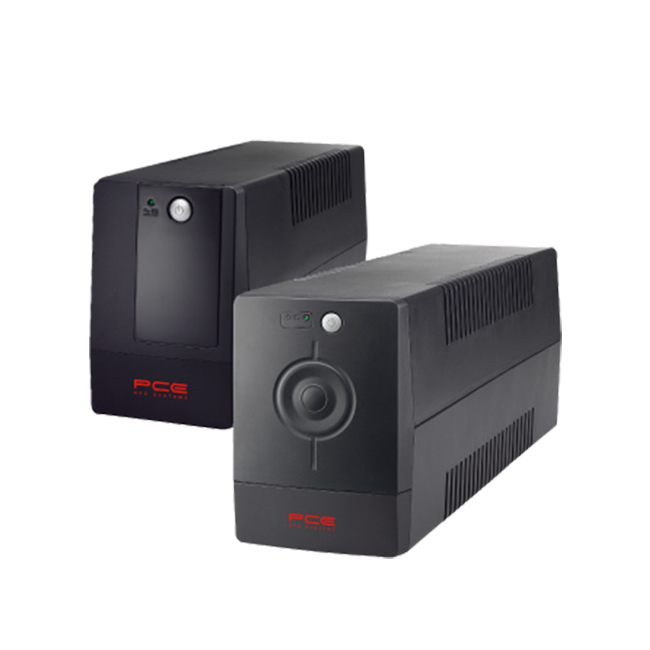
PCE M8-700 UPS (line-interactive) — 700 VA / 360 W backup unit for 220–240 V input. Protects PCs, routers, small electronics from outages and voltage swings. The PCE M8-700 is a line-interactive UPS designed for home or small office use. It provides backup power, voltage regulation (AVR), surge protection, and supports automatic switching during outages. Ideal for desktop PCs, network gear, monitors, or point-of-sale systems. Features & Capabilities Line-interactive topology: regulates input voltage without switching to battery when voltage fluctuates mildly. Automatic Voltage Regulation (AVR) to correct undervolt/overvolt conditions. Simulated (stepped) sine wave output in battery mode. Surge, overload, short circuit, discharge protections built in. Cold start capability (ability to power on from battery with no mains) LED + audible alarms for status (battery mode, overload, fault) USB / RS232 interface in some variants for power management (shutdown, monitoring) Technical Specifications What “Input 220–240 VAC, 50/60 Hz, 3.7 A” Means (and Caveats) If the specification you’re giving is “3.7 A” at input, that corresponds to a maximum input current draw when the UPS is handling a heavy load or during charging cycles. At 230 V × 3.7 A ≈ 850 W of input capacity. The unit’s 360 W output means there’s overhead for losses, inverter inefficiency, battery charging, etc. The UPS must operate within the stated voltage and frequency ranges — if input is too low or too high, it may switch to battery or go into protection mode.

The MSI MAG 274QF X24 monitor delivers sharp 27″ WQHD visuals with a high 240Hz refresh rate for smooth motion. It offers responsive gameplay and fast action performance. Its Rapid IPS panel provides vivid colors and wide viewing angles, ensuring consistent image quality from many positions. The monitor supports AMD FreeSync Premium to help reduce screen tearing and stuttering. This contributes to a fluid gaming experience. It also includes HDR Ready support to enhance contrast and display detail in bright and dark areas. The sleek flat design with anti-glare surface supports long sessions with less eye strain. The MSI MAG 274QF X24 monitor is a strong choice for gamers who want fast refresh performance and sharp 2K visuals. Specifications: 27″ WQHD (2560×1440) Rapid IPS panel with vivid colors 240Hz refresh rate for ultra-smooth motion 0.5ms (GtG) response time for fast responsiveness AMD FreeSync Premium to reduce screen tearing HDR Ready support for enhanced contrast and detail

The Lenovo Legion R24e is a 23.8-inch Full HD gaming monitor designed for smooth competitive gameplay and responsive visual performance. It uses an IPS panel with a high refresh rate for improved motion clarity and wide viewing angles. Additionally, its slim NearEdgeless design fits modern gaming and workstation setups. This monitor delivers a 1920 × 1080 resolution with up to 180Hz refresh rate support. Moreover, it features a 0.5ms MPRT response time to reduce motion blur during fast-paced gaming sessions. The Lenovo Legion R24e also supports AMD FreeSync technology for smoother gameplay with reduced screen tearing. The IPS panel provides 99% sRGB color coverage and wide 178-degree viewing angles for accurate and consistent image quality. Therefore, the monitor works well for gaming, streaming, and everyday multimedia tasks. It also includes anti-glare screen treatment for improved viewing comfort. The Lenovo Legion R24e includes HDMI 2.1 TMDS and DisplayPort 1.4 connectivity for gaming PCs and consoles. Additionally, the ergonomic stand supports tilt, swivel, pivot, and height adjustment for flexible positioning. VESA mount compatibility also allows wall or monitor arm installation. Community feedback highlights the monitor’s strong color quality, smooth refresh rate performance, and good value for competitive gaming setups. Specifications: 23.8-inch Full HD IPS gaming display 180Hz refresh rate for smooth gameplay 0.5ms MPRT response time for reduced blur AMD FreeSync support for tear-free visuals Ergonomic stand with height, tilt, swivel, and pivot adjustment

The Samsung Odyssey G8 32″ 240 Hz OLED Gaming Monitor delivers unmatched gaming performance and stunning visuals. It features a 32‑inch OLED display for deep blacks and vibrant colors. Moreover, the Samsung Odyssey G8 32″ 240 Hz OLED Gaming Monitor supports ultra‑fast 240 Hz refresh rate. It ensures ultra‑smooth gameplay and fewer motion artifacts during fast action. Also, the monitor boasts just 0.03 ms response time for minimal blur. In addition, this gaming monitor uses HDR to boost contrast and brightness. Plus, its OLED panel offers wide viewing angles and consistent color from any position. Furthermore, adaptive sync technology keeps frame rates smooth with FreeSync or G‑SYNC. Therefore, gamers experience tear‑free visuals even under heavy load. It includes DisplayPort and multiple HDMI 2.1 ports for high bandwidth input. Also, USB ports and a built‑in USB hub simplify peripheral connections. Moreover, the monitor supports customizable RGB lighting on its stand and rear. Then, ergonomic stand adjusts height, tilt, and swivel for comfortable viewing angles. Also, low‑blue‑light and flicker‑free modes reduce eye strain during long gaming sessions. Furthermore, the sleek, curved display blends well with modern gaming setups. In addition, its slim bezels help create immersive multi‑monitor environments. Because of OLED quality, contrast ratio is effectively infinite for deep image depth. Meanwhile, factory calibration ensures accurate colors right from setup. Also, power consumption remains efficient even in intense HDR modes. Besides that, thermal design keeps the monitor cool and reliable. Thus, you get long‑lasting performance without overheating. With strong build quality, the monitor offers durable daily use. It works perfectly for high‑frame‑rate gaming, fast‑paced esports, and vivid content. Finally, the Samsung Odyssey G8 32″ 240 Hz OLED Gaming Monitor combines speed, clarity, and design. Overall, it stands as a premium choice for competitive and immersive gamers. Specifications: Display : 32″ Resolution : OLED (3,840 x 2,160) Refresh Rate : 240Hz Response Rate : 0.03ms GTG

WiWU 20W fast Charger for Mobile Phone with USB C Quick Power Adapter in white Wall charger

ViewSonic VX3276-2K-MHD-2 32 SuperClear® IPS panel for vivid picture quality and wider viewing angles Frameless bezel and stylish stand QHD (2560 x 1440) resolution for crisp, clear image detail Adaptive Sync delivers smooth, continuous visuals Flexible connectivity with DisplayPort, Mini DisplayPort and two HDMI ports Specifications: ViewSonic VX3276-2K-MHD-2 32 SuperClear® IPS panel for vivid picture quality and wider viewing angles Frameless bezel and stylish stand QHD (2560 x 1440) resolution for crisp, clear image detail manufacturer link

The Maxfree S2 14″ Portable Laptop Screen Extender lets you expand your workspace with dual or triple displays. First, it connects easily via USB-C or HDMI to your laptop. The screen features full HD resolution, anti-glare technology, and a slim, lightweight design for portability. In addition, it supports multiple monitor setups, boosting productivity for work, gaming, or streaming. Moreover, its adjustable stand and foldable design make it easy to carry and set up anywhere. Therefore, users can enjoy a seamless multi-screen experience without compromising desk space or mobility. Specifications: 14″ full HD screen provides sharp visuals for work and entertainment USB-C and HDMI connectivity support dual or triple monitor setups Slim, lightweight design ensures portability and easy setup Adjustable stand and foldable design for versatile positioning Compatible with laptops and devices for seamless multi-screen productivity

The Samsung 65″ The Frame Pro 4K Samsung Vision AI Smart TV QA65LS03FWUXTW uses a 65-inch LCD panel with 3840 × 2160 4K resolution. It is designed for standard TV viewing and wall-mounted display use in living spaces. Samsung uses Vision AI and picture processing to adjust image settings in real time. As a result, brightness, contrast, and color adjust based on the scene and content type. In addition, the system supports 4K upscaling to improve lower-resolution content clarity. The display supports HDR formats for compatible content. This improves contrast between bright and dark areas. Also, motion processing reduces blur in fast scenes such as sports and action content. The TV runs Samsung Tizen OS. Therefore, users access streaming apps, SmartThings integration, and smart features through a unified interface. It also supports Wi-Fi and Bluetooth for wireless devices. Connectivity includes HDMI ports, USB ports, Ethernet LAN, and optical audio output. It supports external devices such as gaming consoles and sound systems. This model uses The Frame design concept, which allows the display to function as both a TV and a digital art screen when not in use. Specifications: 65-inch 4K UHD LCD panel with 3840 × 2160 resolution Vision AI image processing with real-time adjustments HDR support for compatible content Tizen OS smart platform with streaming apps HDMI, USB, Wi-Fi, Bluetooth, Ethernet connectivity

Brand Lenovo Compatible Devices Laptops Input Voltage 240 Volts Mounting Type Wall Mount Wattage 90 watts Output Voltage 20 Volts Current Rating 4.5 Amps Lenovo 90W Slim Tip Ac Adapter (Original)

HP Series 5 524sa Monitor Overview The HP Series 5 524sa is a 23.8-inch Full HD monitor made for work and everyday entertainment. It combines clear visuals with built-in speakers. As a result, it offers a clean and simple desktop setup. 23.8-Inch Full HD Display This monitor features a 23.8-inch Full HD resolution. Therefore, text looks sharp and easy to read. Moreover, images appear clear and well balanced. Because of this, it supports long working and viewing sessions. In addition, wide viewing angles keep content visible from different positions. As a result, collaboration becomes more comfortable. Built-In Speakers for Simple Audio The HP Series 5 524sa includes integrated speakers. As a result, users enjoy sound without extra accessories. Moreover, this reduces desk clutter. Therefore, the setup stays neat and efficient. Smooth Viewing and Eye Comfort This monitor delivers smooth performance for daily tasks. As a result, scrolling feels natural. In addition, eye comfort features help reduce eye strain. Because of this, users stay comfortable during long hours. Connectivity and Easy Setup The monitor includes HDMI connectivity. Therefore, it connects easily to laptops and desktops. Moreover, setup is fast and straightforward. As a result, users can start working immediately. Slim Design and Mounting Support The slim design fits modern workspaces. In addition, VESA mounting support allows flexible placement. As a result, users can save desk space easily. Ideal for Home and Office Use This monitor focuses on clarity and convenience. Moreover, it suits office work, studying, and media viewing. In conclusion, it is a practical Full HD monitor with built-in speakers. Specifications: Size: 23.8-inch diagonal. Resolution: FHD (1920 x 1080). Refresh Rate: 100 Hz.

The Samsung Odyssey G7 32″ 144Hz Gaming Monitor delivers an unparalleled gaming experience. With its ultra-smooth 144Hz refresh rate, you can enjoy fluid gameplay, giving you the edge in fast-paced action scenes. The Samsung Odyssey G7’s UHD resolution ensures stunning visuals, with crisp details and vibrant colors. Whether you’re gaming or watching movies, you’ll enjoy a rich and immersive visual experience. With its fast 1ms response time, the Samsung Odyssey G7 32″ 144Hz Gaming Monitor eliminates motion blur and ghosting. This feature enhances gameplay performance, giving you faster reactions and sharper precision during intense gaming sessions. Designed for compatibility with NVIDIA G-Sync and AMD FreeSync Premium Pro, this monitor ensures smooth graphics with minimal screen tearing. Your gameplay will be stutter-free, keeping you fully immersed in the game. The Samsung Odyssey G7 also supports HDR600 for enhanced contrast and color depth, bringing out the finest details in bright and dark scenes alike. Games and videos come to life with vivid colors and stunning clarity. In conclusion, the Samsung Odyssey G7 32″ 144Hz Gaming Monitor is built for serious gamers who demand superior performance. Upgrade your gaming setup today with this top-tier monitor for an immersive and responsive experience. Specifications: Display : 32″ IPS Resolution : UHD (3,840 x 2,160) Refresh Rate : 144Hz Response Time : 1ms GTG

A compact and durable pre-owned Dell Latitude 7480 with 14" display, 6th Gen Core i5, 8GB RAM, and 128GB SSD—ideal for light office tasks, students, or as a secure secondary business device.

External Seagate 2TB/4TB HDD Expansion Portable Drive Easily store and access 2TB/4TB of content on the go with Seagate Expansion Portable hard drive This external hard drive for Windows computers makes backup a snap just drag and drop To get set up, connect the portable hard drive to your Windows computer for automatic recognition no software required This USB drive provides plug and play simplicity with the included 18 inch USB 3.0 cable Enjoy long term peace of mind with the included one year limited warranty

The LG 24″ FHD IPS 120Hz HDR10 Monitor – Slim Stand | 24U411A-B delivers crisp visuals and smooth motion for work and play. This monitor brings vibrant colors and sharp detail to all your content. Moreover, its 120Hz refresh rate makes motion feel fluid and responsive. Therefore, it suits gamers, students, and home office users alike. First, the full HD resolution ensures clear images on a 24-inch screen. Text looks sharp, videos pop, and games appear more alive. In addition, the IPS panel provides wide viewing angles so colors stay consistent from any seat. This helps when friends or family watch together. Also, the HDR10 support enhances brightness and contrast for richer scenes. Next, the fast 120Hz refresh rate makes motion smooth in games and video. Low frame drops mean play feels more responsive. Meanwhile, everyday tasks like scrolling and navigating menus feel quicker. As a result, overall screen performance feels natural and enjoyable for all day use. The slim stand design saves desk space and adds modern style to your setup. It fits neatly with any décor and keeps the workspace clean. Additionally, tilt adjustments help you find a comfortable viewing angle. This makes long work or play sessions easier on your neck and eyes. Connectivity includes essential ports so you can link laptops, desktops, and consoles easily. Plug and play means simple setup with few steps. Furthermore, built-in speakers provide basic sound without extra devices attached. This gives extra convenience when audio isn’t your main focus. Overall, the LG 24″ FHD IPS 120Hz HDR10 Monitor – Slim Stand | 24U411A-B combines smooth performance, vivid color, and practical design. It offers great value for users who want quality visuals and fluid motion without complexity. Manufacturer link Specifications: Display : 24″ IPS Resolution : 1920 x 1080 Refresh Rate : 120Hz Response Rate : 5ms

TP-Link AC1200 Archer C50 Wireless Dual Band Router Support smooth 4K streaming with AC1200 Wi-Fi 4 external antennas provide stable wireless connections and optimal coverage Easy network management at your fingertips with TP-Link Tether Supports IGMP Proxy/Snooping, Bridge, and Tag VLAN to optimize IPTV streaming Supports Access Point mode to create a new Wi-Fi access point TP-Link AC1200 Archer C50 Wireless Dual Band Router Support smooth 4K streaming with AC1200 Wi-Fi 4 external antennas provide stable wireless connections and optimal coverage Easy network management at your fingertips with TP-Link Tether Supports IGMP Proxy/Snooping, Bridge, and Tag VLAN to optimize IPTV streaming Supports Access Point mode to create a new Wi-Fi access point TP-Link Archer C50 – AC1200 Wireless Dual Band Router Wireless Speed: Up to 1200 Mbps (300 Mbps on 2.4GHz + 867 Mbps on 5GHz) Wi-Fi Standard: 802.11ac – 3x faster than wireless N speeds Bands: Dual Band (2.4GHz & 5GHz) for reduced interference and better performance Antenna: 4 External Antennas for strong and stable wireless coverage Ports: 4× LAN, 1× WAN (10/100 Mbps) Advanced Features: Parental Controls, Guest Network, IPv6 Support, Access Control Security: WPA/WPA2 encryption for secure wireless connections Ease of Use: Easy setup with TP-Link Tether App Ideal For: HD streaming, online gaming, and high-speed downloads in homes and small offices

Genuine-spec touchpad flex cable for MacBook Pro 16″ (Model A2485, 2021, M1 Pro/Max)—critical for restoring full Force Touch functionality, haptic feedback, and precise multi-touch gesture control during trackpad repairs. Compatible With: MacBook Pro 16-inch (2021, Model A2485) with Apple M1 Pro or M1 Max chip (Model Identifiers: MacBookPro18,1 / MacBookPro18,2). Part Type: Touchpad flex cable only—does not include the trackpad, Taptic Engine, or mounting hardware. This is the OEM-style ribbon cable that connects the trackpad to the logic board. Function: Transmits touch coordinates, Force Touch pressure data, and haptic feedback signals—essential for macOS gestures (e.g., pinch-to-zoom, Force Click, three-finger lookup) and Taptic Engine operation. OEM-Quality Construction: Precisely replicated to Apple’s original specifications—including cable length, connector type, EMI shielding, and flex routing—ensuring signal integrity and long-term reliability. Common Use Cases: Replacing a torn, frayed, or liquid-damaged original flex cable Completing a trackpad replacement when the original cable is compromised Fixing intermittent trackpad behavior, lost Force Touch, or complete unresponsiveness Replacing a torn, frayed, or liquid-damaged original flex cable Completing a trackpad replacement when the original cable is compromised Fixing intermittent trackpad behavior, lost Force Touch, or complete unresponsiveness Installation Note: Requires full disassembly of the bottom case and careful routing around the battery and logic board. Connectors use ZIF (Zero Insertion Force) sockets—must be aligned and latched gently. Recommended for certified or professional repair technicians only.
