
REMAX RT-E601 1200MAH TIME II SERIES EYE-CARING LED LAMP Function— Use the power key to turn on/ off the lamp. Tap the power key to adjust the brightness of the lamp (brightest-normal-dimmest-off) four steps are easy to use. When folding the design lamp holder and arm can rotate the angle within a range of 180 degrees up-down adjustment. Press and hold “Mode” Set” Up” Donkey enter normal time mode, alarm clock and snooze mode, birthday reminder mode timer mode, and temperature mode. Time changes 12 hours/24 hours mode and adjusting the hours, minutes, year, month,t,h, and day. Temperature can change to Celsius or Fahrenheit. The red light will be on when it starts charging, and the red light will go out when it is fully charged. Material—ABS+PC Rated voltage—DC5V /0.5A lighting Mode—Direct glow Key Type—Touch key Luminous flux—250m Color rendering index—>80 Rated power—4W Battery Capacity—1200mAh Weight—346g Charging port—Micro SIZE—87*87*263mmCharging time—4-4:30hour Working time—3:30hour

Apple Magic Mouse: Wireless, Bluetooth, Rechargeable. Works with Mac or iPad; Multi-Touch Surface - White (Pre-Owned) Apple Magic Mouse: Wireless, Bluetooth, Rechargeable. Works with Mac or iPad; Multi-Touch Surface – White (Pre-Owned) About this item WIRELESS, RECHARGEABLE CONVENIENCE — Magic Mouse connects wirelessly to your device via Bluetooth. And the rechargeable internal battery means no loose batteries to replace. WORKS WITH MAC OR IPAD — It’s ready to go right out of the box and pairs quickly with your Mac or iPad so you can get to work right away. SWIPE AND SCROLL ON THE MULTI-TOUCH SURFACE — The Multi-Touch surface allows you to perform simple gestures such as swiping and scrolling. And an optimized foot design lets Magic Mouse glide smoothly across your desk. GO WEEKS WITHOUT CHARGING — The incredibly long-lasting internal battery will power your Magic Mouse for about a month or more between charges. Comes with a woven USB-C to Lightning Cable that lets you pair and charge by connecting to a USB-C port on your Mac or iPad. SYSTEM REQUIREMENTS — Requires a Bluetooth-enabled Mac with OS X 10.11 or later or an iPad with iPadOS 13.4 or later.

The Arzopa A1 is an ultra-slim, lightweight 15.6-inch portable monitor engineered for seamless travel productivity and entertainment. Delivering crisp Full HD imagery on a premium IPS panel with integrated eye care features, it provides a hassle-free plug-and-play experience using dual full-function USB-C and Mini HDMI inputs. Complete with a built-in adjustable kickstand, it is the perfect dual-screen companion for laptops, smartphones, and gaming consoles. ✅ Full Specifications: Model: ARZOPA Type-C Portable Monitor (ARZOPA-A1) Interface / Connection: Multi-Port Input Panel: 2 x USB Type-C Full Function Ports (Supports concurrent video transmission, data, and power delivery) 1 x Mini HDMI Port (Video signal input only) 1 x 3.5mm Headphone / Audio Output Interface Interface / Connection: Multi-Port Input Panel: 2 x USB Type-C Full Function Ports (Supports concurrent video transmission, data, and power delivery) 1 x Mini HDMI Port (Video signal input only) 1 x 3.5mm Headphone / Audio Output Interface Performance / Screen Quality: Panel Type: IPS (In-Plane Switching) display with 178° wide viewing angles Resolution: Full HD 1920 x 1080p Refresh Rate: 60Hz Aspect Ratio: 16:9 Brightness: 300 cd/m² Contrast Ratio: 1200:1 Display Colors: 262K (8-bit) Color Gamut: 45% NTSC / 72% sRGB space coverage Performance / Screen Quality: Panel Type: IPS (In-Plane Switching) display with 178° wide viewing angles Resolution: Full HD 1920 x 1080p Refresh Rate: 60Hz Aspect Ratio: 16:9 Brightness: 300 cd/m² Contrast Ratio: 1200:1 Display Colors: 262K (8-bit) Color Gamut: 45% NTSC / 72% sRGB space coverage Display Technology: Features built-in HDR rendering technology to boost dynamic contrast alongside a Low Blue Light comfort filter to reduce eye fatigue. Audio: Dual built-in stereo speakers (1W x 2 configuration). Material & Build: Premium, durable metal housing constructed out of a sleek aluminum alloy framework. Design & Form Factor: Ultra-thin bezel layout boasting an integrated adjustable smart kickstand for multi-angle landscape deployment. Power Setup: Driverless plug-and-play architecture. Operates without an internal battery; runs on host device power distribution via USB-C or requires an external 5V/3A power input adapter. Compatibility: Fully compatible with MacBooks, Windows PCs/Laptops, Chromebooks, USB-C supported Android smartphones, and modern gaming consoles (Nintendo Switch, Xbox Series X/S, PS4, PS5). Dimensions: Approx. 355.6 x 220.9 x 9.14 mm (Ultra-slim 0.36-inch profile) Weight: Approx. 725 to 735 grams (1.6 lbs lightweight chassis)

MARSRIVA Smart Mini DC UPS KP2 Series | 18 Watts 10000mAh | 0ms AC to DC Transfer | Flame Retardant | Wall Mount Slots | 1 x Passive PoE, 2 x DC and 1 x USB Output Ports | KP2 BLACK Keep Wi-Fi Power On Output:18W (Max.) or 30W (Max.) ● With 1 * Passive PoE, 2 * DC and 1 * USB output ports, DC UPS can power up multiple devices simultaneously. ● AC to DC 0ms transfer technology keeps your devices working when electricity is ON/OFF shifting. ● With wall-mount slots on the back, DC UPS can be mounted on the wall easily. ● Air cooling system provides maximum heat dissipation, ensuring the long-term stability of UPS. ● V-0 flame retardant product housing secures you and your property. ● 16000mAh high-capacity battery (KP2 Plus, KP2 Ultra) provides longer backup time. ● 30W high-power output (KP2 Pro, KP2 Ultra) provides better compatibility.

WIWU Macbook Mate for Macbook Accessories Storage Bag *Two layers with Slim design with big capacity for cards, Coins, cash, passport, tickets, accessroies, mobile phone, etc. *Frond pocket slots are wide enough to accommodate large cell phones like iphone 7 plus making this one of the most important identity protector essentials for men and women *RFID blocking material helps prevent identity theft by blocking RFID signals of 13.56 MHz frequency, used by RFID chips in credit cards and passport

Genuine-spec touchpad flex cable for Apple’s 12-inch MacBook (Model A1534, Early 2015 / Early 2016 / Mid 2017)—essential for restoring full Force Touch trackpad functionality, haptic feedback, and multi-touch gesture support. Compatible With: MacBook 12″ (Early 2015) – 1.1GHz Core M MacBook 12″ (Early 2016) – 1.1GHz/1.3GHz Core M MacBook 12″ (Mid 2017) – 1.2GHz/1.3GHz Core m3/i5/i7 All share Model Number A1534 and Model Identifier MacBook8,1 / MacBook9,1 / MacBook10,1 respectively. MacBook 12″ (Early 2015) – 1.1GHz Core M MacBook 12″ (Early 2016) – 1.1GHz/1.3GHz Core M MacBook 12″ (Mid 2017) – 1.2GHz/1.3GHz Core m3/i5/i7 All share Model Number A1534 and Model Identifier MacBook8,1 / MacBook9,1 / MacBook10,1 respectively. Part Type: Touchpad flex cable only—does not include the trackpad housing, Taptic Engine, or mounting brackets. This is the ribbon cable that connects the Force Touch trackpad to the logic board. Function: Critical for Force Touch functionality—transmits pressure-sensitive input, multi-touch gestures (e.g., pinch, swipe, Force Click), and haptic feedback signals to the Taptic Engine. OEM-Quality Construction: Precisely matches Apple’s original in length, connector pitch, shielding, and routing—ensures reliable signal integrity and compatibility with macOS. Common Use Cases: Replacing a torn, creased, or liquid-damaged flex cable Restoring unresponsive or erratic trackpad behavior Completing a trackpad replacement when the original cable is unusable Replacing a torn, creased, or liquid-damaged flex cable Restoring unresponsive or erratic trackpad behavior Completing a trackpad replacement when the original cable is unusable Installation Note: Requires full bottom case removal and delicate disconnection of the ZIF connector. The cable routes tightly under the battery—extreme care is required. Recommended for experienced or certified technicians only.

256GB SSD Apple Macbook Pro Air 2013 2014 2015 A1502 A1398 A1466 A1465 | Samsung MZ-JPU512T/A06 | 655-1805D ORIGINAL APPLE PART (Apple sources their SSD’s for MacBooks from Samsung) A1502 – A1398 – A1465 – A1466 100% TESTED WORKING Please check compatibility below before you make your purchase: COMPATIBILITY: MacBook Pro Retina Late 2013 – Mid-2015 MacBookPro11,1 (A1502) – ME864LL/A, ME866LL/A, ME867LL/A, MGX72LL/A, MGX92LL/A, & MGXD2LL/A MacBookPro11,2 (A1398) – ME293LL/A & MGXA2LL/A MacBookPro11,3 (A1398) – ME294LL/A, ME874LL/A, MGXC2LL/A, & MGXG2LL/A MacBookPro11,4 (A1398) – MJLQ2LL/A MacBookPro11,5 (A1398) – MJLT2LL/A & MJLU2LL/A MacBookPro12,1 (A1502) – MF839LL/A, MF841LL/A, & MF843LL/A MacBook Air Mid-2013 – Late 2015 MacBookAir6,1 (A1465) – MD711LL/A, MD760LL/A, MD711LL/B, & MF067LL/A MacBookAir6,2 (A1466) – MD760LL/A, MD760LL/B, & MF068LL/A MacBookAir7,1 (A1465) – MJMVM2LL/A MacBookAir7,2 (A1466) – MJVE2LL/A Model Identifier: Samsung Manufacturer Part# MZ-JPU512T/A06

Keyboard for Macbook Pro A1502 ,A1582,A1493 13" Inch Retina Year 2013,2014,2015 Part no ME864 ME864LL/A ME866LL/A APN: 661-8154, 661-02361, 818-4278 Black US Layout Keyboard for Macbook Pro A1502 ,A1582,A1493 13″ Inch Retina Year 2013,2014,2015 Part no ME864 ME864LL/A ME866LL/A APN: 661-8154, 661-02361, 818-4278 Black US Layout Compatibility: FOR MB Pro Retina 13″ A1502 Late 2013: ME864LL/A (2.4 Core i5) Late 2013: ME866LL/A (2.6 Core i5) Late 2013: ME866LL/A (2.8 Core i7) Mid 2014: MGX72LL/A (2.6 Core i5) Mid 2014: MGX92LL/A (2.8 Core i5) Mid 2014: MGX92LL/A (3.0 Core i7) Early 2015: MF839LL/A (2.7 GHz Core i5) Early 2015: MF841LL/A (2.9 GHz Core i5) Early 2015: MF843LL/A (3.1 GHz Core i7) Identifying Numbers APN: 661-8154, 661-02361, 818-4278 Compatible part numbers: ME864 ME865 ME866 MF839 MF841 MF843 MGX72 MGX92 (Layout US) Related Part #: 661-8154, 661-02361, 818-4278 High Quality Laptop Keyboard. 100% Compatible with your brand.

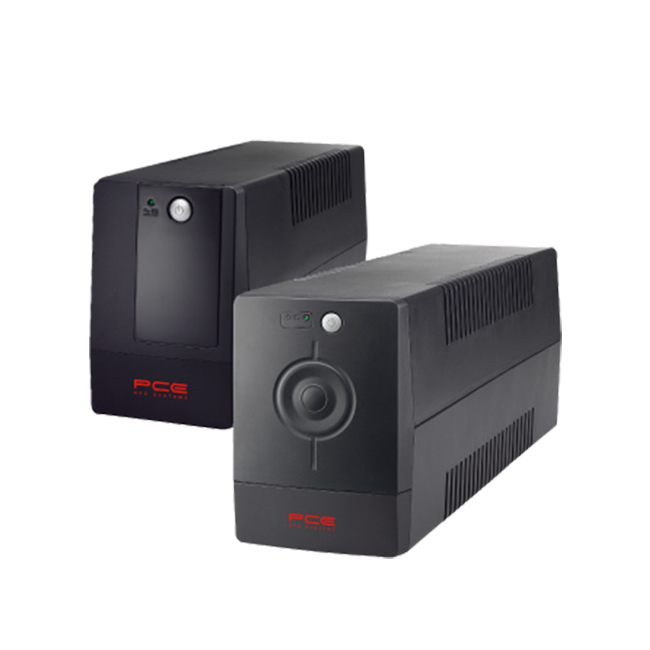
PCE M8-700 UPS (line-interactive) — 700 VA / 360 W backup unit for 220–240 V input. Protects PCs, routers, small electronics from outages and voltage swings. The PCE M8-700 is a line-interactive UPS designed for home or small office use. It provides backup power, voltage regulation (AVR), surge protection, and supports automatic switching during outages. Ideal for desktop PCs, network gear, monitors, or point-of-sale systems. Features & Capabilities Line-interactive topology: regulates input voltage without switching to battery when voltage fluctuates mildly. Automatic Voltage Regulation (AVR) to correct undervolt/overvolt conditions. Simulated (stepped) sine wave output in battery mode. Surge, overload, short circuit, discharge protections built in. Cold start capability (ability to power on from battery with no mains) LED + audible alarms for status (battery mode, overload, fault) USB / RS232 interface in some variants for power management (shutdown, monitoring) Technical Specifications What “Input 220–240 VAC, 50/60 Hz, 3.7 A” Means (and Caveats) If the specification you’re giving is “3.7 A” at input, that corresponds to a maximum input current draw when the UPS is handling a heavy load or during charging cycles. At 230 V × 3.7 A ≈ 850 W of input capacity. The unit’s 360 W output means there’s overhead for losses, inverter inefficiency, battery charging, etc. The UPS must operate within the stated voltage and frequency ranges — if input is too low or too high, it may switch to battery or go into protection mode.

WiWU Factory Customize Eco-friendly Laptop Handbag Laptop bag for Macbook Air Pro

WiWU ZM‑901 – Sturdy foldable aluminum stand with adjustable angles and silicone pads, weighing just 900 g.Enhances posture, airflow, and workspace ergonomics while staying compact and travel-friendly. Model: WiWU ZM‑901 Material: Metal (aluminum/carbon steel) frame with silicone pads for grip Dimensions (Folded): 260 × 225.5 × 53 mm Package Size: 290 × 250 × 50 mm Net Weight: Approx. 900 g Compatibility: Fits laptops, tablets, and smartphones up to ~17 ” (some listings note 15.6″ limit, but device capacity varies) Features: Adjustable angle configuration, detachable foldable design for portability, silicone surface pads for anti-slip and vibration reduction Build & Design: Durable yet lightweight, crafted to enhance airflow and promote ergonomic posture

Meetion Wireless Optical Mouse, Black | R547 DPI switch button Resolution 800/1200/1600dpi 2.4GHz USB Nano receiver included (range-up to 10m)

Genuine-spec keyboard replacement for MacBook Air 13″ (Model A2179, 2020, Intel) — choose US QWERTY or UK QWERTY (with £ symbol). Features Apple’s reliable scissor-switch mechanism, backlighting, and OEM-fit design for seamless performance and aesthetics. Compatible With: MacBook Air 13-inch (2020, Model A2179, EMC 3597) with Intel Core i3/i5/i7 processors (non-M1). Layout Options (select at purchase): US Layout: Standard QWERTY with wide Enter key, @ above 2, # above 3, and full inverted-T arrow keys. UK Layout: QWERTY with £ symbol, tall vertical Enter key, @ accessed via right Alt, and UK-specific punctuation—matches Apple’s official UK regional configuration. US Layout: Standard QWERTY with wide Enter key, @ above 2, # above 3, and full inverted-T arrow keys. UK Layout: QWERTY with £ symbol, tall vertical Enter key, @ accessed via right Alt, and UK-specific punctuation—matches Apple’s official UK regional configuration. Keyboard Type: Traditional scissor-switch mechanism (not Butterfly, not Magic Keyboard)—robust, tactile, and serviceable, with good key travel and proven durability. Integrated Features: Full backlit keys for low-light use Ambient light sensor compatibility OEM-style ribbon cable pre-attached for direct logic board connection Full backlit keys for low-light use Ambient light sensor compatibility OEM-style ribbon cable pre-attached for direct logic board connection Precision Build: Molded to exact Apple specifications—ensures flush mounting, consistent key alignment, and seamless integration into the original top case. Installation Note: Keyboard is screw-mounted with light adhesive—more accessible than glued Butterfly/Magic keyboards. Requires top case access and battery disconnect. Suitable for intermediate DIYers or professional technicians. Important: This is keyboard only—does not include the top case, battery, trackpad, or logic board. Not compatible with M1 MacBook Air (A2337/A2338) or M2 models (A2681/A2941). This is keyboard only—does not include the top case, battery, trackpad, or logic board. Not compatible with M1 MacBook Air (A2337/A2338) or M2 models (A2681/A2941). Model Verification: Confirm your device is MacBook Air A2179 (13″, Intel, 2020) via > About This Mac > Model Identifier (e.g., MacBookAir9,1).

The XPrinter XP-C260M is a fast and reliable thermal POS receipt printer designed for retail stores, restaurants, and supermarkets. With USB and LAN connectivity and support for 80mm paper, it delivers clear printing, high speed, and smooth operation for daily business use.

Genuine-spec bilingual UK/Arabic layout keyboard replacement for MacBook Pro 13″ (Model A1708, 2016–2017)—featuring Apple’s second-generation Butterfly mechanism, backlighting, and OEM fit for seamless typing in both English and Arabic. Compatible With: MacBook Pro 13-inch with Touch Bar (2016 & 2017 models, A1708, Model Identifiers MacBookPro13,1 / MacBookPro14,1). Layout: Bilingual UK/Arabic—primary legends in Arabic, secondary (top-left) legends in UK English (QWERTY). Includes £ symbol, Arabic numerals (٠١٢٣…), and standard Arabic character set aligned with Apple’s regional configuration. Keyboard Type: Apple’s 2nd-generation Butterfly mechanism—thin profile with reduced key travel; requires careful handling and clean environment during installation. Integrated Features: Backlit keys (essential for low-light use—legends remain legible) Ambient light sensor support Original-style ribbon cable connector for direct logic board attachment Backlit keys (essential for low-light use—legends remain legible) Ambient light sensor support Original-style ribbon cable connector for direct logic board attachment Build & Fit: Precision-engineered to match Apple’s original dimensions, key alignment, and top-case curvature—ensures consistent actuation and aesthetic continuity. Installation Note: Keyboard is fully glued into the top case. Replacement requires complete disassembly, meticulous adhesive removal, and professional re-gluing. Recommended for certified or highly experienced technicians only.

WiWU Durable USB C to Type C PD 60W Fast Charging Cable for Mobile Phone Laptop Tablet

Original replacement touchpad for MacBook Air A2442, available in Silver and Space Gray. Perfect for fixing unresponsive or damaged trackpads and restoring smooth cursor control and gesture functionality. The Original MacBook Air A2442 Touchpad is a genuine replacement part designed to restore full trackpad performance and functionality. If your MacBook Air trackpad is not clicking, not responding, or physically damaged, this original touchpad provides a reliable solution with smooth tracking and accurate gesture support. Available in Silver and Space Gray, it matches the original laptop finish for a clean professional repair. Original / Genuine Touchpad for MacBook Air A2442 Available in Silver and Space Gray Restores smooth cursor control and multi-touch gestures Reliable clicking and accurate tracking performance Perfect for repair and replacement of damaged trackpads High-quality build for long-term use ✔ MacBook Air 13-inch (2021 / 2022) A2442 Compatible with MacBook Air A2442 models only. Please confirm the model number on the bottom cover before purchase to ensure a correct fit.

Replacement Keyboard for MacBook Pro 13" inch A1706 & MacBook Pro 15" inch A1707 Touch Bar (for Late 2016 mid 2017 Year) Replacement Keyboard for MacBook Pro 13″ inch A1706 & MacBook Pro 15″ inch A1707 Touch Bar (for Late 2016 mid 2017 Year) 【Compatibility】This replacement keyboard is Compatible with original MacBook Pro 13″ inch A1706 & MacBook Pro 15″ inch A1707 Touch Bar (for Late 2016 mid 2017 Year) Laptop. 【Compatible Part Numbers】661-06377 【Compatible MBP Numbers】A1706 series :MacBook Pro 13 inch 2017 MacBookPro14,2 & MacBook Pro 13 2016 MacBookPro13,2 MNQF2LL/A MNQG2LL/A MLH12LL/A MLVP2LL/A etc A1707 series:MacBook Pro 15 inch 2016 MacBookPro13,3 & MacBook Pro 15 inch 2017 MacBookPro14,3 Release June 2017 MPTR2LL/A MPTU2LL/A MPTT2LL/A MPTV2LL/A Release October 2016 MLH32LL/A MLW72LL/A MLH42LL/A MLW82LL/A

CI03 CI03XL Battery for HP ProBook 640 G2 645 G2 650 G2 655 G2, ProBook 640 G3 645 G3 650 G3 655 G3 Laptop, P/N: HSTNN-UB6Q HSTNN-LB6T HSTNN-PB6K 801554-001 About this item 【BATTERY SPECIFICATIONS】 Type: Li-ion ‖ Capacity: 48Wh ‖ Voltage: 11.4V ‖ Model: CI03XL 【COMPATIBLE LAPTOP MODEL】For ProBook 640 G2, ProBook 640 G3, ProBook 645 G2, ProBook 645 G3, ProBook 650 G2, ProBook 650 G3, ProBook 655 G2, ProBook 655 G3 Notebook. 【PART NUMBER】CI03, CI03XL, C103XL, CIO3XL, CI03048XL, CIO3, HSTNN-UB6Q, HSTNN-LB6T, HSTNN-PB6K, HSTNN-UB6Q, HSTNN-DB7N, HSTNN-I66C-4, HSTNN-I66C-5U, HSTNN-I66C-5H, HSTNN-I67C-4, HSTNN-I67C-5, 801517-221, 801517-222, 801517-231, 801517-232, 801517-241, 801517-242, 801517-421, 801517-422,801517-541, 801517-831, 801554-001. 【MULTIPLE PRETCTION】 Don’t fall into buying cheap and unsafe batteries. All our batteries are certified by CE, and FCC for safety. Bulit-in circuit protection ensures both safety and stability.

Genuine-spec battery flex cable for MacBook Pro models A2159 (16", 2019), A1708 (13", 2016–2017), and A2338 (13", 2020 M1)—restores critical communication between the battery and logic board for proper power-on, charging, and macOS battery status. Genuine-spec battery flex cable for MacBook Pro models A2159 (16″, 2019), A1708 (13″, 2016–2017), and A2338 (13″, 2020 M1)—restores critical communication between the battery and logic board for proper power-on, charging, and macOS battery status. Carries SMBus (System Management Bus) signals from the battery to the logic board Enables: Accurate battery percentage and health reporting in macOS Proper charging control (start/stop, thermal throttling) Power-on capability (MacBooks will not boot without this connection) Prevention of “Battery Not Charging” or “Service Battery” errors Accurate battery percentage and health reporting in macOS Proper charging control (start/stop, thermal throttling) Power-on capability (MacBooks will not boot without this connection) Prevention of “Battery Not Charging” or “Service Battery” errors MacBook won’t turn on (even with a good battery) Battery shows “–%”, 0%, or “Not Charging” Random shutdowns under load macOS displays “No Battery Available” Logic board powers fans or lights but no display output Battery flex cable only (with OEM-style connector and strain relief) ❌ Does not include: battery, logic board, or trackpad Requires full bottom case removal and battery disconnection Connects via a ZIF or press-fit socket on the logic board Must be routed precisely to avoid tension or micro-tears Highly recommended for experienced or certified technicians—improper installation can cause permanent power or battery communication failure
