
ASUS VG278QR Gaming Monitor 27inch 27 inch Full HD gaming monitor with an ultra-fast 165Hz refresh rate and Adaptive-Sync technology to eliminate screen tearing and choppy frame rates Certified as G-SYNC Compatible, FreeSync Premium technology delivering a seamless, tear-free gaming experience by enabling VRR (variable refresh rate) by default. 0.5ms* response time for smooth gameplay, and ASUS Extreme Low Motion Blur (ELMB) Technology to further reduce ghosting and motion blur GameFast Input Technology minimizes input lag and provides much faster motion delivery from end devices to monitor ASUS-exclusive GamePlus hotkey for in-game enhancements while GameVisual for optimized visuals Supports both Adaptive-Sync with NVIDIA GeForce* graphics cards and FreeSync with AMD Radeon graphics cards *Compatible with NVIDIA GeForce GTX 10 series, GTX 16 series, RTX 20 series and newer graphics cards

Panel Size (inch) : 23.8 Aspect Ratio : 16:9 Display Viewing Area (H x V) : 527.04 x 296.46 mm Display Surface : Non-Glare Backlight Type : LED Panel Type : IPS Viewing Angle (CR≧10, H/V) : 178°/ 178° Pixel Pitch : 0.2745mm Resolution : 1920×1080 Color Space (sRGB) : 99% Brightness (Typ.) : 250cd/㎡ Contrast Ratio (Typ.) : 1000:1 ASUS Smart Contrast Ratio (ASCR) : 100000000:1 Display Colors : 16.7M Response Time : 5ms(GTG) Refresh Rate (Max) : 75Hz Flicker-free : Yes Video Feature Trace Free Technology : Yes SPLENDID Technology : Yes Color Temp. Selection : Yes(4 modes) GamePlus : Yes QuickFit : Yes HDCP : Yes VRR Technology : FreeSync™ Low Blue Light : Yes I/O Ports HDMI(v1.4) x 1 DVI x 1 VGA x 1 Signal Frequency Digital Signal Frequency : 24~84 KHz (H) / 48~75 Hz (V) Analog Signal Frequency : 24~84 KHz (H) / 48~60 Hz (V) Power Consumption Power Consumption : 13.2W Power Saving Mode : <0.5W Power Off Mode : <0.5W Voltage : 100-240V, 50/60Hz Mechanical Design Tilt : Yes (+23° ~ -5°) VESA Wall Mounting : 100x100mm Kensington Lock : Yes Dimensions (Esti.) Phys. Dimension with Stand (W x H x D) : 540.45 x 403.67 x 203.94 mm Phys. Dimension without Stand (W x H x D) : 540.45 x 324.67 x 44.4 mm Box Dimension (W x H x D) : 559 x 415 x 127 mm Weight (Esti.) Net Weight with Stand : 3.57 Kg Net Weight without Stand : 3.18 Kg Gross Weight : 5.50 Kg 3 Years Warranty manufacturer link

product name : LG UltraGear 32″ Shipping Dimensions (WxHxD) 31.2″ x 8.9″ x 21.9″ Shipping Weight 22.3 lbs With Stand (WxHxD) 28.1″ x 23.6″ x 11.5″ (UP) 28.1″ x 19.3″ x 11.5″(Down) With Stand Weight 15.9 lbs Without Stand (WxHxD) 28.1″ x 16.9″ x 2″ Without Stand Weight 10.6 lbs iNPUT/OUTPUT DisplayPort Yes HDMI Yes Headphone Out Yes USB Down-stream Yes USB Up-stream Yes PICTURE QUALITY Aspect Ratio 16:9 Brightness 280cd (Min)/350cd (Typ) Color Depth (Number of Colors) 107 Color Gamut (Typ.) DCI-P3 98% (CIE1976) Contrast Ratio 700:1 (Min.), 1000:1 (Typ.) Display Type IPS Pixel Pitch (mm) 0.2724 x 0.2724 mm Refresh Rate 165hz (o/c 180hz) Resolution 2560 x 1440 Response Time (GTG) 1ms (GtG at Faster) Screen Size 32″ Surface Treatment Anti-Glare Viewing Angle 178˚(R/L), 178˚(U/D) POWER DC Off (Max) <0.3W Input 100-240 Vac, 50/60 Hz LG UltraGear 32″ Power Consumption (Max.) 65 W Power Consumption (Typ.) 48 W Power Save/Sleep Mode (Max) Less than 0.5W Type Adapter SOUND Speaker Yes LG UltraGear 32″ SPECIAL FEATURES Adaptive Sync AMD FreeSync™ Premium Auto Input Switch Yes Black Stabilizer® Yes Color Calibrated Yes Crosshair® Yes LG UltraGear 32″ Dynamic Action Sync® Yes Flicker Safe Yes FPS Counter Yes FreeSync (Low Frame Compensation) Yes HDR (High Dynamic Range) Yes HDR Effect Yes Motion Blur Reduction Technology Yes Nano IPS™ Technology Yes NVIDIA G-Sync™ Yes OnScreen Control (OSC) Yes Overclock Yes LG UltraGear 32″Reader Mode Yes Smart Energy Saving Yes User Define Key Yes Wide Color Gamut Yes STAND Display Position Adjustments Height, Pivot, Tilt Wall mount size (mm) 100 x 100 mm Specifications: 32″ FHD (1920 x 1080) Display 165Hz Refresh Rate An ultra-fast speed of 165Hz allows gamers to see the next frame quickly and makes image to appear smoothly. The gamers can respond quickly to opponents and aim at target easily.

Genuine-spec keyboard replacement for MacBook Air 13″ (Model A2179, 2020, Intel) — choose US QWERTY or UK QWERTY (with £ symbol). Features Apple’s reliable scissor-switch mechanism, backlighting, and OEM-fit design for seamless performance and aesthetics. Compatible With: MacBook Air 13-inch (2020, Model A2179, EMC 3597) with Intel Core i3/i5/i7 processors (non-M1). Layout Options (select at purchase): US Layout: Standard QWERTY with wide Enter key, @ above 2, # above 3, and full inverted-T arrow keys. UK Layout: QWERTY with £ symbol, tall vertical Enter key, @ accessed via right Alt, and UK-specific punctuation—matches Apple’s official UK regional configuration. US Layout: Standard QWERTY with wide Enter key, @ above 2, # above 3, and full inverted-T arrow keys. UK Layout: QWERTY with £ symbol, tall vertical Enter key, @ accessed via right Alt, and UK-specific punctuation—matches Apple’s official UK regional configuration. Keyboard Type: Traditional scissor-switch mechanism (not Butterfly, not Magic Keyboard)—robust, tactile, and serviceable, with good key travel and proven durability. Integrated Features: Full backlit keys for low-light use Ambient light sensor compatibility OEM-style ribbon cable pre-attached for direct logic board connection Full backlit keys for low-light use Ambient light sensor compatibility OEM-style ribbon cable pre-attached for direct logic board connection Precision Build: Molded to exact Apple specifications—ensures flush mounting, consistent key alignment, and seamless integration into the original top case. Installation Note: Keyboard is screw-mounted with light adhesive—more accessible than glued Butterfly/Magic keyboards. Requires top case access and battery disconnect. Suitable for intermediate DIYers or professional technicians. Important: This is keyboard only—does not include the top case, battery, trackpad, or logic board. Not compatible with M1 MacBook Air (A2337/A2338) or M2 models (A2681/A2941). This is keyboard only—does not include the top case, battery, trackpad, or logic board. Not compatible with M1 MacBook Air (A2337/A2338) or M2 models (A2681/A2941). Model Verification: Confirm your device is MacBook Air A2179 (13″, Intel, 2020) via > About This Mac > Model Identifier (e.g., MacBookAir9,1).

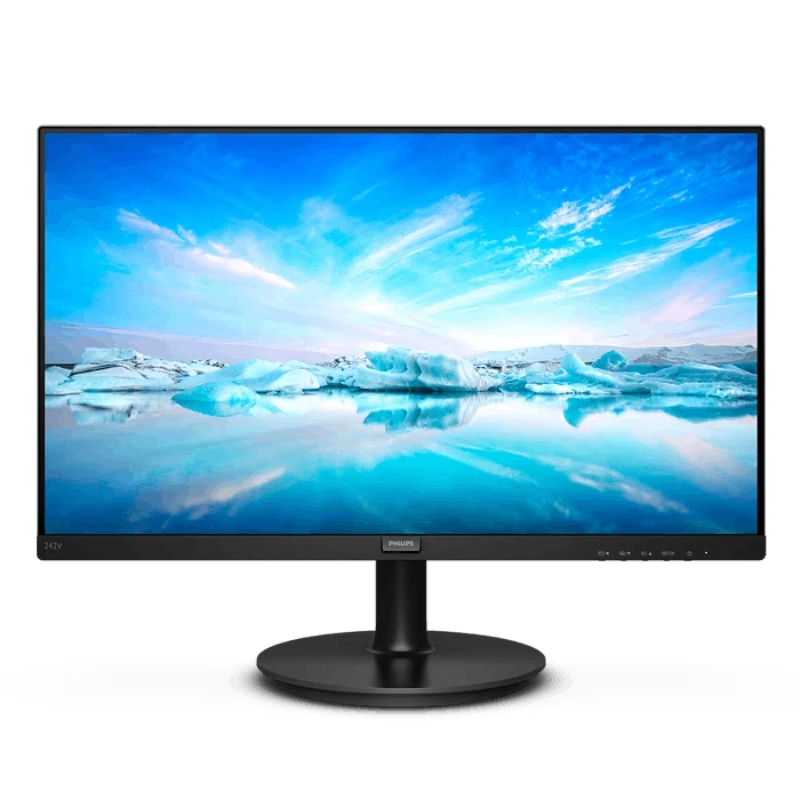
Philips 241V8W/89 23.8-inch IPS Full HD monitor delivers clear visuals and reliable everyday performance. It focuses on wide viewing angles, smooth motion, and eye comfort for home and office use. Additionally, it features a 23.8-inch IPS panel with Full HD resolution (1920 × 1080). This provides sharp detail and consistent colors, so it improves viewing quality from different angles. Moreover, it supports a 75Hz refresh rate with Adaptive Sync. As a result, it delivers smoother motion and reduces screen tearing during video playback and casual use. The monitor includes a 4ms response time (GtG). Therefore, it handles everyday tasks smoothly with reduced motion blur. In addition, it uses an anti-glare coating with LowBlue Mode and Flicker-Free technology. So it reduces eye strain during long working sessions. Furthermore, it offers HDMI and VGA connectivity. This ensures compatibility with modern and older devices for flexible setups. Philips 241V8W/89 23.8-inch IPS monitor provides a balanced mix of clarity, comfort, and smooth performance for daily use. Specifications: 23.8-inch IPS panel with Full HD 1920 × 1080 resolution 75Hz refresh rate with Adaptive Sync support 4ms GtG response time for smooth visuals Anti-glare coating with wide 178° viewing angles LowBlue Mode and Flicker-Free eye comfort technology

Looking for a monitor that delivers unparalleled visual performance? Look no further than the ViewSonic ColorPro 32″ 4K Monitor. With its cutting-edge technology and sleek design, it’s the ultimate choice for professionals and enthusiasts alike. Featuring a stunning 32-inch 4K display, this monitor brings your content to life with breathtaking clarity and detail. Whether you’re editing photos, designing graphics, or watching movies, every pixel pops with vivid color and crisp definition. Moreover, the ViewSonic ColorPro monitor is calibrated to deliver precise color accuracy, making it ideal for graphic design, photography, and video editing. Say goodbye to color distortion and enjoy true-to-life hues that enhance your creative workflow. But it’s not just about visuals—the ViewSonic ColorPro monitor also offers exceptional functionality. With advanced connectivity options like HDMI, DisplayPort, and USB-C, you can easily connect your devices for seamless multitasking. Additionally, the monitor’s ergonomic design ensures comfortable viewing during long hours of use. Adjustable tilt, swivel, and height settings allow you to find the perfect position for maximum productivity and comfort. In summary, the ViewSonic ColorPro 32″ 4K Monitor combines stunning visuals, precise color accuracy, and versatile connectivity to deliver an unparalleled viewing experience. Whether you’re a professional creator or a discerning enthusiast, elevate your display with ViewSonic ColorPro. Specifications: Display : 32″ IPS Resolution : 3840 x 2160 UHD Refresh Rate : 60Hz Response Rate : 5ms

Genuine-spec US layout keyboard replacement for MacBook Pro 13″ (Model A1466, Late 2015–Early 2016)—featuring traditional scissor-switch mechanism, backlighting, and full OEM compatibility for reliable, comfortable typing. Compatible With: MacBook Pro 13-inch non-Touch Bar models: Late 2015 (Intel Core i5/i7, Retina, A1466, Model Identifier MacBookPro12,1) Early 2016 (Intel Core i5/i7, Retina, A1466, MacBookPro13,1) Late 2015 (Intel Core i5/i7, Retina, A1466, Model Identifier MacBookPro12,1) Early 2016 (Intel Core i5/i7, Retina, A1466, MacBookPro13,1) Layout: Standard US English (QWERTY) with full-size keys, inverted-T arrow keys, and dedicated function row (F1–F12). Keyboard Type: Traditional scissor-switch mechanism—not Butterfly or Magic Keyboard—known for durability, deeper key travel, and tactile feedback. Integrated Features: Backlit keys for low-light use, ambient light sensor support, and OEM-style ribbon cable for direct logic board connection. Build & Fit: Precision-engineered to match Apple’s original dimensions and mounting points—ensures flush alignment within the top case and consistent key height. Installation Note: Keyboard is secured with screws and minimal adhesive (unlike later glued models), making replacement more accessible. Still requires full top case disassembly and battery disconnect. Suitable for intermediate to advanced technicians.

Genuine-spec touchpad flex cable for MacBook Pro 16″ (Model A2141, 2019, Intel)—essential for restoring full Force Touch functionality, haptic feedback, and precise multi-touch gesture control during trackpad repair or replacement. Compatible With: MacBook Pro 16-inch (2019, Model A2141) with Intel Core i7/i9 processors (Model Identifier: MacBookPro16,1) (Note: A2141 is the non-base configuration of the 2019 16″ MacBook Pro—typically higher-end Intel models.) Part Type: Touchpad flex cable only—does not include the trackpad housing, Taptic Engine, or mounting hardware. This is the OEM-style ribbon cable that connects the trackpad to the logic board. Function: Transmits touch coordinates, Force Touch pressure data, and haptic feedback signals—critical for macOS gestures (e.g., Force Click, three-finger lookup, pinch-to-zoom) and Taptic Engine responsiveness. OEM-Quality Construction: Replicated to Apple’s exact specifications—including cable length, connector pitch, EMI shielding, and bend radius—ensuring reliable signal integrity and long-term durability. Common Use Cases: Replacing a torn, creased, or liquid-damaged original flex cable Completing a trackpad replacement when the original cable is compromised Fixing intermittent trackpad behavior, loss of Force Touch, or complete unresponsiveness Replacing a torn, creased, or liquid-damaged original flex cable Completing a trackpad replacement when the original cable is compromised Fixing intermittent trackpad behavior, loss of Force Touch, or complete unresponsiveness Installation Note: Requires full disassembly of the bottom case, speaker removal, and careful routing beneath the battery and logic board. Connectors use ZIF (Zero Insertion Force) sockets—must be aligned and latched gently. Recommended for certified or professional repair technicians only. Important: This is flex cable only—not a complete trackpad assembly. Must be used with the original or compatible A2141 trackpad and Taptic Engine. Not compatible with M1 MacBook Pro 16″ (A2485), 14″ models (A2442), or any MacBook Air. This is flex cable only—not a complete trackpad assembly. Must be used with the original or compatible A2141 trackpad and Taptic Engine. Not compatible with M1 MacBook Pro 16″ (A2485), 14″ models (A2442), or any MacBook Air. Model Verification: Confirm your device is MacBook Pro A2141 (16″, 2019, Intel) via > About This Mac > Model Identifier (should read MacBookPro16,1).

The ViewSonic VA2732-mhd 27″ FHD 100Hz Monitor delivers smooth visuals for work, study, and daily entertainment. Its Full HD resolution shows clear text and sharp image details. The 27-inch screen gives more space for multitasking and viewing comfort. This helps users stay focused and productive. Moreover, the ViewSonic VA2732-mhd 27″ FHD 100Hz Monitor features a fast 100 Hz refresh rate. This makes scrolling smoother and motion more natural. Videos and animations look cleaner with less blur. As a result, the viewing experience feels more comfortable. In addition, the monitor uses IPS panel technology for wide viewing angles. Colors stay accurate even when viewed from the side. This helps during group work and shared screen use. The image remains bright and stable from all directions. Furthermore, the ViewSonic VA2732-mhd 27″ FHD 100Hz Monitor includes eye comfort features for daily protection. The low blue light mode reduces eye strain during long use. The flicker-free design supports viewing without discomfort. These features help users work longer with better comfort. Also, the monitor offers built-in speakers for simple audio needs. This removes the need for extra speakers in small spaces. Sound is clear for meetings, videos, and casual media. Desk setups stay clean and organized. In addition, the ViewSonic VA2732-mhd 27″ FHD 100Hz Monitor supports flexible connections. It includes HDMI, DisplayPort, and VGA for wide compatibility. You can connect laptops, desktops, and media devices easily. Switching between sources becomes quick and smooth. Moreover, the slim bezel design gives a modern and clean look. It fits well in home and office spaces. The stand supports tilt adjustment for better viewing comfort. Wall mounting is also supported for flexible setups. Overall, the ViewSonic VA2732-mhd 27″ FHD 100Hz Monitor delivers clarity, smooth motion, and daily comfort. It supports work, entertainment, and multitasking with ease. This monitor is an excellent choice for users who want large size and smooth performance. Specifications: Display : 27″ IPS Resolution : FHD 1920 x 1080 Refresh Rate : 100Hz Response Time : 1ms

The ViewSonic XG2431 24″ 240 Hz gaming monitor delivers ultra‑smooth motion for fast‑paced games and everyday use. Its Full HD panel shows sharp images and crisp text, making work, media, and gameplay easy to see. In addition, the 240 Hz refresh rate significantly reduces motion blur, helping you react faster in competitive games. Furthermore, the monitor includes adaptive sync support to reduce screen tearing and keep visuals smooth during intense scenes. It also offers a quick response time to cut down on ghosting and keep action sharp. In addition, the ergonomic stand lets you adjust tilt and height for comfortable viewing during long sessions. Therefore, this monitor fits both gaming setups and work desks with ease. Overall, the ViewSonic XG2431 combines fast motion, clear visuals, and solid connectivity in a reliable 24″ design. Specifications: 24″ Full HD display with clear, crisp visuals 240 Hz refresh rate for ultra‑smooth motion Adaptive sync to reduce screen tearing Fast response time for sharp action Adjustable ergonomic stand and solid connectivity

The LG 32GN600-B 32″ Monitor delivers clear and smooth visuals for gaming and everyday use.It features a 32-inch QHD display with sharp details and vibrant colors. Moreover, its high refresh rate ensures fluid motion in fast-paced games and videos. This monitor uses a VA panel for strong contrast and wide viewing angles. Additionally, the fast response time reduces blur and ghosting during competitive gaming. The anti-glare screen helps minimize reflections in bright environments. HDMI and DisplayPort inputs allow easy connection to PCs, laptops, and gaming consoles. Furthermore, tilt adjustment helps you find a comfortable viewing angle for long sessions. Low blue light and flicker-free technologies reduce eye strain during extended use. This display is ideal for gamers, streamers, and home users alike. Therefore, it supports competitive gaming, media streaming, and productivity tasks. Finally, it combines sharp visuals, fast performance, and comfort features for daily use. Specifications: Screen Size: 32″ QHD VA panel Resolution: 2560 × 1440 Refresh Rate: High for smooth motion Ports: HDMI + DisplayPort Features: Anti-glare, low blue light, flicker-free eye care

The Cudy AC1200 dual band WiFi extender boosts and extends your wireless coverage with speeds up to 1200Mbps across 2.4GHz and 5GHz bands. Ideal for eliminating dead zones, it provides stronger and more stable WiFi for streaming, gaming, and online work in every corner of your home or office. The Cudy AC1200 Dual Band WiFi Extender is designed to expand your existing WiFi network and deliver stronger coverage where your router signal is weak. With support for both 2.4GHz and 5GHz frequencies, it provides balanced performance for browsing, streaming, video calls, and gaming. Easy to set up and compatible with most routers, this extender is the perfect solution for improving WiFi connectivity in homes, offices, and multi-room spaces. AC1200 Dual Band Speed: Up to 1200Mbps total for smooth browsing and streaming 2.4GHz + 5GHz Support: Better performance and reduced interference Eliminates WiFi Dead Zones: Extends coverage to hard-to-reach rooms Stable Connection: Ideal for HD streaming, gaming, and online meetings Universal Compatibility: Works with most WiFi routers and access points Easy Setup: Simple installation with WPS / web configuration (model dependent) Compact Plug-In Design: Saves space and fits easily in any outlet Multiple Modes: Extender / Access Point (depending on model) Perfect for homes, offices, cafés, and apartments needing stronger WiFi coverage. Works with most routers and improves signal strength for devices like smartphones, laptops, smart TVs, consoles, and IP cameras.

The Samsung 75″ QLED 4K Q60F Smart TV QA75Q6FAAUXTW delivers a large-screen entertainment experience with advanced QLED display technology. It produces bright colors, sharp details, and impressive clarity, making movies, sports, and games more enjoyable on the expansive 75-inch screen. QLED technology uses Quantum Dot enhancement to improve color accuracy and brightness. As a result, images appear vivid and lifelike across a wide range of content. Dark scenes retain detail, while bright scenes remain balanced and clear. This helps create a consistent viewing experience throughout the day. The 4K UHD resolution provides four times the detail of Full HD content. Therefore, images look sharper and more refined. In addition, Samsung’s processing technology enhances lower-resolution content, helping it appear clearer and closer to 4K quality. HDR support improves contrast and expands the range of visible colors. This allows brighter highlights and deeper shadows, creating a more realistic picture. Fast-moving scenes also appear smoother, making sports broadcasts and action movies more enjoyable to watch. The Smart TV platform offers convenient access to popular streaming services, apps, and connected home features. It responds quickly and provides an easy-to-use interface for everyday entertainment. In addition, the slim design and narrow bezels give the Samsung QLED 75 4K Q60F Smart TV QA75Q6FAAUXTW a modern appearance that complements a variety of living spaces. Overall, this Samsung QLED TV combines large-screen immersion, vibrant color performance, and smart connectivity for a reliable home entertainment solution. Specifications: QLED technology delivers vibrant colors and enhanced brightness 75-inch 4K UHD display provides immersive viewing HDR improves contrast and image realism Smart TV platform supports streaming apps and connected features Slim design complements modern living spaces

Logic Board 1.6GHz Core i5 (i5-5250U), 8GB RAM Replacement for (Early 2015-2017)

Battery Model: A1493 A1502 Replacement Laptop Battery for MacBook Pro Retina 13 Inch Late 2013 Mid 2014 ; MacBook Pro A1493 A1582 Battery EMC 2678 2875 2835 ME864 ME865 100% Brand New, Battery Type: Li-Polymer; Capacity: 71.8Wh; Voltage:11.34V; Package include two free screwdriver Compatible:A1502 A1493 (Only for Late 2013, Mid 2014 Version) Apple MacBook Pro 13″ Retina ME864LL/A ME866LL/A ,MacBook Pro “Core i5″ 2.4/2.5 13” Late 2013 Retina Overcharger and Discharger Circuit Protection, CE-/FCC-/RoHS-Certified for safety.

A1389 A1494 Laptop Battery Replacement for MacBook Pro 15 inch Retina A1398 (Late 2013 & Mid 2014), fit Retina ME293 ME294 MGXA2 MGXC2 MJLQ2 MJLT2 MJLU2 Details : Voltage:11.26V; Capacity: 95Wh; Battery Type: Li-Polymer KINDLY NOTES: Replacement for Apple Macbook Pro 15 inch A1494 A1398 Retina Only fit Late 2013 Mid 2014 Version,Do not fit 2012 & Early 2013 Version Packing: 1 x laptop battery,4 x free screwdrivers Desighed for the original battery 1:1,Please confirm that your laptop’s model number, the original battery’s part number and your laptop’s version correctly

Samsung S24D300 24″ Essential S3 Monitor offers a 24‑inch Full HD (1920 × 1080) IPS display for clear and detailed visuals. Additionally, it provides a smooth experience with up to 100 Hz refresh rate, which can show motion more fluidly than standard 60 Hz panels. The flat screen and simple design make it suitable for home, study, or office use. Moreover, it includes Eye Saver Mode and Flicker Free technology to help reduce eye strain during long sessions. Therefore, users can stay comfortable while working, browsing, or watching content. The monitor provides basic connectivity options with HDMI and VGA ports. Furthermore, its slim bezel enhances a modern setup and fits well with other devices. In addition, the tilt‑adjustable stand allows users to set a comfortable viewing angle. Samsung backs the product with a three‑year warranty for added peace of mind. Specifications: Display : 24″ IPS Resolution : 1920 x 1080 FHD Refresh Rate : 100Hz Response Rate : 5ms

Introducing the Samsung ViewFinity S9 S90PC 27—a collection of monitors designed to redefine your visual experience and meet the demands of modern users. Embark on a journey of visual excellence with cutting-edge features that distinguish the Samsung Monitor Series. From vibrant displays to advanced technologies, these monitors ensure a superior and immersive viewing experience for users. Beneath their sleek and modern exteriors lies a commitment to seamless functionality. The Samsung Monitor Series is crafted to deliver not only stunning visuals but also user-friendly interfaces, making them an essential tool for both work and entertainment. Delve into the seamless integration of advanced technologies, ensuring these monitors adapt effortlessly to the evolving demands of modern content consumption. Whether you’re working on detailed tasks, streaming high-definition content, or gaming, the Samsung Monitor Series caters to diverse needs. Portability may not be the focus, but these monitors excel in providing flexible setups for various environments. With their slim profiles and versatile designs, the Samsung Monitor Series ensures your viewing experience remains top-tier. In conclusion, elevate your viewing experience with the Samsung ViewFinity S9 S90PC 27. Immerse yourself in cutting-edge features, vibrant displays, and sleek designs. Choose the Samsung Monitor Series for a monitor lineup that seamlessly blends advanced technology with visual brilliance. Specifications: Display : 27″ Resolution : 5120×2880 Response Time : 5ms Refresh Rate : 60Hz Part Number : LS27C902PAMXUE

Specifications Feature Value Feature Value Input/Output Other Sound Mode Extra Bass Mode Category Speakers Use Other Input Power (W) 25-49W Voice Control No Waterproof Yes Support APP No Intelligent Personal Assistant None Audio Crossover Full-Range Number of Loudspeaker Enclosures 2 Power Source None Channels 2 (2.0) Battery Yes Communication USB Speaker Type Portable Cabinet Material Plastic Brand Name QUCAA Origin Mainland China Certification CE

Genuine-spec touchpad flex cable for MacBook Air 13″ (Model A1534, Early 2015)—essential for restoring full trackpad functionality, including precise cursor control and physical click response, during repair or replacement. Compatible With: MacBook Air 13-inch (Early 2015, Model A1534, Model Identifier MacBookAir7,2). Part Type: Touchpad flex cable only—does not include the trackpad housing, button mechanism, or mounting brackets. This is the ribbon cable that connects the trackpad to the logic board. Function: Carries input signals from the trackpad to the logic board—critical for cursor movement, tap-to-click, and primary/secondary physical click functionality. (Note: This model uses a physical click mechanism, not Force Touch—so no haptic feedback or pressure-sensing.) OEM-Quality Construction: Matches Apple’s original cable in length, connector type, and shielding—ensures reliable signal transmission and long-term durability. Common Use Cases: Replacing a torn, frayed, or damaged original flex cable Completing a trackpad replacement when the original cable is compromised Fixing erratic cursor movement, unresponsive trackpad, or loss of click function Replacing a torn, frayed, or damaged original flex cable Completing a trackpad replacement when the original cable is compromised Fixing erratic cursor movement, unresponsive trackpad, or loss of click function Installation Note: Requires bottom case removal and careful disconnect/reconnect of the ZIF (Zero Insertion Force) connector on the logic board. The cable routes under the battery—handle with care. Suitable for intermediate to advanced DIYers or technicians.
