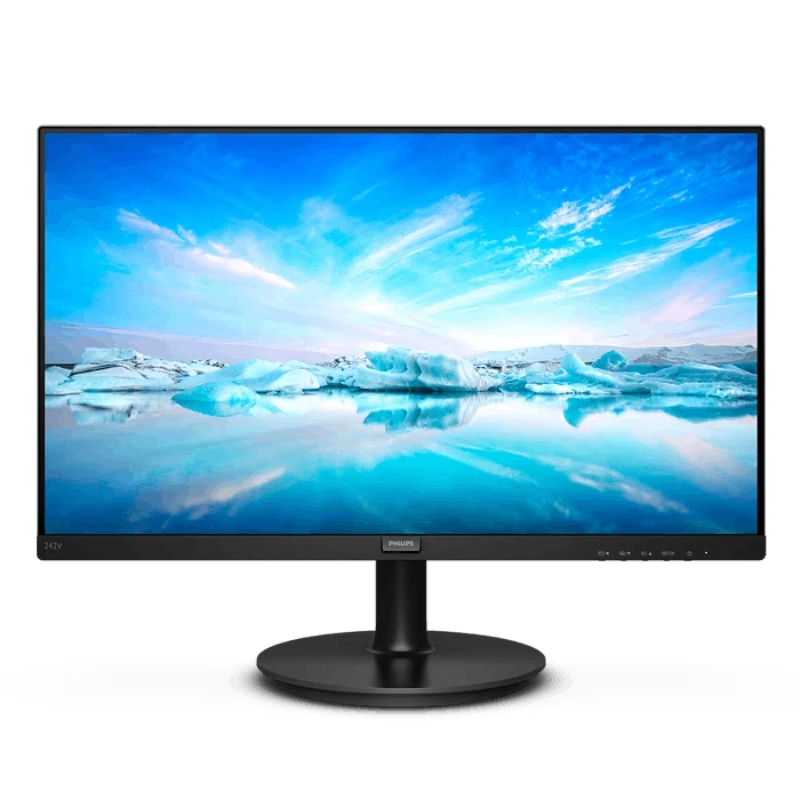

View Sonic VA2215-H 22” Full HD Monitor Eyecare technology for comfortable viewing Eco-mode for low energy consumption ViewMode color rendering options 75Hz FreeSync to eliminate screen tearing and reduce stuttering HDMI and VGA inputs for connectivity

The LB-LINK AX900 USB WiFi adapter delivers fast and stable wireless connectivity with WiFi 6 technology and speeds up to 900Mbps. Featuring dual-band support (2.4GHz + 5GHz), it’s ideal for upgrading PCs and laptops for smoother streaming, gaming, and online work. The LB-LINK AX900 USB WiFi Adapter is a modern wireless solution designed to upgrade your computer to the latest WiFi 6 (802.11ax) standard. It offers improved speed, better network efficiency, and stronger stability compared to older WiFi adapters. With dual-band support, you can connect to either the 2.4GHz band for long-range stability or the 5GHz band for higher speed and lower latency. Its compact USB design makes it perfect for desktops and laptops needing fast internet without installing internal cards. WiFi 6 (802.11ax) Technology for faster performance and better efficiency AX900 Speed (Up to 900Mbps) for smooth streaming and downloads Dual Band Support: 2.4GHz + 5GHz for flexibility and stability USB Plug & Play easy installation (driver may be required) Low Latency Connection ideal for gaming and video calls Compact Portable Design perfect for laptops and desktops Improves WiFi Performance for weak built-in adapters Ideal for PCs and laptops that need faster WiFi speeds and stronger connectivity. Perfect for online gaming, HD streaming, Zoom/Teams meetings, and stable browsing.

WiWU Skin Zero Sleeve – Ultra-thin Lycra laptop case with faux-fur lining and scratch-resistant protection, available in multiple sizes.Sleek, featherlight, and travel-ready for everyday carry without the bulk. Model: WiWU Skin Zero Sleeve Sizes: Available for 13″, 14″, and 16″ laptops Material: Eco-friendly water-resistant Lycra exterior Interior: Faux-fur lining to protect against scratches and minor bumps Design: Ultra-slim profile that fits easily into backpacks or briefcases Weight: Approximately 280–330 g, depending on size Colors: Black, Gray, Purple, Burgundy Closure: Secure magnetic or zipper closure (varies by version) Features: Lightweight, minimal branding, soft internal cushioning, stylish and durable build

This replacement touchpad for MacBook Air A2179 comes in Rose Gold and is sold without the flex cable. Perfect for restoring smooth trackpad performance, it’s ideal for repair technicians and users replacing a damaged or non-working touchpad. The MacBook Air A2179 Touchpad (Rose Gold) is a high-quality replacement part designed to restore full trackpad functionality to your laptop. Whether your original touchpad is unresponsive, physically damaged, or experiencing tracking issues, this replacement provides a reliable solution. Please note that this unit is without the flex cable, meaning it requires the original flex or a separate replacement flex for installation. Ideal for repair shops and technicians, it ensures smooth navigation and precise control. Compatible with MacBook Air A2179 Rose Gold Color Match for original look and finish Replacement Touchpad Only (without flex cable) Restores Smooth Trackpad Functionality Precision Tracking & Gesture Support (when installed correctly) Ideal for Repairs & Replacements High-Quality Build designed for durability and long use Designed specifically for Apple MacBook Air A2179 models. Recommended for technicians and repair shops or users replacing a faulty touchpad. Ensure compatibility before purchase and note that a flex cable is required for installation.

807956-001 807957-001 Replacement HS03 HS04 Laptop Battery for HP 240 G4, 245 G4, 250 G4, 255 G4, 256 G4 Series fits Notebook 14 14G 15 15G HP 807611-421 807611-131 HSTNN-LB6U HSTNN-LB6V About this item Battery Type: Li-ion Voltage: 14.8V Capacity: 2200MAH CELL: 4cell Color: Black. Compatible Models: HP 240 G4 Series, HP 245 246 G4 Series, HP 250 255 256 G4 Series, HP Notebook 14 14g 15 15g Series. Replacement For: HSO4, HSO3, HSTNN-LB6V, HSTNN-LB6U, 807957-001, 807956-001, 807611-421, 807612-421 TPN-C125 TPN-C126 TPN-I119 TPN-I120. 100% New from the Manufacturer, with About 500 recharge cycles over the life of the battery. Overcharger and Discharger Circuit Protection, CE-/FCC-/RoHS-Certified for safety.

Used OEM Original Apple Logic Board Working, 2019 Model 2.7Ghz I7 251gb 16gb (A1989) + Original Touch ID, Tested using latest industry hardware diagnostic software, Fresh pull from fully Working nearly new unit. SPECIFICATION:

HP P24v G5 Monitor Overview The HP P24v G5 is a 24-inch Full HD monitor designed for everyday work. It delivers clear visuals and reliable performance. As a result, it suits offices, home setups, and study spaces. 24-Inch Full HD Display This monitor features a 24-inch Full HD resolution. Therefore, text appears sharp and easy to read. Moreover, images look clear and well defined. Because of this, it supports long working sessions comfortably. In addition, the screen size fits most desks well. As a result, it balances clarity and space efficiency. Smooth Visual Performance The HP P24v G5 provides smooth visuals for daily tasks. As a result, scrolling and browsing feel natural. Furthermore, the display maintains consistent brightness. This improves overall viewing comfort. Eye Comfort and Anti-Glare Screen This monitor includes eye comfort features. Therefore, it helps reduce eye strain. In addition, the anti-glare coating limits reflections. As a result, the screen stays clear in bright environments. Connectivity and Compatibility The HP P24v G5 includes HDMI and VGA ports. As a result, it connects easily to new and older devices. Moreover, setup remains quick and simple. Therefore, users can start working immediately. Design and Mounting Options The monitor features a clean and professional design. In addition, it supports VESA mounting. As a result, users can create a flexible workspace. Ideal for Office and Home Use This monitor focuses on reliability and efficiency. Moreover, it suits office work, browsing, and media viewing. In conclusion, the HP P24v G5 is a practical Full HD monitor for daily use. Specifications: Display Quality: 23.8-inch IPS panel with 1920 x 1080 resolution at 100 Hz, offering 99% sRGB color for accurate visuals. Performance: 100Hz refresh rate and 5ms GtG response time with overdrive minimize screen tearing and ghosting. Connectivity: Equipped with HDMI 1.4 and VGA ports for versatile connectivity.

The LG 32MA70HY 32″ Monitor delivers large, clear visuals for work, entertainment, and everyday use.It features a 32‑inch screen with Full HD resolution for sharp images and smooth video.Moreover, the slim design fits well on desks in homes and offices. This monitor uses an IPS panel for wide viewing angles and consistent color from many positions.Additionally, anti‑glare coating helps reduce reflections in bright lighting.Fast response time reduces blur during moving content like videos and casual gaming. The LG 32MA70HY also includes HDMI and VGA ports for flexible connectivity.Furthermore, tilt adjustment lets you find a comfortable viewing angle during long sessions.Low blue light and flicker‑safe features help reduce eye strain during extended use. This display suits students, professionals, and home users alike.Therefore, it supports productivity, media viewing, and everyday computing.Finally, it combines solid picture quality, reliable performance, and comfort features. Specifications: 32″ Full HD (1920 × 1080) IPS panel HDMI + VGA ports for PC and device connection Anti‑glare coating for comfortable viewing Tilt‑adjustable stand for ergonomic use Low blue light and flicker‑safe eye care

Logic Board 2.2GHz i7 Integrated Graphics, 16GB Replacement for Apple MacBook Pro 15" Retina A1398 (Mid 2015) Logic Board 2.2GHz i7 Integrated Graphics, 16GB Replacement for Apple MacBook Pro 15″ Retina A1398 (Mid 2015)

BATTERY DELL M5Y1K Laptop Battery for Dell Inspiron 15 5000 5555 5558 5559 3552 3558 3567 14 3451 3452 3458 5458 17 5755 5758 Series Rechargeable 40WH li-ion Battery Replacement Fit GXVJ3 VN3N0 YU12005-13001D About this item 【Specification】Dell laptop Replacement Battery Type: Li-ion; Voltage: 14.8 V; Capacity 2600MAH/40WH; Cells:4-Cell 【Stability】M5Y1K Laptop Battery Replacement battery for Dell offers 500+ recharge cycles over life of battery 【COMPATIBLE MODEL】(Check description below for more models) Dell 40WH Standard Rechargeable Li-ion Battery Type M5Y1K 14.8V YU12005-13001D 453-BR GXVJ3 HD4J0 M5YIK MSY1K Dell Inspiron 14 15 3000 Laptop Replacement Battery 3558 3458 3567 3452 3565 3459 P60G Dell Inspiron 14 15 17 5000 Laptop Battery 5555 5558 5559 5755 5758 5458 Dell Vostro Laptop Battery 3558 3458 Dell Latitude Laptop Battery 3460 3560 【GUARANTEE】Our Dell M5Y1K replacement laptop battery is 100% Compatible with the originals. Complying with the CE/FCC/ROHS/UL Certified Standard

Are you in search of a monitor that delivers both smooth performance and vibrant visuals? Look no further than the MSI Pro 27″ 100Hz Monitor. Designed to meet the demands of both gamers and professionals, this monitor offers a seamless viewing experience. First and foremost, let’s discuss its refresh rate. With a refresh rate of 100Hz, this monitor ensures buttery-smooth visuals, free from motion blur or screen tearing. Whether you’re gaming or working, every frame is delivered with precision and clarity. Additionally, the 27-inch display provides ample screen real estate, allowing for immersive gaming sessions or productive work environments. Say goodbye to squinting at small screens and hello to expansive viewing experiences. Transitioning to color accuracy, the MSI Pro monitor boasts vibrant and true-to-life colors, thanks to its advanced display technology. Whether you’re editing photos, watching movies, or gaming, every hue is rendered with stunning accuracy. Moreover, the monitor’s sleek and minimalist design adds a touch of sophistication to any workspace or gaming setup. Its thin bezels maximize screen space, while the adjustable stand ensures ergonomic viewing angles for maximum comfort. Furthermore, with multiple connectivity options, including HDMI and DisplayPort, this monitor seamlessly integrates with your existing setup. Whether you’re connecting a gaming console, PC, or laptop, setup is quick and hassle-free. In conclusion, the MSI Pro 27″ 100Hz Monitor is a versatile display solution that excels in both performance and aesthetics. Whether you’re a gamer, content creator, or professional, this monitor delivers an exceptional viewing experience that enhances productivity and enjoyment. Upgrade your display today and immerse yourself in the world of vibrant visuals and smooth performance. Specifications: Display : 27″ Resolution : 1920 x 1080 (FHD) Refresh Rate : 100Hz Response Rate : 1ms

The HUAWEI IdeaHub Board 2 IHB2-65SU is a 65-inch intelligent collaboration display designed for meetings, classrooms, and hybrid work environments. It combines a 4K UHD interactive touchscreen with built-in collaboration tools for writing, presenting, and video communication. Additionally, it supports smooth interaction for real-time teamwork. Moreover, it features a 65-inch 4K (3840 × 2160) infrared multi-touch screen with up to 20 touch points. Therefore, users can write and interact accurately during meetings and lessons. Furthermore, Huawei designs it with ultra-low writing latency of around 16–25 ms. So, writing feels natural and responsive like a real whiteboard. It also includes anti-glare and zero-gap bonding for clearer visuals. In addition, it integrates a 4K display system with built-in speakers and microphone support. Therefore, it improves audio-visual communication for hybrid meetings and presentations. It also supports dual Wi-Fi and wireless projection from multiple devices. Also, it runs on Android-based system support with optional Windows OPS integration. So, it fits different enterprise IT environments and meeting setups. Overall, the Huawei IdeaHub Board 2 IHB2-65SU delivers interactive 4K collaboration, smooth writing performance, and flexible connectivity for modern workplaces and education spaces. Specifications: 65-inch 4K UHD infrared touch display Up to 20-point multi-touch support Ultra-low writing latency (~16–25 ms) Built-in speakers and conferencing support Wireless projection with dual Wi-Fi connectivity

TPLINK 300Mbps Wireless N ADSL2+ Modem Router TD-W8961N

The Riotouch 65″ Interactive Panel is designed to transform educational and professional environments with its cutting-edge features and user-friendly interface. This interactive flat panel offers a seamless blend of performance, connectivity, and intuitive design, making it an ideal choice for classrooms and conference rooms. Featuring a 65-inch 4K UHD display (3840 x 2160 resolution), the panel delivers crisp visuals and vibrant colors. Its 4mm anti-glare tempered glass ensures clear visibility from any angle, reducing eye strain during prolonged use. The panel supports up to 40-point multi-touch and 20-point multi-writing capabilities, allowing multiple users to interact simultaneously. This feature fosters collaborative learning and dynamic presentations, enhancing engagement and productivity. Powered by a quad-core Cortex-A55 processor and equipped with 4GB RAM and 32GB storage, the Riotouch panel ensures smooth performance. Its dual operating system support (Android and Windows) provides versatility, accommodating various software applications and user preferences. Connectivity is robust, with multiple ports including HDMI, USB 3.0, USB-C, VGA, and RJ45, facilitating easy integration with other devices. Built-in Wi-Fi and Bluetooth capabilities enable wireless connections, promoting a clutter-free workspace. The panel comes with integrated 2x15W front-facing speakers, delivering clear audio for multimedia presentations. Additionally, it includes a built-in 13MP 4K camera and microphone, supporting high-quality video conferencing and remote collaboration. Designed with user convenience in mind, the Riotouch panel features intuitive front controls for power, volume, and input selection. Its slim aluminum frame and wall-mountable design ensure it fits seamlessly into any environment. In summary, the Riotouch 65″ Interactive Panel combines high-resolution display, multi-touch interactivity, and versatile connectivity, making it a comprehensive solution for modern collaborative spaces. Specifications: Display : 65″ 4K UHD Touch Memory : 4GB Storage : 32GB OS : Android 11

27-inch UHD 4K IPS display DCI-P3 95% (Typ.) VESA DisplayHDR™ 400 AMD FreeSync™ Dynamic Action Sync, Black Stabilizer Tilt, Height and Pivot Adjustable Stand DISPLAY Size (Inch) 27 Size (cm) 68.4 Resolution 3840 x 2160 Panel Type IPS Aspect Ratio 16:9 Pixel Pitch 0.1554 x 0.1554 Brightness (Min.) 320 cd/m² Brightness (Typ.) 400 cd/m² Color Gamut (Typ.) DCI-P3 95% (CIE1976) Color Depth (Number of Colors) 1.07B Contrast Ratio (Min.) 1000:1 Contrast Ratio (Typ.) 1200:1 Response Time 5ms (GtG at Faster) Viewing Angle (CR≥10) 178º(R/L), 178º(U/D) Surface Treatment Anti-Glare HDR HDR 10 Yes VESA DisplayHDR™ DisplayHDR™ 400 HDR Effect Yes COLOR & CALIBRATION Wide Color Gamut Yes Color Calibrated Yes FEATURES Flicker safe Yes Reader Mode Yes Color Weakness Yes Super Resolution+ Yes RADEON FreeSync™ Yes Black Stabilizer Yes Dynamic Action Sync Yes Smart Energy Saving Yes SOFTWARE APPLICATION Dual Controller Yes OnScreen Control (LG Screen Manager) Yes CONNECTIVITY HDMI Yes (2ea) HDMI (Max. Resolution at Hz) 3840×2160@60Hz DisplayPort Yes(1ea) DP Version 1.4 DP (Max. Resolution at Hz) 3840×2160@60Hz Headphone Out Yes POWER Type External Power(Adapter) AC Input 100~240V (50/60Hz) Power Consumption (Typ.) 40W Power Consumption (Max.) 44W Power Consumption (Energy Star) 24W Power Consumption (Sleep Mode) 0.5W Power Consumption (DC Off) Less than 0.3W MECHANICAL Display Position Adjustments Tilt/Height/Pivot Wall Mountable 100 x 100 mm DIMENSIONS/WEIGHT Dimension with Stand (W x H x D) 613.5 x 569.3 x 239.3 mm (Up) 613.5 x 459.3 x 239.3 mm (Down) Dimension without Stand (W x H x D) 613.5 x 363.5 x 45.4 mm Dimension in Shiping (W x H x D) 694 x 496 x 212 mm Weight with Stand 5.6kg Weight without Stand 3.8kg Weight in Shipping 9kg 3 Years Warranty manufacturer link

Genuine-spec touchpad flex cable compatible with both MacBook Air A2179 (Intel, 2020) and A2337 (M1, 2020)—restores full Force Touch functionality, haptic feedback, and precise multi-touch gesture control during trackpad repair or replacement. Compatible With: MacBook Air 13″ (2020, Intel) – Model A2179 (Model Identifier: MacBookAir9,1) MacBook Air 13″ (2020, Apple M1) – Model A2337 (Model Identifier: MacBookAir10,1) MacBook Air 13″ (2020, Intel) – Model A2179 (Model Identifier: MacBookAir9,1) MacBook Air 13″ (2020, Apple M1) – Model A2337 (Model Identifier: MacBookAir10,1) ✅ Important Note: Despite different processors (Intel vs. M1), Apple used the same trackpad assembly and flex cable in both A2179 and A2337. This makes the flex cable fully interchangeable between the two models. Part Type: Touchpad flex cable only — does not include the trackpad housing, Taptic Engine, or mounting hardware. This is the OEM-style ribbon cable that connects the trackpad to the logic board. Function: Transmits: Touch input coordinates Force Touch pressure data Haptic feedback signals to the Taptic Engine Enables full macOS gesture support: Force Click, three-finger lookup, swipe navigation, pinch-to-zoom, and smooth cursor tracking. Touch input coordinates Force Touch pressure data Haptic feedback signals to the Taptic Engine Enables full macOS gesture support: Force Click, three-finger lookup, swipe navigation, pinch-to-zoom, and smooth cursor tracking. OEM-Quality Build: Matches Apple’s original specifications in: Cable length and routing path Connector pitch and ZIF latch design EMI shielding and flex durability Cable length and routing path Connector pitch and ZIF latch design EMI shielding and flex durability Common Use Cases: Replacing a torn, creased, or liquid-damaged original flex cable Completing a trackpad replacement when the original cable is compromised Fixing intermittent trackpad behavior, loss of Force Touch, or complete unresponsiveness Replacing a torn, creased, or liquid-damaged original flex cable Completing a trackpad replacement when the original cable is compromised Fixing intermittent trackpad behavior, loss of Force Touch, or complete unresponsiveness Installation Note: Requires full bottom case removal and battery disconnection. Cable routes under the right side of the battery and logic board. Connects via a ZIF (Zero Insertion Force) socket—align carefully and latch gently. Recommended for experienced or certified technicians only. Requires full bottom case removal and battery disconnection. Cable routes under the right side of the battery and logic board. Connects via a ZIF (Zero Insertion Force) socket—align carefully and latch gently. Recommended for experienced or certified technicians only.

Genuine-spec touchpad flex cable for MacBook Pro 14″ (Model A2442, 2021, M1 Pro/Max)—essential for restoring full Force Touch functionality, haptic feedback, and precise multi-touch gesture control. Compatible With: MacBook Pro 14-inch (2021, Model A2442) with Apple M1 Pro or M1 Max chip (Model Identifiers: MacBookPro18,3 / MacBookPro18,4). Part Type: Touchpad flex cable only—does not include the trackpad, Taptic Engine, or mounting brackets. This is the OEM-style ribbon cable that connects the trackpad to the logic board. Function: Carries touch input, Force Touch pressure data, and haptic feedback signals—critical for macOS trackpad gestures, Force Click, and Taptic Engine responsiveness. OEM-Quality Build: Matches Apple’s original flex circuit in length, connector pitch, shielding, and bend geometry—ensures reliable signal transmission and durability under repeated use. Common Use Cases: Replacing a damaged, torn, or corroded original flex cable Completing a trackpad replacement when the original cable is unusable Fixing intermittent trackpad issues, unresponsiveness, or loss of Force Touch Replacing a damaged, torn, or corroded original flex cable Completing a trackpad replacement when the original cable is unusable Fixing intermittent trackpad issues, unresponsiveness, or loss of Force Touch Installation Note: Requires full bottom case removal and careful routing beneath internal components. Connectors use ZIF (Zero Insertion Force) sockets—must be seated properly without force. Recommended for certified or highly experienced technicians only.

Elevate Your Gaming with the ViewSonic VX2728 27” 180Hz Gaming Monitor – Simple, Smooth, and Immersive! Are you searching for a monitor that can elevate your gaming experience? Look no further than the ViewSonic VX2728 27” opens 165 to 180Hz Fast IPS Gaming Monitor, designed to provide a simple, smooth, and immersive gaming experience. First and foremost, let’s talk about simplicity. Setting up this gaming monitor is a breeze. With straightforward instructions, you’ll have your high-quality gaming display ready to go in no time. No need for complicated technical knowledge. therefore One of the standout features of the ViewSonic VX2728 is its impressive 180Hz refresh rate. This means that you can enjoy incredibly smooth and responsive gameplay, free from annoying screen tearing and lag. It’s gaming made easy. The Fast IPS panel on this monitor ensures vibrant colors and wide viewing angles, making your games come to life. You don’t need to be a tech expert to appreciate the stunning visuals that this monitor offers. This gaming monitor has been designed with user-friendliness in mind. It comes with a simple interface that allows you to customize settings such as brightness and contrast easily. No need to navigate complex menus. Additionally, the monitor boasts ultra-slim bezels that minimize distractions, providing an immersive gaming experience. With your focus squarely on the game, you’ll find yourself performing at your best. In conclusion, the ViewSonic VX2728 27” 180Hz Fast IPS Gaming Monitor offers simplicity, smooth gameplay, and an immersive experience. With easy setup, stunning visuals, and user-friendly features, it’s the ideal choice for gamers of all levels. Elevate your gaming experience with the ViewSonic VX2728 today. you can always check here and if you like to see other options you can check here ! Specifications: Fast IPS Display with HDR10 AMD FreeSync™ Premium for smooth gameplay VESA AdaptiveSync for tear-free gaming experience 1 year warranty

The MSI G32C4X 32″ Monitor delivers ultra-smooth and immersive visuals for gaming and entertainment.It features a 32-inch Full HD curved display that enhances immersion and provides a wide field of view. Moreover, its 250Hz refresh rate ensures extremely smooth motion during fast-paced games. This monitor uses a VA panel for strong contrast and deep colors. Additionally, the fast response time reduces blur and ghosting for competitive gaming. The anti-glare screen helps minimize reflections in bright rooms. HDMI and DisplayPort inputs allow easy connection to gaming PCs and consoles. Furthermore, the curved design and tilt adjustment help you maintain a comfortable viewing angle during long sessions. Low blue light and flicker-free technologies reduce eye strain during extended use. This display is ideal for gamers, esports enthusiasts, and home users alike. Therefore, it supports competitive gaming, streaming, and everyday computing. Finally, it combines fast performance, immersive visuals, and comfort features for daily use. Specifications: Display : 31.5″ VA Resolution : 1920 x 1080 (FHD) Refresh Rate : 250Hz Response Rate : 1ms Curvature : 1500R

Genuine-spec touchpad flex cable for MacBook Pro 15″ (Model A1706 – 2017 and A1989 – 2018/2019)—restores full Force Touch functionality, haptic feedback, and precise multi-touch gesture control during trackpad repair or replacement. Compatible With: MacBook Pro 15″ (2017) – Model A1706 (Model Identifier: MacBookPro14,3) MacBook Pro 15″ (2018–2019) – Model A1989 (Model Identifier: MacBookPro15,2) ✅ Note: Apple used the same trackpad assembly and flex cable across both A1706 and A1989 15″ models—making this part interchangeable between them. MacBook Pro 15″ (2017) – Model A1706 (Model Identifier: MacBookPro14,3) MacBook Pro 15″ (2018–2019) – Model A1989 (Model Identifier: MacBookPro15,2) ✅ Note: Apple used the same trackpad assembly and flex cable across both A1706 and A1989 15″ models—making this part interchangeable between them. ✅ Note: Apple used the same trackpad assembly and flex cable across both A1706 and A1989 15″ models—making this part interchangeable between them. Part Type: Touchpad flex cable only — does not include the trackpad housing, Taptic Engine, or mounting hardware. This is the OEM-style ribbon cable connecting the trackpad to the logic board. Function: Transmits: Touch input coordinates Force Touch pressure data Haptic feedback signals to the Taptic Engine Enables full macOS gesture support: Force Click, three-finger lookup, swipe navigation, pinch-to-zoom, and smooth cursor tracking. Touch input coordinates Force Touch pressure data Haptic feedback signals to the Taptic Engine Enables full macOS gesture support: Force Click, three-finger lookup, swipe navigation, pinch-to-zoom, and smooth cursor tracking. OEM-Quality Build: Matches Apple’s original in: Cable length and routing Connector pitch and ZIF latch design EMI shielding and flex durability Cable length and routing Connector pitch and ZIF latch design EMI shielding and flex durability Common Use Cases: Replacing a torn, creased, or liquid-damaged original flex cable Completing a trackpad replacement when the original cable is compromised Fixing intermittent trackpad behavior, loss of Force Touch, or complete unresponsiveness Replacing a torn, creased, or liquid-damaged original flex cable Completing a trackpad replacement when the original cable is compromised Fixing intermittent trackpad behavior, loss of Force Touch, or complete unresponsiveness Installation Note: Requires full bottom case removal and battery disconnection. Cable routes under internal components near the right speaker and logic board. Connects via a ZIF (Zero Insertion Force) socket—must be aligned carefully and latched gently. Recommended for experienced or certified technicians only. Requires full bottom case removal and battery disconnection. Cable routes under internal components near the right speaker and logic board. Connects via a ZIF (Zero Insertion Force) socket—must be aligned carefully and latched gently. Recommended for experienced or certified technicians only.
