
The ASUS ROG Strix XG27ACS 27” QHD 180Hz HDR400 Gaming Monitor is a 27-inch gaming display designed for high-performance gameplay and clear image quality. It uses a Fast IPS panel that delivers wide viewing angles and accurate color reproduction. It features a QHD (2560×1440) resolution, which provides sharper detail and more screen space compared to Full HD. Therefore, it improves both gaming clarity and productivity use. The monitor supports a 180Hz refresh rate, which ensures smoother motion in fast-paced games. In addition, it includes a fast response time that helps reduce motion blur during rapid movement. It is also HDR400 certified, which enhances brightness and contrast in supported content. As a result, images appear more dynamic with improved highlights and shadow detail. Moreover, it supports adaptive sync technology for smoother gameplay and reduced screen tearing when paired with compatible GPUs. The monitor also includes gaming features such as customizable display modes and on-screen controls. Overall, the ASUS ROG Strix XG27ACS 27” QHD 180Hz HDR400 Gaming Monitor is designed for smooth performance, sharp visuals, and responsive gaming in a 27-inch QHD format. Specifications: 27-inch QHD (2560×1440) display 180Hz refresh rate HDR400 support Fast IPS panel Adaptive sync technology 90LM09Q0-B01170

Genuine-spec touchpad flex cable for Apple’s 12-inch MacBook (Model A1534, Early 2015 / Early 2016 / Mid 2017)—essential for restoring full Force Touch trackpad functionality, haptic feedback, and multi-touch gesture support. Compatible With: MacBook 12″ (Early 2015) – 1.1GHz Core M MacBook 12″ (Early 2016) – 1.1GHz/1.3GHz Core M MacBook 12″ (Mid 2017) – 1.2GHz/1.3GHz Core m3/i5/i7 All share Model Number A1534 and Model Identifier MacBook8,1 / MacBook9,1 / MacBook10,1 respectively. MacBook 12″ (Early 2015) – 1.1GHz Core M MacBook 12″ (Early 2016) – 1.1GHz/1.3GHz Core M MacBook 12″ (Mid 2017) – 1.2GHz/1.3GHz Core m3/i5/i7 All share Model Number A1534 and Model Identifier MacBook8,1 / MacBook9,1 / MacBook10,1 respectively. Part Type: Touchpad flex cable only—does not include the trackpad housing, Taptic Engine, or mounting brackets. This is the ribbon cable that connects the Force Touch trackpad to the logic board. Function: Critical for Force Touch functionality—transmits pressure-sensitive input, multi-touch gestures (e.g., pinch, swipe, Force Click), and haptic feedback signals to the Taptic Engine. OEM-Quality Construction: Precisely matches Apple’s original in length, connector pitch, shielding, and routing—ensures reliable signal integrity and compatibility with macOS. Common Use Cases: Replacing a torn, creased, or liquid-damaged flex cable Restoring unresponsive or erratic trackpad behavior Completing a trackpad replacement when the original cable is unusable Replacing a torn, creased, or liquid-damaged flex cable Restoring unresponsive or erratic trackpad behavior Completing a trackpad replacement when the original cable is unusable Installation Note: Requires full bottom case removal and delicate disconnection of the ZIF connector. The cable routes tightly under the battery—extreme care is required. Recommended for experienced or certified technicians only.

Genuine-spec touchpad flex cable compatible with both MacBook Air A2179 (Intel, 2020) and A2337 (M1, 2020)—restores full Force Touch functionality, haptic feedback, and precise multi-touch gesture control during trackpad repair or replacement. Compatible With: MacBook Air 13″ (2020, Intel) – Model A2179 (Model Identifier: MacBookAir9,1) MacBook Air 13″ (2020, Apple M1) – Model A2337 (Model Identifier: MacBookAir10,1) MacBook Air 13″ (2020, Intel) – Model A2179 (Model Identifier: MacBookAir9,1) MacBook Air 13″ (2020, Apple M1) – Model A2337 (Model Identifier: MacBookAir10,1) ✅ Important Note: Despite different processors (Intel vs. M1), Apple used the same trackpad assembly and flex cable in both A2179 and A2337. This makes the flex cable fully interchangeable between the two models. Part Type: Touchpad flex cable only — does not include the trackpad housing, Taptic Engine, or mounting hardware. This is the OEM-style ribbon cable that connects the trackpad to the logic board. Function: Transmits: Touch input coordinates Force Touch pressure data Haptic feedback signals to the Taptic Engine Enables full macOS gesture support: Force Click, three-finger lookup, swipe navigation, pinch-to-zoom, and smooth cursor tracking. Touch input coordinates Force Touch pressure data Haptic feedback signals to the Taptic Engine Enables full macOS gesture support: Force Click, three-finger lookup, swipe navigation, pinch-to-zoom, and smooth cursor tracking. OEM-Quality Build: Matches Apple’s original specifications in: Cable length and routing path Connector pitch and ZIF latch design EMI shielding and flex durability Cable length and routing path Connector pitch and ZIF latch design EMI shielding and flex durability Common Use Cases: Replacing a torn, creased, or liquid-damaged original flex cable Completing a trackpad replacement when the original cable is compromised Fixing intermittent trackpad behavior, loss of Force Touch, or complete unresponsiveness Replacing a torn, creased, or liquid-damaged original flex cable Completing a trackpad replacement when the original cable is compromised Fixing intermittent trackpad behavior, loss of Force Touch, or complete unresponsiveness Installation Note: Requires full bottom case removal and battery disconnection. Cable routes under the right side of the battery and logic board. Connects via a ZIF (Zero Insertion Force) socket—align carefully and latch gently. Recommended for experienced or certified technicians only. Requires full bottom case removal and battery disconnection. Cable routes under the right side of the battery and logic board. Connects via a ZIF (Zero Insertion Force) socket—align carefully and latch gently. Recommended for experienced or certified technicians only.

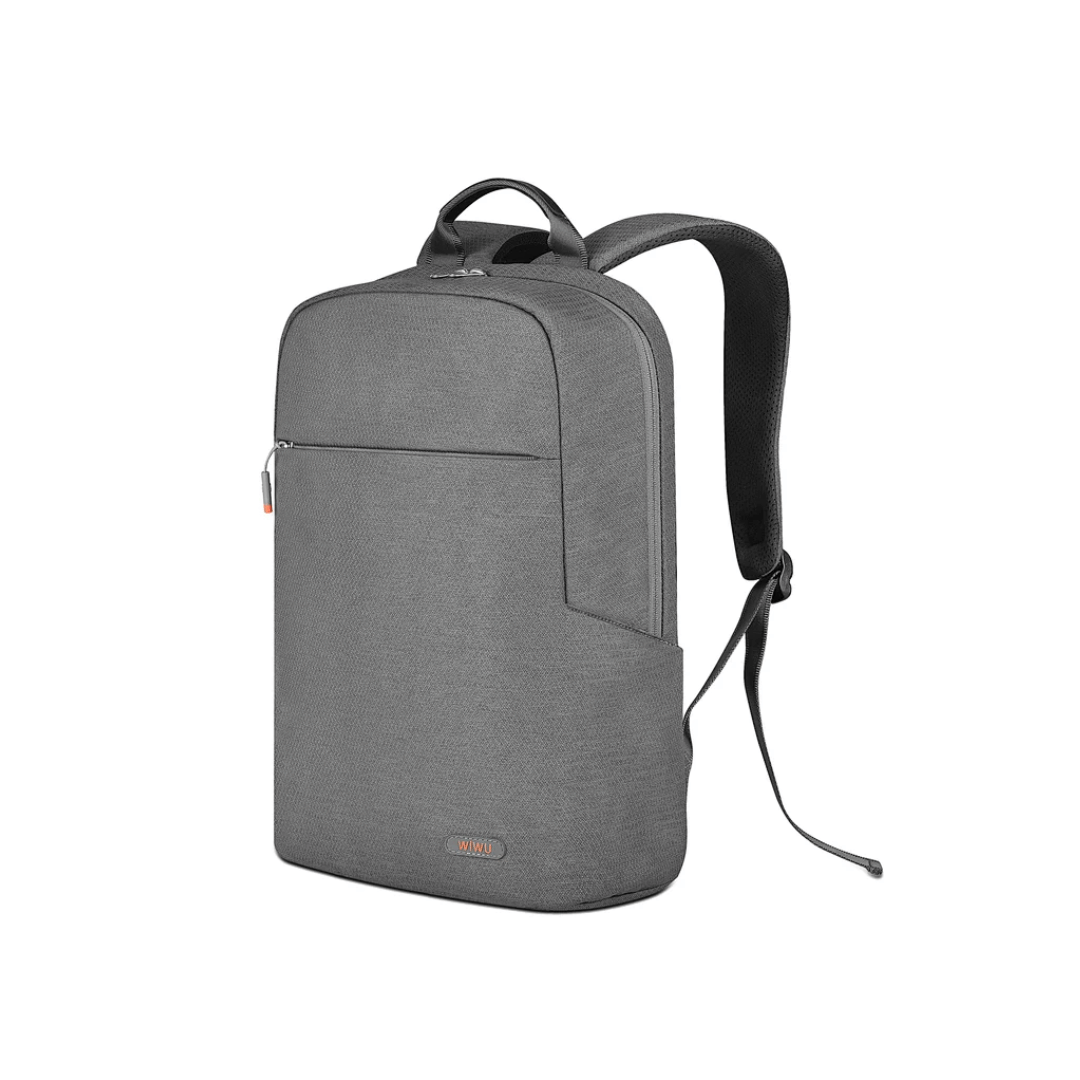
WIWU Osun PU Leather Backpack – Stylish and compact bag crafted from water-resistant PU leather; fits 15.6″ laptops yet weighs only ~387 g.Offers organized storage, durable build, and comfy straps—perfect for daily commutes, work, or travel. Model: WIWU Osun PU Leather Notebook Backpack Material: Water-resistant 1680D polyester exterior with upscale PU leather finish Laptop Compartment: Padded sleeve fits up to 15.6″ laptops, shock-resistant protection Design: Compact “mini” size (26.5 × 21 × 6 cm), yet offers large internal capacity Pockets: Front zip pocket for phone and accessories; interior organization for tech and essentials Comfort: Adjustable padded shoulder straps, soft and skin-friendly inner lining Weight: Approximately 387 g (including packing) Extras: Sleek metal WIWU logo; suitable for travel, business, daily commuting

ViewSonic XG272-2K-OLED 27″ 240Hz OLED Gaming Monitor is designed by ViewSonic for competitive gaming and high-end visual performance. ViewSonic builds this monitor to deliver ultra-fast response times, deep contrast, and smooth motion clarity for esports and AAA gaming. ViewSonic XG272-2K-OLED 27″ 240Hz OLED Gaming Monitor features a 2560 × 1440 QHD resolution for sharp image detail. Additionally, it uses OLED panel technology with a 240Hz refresh rate and an extremely fast ~0.02ms response time for smooth and blur-free gameplay. It supports high dynamic range with strong contrast performance thanks to OLED pixel-level lighting. Moreover, it delivers wide color coverage and deep blacks for more immersive visuals during gaming and media use. The monitor supports adaptive sync technologies such as FreeSync Premium and G-Sync compatibility. Therefore, it reduces screen tearing and improves smoothness during fast-paced action scenes. ViewSonic includes versatile connectivity options such as HDMI 2.1, DisplayPort, and USB-C. Furthermore, it supports multiple device setups including PCs, consoles, and accessories through its integrated hub system. ViewSonic XG272-2K-OLED 27″ 240Hz OLED Gaming Monitor delivers ultra-fast response, high refresh rate performance, and premium OLED image quality for competitive and immersive gaming. Specifications: 27-inch QHD (2560×1440) OLED display 240Hz refresh rate for ultra-smooth motion ~0.02ms ultra-fast response time FreeSync Premium and G-Sync compatibility HDMI 2.1, DisplayPort, and USB-C connectivity

OEM-quality trackpad replacement (without flex cable) for MacBook Air 13″ (Model A1932, 2018–2019) in Gold finish—engineered for precise Force Touch response, smooth multi-touch gestures, and perfect color-matched integration with the original chassis. Compatible With: MacBook Air 13-inch (2018 & 2019, Model A1932, Model Identifiers MacBookAir8,1) with Intel Core i5/i7 processors. Part Type: Trackpad only—does not include the flex cable, Taptic Engine, or mounting hardware. Designed for technicians who will reuse the original internal components. Finish: Gold—specifically matched to the Gold variant of the A1932 MacBook Air for seamless aesthetic continuity. Force Touch Support: Fully compatible with pressure-sensitive input and haptic feedback when paired with the original Taptic Engine and logic board—ensuring full macOS gesture functionality (e.g., Force Click, Look Up, pressure-sensitive navigation). Precision Build: Smooth glass surface with exact curvature, texture, and micro-click mechanism matching Apple’s original design for consistent tracking accuracy and tactile feel. Installation Requirements: Requires full bottom case disassembly and careful transfer of the original flex cable and Taptic Engine. Adhesive must be applied precisely to maintain structural integrity and sensor alignment. Recommended for professional or experienced repair technicians only.

2016 Apple 15" MacBook Pro Touch-Bar Logic Board 2.7Ghz i7 16Gb A1707 512GB , With Dual Graphics Radeon Pro 2016 Apple 15″ MacBook Pro Touch-Bar Logic Board 2.7Ghz i7 16Gb A1707 512GB , With Dual Graphics Radeon Pro

Remax F27 Fonzyr Desktop Fan – 5 W rechargeable fan with 360° adjustable airflow and multi-installation options.Compact (187×206 mm), lightweight, with fast Type-C charging (~2 h) and built-in 1,200 mAh battery. Model: Remax F27 Fonzyr Series Circulation Desktop Fan Power: 5 W, operates on 5 V/1 A power supply Rotation: 360° adjustable airflow for full-range ventilation Battery: Built-in 1,200 mAh rechargeable battery; Type-C charging, ~2 hours charging time Dimensions & Build: Approx. 187 × 206 mm, lightweight ABS plastic housing (~697 g) Installation: Designed for desktop use, wall mounting, or hanging—ideal for multi-location placement

Genuine-spec US layout keyboard replacement for MacBook Pro 13″ (Model A1466, Late 2015–Early 2016)—featuring traditional scissor-switch mechanism, backlighting, and full OEM compatibility for reliable, comfortable typing. Compatible With: MacBook Pro 13-inch non-Touch Bar models: Late 2015 (Intel Core i5/i7, Retina, A1466, Model Identifier MacBookPro12,1) Early 2016 (Intel Core i5/i7, Retina, A1466, MacBookPro13,1) Late 2015 (Intel Core i5/i7, Retina, A1466, Model Identifier MacBookPro12,1) Early 2016 (Intel Core i5/i7, Retina, A1466, MacBookPro13,1) Layout: Standard US English (QWERTY) with full-size keys, inverted-T arrow keys, and dedicated function row (F1–F12). Keyboard Type: Traditional scissor-switch mechanism—not Butterfly or Magic Keyboard—known for durability, deeper key travel, and tactile feedback. Integrated Features: Backlit keys for low-light use, ambient light sensor support, and OEM-style ribbon cable for direct logic board connection. Build & Fit: Precision-engineered to match Apple’s original dimensions and mounting points—ensures flush alignment within the top case and consistent key height. Installation Note: Keyboard is secured with screws and minimal adhesive (unlike later glued models), making replacement more accessible. Still requires full top case disassembly and battery disconnect. Suitable for intermediate to advanced technicians.

Original 13.3-inch Retina LCD display (Space Gray) for MacBook Air A2337 (2020), pulled from a working unit. OEM part, ready to replace cracked or faulty screens with perfect fit and optics. This is a genuine Apple Retina display assembly removed from a working MacBook Air (model A2337, 2020). It’s ideal for repairing a damaged or nonfunctional screen on a matching model, delivering original visuals without resorting to aftermarket knockoffs. Key Features & Functionality True OEM Retina panel with factory calibration Integrated display glass, backlight, and flex cable Designed for model A2337 (Late 2020, M1) iFixit+1 Space Gray finish to match original chassis Tested: Display, backlight, no dead pixels (unless noted) Drop-in replacement requiring alignment and cable reconnection Specifications Important Notes & Considerations Must use exact model A2337 — other models are incompatible Slight blemishes or dust might exist due to being a used part Handle with care: screen glass is fragile Professional installation recommended if you’re not experienced

BenQ Board Essential Series 75 inch RE7504FV is designed for classrooms, meeting rooms, and interactive collaboration. It features a 75-inch 4K UHD IPS display with precision IR touch technology for smooth writing and presentations. Additionally, it supports up to 40 touch points. Therefore, it improves teamwork, teaching, and interactive learning experiences. The BenQ RE7504FV delivers 3840 × 2160 resolution with 450 nits brightness and anti-glare protection for clear visibility in bright environments. Moreover, it uses 9H tempered glass for durability and safer daily use. It also includes low blue light and flicker-free technology to reduce eye strain. In addition, it runs Android 14 (EDLA) with strong memory and storage options for smooth performance. Furthermore, it provides wide connectivity including HDMI 2.0, DisplayPort, USB-A, USB-C with 65W power delivery, VGA, and OPS slot support. As a result, users can easily connect laptops, cameras, and external systems. It also includes an 8-microphone array and dual 20W speakers for clear audio in meetings and lessons. Specifications: 75-inch 4K UHD (3840 × 2160) IPS display Precision IR touch with up to 40 touch points Android 14 (EDLA) with smooth system performance 450 nits brightness with anti-glare 9H tempered glass USB-C 65W, HDMI, OPS slot, mic array, and dual 20W speakers

Screen Gigabyte Monistor AORUS KD25F 24.5″ FHD Gaming Monitor 240Hz

A rugged and versatile pre-owned Lenovo ThinkPad T480 with 14" touchscreen, 8th Gen Core i5, 8GB RAM, and 256GB SSD—ideal for professionals who need durability, security, and touch-enabled productivity.

Compact and stylish with a zinc alloy shell, the SatcOp 8‑in‑1 USB‑C Multiport Dock delivers essential ports—Ethernet, HDMI, USB, card readers, and charging—in one portable adapter. Ideal for powering your laptop while expanding connectivity on the go. 🖥️ HDMI Port – Connect to external displays in Full HD or 4K (depending on your host device). 🌐 RJ45 Ethernet Port – Provides stable wired internet access with gigabit-speed support. ⚡ USB-C PD Charging – Power your laptop while using other ports (up to 87W pass-through). 🔌 USB 3.0 & USB 2.0 Ports – Connect flash drives, external storage, keyboards, and mice. 💾 SD & TF Card Readers – Quick access to camera and device storage cards. 🧊 Material – Premium zinc alloy casing for durability and efficient heat dissipation. 💼 Design – Slim, lightweight, and perfect for travel, home, or office setups. 💻 Compatibility – Works with most USB-C laptops, including Windows, macOS, Chrome OS, and select Android tablets.

✅ Full Specifications: Model: A4Tech HS-30i Type: Over-Ear Stereo Headset Connectivity: 1 x 3.5mm Combo Jack (for audio + mic) Speaker Driver Unit: 40mm Microphone: Built-in adjustable boom mic Noise-canceling for clear voice capture Frequency Response: Speaker: 20Hz – 20kHz Microphone: 100Hz – 10kHz Impedance: 32 Ohms Sensitivity: Speaker: 105dB ± 3dB Microphone: -58dB ± 3dB Cable Length: Approx. 2 meters Design Features: Adjustable headband Soft ear cushions for long-term comfort Compatibility: PC, laptop, mobile (with combo jack)

BenQ RE8604 86” 4K UHD Interactive Flat Panel is a large interactive display designed for classrooms, meeting rooms, and training environments. It supports touch interaction, built-in Android system, and 4K resolution for collaboration and presentations. It features an 86-inch IPS panel with 3840 × 2160 4K UHD resolution. Therefore, it delivers sharp visuals and wide viewing angles for group use. In addition, it supports up to 40-point multi-touch input for writing and collaboration. Moreover, it runs an Android-based system (EDLA-supported depending on configuration). As a result, users can open apps, use whiteboard tools, and present content directly on the display without an external PC. The display includes anti-glare glass. Therefore, it remains readable in bright environments. In addition, it supports 4K 60Hz output for smooth visuals during presentations and video playback. Furthermore, it includes HDMI, USB, USB-C, LAN, and OPS slot connectivity. As a result, it works with laptops, external PCs, and modular computing systems. It also includes built-in speakers for classroom and meeting audio. Therefore, it supports presentations without extra sound systems. Finally, the BenQ RE8604 delivers a large 4K interactive workspace with multi-touch control and flexible connectivity for education and business use. Specifications: Display: 86-inch IPS panel with 3840×2160 4K UHD resolution Touch: Up to 40-point multi-touch support for collaboration System: Android-based interactive platform (EDLA support depending on model) Connectivity: HDMI, USB, USB-C, LAN, and OPS slot Display: Anti-glare screen with 4K 60Hz smooth output

A1466 Laptop Replacement Battery for MacBook Air 13 inch A1466 (Mid 2012, Mid 2013,Early 2014, Early 2015,2017) A1369(Late 2010,Mid 2011 Version) High Performance 7200mAh fits A1496 A1405 A1377 A1496 A1405 A1377 Macbook Air Battery: 7200mAh/55Wh, Voltage: 7.6V, can up to 500 charging cycles; (Compatible with 7.4V/53.28Wh) Manufacturing standards are the same as those of the original battery supplier Replacement For: Macbook Air 13-inch A1466 battery (2017, Early 2015, Early 2014, Mid 2013), A1369 battery (Late 2010, Mid 2011). EMC Applicable number: 2469 2559 2392 2632 2925 3178 (“Ctrl” + “F” to find your models), But note: Not for MacBook Air 11″ A1465, A1495, A1406, A1370 10 years of professional production: Introduce American high-end battery chips, low power design to reach long battery life. Built-in circuit protection ensures battery both safety and stability. Offer Over-charge & over-discharge& short-circuit protection. Certified safe By UL/ CE/ FCC and RoHS. Compatible With MacBook Air 13 inch Computer Model: MC503LL/A, MC504LL/A, MC965LL/A, MC966LL/A, MD231LL/A, MD232LL/A, MD760LL/A, MD761LL/A, MD760LL/B, MD761LL/B, MJVE2LL/A, MJVG2LL/A, MC503LL/A, 【Please Check Your MacBook Model correctly match our battery. You can access this information on your computer by Logo on the upper left corner of the MacBook screen–> About this Mac】

ZOWIE XL2540K TN 240Hz 24.5 Inch 240Hz Refresh Rate; TN Panel Black eQualizer; Color Vibrance Optional Accessory: S Switch & Shielding Hood

MULTI-FUNCTIONAL: Portable retro speaker, support Bluetooth, U disk, Memory Card, AUX (connect to MP3, MP4 player, smartphone, PC) to play music. It is easy to enjoy stereo sound for music lovers. LONG BATTERY LIFE: Bluetooth speaker has a built-in 1800mAh battery, rechargeable and environmentally friendly, providing 8 hours of battery life, ensuring you can enjoy your favorite music and radio stations for a long time. CLEAR SOUND: The radio speaker’s built-in powerful DSP chip and antenna provide excellent reception, allowing you to experience clear sound. Stations can be easily selected, making it convenient to find your favorite FM channels. POWERFUL: This speaker is compact but with high power, the 5W speaker delivers powerful sound quality. Allows you to enjoy rich and immersive sound, transforming your room into a charming listening environment. RETRO DESIGN: The small FM radio speaker with charming and versatile design incorporates classic aesthetics, making it a delightful addition to your sound collection. For living rooms, bedrooms, parties, etc.

Gain the competitive advantage with the Bloody ES7, featuring a high-performance 6000 CPI PixArt Optical Engine. With ultra-fast 1ms click response and customizable 16.8 million color RGB lighting, this mouse is built for gamers who demand precision, speed, and comfort in every match. The A4Tech Bloody ES7 is a professional-grade esports tool designed to translate every hand movement into on-screen action with 1:1 tracking accuracy. Driven by the reliable PixArt Optical Engine, it eliminates “angle snapping” and artificial corrections, ensuring your aim remains raw and precise. Its ergonomic symmetrical shape supports various grip styles, while the anti-sweat matte finish ensures you stay in control even during the most intense gaming sessions. PixArt Optical Engine (6000 CPI): High-precision tracking with 5-level adjustable sensitivity (1000/1200/1600/2000/6000 CPI). Fine-tune your control via software to suit any game genre. Lightning-Fast 1ms Response: Equipped with ahead-of-the-curve technology, the ES7 reacts instantly to your clicks, providing the low-latency performance required for competitive play. Vibrant RGB Lighting: Immerse yourself in your gaming setup with 16.8 million customizable RGB colors and dynamic lighting effects. Customizable “M” Button: The dedicated M button can be programmed via software to execute complex macros or combined functions, putting more power at your fingertips. Extreme Durability: Built to last, the primary buttons are rated for over 10 million clicks, and the high-quality scroll wheel is tested for over 500,000 scrolls. Braided 1.8m Cable: The robust, tangle-free braided cable ensures a stable connection and long-term durability against wear and tear. Sensor: PixArt Optical Engine Resolution: 100 – 6,000 CPI Report Rate: 125 – 1,000 Hz (Adjustable) Key Response: 1 ms Acceleration: 15 g Tracking Speed: 45 ips Frame Speed: 6,000 fps Buttons: 7 Buttons Memory: 256K Onboard Memory Interface: USB Wired (1.8m Cable) System Requirements: Windows 7/8/8.1/10/11 or later Bloody ES7 Esports Gaming Mouse Quick Start Guide
