
Genuine-spec touchpad flex cable compatible with both MacBook Air A2179 (Intel, 2020) and A2337 (M1, 2020)—restores full Force Touch functionality, haptic feedback, and precise multi-touch gesture control during trackpad repair or replacement. Compatible With: MacBook Air 13″ (2020, Intel) – Model A2179 (Model Identifier: MacBookAir9,1) MacBook Air 13″ (2020, Apple M1) – Model A2337 (Model Identifier: MacBookAir10,1) MacBook Air 13″ (2020, Intel) – Model A2179 (Model Identifier: MacBookAir9,1) MacBook Air 13″ (2020, Apple M1) – Model A2337 (Model Identifier: MacBookAir10,1) ✅ Important Note: Despite different processors (Intel vs. M1), Apple used the same trackpad assembly and flex cable in both A2179 and A2337. This makes the flex cable fully interchangeable between the two models. Part Type: Touchpad flex cable only — does not include the trackpad housing, Taptic Engine, or mounting hardware. This is the OEM-style ribbon cable that connects the trackpad to the logic board. Function: Transmits: Touch input coordinates Force Touch pressure data Haptic feedback signals to the Taptic Engine Enables full macOS gesture support: Force Click, three-finger lookup, swipe navigation, pinch-to-zoom, and smooth cursor tracking. Touch input coordinates Force Touch pressure data Haptic feedback signals to the Taptic Engine Enables full macOS gesture support: Force Click, three-finger lookup, swipe navigation, pinch-to-zoom, and smooth cursor tracking. OEM-Quality Build: Matches Apple’s original specifications in: Cable length and routing path Connector pitch and ZIF latch design EMI shielding and flex durability Cable length and routing path Connector pitch and ZIF latch design EMI shielding and flex durability Common Use Cases: Replacing a torn, creased, or liquid-damaged original flex cable Completing a trackpad replacement when the original cable is compromised Fixing intermittent trackpad behavior, loss of Force Touch, or complete unresponsiveness Replacing a torn, creased, or liquid-damaged original flex cable Completing a trackpad replacement when the original cable is compromised Fixing intermittent trackpad behavior, loss of Force Touch, or complete unresponsiveness Installation Note: Requires full bottom case removal and battery disconnection. Cable routes under the right side of the battery and logic board. Connects via a ZIF (Zero Insertion Force) socket—align carefully and latch gently. Recommended for experienced or certified technicians only. Requires full bottom case removal and battery disconnection. Cable routes under the right side of the battery and logic board. Connects via a ZIF (Zero Insertion Force) socket—align carefully and latch gently. Recommended for experienced or certified technicians only.

Genuine-spec US layout keyboard replacement for MacBook Pro 13″ (Model A1466, Late 2015–Early 2016)—featuring traditional scissor-switch mechanism, backlighting, and full OEM compatibility for reliable, comfortable typing. Compatible With: MacBook Pro 13-inch non-Touch Bar models: Late 2015 (Intel Core i5/i7, Retina, A1466, Model Identifier MacBookPro12,1) Early 2016 (Intel Core i5/i7, Retina, A1466, MacBookPro13,1) Late 2015 (Intel Core i5/i7, Retina, A1466, Model Identifier MacBookPro12,1) Early 2016 (Intel Core i5/i7, Retina, A1466, MacBookPro13,1) Layout: Standard US English (QWERTY) with full-size keys, inverted-T arrow keys, and dedicated function row (F1–F12). Keyboard Type: Traditional scissor-switch mechanism—not Butterfly or Magic Keyboard—known for durability, deeper key travel, and tactile feedback. Integrated Features: Backlit keys for low-light use, ambient light sensor support, and OEM-style ribbon cable for direct logic board connection. Build & Fit: Precision-engineered to match Apple’s original dimensions and mounting points—ensures flush alignment within the top case and consistent key height. Installation Note: Keyboard is secured with screws and minimal adhesive (unlike later glued models), making replacement more accessible. Still requires full top case disassembly and battery disconnect. Suitable for intermediate to advanced technicians.

This 1.8-meter DisplayPort to HDMI cable lets you connect a DisplayPort-enabled PC or laptop to an HDMI monitor, TV, or projector. It delivers clear high-definition video and reliable signal transmission, making it perfect for office work, presentations, and home entertainment. The DisplayPort to HDMI cable (1.8M) is a simple and reliable solution for connecting modern computers and laptops with a DisplayPort output to HDMI displays. Ideal for upgrading your setup, it supports high-quality video output for monitors, HDTVs, and projectors. With plug-and-play functionality and a durable build, it ensures stable performance for both professional and home use. DisplayPort to HDMI Connection for easy compatibility with HDMI screens 1.8M Cable Length ideal for desk and office setups High-Definition Video Output for clear and sharp visuals Plug & Play no drivers required Durable Connectors & Cable Build for long-term reliability Perfect for Work & Entertainment supports monitors, TVs, and projectors Works with devices that have a DisplayPort output and displays with an HDMI input, including monitors, TVs, projectors, and display systems. Ideal for workstations, presentations, and dual-screen setups.

A reliable pre-owned Dell Latitude 5410 with 14" display, 10th Gen Core i5, 8GB RAM, and 256GB SSD—ideal for business users and students seeking solid performance, security, and portability.

A high-end pre-owned HP ZBook Fury G8 mobile workstation with 17.3" display, Intel Core i7-11850H, 64GB RAM, 512GB SSD+HDD 1TB, and NVIDIA RTX A2000 (T1200) 4GB—built for demanding engineering, design, and creative workflows.

Reliable, secure, and built for productivity—the Lenovo ThinkPad T14 features a 10th Gen Intel Core i5 processor, 16GB RAM, and a fast 256GB SSD in a durable,14-inch business laptop.

Experience fluid motion and edge-to-edge clarity with this ultra-smooth 100Hz Full HD display. Featuring a frameless IPS panel and a modern minimalist design, it’s the perfect upgrade for smooth office workflows and casual gaming. Model: Buerotika B24M1 Primary Specs: 23.8-inch (24″ class) Display/Performance: IPS (In-Plane Switching) for superior color accuracy Visual/Build Quality: 1920 x 1080 (Full HD) Resolution Aesthetic: Frameless “Zero-Bezel” design for immersive viewing and seamless multi-monitor setups Build: Ultra-slim profile with a sturdy, modern base Adjustability: Tilt-adjustable stand for ergonomic positioning Input/Output: HDMI and VGA ports for universal compatibility with PCs and laptops Compatibility: Plug-and-play support for Windows and macOS Smooth Motion: 100Hz Refresh Rate (provides significantly smoother scrolling and video compared to standard 60Hz) Eye Care: Low Blue Light technology and Flicker-Free backlight to reduce eye fatigue during long sessions Response Time: 14ms (typical) – optimized for stable, everyday professional use Home & Office: Enhancing productivity with smooth window transitions. Content Consumption: Watching movies and streaming with vibrant IPS colors. Multi-Monitor Arrays: The frameless edges make it ideal for side-by-side configurations. Casual Gaming: A budget-friendly entry into high-refresh-rate smoothness.

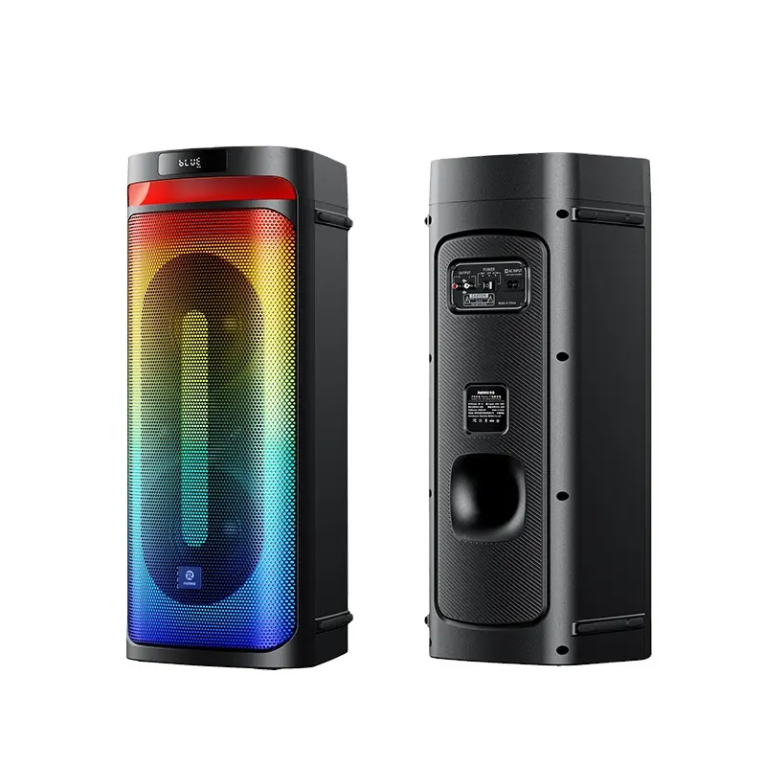
About this item 📱 Versatile Connectivity: Connect effortlessly with Bluetooth 4.2 to your smartphones, iPads, and computers. Also supports U disk, TF card (up to 32G), AUX input, and FM radio for versatile playback options. 📲 🔊 Powerful Sound with Heavy Bass: Enjoy rich, high-volume stereo sound with a powerful 20W output and a built-in heavy subwoofer, delivering an immersive audio experience for your home. 🎶 📻 Built-in FM Radio: Stay tuned to your favorite stations with the built-in FM radio feature, ensuring you never miss out on the latest news, music, and more. 📡 📞 Hands-Free Calling: Equipped with a clear call feature, this speaker allows you to answer phone calls directly through the speaker without lifting your phone. Perfect for multitasking! 🗣️ 📞 Hands-Free Calling: Equipped with a clear call feature, this speaker allows you to answer phone calls directly through the speaker without lifting your phone. Perfect for multitasking! 🗣️

MARSRIVA Smart Mini DC UPS KP2 Series | 18 Watts 10000mAh | 0ms AC to DC Transfer | Flame Retardant | Wall Mount Slots | 1 x Passive PoE, 2 x DC and 1 x USB Output Ports | KP2 BLACK Keep Wi-Fi Power On Output:18W (Max.) or 30W (Max.) ● With 1 * Passive PoE, 2 * DC and 1 * USB output ports, DC UPS can power up multiple devices simultaneously. ● AC to DC 0ms transfer technology keeps your devices working when electricity is ON/OFF shifting. ● With wall-mount slots on the back, DC UPS can be mounted on the wall easily. ● Air cooling system provides maximum heat dissipation, ensuring the long-term stability of UPS. ● V-0 flame retardant product housing secures you and your property. ● 16000mAh high-capacity battery (KP2 Plus, KP2 Ultra) provides longer backup time. ● 30W high-power output (KP2 Pro, KP2 Ultra) provides better compatibility.

Genuine-spec UK layout (QWERTY) black keyboard replacement for MacBook Air 13.6″ and 15″ models (2023–2025, M2/M3/M4 chips)—featuring Apple’s Magic Keyboard design with scissor-switch mechanism, backlighting, and precise OEM fit. Compatible With: 13.6″ MacBook Air: A2681 (M2, 2022–2023), A3113 (M3, 2023–2024), A3240 (M4, 2024–2025) 15″ MacBook Air: A2941 (M2, 2023), A3114 (M3, 2023–2024), A3241 (M4, 2024–2025) 13.6″ MacBook Air: A2681 (M2, 2022–2023), A3113 (M3, 2023–2024), A3240 (M4, 2024–2025) 15″ MacBook Air: A2941 (M2, 2023), A3114 (M3, 2023–2024), A3241 (M4, 2024–2025) Keyboard Layout: UK English (QWERTY) with £ symbol, taller Enter key, and standard UK key labeling—matches Apple’s original regional configuration. Design: Apple’s Magic Keyboard with scissor-switch mechanism—offering quiet, responsive typing with 1mm travel and improved reliability. Features: Backlit keys, ambient light sensor support, and original-style flex cable connector for seamless integration with the logic board. Color: Matte black keycaps matching the Space Gray and Midnight MacBook Air finishes (also compatible with Silver/Starlight—keycaps are model-agnostic). Precision Engineering: Manufactured to exact OEM specifications for fit, alignment, and tactile performance—ensures flush mounting within the top case. Installation Note: Keyboard is glued into the top case and requires full disassembly and careful re-adhesion. Recommended for professional technicians only due to complexity and risk of damage.

LENOVO BATTERY L19M4PC0 Compatible for Lenovo Legion 5P-15IMH05 Legion 5-15IMH05 5-15ARH05 Series 5B10W86196 L19M4PC0 5B10W86195 L19M4PC1 5B10W86192 L19C4PC1 5B10W86194 Laptop Battery About this item 【Battery type】Li-ion. Voltage: 15.44V. Capacity: 60Wh 4000mAh . Compatible Models (use “Ctrl+F to find your model quickly”) Fit for Legion 5P-15IMH05 Series Fit for Legion 5P-15IMH05H Series Fit for Legion 5P-15ARH05H Series Fit for Legion 5-15IMH05 Series Fit for Legion 5-15IMH05H Series Fit for Legion 5-15ARH05 Series Fit for Legion 5-15ARH05H Series. .Replacement for Part Number: L19C4PC0 5B10W86196 L19M4PC0 5B10W86195 L19M4PC1 5B10W86192 L19C4PC1 5B10W86194.

WiWU Vivid Laptop Bag – Durable waterproof case with faux-fur lining and two compartments, available in both 14″ and 15.6″ sizes.Stylish, lightweight, and well-padded—perfect for daily professional or student use. Model: WiWU Vivid Laptop Handbag Material: Water-resistant polyester exterior, soft faux-fur lining interior Sizes: 14″ version: fits up to 14-inch laptops 15.6″ version: fits standard 15.6-inch laptops Sizes: 14″ version: fits up to 14-inch laptops 15.6″ version: fits standard 15.6-inch laptops Protection: Shock-resistant padded compartment, anti-scratch lining Storage: Main laptop compartment Zippered front pocket for charger, cables, mouse, or tablet Storage: Main laptop compartment Zippered front pocket for charger, cables, mouse, or tablet Carrying Options: Comfortable padded handles + optional adjustable shoulder strap Design: Lightweight and slim profile with minimalist look; available in multiple colors Weight: Approx. 365 g (14″), approx. 420 g (15.6″) Use Case: Designed for work, school, commuting, or travel

Features Stylish and compact Bluetooth speaker, easy to carry. Supports wireless connectivity via Bluetooth. True Wireless Stereo (TWS): Connect two speakers simultaneously. Durable ABS plastic material with a fabric-covered front panel. Built-in microphone for hands-free calls. LED indicator to display working status. Water-resistant with an IPX7 rating. Continuous playback for 8-12 hours (depending on volume). 5-watt speaker delivering Hi-Fi audio quality. On-speaker controls for music playback and volume adjustment. Built-in battery with Type-C charging port for easy recharging. Technical Specifications Bluetooth Version: V5.4 Transmission Distance: 10 meters Rated Power: 5W Driver Unit: 40mm Input: DC5V Battery Capacity: 1200mAh Charging Time: 2 hours Playback Time: 8-12 hours (depending on volume)

Genuine-spec touchpad flex cable for MacBook Pro 16″ (Model A2485, 2021, M1 Pro/Max)—critical for restoring full Force Touch functionality, haptic feedback, and precise multi-touch gesture control during trackpad repairs. Compatible With: MacBook Pro 16-inch (2021, Model A2485) with Apple M1 Pro or M1 Max chip (Model Identifiers: MacBookPro18,1 / MacBookPro18,2). Part Type: Touchpad flex cable only—does not include the trackpad, Taptic Engine, or mounting hardware. This is the OEM-style ribbon cable that connects the trackpad to the logic board. Function: Transmits touch coordinates, Force Touch pressure data, and haptic feedback signals—essential for macOS gestures (e.g., pinch-to-zoom, Force Click, three-finger lookup) and Taptic Engine operation. OEM-Quality Construction: Precisely replicated to Apple’s original specifications—including cable length, connector type, EMI shielding, and flex routing—ensuring signal integrity and long-term reliability. Common Use Cases: Replacing a torn, frayed, or liquid-damaged original flex cable Completing a trackpad replacement when the original cable is compromised Fixing intermittent trackpad behavior, lost Force Touch, or complete unresponsiveness Replacing a torn, frayed, or liquid-damaged original flex cable Completing a trackpad replacement when the original cable is compromised Fixing intermittent trackpad behavior, lost Force Touch, or complete unresponsiveness Installation Note: Requires full disassembly of the bottom case and careful routing around the battery and logic board. Connectors use ZIF (Zero Insertion Force) sockets—must be aligned and latched gently. Recommended for certified or professional repair technicians only.

The Lenovo 65W Round-Tip AC Adapter (AU) provides reliable and efficient power for compatible Lenovo laptops. Designed with a round-tip connector and Australian plug, it’s perfect as a replacement or travel charger. ⚡ 65W Power Output: Delivers stable and efficient charging for Lenovo laptops and notebooks. 🔌 Round-Tip Connector: Designed specifically for Lenovo models using the classic round charging port. 🇦🇺 AU Power Plug: Built for Australian power outlets — ideal for home, office, and travel use in AU regions. 👜 Compact & Portable: Lightweight design makes it easy to carry in a bag or backpack. 🔒 Safe Charging: Features over-voltage, over-current, and short-circuit protection. 🛠️ OEM-Compatible: Works with a wide range of ThinkPad, ThinkBook, and IdeaPad models using round-tip charging.

Apple 60W MagSafe Power Adapter (for MacBook and 13-inch MacBook Pro) The 60 Watt MagSafe Power Adapter features a magnetic DC connector that ensures your power cable will disconnect if it experiences undue strain and helps prevent fraying or weakening of the cables over time. In addition, the magnetic DC helps guide the plug into the system for a quick and secure connection. When the connection is secure, an LED located at the head of the DC connector will light up; an amber light lets you know that your portable is charging, while a green light tells you that you have a full charge. An AC lead is provided with the adapter for maximum lead length, while the AC wall adapter (also provided) gives users an even easier and more compact way to travel. Designed to be the perfect travelling companion, the adapter has a clever design that allows the DC cable to be wound neatly around itself for easy cable storage. This power adapter recharges the lithium polymer battery while the system is off, on, or in sleep mode. It also powers the system if you choose to operate without a battery. Compatible with MacBook and 13-inch MacBook Pro. See this article for more details about choosing the right one. Knowing which specific Mac model you have is important. If you are running OS X Lion (10.7) or later, go to the “” menu at the top left of your screen, choose “About this Mac” then click the “More Info…” button. Your Mac model and generation will be displayed. If you are running an earlier version of OS X, you can enter your serial number here to find out which model you have.

The MSI PRO MP252L features a 25-inch Full HD IPS display with a smooth 120Hz refresh rate and 1ms MPRT response time. Equipped with HDMI and DisplayPort connectivity plus eye-care technology, it’s ideal for productivity, study, and everyday use. The MSI PRO MP252L is a professional-grade monitor designed for office work, learning, and home use. Its 25-inch Full HD IPS panel delivers sharp visuals and accurate colors, while the 120Hz refresh rate ensures smoother scrolling and motion. With versatile connectivity options, it easily integrates into modern and legacy setups. 25” Full HD Display (1920×1080): Clear and detailed visuals for work and entertainment. IPS Panel Technology: Wide viewing angles and consistent color accuracy. 120Hz Refresh Rate: Smoother visuals compared to standard 60Hz monitors. 1ms MPRT Response Time: Reduces motion blur for improved clarity. Eye Care Technology: Anti-Flicker and Less Blue Light reduce eye strain. 1× HDMI Port: Easy connection to laptops, desktops, and media devices. 1× DisplayPort: Stable and high-quality video signal for modern systems. Headphone Out: Convenient audio output for headphones or external speakers. Built with MSI’s trusted quality standards, the PRO MP252L features a durable yet sleek design that fits perfectly in professional and home environments.

Laptop Battery Compatible for A31N1519 Battery for ASUS X540S X540L X540SA X540S X540LA-SI302 A540 F540 R540LA About this item Compatible model no. :- a31n1519, asus x540s x540l x540sa x540s x540la-si302 a540 f540 r540la Warranty not covered if defects due to external causes, accidental, physical or liquid damage, cut, burnt, misuse and missing warranty stickers or labels Battery capacity/power capability (mah/wattage) may be different from the reference picture but a backup of the battery will be the same as the original Please match your product with the image provided before placing the order for any help please get in touch with us.

The 85W MagSafe 2 Power Adapter features a magnetic DC connector so if someone should trip over it, the cord disconnects harmlessly and your MacBook Pro stays put safely. It also helps prevent fraying or weakening of the cables over time. In addition, the magnetic DC helps guide the plug into the system for a quick and secure connection. The 85W MagSafe 2 Power Adapter features a magnetic DC connector so if someone should trip over it, the cord disconnects harmlessly and your MacBook Pro stays put safely. It also helps prevent fraying or weakening of the cables over time. In addition, the magnetic DC helps guide the plug into the system for a quick and secure connection. When the connection is secure, an LED located at the head of the DC connector lights up; an amber light lets you know that your notebook is charging, while a green light tells you that you have a full charge. An AC cord is provided with the adapter for maximum cord length, while the AC wall adapter (also provided) gives you an even easier and more compact way to travel. Designed to be the perfect traveling companion, the adapter has a clever design which allows the DC cable to be wound neatly around itself for easy cable storage. Compatible with MacBook Pro with 13-inch Retina display. See this article for more details about choosing the right one. Knowing which specific Mac model you have is important. If you are running OS X Lion (10.7) or later go to the “” menu at the top left of your screen, choose “About this Mac” then click the “More Info…” button. Your Mac model and generation will be displayed. If you are running an earlier version of OS X, you can enter your serial number here to find out which model you have. COMPATIBILITY Mac Models: MacBook Pro (Retina, 13-inch, Late 2012 – 2015)

Genuine-spec touchpad flex cable for MacBook Pro 13″ (Model A1502, Mid 2014)—restores full trackpad functionality, including precise cursor control and physical click response. Essential for repairing unresponsive or erratic trackpad behavior. Compatible With: MacBook Pro 13-inch (Mid 2014, Model A1502, Model Identifier MacBookPro11,1) with Intel Core i5/i7 processors and Retina display. Part Type: Touchpad flex cable only — does not include the trackpad housing, button mechanism, or mounting hardware. This is the ribbon cable that connects the trackpad to the logic board. Function: Transmits cursor movement and click signals (left/right physical clicks) Supports standard multi-touch gestures (two-finger scroll, tap-to-click, pinch-to-zoom) ⚠️ Note: This model uses a physical click mechanism—not Force Touch (no haptic feedback or pressure sensitivity). Transmits cursor movement and click signals (left/right physical clicks) Supports standard multi-touch gestures (two-finger scroll, tap-to-click, pinch-to-zoom) ⚠️ Note: This model uses a physical click mechanism—not Force Touch (no haptic feedback or pressure sensitivity). OEM-Quality Build: Matches Apple’s original in: Cable length and routing path Connector type and pin alignment Insulation and flexibility for long-term reliability Cable length and routing path Connector type and pin alignment Insulation and flexibility for long-term reliability Common Use Cases: Replacing a torn, frayed, or corroded original flex cable Fixing: Unresponsive or intermittent trackpad Cursor jumping or drifting Click function failure (left or right) Complete trackpad disconnect Replacing a torn, frayed, or corroded original flex cable Fixing: Unresponsive or intermittent trackpad Cursor jumping or drifting Click function failure (left or right) Complete trackpad disconnect Unresponsive or intermittent trackpad Cursor jumping or drifting Click function failure (left or right) Complete trackpad disconnect Installation Note: Requires bottom case removal and battery disconnect. Connects via a ZIF (Zero Insertion Force) socket on the logic board—do not force. Cable routes under the battery; handle with care to avoid strain. Suitable for intermediate to advanced DIYers or technicians. Requires bottom case removal and battery disconnect. Connects via a ZIF (Zero Insertion Force) socket on the logic board—do not force. Cable routes under the battery; handle with care to avoid strain. Suitable for intermediate to advanced DIYers or technicians.
