
90W Adapter Laptop Charger for Toshiba Satellite L305 L305D L455 L505 L505D L635 L645 L655 L655D L745 L755 L775 L855 L875 A105 A135 C655 C675 C850 C855; PA3714U-1ACA PA5035U-1ACA Power Cord

The Apple 240W USB-C Charge Cable (2 m) is a durable, braided USB-C to USB-C cable that supports fast charging up to 240W and USB 2.0 data transfer—ideal for powering high-performance MacBooks and other USB-C devices. Length: 2 meters Connector: USB-C to USB-C Power Support: Up to 240W (48V/5A), compatible with the new USB-C PD 3.1 Extended Power Range standard Data Transfer: USB 2.0 speeds (up to 480 Mbps) — this cable prioritizes power delivery over high-speed data Ideal for charging MacBook Pro (2021 and later), MacBook Air (M2 and later), and other high-power laptops Backward-compatible with lower-wattage devices (iPad, iPhone 15 lineup, etc.) Works with any USB-C power adapter, but you’ll only get full 240W output when paired with a compatible high-wattage charger The standard USB-C Charge Cable (2 m, 60W/100W) only supports up to 100W. The Thunderbolt 4 Pro Cable (3 m) supports high-speed data (40 Gb/s) and video output, but maxes at 100W charging. This 240W version is the one to get if your priority is maximum charging power rather than data/video.

Remax F41 6″ Wireless Clamp Fan – USB‑C rechargeable (4,000 mAh), 4 speeds, 720° rotation, up to 3 hrs runtime.Modular 3‑in‑1 design with detachable grille, washable parts, and night‑light feature. Model: Remax F41 6-inch Wireless Air Circulating Clamp Fan Power & Battery: Rechargeable 4,000 mAh battery; USB-C charging (~3 hours to full charge), offers ~3 hours continuous use at high speeds Operation Modes: 4 fan speeds, 3‑in‑1 usage (desktop, clamp, or hanging), 720° wide-angle rotation Design Features: Detachable, washable grille plus built-in warm night light Care Tips: Recharge every two months if unused; avoid inserting objects into blades

Genuine-spec touchpad flex cable for MacBook Pro 16″ (Model A2141, 2019, Intel)—essential for restoring full Force Touch functionality, haptic feedback, and precise multi-touch gesture control during trackpad repair or replacement. Compatible With: MacBook Pro 16-inch (2019, Model A2141) with Intel Core i7/i9 processors (Model Identifier: MacBookPro16,1) (Note: A2141 is the non-base configuration of the 2019 16″ MacBook Pro—typically higher-end Intel models.) Part Type: Touchpad flex cable only—does not include the trackpad housing, Taptic Engine, or mounting hardware. This is the OEM-style ribbon cable that connects the trackpad to the logic board. Function: Transmits touch coordinates, Force Touch pressure data, and haptic feedback signals—critical for macOS gestures (e.g., Force Click, three-finger lookup, pinch-to-zoom) and Taptic Engine responsiveness. OEM-Quality Construction: Replicated to Apple’s exact specifications—including cable length, connector pitch, EMI shielding, and bend radius—ensuring reliable signal integrity and long-term durability. Common Use Cases: Replacing a torn, creased, or liquid-damaged original flex cable Completing a trackpad replacement when the original cable is compromised Fixing intermittent trackpad behavior, loss of Force Touch, or complete unresponsiveness Replacing a torn, creased, or liquid-damaged original flex cable Completing a trackpad replacement when the original cable is compromised Fixing intermittent trackpad behavior, loss of Force Touch, or complete unresponsiveness Installation Note: Requires full disassembly of the bottom case, speaker removal, and careful routing beneath the battery and logic board. Connectors use ZIF (Zero Insertion Force) sockets—must be aligned and latched gently. Recommended for certified or professional repair technicians only. Important: This is flex cable only—not a complete trackpad assembly. Must be used with the original or compatible A2141 trackpad and Taptic Engine. Not compatible with M1 MacBook Pro 16″ (A2485), 14″ models (A2442), or any MacBook Air. This is flex cable only—not a complete trackpad assembly. Must be used with the original or compatible A2141 trackpad and Taptic Engine. Not compatible with M1 MacBook Pro 16″ (A2485), 14″ models (A2442), or any MacBook Air. Model Verification: Confirm your device is MacBook Pro A2141 (16″, 2019, Intel) via > About This Mac > Model Identifier (should read MacBookPro16,1).

Genuine-spec touchpad flex cable for MacBook Pro 15″ (Model A1706 – 2017 and A1989 – 2018/2019)—restores full Force Touch functionality, haptic feedback, and precise multi-touch gesture control during trackpad repair or replacement. Compatible With: MacBook Pro 15″ (2017) – Model A1706 (Model Identifier: MacBookPro14,3) MacBook Pro 15″ (2018–2019) – Model A1989 (Model Identifier: MacBookPro15,2) ✅ Note: Apple used the same trackpad assembly and flex cable across both A1706 and A1989 15″ models—making this part interchangeable between them. MacBook Pro 15″ (2017) – Model A1706 (Model Identifier: MacBookPro14,3) MacBook Pro 15″ (2018–2019) – Model A1989 (Model Identifier: MacBookPro15,2) ✅ Note: Apple used the same trackpad assembly and flex cable across both A1706 and A1989 15″ models—making this part interchangeable between them. ✅ Note: Apple used the same trackpad assembly and flex cable across both A1706 and A1989 15″ models—making this part interchangeable between them. Part Type: Touchpad flex cable only — does not include the trackpad housing, Taptic Engine, or mounting hardware. This is the OEM-style ribbon cable connecting the trackpad to the logic board. Function: Transmits: Touch input coordinates Force Touch pressure data Haptic feedback signals to the Taptic Engine Enables full macOS gesture support: Force Click, three-finger lookup, swipe navigation, pinch-to-zoom, and smooth cursor tracking. Touch input coordinates Force Touch pressure data Haptic feedback signals to the Taptic Engine Enables full macOS gesture support: Force Click, three-finger lookup, swipe navigation, pinch-to-zoom, and smooth cursor tracking. OEM-Quality Build: Matches Apple’s original in: Cable length and routing Connector pitch and ZIF latch design EMI shielding and flex durability Cable length and routing Connector pitch and ZIF latch design EMI shielding and flex durability Common Use Cases: Replacing a torn, creased, or liquid-damaged original flex cable Completing a trackpad replacement when the original cable is compromised Fixing intermittent trackpad behavior, loss of Force Touch, or complete unresponsiveness Replacing a torn, creased, or liquid-damaged original flex cable Completing a trackpad replacement when the original cable is compromised Fixing intermittent trackpad behavior, loss of Force Touch, or complete unresponsiveness Installation Note: Requires full bottom case removal and battery disconnection. Cable routes under internal components near the right speaker and logic board. Connects via a ZIF (Zero Insertion Force) socket—must be aligned carefully and latched gently. Recommended for experienced or certified technicians only. Requires full bottom case removal and battery disconnection. Cable routes under internal components near the right speaker and logic board. Connects via a ZIF (Zero Insertion Force) socket—must be aligned carefully and latched gently. Recommended for experienced or certified technicians only.

Fast-charging feature available on select iPhone and iPad models.

GAMDIAS 7 Colour Backlit Gaming USB Mechanical Keyboard with 87 Keys, Blue Switches, Anti-ghosting, Multimedia Control Key with Metal Plate, Combo (Multicolour, Hermes E2) About this item Certified mechanical blue switches feature a 50 Million actuation lifecycle Neon Light Spectrum- 7 colors backlight Elegant metal plate mechanical keyboard for added durability N-key rollover Compact 87 Keys Keyboard : By using small tenkeyless keyboard can save the space, and also makes the keyboard and mouse to become closer, so you can maximize the comfort and accuracy of your operation

Genuine-spec touchpad flex cable for MacBook Pro 13″ (Model A1502, Mid 2014)—restores full trackpad functionality, including precise cursor control and physical click response. Essential for repairing unresponsive or erratic trackpad behavior. Compatible With: MacBook Pro 13-inch (Mid 2014, Model A1502, Model Identifier MacBookPro11,1) with Intel Core i5/i7 processors and Retina display. Part Type: Touchpad flex cable only — does not include the trackpad housing, button mechanism, or mounting hardware. This is the ribbon cable that connects the trackpad to the logic board. Function: Transmits cursor movement and click signals (left/right physical clicks) Supports standard multi-touch gestures (two-finger scroll, tap-to-click, pinch-to-zoom) ⚠️ Note: This model uses a physical click mechanism—not Force Touch (no haptic feedback or pressure sensitivity). Transmits cursor movement and click signals (left/right physical clicks) Supports standard multi-touch gestures (two-finger scroll, tap-to-click, pinch-to-zoom) ⚠️ Note: This model uses a physical click mechanism—not Force Touch (no haptic feedback or pressure sensitivity). OEM-Quality Build: Matches Apple’s original in: Cable length and routing path Connector type and pin alignment Insulation and flexibility for long-term reliability Cable length and routing path Connector type and pin alignment Insulation and flexibility for long-term reliability Common Use Cases: Replacing a torn, frayed, or corroded original flex cable Fixing: Unresponsive or intermittent trackpad Cursor jumping or drifting Click function failure (left or right) Complete trackpad disconnect Replacing a torn, frayed, or corroded original flex cable Fixing: Unresponsive or intermittent trackpad Cursor jumping or drifting Click function failure (left or right) Complete trackpad disconnect Unresponsive or intermittent trackpad Cursor jumping or drifting Click function failure (left or right) Complete trackpad disconnect Installation Note: Requires bottom case removal and battery disconnect. Connects via a ZIF (Zero Insertion Force) socket on the logic board—do not force. Cable routes under the battery; handle with care to avoid strain. Suitable for intermediate to advanced DIYers or technicians. Requires bottom case removal and battery disconnect. Connects via a ZIF (Zero Insertion Force) socket on the logic board—do not force. Cable routes under the battery; handle with care to avoid strain. Suitable for intermediate to advanced DIYers or technicians.

Genuine-spec touchpad flex cable for MacBook Pro 16″ (Model A2159, 2019, Intel)—essential for restoring full Force Touch functionality, haptic feedback, and precise trackpad responsiveness during repair or replacement. Compatible With: MacBook Pro 16-inch (2019, Model A2159) with Intel Core i7/i9 processors (Model Identifier: MacBookPro16,1). Part Type: Touchpad flex cable only—does not include the trackpad, Taptic Engine, or mounting hardware. This is the OEM-style ribbon cable that connects the trackpad to the logic board. Function: Transmits touch input, Force Touch pressure data, and haptic feedback signals—critical for macOS gestures (e.g., Force Click, three-finger swipe, pinch-to-zoom) and Taptic Engine operation. OEM-Quality Build: Matches Apple’s original flex circuit in length, connector pitch, shielding, and bend radius—ensures reliable signal integrity and durability under repeated use. Common Use Cases: Replacing a torn, frayed, or corroded original flex cable Completing a trackpad replacement when the original cable is damaged Fixing intermittent or unresponsive trackpad behavior caused by cable failure Replacing a torn, frayed, or corroded original flex cable Completing a trackpad replacement when the original cable is damaged Fixing intermittent or unresponsive trackpad behavior caused by cable failure Installation Note: Requires full bottom case removal and careful routing beneath the battery and logic board. Connectors use ZIF (Zero Insertion Force) sockets—must be properly aligned and latched without force. Recommended for certified or experienced technicians only.

Original top case (upper case) assembly for MacBook model A2338 (2020/2022), pulled from a working unit. Includes keyboard, battery, and palm rest — ready for drop-in replacement of a damaged upper half. This is a genuine Apple top case (upper case) assembly removed from a functioning MacBook Pro A2338. Ideal to replace a worn, cracked, or non-functional upper chassis with a fully integrated solution. It carries all the components you need for the top half of the laptop — keyboard, battery, housing, etc. Key Features & Components OEM top case: Apple original part Includes backlit keyboard built into the upper case Integrated battery cells mounted to the housing Palm rest / palm area with matching finish Cutouts and mounts for trackpad, speakers, and internal cabling Compatible with A2338 MacBook Pro (2020 M1 / 2022 M2) models Requires transfer of the Touch ID sensor, as it’s paired to the logic board not included in the case May or may not include trackpad (depending on seller / condition) Tested for battery health, keyboard functionality, internal connections (unless otherwise stated) Detailed Specifications Important Notes & Caveats Must ensure exact model (A2338) — other top cases won’t match in ports, screw layout, and internal fit. Transfer the Touch ID / fingerprint sensor from your original case — it’s tied to the logic board. Check battery condition before listing / resale — internal cells may have wear. Minor cosmetic defects or marks may exist due to being a used part. Installation requires moderate repair skills — ribbon cables, screws, and internals must be aligned correctly.

REMAX RM-C45 Mena Aroma Diffuser Portable Humidifier, Mini Diffuser for Car Home Office Bedroom with Smart Connectivity, Remote Control, Long-Lasting Fragrance and Mesmerizing Starlight Effect, Black About this item Dual Purpose Design: Perfectly suited for both car and home use, this aroma diffuser enhances any space with delightful fragrances, whether you’re on the road or relaxing at home. Starlight Effect: Create a mesmerizing ambiance with the starlight effect, projecting a soothing light pattern that complements your favorite scents for a relaxing experience. Smart Connectivity: Enjoy modern convenience with smart connectivity features that allow you to control the diffuser remotely, ensuring ease of use and customization from anywhere. Long-Lasting Fragrance: Formulated for extended scent release, this diffuser ensures that your environment remains fresh and inviting for hours on end, without the need for constant refills. User-Friendly Remote Control: The included remote control makes it easy to adjust settings and change fragrances without needing to reach the diffuser directly, providing ultimate convenience. Customizable Aromatherapy: Choose from a variety of essential oils or fragrances to create your desired atmosphere, whether you seek relaxation, invigoration, or a fresh ambiance. Compact and Stylish Design: The sleek and modern design fits seamlessly into any decor, enhancing your car’s interior or your home’s aesthetic without taking up too much space. Perfect Gift Idea: A thoughtful gift for friends or family who appreciate home fragrance and wellness, making it a great addition to any special occasion or celebration.

DELL 90W Big/Moti Pin 7.4MM X 5.0MM Laptop Charger for Dell Inspiron N5010 19.5V 4.62A Laptop Adapter with Power Cord Cable,Black

WiWU ZM‑901 – Sturdy foldable aluminum stand with adjustable angles and silicone pads, weighing just 900 g.Enhances posture, airflow, and workspace ergonomics while staying compact and travel-friendly. Model: WiWU ZM‑901 Material: Metal (aluminum/carbon steel) frame with silicone pads for grip Dimensions (Folded): 260 × 225.5 × 53 mm Package Size: 290 × 250 × 50 mm Net Weight: Approx. 900 g Compatibility: Fits laptops, tablets, and smartphones up to ~17 ” (some listings note 15.6″ limit, but device capacity varies) Features: Adjustable angle configuration, detachable foldable design for portability, silicone surface pads for anti-slip and vibration reduction Build & Design: Durable yet lightweight, crafted to enhance airflow and promote ergonomic posture

Apple MacBook Pro 13” (2015) — reliable performance and classic MacBook design.• Intel Core i5 • 8 GB RAM • 128 GB SSD • Retina DisplaymacOS | Backlit Keyboard

Brand Lenovo Compatible Devices Laptops Input Voltage 240 Volts Mounting Type Wall Mount Wattage 90 watts Output Voltage 20 Volts Current Rating 4.5 Amps Lenovo 90W Slim Tip Ac Adapter (Original)

RK ROYAL KLUDGE RK61 Wireless 60% Mechanical Gaming Keyboard, Ultra-Compact 60 Keys Bluetooth Mechanical Keyboard with Programmable Software (Blue Switch, White) Model: RK ROYAL KLUDGE RK61 Layout: 60% compact layout (61 keys, no number pad or function row) Switch Type: Mechanical switches (Red – Linear, Blue – Clicky, Brown – Tactile) Connectivity: Bluetooth 5.0 (connects up to 3 devices) USB-C Wired Optional 2.4GHz Wireless (on some versions) Connectivity: Bluetooth 5.0 (connects up to 3 devices) USB-C Wired Optional 2.4GHz Wireless (on some versions) Backlight: RGB LED with 18+ lighting modes and effects Battery: 1450mAh rechargeable lithium battery Key Rollover: Full N-Key rollover, anti-ghosting Compatibility: Windows, macOS, Android, iOS Software Support: Key remapping and lighting customization (Windows only) Build Quality: ABS plastic frame, double-shot keycaps Dimensions: Approx. 290 x 100 x 40 mm Weight: ~500g Extras: Hot-swappable switch support (on select versions)

A dependable pre-owned Dell Latitude 5470 with 14" display, 6th Gen Core i5, 8GB RAM, and 256GB SSD—offering solid business performance, security, and durability at an affordable price.

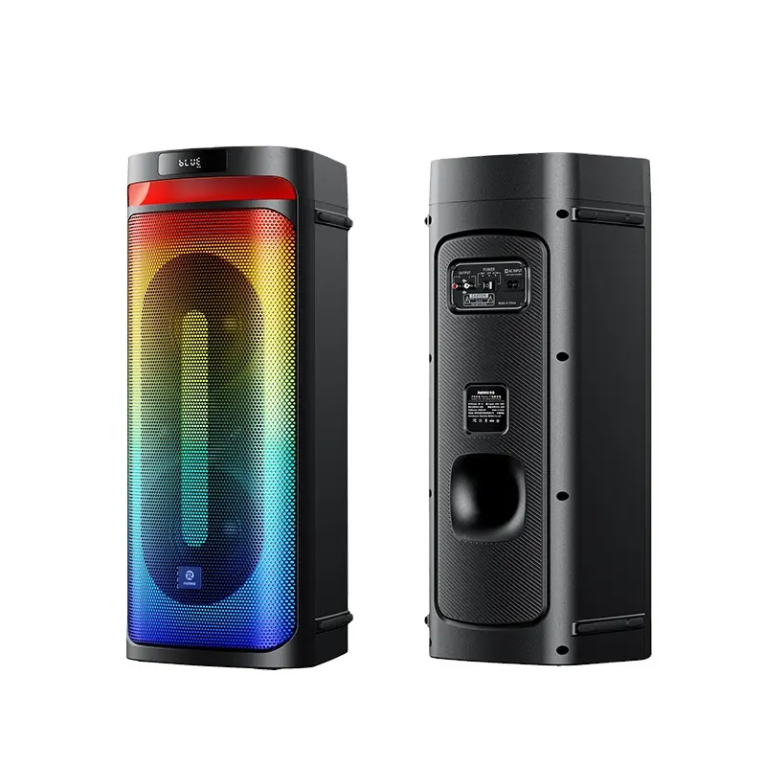
Specifications Weight (g) 750 Depth (mm) 500 Width (mm) 140 Height (mm) 190 Input/Output Other Battery Capacity (mAh) 8000 Sound Mode Other Category Speakers Use HOME Input Power (W) <25 W Voice Control No Waterproof No Support APP No Playback Function MP3 Remote Control No Intelligent Personal Assistant None Display Screen Yes Built-in Microphone No Audio Crossover Two-Way Number of Loudspeaker Enclosure 1 Power Source Battery Channels 2 (2.0) Feature Wireless Charger for Mobile Phone Battery Yes Communication Bluetooth Speaker Type Portable Cabinet Material Plastic Brand Name RNABAU Model DB Origin Mainland China Certification CE Type1 Caixa De Som Type2 HiFi Wireless Bluetooth Speaker Type3 Mobile Phone Charger Type4 Alarm Clock Speaker Type5 FM Radio Soundbox Type6 Vintage Bluetooth Speaker Type7 Home Stereo Audio Set

Genuine-spec touchpad flex cable for MacBook Pro 13″ (Model A2289, 2020, Intel)—restores full Force Touch functionality, haptic feedback, and preci multi-touch gesture control. OEM-quality replacement for damaged or faulty original cables. Compatible With: MacBook Pro 13-inch (2020, Four Thunderbolt Ports, Model A2289, Model Identifier MacBookPro16,2) with Intel Core i5/i7 processors. Part Type: Touchpad flex cable only — does not include the trackpad housing, Taptic Engine, or mounting hardware. This is the OEM-style ribbon cable that connects the trackpad to the logic board. Function: Transmits: Touch input coordinates Force Touch pressure data Haptic feedback signals to the Taptic Engine Enables full macOS gesture support: Force Click, three-finger lookup, swipe navigation, pinch-to-zoom, and smooth cursor tracking. Touch input coordinates Force Touch pressure data Haptic feedback signals to the Taptic Engine Enables full macOS gesture support: Force Click, three-finger lookup, swipe navigation, pinch-to-zoom, and smooth cursor tracking. OEM-Quality Build: Matches Apple’s original specifications in: Cable length and routing path Connector pitch and ZIF latch design EMI shielding and flex durability Cable length and routing path Connector pitch and ZIF latch design EMI shielding and flex durability Common Use Cases: Replacing a torn, creased, or liquid-damaged original flex cable Completing a trackpad replacement when the original cable is unusable Fixing: Intermittent or erratic trackpad behavior Loss of Force Touch or haptic feedback Complete trackpad unresponsiveness Replacing a torn, creased, or liquid-damaged original flex cable Completing a trackpad replacement when the original cable is unusable Fixing: Intermittent or erratic trackpad behavior Loss of Force Touch or haptic feedback Complete trackpad unresponsiveness Intermittent or erratic trackpad behavior Loss of Force Touch or haptic feedback Complete trackpad unresponsiveness Installation Note: Requires full bottom case removal and battery disconnection. Cable routes under internal components (speaker, logic board)—must follow original path. Connects via ZIF (Zero Insertion Force) socket—align carefully, never force. Recommended for experienced or certified technicians only. Requires full bottom case removal and battery disconnection. Cable routes under internal components (speaker, logic board)—must follow original path. Connects via ZIF (Zero Insertion Force) socket—align carefully, never force. Recommended for experienced or certified technicians only. Important Compatibility Notes: ✅ Only for A2289 (13″, 4 Thunderbolt ports, 2020, Intel) ❌ Not compatible with: A2251 (2 Thunderbolt ports, 2020) A2338 (M1 MacBook Pro, 2020) Any MacBook Air or 14″/16″ MacBook Pro ✅ Only for A2289 (13″, 4 Thunderbolt ports, 2020, Intel) ❌ Not compatible with: A2251 (2 Thunderbolt ports, 2020) A2338 (M1 MacBook Pro, 2020) Any MacBook Air or 14″/16″ MacBook Pro A2251 (2 Thunderbolt ports, 2020) A2338 (M1 MacBook Pro, 2020) Any MacBook Air or 14″/16″ MacBook Pro

