
WIWU Osun PU Leather Backpack – Stylish and compact bag crafted from water-resistant PU leather; fits 15.6″ laptops yet weighs only ~387 g.Offers organized storage, durable build, and comfy straps—perfect for daily commutes, work, or travel. Model: WIWU Osun PU Leather Notebook Backpack Material: Water-resistant 1680D polyester exterior with upscale PU leather finish Laptop Compartment: Padded sleeve fits up to 15.6″ laptops, shock-resistant protection Design: Compact “mini” size (26.5 × 21 × 6 cm), yet offers large internal capacity Pockets: Front zip pocket for phone and accessories; interior organization for tech and essentials Comfort: Adjustable padded shoulder straps, soft and skin-friendly inner lining Weight: Approximately 387 g (including packing) Extras: Sleek metal WIWU logo; suitable for travel, business, daily commuting

WiWU Pilot Backpack 15.6 inch Travelling Polyester Laptop Business School Travelling Backpack WiWU Pilot Backpack 15.6 inch Travelling Polyester Laptop Business School Travelling Backpack

Genuine-spec touchpad flex cable for MacBook Pro 16″ (Model A2485, 2021, M1 Pro/Max)—critical for restoring full Force Touch functionality, haptic feedback, and precise multi-touch gesture control during trackpad repairs. Compatible With: MacBook Pro 16-inch (2021, Model A2485) with Apple M1 Pro or M1 Max chip (Model Identifiers: MacBookPro18,1 / MacBookPro18,2). Part Type: Touchpad flex cable only—does not include the trackpad, Taptic Engine, or mounting hardware. This is the OEM-style ribbon cable that connects the trackpad to the logic board. Function: Transmits touch coordinates, Force Touch pressure data, and haptic feedback signals—essential for macOS gestures (e.g., pinch-to-zoom, Force Click, three-finger lookup) and Taptic Engine operation. OEM-Quality Construction: Precisely replicated to Apple’s original specifications—including cable length, connector type, EMI shielding, and flex routing—ensuring signal integrity and long-term reliability. Common Use Cases: Replacing a torn, frayed, or liquid-damaged original flex cable Completing a trackpad replacement when the original cable is compromised Fixing intermittent trackpad behavior, lost Force Touch, or complete unresponsiveness Replacing a torn, frayed, or liquid-damaged original flex cable Completing a trackpad replacement when the original cable is compromised Fixing intermittent trackpad behavior, lost Force Touch, or complete unresponsiveness Installation Note: Requires full disassembly of the bottom case and careful routing around the battery and logic board. Connectors use ZIF (Zero Insertion Force) sockets—must be aligned and latched gently. Recommended for certified or professional repair technicians only.

The BYL-2207 2-in-1 LAN adapter provides fast and stable wired internet through a Gigabit Ethernet port using either USB-C or USB 3.0. Perfect for laptops, MacBooks, and PCs without an Ethernet port, it ensures smooth streaming, online meetings, and reliable network performance. The BYL-2207 2-in-1 Type-C / USB 3.0 to Gigabit LAN Adapter is designed for users who need a reliable wired connection on modern laptops and devices. It supports both USB-C and USB 3.0, making it compatible with a wide range of systems including MacBooks, ultrabooks, and desktops. With Gigabit Ethernet speed, it provides faster and more stable internet compared to Wi-Fi, making it ideal for work, gaming, and streaming. 2-in-1 Connector (USB-C + USB 3.0) for wide compatibility Gigabit Ethernet Port (RJ45) for fast and stable wired internet High-Speed Performance supports up to 1000Mbps network speed Plug & Play installation on most systems Compact & Portable Design easy to carry anywhere Ideal for Work & Streaming improves stability for meetings and downloads Reliable Connection reduces lag compared to Wi-Fi Ideal for MacBooks, laptops, ultrabooks, desktops, and tablets that need a stable wired internet connection. Perfect for online meetings, remote work, gaming, IPTV, streaming, and downloading.

WiWU ZM‑901 – Sturdy foldable aluminum stand with adjustable angles and silicone pads, weighing just 900 g.Enhances posture, airflow, and workspace ergonomics while staying compact and travel-friendly. Model: WiWU ZM‑901 Material: Metal (aluminum/carbon steel) frame with silicone pads for grip Dimensions (Folded): 260 × 225.5 × 53 mm Package Size: 290 × 250 × 50 mm Net Weight: Approx. 900 g Compatibility: Fits laptops, tablets, and smartphones up to ~17 ” (some listings note 15.6″ limit, but device capacity varies) Features: Adjustable angle configuration, detachable foldable design for portability, silicone surface pads for anti-slip and vibration reduction Build & Design: Durable yet lightweight, crafted to enhance airflow and promote ergonomic posture

Genuine-spec touchpad flex cable for MacBook Pro 13″ (Model A2338, 2020, Apple M1)—essential for restoring full Force Touch functionality, haptic feedback, and precise multi-touch gesture control during trackpad repair or replacement. Compatible With: MacBook Pro 13-inch (2020, Model A2338, Model Identifier MacBookPro17,1) with Apple M1 chip (2 Thunderbolt ports). Part Type: Touchpad flex cable only — does not include the trackpad housing, Taptic Engine, or mounting hardware. This is the OEM-style ribbon cable that connects the trackpad to the logic board. Function: Transmits: Touch input coordinates Force Touch pressure data Haptic feedback signals to the Taptic Engine Enables full macOS gesture support: Force Click, three-finger lookup, swipe navigation, pinch-to-zoom, and smooth cursor tracking. Touch input coordinates Force Touch pressure data Haptic feedback signals to the Taptic Engine Enables full macOS gesture support: Force Click, three-finger lookup, swipe navigation, pinch-to-zoom, and smooth cursor tracking. OEM-Quality Build: Matches Apple’s original specifications in: Cable length and routing Connector pitch and ZIF latch design EMI shielding and flex durability Cable length and routing Connector pitch and ZIF latch design EMI shielding and flex durability Common Use Cases: Replacing a torn, creased, or liquid-damaged original flex cable Completing a trackpad replacement when the original cable is compromised Fixing intermittent trackpad behavior, loss of Force Touch, or complete unresponsiveness Replacing a torn, creased, or liquid-damaged original flex cable Completing a trackpad replacement when the original cable is compromised Fixing intermittent trackpad behavior, loss of Force Touch, or complete unresponsiveness Installation Note: Requires full bottom case removal and battery disconnection. Cable routes under internal components near the right speaker and logic board. Connects via a ZIF (Zero Insertion Force) socket—must be aligned carefully and latched gently. Recommended for experienced or certified technicians only. Requires full bottom case removal and battery disconnection. Cable routes under internal components near the right speaker and logic board. Connects via a ZIF (Zero Insertion Force) socket—must be aligned carefully and latched gently. Recommended for experienced or certified technicians only. Important Compatibility Notes: ✅ Only for A2338 (13″, M1, 2020) ❌ Not compatible with: Intel-based A2251 / A2289 (2020) MacBook Air M1 (A2337) Any MacBook Air or 14″/16″ MacBook Pro ✅ Only for A2338 (13″, M1, 2020) ❌ Not compatible with: Intel-based A2251 / A2289 (2020) MacBook Air M1 (A2337) Any MacBook Air or 14″/16″ MacBook Pro Intel-based A2251 / A2289 (2020) MacBook Air M1 (A2337) Any MacBook Air or 14″/16″ MacBook Pro

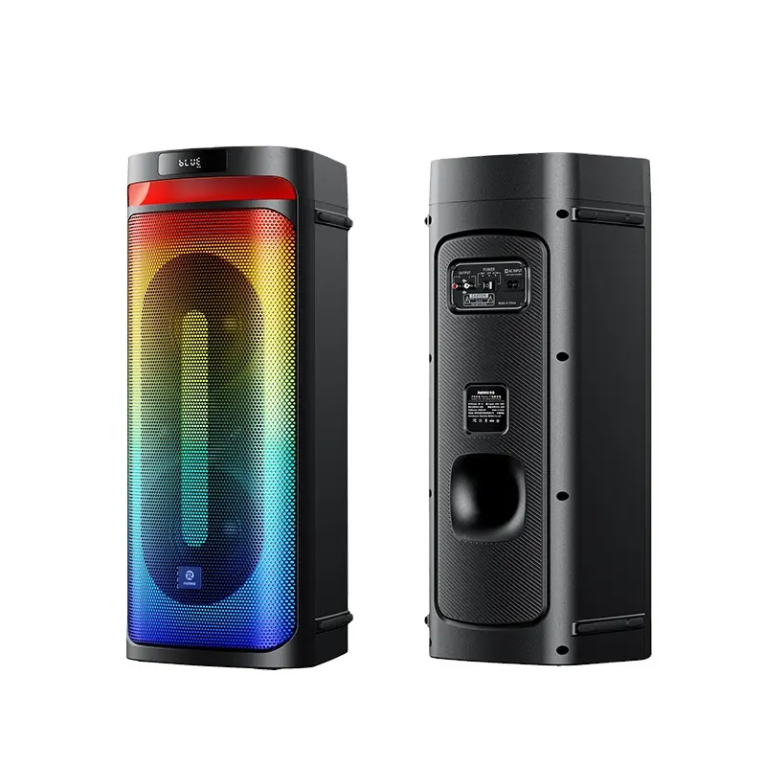
About this item 📱 Versatile Connectivity: Connect effortlessly with Bluetooth 4.2 to your smartphones, iPads, and computers. Also supports U disk, TF card (up to 32G), AUX input, and FM radio for versatile playback options. 📲 🔊 Powerful Sound with Heavy Bass: Enjoy rich, high-volume stereo sound with a powerful 20W output and a built-in heavy subwoofer, delivering an immersive audio experience for your home. 🎶 📻 Built-in FM Radio: Stay tuned to your favorite stations with the built-in FM radio feature, ensuring you never miss out on the latest news, music, and more. 📡 📞 Hands-Free Calling: Equipped with a clear call feature, this speaker allows you to answer phone calls directly through the speaker without lifting your phone. Perfect for multitasking! 🗣️ 📞 Hands-Free Calling: Equipped with a clear call feature, this speaker allows you to answer phone calls directly through the speaker without lifting your phone. Perfect for multitasking! 🗣️

A capable pre-owned Dell Latitude 5401 with 14" display, 10th Gen Core i7, 16GB RAM, 512GB SSD, and NVIDIA GeForce MX330 2GB—ideal for professionals who need extra graphics power for light creative work or multitasking in a durable business laptop.

The Lenovo 65W Round-Tip AC Adapter (AU) provides reliable and efficient power for compatible Lenovo laptops. Designed with a round-tip connector and Australian plug, it’s perfect as a replacement or travel charger. ⚡ 65W Power Output: Delivers stable and efficient charging for Lenovo laptops and notebooks. 🔌 Round-Tip Connector: Designed specifically for Lenovo models using the classic round charging port. 🇦🇺 AU Power Plug: Built for Australian power outlets — ideal for home, office, and travel use in AU regions. 👜 Compact & Portable: Lightweight design makes it easy to carry in a bag or backpack. 🔒 Safe Charging: Features over-voltage, over-current, and short-circuit protection. 🛠️ OEM-Compatible: Works with a wide range of ThinkPad, ThinkBook, and IdeaPad models using round-tip charging.

Arabic Language Ultra Thin Silicone Keyboard Cover for 2021 2020 MacBook Air 13 Inch A2179 and A2337 Apple M1 Chip (US Layout) with Touch ID Keyboard Accessories Protective Skin (Black) Color Black-Arabic Compatible Devices 2021 2020 MacBook Air 13.3-Inch with Apple M1 Chip (model: A2337), 2020 MacBook Air 13.3-Inch (model: A2179)2021 2020 MacBook Air 13.3-Inch with Apple M1 Chip (model: A2337), 2020 MacBook Air 13.3-Inch (model: A2179) Material Silicone Special Feature Waterproof, Dust Proof About this item [√] COMPATIBLE WITH: ONLY U.S keyboard layout–MacBook Air 13″ with Touch ID Early 2020 (model: A2179) and 2021 2020 MacBook Air 13″ with Apple M1 Chip (model: A2337). [√] MORE PROTECTION for KEYBOARD: waterproof, dust-proof and dirt-proof design can prevent liquid, dust, cigarette ash, biscuit crumbs falling onto your keyboard to affect your keyboard’s life. [√] ACCURATE KEYS: every key is specially molded, manufactured to the quality available. Flexible, this cover is easy to apply and remove for cleaning or disinfecting. [√] 0.25 MM THICKNESS: ultra thin silicone keyboard cover skin, made it easier for typing. Soft keyboard protector can weaken the sound in typing. About this item [√] COMPATIBLE WITH: ONLY U.S keyboard layout–MacBook Air 13″ with Touch ID Early 2020 (model: A2179) and 2021 2020 MacBook Air 13″ with Apple M1 Chip (model: A2337). [√] MORE PROTECTION for KEYBOARD: waterproof, dust-proof and dirt-proof design can prevent liquid, dust, cigarette ash, biscuit crumbs falling onto your keyboard to affect your keyboard’s life. [√] ACCURATE KEYS: every key is specially molded, manufactured to the quality available. Flexible, this cover is easy to apply and remove for cleaning or disinfecting. [√] 0.25 MM THICKNESS: ultra thin silicone keyboard cover skin, made it easier for typing. Soft keyboard protector can weaken the sound in typing.

WiWU T22 Earbuds – Stylish TWS earbuds with TFT display case, Bluetooth 6.0, ANC (-23 dB), 4 hrs playback, and in-ear detection.Sleek, feature-rich, and comfortable — ideal for mobile users who want touch control and immersive sound. Model: WiWU T22 Display & Controls: Charging case includes vibrant TFT/LCD screen with touch controls for playback, ANC toggle, and battery levels Bluetooth: JL 7003D8 chipset, Bluetooth 6.0 (alias V6 or 5.4) for stable, low-latency connection up to 10 m Noise Reduction: Active Noise Cancellation at –23 dB Battery: Earbuds: 30 mAh each; Charging case: 300 mAh; ~4 hrs music, ~3 hrs talk (at ~80% volume); ~50 hrs standby Charging: USB‑C, ~1 hr to full charge Other Features: In-ear detection (auto play/pause), Hi-Fi audio, ergonomic fit, compact design

Mini Slim Wired USB Numeric Digital Keyboard Number Pad (18 Keys) Numeric Keypad for Laptop,18 Key USB Keypad, Numerical Keypad Wired Portable Ultra Slim Mini Numpad External Numbers Keyboard Pad for Laptop PC Computer Desktop Surface pro Notebook

The 85W MagSafe 2 Power Adapter features a magnetic DC connector so if someone should trip over it, the cord disconnects harmlessly and your MacBook Pro stays put safely. It also helps prevent fraying or weakening of the cables over time. In addition, the magnetic DC helps guide the plug into the system for a quick and secure connection. The 85W MagSafe 2 Power Adapter features a magnetic DC connector so if someone should trip over it, the cord disconnects harmlessly and your MacBook Pro stays put safely. It also helps prevent fraying or weakening of the cables over time. In addition, the magnetic DC helps guide the plug into the system for a quick and secure connection. When the connection is secure, an LED located at the head of the DC connector lights up; an amber light lets you know that your notebook is charging, while a green light tells you that you have a full charge. An AC cord is provided with the adapter for maximum cord length, while the AC wall adapter (also provided) gives you an even easier and more compact way to travel. Designed to be the perfect traveling companion, the adapter has a clever design which allows the DC cable to be wound neatly around itself for easy cable storage. Compatible with MacBook Pro with 13-inch Retina display. See this article for more details about choosing the right one. Knowing which specific Mac model you have is important. If you are running OS X Lion (10.7) or later go to the “” menu at the top left of your screen, choose “About this Mac” then click the “More Info…” button. Your Mac model and generation will be displayed. If you are running an earlier version of OS X, you can enter your serial number here to find out which model you have. COMPATIBILITY Mac Models: MacBook Pro (Retina, 13-inch, Late 2012 – 2015)

The Lenovo V130 is powered by an Intel Core i5 7th Gen processor, paired with 8GB RAM and a fast 256GB SSD for smooth and reliable everyday performance. Designed for office work, study, and productivity, it features a simple, durable design and a clear 15.6-inch non-touch display for comfortable daily use.

Apple MacBook Pro 13” (2015) — reliable performance and classic MacBook design.• Intel Core i5 • 8 GB RAM • 128 GB SSD • Retina DisplaymacOS | Backlit Keyboard

Apple MacBook Pro 15” (2018) — professional-grade performance for creative power users.• Intel Core i9 • 32 GB RAM • 500 GB SSD • 4 GB Dedicated GraphicsRetina Display | macOS |

Genuine-spec touchpad flex cable for MacBook Pro 16″ (Model A2141, 2019, Intel)—essential for restoring full Force Touch functionality, haptic feedback, and precise multi-touch gesture control during trackpad repair or replacement. Compatible With: MacBook Pro 16-inch (2019, Model A2141) with Intel Core i7/i9 processors (Model Identifier: MacBookPro16,1) (Note: A2141 is the non-base configuration of the 2019 16″ MacBook Pro—typically higher-end Intel models.) Part Type: Touchpad flex cable only—does not include the trackpad housing, Taptic Engine, or mounting hardware. This is the OEM-style ribbon cable that connects the trackpad to the logic board. Function: Transmits touch coordinates, Force Touch pressure data, and haptic feedback signals—critical for macOS gestures (e.g., Force Click, three-finger lookup, pinch-to-zoom) and Taptic Engine responsiveness. OEM-Quality Construction: Replicated to Apple’s exact specifications—including cable length, connector pitch, EMI shielding, and bend radius—ensuring reliable signal integrity and long-term durability. Common Use Cases: Replacing a torn, creased, or liquid-damaged original flex cable Completing a trackpad replacement when the original cable is compromised Fixing intermittent trackpad behavior, loss of Force Touch, or complete unresponsiveness Replacing a torn, creased, or liquid-damaged original flex cable Completing a trackpad replacement when the original cable is compromised Fixing intermittent trackpad behavior, loss of Force Touch, or complete unresponsiveness Installation Note: Requires full disassembly of the bottom case, speaker removal, and careful routing beneath the battery and logic board. Connectors use ZIF (Zero Insertion Force) sockets—must be aligned and latched gently. Recommended for certified or professional repair technicians only. Important: This is flex cable only—not a complete trackpad assembly. Must be used with the original or compatible A2141 trackpad and Taptic Engine. Not compatible with M1 MacBook Pro 16″ (A2485), 14″ models (A2442), or any MacBook Air. This is flex cable only—not a complete trackpad assembly. Must be used with the original or compatible A2141 trackpad and Taptic Engine. Not compatible with M1 MacBook Pro 16″ (A2485), 14″ models (A2442), or any MacBook Air. Model Verification: Confirm your device is MacBook Pro A2141 (16″, 2019, Intel) via > About This Mac > Model Identifier (should read MacBookPro16,1).

Genuine-spec touchpad flex cable for MacBook Air 13.6″ (Model A2681, 2022, M2)—essential for restoring full Force Touch functionality, haptic feedback, and multi-touch gesture support when replacing or repairing the trackpad assembly. Compatible With: MacBook Air 13.6-inch (2022, Model A2681) with Apple M2 chip (all colors: Silver, Space Gray, Starlight, Midnight). Part Type: Touchpad flex cable only—does not include the trackpad, Taptic Engine, or mounting hardware. This is the ribbon cable assembly that connects the trackpad to the logic board. Function: Transmits touch input, Force Touch pressure data, and haptic feedback signals between the trackpad and logic board—critical for macOS gesture recognition and Taptic Engine operation. OEM-Quality Construction: Matches Apple’s original flex circuit in length, connector type, shielding, and bend radius—ensures reliable signal integrity and long-term durability. Common Use Cases: Replacing a torn, frayed, or damaged original flex cable Completing a trackpad replacement when the original cable was compromised Repairing unresponsive or erratic trackpad behavior caused by cable failure Replacing a torn, frayed, or damaged original flex cable Completing a trackpad replacement when the original cable was compromised Repairing unresponsive or erratic trackpad behavior caused by cable failure Installation Note: Requires full bottom case disassembly and careful routing under the battery and logic board. Connectors use ZIF (Zero Insertion Force) sockets—do not force. Recommended for experienced or certified technicians only.

0G74G Laptop Battery Replacement for Dell Latitude 5300 2-in-1 5310 7300 7400 Series Notebook OG74G 02PFPW 2PFPW 3KF82 8JYHH 11.4V 42Wh 3-Cell About this item Specification: Battery type: Li-ion. Color: Black. Voltage: 11.4V. Capacity: 42Wh/3Cell. New from Manufacturer Replace Part Number: For MXV9V 0G74G 00G74G 2PFPW 3KF82 8JYHH Compatible Models: Replacement for Dell Latitude 5300 E5300 / 5300 2-in-1 / 5310 E5310 / 5310 2-in-1 / 7300 E7300 / 7400 E7400 Series (Important Note: NOT fit for latitude 7400 2-in-1 Series) Note: The Dell laptop models on this product page are compatible with 2 battery models: 0G74G (42Wh 3-Cell 11.4V) , MXV9V(60Wh 4-Cell 7.6V). Please open the back cover of your laptop to check the original battery size and capacity before placing an order. Make sure that the battery model you need is 0G74G (42Wh 3-Cell 11.4V). Note: If the new battery is not recognized during the initial installation, please reinstall and check if the interface is fully connected. Discharge the new battery to 10-20% (not 0%), then charge and cycle 3-4 times to wake up the new battery

