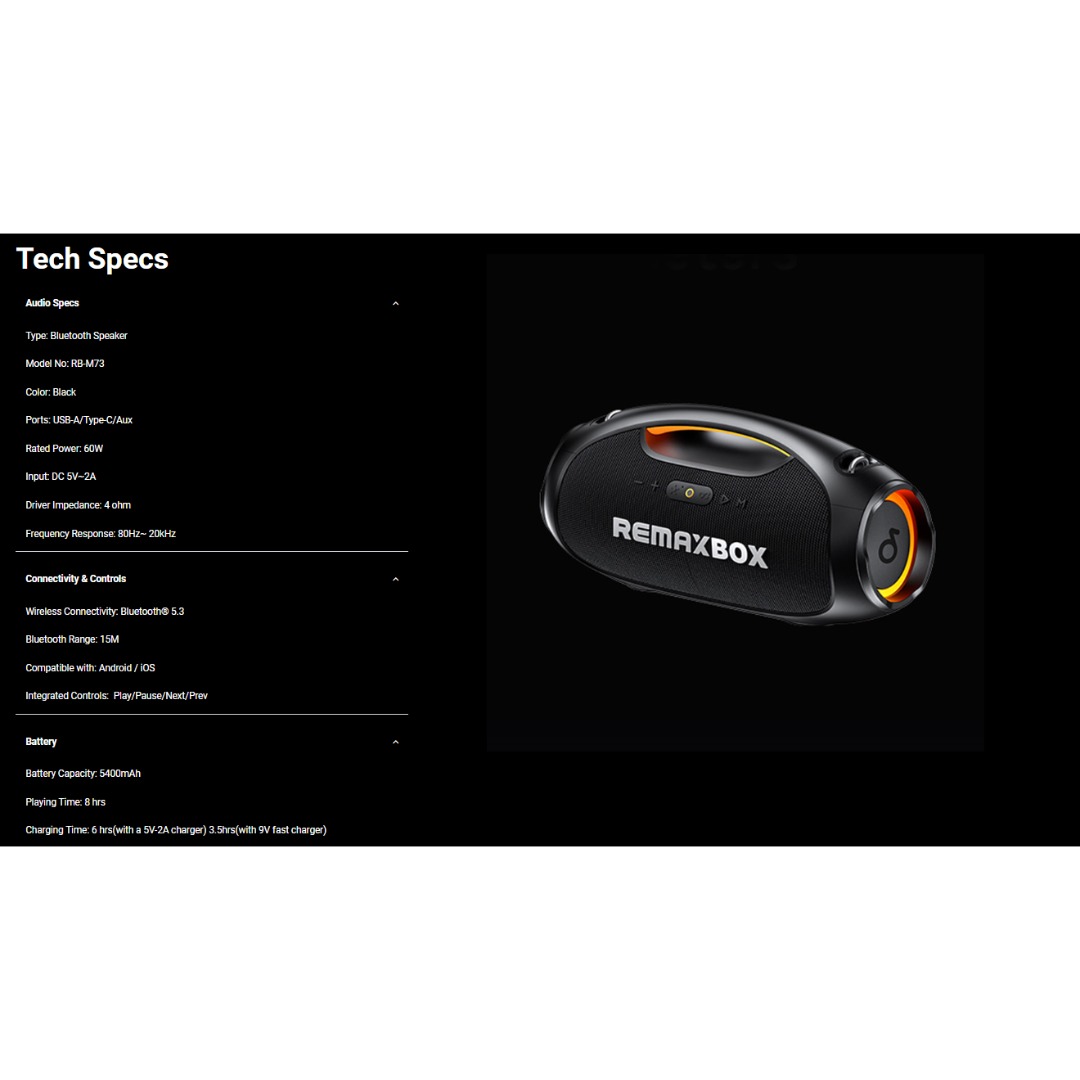

Specifications Input/Output USB Sound Mode Live Sound Mode, Standard Mode Category Speakers Use HOME Bluetooth Version 5.0 Input Power (W) <25 W Active Noise-Cancellation PASSIVE Wi-Fi Music Apple Music Voice Control No Frequency Range 100Hz-20kHz Output Power 35W Display Screen No Waterproof No Support APP Yes Support Memory Card Yes Material Plastic Playback Function MP3 Remote Control No Support Apt-x No Intelligent Personal Assistant None Display Screen No Built-in Microphone No Audio Crossover Full-Range Number of Loudspeaker Enclosure 1 Power Source Battery PMPO 25W Channels 2 (2.0) Feature Play Video, Wireless Subwoofer, Wireless Rear Speakers Battery Yes Communication AUX, USB, Bluetooth Speaker Type Portable Cabinet Material Plastic Brand Name SwYiSm Origin Mainland China Certification CE Function 1 Wireless Bluetooth Function 2 Originality Function 3 Vintage Kerosene Lamp Function 4 Decorative Lamp

Compact and stylish with a zinc alloy shell, the SatcOp 8‑in‑1 USB‑C Multiport Dock delivers essential ports—Ethernet, HDMI, USB, card readers, and charging—in one portable adapter. Ideal for powering your laptop while expanding connectivity on the go. 🖥️ HDMI Port – Connect to external displays in Full HD or 4K (depending on your host device). 🌐 RJ45 Ethernet Port – Provides stable wired internet access with gigabit-speed support. ⚡ USB-C PD Charging – Power your laptop while using other ports (up to 87W pass-through). 🔌 USB 3.0 & USB 2.0 Ports – Connect flash drives, external storage, keyboards, and mice. 💾 SD & TF Card Readers – Quick access to camera and device storage cards. 🧊 Material – Premium zinc alloy casing for durability and efficient heat dissipation. 💼 Design – Slim, lightweight, and perfect for travel, home, or office setups. 💻 Compatibility – Works with most USB-C laptops, including Windows, macOS, Chrome OS, and select Android tablets.

Remax F21 Ruiyal Series – Oscillating water‑cooling fan with 4,000 mAh battery, digital display, and 6 wind levels.Portable and stylish small-table fan with 3 oscillation modes and mist spray cooling. Model: Remax F21 Ruiyal Series Water‑Cooling Oscillating Fan (White) Battery & Power: Built‑in 4,000 mAh battery; USB‑C rechargeable (details unspecified) Cooling Method: Water‑cooling spray system with turbine-style fan blades Wind Speed: 6 adjustable speed levels Oscillation: 3 movement modes—approx. 45°, 90°, or 120° Display & Controls: Digital display showing mode, speed, and battery indicators Dimensions & Weight: Compact tabletop size, ~868 g Power Consumption: Around 8W rated power

Genuine-spec touchpad flex cable for MacBook Pro 13″ (Model A2251, 2020, Intel)—essential for restoring full Force Touch functionality, haptic feedback, and precise multi-touch gesture control during trackpad repair or replacement. Compatible With: MacBook Pro 13-inch (2020, Two Thunderbolt Ports, Model A2251, Model Identifier MacBookPro16,1) with Intel Core i5/i7 processors. Part Type: Touchpad flex cable only—does not include the trackpad housing, Taptic Engine, or mounting hardware. This is the OEM-style ribbon cable that connects the trackpad to the logic board. Function: Transmits: Precise touch coordinates Force Touch pressure data Haptic feedback signals to the Taptic Engine Enables full macOS gesture support including Force Click, three-finger lookup, swipe navigation, and inertial scrolling. Precise touch coordinates Force Touch pressure data Haptic feedback signals to the Taptic Engine Enables full macOS gesture support including Force Click, three-finger lookup, swipe navigation, and inertial scrolling. OEM-Quality Build: Matches Apple’s original specifications in: Cable length and routing Connector pitch and ZIF latch design EMI shielding and flex durability Cable length and routing Connector pitch and ZIF latch design EMI shielding and flex durability Common Use Cases: Replacing a torn, creased, or liquid-damaged original flex Completing a trackpad replacement when the original cable is compromised Fixing intermittent trackpad behavior, loss of Force Touch, or complete unresponsiveness Replacing a torn, creased, or liquid-damaged original flex Completing a trackpad replacement when the original cable is compromised Fixing intermittent trackpad behavior, loss of Force Touch, or complete unresponsiveness Installation Note: Requires full bottom case removal and partial disassembly (including battery disconnect). Cable routes under the right speaker and logic board—must be seated in original retention channels. Connects via ZIF (Zero Insertion Force) socket—align carefully and latch gently. Recommended for experienced or certified technicians only. Requires full bottom case removal and partial disassembly (including battery disconnect). Cable routes under the right speaker and logic board—must be seated in original retention channels. Connects via ZIF (Zero Insertion Force) socket—align carefully and latch gently. Recommended for experienced or certified technicians only.

Original replacement touchpad for MacBook Air A2442, available in Silver and Space Gray. Perfect for fixing unresponsive or damaged trackpads and restoring smooth cursor control and gesture functionality. The Original MacBook Air A2442 Touchpad is a genuine replacement part designed to restore full trackpad performance and functionality. If your MacBook Air trackpad is not clicking, not responding, or physically damaged, this original touchpad provides a reliable solution with smooth tracking and accurate gesture support. Available in Silver and Space Gray, it matches the original laptop finish for a clean professional repair. Original / Genuine Touchpad for MacBook Air A2442 Available in Silver and Space Gray Restores smooth cursor control and multi-touch gestures Reliable clicking and accurate tracking performance Perfect for repair and replacement of damaged trackpads High-quality build for long-term use ✔ MacBook Air 13-inch (2021 / 2022) A2442 Compatible with MacBook Air A2442 models only. Please confirm the model number on the bottom cover before purchase to ensure a correct fit.

BATTERY ASUS A41-X550E X450 X450e X450j X450jf X550e X550z X550za X750j X750ja X751 X751m A450j A450jf A450e F751la F751ma F751mj R751 R752 F751 K751 P750L P750L Series About this item Gomarty:100% Brand NEW, Battery Type: Li-ion Voltage: 15V Capacity: 2600MAH Cells: 4-cell Color: Black, High-Quality Battery for ASUS; Gomarty has registered a U.S. Trademark and the serial number is 87155272 Battery Models: A41-X550E Laptop Battery for Asus X450 X450E X450J X450JF X751M X751MA-DB01Q X751MA X751L X750JA This laptop Battery works with ASUS D451V D451E K450V K550E K550D K550DP F450 F450C F450V F450E F450J F450JF F751 F751L F751LA F751LAV F751LB F751LD F751LDV F751LJ F751LK F751LN F751LX F751M F751MA F751MD F751MJ A450 A450C A450V A450E A450J A450JF Series 0B110-00220000M. Grade A cells ensure fast charges and low power consumption, while built-in circuit protection ensures safety and stability. Customer Questions: If you have any questions, you can contact us. We will respond within 24 hours.

A next-generation Wi-Fi 6 router delivering AX1500 speeds (1201 Mbps on 5GHz + 300 Mbps on 2.4GHz), 4 high-performance antennas, and Gigabit ports—ideal for 2–3 bedroom homes needing faster speeds, lower latency, and seamless connectivity for 100+ devices. The TP-Link Archer AX12 is a powerful Wi-Fi 6 (802.11ax) dual-band router engineered for modern connected homes. With a combined speed of AX1500—delivering up to 1201 Mbps on the 5GHz band and 300 Mbps on the 2.4GHz band—it provides significantly faster throughput, reduced latency, and improved capacity compared to older Wi-Fi standards. Powered by a 1 GHz dual-core processor and equipped with four fixed high-performance antennas, the Archer AX12 delivers strong, stable coverage throughout 2–3 bedroom homes, eliminating dead zones and buffering. Advanced beamforming technology focuses Wi-Fi signals directly toward connected devices for clearer, stronger connections—even at greater distances. OFDMA + MU-MIMO: Efficiently serves multiple devices simultaneously—perfect for households with smartphones, laptops, smart TVs, and IoT devices connected at once (supports 100+ devices). www.wifi-stock.com WPA3 Security: Next-generation encryption for stronger protection against unauthorized access and cyber threats. www.amazon.in Backward Compatibility: Works seamlessly with all existing Wi-Fi devices (802.11a/b/g/n/ac/ax). www.tp-link.com Wired connectivity includes one Gigabit WAN port and three Gigabit LAN ports for high-speed connections to desktops, game consoles, NAS devices, or smart TVs. Parental Controls: Set schedules, filter content, and manage screen time per device QoS (Quality of Service): Prioritize bandwidth for video calls, gaming, or streaming TP-Link Tether App: Easy setup and management from your smartphone

MacBook Air 13″ Retina A1932(2018-2019-2020) Display Assembly (Silver) MacBook Air 13″ Retina Display 2019 A1932 (EMC 3184 MacBookAir8,2) 1.6 GHz MacBook Air 13″ Retina Display 2020 A2179 (EMC 3302 MacBookAir9,1) 1.1 GHz Core i3 A2179 (EMC 3302 MacBookAir9,1) 1.1 GHz Core i5 A2179 (EMC 3302 MacBookAir9,1) 1.2 GHz Core i7 MacBook Air 13” Retina Display Late 2018 A1932 (EMC 3184 MacBookAir8,1) 1.6 GHz

HP 17A Black Toner Cartridge | Works with HP LaserJet Pro M102 Series, HP LaserJet Pro MFP M130 Series | CF217A

WiWU Durable USB C to Type C PD 60W Fast Charging Cable for Mobile Phone Laptop Tablet

Apple USB-C Charge Cable (1m) , With Apple Warranty This 1-metre charge cable is made with a woven design — with USB-C connectors on both ends — and is ideal for charging, syncing and transferring data between USB-C devices. Pair the USB-C Charge Cable with a compatible USB-C power adapter to conveniently charge your devices from a power point and take advantage of fast-charging capabilities. USB-C power adapters sold separately.

lenovo battery 00NY486 48Wh 4.4Ah Battery Replacement for Lenovo ThinkPad L560 20F1 20F2 L570 20J8 20J9 20JQ 20JR Series Laptop SB10H45071 00NY487 SB10H45072 00NY488 SB10H45073 00NY489 SB10H45074 71+ 10.8V About this item 【Battery Model】00NY486; Voltage:10.8V; Capatity:48Wh 4.4Ah 6-Cells; Color:Black; Condition:Brand New. 【Replacement Part Number】00NY486 SB10H45071 00NY487 SB10H45072 00NY488 SB10H45073 00NY489 SB10H45074 71+ 【Compatible Machine Models】 for Lenovo ThinkPad L560 (Type 20F1 20F2) Series; for Lenovo ThinkPad L570 (type 20J8 20J9 20JQ 20JR) Series 【Security Certified】 Certified by CE, UL, FCC, and RoHS for safety. Every battery has passed factory testing, built-in circuit protection ensures safety and stability. More than 500 recharge cycles over the life of the battery.

PCE 900 M8 900VA 480W Output Power: 700VA (M8 700), 900VA (M8 900) Voltage Input Range: 220-240 VAC with 102 wires (M8 700), 140-300 VAC (M8 900) Output Protection: Overload, discharge, and overcharge protection (M8 700), Fault protection (M8 900) Waveform: Simulated Sine Wave LED Indicators: Green lighting (M8 700), Green flashing (M8 900) Frequency: 50 or 60 Hz +/- 10% (auto sensing) (M8 700), 50 or 60 Hz +/- 1% (M8 900) Voltage (backup mode): 12V/9AH x 1 (M8 700), 12V/7AH x 1 (M8 900) Frequency (backup mode): 50 or 60 Hz +/- 1% (M8 700 and M8 900) Transfer time (M8 700): Typical 2 to 6 ms Backup time (M8 900): 10-20min depending on load level Net Weight: 4.3 kg (9.46 lbs) (M8 700), 4.8 kg (10.56 lbs) (M8 900) Output Receptacles: Universal sockets x 2 or German x 2 (M8 700), Universal sockets x 4 (M8 900) Audible Noise: Sounding every 10 seconds (M8 700), Sounding every second (M8 900) Dimensions: 100x278x140 (3.9″x10.8″x5.5″) (M8 700), 130x320x182 (5.07″x12.48″x7.1″) (M8 900) Compatibility: Windows 2000/XP/2003/2008/Vista/7, NOVELL, LINUX, UNIX (M8 700), Optional Interface with power management software (M8 900) Certifications: EN 50091-1-1/EN 69050 (RD), IEC 60950, TUV GC-Mark, EN 50091-2, EN 50022/B, IEC 62040-2, IEC 61000-3-2, IEC 61000-3-3, ISO 9001, ISO 14001 (M8 700 and M8 900)

Genuine-spec touchpad flex cable for MacBook Air 13″ (Model A1932, 2018–2019)—essential for restoring full Force Touch functionality, haptic feedback, and precise multi-touch gesture control during trackpad repair or replacement. Compatible With: MacBook Air 13-inch (2018 & 2019, Model A1932, Model Identifier MacBookAir8,1) with Intel Core i5/i7 processors. Part Type: Touchpad flex cable only—does not include the trackpad housing, Taptic Engine, or mounting hardware. This is the OEM-style ribbon cable that connects the trackpad to the logic board. Function: Transmits touch input, Force Touch pressure data, and haptic feedback signals—critical for macOS gestures like Force Click, three-finger lookup, pinch-to-zoom, and smooth cursor tracking. OEM-Quality Build: Matches Apple’s original in length, connector pitch, EMI shielding, and flexibility—ensures reliable signal integrity and long-term durability. Common Use Cases: Replacing a torn, creased, or liquid-damaged original flex cable Completing a trackpad replacement when the original cable is unusable Fixing intermittent trackpad behavior, loss of Force Touch, or complete unresponsiveness Replacing a torn, creased, or liquid-damaged original flex cable Completing a trackpad replacement when the original cable is unusable Fixing intermittent trackpad behavior, loss of Force Touch, or complete unresponsiveness Installation Note: Requires full bottom case removal and careful routing beneath the battery. The cable connects via a ZIF (Zero Insertion Force) socket on the logic board—must be properly aligned and latched without force. Recommended for experienced or certified technicians. Important: This is flex cable only—not a complete trackpad assembly. Must be used with the original or compatible A1932 trackpad and Taptic Engine. Not compatible with MacBook Air M1 (A2337/A2338), M2 (A2681/A2941), or any MacBook Pro model. This is flex cable only—not a complete trackpad assembly. Must be used with the original or compatible A1932 trackpad and Taptic Engine. Not compatible with MacBook Air M1 (A2337/A2338), M2 (A2681/A2941), or any MacBook Pro model.

WIWU S400 Aluminum Laptop Stand Portable, Adjustable and Foldable - Silver WIWU S400 Aluminum Laptop Stand Portable, Adjustable and Foldable – Silver

Genuine-spec touchpad flex cable compatible with both MacBook Air A2179 (Intel, 2020) and A2337 (M1, 2020)—restores full Force Touch functionality, haptic feedback, and precise multi-touch gesture control during trackpad repair or replacement. Compatible With: MacBook Air 13″ (2020, Intel) – Model A2179 (Model Identifier: MacBookAir9,1) MacBook Air 13″ (2020, Apple M1) – Model A2337 (Model Identifier: MacBookAir10,1) MacBook Air 13″ (2020, Intel) – Model A2179 (Model Identifier: MacBookAir9,1) MacBook Air 13″ (2020, Apple M1) – Model A2337 (Model Identifier: MacBookAir10,1) ✅ Important Note: Despite different processors (Intel vs. M1), Apple used the same trackpad assembly and flex cable in both A2179 and A2337. This makes the flex cable fully interchangeable between the two models. Part Type: Touchpad flex cable only — does not include the trackpad housing, Taptic Engine, or mounting hardware. This is the OEM-style ribbon cable that connects the trackpad to the logic board. Function: Transmits: Touch input coordinates Force Touch pressure data Haptic feedback signals to the Taptic Engine Enables full macOS gesture support: Force Click, three-finger lookup, swipe navigation, pinch-to-zoom, and smooth cursor tracking. Touch input coordinates Force Touch pressure data Haptic feedback signals to the Taptic Engine Enables full macOS gesture support: Force Click, three-finger lookup, swipe navigation, pinch-to-zoom, and smooth cursor tracking. OEM-Quality Build: Matches Apple’s original specifications in: Cable length and routing path Connector pitch and ZIF latch design EMI shielding and flex durability Cable length and routing path Connector pitch and ZIF latch design EMI shielding and flex durability Common Use Cases: Replacing a torn, creased, or liquid-damaged original flex cable Completing a trackpad replacement when the original cable is compromised Fixing intermittent trackpad behavior, loss of Force Touch, or complete unresponsiveness Replacing a torn, creased, or liquid-damaged original flex cable Completing a trackpad replacement when the original cable is compromised Fixing intermittent trackpad behavior, loss of Force Touch, or complete unresponsiveness Installation Note: Requires full bottom case removal and battery disconnection. Cable routes under the right side of the battery and logic board. Connects via a ZIF (Zero Insertion Force) socket—align carefully and latch gently. Recommended for experienced or certified technicians only. Requires full bottom case removal and battery disconnection. Cable routes under the right side of the battery and logic board. Connects via a ZIF (Zero Insertion Force) socket—align carefully and latch gently. Recommended for experienced or certified technicians only.

Transparent 2.5" USB 3.0 HDD/SSD Enclosure – Supports SATA drives up to 6TB with UASP and tool-free design.Fast, plug-and-play storage case using JMS578 chipset with crystal-clear ABS shell. Transparent 2.5″ USB 3.0 HDD/SSD Enclosure – Supports SATA drives up to 6TB with UASP and tool-free design.Fast, plug-and-play storage case using JMS578 chipset with crystal-clear ABS shell. Model: 2.5″ HDD/SSD Enclosure with JMS578 Chipset Material: Transparent ABS Plastic (durable and lightweight) Interface: USB 3.0 (backward compatible with USB 2.0 & 1.1) Chipset: JMS578 (JMicron) – supports UASP for faster data transfer Drive Compatibility: 2.5″ SATA I/II/III HDD or SSD Supports up to 6TB capacity Fits 7mm or 9.5mm thick drives Drive Compatibility: 2.5″ SATA I/II/III HDD or SSD Supports up to 6TB capacity Fits 7mm or 9.5mm thick drives Data Transfer Rate: Up to 5Gbps via USB 3.0 UASP support enables up to 20% faster transfers (with UASP-enabled OS) Data Transfer Rate: Up to 5Gbps via USB 3.0 UASP support enables up to 20% faster transfers (with UASP-enabled OS) Tool-Free Design: No screws needed – easy slide-in installation Hot Swappable: Plug and play, no drivers needed for most systems LED Indicator: Blue light for power and activity status Operating Systems: Windows 7/8/10/11, macOS, Linux Dimensions: Approx. 125 x 80 x 14 mm Cable Included: USB 3.0 cable (typically 30–50 cm)

Genuine-spec US layout keyboard replacement for MacBook Air 13″ (Model A2337, 2020)—featuring the Magic Keyboard design with scissor-switch mechanism, backlighting, and full OEM compatibility. Compatible With: MacBook Air 13-inch (2020, Model A2337) – includes both M1 and Intel Core i3/i5/i7 variants. Keyboard Type: Apple’s updated Magic Keyboard with scissor-switch mechanism—more reliable and comfortable than earlier Butterfly designs. Layout: Standard US English (QWERTY), including inverted-T arrow keys and full function row. Integrated Features: Backlit keys, ambient light sensor support, and original ribbon cable connector for seamless plug-and-play installation. Build & Fit: Precision-engineered to match Apple’s original dimensions, key spacing, and tactile response—ensures flush mounting within the top case. Installation Note: The keyboard is glued into the top case and requires careful removal and re-adhesion. Full top case disassembly is necessary. Recommended for experienced repair technicians

WIWU Pilot Water Resistant High-Capacity Laptop Sleeve Case

Genuine-spec touchpad flex cable for MacBook Air 13″ (Model A1534, Early 2015)—essential for restoring full trackpad functionality, including precise cursor control and physical click response, during repair or replacement. Compatible With: MacBook Air 13-inch (Early 2015, Model A1534, Model Identifier MacBookAir7,2). Part Type: Touchpad flex cable only—does not include the trackpad housing, button mechanism, or mounting brackets. This is the ribbon cable that connects the trackpad to the logic board. Function: Carries input signals from the trackpad to the logic board—critical for cursor movement, tap-to-click, and primary/secondary physical click functionality. (Note: This model uses a physical click mechanism, not Force Touch—so no haptic feedback or pressure-sensing.) OEM-Quality Construction: Matches Apple’s original cable in length, connector type, and shielding—ensures reliable signal transmission and long-term durability. Common Use Cases: Replacing a torn, frayed, or damaged original flex cable Completing a trackpad replacement when the original cable is compromised Fixing erratic cursor movement, unresponsive trackpad, or loss of click function Replacing a torn, frayed, or damaged original flex cable Completing a trackpad replacement when the original cable is compromised Fixing erratic cursor movement, unresponsive trackpad, or loss of click function Installation Note: Requires bottom case removal and careful disconnect/reconnect of the ZIF (Zero Insertion Force) connector on the logic board. The cable routes under the battery—handle with care. Suitable for intermediate to advanced DIYers or technicians.
