
The ViewSonic VA2405-H 24″ FHD 75Hz Monitor delivers clear and smooth visuals for daily work and home use. Its Full HD resolution shows sharp text and clean image details. The 24-inch screen offers a balanced size for comfort and productivity. This makes it ideal for office desks and study spaces. Moreover, the ViewSonic VA2405-H 24″ FHD 75Hz Monitor features a smooth 75 Hz refresh rate. This makes scrolling softer and screen motion more natural. Video playback looks cleaner with less blur. As a result, long viewing sessions feel more comfortable. In addition, the monitor uses an IPS panel for wide viewing angles. Colors stay accurate even when viewed from the side. This helps during meetings, teamwork, and shared viewing. The image remains bright and clear from many angles. Furthermore, the ViewSonic VA2405-H 24″ FHD 75Hz Monitor includes eye comfort features for daily protection. The low blue light mode helps reduce eye strain. The flicker-free design supports longer use without discomfort. These features improve viewing comfort throughout the day. Also, the monitor supports modern connection options for easy setup. It includes HDMI and VGA for wide device compatibility. You can connect laptops, desktops, and media devices with ease. Switching between sources becomes fast and simple. In addition, the slim bezel design gives a clean and modern look. It fits well in both home and office spaces. The stand supports tilt adjustment for basic viewing comfort. Wall mounting is also supported for flexible desk setups. Moreover, the display works well for documents, web browsing, and video watching. Text appears clear and easy to read. Daily tasks feel more organized and productive. The monitor blends smoothly into any workspace style. Overall, the ViewSonic VA2405-H 24″ FHD 75Hz Monitor delivers reliable performance, clean visuals, and daily comfort. It supports work, study, and entertainment with ease. This monitor is a smart choice for users who want smooth and simple screen performance. Specifications: Display : 24″ VA Resolution : FHD 1920 x 1080 Refresh Rate : 75Hz Response Time : 4ms

The Alienware AW2723DF 27″ 280Hz Gaming Monitor is made for gamers who want smooth performance and sharp visuals. It features a 27-inch Fast IPS screen with QHD resolution (2560 x 1440) for detailed and vibrant images. With a 240Hz native refresh rate, overclockable to 280Hz via DisplayPort, it delivers incredibly fluid motion. Its 1ms response time keeps gameplay sharp, reducing blur during intense action. It supports AMD FreeSync Premium Pro and is G-SYNC compatible, helping to eliminate screen tearing and stuttering. This ensures a smooth experience across all types of games. The display offers 100% sRGB and 95% DCI-P3 color coverage, making colors rich and lifelike. It also supports HDR with 600-nit brightness, which improves contrast and light detail. For connectivity, it includes two HDMI 2.0 ports, one DisplayPort 1.4, four USB 3.2 Gen 1 ports, and audio out, giving you flexible connection options. A built-in USB hub helps manage your accessories with ease. The stand supports height, tilt, swivel, and pivot adjustments for ergonomic comfort. You can also mount it using VESA compatibility, giving you more control over your setup. Extra features include AlienFX lighting, Picture-in-Picture (PiP) and Picture-by-Picture (PbP) modes. These tools enhance your multitasking and customization. In short, the Alienware AW2723DF is a powerful gaming monitor that combines speed, color accuracy, and versatility for both competitive play and creative work. Specifications: Display : 27″ Fast IPS Resolution : QHD 2560 x 1440 Refresh Rate : 280Hz Response Time : 1ms

Looking to take your gaming to the next level? Look no further than the LG 27″ 165Hz UltraGear monitor. This powerhouse display is your ticket to an immersive and smooth gaming experience. First and foremost, let’s talk about speed. With a blazing-fast 165Hz refresh rate, this monitor ensures buttery-smooth gameplay, free from motion blur or screen tearing. Get ready to react quicker and gain a competitive edge in every game. Transitioning to visuals, prepare to be amazed by the stunning clarity and vibrant colors of the UltraGear monitor. With a crisp 27-inch display and high-resolution capabilities, every detail pops off the screen, immersing you in your favorite games like never before. Moreover, the monitor’s advanced IPS panel technology ensures wide viewing angles and consistent color accuracy, so you can enjoy stunning visuals from any angle without distortion. But that’s not all – the UltraGear monitor is also packed with features to enhance your gaming experience. From customizable gaming modes to built-in crosshair overlays, it offers everything you need to optimize your gameplay to your preferences. Additionally, with support for HDR content, you can enjoy breathtaking visuals with enhanced contrast and brightness, bringing your games to life with stunning realism. In conclusion, the LG 27″ 165Hz UltraGear monitor is the ultimate gaming companion for enthusiasts seeking unparalleled performance and immersion. Elevate your gaming setup with this powerhouse display and experience gaming like never before. Specifications: Display : 27″ IPS Resolution : QHD (2560 x 1440) Refresh Rate : 165Hz Response Rate : 1ms GTG

The Samsung Odyssey G8 32″ 240 Hz OLED Gaming Monitor delivers unmatched gaming performance and stunning visuals. It features a 32‑inch OLED display for deep blacks and vibrant colors. Moreover, the Samsung Odyssey G8 32″ 240 Hz OLED Gaming Monitor supports ultra‑fast 240 Hz refresh rate. It ensures ultra‑smooth gameplay and fewer motion artifacts during fast action. Also, the monitor boasts just 0.03 ms response time for minimal blur. In addition, this gaming monitor uses HDR to boost contrast and brightness. Plus, its OLED panel offers wide viewing angles and consistent color from any position. Furthermore, adaptive sync technology keeps frame rates smooth with FreeSync or G‑SYNC. Therefore, gamers experience tear‑free visuals even under heavy load. It includes DisplayPort and multiple HDMI 2.1 ports for high bandwidth input. Also, USB ports and a built‑in USB hub simplify peripheral connections. Moreover, the monitor supports customizable RGB lighting on its stand and rear. Then, ergonomic stand adjusts height, tilt, and swivel for comfortable viewing angles. Also, low‑blue‑light and flicker‑free modes reduce eye strain during long gaming sessions. Furthermore, the sleek, curved display blends well with modern gaming setups. In addition, its slim bezels help create immersive multi‑monitor environments. Because of OLED quality, contrast ratio is effectively infinite for deep image depth. Meanwhile, factory calibration ensures accurate colors right from setup. Also, power consumption remains efficient even in intense HDR modes. Besides that, thermal design keeps the monitor cool and reliable. Thus, you get long‑lasting performance without overheating. With strong build quality, the monitor offers durable daily use. It works perfectly for high‑frame‑rate gaming, fast‑paced esports, and vivid content. Finally, the Samsung Odyssey G8 32″ 240 Hz OLED Gaming Monitor combines speed, clarity, and design. Overall, it stands as a premium choice for competitive and immersive gamers. Specifications: Display : 32″ Resolution : OLED (3,840 x 2,160) Refresh Rate : 240Hz Response Rate : 0.03ms GTG

The ViewSonic VG2455 24″ FHD 100Hz Monitor delivers clear visuals for office work and daily use. Its Full HD resolution shows sharp text and smooth image detail. The 24-inch screen offers a balanced size for most desks. This makes it ideal for home and professional setups. Moreover, the ViewSonic VG2455 24″ FHD 100Hz Monitor features a smooth 100 Hz refresh rate. This makes scrolling smoother and video playback more fluid. Motion looks cleaner during fast content. In addition, the monitor uses an IPS panel for wide viewing angles. Colors stay accurate even when viewed from the sides. This helps during team work and shared screen tasks. The image remains stable and clear. Furthermore, the ViewSonic VG2455 24″ FHD 100Hz Monitor includes built-in eye care features. Low blue light mode helps reduce eye strain. The flicker-free design supports long viewing without discomfort. This helps protect your eyes every day. Also, the monitor offers flexible connection options. It supports HDMI, DisplayPort, and USB-C in one display. In addition, the stand supports height, tilt, swivel, and pivot adjustment. You can set the screen for full comfort. Vertical mode helps with coding and reading. This improves posture and daily comfort. Moreover, the slim bezel design gives a clean and modern look. It fits well into any professional workspace. The simple design keeps your desk neat and organized. The monitor blends easily with other screens. Overall, the ViewSonic VG2455 24″ FHD 100Hz Monitor delivers comfort, clarity, and smooth daily performance. It improves workflow and reduces eye strain. This monitor is perfect for office users, students, and home professionals needing a reliable display. Specifications: Display : 24″ IPS Resolution : FHD 1920 x 1080 Refresh Rate : 100Hz Response Time : 5ms

Genuine-spec touchpad flex cable for MacBook Pro 13″ (Model A1502, Mid 2014)—restores full trackpad functionality, including precise cursor control and physical click response. Essential for repairing unresponsive or erratic trackpad behavior. Compatible With: MacBook Pro 13-inch (Mid 2014, Model A1502, Model Identifier MacBookPro11,1) with Intel Core i5/i7 processors and Retina display. Part Type: Touchpad flex cable only — does not include the trackpad housing, button mechanism, or mounting hardware. This is the ribbon cable that connects the trackpad to the logic board. Function: Transmits cursor movement and click signals (left/right physical clicks) Supports standard multi-touch gestures (two-finger scroll, tap-to-click, pinch-to-zoom) ⚠️ Note: This model uses a physical click mechanism—not Force Touch (no haptic feedback or pressure sensitivity). Transmits cursor movement and click signals (left/right physical clicks) Supports standard multi-touch gestures (two-finger scroll, tap-to-click, pinch-to-zoom) ⚠️ Note: This model uses a physical click mechanism—not Force Touch (no haptic feedback or pressure sensitivity). OEM-Quality Build: Matches Apple’s original in: Cable length and routing path Connector type and pin alignment Insulation and flexibility for long-term reliability Cable length and routing path Connector type and pin alignment Insulation and flexibility for long-term reliability Common Use Cases: Replacing a torn, frayed, or corroded original flex cable Fixing: Unresponsive or intermittent trackpad Cursor jumping or drifting Click function failure (left or right) Complete trackpad disconnect Replacing a torn, frayed, or corroded original flex cable Fixing: Unresponsive or intermittent trackpad Cursor jumping or drifting Click function failure (left or right) Complete trackpad disconnect Unresponsive or intermittent trackpad Cursor jumping or drifting Click function failure (left or right) Complete trackpad disconnect Installation Note: Requires bottom case removal and battery disconnect. Connects via a ZIF (Zero Insertion Force) socket on the logic board—do not force. Cable routes under the battery; handle with care to avoid strain. Suitable for intermediate to advanced DIYers or technicians. Requires bottom case removal and battery disconnect. Connects via a ZIF (Zero Insertion Force) socket on the logic board—do not force. Cable routes under the battery; handle with care to avoid strain. Suitable for intermediate to advanced DIYers or technicians.

The Lenovo ThinkPad P50s is a business-class 15.6-inch mobile workstation that pairs a 6th-generation Intel Core i7 dual-core processor with a dedicated NVIDIA Quadro M500M 2 GB graphics card, 16 GB of RAM and a 256 GB SSD. It’s designed for professionals who need workstation capability in a relatively slim and portable form-factor.

Professional battery testing flex cable for MacBook Pro 15″ (Model A1990, 2018–2019)—used by technicians to bypass a faulty battery or diagnose power-on issues without permanent battery removal. Enables safe logic board testing and troubleshooting. This is not a replacement battery cable—it’s a diagnostic tool used in repair workflows. It mimics the battery’s presence by providing the necessary SMBus signal and power-enable lines to the logic board, allowing the MacBook to: Power on without a battery installed Test logic board functionality independently Diagnose whether a no-power issue is caused by the battery or logic board MacBook Pro 15″ (2018–2019) Model: A1990 Model Identifiers: MacBookPro15,2 Chip: Intel Core i7/i9 Model: A1990 Model Identifiers: MacBookPro15,2 Chip: Intel Core i7/i9 ⚠️ Not compatible with A1707 (2016–2017), A2159 (16″), or any M1/M2 models. Simulates battery presence via correct SMBus resistance and ID signals Includes power-enable circuitry matching Apple’s safety protocol Pre-terminated with OEM-style connector for A1990 logic board Allows safe bench testing of logic boards during repair Diagnosing “no power, no fan spin, no display” issues Verifying if a logic board powers on without risking a shorted battery Testing after liquid damage or DC-in board replacement Avoiding unnecessary battery replacements during diagnostics Not for permanent installation—intended for temporary diagnostic use only Does not charge or store power—requires connected USB-C power adapter to operate Must be used with a known-good power adapter (87W recommended) Not a consumer part—designed for professional repair shops and technicians

90W AC Charger Replacement for HP EliteDesk 705 G1 G2 G4 705 800 G5 Desktop Mini ProOne 400 G4 G5 23.8-inch All-in-One ProOne 400 G2 G3 G4 G5 460 G2 G3 480 G2 G3 20-inch All-in-One

The MSI Pro MP161 E2 15.6″ 60Hz Portable Monitor is a lightweight and versatile display for professionals and gamers. It offers a compact design, making it easy to carry anywhere. This portable monitor features a 15.6-inch Full HD display with a resolution of 1920 x 1080. The 60Hz refresh rate ensures smooth visuals for work, entertainment, and gaming. The IPS panel delivers vibrant colors and wide viewing angles. With ultra-slim bezels, the MSI Pro MP161 E2 provides a sleek and modern look. It enhances your workspace without taking up too much space. The anti-glare screen ensures comfortable viewing in different lighting conditions. The portable monitor supports multiple connectivity options, including USB-C and Mini HDMI. This allows easy connection to laptops, tablets, and gaming consoles. Plug-and-play functionality makes setup quick and hassle-free. Weighing only 0.75 kg, the MSI Pro MP161 E2 15.6″ 60Hz Portable Monitor is perfect for travel. Its ultra-slim profile fits easily into bags, making it ideal for remote work or presentations. The built-in stand allows flexible positioning for better comfort. You can adjust the screen angle for the best viewing experience. The durable design ensures long-term reliability. With low blue light technology, this portable monitor reduces eye strain during extended use. It is perfect for professionals who spend hours in front of a screen. In conclusion, the MSI Pro MP161 E2 15.6″ 60Hz Portable Monitor is a great choice for those needing a secondary display. Its lightweight design, excellent visuals, and versatile connectivity make it ideal for work and entertainment. Specifications: Display : 15.6″ IPS Resolution : 1920×1080 FHD Refresh Rate : 60Hz Response Rate : 4ms Speaker : 1.5W x2

Battery Model: A1493 A1502 Replacement Laptop Battery for MacBook Pro Retina 13 Inch Late 2013 Mid 2014 ; MacBook Pro A1493 A1582 Battery EMC 2678 2875 2835 ME864 ME865 100% Brand New, Battery Type: Li-Polymer; Capacity: 71.8Wh; Voltage:11.34V; Package include two free screwdriver Compatible:A1502 A1493 (Only for Late 2013, Mid 2014 Version) Apple MacBook Pro 13″ Retina ME864LL/A ME866LL/A ,MacBook Pro “Core i5″ 2.4/2.5 13” Late 2013 Retina Overcharger and Discharger Circuit Protection, CE-/FCC-/RoHS-Certified for safety.

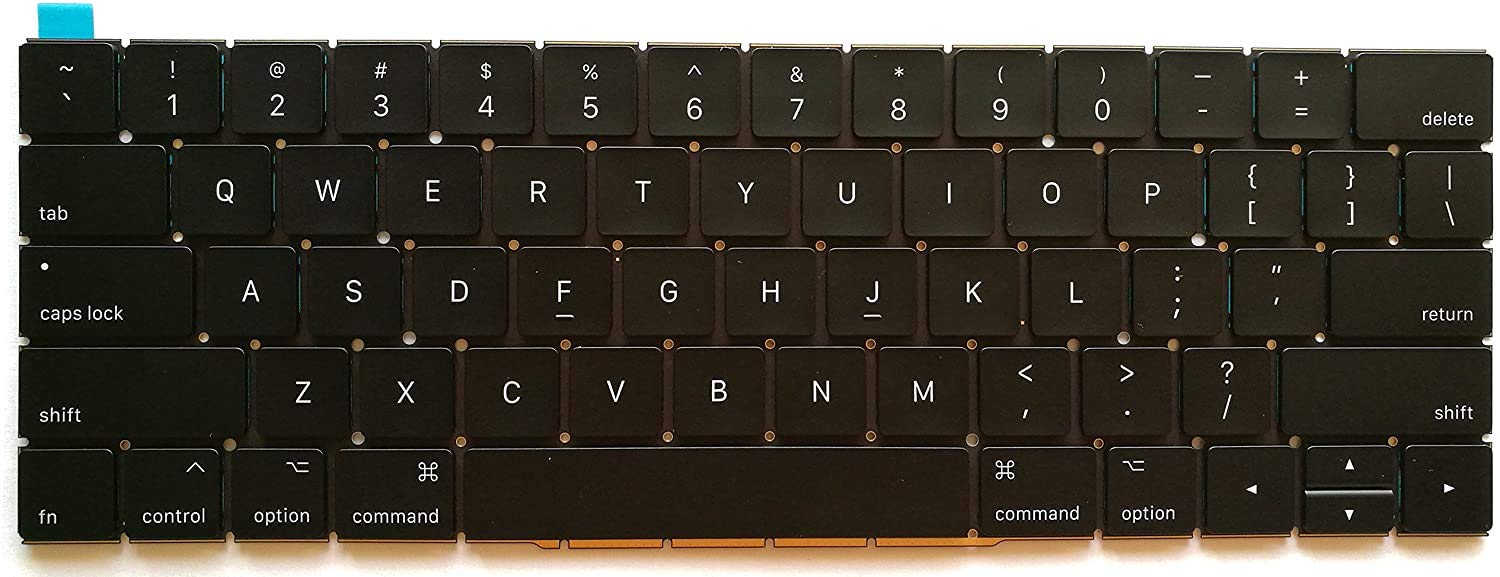
Genuine-quality keyboard and touchpad connection board (also known as the keyboard flex cable or I/O board) for the 2022 MacBook Pro 14″ (Model A2681)—essential for restoring full keyboard and Touch ID functionality during repairs. Compatible With: MacBook Pro 14-inch (2022, M2 Pro/M2 Max models, Apple Model A2681). Function: This internal connection board links the keyboard, Touch ID sensor, and touchpad to the logic board—critical for proper operation of input devices. Includes: Keyboard flex cable assembly with integrated Touch ID sensor and touchpad connector (exact configuration matches Apple’s original design). Common Use Cases: Replacing after liquid damage, physical impact, or keyboard/touchpad failure; often required when the built-in keyboard or power button (with Touch ID) stops responding. OEM-Spec Quality: Built to match Apple’s original specifications for fit, signal integrity, and durability—ensures seamless integration and reliable performance. Installation Note: Requires precision disassembly of the MacBook’s lower case and display. Recommended for experienced technicians or certified repair centers.

Apple MacBook Pro 16” (2019) — professional-grade power and stunning Retina display.• Intel Core i9 • 32 GB RAM • 500 GB SSD • 4 GB Dedicated GraphicsRetina Display | macOS |

Philips 346B1C 34-inch curved ultrawide monitor delivers wide workspace and efficient multitasking for professional use. It focuses on UltraWide clarity, USB-C docking, and ergonomic comfort for daily productivity. Additionally, it features a 34-inch VA panel with UltraWide QHD resolution (3440 × 1440). This resolution provides more horizontal space, so it improves multitasking and side-by-side workflows. Moreover, it uses a 1500R curved design. As a result, it creates a more immersive viewing experience and keeps content within a natural field of view. The monitor supports up to a 100Hz refresh rate with 4ms response time. Therefore, it delivers smooth visuals for office work, media, and light gaming. In addition, it includes USB-C docking with power delivery up to 90W. This allows video, data, and charging through a single cable, so it simplifies desk setup. Furthermore, it features Adaptive Sync, MultiView (PIP/PBP), and built-in Ethernet. These features improve workflow flexibility and connectivity across multiple devices. It also includes Flicker-Free and LowBlue Mode. So it helps reduce eye strain during long working sessions. Philips 346B1C 34-inch curved ultrawide monitor provides a large immersive display, strong connectivity, and productivity-focused features for modern work environments. Specifications: 34-inch VA panel with 3440 × 1440 UltraWide QHD resolution 100Hz refresh rate with 4ms response time 1500R curved design for immersive viewing USB-C docking with up to 90W power delivery MultiView, Adaptive Sync, and built-in Ethernet connectivity

A next-generation Wi-Fi 6 router delivering AX1500 speeds (1201 Mbps on 5GHz + 300 Mbps on 2.4GHz), 4 high-performance antennas, and Gigabit ports—ideal for 2–3 bedroom homes needing faster speeds, lower latency, and seamless connectivity for 100+ devices. The TP-Link Archer AX12 is a powerful Wi-Fi 6 (802.11ax) dual-band router engineered for modern connected homes. With a combined speed of AX1500—delivering up to 1201 Mbps on the 5GHz band and 300 Mbps on the 2.4GHz band—it provides significantly faster throughput, reduced latency, and improved capacity compared to older Wi-Fi standards. Powered by a 1 GHz dual-core processor and equipped with four fixed high-performance antennas, the Archer AX12 delivers strong, stable coverage throughout 2–3 bedroom homes, eliminating dead zones and buffering. Advanced beamforming technology focuses Wi-Fi signals directly toward connected devices for clearer, stronger connections—even at greater distances. OFDMA + MU-MIMO: Efficiently serves multiple devices simultaneously—perfect for households with smartphones, laptops, smart TVs, and IoT devices connected at once (supports 100+ devices). www.wifi-stock.com WPA3 Security: Next-generation encryption for stronger protection against unauthorized access and cyber threats. www.amazon.in Backward Compatibility: Works seamlessly with all existing Wi-Fi devices (802.11a/b/g/n/ac/ax). www.tp-link.com Wired connectivity includes one Gigabit WAN port and three Gigabit LAN ports for high-speed connections to desktops, game consoles, NAS devices, or smart TVs. Parental Controls: Set schedules, filter content, and manage screen time per device QoS (Quality of Service): Prioritize bandwidth for video calls, gaming, or streaming TP-Link Tether App: Easy setup and management from your smartphone

The MSI MPG 242R X60N 600Hz FHD Rapid TN Gaming Monitor delivers ultra‑fast performance and fluid visuals for competitive gamers. Its 24‑inch Full HD display combines high refresh rates with sharp clarity to make every frame feel smooth and responsive. Moreover, the blazing 600Hz refresh rate helps reduce motion blur so you can react faster in fast‑paced games and esports titles. This gaming monitor features a Rapid TN panel that offers extremely quick response times, minimizing ghosting and motion artifacts during intense action. Additionally, the crisp visuals and rich colors bring games and media to life, enhancing your overall experience. The sleek design and thin bezels provide a clean and immersive view that fits perfectly into any gaming setup. The MSI MPG 242R X60N includes multiple connectivity options, allowing easy connection to gaming PCs, consoles, and other devices. Furthermore, ergonomic adjustments help you find a comfortable viewing angle during long sessions. Therefore, it is ideal for esports players and competitive gamers who demand peak performance. Finally, it combines ultra‑fast refresh rates, responsive visuals, and versatile design for superior gaming experiences. Specifications: 24″ FHD gaming monitor 600Hz refresh rate for ultra‑smooth gameplay Rapid TN panel for quick response times Immersive visuals and sleek design Multiple connectivity options

LED feature Specification Display size 60.5 cm (23.8 in) diagonal Display type IPS with LED backlight Panel active area 52.7 x 29.6 cm (20.7 x 11.7 in) Scan range Horizontal: 30 to 80 KHz Vertical: 50 to 60 Hz Brightness 250 nits Color support Up to 16.7 million colors with the use of FRC technology Color gamut 72% Pixel pitch 0.2745 (H) mm x 0.2745 (V) mm 93 PPI Inputs 1 VGA 1 HDMI Audio in/Audio out HDCP support Viewing angle Horizontal viewing angle (typical): 178 degrees Vertical viewing angle (typical): 178 degrees Recommended resolution (H x V) 1920 x 1080 @ 60 Hz (Full HD) Aspect ratio 16:9 Static contrast ratio 1000:1 Dynamic contrast ratio 10,000,000:1 Response time 6 ms GtG w/OD 14 ms GtG (typ) / 28 ms GtG (Max) Power supply External Power consumption 30 Watts max Tilt -5 to +25 degrees Dimensions W x D x H (unpacked): 54.1 x 18.3 x 40.9 cm (21.3 x 7.2 x 16.1 in) Weight Unpacked: 3.1 Kg (6.8 lbs) Specifications: HP Monitor 24ea 23.8-inch IPS Display Display size 60.5 cm (23.8 in) diagonal Display type IPS with LED backlight Panel active area 52.7 x 29.6 cm (20.7 x 11.7 in)

Genuine-spec touchpad flex cable for MacBook Pro 13″ (Model A2289, 2020, Intel)—restores full Force Touch functionality, haptic feedback, and preci multi-touch gesture control. OEM-quality replacement for damaged or faulty original cables. Compatible With: MacBook Pro 13-inch (2020, Four Thunderbolt Ports, Model A2289, Model Identifier MacBookPro16,2) with Intel Core i5/i7 processors. Part Type: Touchpad flex cable only — does not include the trackpad housing, Taptic Engine, or mounting hardware. This is the OEM-style ribbon cable that connects the trackpad to the logic board. Function: Transmits: Touch input coordinates Force Touch pressure data Haptic feedback signals to the Taptic Engine Enables full macOS gesture support: Force Click, three-finger lookup, swipe navigation, pinch-to-zoom, and smooth cursor tracking. Touch input coordinates Force Touch pressure data Haptic feedback signals to the Taptic Engine Enables full macOS gesture support: Force Click, three-finger lookup, swipe navigation, pinch-to-zoom, and smooth cursor tracking. OEM-Quality Build: Matches Apple’s original specifications in: Cable length and routing path Connector pitch and ZIF latch design EMI shielding and flex durability Cable length and routing path Connector pitch and ZIF latch design EMI shielding and flex durability Common Use Cases: Replacing a torn, creased, or liquid-damaged original flex cable Completing a trackpad replacement when the original cable is unusable Fixing: Intermittent or erratic trackpad behavior Loss of Force Touch or haptic feedback Complete trackpad unresponsiveness Replacing a torn, creased, or liquid-damaged original flex cable Completing a trackpad replacement when the original cable is unusable Fixing: Intermittent or erratic trackpad behavior Loss of Force Touch or haptic feedback Complete trackpad unresponsiveness Intermittent or erratic trackpad behavior Loss of Force Touch or haptic feedback Complete trackpad unresponsiveness Installation Note: Requires full bottom case removal and battery disconnection. Cable routes under internal components (speaker, logic board)—must follow original path. Connects via ZIF (Zero Insertion Force) socket—align carefully, never force. Recommended for experienced or certified technicians only. Requires full bottom case removal and battery disconnection. Cable routes under internal components (speaker, logic board)—must follow original path. Connects via ZIF (Zero Insertion Force) socket—align carefully, never force. Recommended for experienced or certified technicians only. Important Compatibility Notes: ✅ Only for A2289 (13″, 4 Thunderbolt ports, 2020, Intel) ❌ Not compatible with: A2251 (2 Thunderbolt ports, 2020) A2338 (M1 MacBook Pro, 2020) Any MacBook Air or 14″/16″ MacBook Pro ✅ Only for A2289 (13″, 4 Thunderbolt ports, 2020, Intel) ❌ Not compatible with: A2251 (2 Thunderbolt ports, 2020) A2338 (M1 MacBook Pro, 2020) Any MacBook Air or 14″/16″ MacBook Pro A2251 (2 Thunderbolt ports, 2020) A2338 (M1 MacBook Pro, 2020) Any MacBook Air or 14″/16″ MacBook Pro

Apple USB-C to Lightning Cable (1m) - With Apple Warranty Apple USB-C to Lightning Cable (1m) – With Apple Warranty Connect your iPhone, iPad or iPod with Lightning connector to your USB-C– or Thunderbolt 3 (USB-C)–enabled Mac for syncing and charging, or to your USB-C–enabled iPad for charging. You can also use this cable with your Apple 18W, 20W, 29W, 30W, 61W, 87W or 96W USB‑C Power Adapter to charge your iOS device and even take advantage of the fast-charging feature on selected iPhone and iPad models.

Display Panel Size (inch) : 27 Aspect Ratio : 16:9 Display Viewing Area (H x V) : 597.888 x 336.312 mm Display Surface : Non-Glare Backlight Type : LED Panel Type : IPS Viewing Angle (CR≧10, H/V) : 178°/ 178° Pixel Pitch : 0.311mm Resolution : 1920×1080 Color Space (sRGB) : 100% Brightness (Typ.) : 250cd/㎡ Contrast Ratio (Typ.) : 1000:1 ASUS Smart Contrast Ratio (ASCR) : 100000000:1 Display Colors : 16.7M Response Time : 1ms MPRT Refresh Rate (Max) : 144Hz Flicker-free : Yes Video Feature Trace Free Technology : Yes GameVisual : Yes Color Temp. Selection : Yes(4 modes) GamePlus : Yes HDCP : Yes VRR Technology : FreeSync™ Premium GameFast Input technology : Yes Shadow Boost : Yes Low Blue Light : Yes Audio Feature Speaker : Yes(2Wx2) I/O Ports DisplayPort 1.2 x 1 HDMI(v1.4) x 2 Earphone Jack : Yes Signal Frequency Digital Signal Frequency : HDMI: 30~160 KHz (H) / 48~ 144 Hz (V) DisplayPort: 30~160 KHz (H) / 48~144 Hz (V) Power Consumption Power Consumption : <18W* Power Saving Mode : <0.5W Power Off Mode : <0.3W Voltage : 100-240V, 50/60Hz Mechanical Design Tilt : Yes (+22° ~ -5°) VESA Wall Mounting : 75x75mm Kensington Lock : Yes Dimensions (Esti.) Phys. Dimension with Stand (W x H x D) : 612.6x431x213 mm Phys. Dimension without Stand (W x H x D) : 612.6 x 362.5 x 37.7 mm Box Dimension (W x H x D) : 692 x 499 x 183 mm Weight (Esti.) Net Weight with Stand : 3.9 Kg Net Weight without Stand : 3.5 Kg Gross Weight : 6.1 Kg Accessories (vary by regions) DisplayPort cable HDMI cable Power adapter Power cord Quick start guide Warranty Card 90LM05S1-B01E70 manufacturer link
