
Genuine-spec touchpad flex cable for MacBook Pro 13″ with Touch Bar (Model A1708, 2016–2017)—restores full Force Touch functionality, haptic feedback, and precise multi-touch gesture control during trackpad repair or replacement. Compatible With: MacBook Pro 13″ (2016) – Model A1708 (Model Identifier: MacBookPro13,1) MacBook Pro 13″ (2017) – Model A1708 (Model Identifier: MacBookPro14,1) (Both years share the same internal trackpad assembly and flex cable.) MacBook Pro 13″ (2016) – Model A1708 (Model Identifier: MacBookPro13,1) MacBook Pro 13″ (2017) – Model A1708 (Model Identifier: MacBookPro14,1) (Both years share the same internal trackpad assembly and flex cable.) Part Type: Touchpad flex cable only — does not include the trackpad housing, Taptic Engine, or mounting hardware. This is the OEM-style ribbon cable that connects the trackpad to the logic board. Function: Transmits: Touch input coordinates Force Touch pressure data Haptic feedback signals to the Taptic Engine Enables full macOS gesture support: Force Click, three-finger lookup, swipe navigation, pinch-to-zoom, and smooth cursor tracking. Touch input coordinates Force Touch pressure data Haptic feedback signals to the Taptic Engine Enables full macOS gesture support: Force Click, three-finger lookup, swipe navigation, pinch-to-zoom, and smooth cursor tracking. OEM-Quality Build: Matches Apple’s original specifications in: Cable length and routing path Connector pitch and ZIF latch design EMI shielding and flex durability Cable length and routing path Connector pitch and ZIF latch design EMI shielding and flex durability Common Use Cases: Replacing a torn, creased, or liquid-damaged original flex cable Completing a trackpad replacement when the original cable is compromised Fixing intermittent trackpad behavior, loss of Force Touch, or complete unresponsiveness Replacing a torn, creased, or liquid-damaged original flex cable Completing a trackpad replacement when the original cable is compromised Fixing intermittent trackpad behavior, loss of Force Touch, or complete unresponsiveness Installation Note: Requires full bottom case removal and battery disconnection. Cable routes under internal components near the right speaker and logic board. Connects via a ZIF (Zero Insertion Force) socket—must be aligned carefully and latched gently. Recommended for experienced or certified technicians only. Requires full bottom case removal and battery disconnection. Cable routes under internal components near the right speaker and logic board. Connects via a ZIF (Zero Insertion Force) socket—must be aligned carefully and latched gently. Recommended for experienced or certified technicians only.

Used, original 35 W USB-C charger for Mac — reliable Apple power adapter (dual USB-C) for charging your Mac and other devices. This is an authentic Apple 35 W USB-C power adapter (dual-port) — used but tested. It’s built to charge MacBooks, iPhones, iPads, and other USB-C devices. Though lower wattage than larger Mac adapters, it works well for light use or supplemental charging. Features & Behavior Dual USB-C ports: can charge two devices simultaneously Intelligent power distribution: if both ports are used, the output splits evenly (~17.5 W each) USB Power Delivery support across standard profiles (5V, 9V, 15V, 20V) Accepts input 100-240V AC, so usable worldwide (with correct plug) Compact form factor in one variant, or standard “duckhead” plug style in another Specifications Strengths & Limitations Pros Authentic Apple unit — safer and more reliable than generic chargers Dual ports give flexibility — charge phone + Mac concurrently Portable and suitable for travel (universal voltage) Cons 35 W is low for MacBook Pro under load — might not maintain charging during heavy use When both ports used, power is halved (~17.5 W each) Used condition may include wear, scuffs, or reduced efficiency

Original Apple - 87W USB-C Power Adapter - White | MNF82LL/A | A1719 Original Apple – 87W USB-C Power Adapter – White | MNF82LL/A | A1719 The Apple 87W USB-C Power Adapter (Model A1719) is designed to provide fast and efficient charging for a variety of Apple devices. Key Features: High Power Output: Delivers up to 87 watts of power, suitable for charging larger devices like the 15-inch MacBook Pro. Versatile Charging: Supports multiple output voltages—20.2V at 4.3A, 9V at 3A, and 5.2V at 2.4A—allowing it to charge a range of USB-C–enabled devices. chargerlab.com Versatile Charging: Supports multiple output voltages—20.2V at 4.3A, 9V at 3A, and 5.2V at 2.4A—allowing it to charge a range of USB-C–enabled devices. Compact Design: Its sleek and portable build makes it convenient for use at home, in the office, or while traveling. Compatibility: While this adapter is compatible with any USB-C–enabled device, Apple recommends pairing it with the 15-inch MacBook Pro with Thunderbolt 3 (USB-C) ports for optimal charging performance.

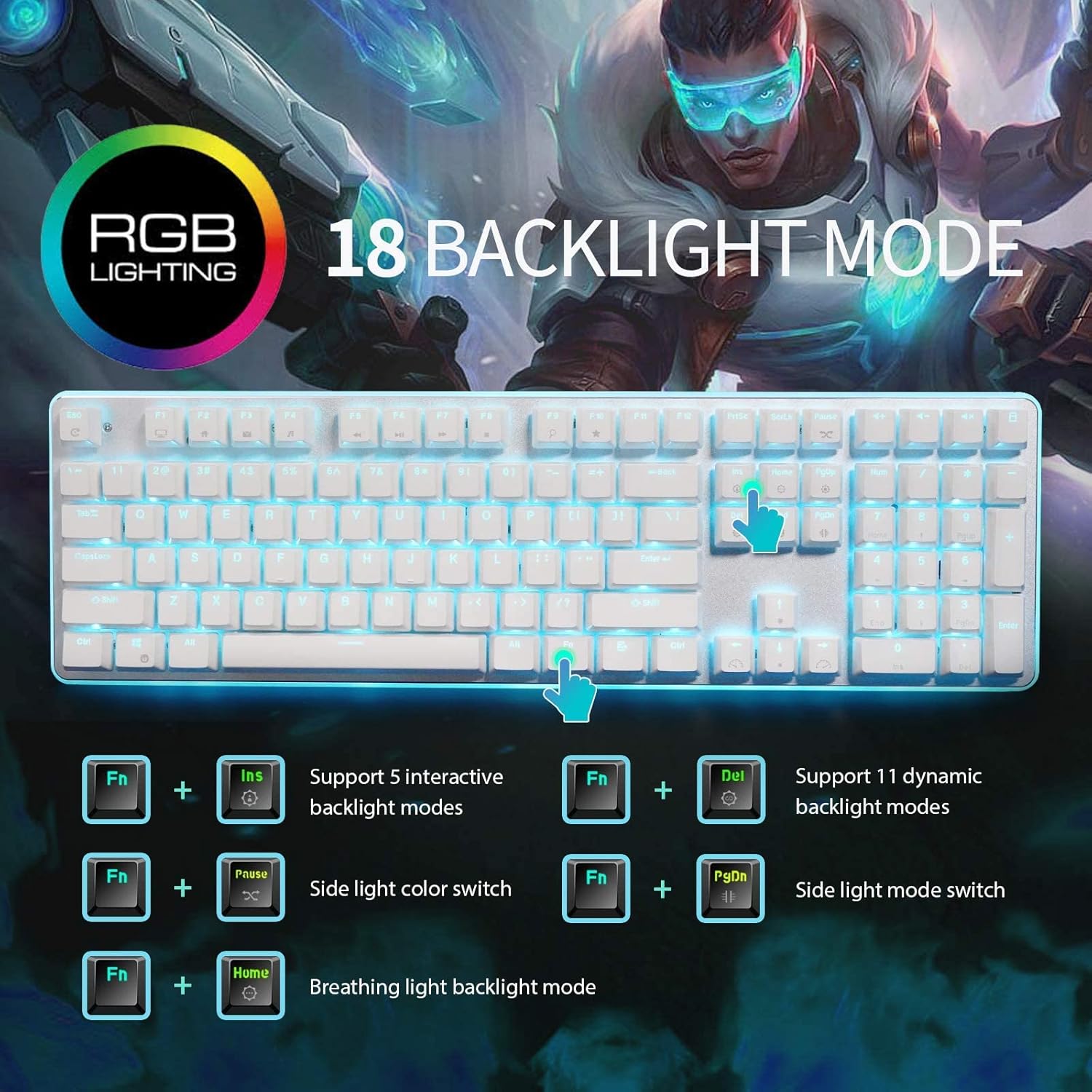
The Royal Kludge RK61 is an ultra-compact 60% mechanical gaming keyboard featuring brilliant RGB backlighting and smooth, linear RK Red switches. Equipped with versatile triple-mode connectivity (Bluetooth, 2.4GHz wireless, and USB-C wired), it offers maximum flexibility and a clean, cable-free desktop layout optimized for both competitive gaming and office productivity. ✅ Full Specifications: Model: Royal Kludge RK61 (61 Keys) — Black Edition Interface / Connection: Triple Mode Connection (3C): Wireless 2.4GHz (via included USB dongle) Bluetooth 5.1 (Pairs with up to 3 devices simultaneously) Wired USB Type-C (Detachable cable included) Interface / Connection: Triple Mode Connection (3C): Wireless 2.4GHz (via included USB dongle) Bluetooth 5.1 (Pairs with up to 3 devices simultaneously) Wired USB Type-C (Detachable cable included) Switch Type: RK Red Mechanical Switches (Linear feel, smooth and quiet keystrokes, ideal for fast-paced gaming and quiet office typing) Hot-Swappable PCB: Yes (Supports easy replacement of 3-pin or 5-pin switches without soldering) Layout: Compact 60% Minimalism Layout, 61 Keys (US QWERTY / Arabic-English dual print variants supported) Backlighting: Full dynamic RGB Backlight with 18 customizable lighting modes, 8 monochrome modes, and adjustable brightness/speed Material & Build: Durable ABS polymer housing with high-quality ergonomically curved keycaps to reduce hand fatigue Design & Form Factor: Compact, space-saving design with a built-in 8° ergonomic typing angle for optimal comfort Battery Capacity: 1450mAh rechargeable battery built-in (Up to 13 hours of continuous use with backlighting active, high standby efficiency) Compatibility: Windows, macOS, Android, iOS, Linux, and major gaming consoles Dimensions: Approx. 289 x 103 x 39 mm (11.4 x 4 x 1.6 inches) Weight: Approx. 0.50 kg (1.1 lbs)

OEM-quality trackpad replacement (without flex cable) for MacBook Pro 14″ (Model A2442, 2021, M1 Pro/Max) in Silver finish—designed for precise Force Touch performance, seamless gesture control, and perfect visual integration with the original chassis. Compatible With: MacBook Pro 14-inch (2021, Model A2442) with Apple M1 Pro or M1 Max chip. Part Type: Trackpad only—does not include the flex cable, Taptic Engine, or mounting hardware. Intended for professional technicians who will reuse the original internal components. Finish: Silver—matches the Silver and Space Gray top/bottom case (Apple uses the same trackpad finish across both color variants for this model). Force Touch Capable: Fully supports pressure-sensitive input and haptic feedback when paired with the original Taptic Engine and logic board—ensuring full macOS gesture and functionality support. OEM Precision: Features the same glass surface, curvature, and micro-click mechanism as Apple’s original—delivering consistent tracking accuracy and tactile response. Installation Requirements: Requires complete bottom case removal and careful transfer of the original flex cable and Taptic Engine. Adhesive must be applied precisely to maintain structural integrity and sensor alignment. Recommended for certified or experienced repair professionals only.

Arabic Silicone Keyboard Skin Cover for MacBook Pro 13" A1708 Without Touch bar and MacBook 12" A1534 with Retina Display US Layout (Black) Arabic Silicone Keyboard Skin Cover for MacBook Pro 13″ A1708 Without Touch bar and MacBook 12″ A1534 with Retina Display US Layout (Black) About this item Arabic language silicone keyboard skin, US version, perfect fit for your MacBook 12″ A1534, which was released in 2015 & new MacBook Pro 13-Inch 13″ Model A1708 without/no Touch Bar, which was released in 2016; Do not fit for Europe Version MacBook Handmade Skin – XSKN is the original Manufacturer of these “Keyboard Art Skin” silicone covers. They are durable, thin and soft with a cashmere feel. The keys fit snug over the keyboard, smooth surface treatment, suit for regular laptop user who types a lot and quickly Each XSKN silicone skin is heat molded to ensure, each color is paints taking hand screened using silicone paint which is heat fuses into the silicone keyboard skin to become one, making it Soft, ultra-thin, durable and easy to washable High quality silicone raw material assure no extension with longtime using. Every detail clearly prinited, imported ink keep it looking good, rubber coating help to remain in good condition Aside from being beautiful they protect your keyboard from spills, crumbs, animal hair and dust. Washable, can be cleaned easily

A reliable pre-owned HP EliteBook 840 G3 with 14" display, 6th Gen Core i5, 8GB RAM, and 256GB SSD—offering solid business performance, security, and durability for everyday professional use.

A4tech KR-85 Natural A Rounded Edge Ergonomical Keyboard

Original top case (upper case) assembly for MacBook model A2338 (2020/2022), pulled from a working unit. Includes keyboard, battery, and palm rest — ready for drop-in replacement of a damaged upper half. This is a genuine Apple top case (upper case) assembly removed from a functioning MacBook Pro A2338. Ideal to replace a worn, cracked, or non-functional upper chassis with a fully integrated solution. It carries all the components you need for the top half of the laptop — keyboard, battery, housing, etc. Key Features & Components OEM top case: Apple original part Includes backlit keyboard built into the upper case Integrated battery cells mounted to the housing Palm rest / palm area with matching finish Cutouts and mounts for trackpad, speakers, and internal cabling Compatible with A2338 MacBook Pro (2020 M1 / 2022 M2) models Requires transfer of the Touch ID sensor, as it’s paired to the logic board not included in the case May or may not include trackpad (depending on seller / condition) Tested for battery health, keyboard functionality, internal connections (unless otherwise stated) Detailed Specifications Important Notes & Caveats Must ensure exact model (A2338) — other top cases won’t match in ports, screw layout, and internal fit. Transfer the Touch ID / fingerprint sensor from your original case — it’s tied to the logic board. Check battery condition before listing / resale — internal cells may have wear. Minor cosmetic defects or marks may exist due to being a used part. Installation requires moderate repair skills — ribbon cables, screws, and internals must be aligned correctly.

Genuine-spec US layout keyboard replacement for MacBook Pro (Model A1398, Late 2011–Mid 2012)—featuring durable scissor-switch keys, backlighting, and OEM-fit design for reliable typing and straightforward installation. Compatible With: MacBook Pro 13″: Late 2011 (Model A1278, but labeled A1398 in some regions) – Model Identifier MacBookPro8,1 MacBook Pro 15″: Early 2011, Late 2011, and Mid 2012 – Model Identifiers MacBookPro8,2 (15″ early/late 2011) and MacBookPro9,1 (15″ mid 2012) *(Note: “A1398” is primarily associated with the 15″ unibody MacBook Pro with Retina display (Mid 2012), which was the first Retina MacBook Pro.)* This keyboard fits the non-Retina 15″ A1398 (Mid 2012) and compatible Late 2011 models. MacBook Pro 13″: Late 2011 (Model A1278, but labeled A1398 in some regions) – Model Identifier MacBookPro8,1 MacBook Pro 15″: Early 2011, Late 2011, and Mid 2012 – Model Identifiers MacBookPro8,2 (15″ early/late 2011) and MacBookPro9,1 (15″ mid 2012) *(Note: “A1398” is primarily associated with the 15″ unibody MacBook Pro with Retina display (Mid 2012), which was the first Retina MacBook Pro.)* This keyboard fits the non-Retina 15″ A1398 (Mid 2012) and compatible Late 2011 models. Layout: Standard US English (QWERTY) with full-size keys, inverted-T arrow keys, and dedicated function row (F1–F12). Keyboard Type: Traditional scissor-switch mechanism—robust, tactile, and serviceable (pre-Butterfly era). Integrated Features: Backlit keys (adjustable brightness via F5/F6) OEM ribbon cable with ZIF connector Matches original key spacing and actuation force Backlit keys (adjustable brightness via F5/F6) OEM ribbon cable with ZIF connector Matches original key spacing and actuation force Build & Fit: Precision-molded plastic frame with exact screw mounts and alignment pegs—ensures secure, rattle-free installation in the top case. Installation Note: Keyboard is secured with screws and minimal adhesive. Requires full top case access and battery disconnect. Recommended for intermediate to advanced users or technicians.

Genuine-spec touchpad flex cable for Apple’s 12-inch MacBook (Model A1534, Early 2015 / Early 2016 / Mid 2017)—essential for restoring full Force Touch trackpad functionality, haptic feedback, and multi-touch gesture support. Compatible With: MacBook 12″ (Early 2015) – 1.1GHz Core M MacBook 12″ (Early 2016) – 1.1GHz/1.3GHz Core M MacBook 12″ (Mid 2017) – 1.2GHz/1.3GHz Core m3/i5/i7 All share Model Number A1534 and Model Identifier MacBook8,1 / MacBook9,1 / MacBook10,1 respectively. MacBook 12″ (Early 2015) – 1.1GHz Core M MacBook 12″ (Early 2016) – 1.1GHz/1.3GHz Core M MacBook 12″ (Mid 2017) – 1.2GHz/1.3GHz Core m3/i5/i7 All share Model Number A1534 and Model Identifier MacBook8,1 / MacBook9,1 / MacBook10,1 respectively. Part Type: Touchpad flex cable only—does not include the trackpad housing, Taptic Engine, or mounting brackets. This is the ribbon cable that connects the Force Touch trackpad to the logic board. Function: Critical for Force Touch functionality—transmits pressure-sensitive input, multi-touch gestures (e.g., pinch, swipe, Force Click), and haptic feedback signals to the Taptic Engine. OEM-Quality Construction: Precisely matches Apple’s original in length, connector pitch, shielding, and routing—ensures reliable signal integrity and compatibility with macOS. Common Use Cases: Replacing a torn, creased, or liquid-damaged flex cable Restoring unresponsive or erratic trackpad behavior Completing a trackpad replacement when the original cable is unusable Replacing a torn, creased, or liquid-damaged flex cable Restoring unresponsive or erratic trackpad behavior Completing a trackpad replacement when the original cable is unusable Installation Note: Requires full bottom case removal and delicate disconnection of the ZIF connector. The cable routes tightly under the battery—extreme care is required. Recommended for experienced or certified technicians only.

Logitech C270 HD webcam — 720p USB camera with built-in mic and automatic light correction. Solid pick for video calls, remote work, or basic streaming. This is the Logitech C270 HD Webcam, a budget plug-and-play USB camera suited for everyday video calls. It doesn’t strive for professional streaming quality, but it reliably handles meeting needs, student calls, or backup cam duties. Key Features & Functionality Records video in HD 720p at 30 fps Fixed focus lens (no autofocus) Built-in mono microphone with noise reduction (captures voice clearly in standard environments) Automatic light correction (RightLight / similar tech) to adjust in low or uneven lighting Universal mounting clip: works on laptop lids, monitors, or can sit on a shelf USB 2.0 interface, 1.5 m (≈ 5 ft) cable length Technical Specifications Strengths & Limitations Pros: Reliable and easy to set up: plug and play Good for video calls in decent lighting Noise suppression in mic helps reduce background hiss Affordable alternative if your built-in camera fails Cons: Only 720p — not ideal for high quality streaming Fixed focus — manual adjusting can’t zoom/focus No privacy shutter (you may need stickers or external cover) Color and sharpness aren’t top tier under weak light

The 60W MagSafe 2 Power Adapter features a magnetic DC connector so if someone should trip over it, the cord disconnects harmlessly and your MacBook Pro stays put safely. It also helps prevent fraying or weakening of the cables over time. In addition, the magnetic DC helps guide the plug into the system for a quick and secure connection. The 60W MagSafe 2 Power Adapter features a magnetic DC connector so if someone should trip over it, the cord disconnects harmlessly and your MacBook Pro stays put safely. It also helps prevent fraying or weakening of the cables over time. In addition, the magnetic DC helps guide the plug into the system for a quick and secure connection. When the connection is secure, an LED located at the head of the DC connector lights up; an amber light lets you know that your notebook is charging, while a green light tells you that you have a full charge. An AC cord is provided with the adapter for maximum cord length, while the AC wall adapter (also provided) gives you an even easier and more compact way to travel. Designed to be the perfect traveling companion, the adapter has a clever design which allows the DC cable to be wound neatly around itself for easy cable storage. Compatible with MacBook Pro with 13-inch Retina display. See this article for more details about choosing the right one. Knowing which specific Mac model you have is important. If you are running OS X Lion (10.7) or later go to the “” menu at the top left of your screen, choose “About this Mac” then click the “More Info…” button. Your Mac model and generation will be displayed. If you are running an earlier version of OS X, you can enter your serial number here to find out which model you have. COMPATIBILITY Mac Models: MacBook Pro (Retina, 13-inch, Late 2012 – 2015)

This 1.8-meter DisplayPort to HDMI cable lets you connect a DisplayPort-enabled PC or laptop to an HDMI monitor, TV, or projector. It delivers clear high-definition video and reliable signal transmission, making it perfect for office work, presentations, and home entertainment. The DisplayPort to HDMI cable (1.8M) is a simple and reliable solution for connecting modern computers and laptops with a DisplayPort output to HDMI displays. Ideal for upgrading your setup, it supports high-quality video output for monitors, HDTVs, and projectors. With plug-and-play functionality and a durable build, it ensures stable performance for both professional and home use. DisplayPort to HDMI Connection for easy compatibility with HDMI screens 1.8M Cable Length ideal for desk and office setups High-Definition Video Output for clear and sharp visuals Plug & Play no drivers required Durable Connectors & Cable Build for long-term reliability Perfect for Work & Entertainment supports monitors, TVs, and projectors Works with devices that have a DisplayPort output and displays with an HDMI input, including monitors, TVs, projectors, and display systems. Ideal for workstations, presentations, and dual-screen setups.

The 512GB Apple MacBook SSD is a high-speed solid-state drive designed for select MacBook Pro and MacBook Air models from 2013 to 2015. It delivers fast boot times, quick file access, and reliable performance, making it an ideal replacement or upgrade for aging Apple laptops. Key Features 512GB Storage Capacity – Plenty of space for macOS, applications, and files High-Speed SSD Performance – Faster boot times and smoother system operation Apple Proprietary Interface – Designed specifically for compatible MacBooks Reliable & Durable – No moving parts for improved stability and longevity Perfect Upgrade or Replacement – Restore performance or increase storage Compatible Models MacBook Pro Retina 13-inch (2013–2015) MacBook Pro Retina 15-inch (2013–2015) MacBook Air 11-inch (2013–2015) MacBook Air 13-inch (2013–2015) Compatible Model Numbers MacBook Pro: A1398, A1502 MacBook Air: A1465, A1466

A reliable pre-owned Dell Latitude 5480 with 14" display, 7th Gen Core i5, 8GB RAM, and 256GB SSD—offering solid business performance, security, and durability for everyday professional use.

The Lenovo V130 is powered by an Intel Core i5 7th Gen processor, paired with 8GB RAM and a fast 256GB SSD for smooth and reliable everyday performance. Designed for office work, study, and productivity, it features a simple, durable design and a clear 15.6-inch non-touch display for comfortable daily use.

WIWU Alpha Double Layer Sleeve Bag For 16\14″ Laptop/MacBook Brand: WIWU The corner patent design protects your laptop from bumps and drops in potential accident. SBS water resistance zipper Retractable waterproof TPU handle, firm and scratch resistant (commonly used in car trailer ropes) 2 compartment zipper design, organize your accessories well Water-resistant material

Apple MacBook Pro 15” (2018) — professional-grade performance for creative power users.• Intel Core i9 • 32 GB RAM • 500 GB SSD • 4 GB Dedicated GraphicsRetina Display | macOS |

Genuine-spec Touch Bar assembly with integrated flex cable for MacBook Pro 15″ (Models A1706 – 2017 and A1989 – 2018)—fully restores dynamic Touch ID, system controls, and app-specific functions with OEM-level fit and reliability. Compatible With: MacBook Pro 15″ (2017) – Model A1706 (Intel Core i7/i9, 4 Thunderbolt 3 ports) MacBook Pro 15″ (2018) – Model A1989 (Intel Core i7/i9, 4 Thunderbolt 3 ports) MacBook Pro 15″ (2017) – Model A1706 (Intel Core i7/i9, 4 Thunderbolt 3 ports) MacBook Pro 15″ (2018) – Model A1989 (Intel Core i7/i9, 4 Thunderbolt 3 ports) Includes: Complete Touch Bar module with pre-attached flex cable, integrated Touch ID sensor (doubles as power button), and ambient light sensor—ready for direct connection to the logic board. Full Functionality: Restores all Touch Bar features including dynamic app controls, system brightness/volume sliders, Siri, and fingerprint authentication via Touch ID. Color Match: Available in Space Gray and Silver—select the finish that matches your MacBook’s top case. OEM-Quality Build: Matches Apple’s original dimensions, sensor alignment, and surface texture—ensures seamless integration with macOS and consistent responsiveness. Installation Note: Requires full top case disassembly. The flex cable routes under the left speaker and connects near the logic board—precision is critical to avoid damage. Recommended for experienced technicians.
