
Samsung Lebanon 32″ Flat The Samsung Lebanon 32″ Flat Everything you need is right in your screen. Watch, work and chat – all without connecting a separate PC – with Smart Monitor. Your favorite content, productivity and video call apps are built-in. for a simpler and more stylish desk setup that’s a joy to use every time. Smart TV Experience Effortless entertainment. Enjoy Netflix, YouTube and other streaming services by simply connecting the monitor to WiFi. Samsung TV Plus also offers free live and on-demand content with no downloads or sign-up needed. while Universal Guide provides personalized content recommendations. Workspace Experience PC-less. Browse the web, edit documents and work on projects, all without the need for a separate PC. With new Workmode, you can also remotely access another PC, use Microsoft 365 programs . and even connect to Samsung mobile devices with Samsung DeX for seamless working. SlimFit camera Jump into any conversation. The SlimFit camera with tilt functionality allows you to create the perfect angle while using. your favorite video call apps like Google Duo, which can be accessed directly through the monitor. Plus, the camera cover and option to fully detach always protect your privacy. IoT Hub Turn your Smart Monitor into a control center for the home by connecting it to your IoT home products with SmartThings. Relax by turning off the lights, pulling down the blinds and setting the thermostat. to the perfect temperature all with the Smart Monitor for a perfectly relaxed evening. Mobile connectivity Convenient connectivity. With AirPlay integration, you can wirelessly connect Apple devices to the Smart Monitor and view on a bigger screen. Enjoy your favorite content from an iPhone, iPad, and Mac on the Smart Monitor and even mirror apps, documents, and websites. Adaptive Picture Sensational picture, day or night. Surrounding light is detected by a sensor to adjust brightness automatically with Adaptive Picture. Even in broad daylight, watch dark, gritty dramas without squinting and straining your eyes to see the picture. Specifications: Specifications Aspect Ratio16:9 Brightness (Typical)250 cd/㎡ Contrast Ratio Static3,000:1 (Typ.) Resolution1,920 x 1,080 Response Time4ms (GTG) Viewing Angle (H/V)178°/178° 3 year warranty Manufacturer Link

WiWU WI‑C052 Converter – Compact aluminum adapter enables OTG and fast PD-style charging (≈27 W) with USB‑C/Lightning on USB‑A ports.Supports high-speed 10 Gbps data transfer, is plug‑and‑play, and works across phones, tablets, and laptops. Functionality: OTG-capable USB-A to USB-C (A→C) Data Transfer: Supports USB 3.2 (up to 10 Gbps) and backward compatible with USB 3.0/2.0 Fast Charging: Supports PD profile fast charging (up to ~27W Apple PD equivalent) without triggering charge pop-ups Build: Durable aluminum-alloy shell with silicone lanyard design for portability and heat dissipation Compatibility: Works with smartphones, tablets, laptops—enabling USB-A peripherals, USB-C or Lightning cables Plug & Play: No drivers required; reversible connector design Portability: Lightweight, compact—easy to carry

The Cudy WR3000 AX3000 WiFi 6 Router delivers ultra-fast wireless speeds and improved network efficiency with the latest WiFi 6 technology. Designed for modern homes and offices, it offers high-speed Gigabit connectivity, wider coverage, and stable performance for multiple devices. AX3000 WiFi 6 Speed – Combined speeds of up to 3000Mbps for ultra-smooth streaming, gaming, and downloads. Next-Gen WiFi 6 Technology – Improved efficiency, lower latency, and better performance for multiple connected devices. Gigabit Ethernet Ports – High-speed WAN and LAN ports for maximum wired performance. Enhanced Coverage – High-performance antennas provide strong and stable WiFi signal across your space. OFDMA & MU-MIMO – Efficient data transmission to multiple devices simultaneously without slowing down the network. Multiple Operating Modes – Supports Router, Access Point, and Repeater modes for flexible setup. Advanced Security – WPA3/WPA2 encryption ensures a secure and protected network. 1 × Gigabit WAN Port 4 × Gigabit LAN Ports Dual Band WiFi (2.4GHz & 5GHz) WiFi 6 (802.11ax) Ethernet (RJ45) Wireless Security (WPA2/WPA3)

Genuine-spec touchpad flex cable compatible with both MacBook Air A2179 (Intel, 2020) and A2337 (M1, 2020)—restores full Force Touch functionality, haptic feedback, and precise multi-touch gesture control during trackpad repair or replacement. Compatible With: MacBook Air 13″ (2020, Intel) – Model A2179 (Model Identifier: MacBookAir9,1) MacBook Air 13″ (2020, Apple M1) – Model A2337 (Model Identifier: MacBookAir10,1) MacBook Air 13″ (2020, Intel) – Model A2179 (Model Identifier: MacBookAir9,1) MacBook Air 13″ (2020, Apple M1) – Model A2337 (Model Identifier: MacBookAir10,1) ✅ Important Note: Despite different processors (Intel vs. M1), Apple used the same trackpad assembly and flex cable in both A2179 and A2337. This makes the flex cable fully interchangeable between the two models. Part Type: Touchpad flex cable only — does not include the trackpad housing, Taptic Engine, or mounting hardware. This is the OEM-style ribbon cable that connects the trackpad to the logic board. Function: Transmits: Touch input coordinates Force Touch pressure data Haptic feedback signals to the Taptic Engine Enables full macOS gesture support: Force Click, three-finger lookup, swipe navigation, pinch-to-zoom, and smooth cursor tracking. Touch input coordinates Force Touch pressure data Haptic feedback signals to the Taptic Engine Enables full macOS gesture support: Force Click, three-finger lookup, swipe navigation, pinch-to-zoom, and smooth cursor tracking. OEM-Quality Build: Matches Apple’s original specifications in: Cable length and routing path Connector pitch and ZIF latch design EMI shielding and flex durability Cable length and routing path Connector pitch and ZIF latch design EMI shielding and flex durability Common Use Cases: Replacing a torn, creased, or liquid-damaged original flex cable Completing a trackpad replacement when the original cable is compromised Fixing intermittent trackpad behavior, loss of Force Touch, or complete unresponsiveness Replacing a torn, creased, or liquid-damaged original flex cable Completing a trackpad replacement when the original cable is compromised Fixing intermittent trackpad behavior, loss of Force Touch, or complete unresponsiveness Installation Note: Requires full bottom case removal and battery disconnection. Cable routes under the right side of the battery and logic board. Connects via a ZIF (Zero Insertion Force) socket—align carefully and latch gently. Recommended for experienced or certified technicians only. Requires full bottom case removal and battery disconnection. Cable routes under the right side of the battery and logic board. Connects via a ZIF (Zero Insertion Force) socket—align carefully and latch gently. Recommended for experienced or certified technicians only.

A sleek and responsive pre-owned MacBook Pro 15" (2015) with a brilliant Retina display, upgraded 16GB RAM, fast 128GB SSD, and efficient Intel Iris Pro graphics—ideal for students, developers, and everyday productivity.

Are you in search of a reliable monitor that combines functionality and style? Look no further than the LG DualUp 28″ Monitor. This comprehensive review will delve into its features, highlighting why it’s an excellent choice for both work and play. Firstly, the dual-screen capabilities of the LG 28″ Monitor provide a seamless multitasking experience. Boost your productivity by effortlessly managing multiple applications side by side, streamlining your workflow. The sleek design of this monitor not only adds a touch of sophistication to your workspace but also ensures practicality. Its slim bezels and adjustable stand contribute to a clutter-free and ergonomic setup, promoting comfort during extended use. With a crisp 4K UHD resolution, this monitor delivers stunning visuals, making it ideal for both work and entertainment. Enjoy sharp images and vibrant colors for a truly immersive experience, whether you’re editing documents or watching your favorite movies. Connectivity is a breeze with the LG 28″ Monitor. Multiple ports, including HDMI and USB-C, offer versatile options for connecting various devices. Say goodbye to cable clutter and hello to a streamlined and organized workspace. The inclusion of reader mode and flicker-safe technology prioritizes your eye health during prolonged use. Reduce eye strain and fatigue, ensuring a comfortable viewing experience for extended periods. In conclusion, the LG DualUp 28″ Monitor is a versatile and stylish addition to any workspace. Its dual-screen capabilities, sleek design, and advanced features make it a top choice for those seeking an enhanced computing experience. Upgrade your setup with the LG DualUp 28″ Monitor today! Specifications: Display : 28″ Nano IPS Resolution : SDQHD (2560 x 2880) Refresh Rate : 60hz Response Time : 5ms GTG

The HP Series 5 Pro 23.8″ FHD USB‑C Conferencing Monitor delivers crisp visuals on a 23.8‑inch Full HD IPS screen with a 16:9 aspect ratio. Additionally, it features a built‑in 5 MP Poly Studio tiltable webcam. This webcam, combined with AI noise reduction, ensures clear video and audio during calls. Moreover, the monitor supports USB‑C video input with up to 100 W power delivery. It also provides USB‑C data transfer, HDMI 2.0, DisplayPort 1.4, USB‑A ports with one charging port, an audio combo jack, and an RJ‑45 Ethernet port. These connections simplify hybrid work setups. Furthermore, the ergonomic stand allows height adjustment for comfort. The ambient light sensor with HP Eye Ease reduces blue light while preserving color accuracy. The monitor incorporates recycled materials in its design and comes with a three‑year limited warranty for peace of mind. Specifications: 23.8″ Full HD (1920 × 1080) IPS display with 350 nits brightness and 1500:1 contrast Built‑in 5 MP Poly Studio webcam with AI noise reduction USB‑C video with up to 100 W power delivery and USB‑C data port HDMI 2.0, DisplayPort 1.4, USB‑A ports, Ethernet, and audio combo jack Ergonomic stand with height adjustment and HP Eye Ease ambient light sensor

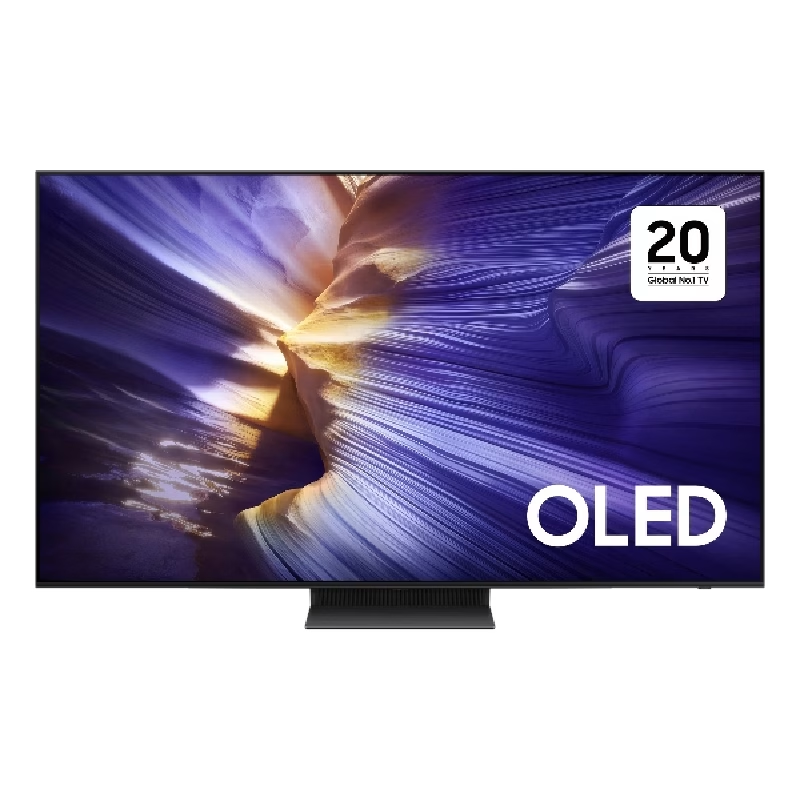
The Samsung 77 OLED S85F 4K Vision AI Smart TV QA77S85FAEXTW delivers a premium home cinema experience built on advanced OLED technology. It produces deep blacks, rich colors, and strong contrast, so movies, sports, and games look more realistic on the large 77-inch screen. OLED technology controls each pixel individually, so every detail appears with high precision. This improves dark scenes by keeping blacks deep and detailed, while bright areas stay clean and accurate. As a result, the picture stays balanced in both bright and dark environments. Samsung Vision AI improves picture and sound in real time. It analyzes each scene and adjusts brightness, color, and sharpness automatically. Therefore, the Samsung 77 OLED S85F 4K Vision AI Smart TV QA77S85FAEXTW always delivers optimized visuals without manual settings. In addition, AI upscaling improves lower-resolution content closer to 4K quality. HDR expands contrast and color depth, making visuals more lifelike. Fast motion also appears smoother and clearer, which improves sports and action viewing. The Smart TV system gives access to streaming apps, games, and smart home features. It runs smoothly and is easy to navigate. In addition, the slim design with thin bezels gives the Samsung 77 OLED S85F 4K Vision AI Smart TV QA77S85FAEXTW a modern, premium look. Overall, this Samsung OLED TV combines strong picture quality, AI optimization, and smart connectivity for a high-end viewing experience. Specifications: OLED technology delivers deep blacks and rich color accuracy 77-inch 4K display provides immersive large-screen viewing Vision AI optimizes picture and sound automatically in real time HDR enhances contrast, brightness, and color depth Smart TV platform supports streaming apps and smart features

The MSI PRO MP272L E2 27-inch business monitor is designed for productivity, office workflows, and everyday multitasking. It offers a clean and modern design that fits well in professional setups. Therefore, it helps users stay focused while maintaining an organized workspace. Moreover, the IPS panel delivers consistent colors and wide viewing angles for comfortable collaboration. The Full HD resolution ensures clear text and sharp visuals for documents, spreadsheets, and web browsing. In addition, the 100Hz refresh rate provides smoother scrolling and a more responsive experience than standard office displays. The monitor also includes MSI Eye Care technologies such as anti-flicker and low blue light support. As a result, it reduces eye strain during long working sessions. Furthermore, adaptive sync support helps improve smoothness in general media playback. In addition, the MSI PRO MP272L E2 27-inch business monitor supports multiple connectivity options, making it easy to connect laptops, desktops, and other devices. It also includes tilt adjustment for better ergonomic positioning. Consequently, it is suitable for both home offices and corporate environments. The MSI PRO MP272L E2 27-inch business monitor delivers a balanced mix of comfort, clarity, and productivity-focused performance. Specifications: 27-inch Full HD (1920 × 1080) IPS display 100Hz refresh rate for smoother visuals Anti-flicker and low blue light eye-care technology Wide 178° viewing angles for consistent colors HDMI and DisplayPort connectivity with ergonomic tilt support

BenQ RE8604 86” 4K UHD Interactive Flat Panel is a large interactive display designed for classrooms, meeting rooms, and training environments. It supports touch interaction, built-in Android system, and 4K resolution for collaboration and presentations. It features an 86-inch IPS panel with 3840 × 2160 4K UHD resolution. Therefore, it delivers sharp visuals and wide viewing angles for group use. In addition, it supports up to 40-point multi-touch input for writing and collaboration. Moreover, it runs an Android-based system (EDLA-supported depending on configuration). As a result, users can open apps, use whiteboard tools, and present content directly on the display without an external PC. The display includes anti-glare glass. Therefore, it remains readable in bright environments. In addition, it supports 4K 60Hz output for smooth visuals during presentations and video playback. Furthermore, it includes HDMI, USB, USB-C, LAN, and OPS slot connectivity. As a result, it works with laptops, external PCs, and modular computing systems. It also includes built-in speakers for classroom and meeting audio. Therefore, it supports presentations without extra sound systems. Finally, the BenQ RE8604 delivers a large 4K interactive workspace with multi-touch control and flexible connectivity for education and business use. Specifications: Display: 86-inch IPS panel with 3840×2160 4K UHD resolution Touch: Up to 40-point multi-touch support for collaboration System: Android-based interactive platform (EDLA support depending on model) Connectivity: HDMI, USB, USB-C, LAN, and OPS slot Display: Anti-glare screen with 4K 60Hz smooth output

Mouschi Field Computer Mouse Pad, Non-Slip Rubber Base and Textured Stitched Edge Mousepads, Mouse Pad Pack for Office and Home Mouschi Field Computer Mouse Pad, Non-Slip Rubber Base and Textured Stitched Edge Mousepads, Mouse Pad Pack for Office and Home Brand: Mouschi Size: Small – 290 X 240 X 3mm Medium – 360 X 300 X 3mm Large – 450 X 400 X 4 mm X-Large – 900 X 420 X 4 mm Color: Black Recommended uses for product: Gaming Material: fabric Mouschi Field Mouse Pad Micro-Weave Fabric: Creates a dense surface for a faster and smoother glide for your mouse. Durable Stitched Anti-Fray Edges: 360° of stitching guards against surface peeling. Staying Power: An anti-skid textured rubber base keeps the mouse pad securely in place even during the most intense gaming sessions. Brand: Mouschi Size: Small – 290 X 240 X 3mm Medium – 360 X 300 X 3mm Large – 450 X 400 X 4 mm X-Large – 900 X 420 X 4 mm Color: Black Recommended uses for product: Gaming Material: fabric

The ViewSonic VG2239Smh 22″ 60Hz Monitor is designed to elevate your viewing experience. With its 22-inch screen, this monitor offers a perfect balance between size and performance for both work and entertainment. Enjoy clear and vibrant visuals with the ViewSonic VG2239Smh. The full HD 1080p resolution delivers sharp and detailed images, making it ideal for watching videos, working on documents, or browsing the web. With a refresh rate of 60Hz, the ViewSonic VG2239Smh Monitor ensures smooth and fluid motion. This makes it perfect for casual gaming and watching fast-paced videos without any lag or stuttering. The ViewSonic VG2239Smh Monitor features versatile connectivity options, including HDMI, DisplayPort, and VGA inputs. This allows you to easily connect your computer, laptop, or other devices for a seamless setup. Designed with ergonomics in mind, the ViewSonic VG2239Smh Monitor offers a range of adjustable features. You can tilt, swivel, and adjust the height to find the most comfortable viewing angle, reducing strain during extended use. The monitor also includes built-in speakers, providing a convenient audio solution without the need for external speakers. Enjoy clear and crisp sound for your videos, music, and other media. The ViewSonic VG2239Smh Monitor is energy-efficient, helping you save on electricity bills while reducing your carbon footprint. It meets various energy standards, making it an eco-friendly choice for your home or office. In conclusion, the ViewSonic VG2239Smh 22″ 60Hz Monitor combines stunning visuals, smooth performance, and ergonomic design for an exceptional viewing experience. Upgrade to the ViewSonic VG2239Smh today and enjoy the perfect blend of functionality and style. Specifications: Display : 22″ VA Resolution : FHD 1920 x 1080 Refresh Rate : 60Hz Response Rate : 5ms Built-in Speaker : 2x 2 Watt

The MSI MAG 255XFV 25″ FHD 250Hz Gaming Monitor is built for fast-paced competitive gaming. It features a 24.5-inch Full HD (1920×1080) Rapid VA panel with a 250Hz overclocked refresh rate for ultra-smooth motion. Additionally, it delivers a 0.5ms (GtG) response time, reducing motion blur in fast scenes. The monitor also uses Adaptive-Sync technology to reduce screen tearing and stuttering during gameplay. Therefore, the MSI MAG 255XFV 25″ FHD 250Hz Gaming Monitor is designed for responsiveness, speed, and smooth visual performance in competitive titles. Moreover, it includes MSI gaming features such as AI Vision, Less Blue Light, and Anti-Flicker technology for improved viewing comfort. Specifications: 24.5-inch Full HD (1920×1080) Rapid VA panel 250Hz (OC) refresh rate for ultra-smooth gameplay 0.5ms (GtG) fast response time for reduced blur Adaptive-Sync technology for tear-free visuals MSI AI Vision, Anti-Flicker, and Less Blue Light support

Genuine-spec touchpad flex cable for MacBook Pro 13″ (Model A2289, 2020, Intel)—restores full Force Touch functionality, haptic feedback, and preci multi-touch gesture control. OEM-quality replacement for damaged or faulty original cables. Compatible With: MacBook Pro 13-inch (2020, Four Thunderbolt Ports, Model A2289, Model Identifier MacBookPro16,2) with Intel Core i5/i7 processors. Part Type: Touchpad flex cable only — does not include the trackpad housing, Taptic Engine, or mounting hardware. This is the OEM-style ribbon cable that connects the trackpad to the logic board. Function: Transmits: Touch input coordinates Force Touch pressure data Haptic feedback signals to the Taptic Engine Enables full macOS gesture support: Force Click, three-finger lookup, swipe navigation, pinch-to-zoom, and smooth cursor tracking. Touch input coordinates Force Touch pressure data Haptic feedback signals to the Taptic Engine Enables full macOS gesture support: Force Click, three-finger lookup, swipe navigation, pinch-to-zoom, and smooth cursor tracking. OEM-Quality Build: Matches Apple’s original specifications in: Cable length and routing path Connector pitch and ZIF latch design EMI shielding and flex durability Cable length and routing path Connector pitch and ZIF latch design EMI shielding and flex durability Common Use Cases: Replacing a torn, creased, or liquid-damaged original flex cable Completing a trackpad replacement when the original cable is unusable Fixing: Intermittent or erratic trackpad behavior Loss of Force Touch or haptic feedback Complete trackpad unresponsiveness Replacing a torn, creased, or liquid-damaged original flex cable Completing a trackpad replacement when the original cable is unusable Fixing: Intermittent or erratic trackpad behavior Loss of Force Touch or haptic feedback Complete trackpad unresponsiveness Intermittent or erratic trackpad behavior Loss of Force Touch or haptic feedback Complete trackpad unresponsiveness Installation Note: Requires full bottom case removal and battery disconnection. Cable routes under internal components (speaker, logic board)—must follow original path. Connects via ZIF (Zero Insertion Force) socket—align carefully, never force. Recommended for experienced or certified technicians only. Requires full bottom case removal and battery disconnection. Cable routes under internal components (speaker, logic board)—must follow original path. Connects via ZIF (Zero Insertion Force) socket—align carefully, never force. Recommended for experienced or certified technicians only. Important Compatibility Notes: ✅ Only for A2289 (13″, 4 Thunderbolt ports, 2020, Intel) ❌ Not compatible with: A2251 (2 Thunderbolt ports, 2020) A2338 (M1 MacBook Pro, 2020) Any MacBook Air or 14″/16″ MacBook Pro ✅ Only for A2289 (13″, 4 Thunderbolt ports, 2020, Intel) ❌ Not compatible with: A2251 (2 Thunderbolt ports, 2020) A2338 (M1 MacBook Pro, 2020) Any MacBook Air or 14″/16″ MacBook Pro A2251 (2 Thunderbolt ports, 2020) A2338 (M1 MacBook Pro, 2020) Any MacBook Air or 14″/16″ MacBook Pro

MacBook Pro 13″ Keyboard Replacement/Compatible for Apple MacBook Pro A1708 Color :- Black, Layout :- US Apple MacBook Pro A1708 Keyboard is a high quality replacement keyboard which is perfect for replacing your old and broken laptop keyboard. Before you order,Please firstly compare the picture with your keyboard, especially the ribbon cable (position, length and width). Make sure that the model of laptop and part number of keyboard is the right one you need as well as the layout version.

A1618 Replacement Battery for MacBook Pro 15 Inch Retina A1398 (Early 2015), Laptop A1494 A1618 Replacement Battery Capacity: 8440mAh/95.03Wh 11.26V, Battery Type: Li-Polymer 【Package include: 1pcs – OEM laptop replacement battery for macbook air 13 inch, 2pcs – screwdrivers, 1pcs – Professional installation instructions】 【Operating life and certification】UL-/CE-/FCC-/RoHS-Certified/PSE Report for safety. Cobalt Proportion: >98%. Upgrade chip — Up to 1500+ recharge cycles over the life of the battery, Long operating time after charging full with 8440mAh real high capacity, same with original battery A1494/A1618 【Premium Electric Core】Japan Newest 4.0 upgraded OEM Battery for macbook pro 15 Inch A1398 (Late 2013, Mid 2014, Early 2015). Better circuit board, multiple command chip control, keep the battery stable charge and discharge.Over charger and discharger (short-circuit) protection, ensure fast charges and low power consumption 【Compatibility】 MacBook pro 15” Retina A1398 (Late 2013, Mid 2014, Early 2015) ME293 ME294 MGXA2 MGXC2 MJLQ2 MJLT2 MJLU2. Please check the picture to get more detail

This 1.8-meter DisplayPort to HDMI cable lets you connect a DisplayPort-enabled PC or laptop to an HDMI monitor, TV, or projector. It delivers clear high-definition video and reliable signal transmission, making it perfect for office work, presentations, and home entertainment. The DisplayPort to HDMI cable (1.8M) is a simple and reliable solution for connecting modern computers and laptops with a DisplayPort output to HDMI displays. Ideal for upgrading your setup, it supports high-quality video output for monitors, HDTVs, and projectors. With plug-and-play functionality and a durable build, it ensures stable performance for both professional and home use. DisplayPort to HDMI Connection for easy compatibility with HDMI screens 1.8M Cable Length ideal for desk and office setups High-Definition Video Output for clear and sharp visuals Plug & Play no drivers required Durable Connectors & Cable Build for long-term reliability Perfect for Work & Entertainment supports monitors, TVs, and projectors Works with devices that have a DisplayPort output and displays with an HDMI input, including monitors, TVs, projectors, and display systems. Ideal for workstations, presentations, and dual-screen setups.

The Dell OptiPlex 3040 Micro delivers dependable business performance in a compact, energy-efficient design. Featuring an Intel Core i5 6th Gen processor, 8GB DDR3L RAM, and SSD storage options, it is built for smooth multitasking, fast startups, and reliable operation in professional environments.

Acer V227Q BIV Monitor Aspect Ratio 16:9 MasterFormat® Number 11 28 00 Model Number *227Q Power Supply No Screen Size (in.) 21.5 3 Years Warranty

Genuine-spec touchpad flex cable for MacBook Pro 13″ (Model A2338, 2020, Apple M1)—essential for restoring full Force Touch functionality, haptic feedback, and precise multi-touch gesture control during trackpad repair or replacement. Compatible With: MacBook Pro 13-inch (2020, Model A2338, Model Identifier MacBookPro17,1) with Apple M1 chip (2 Thunderbolt ports). Part Type: Touchpad flex cable only — does not include the trackpad housing, Taptic Engine, or mounting hardware. This is the OEM-style ribbon cable that connects the trackpad to the logic board. Function: Transmits: Touch input coordinates Force Touch pressure data Haptic feedback signals to the Taptic Engine Enables full macOS gesture support: Force Click, three-finger lookup, swipe navigation, pinch-to-zoom, and smooth cursor tracking. Touch input coordinates Force Touch pressure data Haptic feedback signals to the Taptic Engine Enables full macOS gesture support: Force Click, three-finger lookup, swipe navigation, pinch-to-zoom, and smooth cursor tracking. OEM-Quality Build: Matches Apple’s original specifications in: Cable length and routing Connector pitch and ZIF latch design EMI shielding and flex durability Cable length and routing Connector pitch and ZIF latch design EMI shielding and flex durability Common Use Cases: Replacing a torn, creased, or liquid-damaged original flex cable Completing a trackpad replacement when the original cable is compromised Fixing intermittent trackpad behavior, loss of Force Touch, or complete unresponsiveness Replacing a torn, creased, or liquid-damaged original flex cable Completing a trackpad replacement when the original cable is compromised Fixing intermittent trackpad behavior, loss of Force Touch, or complete unresponsiveness Installation Note: Requires full bottom case removal and battery disconnection. Cable routes under internal components near the right speaker and logic board. Connects via a ZIF (Zero Insertion Force) socket—must be aligned carefully and latched gently. Recommended for experienced or certified technicians only. Requires full bottom case removal and battery disconnection. Cable routes under internal components near the right speaker and logic board. Connects via a ZIF (Zero Insertion Force) socket—must be aligned carefully and latched gently. Recommended for experienced or certified technicians only. Important Compatibility Notes: ✅ Only for A2338 (13″, M1, 2020) ❌ Not compatible with: Intel-based A2251 / A2289 (2020) MacBook Air M1 (A2337) Any MacBook Air or 14″/16″ MacBook Pro ✅ Only for A2338 (13″, M1, 2020) ❌ Not compatible with: Intel-based A2251 / A2289 (2020) MacBook Air M1 (A2337) Any MacBook Air or 14″/16″ MacBook Pro Intel-based A2251 / A2289 (2020) MacBook Air M1 (A2337) Any MacBook Air or 14″/16″ MacBook Pro
