
The Lenovo Monitor 32″ C32U‑40 (63DAGAT2EU) delivers crisp and detailed visuals with its 32‑inch 4K UHD display. Its high resolution shows clear text and sharp images, making it easier to work on spreadsheets, view photos, or stream video content. In addition, the IPS panel provides wide viewing angles so colors stay accurate when viewed from different positions. Furthermore, this monitor includes smooth motion support with a 60 Hz refresh rate that keeps everyday use and video playback fluid. It also offers essential connectivity options, allowing you to connect laptops, desktops, and media players without extra adapters. Therefore, it fits well in both home and office setups needing dependable display quality and practical performance. Overall, the Lenovo C32U‑40 combines large‑screen clarity, wide viewing angles, and flexible connections in a reliable 32‑inch design that supports both productivity and entertainment. Specifications: 32″ 4K UHD (3840×2160) IPS display for detailed visuals Wide viewing angles for consistent color Smooth everyday performance Essential connectivity for laptops and desktops Practical design for work and media use

ZOWIE XL2411K ZOWIE XL2411K With the introduction of the PS5 and Xbox Series X. console gamers are finally able to take advantage of a 120Hz refresh rate . This is a significant upgrade for competitive FPS players, as the increased smoothness and clarity . can result in quicker reaction times and easier tracking of enemies. DyAc™ Technology – A Different Spray Feeling DyAc™ makes vigorous in-game actions such as spraying less blurry. This allows gamers to see the position of crosshair and impact points more clearly which can help with recoil control. Different In-Game Color Modes – Play To Your Liking We are releasing tailored game modes to meet different preferences and scenarios. Each color setting takes careful consideration, game by game, scene by scene. to make sure the colors work throughout the gameplay, and not compromised across different maps. Make Visual Adjustments Based on Your In-Game Needs Black eQualizer to increase visibility in dark scenes without the bright areas. Color Vibrance to adjust color setting and tone to differentiate enemy targets in-game. and Game modes to switch between presets for different game titles. these are all adjustments that allow players to play with their preferred visual settings. XL Setting to Share Share your own settings with a teammate, friend, or your fans. Save video profiles quickly and share conveniently through a simple user interface. Fluid & Flexible Adjustment – More Comfort In-Game We understand that each player has his/her own unique combination of monitor height and angle adjustment. With height adjustment & free tilt, players are able to setup quickly and conveniently resulting in a more comfortable playing environment. Smaller Base – More Playing Space New base is designed to take up less space while maintaining the same stability. This allows gamers more space in their setup for in-game movements and allows. them the flexibility to make adjustments and play comfortably. Specifications: Specifications LCD size (inch) 24″ Aspect ratio 16:9 Max. resolution (PC/Laptop) 1920 x 1080 at 144Hz (HDMI 2.0, DP) Max. resolution (Console) 1920 x 1080 at 120Hz for PS5 / Xbox series X (HDMI2.0) Refresh rate 144Hz Display area (mm) 531.36 x 298.89 Pixel pitch (mm) 0.276 1 year warranty Manufacturer Link

Used, original 35 W USB-C charger for Mac — reliable Apple power adapter (dual USB-C) for charging your Mac and other devices. This is an authentic Apple 35 W USB-C power adapter (dual-port) — used but tested. It’s built to charge MacBooks, iPhones, iPads, and other USB-C devices. Though lower wattage than larger Mac adapters, it works well for light use or supplemental charging. Features & Behavior Dual USB-C ports: can charge two devices simultaneously Intelligent power distribution: if both ports are used, the output splits evenly (~17.5 W each) USB Power Delivery support across standard profiles (5V, 9V, 15V, 20V) Accepts input 100-240V AC, so usable worldwide (with correct plug) Compact form factor in one variant, or standard “duckhead” plug style in another Specifications Strengths & Limitations Pros Authentic Apple unit — safer and more reliable than generic chargers Dual ports give flexibility — charge phone + Mac concurrently Portable and suitable for travel (universal voltage) Cons 35 W is low for MacBook Pro under load — might not maintain charging during heavy use When both ports used, power is halved (~17.5 W each) Used condition may include wear, scuffs, or reduced efficiency

HP LaserJet 179fnw is a compact color laser multifunction printer that offers printing, scanning, copying, and faxing in one device. With Wi-Fi wireless printing, fast performance, and high-quality color output, it is suitable for small offices, home offices, and business use.

The Samsung QLED 55″ 4K UHD Smart TV Q7 Series QA55Q7FAAU delivers a premium viewing experience with advanced QLED display technology. It produces bright, sharp, and colorful images, so movies, sports, and games look clear and immersive on the 55-inch screen. QLED technology uses Quantum Dot enhancement to improve brightness and color accuracy. As a result, visuals appear more vibrant and balanced across both dark and bright scenes. This helps maintain consistent picture quality in different lighting conditions and content types. Vision AI enhances picture and sound in real time. It analyzes each scene and automatically adjusts brightness, sharpness, and color for optimal results. Therefore, the TV consistently delivers improved visuals without manual tuning. In addition, AI upscaling improves lower-resolution content closer to 4K quality for better clarity and detail. HDR support expands contrast and color depth, making visuals more dynamic and lifelike. Fast motion handling also improves clarity, which enhances sports and action content by reducing blur and improving smoothness. The Smart TV platform provides easy access to streaming apps, gaming features, and smart home controls. It runs smoothly and allows quick switching between applications. In addition, the slim design with thin bezels gives the Samsung QLED 55 4K UHD Smart TV Q7 Series QA55Q7FAAU a modern and premium appearance suitable for any living space. Overall, this Samsung QLED TV combines strong brightness performance, AI optimization, and smart connectivity for a powerful home entertainment experience. Specifications: QLED technology delivers bright and vivid picture quality 55-inch 4K UHD display provides immersive viewing experience Vision AI enhances picture and sound automatically in real time HDR improves contrast, brightness, and color depth Smart TV platform supports apps, streaming, and smart features

Philips 241V8W/89 23.8-inch IPS Full HD monitor delivers clear visuals and reliable everyday performance. It focuses on wide viewing angles, smooth motion, and eye comfort for home and office use. Additionally, it features a 23.8-inch IPS panel with Full HD resolution (1920 × 1080). This provides sharp detail and consistent colors, so it improves viewing quality from different angles. Moreover, it supports a 75Hz refresh rate with Adaptive Sync. As a result, it delivers smoother motion and reduces screen tearing during video playback and casual use. The monitor includes a 4ms response time (GtG). Therefore, it handles everyday tasks smoothly with reduced motion blur. In addition, it uses an anti-glare coating with LowBlue Mode and Flicker-Free technology. So it reduces eye strain during long working sessions. Furthermore, it offers HDMI and VGA connectivity. This ensures compatibility with modern and older devices for flexible setups. Philips 241V8W/89 23.8-inch IPS monitor provides a balanced mix of clarity, comfort, and smooth performance for daily use. Specifications: 23.8-inch IPS panel with Full HD 1920 × 1080 resolution 75Hz refresh rate with Adaptive Sync support 4ms GtG response time for smooth visuals Anti-glare coating with wide 178° viewing angles LowBlue Mode and Flicker-Free eye comfort technology

MacBook Pro 13″ Retina A1989 / A2159 (2018-2019) Display Assembly (Silver) MacBook Pro 13″ Touch Bar 2019z A1989 (EMC 3214 MacBookPro15,2) 2.3 GHz A1989 (EMC 3214 MacBookPro15,2) 2.7 GHz MacBook Pro 13″ Touch Bar 2019 A1989 (EMC 3358 MacBookPro15,2) 2.4 GHz A1989 (EMC 3358 MacBookPro15,2) 2.8 Ghz MacBook Pro 13″ Two Thunderbolt Ports 2019 A2159 (EMC 3301 MacBookPro15,4) 1.4 GHz A2159 (EMC 3301 MacBookPro15,4) 1.7 GHz

Introducing the ASUS VG248QE 24″ 144Hz gaming monitor, designed to take your gaming experience to the next level. With its ultra-smooth 144Hz refresh rate, enjoy fluid motion and responsive gameplay for a competitive edge. Furthermore featuring a 24-inch display, the VG248QE delivers crisp, clear visuals with Full HD resolution. Dive into immersive worlds with stunning detail and vibrant colors, bringing your games to life like never before. Moreover equipped with ASUS-exclusive GamePlus technology, enhance your gaming performance with crosshair overlays, timer functions, and FPS counters. Gain the edge in fast-paced action games and dominate the battlefield with precision and accuracy. Say goodbye to motion blur and screen tearing thanks to the monitor’s 1ms response time and NVIDIA G-SYNC compatibility. Enjoy buttery-smooth gameplay with seamless graphics, ensuring every moment is immersive and lag-free. With ergonomic design features like tilt, swivel, pivot, and height adjustment, customize your gaming setup for optimal comfort and visibility. Stay comfortable during extended gaming sessions and maintain focus on the action. Connectivity options include DisplayPort, HDMI, and Dual-link DVI-D ports, providing versatile compatibility with gaming consoles, PCs, and other devices. Enjoy hassle-free connectivity and seamless integration into your gaming setup. In conclusion, the ASUS VG248QE 24″ 144Hz gaming monitor offers unparalleled performance, stunning visuals, and customizable features for the ultimate gaming experience. Elevate your gameplay and immerse yourself in the world of gaming excellence. Specifications: Display : 24″ Resolution : 1920×1080 FHD Refresh Rate : 144Hz Response Rate : 1ms Speaker : 2W Built-in Stereo Speaker

Xprinter XP-80T 80mm Thermal Receipt Printer Press to download driver: XPrinter Driver Setup V7.77

The HUAWEI IdeaHub Board 2 IHB2-65SU is a 65-inch intelligent collaboration display designed for meetings, classrooms, and hybrid work environments. It combines a 4K UHD interactive touchscreen with built-in collaboration tools for writing, presenting, and video communication. Additionally, it supports smooth interaction for real-time teamwork. Moreover, it features a 65-inch 4K (3840 × 2160) infrared multi-touch screen with up to 20 touch points. Therefore, users can write and interact accurately during meetings and lessons. Furthermore, Huawei designs it with ultra-low writing latency of around 16–25 ms. So, writing feels natural and responsive like a real whiteboard. It also includes anti-glare and zero-gap bonding for clearer visuals. In addition, it integrates a 4K display system with built-in speakers and microphone support. Therefore, it improves audio-visual communication for hybrid meetings and presentations. It also supports dual Wi-Fi and wireless projection from multiple devices. Also, it runs on Android-based system support with optional Windows OPS integration. So, it fits different enterprise IT environments and meeting setups. Overall, the Huawei IdeaHub Board 2 IHB2-65SU delivers interactive 4K collaboration, smooth writing performance, and flexible connectivity for modern workplaces and education spaces. Specifications: 65-inch 4K UHD infrared touch display Up to 20-point multi-touch support Ultra-low writing latency (~16–25 ms) Built-in speakers and conferencing support Wireless projection with dual Wi-Fi connectivity

Specifications Feature Value Feature Value Input/Output Other Sound Mode Extra Bass Mode Category Speakers Use Other Input Power (W) 25-49W Voice Control No Waterproof Yes Support APP No Intelligent Personal Assistant None Audio Crossover Full-Range Number of Loudspeaker Enclosures 2 Power Source None Channels 2 (2.0) Battery Yes Communication USB Speaker Type Portable Cabinet Material Plastic Brand Name QUCAA Origin Mainland China Certification CE

The HP Series 7 Pro 27″ 2K 165Hz Gaming Monitor delivers crisp, sharp visuals for games, work, and media. Its 2K resolution shows more detail than FHD. The 27-inch size gives ample space for immersive scenes and multitasking. This helps you see more content and stay productive. Moreover, the HP Series 7 Pro 27″ 2K 165Hz Gaming Monitor features a high 165 Hz refresh rate. This refresh rate makes motion smoother and cleaner on screen. Fast-paced games and action scenes appear smoother and responsive. This reduces blur and improves reaction time. In addition, the monitor offers low response time for precise input. Quick response helps reduce ghosting and keeps fast visuals sharp. It makes your movements feel accurate during gameplay. This enhances gaming performance, especially in competitive titles. Furthermore, the HP Series 7 Pro 27″ 2K 165Hz Gaming Monitor uses a high-quality panel with bright colors and good contrast. Colors stay strong and true under different viewing angles. Also, the monitor supports multiple connection options like HDMI and DisplayPort. This allows easy setup with PCs, laptops, or consoles. The installation is simple, and connections are stable. This makes it ready quickly for gaming or work. The monitor’s design is modern and minimal. The slim bezels offer a sleek look that fits many setups. The stand is stable and supports adjustable viewing angles. The build feels solid, adding long-term durability. Overall, the HP Series 7 Pro 27″ 2K 165Hz Gaming Monitor provides strong performance, sharp visuals, and smooth motion. It improves gaming, creative work, and daily tasks. It fits gamers, designers, and professionals who want quality and speed in one display. Specifications: Display : 27″ IPS Resolution : QHD 2560×1440 Refresh Rate : 165Hz Response Time : 5ms

The MSI PRO MP225V 22″ 100Hz Business Monitor is designed to improve productivity while maintaining eye comfort and reliable performance. With its 22-inch Full HD display, it provides sharp visuals and clear details for work and study. Moreover, the compact size makes it a perfect choice for small desks and home offices. Because comfort matters, this monitor includes TÜV-certified low blue light and flicker-free technology. As a result, you can work for longer hours without eye strain. In addition, the adjustable tilt feature helps you find the most natural viewing position for daily use. The MSI PRO MP225V 22″ 100Hz Business Monitor also ensures smooth visuals with its 100Hz refresh rate. Furthermore, it supports AMD FreeSync, reducing screen tearing and stuttering during presentations, videos, or even light gaming. Therefore, it offers a balance between work and entertainment. Connectivity options include HDMI and VGA, making it easy to link with various devices. Besides that, its slim design with narrow bezels provides a modern look while maximizing screen space. Not only is it efficient, but it is also compatible with VESA mounts, allowing flexible installation on a wall or monitor arm. In short, the MSI PRO MP225V 22″ 100Hz Business Monitor combines clarity, comfort, and versatility, making it a smart solution for professionals and students. Specifications: Display : 21.45″ IPS Screen : FHD (1920×1080) Refresh Rate : 100Hz Response Rate : 1ms (MPRT) / 4ms (GtG)

Samsung Monitor LS32BG850 32″Neo G8 4K Curved UHD Display Screen Size (Class)32 Flat / CurvedCurved Active Display Size (HxV) (mm)697.306 x 392.234 Screen Curvature1000R Aspect Ratio16:9 Panel TypeVA Brightness (Typical)350 cd/㎡ Peak Brightness (Typical)1000 cd/㎡ Brightness (Min)300 cd/㎡ Contrast Ratio Static1,000,000:1 Dynamic Contrast RatioMega DCR HDR(High Dynamic Range)Quantum HDR 2000 HDR10+Yes Mini LED Local DimmingYes (1,196 zones) HDR10+ GamingYes Resolution3,840 x 2,160 Response Time1ms(GTG) Viewing Angle (H/V)178°/178° Color SupportedMax 1B Color Gamut (DCI Coverage)95% (Typ) Refresh RateMax 240Hz Specifications: Specifications Screen Size (Class)32 Flat / CurvedCurved Active Display Size (HxV) (mm)697.306 x 392.234 Screen Curvature1000R Aspect Ratio16:9 Panel TypeVA Brightness (Typical)350 cd/㎡ Peak Brightness (Typical)1000 cd/㎡ Brightness (Min)300 cd/㎡ Contrast Ratio Static1,000,000:1 3 year warranty

Screen Gigabyte Monistor AORUS KD25F 24.5″ FHD Gaming Monitor 240Hz

This replacement touchpad for MacBook Air A2179 comes in Rose Gold and is sold without the flex cable. Perfect for restoring smooth trackpad performance, it’s ideal for repair technicians and users replacing a damaged or non-working touchpad. The MacBook Air A2179 Touchpad (Rose Gold) is a high-quality replacement part designed to restore full trackpad functionality to your laptop. Whether your original touchpad is unresponsive, physically damaged, or experiencing tracking issues, this replacement provides a reliable solution. Please note that this unit is without the flex cable, meaning it requires the original flex or a separate replacement flex for installation. Ideal for repair shops and technicians, it ensures smooth navigation and precise control. Compatible with MacBook Air A2179 Rose Gold Color Match for original look and finish Replacement Touchpad Only (without flex cable) Restores Smooth Trackpad Functionality Precision Tracking & Gesture Support (when installed correctly) Ideal for Repairs & Replacements High-Quality Build designed for durability and long use Designed specifically for Apple MacBook Air A2179 models. Recommended for technicians and repair shops or users replacing a faulty touchpad. Ensure compatibility before purchase and note that a flex cable is required for installation.

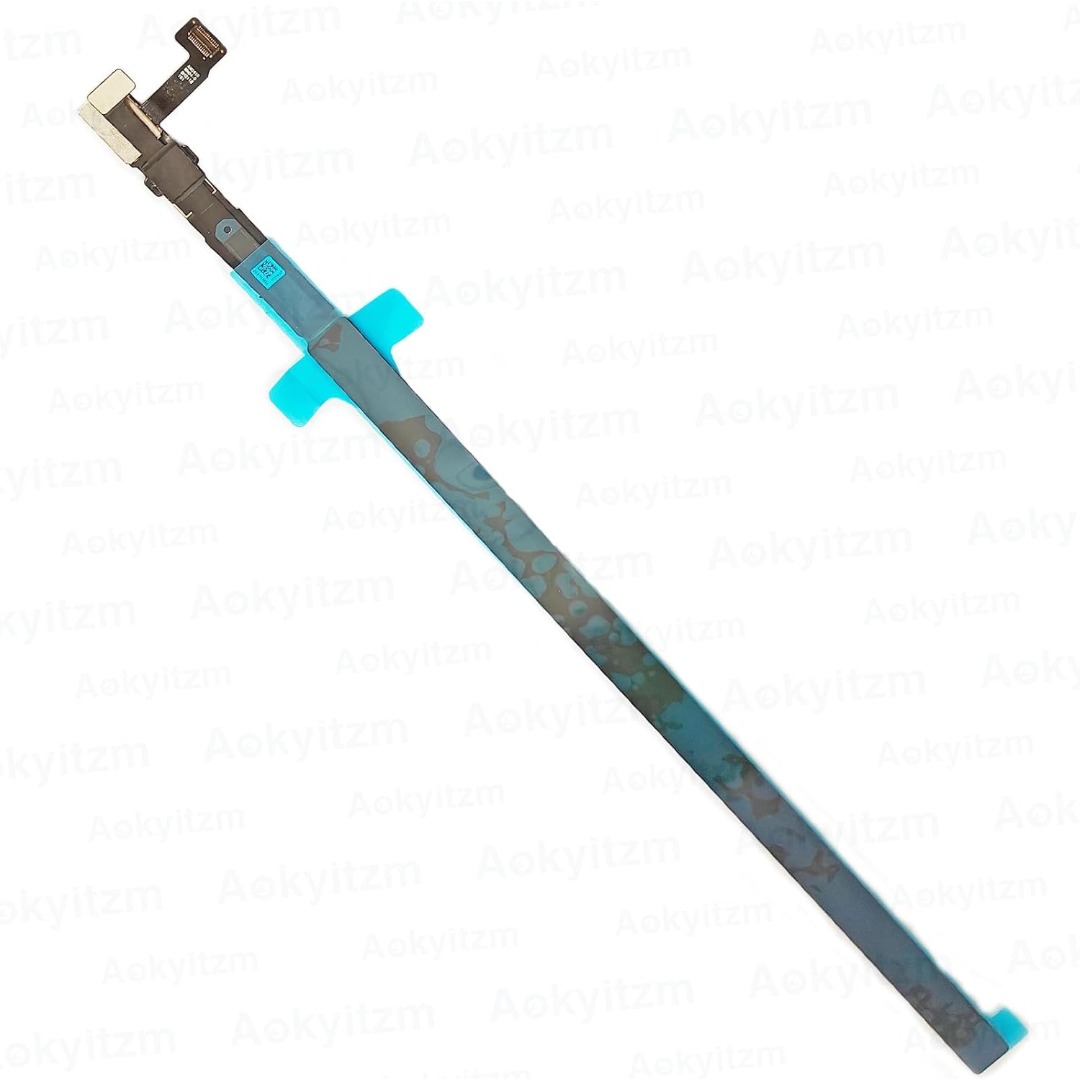
Genuine-spec touchpad flex cable for MacBook Pro 16″ (Model A2159, 2019, Intel)—essential for restoring full Force Touch functionality, haptic feedback, and precise trackpad responsiveness during repair or replacement. Compatible With: MacBook Pro 16-inch (2019, Model A2159) with Intel Core i7/i9 processors (Model Identifier: MacBookPro16,1). Part Type: Touchpad flex cable only—does not include the trackpad, Taptic Engine, or mounting hardware. This is the OEM-style ribbon cable that connects the trackpad to the logic board. Function: Transmits touch input, Force Touch pressure data, and haptic feedback signals—critical for macOS gestures (e.g., Force Click, three-finger swipe, pinch-to-zoom) and Taptic Engine operation. OEM-Quality Build: Matches Apple’s original flex circuit in length, connector pitch, shielding, and bend radius—ensures reliable signal integrity and durability under repeated use. Common Use Cases: Replacing a torn, frayed, or corroded original flex cable Completing a trackpad replacement when the original cable is damaged Fixing intermittent or unresponsive trackpad behavior caused by cable failure Replacing a torn, frayed, or corroded original flex cable Completing a trackpad replacement when the original cable is damaged Fixing intermittent or unresponsive trackpad behavior caused by cable failure Installation Note: Requires full bottom case removal and careful routing beneath the battery and logic board. Connectors use ZIF (Zero Insertion Force) sockets—must be properly aligned and latched without force. Recommended for certified or experienced technicians only.

Samsung Lebanon 32″ LS32C390EAMXUE The Samsung Lebanon 32″ Introducing the boldest curve ever This , born from years of and the future of monitor technology. Easy on the eyes In tol monitors that have less curve, 1000R fits the human field of view for less eye strain. A clinical study at Seoul National University Hospital shows that the closer to 1000R, the more it limits eye fatigue. Visionary Minimalism Next-generation design. The striking aesthetic is by a backside and premium-quality slim metal stand. The result is a monitor that won’t just catch eyes. but complements any interior, too. What Gamers Want Welcome to your new playground. AMD FreeSync delivers seamless gaming, while 75Hz makes scenes smooth. This flawless imagery comes together with Game Mode and the renowned 1000R curve for Focused Comfort Protect your eyes and do more. The T55’s advanced eye comfort technology reduces eye strain for more comfortable Flicker Free technology continuously removes tiring and irritating screen flicker, while Eye Saver Mode minimizes emitted blue light. Your eyes stay fresh longer. Ready to Entertain Connect to all your favorite devices with a convenient HDMI, DP, and D-Sub triple interface. The built-in 5 Watt speakers make it even easier lost in your favorite movies or TV shows, without plugging in a speaker. Easy on the eyes with 1000R curved screen Minimalist design with the borderless display, fabric-textured backside and slim metal stand Realistic immersion with the renowned 1000R curve and game-related features Running a monitor self-test is a simple and effective way to check the health and functionality of your computer monitor. The purpose of this test is to diagnose any potential issues with the monitor, such as dead pixels, color accuracy, contrast, or brightness problems. Power off both your computer and the monitor. 2Disconnect the signal cable from the back of the computer. 3Power on the monitor. Specifications: Specifications Screen Curvature1000R Active Display Size (HxV) (mm)698.4×392.85 Flat / CurvedCurved Screen Size (Class)32 3 year warranty Manufacturer Link

Are you in search of a reliable monitor that combines functionality and style? Look no further than the LG DualUp 28″ Monitor. This comprehensive review will delve into its features, highlighting why it’s an excellent choice for both work and play. Firstly, the dual-screen capabilities of the LG 28″ Monitor provide a seamless multitasking experience. Boost your productivity by effortlessly managing multiple applications side by side, streamlining your workflow. The sleek design of this monitor not only adds a touch of sophistication to your workspace but also ensures practicality. Its slim bezels and adjustable stand contribute to a clutter-free and ergonomic setup, promoting comfort during extended use. With a crisp 4K UHD resolution, this monitor delivers stunning visuals, making it ideal for both work and entertainment. Enjoy sharp images and vibrant colors for a truly immersive experience, whether you’re editing documents or watching your favorite movies. Connectivity is a breeze with the LG 28″ Monitor. Multiple ports, including HDMI and USB-C, offer versatile options for connecting various devices. Say goodbye to cable clutter and hello to a streamlined and organized workspace. The inclusion of reader mode and flicker-safe technology prioritizes your eye health during prolonged use. Reduce eye strain and fatigue, ensuring a comfortable viewing experience for extended periods. In conclusion, the LG DualUp 28″ Monitor is a versatile and stylish addition to any workspace. Its dual-screen capabilities, sleek design, and advanced features make it a top choice for those seeking an enhanced computing experience. Upgrade your setup with the LG DualUp 28″ Monitor today! Specifications: Display : 28″ Nano IPS Resolution : SDQHD (2560 x 2880) Refresh Rate : 60hz Response Time : 5ms GTG

Genuine-spec touchpad flex cable for MacBook Pro 14″ (Model A2442, 2021, M1 Pro/Max)—essential for restoring full Force Touch functionality, haptic feedback, and precise multi-touch gesture control. Compatible With: MacBook Pro 14-inch (2021, Model A2442) with Apple M1 Pro or M1 Max chip (Model Identifiers: MacBookPro18,3 / MacBookPro18,4). Part Type: Touchpad flex cable only—does not include the trackpad, Taptic Engine, or mounting brackets. This is the OEM-style ribbon cable that connects the trackpad to the logic board. Function: Carries touch input, Force Touch pressure data, and haptic feedback signals—critical for macOS trackpad gestures, Force Click, and Taptic Engine responsiveness. OEM-Quality Build: Matches Apple’s original flex circuit in length, connector pitch, shielding, and bend geometry—ensures reliable signal transmission and durability under repeated use. Common Use Cases: Replacing a damaged, torn, or corroded original flex cable Completing a trackpad replacement when the original cable is unusable Fixing intermittent trackpad issues, unresponsiveness, or loss of Force Touch Replacing a damaged, torn, or corroded original flex cable Completing a trackpad replacement when the original cable is unusable Fixing intermittent trackpad issues, unresponsiveness, or loss of Force Touch Installation Note: Requires full bottom case removal and careful routing beneath internal components. Connectors use ZIF (Zero Insertion Force) sockets—must be seated properly without force. Recommended for certified or highly experienced technicians only.
