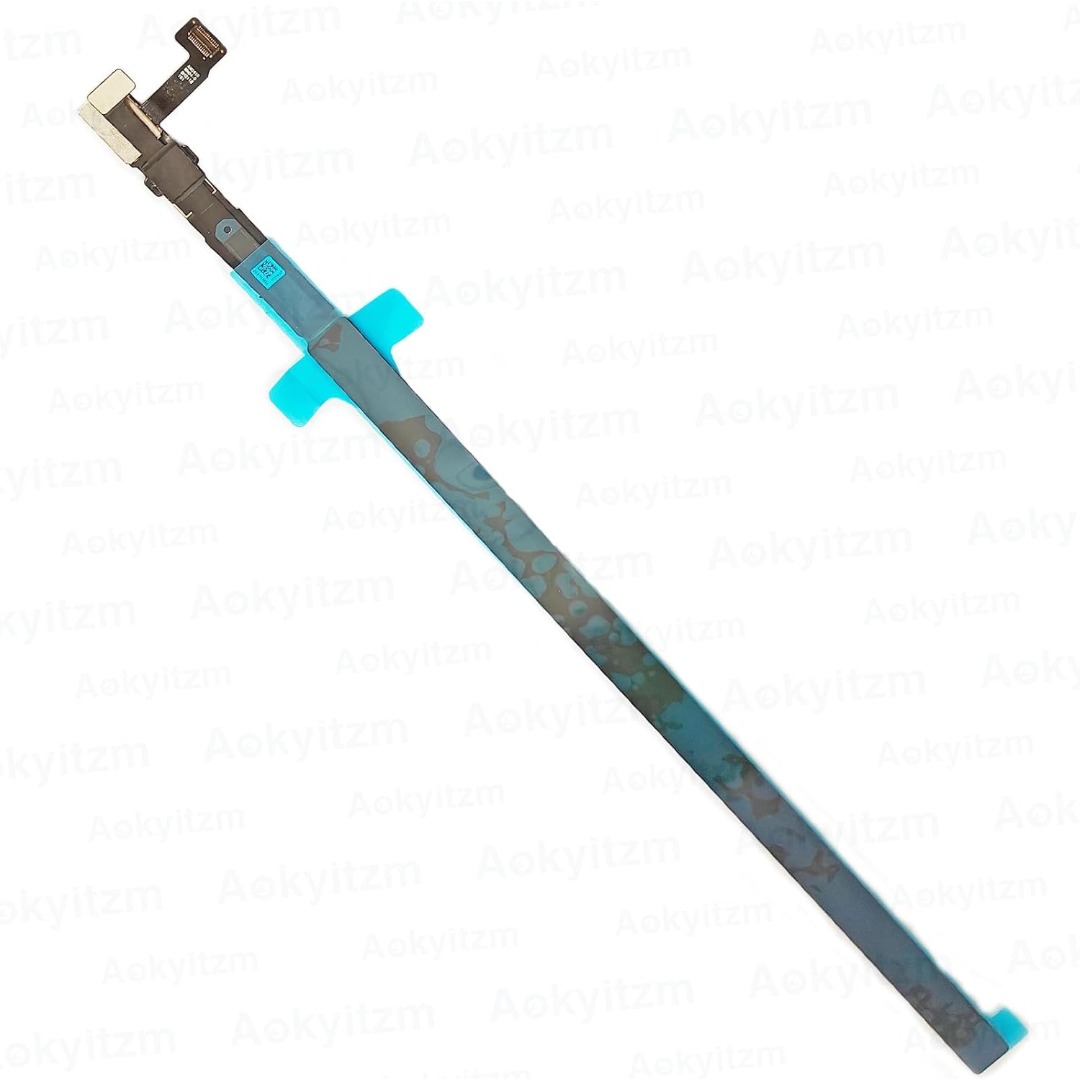

Genuine-spec touchpad flex cable for MacBook Pro 13″ with Touch Bar (Model A1708, 2016–2017)—restores full Force Touch functionality, haptic feedback, and precise multi-touch gesture control during trackpad repair or replacement. Compatible With: MacBook Pro 13″ (2016) – Model A1708 (Model Identifier: MacBookPro13,1) MacBook Pro 13″ (2017) – Model A1708 (Model Identifier: MacBookPro14,1) (Both years share the same internal trackpad assembly and flex cable.) MacBook Pro 13″ (2016) – Model A1708 (Model Identifier: MacBookPro13,1) MacBook Pro 13″ (2017) – Model A1708 (Model Identifier: MacBookPro14,1) (Both years share the same internal trackpad assembly and flex cable.) Part Type: Touchpad flex cable only — does not include the trackpad housing, Taptic Engine, or mounting hardware. This is the OEM-style ribbon cable that connects the trackpad to the logic board. Function: Transmits: Touch input coordinates Force Touch pressure data Haptic feedback signals to the Taptic Engine Enables full macOS gesture support: Force Click, three-finger lookup, swipe navigation, pinch-to-zoom, and smooth cursor tracking. Touch input coordinates Force Touch pressure data Haptic feedback signals to the Taptic Engine Enables full macOS gesture support: Force Click, three-finger lookup, swipe navigation, pinch-to-zoom, and smooth cursor tracking. OEM-Quality Build: Matches Apple’s original specifications in: Cable length and routing path Connector pitch and ZIF latch design EMI shielding and flex durability Cable length and routing path Connector pitch and ZIF latch design EMI shielding and flex durability Common Use Cases: Replacing a torn, creased, or liquid-damaged original flex cable Completing a trackpad replacement when the original cable is compromised Fixing intermittent trackpad behavior, loss of Force Touch, or complete unresponsiveness Replacing a torn, creased, or liquid-damaged original flex cable Completing a trackpad replacement when the original cable is compromised Fixing intermittent trackpad behavior, loss of Force Touch, or complete unresponsiveness Installation Note: Requires full bottom case removal and battery disconnection. Cable routes under internal components near the right speaker and logic board. Connects via a ZIF (Zero Insertion Force) socket—must be aligned carefully and latched gently. Recommended for experienced or certified technicians only. Requires full bottom case removal and battery disconnection. Cable routes under internal components near the right speaker and logic board. Connects via a ZIF (Zero Insertion Force) socket—must be aligned carefully and latched gently. Recommended for experienced or certified technicians only.

HP S3PRO 324pv Monitor Overview The HP S3PRO 324pv is a Full HD monitor designed for professional and office use. It delivers clear visuals and stable performance. As a result, it suits business environments and home offices. 23.8-Inch Full HD Display This monitor features a 23.8-inch Full HD resolution. Therefore, text appears sharp and easy to read. Moreover, images look clear and well balanced. Because of this, it supports long working sessions comfortably. In addition, wide viewing angles keep content visible from different positions. As a result, collaboration becomes easier. Smooth and Reliable Visual Performance The HP S3PRO 324pv provides smooth visuals for daily tasks. As a result, scrolling and multitasking feel natural. Furthermore, the display maintains consistent brightness. This improves overall viewing comfort. Eye Comfort and Anti-Glare Screen This monitor includes eye comfort features. Therefore, it helps reduce eye strain during extended use. In addition, the anti-glare coating minimizes reflections. As a result, the screen stays clear in bright environments. Connectivity and Easy Setup The HP S3PRO 324pv includes essential connectivity options. As a result, it connects easily to desktops and laptops. Moreover, setup is quick and simple. Therefore, users can start working immediately. Professional Design and Mounting Support The monitor features a clean and professional design. In addition, it supports VESA mounting. As a result, users can create a flexible workspace layout. Ideal for Business and Office Use This monitor focuses on clarity and reliability. Moreover, it supports productivity without distractions. In conclusion, the HP S3PRO 324pv is a practical Full HD monitor for professional use. Specifications: Display: 23.8-inch diagonal VA panel with 3-sided micro-edge bezels. Performance: 100Hz refresh rate for smooth visuals, 3000:1 contrast ratio, 250 nits brightness, 16:9 aspect ratio. Connectivity: 1x HDMI 1.4, 1x VGA.

Genuine-spec touchpad flex cable for MacBook Pro 15″ (Model A1707, 2016–2017)—restores full Force Touch functionality, haptic feedback, and precise multi-touch gesture control during trackpad repair or replacement. Compatible With: MacBook Pro 15″ (2016) – Model A1707 (Model Identifier: MacBookPro13,2) MacBook Pro 15″ (2017) – Model A1707 (Model Identifier: MacBookPro14,2) MacBook Pro 15″ (2016) – Model A1707 (Model Identifier: MacBookPro13,2) MacBook Pro 15″ (2017) – Model A1707 (Model Identifier: MacBookPro14,2) Part Type: Touchpad flex cable only — does not include the trackpad housing, Taptic Engine, or mounting hardware. This is the OEM-style ribbon cable that connects the trackpad to the logic board. Function: Transmits: Touch input coordinates Force Touch pressure data Haptic feedback signals to the Taptic Engine Enables full macOS gesture support: Force Click, three-finger lookup, swipe navigation, pinch-to-zoom, and smooth cursor tracking. Touch input coordinates Force Touch pressure data Haptic feedback signals to the Taptic Engine Enables full macOS gesture support: Force Click, three-finger lookup, swipe navigation, pinch-to-zoom, and smooth cursor tracking. OEM-Quality Build: Matches Apple’s original specifications in: Cable length and routing path Connector pitch and ZIF latch design EMI shielding and flex durability Cable length and routing path Connector pitch and ZIF latch design EMI shielding and flex durability Common Use Cases: Replacing a torn, creased, or liquid-damaged original flex cable Completing a trackpad replacement when the original cable is compromised Fixing intermittent trackpad behavior, loss of Force Touch, or complete unresponsiveness Replacing a torn, creased, or liquid-damaged original flex cable Completing a trackpad replacement when the original cable is compromised Fixing intermittent trackpad behavior, loss of Force Touch, or complete unresponsiveness Installation Note: Requires full bottom case removal and battery disconnection. Cable routes under internal components near the right speaker and logic board. Connects via a ZIF (Zero Insertion Force) socket—must be aligned carefully and latched gently. Recommended for experienced or certified technicians only. Requires full bottom case removal and battery disconnection. Cable routes under internal components near the right speaker and logic board. Connects via a ZIF (Zero Insertion Force) socket—must be aligned carefully and latched gently. Recommended for experienced or certified technicians only.

Samsung Lebanon 32″ Flat The Samsung Lebanon 32″ Flat Everything you need is right in your screen. Watch, work and chat – all without connecting a separate PC – with Smart Monitor. Your favorite content, productivity and video call apps are built-in. for a simpler and more stylish desk setup that’s a joy to use every time. Smart TV Experience Effortless entertainment. Enjoy Netflix, YouTube and other streaming services by simply connecting the monitor to WiFi. Samsung TV Plus also offers free live and on-demand content with no downloads or sign-up needed. while Universal Guide provides personalized content recommendations. Workspace Experience PC-less. Browse the web, edit documents and work on projects, all without the need for a separate PC. With new Workmode, you can also remotely access another PC, use Microsoft 365 programs . and even connect to Samsung mobile devices with Samsung DeX for seamless working. SlimFit camera Jump into any conversation. The SlimFit camera with tilt functionality allows you to create the perfect angle while using. your favorite video call apps like Google Duo, which can be accessed directly through the monitor. Plus, the camera cover and option to fully detach always protect your privacy. IoT Hub Turn your Smart Monitor into a control center for the home by connecting it to your IoT home products with SmartThings. Relax by turning off the lights, pulling down the blinds and setting the thermostat. to the perfect temperature all with the Smart Monitor for a perfectly relaxed evening. Mobile connectivity Convenient connectivity. With AirPlay integration, you can wirelessly connect Apple devices to the Smart Monitor and view on a bigger screen. Enjoy your favorite content from an iPhone, iPad, and Mac on the Smart Monitor and even mirror apps, documents, and websites. Adaptive Picture Sensational picture, day or night. Surrounding light is detected by a sensor to adjust brightness automatically with Adaptive Picture. Even in broad daylight, watch dark, gritty dramas without squinting and straining your eyes to see the picture. Specifications: Specifications Aspect Ratio16:9 Brightness (Typical)250 cd/㎡ Contrast Ratio Static3,000:1 (Typ.) Resolution1,920 x 1,080 Response Time4ms (GTG) Viewing Angle (H/V)178°/178° 3 year warranty Manufacturer Link

Arabic Language Ultra Thin Silicone Keyboard Cover for 2021 2020 MacBook Air 13 Inch A2179 and A2337 Apple M1 Chip (US Layout) with Touch ID Keyboard Accessories Protective Skin (Black) Color Black-Arabic Compatible Devices 2021 2020 MacBook Air 13.3-Inch with Apple M1 Chip (model: A2337), 2020 MacBook Air 13.3-Inch (model: A2179)2021 2020 MacBook Air 13.3-Inch with Apple M1 Chip (model: A2337), 2020 MacBook Air 13.3-Inch (model: A2179) Material Silicone Special Feature Waterproof, Dust Proof About this item [√] COMPATIBLE WITH: ONLY U.S keyboard layout–MacBook Air 13″ with Touch ID Early 2020 (model: A2179) and 2021 2020 MacBook Air 13″ with Apple M1 Chip (model: A2337). [√] MORE PROTECTION for KEYBOARD: waterproof, dust-proof and dirt-proof design can prevent liquid, dust, cigarette ash, biscuit crumbs falling onto your keyboard to affect your keyboard’s life. [√] ACCURATE KEYS: every key is specially molded, manufactured to the quality available. Flexible, this cover is easy to apply and remove for cleaning or disinfecting. [√] 0.25 MM THICKNESS: ultra thin silicone keyboard cover skin, made it easier for typing. Soft keyboard protector can weaken the sound in typing. About this item [√] COMPATIBLE WITH: ONLY U.S keyboard layout–MacBook Air 13″ with Touch ID Early 2020 (model: A2179) and 2021 2020 MacBook Air 13″ with Apple M1 Chip (model: A2337). [√] MORE PROTECTION for KEYBOARD: waterproof, dust-proof and dirt-proof design can prevent liquid, dust, cigarette ash, biscuit crumbs falling onto your keyboard to affect your keyboard’s life. [√] ACCURATE KEYS: every key is specially molded, manufactured to the quality available. Flexible, this cover is easy to apply and remove for cleaning or disinfecting. [√] 0.25 MM THICKNESS: ultra thin silicone keyboard cover skin, made it easier for typing. Soft keyboard protector can weaken the sound in typing.

LB-LINK BL-WN510BT – Compact USB Bluetooth 5.1 adapter with up to 20m range and support for multiple device types.Ideal for connecting headsets, gamepads, and more to PCs with strong, stable wireless performance. Model: LB-LINK BL-WN510BT Bluetooth Version: Bluetooth 5.1 (backward compatible with 5.0/4.2/4.0/3.0/2.0) Interface: USB 2.0 (Plug-and-Play) Operating Range: Up to 20 meters (unobstructed) Data Transfer Rate: Up to 3 Mbps Supported Profiles: A2DP, HSP, HFP, AVRCP, HID, PAN, FTP, SPP, etc. OS Compatibility: Windows 7 / 8 / 8.1 / 10 / 11 (Driver may be required for Win 7) Not natively compatible with macOS or Linux OS Compatibility: Windows 7 / 8 / 8.1 / 10 / 11 (Driver may be required for Win 7) Not natively compatible with macOS or Linux Functions: Enables PC or laptop Bluetooth connection with headsets, keyboards, mice, speakers, gamepads, printers, etc. Supports dual-mode Bluetooth (BR/EDR and LE) Functions: Enables PC or laptop Bluetooth connection with headsets, keyboards, mice, speakers, gamepads, printers, etc. Supports dual-mode Bluetooth (BR/EDR and LE) Power Consumption: Low Energy (LE) support for improved efficiency Security: Enhanced encryption and pairing features for secure connections Size: Ultra-compact nano design Weight: Less than 5g Plug & Play: Driver-free on Windows 10 and 11

0G74G Laptop Battery Replacement for Dell Latitude 5300 2-in-1 5310 7300 7400 Series Notebook OG74G 02PFPW 2PFPW 3KF82 8JYHH 11.4V 42Wh 3-Cell About this item Specification: Battery type: Li-ion. Color: Black. Voltage: 11.4V. Capacity: 42Wh/3Cell. New from Manufacturer Replace Part Number: For MXV9V 0G74G 00G74G 2PFPW 3KF82 8JYHH Compatible Models: Replacement for Dell Latitude 5300 E5300 / 5300 2-in-1 / 5310 E5310 / 5310 2-in-1 / 7300 E7300 / 7400 E7400 Series (Important Note: NOT fit for latitude 7400 2-in-1 Series) Note: The Dell laptop models on this product page are compatible with 2 battery models: 0G74G (42Wh 3-Cell 11.4V) , MXV9V(60Wh 4-Cell 7.6V). Please open the back cover of your laptop to check the original battery size and capacity before placing an order. Make sure that the battery model you need is 0G74G (42Wh 3-Cell 11.4V). Note: If the new battery is not recognized during the initial installation, please reinstall and check if the interface is fully connected. Discharge the new battery to 10-20% (not 0%), then charge and cycle 3-4 times to wake up the new battery

WiWU Linker 721HD Hub – Compact USB-C hub with 7 ports including 100W PD, dual USB-A, USB-C data, HDMI 4K60, and dual SD/TF slots.Aluminum body, plug‑and‑play compatibility with MacBooks and modern USB‑C devices—ideal for laptop expansion. Model: Linker 721HD (WiWU) Material: Aluminum-alloy shell Ports: 2 × USB‑A 3.1 1 × USB‑C 3.1 (data) 1 × USB‑C PD power delivery (up to 100 W) 1 × HDMI (4K @ 60 Hz) SD card slot + micro‑SD (TF) slot (USB 3.0 speed) Ports: 2 × USB‑A 3.1 1 × USB‑C 3.1 (data) 1 × USB‑C PD power delivery (up to 100 W) 1 × HDMI (4K @ 60 Hz) SD card slot + micro‑SD (TF) slot (USB 3.0 speed) Cable: Fixed USB‑C male cable (approx. 15 cm) Compatibility: Plug-and-play with USB-C/Thunderbolt 3/4 devices (MacBook, XPS, Chromebooks, mobile devices with DP-Alt Mode) Design: Compact, space gray finish optimized for travel/work setups Weight: ~150 g

HP P22V G5 Monitor Overview The HP P22V G5 is a 22-inch Full HD monitor designed for daily work and home use. It offers reliable performance and a clean design. As a result, it suits offices, students, and remote workers. 22-Inch Full HD Display This monitor features a 22-inch Full HD resolution. Therefore, text appears sharp and easy to read. Moreover, images look clear and well-defined. Because of this, it supports long working sessions comfortably. In addition, the screen size fits well on most desks. As a result, it saves space without sacrificing clarity. 75Hz Refresh Rate for Smooth Viewing The monitor supports a 75Hz refresh rate. As a result, scrolling feels smoother than standard displays. Furthermore, everyday tasks look more fluid. This makes it suitable for office work and casual entertainment. Eye Comfort and Productivity The HP P22V G5 includes eye comfort features. Therefore, it helps reduce eye strain during long use. In addition, the anti-glare screen improves visibility. As a result, users stay focused throughout the day. Connectivity and Compatibility This monitor includes HDMI and VGA ports. As a result, it connects easily to modern and older devices. Moreover, it supports a wide range of PCs and laptops. Therefore, setup is quick and simple. Design and Mounting Options The monitor features a clean and professional design. In addition, it supports VESA mounting. As a result, users can create a flexible workspace. Everyday Use and Reliability This monitor delivers stable performance for daily tasks. Moreover, it focuses on durability and efficiency. In conclusion, it is a practical choice for work environments. Specifications: Display : 21.45″ VA Resolution : FHD (1920 X 1080) Refresh Rate : 75 Hz Response Rate : 5ms GtG

The S3 2-in-1 Bluetooth Headset and Speaker is a versatile audio device that seamlessly transitions between personal listening and shared sound experiences. Designed for both convenience and high-quality audio performance, it caters to diverse user needs. Key Features: Dual Functionality: Operate as traditional over-ear headphones for private listening or twist the earcups outward to activate the external speaker mode, allowing you to share music with others. Superior Sound Quality: Equipped with advanced audio technology, the S3 delivers crisp and clear sound in both headphone and speaker modes, ensuring an immersive listening experience. Active Noise Cancellation (ANC): Reduces ambient noise, enabling users to enjoy music without external interruptions. Comfortable Design: Features extra-padded ear cushions and an adjustable headband, providing long-lasting comfort for extended use. Foldable and Portable: The foldable design makes it easy to carry, making it an ideal companion for travel and daily commutes. Multiple Playback Options: Supports Bluetooth 5.0 for wireless streaming, NFC for quick pairing, TF card slot for direct music playback, and FM radio functionality, offering a variety of listening choices. Long Battery Life: Built-in 600mAh rechargeable battery provides up to 14 hours of playback in headphone mode and 6.5 hours in speaker mode, ensuring uninterrupted entertainment. Integrated Controls and Microphone: Built-in controls allow for easy navigation between tracks, volume adjustment, and call management. The integrated microphone ensures clear hands-free communication.

The Horion Interactive Flat Panel 65″ transforms any space into a dynamic and interactive environment. Whether in classrooms or conference rooms, it enhances collaboration and productivity. Featuring a stunning 65-inch 4K UHD display, the Horion Interactive Flat Panel delivers crystal-clear visuals and vibrant colors. This ensures every detail is visible, making presentations and lessons more engaging. The Interactive Flat Panel comes with advanced touch technology, allowing multiple users to interact with the screen simultaneously. This fosters teamwork and encourages active participation. With built-in annotation tools, the Interactive Flat Panel 65″ makes it easy to highlight key points and add notes during presentations. These tools are intuitive and user-friendly, making it accessible for everyone. Connectivity is seamless with the Interactive Flat Panel. It offers multiple ports, including HDMI, USB, and wireless options, ensuring compatibility with various devices. This flexibility makes it easy to integrate into your existing setup. The Interactive Flat Panel 65″ is designed for ease of use. Its user-friendly interface and responsive touch screen make it simple to navigate and control. Whether you’re a teacher or a business professional, you’ll find it easy to use. In addition, the Interactive Flat Panel includes powerful built-in speakers, delivering clear and immersive audio. This enhances the overall experience, making it ideal for multimedia presentations. In conclusion, the Horion Interactive Flat Panel 65″ combines stunning visuals, interactive features, and ease of use for a superior collaborative experience. Upgrade your space with the Interactive Flat Panel and boost engagement and productivity today. Specifications: Display : 65″ Resolution : 4K (3840×2160) Refresh Rate : 60Hz CPU : Octacore Ram : 8GB Memory : 128GB GPU : Mali G52-MP8 OS : Android 13.0 Sensor : Infrared, NFC, Light Sensor

MacBook Pro 15″ Top case A1990 2018 2019 MacBook Pro 15″ A1990 MacBookPro15,1 Mid 2018: MR932LL/A or MR962LL/A (2.2 GHz Core i7) MacBookPro15,1 Mid 2018: MR942LL/A or MR972LL/A (2.6 GHz Core i7) MacBookPro15,3 Mid 2018: BTO/CTO (2.6 GHz Core i7) MacBookPro15,3 Mid 2018: BTO/CTO (2.9 GHz Core i9)

A sleek and secure pre-owned Dell Latitude 7490 with 14" display, 8th Gen Core i5, 8GB RAM, and 128GB SSD—designed for business professionals who need portability, durability, and enterprise-grade performance.

OEM-quality trackpad replacement (without flex cable) for MacBook Air 13″ (Model A2179, 2020)—available in Space Gray and Silver finishes—engineered for precise Force Touch performance, smooth multi-touch gestures, and seamless visual integration. Compatible With: MacBook Air 13-inch (2020, Model A2179) with Intel Core i3/i5/i7 processors (non-M1). Part Type: Trackpad only—does not include the flex cable, Taptic Engine, or mounting hardware. Designed for technicians who will reuse the original internal components. Color Options: Space Gray: Matches Space Gray and Midnight finishes Silver: Matches Silver and Starlight finishes (Note: “Z1” typically refers to Apple’s internal regional/part code—this listing covers standard OEM trackpads for A2179.) Space Gray: Matches Space Gray and Midnight finishes Silver: Matches Silver and Starlight finishes (Note: “Z1” typically refers to Apple’s internal regional/part code—this listing covers standard OEM trackpads for A2179.) Force Touch Capable: Fully supports pressure-sensitive input and haptic feedback when paired with the original Taptic Engine and logic board—ensuring full macOS gesture functionality. Precision Build: Mirror-smooth glass surface with exact curvature, texture, and micro-click mechanism matching Apple’s original design for consistent tracking and tactile response. Installation Requirements: Requires full bottom case disassembly and careful transfer of the original flex cable and Taptic Engine. Proper adhesive application is critical for structural integrity and sensor alignment. Recommended for professional or experienced repair technicians only. Important: This is a bare trackpad assembly—not a plug-and-play module. Functionality depends on correct integration with original electronics.

A compact and powerful pre-owned HP ProBook x360 435 G8 with 13.3" non-touch display, AMD Ryzen 7 5800U, 16GB RAM, and 512GB SSD—offering strong performance and 360° versatility without touch, ideal for professionals and students on the go.

The LG 27GX790A-B 27″ OLED QHD 480Hz gaming monitor delivers extreme speed and stunning image quality for competitive and professional gamers. Its 27-inch QHD OLED panel produces deep contrast, vibrant colors, and sharp detail, making every scene more immersive. Moreover, OLED technology provides fast pixel response for smooth visuals and minimal motion blur during high-speed gameplay. This monitor is built for esports performance thanks to its ultra-fast 480Hz refresh rate. Additionally, the QHD resolution balances clarity and performance, allowing gamers to enjoy sharp graphics while maintaining high frame rates. The sleek UltraGear design fits modern gaming setups and keeps desks organized while enhancing the overall gaming atmosphere. Connectivity options make it easy to connect PCs and gaming consoles. Furthermore, ergonomic stand adjustments help users maintain comfortable viewing positions during long gaming sessions. Therefore, this monitor suits competitive players and enthusiasts seeking top-tier performance. Finally, it combines OLED picture quality, ultra-fast refresh rate, and gaming-focused features for serious gameplay. Specifications: 27-inch QHD OLED gaming monitor Ultra-fast 480Hz refresh rate Deep contrast and vibrant OLED visuals Designed for competitive gaming setups Multiple connectivity options

LENOVO BATTERY L19M4PC0 Compatible for Lenovo Legion 5P-15IMH05 Legion 5-15IMH05 5-15ARH05 Series 5B10W86196 L19M4PC0 5B10W86195 L19M4PC1 5B10W86192 L19C4PC1 5B10W86194 Laptop Battery About this item 【Battery type】Li-ion. Voltage: 15.44V. Capacity: 60Wh 4000mAh . Compatible Models (use “Ctrl+F to find your model quickly”) Fit for Legion 5P-15IMH05 Series Fit for Legion 5P-15IMH05H Series Fit for Legion 5P-15ARH05H Series Fit for Legion 5-15IMH05 Series Fit for Legion 5-15IMH05H Series Fit for Legion 5-15ARH05 Series Fit for Legion 5-15ARH05H Series. .Replacement for Part Number: L19C4PC0 5B10W86196 L19M4PC0 5B10W86195 L19M4PC1 5B10W86192 L19C4PC1 5B10W86194.

The Asus VP228HE 22″ 60Hz Gaming Monitor is designed for gamers who want smooth visuals and fast response times. It offers a great balance of performance and affordability for casual and competitive players. This gaming monitor features a 22-inch Full HD display with a 1920 x 1080 resolution. The screen delivers sharp visuals with vibrant colors, enhancing your gaming experience. The 60Hz refresh rate ensures smooth motion in fast-paced games. With a 1ms response time, the Asus VP228HE reduces motion blur and ghosting. This makes gameplay more responsive, giving you an advantage in action-packed games. The monitor also includes ASUS GamePlus technology with crosshair and timer functions for better accuracy. The Asus VP228HE 22″ 60Hz Gaming Monitor features ASUS Eye Care technology. It includes a flicker-free display and a blue light filter to reduce eye strain. You can game for longer periods without discomfort. For connectivity, this monitor includes HDMI and VGA ports, making it compatible with gaming consoles, PCs, and laptops. It provides flexibility for different gaming setups. The built-in speakers deliver clear sound, eliminating the need for external speakers. The gaming monitor has a sleek and compact design that fits any setup. It is lightweight and easy to adjust, ensuring comfortable viewing angles. The durable build ensures long-lasting performance. If you need a reliable and affordable gaming monitor, the Asus VP228HE 22″ 60Hz Gaming Monitor is a great choice. It delivers smooth visuals, fast response times, and eye care features for comfortable gaming. Specifications: Display : 22″ TN Resolution : 1920×1080 Refresh Rate : 60Hz Response Rate : 1ms Speaker : 1.5W x2

Brand-new UK-layout keyboard replacement (Z1 Black) for MacBook Air models with M2, M3, and M4 chips (13.6″ and 15″, 2023–2025). Compatible with A2681 and A2941—precision-engineered for seamless fit and reliable typing performance. This is a brand-new, high-quality keyboard replacement designed specifically for the latest MacBook Air models featuring Apple’s M2, M3, and M4 chips (released 2023–2025). It fits both the 13.6-inch (Model A2681) and 15-inch (Model A2941) MacBook Air variants and comes in the sleek Z1 Black (Space Black) finish with a UK English layout (including the £ symbol and correct key positioning). Engineered to match Apple’s original specifications, this keyboard ensures a responsive, quiet, and comfortable typing experience with consistent key travel and tactile feedback. It includes the full top case assembly with integrated backlighting, function keys, and Touch ID sensor cutout (sensor not included), making it ideal for professional repairs or replacements after liquid damage, wear, or key failure. Installation requires technical expertise and proper tools due to the integrated nature of the MacBook Air’s top case design. Recommended for certified technicians or experienced repair professionals. Important Notes: This is a keyboard + top case assembly, not just keycaps. Touch ID sensor is not included—you must transfer your original sensor to maintain functionality. Compatible only with MacBook Air M2 (2022–2023), M3 (2023–2024), and M4 (2024–2025) models in 13.6″ (A2681) and 15″ (A2941) sizes. Color: Z1 Black (Space Black) – matches official Apple Space Black finish. Layout: UK English (ISO) – features the correct “£” key and shifted Enter key.

OEM-quality trackpad replacement (without flex cable) for MacBook Pro 14″ (Model A2442, 2021, M1 Pro/Max) in Silver finish—designed for precise Force Touch performance, seamless gesture control, and perfect visual integration with the original chassis. Compatible With: MacBook Pro 14-inch (2021, Model A2442) with Apple M1 Pro or M1 Max chip. Part Type: Trackpad only—does not include the flex cable, Taptic Engine, or mounting hardware. Intended for professional technicians who will reuse the original internal components. Finish: Silver—matches the Silver and Space Gray top/bottom case (Apple uses the same trackpad finish across both color variants for this model). Force Touch Capable: Fully supports pressure-sensitive input and haptic feedback when paired with the original Taptic Engine and logic board—ensuring full macOS gesture and functionality support. OEM Precision: Features the same glass surface, curvature, and micro-click mechanism as Apple’s original—delivering consistent tracking accuracy and tactile response. Installation Requirements: Requires complete bottom case removal and careful transfer of the original flex cable and Taptic Engine. Adhesive must be applied precisely to maintain structural integrity and sensor alignment. Recommended for certified or experienced repair professionals only.
