
EarPods with Lightning Connector (Apple Original Product , White) Designed by Apple Deeper, richer bass tones Greater protection from sweat and water Control music and video playback Answer and end calls Works with all devices that have a Lightning connector and support iOS 10 or later, including iPod touch, iPad, and iPhone

A4Tech Wireless Keyboard & Mouse Combo USB | 3000N

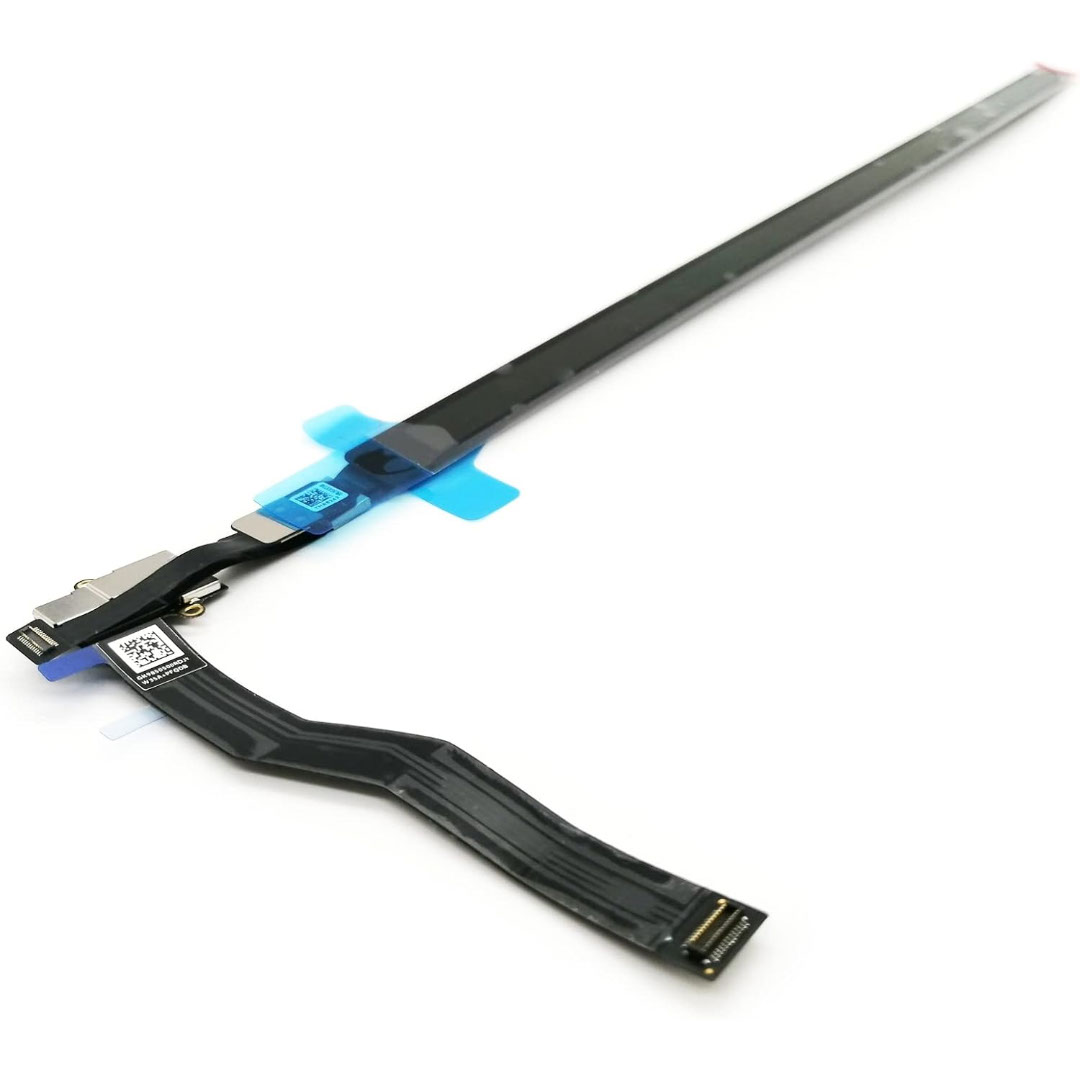
Genuine-spec touchpad flex cable for MacBook Pro 16″ (Model A2159, 2019, Intel)—essential for restoring full Force Touch functionality, haptic feedback, and precise trackpad responsiveness during repair or replacement. Compatible With: MacBook Pro 16-inch (2019, Model A2159) with Intel Core i7/i9 processors (Model Identifier: MacBookPro16,1). Part Type: Touchpad flex cable only—does not include the trackpad, Taptic Engine, or mounting hardware. This is the OEM-style ribbon cable that connects the trackpad to the logic board. Function: Transmits touch input, Force Touch pressure data, and haptic feedback signals—critical for macOS gestures (e.g., Force Click, three-finger swipe, pinch-to-zoom) and Taptic Engine operation. OEM-Quality Build: Matches Apple’s original flex circuit in length, connector pitch, shielding, and bend radius—ensures reliable signal integrity and durability under repeated use. Common Use Cases: Replacing a torn, frayed, or corroded original flex cable Completing a trackpad replacement when the original cable is damaged Fixing intermittent or unresponsive trackpad behavior caused by cable failure Replacing a torn, frayed, or corroded original flex cable Completing a trackpad replacement when the original cable is damaged Fixing intermittent or unresponsive trackpad behavior caused by cable failure Installation Note: Requires full bottom case removal and careful routing beneath the battery and logic board. Connectors use ZIF (Zero Insertion Force) sockets—must be properly aligned and latched without force. Recommended for certified or experienced technicians only.

TP-Link 8 Port Gigabit Ethernet Network Switch | Plug and Play | Desktop or Wall-Mount | Plastic Case Ethernet Splitter | Fanless | Traffic Optimization | Unmanaged (TL-SG1008D),Black About this item PLUG-AND-PLAY – Easy setup with no configuration or no software needed ETHERNET SPLITTER – Connectivity to your router or modem router for additional wired connections (laptop, gaming console, printer, etc) 8 Ports GIGABIT ETHERNET – 8 10/100/1000 Mbps Gigabit auto-negotiation RJ45 ports greatly expand network capacity COST EFFECTIVE – Fanless Quiet Design, Desktop design RELIABLE – IEEE 802.3x flow control provides reliable data transfer UP to 80% Power Saving – Automatically adjusts power consumption according to the link status and cable length AUTO-NEGOTIATION – Supports Auto-MDI/MDIX, eliminating the need for crossover cables

Professional Grade K9 Dual Wireless Lavalier Mic For Android Smartphones Type C K9 Wireless Collar Microphone For YouTube Voice Recording Live Videos Vlog ASMR Podcast & Interview Expert Features 【Wireless Lavalier Microphone (2 Pcs) 】: Ideal for USB-C, iPhone, Smartphones, iPads and Macs with USB-C ports, Android devices, and laptops with USportsPort | Auto Noise Reduction. 【Dual Microphone Set】:Includes two wireless Lavalier microphones for versatile audio recording options. Simply plug the microphone into the USB port for instant connectivity and ease of use. 【Wide Compatibility】:Ideal for use with USB-C devices, iPhones, smartphones, iPads, Macs, Android devices, and laptops with USB-C ports, ensuring compatibility across various platforms. 【Auto Noise Reduction】: Features built-in noise reduction technology to minimize background noise and ensure clear and crisp audio. 【Long Battery Life】:Powered by lithium-ion batteries, providing reliable performance for extended recording sessions. 【Versatile Applications】:Suitable for a wide range of applications, including vlogging, interviews, presentations, podcasting, and more.

Specifications Weight (g) 750 Depth (mm) 500 Width (mm) 140 Height (mm) 190 Input/Output Other Battery Capacity (mAh) 8000 Sound Mode Other Category Speakers Use HOME Input Power (W) <25 W Voice Control No Waterproof No Support APP No Playback Function MP3 Remote Control No Intelligent Personal Assistant None Display Screen Yes Built-in Microphone No Audio Crossover Two-Way Number of Loudspeaker Enclosure 1 Power Source Battery Channels 2 (2.0) Feature Wireless Charger for Mobile Phone Battery Yes Communication Bluetooth Speaker Type Portable Cabinet Material Plastic Brand Name RNABAU Model DB Origin Mainland China Certification CE Type1 Caixa De Som Type2 HiFi Wireless Bluetooth Speaker Type3 Mobile Phone Charger Type4 Alarm Clock Speaker Type5 FM Radio Soundbox Type6 Vintage Bluetooth Speaker Type7 Home Stereo Audio Set

SS03XL 933321-855 Laptop Battery Replace for Hp EliteBook 840 G5 G6 Notebook 730 735 740 745 830 846 G5 840 G6 735 745 830 G6 ZBook 14U G5 G6 Series HSN-I13C-4 HSTNN-LB8G 932823-421 933321-852 50Wh About this item 【Basic Details】Item Model: SS03XL; Battery Type: Li-ion; Voltage: 11.55V; Capacity: 50Wh/4330mAh; Battery Color: Black. 【Compatible P/N 】SS03XL SS03 933321-855 / 932823-171 / 933321-852 932823-1C1 / 932823-271 / 932823-2C1 / 932823-421 / HSN-112C / HSN-113C-4 / HSN-I13C-4 / HSN-I12C / HSTNN-IB8C / HSTNN-LB8G / HSTNN-DB8J / SS03050XL 【Compatible Laptop Models】HP Elitebook 840 G5/ 730 G5/ 735 G5/ 740 G5/ 745 G5/ 836 G5/ 846 G5 Series; HP Elitebook 840 G6/ 735 G6/ 745 G6/ 830 G6 Series; HP ZBook 14U G5 Series; HP ZBook 14U G6 Series; HP MT44 Mobile Thin Client

Genuine-spec US layout (QWERTY) black keyboard replacement for MacBook Air 13.6″ and 15″ models (2023–2025, M2/M3/M4 chips)—featuring Apple’s Magic Keyboard with scissor-switch mechanism, backlighting, and precise OEM fit. Compatible With: 13.6″ MacBook Air: A2681 (M2, 2022–2023), A3113 (M3, 2023–2024), A3240 (M4, 2024–2025) 15″ MacBook Air: A2941 (M2, 2023), A3114 (M3, 2023–2024), A3241 (M4, 2024–2025) 13.6″ MacBook Air: A2681 (M2, 2022–2023), A3113 (M3, 2023–2024), A3240 (M4, 2024–2025) 15″ MacBook Air: A2941 (M2, 2023), A3114 (M3, 2023–2024), A3241 (M4, 2024–2025) Keyboard Layout: Standard US English (QWERTY) with wide Enter key, dedicated left/right arrow keys in inverted-T layout, and full function row—matches Apple’s original US configuration. Design: Apple’s Magic Keyboard with scissor-switch mechanism—providing quiet, stable, and responsive typing with 1mm key travel and enhanced durability. Features: Integrated backlighting for low-light use, ambient light sensor compatibility, and OEM-style flex cable for direct logic board connection. Color: Sleek black keycaps—ideal for Space Gray and Midnight finishes, and visually consistent across all color variants. Precision Fit: Engineered to exact Apple specifications for alignment, key spacing, and mounting—ensures seamless integration into the original top case. Installation Note: The keyboard is factory-glued into the top case. Replacement requires full disassembly, careful removal, and professional-grade re-adhesion. Recommended for experienced technicians only.

Keyboard for Macbook Pro A1502 ,A1582,A1493 13" Inch Retina Year 2013,2014,2015 Part no ME864 ME864LL/A ME866LL/A APN: 661-8154, 661-02361, 818-4278 Black US Layout Keyboard for Macbook Pro A1502 ,A1582,A1493 13″ Inch Retina Year 2013,2014,2015 Part no ME864 ME864LL/A ME866LL/A APN: 661-8154, 661-02361, 818-4278 Black US Layout Compatibility: FOR MB Pro Retina 13″ A1502 Late 2013: ME864LL/A (2.4 Core i5) Late 2013: ME866LL/A (2.6 Core i5) Late 2013: ME866LL/A (2.8 Core i7) Mid 2014: MGX72LL/A (2.6 Core i5) Mid 2014: MGX92LL/A (2.8 Core i5) Mid 2014: MGX92LL/A (3.0 Core i7) Early 2015: MF839LL/A (2.7 GHz Core i5) Early 2015: MF841LL/A (2.9 GHz Core i5) Early 2015: MF843LL/A (3.1 GHz Core i7) Identifying Numbers APN: 661-8154, 661-02361, 818-4278 Compatible part numbers: ME864 ME865 ME866 MF839 MF841 MF843 MGX72 MGX92 (Layout US) Related Part #: 661-8154, 661-02361, 818-4278 High Quality Laptop Keyboard. 100% Compatible with your brand.

Replacement Keyboard for MacBook Pro 13" inch A1706 & MacBook Pro 15" inch A1707 Touch Bar (for Late 2016 mid 2017 Year) Replacement Keyboard for MacBook Pro 13″ inch A1706 & MacBook Pro 15″ inch A1707 Touch Bar (for Late 2016 mid 2017 Year) 【Compatibility】This replacement keyboard is Compatible with original MacBook Pro 13″ inch A1706 & MacBook Pro 15″ inch A1707 Touch Bar (for Late 2016 mid 2017 Year) Laptop. 【Compatible Part Numbers】661-06377 【Compatible MBP Numbers】A1706 series :MacBook Pro 13 inch 2017 MacBookPro14,2 & MacBook Pro 13 2016 MacBookPro13,2 MNQF2LL/A MNQG2LL/A MLH12LL/A MLVP2LL/A etc A1707 series:MacBook Pro 15 inch 2016 MacBookPro13,3 & MacBook Pro 15 inch 2017 MacBookPro14,3 Release June 2017 MPTR2LL/A MPTU2LL/A MPTT2LL/A MPTV2LL/A Release October 2016 MLH32LL/A MLW72LL/A MLH42LL/A MLW82LL/A

Genuine-spec touchpad flex cable for MacBook Pro 13″ with Touch Bar (Model A1708, 2016–2017)—restores full Force Touch functionality, haptic feedback, and precise multi-touch gesture control during trackpad repair or replacement. Compatible With: MacBook Pro 13″ (2016) – Model A1708 (Model Identifier: MacBookPro13,1) MacBook Pro 13″ (2017) – Model A1708 (Model Identifier: MacBookPro14,1) (Both years share the same internal trackpad assembly and flex cable.) MacBook Pro 13″ (2016) – Model A1708 (Model Identifier: MacBookPro13,1) MacBook Pro 13″ (2017) – Model A1708 (Model Identifier: MacBookPro14,1) (Both years share the same internal trackpad assembly and flex cable.) Part Type: Touchpad flex cable only — does not include the trackpad housing, Taptic Engine, or mounting hardware. This is the OEM-style ribbon cable that connects the trackpad to the logic board. Function: Transmits: Touch input coordinates Force Touch pressure data Haptic feedback signals to the Taptic Engine Enables full macOS gesture support: Force Click, three-finger lookup, swipe navigation, pinch-to-zoom, and smooth cursor tracking. Touch input coordinates Force Touch pressure data Haptic feedback signals to the Taptic Engine Enables full macOS gesture support: Force Click, three-finger lookup, swipe navigation, pinch-to-zoom, and smooth cursor tracking. OEM-Quality Build: Matches Apple’s original specifications in: Cable length and routing path Connector pitch and ZIF latch design EMI shielding and flex durability Cable length and routing path Connector pitch and ZIF latch design EMI shielding and flex durability Common Use Cases: Replacing a torn, creased, or liquid-damaged original flex cable Completing a trackpad replacement when the original cable is compromised Fixing intermittent trackpad behavior, loss of Force Touch, or complete unresponsiveness Replacing a torn, creased, or liquid-damaged original flex cable Completing a trackpad replacement when the original cable is compromised Fixing intermittent trackpad behavior, loss of Force Touch, or complete unresponsiveness Installation Note: Requires full bottom case removal and battery disconnection. Cable routes under internal components near the right speaker and logic board. Connects via a ZIF (Zero Insertion Force) socket—must be aligned carefully and latched gently. Recommended for experienced or certified technicians only. Requires full bottom case removal and battery disconnection. Cable routes under internal components near the right speaker and logic board. Connects via a ZIF (Zero Insertion Force) socket—must be aligned carefully and latched gently. Recommended for experienced or certified technicians only.

GAMDIAS XC3 (2g, incl. Cleaning Wipe and Scraper) - Ultimate Performance Thermal Paste for CPU, GPU, consoles, laptops, high thermal conductivity, long durability, non-conductive, non-capacitive GAMDIAS XC3 (2g, incl. Cleaning Wipe and Scraper) – Ultimate Performance Thermal Paste for CPU, GPU, consoles, laptops, high thermal conductivity, long durability, non-conductive, non-capacitive PERFORMANCE THERMAL COMPOUND: XC3 is an easy-to-apply thermal paste that features high-quality thermal compounds with nano-diamond particles that allow excellent conductivity to lower thermals and push your PC to the limit. HIGH THERMAL CONDUCTIVITY: XC3 ensures exceptional heat dissipation by utilizing high conductivity nanoparticles and lowering thermal impedance between the CPU and cooler with its nano-diamond particles. VERSATILE APPLICATION: The compound provides a stable working status from -50°C to 220°C. SAFE AND STABLE: Without electrically conductive materials,the grease eliminates the risk of short-circuiting or discharging. APPLICATION KIT: The paste comes in a luer lock syringe, with a cleaning wipe and scraper included in the product pack for convenience.

WiWU Vivid Laptop Bag – Durable waterproof case with faux-fur lining and two compartments, available in both 14″ and 15.6″ sizes.Stylish, lightweight, and well-padded—perfect for daily professional or student use. Model: WiWU Vivid Laptop Handbag Material: Water-resistant polyester exterior, soft faux-fur lining interior Sizes: 14″ version: fits up to 14-inch laptops 15.6″ version: fits standard 15.6-inch laptops Sizes: 14″ version: fits up to 14-inch laptops 15.6″ version: fits standard 15.6-inch laptops Protection: Shock-resistant padded compartment, anti-scratch lining Storage: Main laptop compartment Zippered front pocket for charger, cables, mouse, or tablet Storage: Main laptop compartment Zippered front pocket for charger, cables, mouse, or tablet Carrying Options: Comfortable padded handles + optional adjustable shoulder strap Design: Lightweight and slim profile with minimalist look; available in multiple colors Weight: Approx. 365 g (14″), approx. 420 g (15.6″) Use Case: Designed for work, school, commuting, or travel

Fast-charging feature available on select iPhone and iPad models.

A reliable pre-owned HP EliteBook 840 G3 with 14" display, 6th Gen Core i5, 8GB RAM, and 256GB SSD—offering solid business performance, security, and durability for everyday professional use.

WiWU Pilot Backpack 15.6 inch Travelling Polyester Laptop Business School Travelling Backpack WiWU Pilot Backpack 15.6 inch Travelling Polyester Laptop Business School Travelling Backpack

Genuine-spec touchpad flex cable for MacBook Air 13″ (Model A1534, Early 2015)—essential for restoring full trackpad functionality, including precise cursor control and physical click response, during repair or replacement. Compatible With: MacBook Air 13-inch (Early 2015, Model A1534, Model Identifier MacBookAir7,2). Part Type: Touchpad flex cable only—does not include the trackpad housing, button mechanism, or mounting brackets. This is the ribbon cable that connects the trackpad to the logic board. Function: Carries input signals from the trackpad to the logic board—critical for cursor movement, tap-to-click, and primary/secondary physical click functionality. (Note: This model uses a physical click mechanism, not Force Touch—so no haptic feedback or pressure-sensing.) OEM-Quality Construction: Matches Apple’s original cable in length, connector type, and shielding—ensures reliable signal transmission and long-term durability. Common Use Cases: Replacing a torn, frayed, or damaged original flex cable Completing a trackpad replacement when the original cable is compromised Fixing erratic cursor movement, unresponsive trackpad, or loss of click function Replacing a torn, frayed, or damaged original flex cable Completing a trackpad replacement when the original cable is compromised Fixing erratic cursor movement, unresponsive trackpad, or loss of click function Installation Note: Requires bottom case removal and careful disconnect/reconnect of the ZIF (Zero Insertion Force) connector on the logic board. The cable routes under the battery—handle with care. Suitable for intermediate to advanced DIYers or technicians.

WiWU Linker 721HD Hub – Compact USB-C hub with 7 ports including 100W PD, dual USB-A, USB-C data, HDMI 4K60, and dual SD/TF slots.Aluminum body, plug‑and‑play compatibility with MacBooks and modern USB‑C devices—ideal for laptop expansion. Model: Linker 721HD (WiWU) Material: Aluminum-alloy shell Ports: 2 × USB‑A 3.1 1 × USB‑C 3.1 (data) 1 × USB‑C PD power delivery (up to 100 W) 1 × HDMI (4K @ 60 Hz) SD card slot + micro‑SD (TF) slot (USB 3.0 speed) Ports: 2 × USB‑A 3.1 1 × USB‑C 3.1 (data) 1 × USB‑C PD power delivery (up to 100 W) 1 × HDMI (4K @ 60 Hz) SD card slot + micro‑SD (TF) slot (USB 3.0 speed) Cable: Fixed USB‑C male cable (approx. 15 cm) Compatibility: Plug-and-play with USB-C/Thunderbolt 3/4 devices (MacBook, XPS, Chromebooks, mobile devices with DP-Alt Mode) Design: Compact, space gray finish optimized for travel/work setups Weight: ~150 g

The Apple Magic Mouse (USB-C version) is a sleek, minimalist multi-touch wireless mouse built for Mac users. It offers smooth gesture support, Bluetooth connectivity and a built-in rechargeable battery — a great choice if you prefer a clean desk setup and full compatibility with macOS and iPadOS. General Name: Magic Mouse (USB-C) — part of Apple’s pointing-device lineup. Wireless connectivity: Bluetooth. Rechargeable battery: built-in, no disposable AA cells. Charging / port: USB-C port (bottom of mouse) for pairing and charging. Compatibility: Requires a Mac with macOS 15.1 or later, or an iPad with iPadOS 18.1 or later. Size & Weight Height: ~0.85 inch (2.16 cm) Width: ~2.25 inch (5.71 cm) Depth: ~4.47 inch (11.35 cm) Weight: ~0.22 pound (0.099 kg) (varies slightly by manufacturing) Features Multi-Touch surface: supports gestures such as swiping between pages, scrolling through documents, zooming. Glide / foot design: optimized for smooth movement across desktop surfaces. Rechargeable battery life: about a month or more between charges (typical use) per Apple spec. Used Condition ConsiderationsSince you’re specifying a used unit: Check for wear on the bottom feet / skates — these degrade and affect glide. Verify battery capacity / health (rechargeable batteries age). Confirm the port is functioning (USB-C) and Bluetooth connectivity is stable. Look for signs of excessive surface scratches on the multi-touch top — may impair gestures. Ensure the firmware / Mac recognizes it fully (gestures working). Upgradability / Limitations Not user-upgradable: You cannot replace the internal battery or change internals easily. Design limitation: The USB-C port remains on the bottom of the mouse, meaning you cannot use it while charging unless you flip it. This design is still criticized. Ergonomics: The flat, low-profile design is stylish but may not suit extended-use comfort for some users.

