
OEM-quality touchpad replacement (without flex cable) for MacBook Air 15″ (Model A2941, 2023)—in Space Gray finish—designed for precise Force Touch performance and seamless integration with the original chassis. Compatible With: MacBook Air 15-inch (2023, Model A2941) with Apple M2 chip. Part Type: Touchpad only—does not include the flex cable, Taptic Engine, or mounting hardware. Intended for technicians who will reuse or transfer the original internal components. Color: Space Gray—matches the original lower case of Space Gray A2941 models. Force Touch Ready: Fully supports pressure-sensitive gestures and haptic feedback when paired with the original Taptic Engine and logic board. OEM Build Quality: Matches Apple’s original surface texture, curvature, and responsiveness for consistent tracking and click feel. Installation Note: Requires full bottom case disassembly and careful transfer of the original flex cable and Taptic Engine. Adhesive and alignment must be precise to avoid gaps or malfunction. Recommended for professional repair technicians.

The BYL-2207 2-in-1 LAN adapter provides fast and stable wired internet through a Gigabit Ethernet port using either USB-C or USB 3.0. Perfect for laptops, MacBooks, and PCs without an Ethernet port, it ensures smooth streaming, online meetings, and reliable network performance. The BYL-2207 2-in-1 Type-C / USB 3.0 to Gigabit LAN Adapter is designed for users who need a reliable wired connection on modern laptops and devices. It supports both USB-C and USB 3.0, making it compatible with a wide range of systems including MacBooks, ultrabooks, and desktops. With Gigabit Ethernet speed, it provides faster and more stable internet compared to Wi-Fi, making it ideal for work, gaming, and streaming. 2-in-1 Connector (USB-C + USB 3.0) for wide compatibility Gigabit Ethernet Port (RJ45) for fast and stable wired internet High-Speed Performance supports up to 1000Mbps network speed Plug & Play installation on most systems Compact & Portable Design easy to carry anywhere Ideal for Work & Streaming improves stability for meetings and downloads Reliable Connection reduces lag compared to Wi-Fi Ideal for MacBooks, laptops, ultrabooks, desktops, and tablets that need a stable wired internet connection. Perfect for online meetings, remote work, gaming, IPTV, streaming, and downloading.

Genuine Apple MagSafe 3 charging cable (2-meter length), originally shipped with MacBook Pro 14"/16" (2021, M1 Pro/Max) and MacBook Pro 16" (2023, M2/M3 Max). Used but fully functional, tested for safe power delivery and data handshake with Apple laptops. Compatibility: MacBook Pro 14″ (2021–2023, M1 Pro/Max, M2 Pro/Max, M3 Pro/Max) MacBook Pro 16″ (2021–2023, M1 Max, M2 Max, M3 Max) Works with Apple 67W, 96W, and 140W USB-C Power Adapters (sold separately) MacBook Pro 14″ (2021–2023, M1 Pro/Max, M2 Pro/Max, M3 Pro/Max) MacBook Pro 16″ (2021–2023, M1 Max, M2 Max, M3 Max) Works with Apple 67W, 96W, and 140W USB-C Power Adapters (sold separately) Connector Type: MagSafe 3 (magnetic, tri-oval tip) on laptop end USB-C on power adapter end MagSafe 3 (magnetic, tri-oval tip) on laptop end USB-C on power adapter end Cable Length: 2 meters (≈6.6 feet) – longer than the standard 1.8m cable, ideal for flexible desk or bedside setups. Condition: Original Apple cable, previously used but fully tested: No fraying, kinks, or exposed wires MagSafe 3 connector intact with strong magnetic hold Charges MacBook at full rated speed (supports up to 140W with compatible adapter) Passes Apple’s authentication handshake (no “Not Supported” warnings) No fraying, kinks, or exposed wires MagSafe 3 connector intact with strong magnetic hold Charges MacBook at full rated speed (supports up to 140W with compatible adapter) Passes Apple’s authentication handshake (no “Not Supported” warnings) What’s Included: MagSafe 3 to USB-C cable only Power adapter NOT included MagSafe 3 to USB-C cable only Power adapter NOT included Why Choose This: Cost-effective alternative to buying new 100% genuine Apple—no third-party risks (overheating, slow charging, compatibility errors) Ideal for backup, travel, or replacing a damaged original cable Cost-effective alternative to buying new 100% genuine Apple—no third-party risks (overheating, slow charging, compatibility errors) Ideal for backup, travel, or replacing a damaged original cable

The Lenovo V130 is powered by an Intel Core i5 7th Gen processor, paired with 8GB RAM and a fast 256GB SSD for smooth and reliable everyday performance. Designed for office work, study, and productivity, it features a simple, durable design and a clear 15.6-inch non-touch display for comfortable daily use.

Apple Magic Mouse: Wireless, Bluetooth, Rechargeable. Works with Mac or iPad; Multi-Touch Surface - White (Pre-Owned) Apple Magic Mouse: Wireless, Bluetooth, Rechargeable. Works with Mac or iPad; Multi-Touch Surface – White (Pre-Owned) About this item WIRELESS, RECHARGEABLE CONVENIENCE — Magic Mouse connects wirelessly to your device via Bluetooth. And the rechargeable internal battery means no loose batteries to replace. WORKS WITH MAC OR IPAD — It’s ready to go right out of the box and pairs quickly with your Mac or iPad so you can get to work right away. SWIPE AND SCROLL ON THE MULTI-TOUCH SURFACE — The Multi-Touch surface allows you to perform simple gestures such as swiping and scrolling. And an optimized foot design lets Magic Mouse glide smoothly across your desk. GO WEEKS WITHOUT CHARGING — The incredibly long-lasting internal battery will power your Magic Mouse for about a month or more between charges. Comes with a woven USB-C to Lightning Cable that lets you pair and charge by connecting to a USB-C port on your Mac or iPad. SYSTEM REQUIREMENTS — Requires a Bluetooth-enabled Mac with OS X 10.11 or later or an iPad with iPadOS 13.4 or later.

DELL 357F9 11.1V or 11.4V 74Wh Battery For DELL Inspiron 15 5000 Gaming 5576 5577 ,15 7000 Gaming 7557 7559 7566 7567 Laptops Alternant Part Number: 357F9 71JF4 0GFJ6 071FJ4 00GFJ6 P65F001 P57F003 About this item Battery Type:6 cell Li-Polymer Best Quality Voltage &Capacity :11.1V 74Wh 6330mAh , 11.4V 74Wh 6480mAh SANISI Concept: The customer is god, Product Quality and Service must be perfect! We will let every customer feel satisfied Package Contents: 1 pcs Brand New Battery

Replacement cable for MacBook Pro A2794, designed to restore proper connection and functionality for damaged or faulty internal cables. Ideal for technicians and repair shops, ensuring reliable performance and correct fit for A2794 models. Type: USB-C to USB-C charging/data cable Model: A2794 Length: 2 meters (≈ 6.6 ft) Color: White Design: Woven braided cable for durability Connectors: USB-C (Male) on both ends Power Delivery: Supports up to 240 W high-power charging when used with a compatible USB-C PD adapter Data Transfer: USB 2.0 transfer speeds Designed for fast charging and syncing between USB-C devices

Experience flagship performance with this pre-owned ThinkPad E14 Gen 2. Driven by an 11th Gen Intel Core i7 processor, 16GB RAM, and a 512GB NVMe SSD, this 14-inch laptop delivers high-speed responsiveness and modern features like Thunderbolt 4 for the ultimate professional setup.

Genuine-spec keyboard replacement for MacBook Air 13″ (Model A2179, 2020, Intel) — choose US QWERTY or UK QWERTY (with £ symbol). Features Apple’s reliable scissor-switch mechanism, backlighting, and OEM-fit design for seamless performance and aesthetics. Compatible With: MacBook Air 13-inch (2020, Model A2179, EMC 3597) with Intel Core i3/i5/i7 processors (non-M1). Layout Options (select at purchase): US Layout: Standard QWERTY with wide Enter key, @ above 2, # above 3, and full inverted-T arrow keys. UK Layout: QWERTY with £ symbol, tall vertical Enter key, @ accessed via right Alt, and UK-specific punctuation—matches Apple’s official UK regional configuration. US Layout: Standard QWERTY with wide Enter key, @ above 2, # above 3, and full inverted-T arrow keys. UK Layout: QWERTY with £ symbol, tall vertical Enter key, @ accessed via right Alt, and UK-specific punctuation—matches Apple’s official UK regional configuration. Keyboard Type: Traditional scissor-switch mechanism (not Butterfly, not Magic Keyboard)—robust, tactile, and serviceable, with good key travel and proven durability. Integrated Features: Full backlit keys for low-light use Ambient light sensor compatibility OEM-style ribbon cable pre-attached for direct logic board connection Full backlit keys for low-light use Ambient light sensor compatibility OEM-style ribbon cable pre-attached for direct logic board connection Precision Build: Molded to exact Apple specifications—ensures flush mounting, consistent key alignment, and seamless integration into the original top case. Installation Note: Keyboard is screw-mounted with light adhesive—more accessible than glued Butterfly/Magic keyboards. Requires top case access and battery disconnect. Suitable for intermediate DIYers or professional technicians. Important: This is keyboard only—does not include the top case, battery, trackpad, or logic board. Not compatible with M1 MacBook Air (A2337/A2338) or M2 models (A2681/A2941). This is keyboard only—does not include the top case, battery, trackpad, or logic board. Not compatible with M1 MacBook Air (A2337/A2338) or M2 models (A2681/A2941). Model Verification: Confirm your device is MacBook Air A2179 (13″, Intel, 2020) via > About This Mac > Model Identifier (e.g., MacBookAir9,1).

Specifications Feature Value Feature Value Input/Output Other Sound Mode Extra Bass Mode Category Speakers Use Other Input Power (W) 25-49W Voice Control No Waterproof Yes Support APP No Intelligent Personal Assistant None Audio Crossover Full-Range Number of Loudspeaker Enclosures 2 Power Source None Channels 2 (2.0) Battery Yes Communication USB Speaker Type Portable Cabinet Material Plastic Brand Name QUCAA Origin Mainland China Certification CE

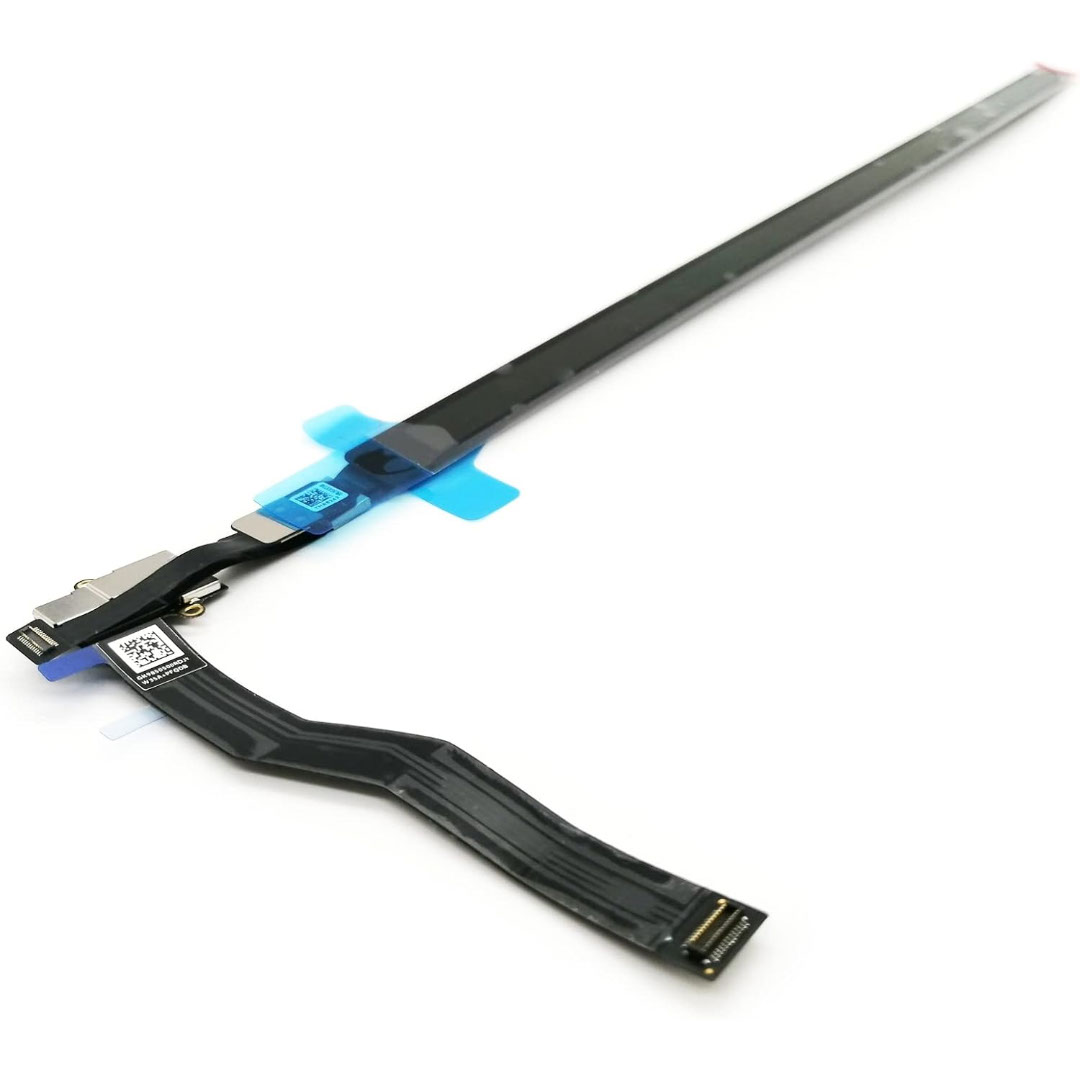
Genuine-spec touchpad flex cable compatible with both MacBook Air A2179 (Intel, 2020) and A2337 (M1, 2020)—restores full Force Touch functionality, haptic feedback, and precise multi-touch gesture control during trackpad repair or replacement. Compatible With: MacBook Air 13″ (2020, Intel) – Model A2179 (Model Identifier: MacBookAir9,1) MacBook Air 13″ (2020, Apple M1) – Model A2337 (Model Identifier: MacBookAir10,1) MacBook Air 13″ (2020, Intel) – Model A2179 (Model Identifier: MacBookAir9,1) MacBook Air 13″ (2020, Apple M1) – Model A2337 (Model Identifier: MacBookAir10,1) ✅ Important Note: Despite different processors (Intel vs. M1), Apple used the same trackpad assembly and flex cable in both A2179 and A2337. This makes the flex cable fully interchangeable between the two models. Part Type: Touchpad flex cable only — does not include the trackpad housing, Taptic Engine, or mounting hardware. This is the OEM-style ribbon cable that connects the trackpad to the logic board. Function: Transmits: Touch input coordinates Force Touch pressure data Haptic feedback signals to the Taptic Engine Enables full macOS gesture support: Force Click, three-finger lookup, swipe navigation, pinch-to-zoom, and smooth cursor tracking. Touch input coordinates Force Touch pressure data Haptic feedback signals to the Taptic Engine Enables full macOS gesture support: Force Click, three-finger lookup, swipe navigation, pinch-to-zoom, and smooth cursor tracking. OEM-Quality Build: Matches Apple’s original specifications in: Cable length and routing path Connector pitch and ZIF latch design EMI shielding and flex durability Cable length and routing path Connector pitch and ZIF latch design EMI shielding and flex durability Common Use Cases: Replacing a torn, creased, or liquid-damaged original flex cable Completing a trackpad replacement when the original cable is compromised Fixing intermittent trackpad behavior, loss of Force Touch, or complete unresponsiveness Replacing a torn, creased, or liquid-damaged original flex cable Completing a trackpad replacement when the original cable is compromised Fixing intermittent trackpad behavior, loss of Force Touch, or complete unresponsiveness Installation Note: Requires full bottom case removal and battery disconnection. Cable routes under the right side of the battery and logic board. Connects via a ZIF (Zero Insertion Force) socket—align carefully and latch gently. Recommended for experienced or certified technicians only. Requires full bottom case removal and battery disconnection. Cable routes under the right side of the battery and logic board. Connects via a ZIF (Zero Insertion Force) socket—align carefully and latch gently. Recommended for experienced or certified technicians only.

Genuine-spec touchpad flex cable for MacBook Pro 13″ (Model A2338, 2020, Apple M1)—essential for restoring full Force Touch functionality, haptic feedback, and precise multi-touch gesture control during trackpad repair or replacement. Compatible With: MacBook Pro 13-inch (2020, Model A2338, Model Identifier MacBookPro17,1) with Apple M1 chip (2 Thunderbolt ports). Part Type: Touchpad flex cable only — does not include the trackpad housing, Taptic Engine, or mounting hardware. This is the OEM-style ribbon cable that connects the trackpad to the logic board. Function: Transmits: Touch input coordinates Force Touch pressure data Haptic feedback signals to the Taptic Engine Enables full macOS gesture support: Force Click, three-finger lookup, swipe navigation, pinch-to-zoom, and smooth cursor tracking. Touch input coordinates Force Touch pressure data Haptic feedback signals to the Taptic Engine Enables full macOS gesture support: Force Click, three-finger lookup, swipe navigation, pinch-to-zoom, and smooth cursor tracking. OEM-Quality Build: Matches Apple’s original specifications in: Cable length and routing Connector pitch and ZIF latch design EMI shielding and flex durability Cable length and routing Connector pitch and ZIF latch design EMI shielding and flex durability Common Use Cases: Replacing a torn, creased, or liquid-damaged original flex cable Completing a trackpad replacement when the original cable is compromised Fixing intermittent trackpad behavior, loss of Force Touch, or complete unresponsiveness Replacing a torn, creased, or liquid-damaged original flex cable Completing a trackpad replacement when the original cable is compromised Fixing intermittent trackpad behavior, loss of Force Touch, or complete unresponsiveness Installation Note: Requires full bottom case removal and battery disconnection. Cable routes under internal components near the right speaker and logic board. Connects via a ZIF (Zero Insertion Force) socket—must be aligned carefully and latched gently. Recommended for experienced or certified technicians only. Requires full bottom case removal and battery disconnection. Cable routes under internal components near the right speaker and logic board. Connects via a ZIF (Zero Insertion Force) socket—must be aligned carefully and latched gently. Recommended for experienced or certified technicians only. Important Compatibility Notes: ✅ Only for A2338 (13″, M1, 2020) ❌ Not compatible with: Intel-based A2251 / A2289 (2020) MacBook Air M1 (A2337) Any MacBook Air or 14″/16″ MacBook Pro ✅ Only for A2338 (13″, M1, 2020) ❌ Not compatible with: Intel-based A2251 / A2289 (2020) MacBook Air M1 (A2337) Any MacBook Air or 14″/16″ MacBook Pro Intel-based A2251 / A2289 (2020) MacBook Air M1 (A2337) Any MacBook Air or 14″/16″ MacBook Pro

The 512GB Apple MacBook SSD is a high-speed solid-state drive designed for select MacBook Pro and MacBook Air models from 2013 to 2015. It delivers fast boot times, quick file access, and reliable performance, making it an ideal replacement or upgrade for aging Apple laptops. Key Features 512GB Storage Capacity – Plenty of space for macOS, applications, and files High-Speed SSD Performance – Faster boot times and smoother system operation Apple Proprietary Interface – Designed specifically for compatible MacBooks Reliable & Durable – No moving parts for improved stability and longevity Perfect Upgrade or Replacement – Restore performance or increase storage Compatible Models MacBook Pro Retina 13-inch (2013–2015) MacBook Pro Retina 15-inch (2013–2015) MacBook Air 11-inch (2013–2015) MacBook Air 13-inch (2013–2015) Compatible Model Numbers MacBook Pro: A1398, A1502 MacBook Air: A1465, A1466

Compact and stylish with a zinc alloy shell, the SatcOp 8‑in‑1 USB‑C Multiport Dock delivers essential ports—Ethernet, HDMI, USB, card readers, and charging—in one portable adapter. Ideal for powering your laptop while expanding connectivity on the go. 🖥️ HDMI Port – Connect to external displays in Full HD or 4K (depending on your host device). 🌐 RJ45 Ethernet Port – Provides stable wired internet access with gigabit-speed support. ⚡ USB-C PD Charging – Power your laptop while using other ports (up to 87W pass-through). 🔌 USB 3.0 & USB 2.0 Ports – Connect flash drives, external storage, keyboards, and mice. 💾 SD & TF Card Readers – Quick access to camera and device storage cards. 🧊 Material – Premium zinc alloy casing for durability and efficient heat dissipation. 💼 Design – Slim, lightweight, and perfect for travel, home, or office setups. 💻 Compatibility – Works with most USB-C laptops, including Windows, macOS, Chrome OS, and select Android tablets.

Experience fluid motion and edge-to-edge clarity with this ultra-smooth 100Hz Full HD display. Featuring a frameless IPS panel and a modern minimalist design, it’s the perfect upgrade for smooth office workflows and casual gaming. Model: Buerotika B24M1 Primary Specs: 23.8-inch (24″ class) Display/Performance: IPS (In-Plane Switching) for superior color accuracy Visual/Build Quality: 1920 x 1080 (Full HD) Resolution Aesthetic: Frameless “Zero-Bezel” design for immersive viewing and seamless multi-monitor setups Build: Ultra-slim profile with a sturdy, modern base Adjustability: Tilt-adjustable stand for ergonomic positioning Input/Output: HDMI and VGA ports for universal compatibility with PCs and laptops Compatibility: Plug-and-play support for Windows and macOS Smooth Motion: 100Hz Refresh Rate (provides significantly smoother scrolling and video compared to standard 60Hz) Eye Care: Low Blue Light technology and Flicker-Free backlight to reduce eye fatigue during long sessions Response Time: 14ms (typical) – optimized for stable, everyday professional use Home & Office: Enhancing productivity with smooth window transitions. Content Consumption: Watching movies and streaming with vibrant IPS colors. Multi-Monitor Arrays: The frameless edges make it ideal for side-by-side configurations. Casual Gaming: A budget-friendly entry into high-refresh-rate smoothness.

BATTERY DELL RYXXH Laptop Battery Compatible with DELL Latitude E5250 P25S001 Latitude E5450 E5550 DELL Latitude 3150 P21T001 Series Notebook 09P4D2 9P4D2 0YD8XC R5MD0 5TFCY VVXTW VY9ND 38Wh 11.1V About this item 【Basic Details】Item Model: RYXXH ; Battery Type: Li-ion; Voltage: 11.1V; Capacity: 38Wh; Battery Color: Black. 【Compatible P/N 】RYXXH 0RYXXH 9P4D2 R5MD0 YD8XC 5TFCY VVXTW VY9ND 0VY9ND Laptop Battery. 【Compatible Laptop Models】 DELL Latitude 12 5000 Series, DELL Latitude 12 E5250 Series, DELL Latitude E5450 Series, DELL Latitude E5550 Series, DELL Latitude 3150 Series, DELL Latitude 3160 Series. 【Note】The package includes: 1*battery and 1*Instructions. Packaged by sponge or bubbles to prevent damage. Before purchasing, please open the back cover of the laptop to confirm the battery model and shape.

BATTERY TOSHIBA PA5185U-1BRS Laptop Battery for Toshiba Satellite C50 C55 C55D C55T L55 L55D L55T Series fit C55-B5200 C55-B5270 C55D-B5310 PA5184U-1BRS PA5186U-1BRS PA5195U-1BRS Battery Type: Li-ion Capacity: 2800Mah Voltage: 14.4V Cells: 4-cell Fit Model: Toshiba Satellite PA5185-1BRS PA5184U-1BRS PA5184-1BRS PA5186-1BRS PA5195-1BRS PA5185U1BRS PA5185U PA5185 PA5195U PA5184 Battery Compatible: Toshiba Satellite C55-B5302 C55-B5299 C55-B5287 C55-B5272 C55-B5270 C55-B5200 C55-B5101 C55-B5100 C55D-B5319 C55D-B5310 C55D-B5241 C55D-B5219 C55D-B5214 C55D-B5212 C55D-B5206 C55D-B5203 C55T-B5349 C55T-B5110 C55T-B5230 C55T-B5109 L55-B5294 L55-B5284 L55-B5276 Battery 100% New from Manufacturer. Up to 500 recharge cycles over the life of the battery. CE-/FCC-Certified for safety If you have any questions, please feel free to contact us, our professional service team will provide you with the most guaranteed support

Genuine-spec US layout keyboard replacement for MacBook Pro (Model A1398, Late 2011–Mid 2012)—featuring durable scissor-switch keys, backlighting, and OEM-fit design for reliable typing and straightforward installation. Compatible With: MacBook Pro 13″: Late 2011 (Model A1278, but labeled A1398 in some regions) – Model Identifier MacBookPro8,1 MacBook Pro 15″: Early 2011, Late 2011, and Mid 2012 – Model Identifiers MacBookPro8,2 (15″ early/late 2011) and MacBookPro9,1 (15″ mid 2012) *(Note: “A1398” is primarily associated with the 15″ unibody MacBook Pro with Retina display (Mid 2012), which was the first Retina MacBook Pro.)* This keyboard fits the non-Retina 15″ A1398 (Mid 2012) and compatible Late 2011 models. MacBook Pro 13″: Late 2011 (Model A1278, but labeled A1398 in some regions) – Model Identifier MacBookPro8,1 MacBook Pro 15″: Early 2011, Late 2011, and Mid 2012 – Model Identifiers MacBookPro8,2 (15″ early/late 2011) and MacBookPro9,1 (15″ mid 2012) *(Note: “A1398” is primarily associated with the 15″ unibody MacBook Pro with Retina display (Mid 2012), which was the first Retina MacBook Pro.)* This keyboard fits the non-Retina 15″ A1398 (Mid 2012) and compatible Late 2011 models. Layout: Standard US English (QWERTY) with full-size keys, inverted-T arrow keys, and dedicated function row (F1–F12). Keyboard Type: Traditional scissor-switch mechanism—robust, tactile, and serviceable (pre-Butterfly era). Integrated Features: Backlit keys (adjustable brightness via F5/F6) OEM ribbon cable with ZIF connector Matches original key spacing and actuation force Backlit keys (adjustable brightness via F5/F6) OEM ribbon cable with ZIF connector Matches original key spacing and actuation force Build & Fit: Precision-molded plastic frame with exact screw mounts and alignment pegs—ensures secure, rattle-free installation in the top case. Installation Note: Keyboard is secured with screws and minimal adhesive. Requires full top case access and battery disconnect. Recommended for intermediate to advanced users or technicians.

This replacement touchpad for MacBook Air A2179 comes in Rose Gold and is sold without the flex cable. Perfect for restoring smooth trackpad performance, it’s ideal for repair technicians and users replacing a damaged or non-working touchpad. The MacBook Air A2179 Touchpad (Rose Gold) is a high-quality replacement part designed to restore full trackpad functionality to your laptop. Whether your original touchpad is unresponsive, physically damaged, or experiencing tracking issues, this replacement provides a reliable solution. Please note that this unit is without the flex cable, meaning it requires the original flex or a separate replacement flex for installation. Ideal for repair shops and technicians, it ensures smooth navigation and precise control. Compatible with MacBook Air A2179 Rose Gold Color Match for original look and finish Replacement Touchpad Only (without flex cable) Restores Smooth Trackpad Functionality Precision Tracking & Gesture Support (when installed correctly) Ideal for Repairs & Replacements High-Quality Build designed for durability and long use Designed specifically for Apple MacBook Air A2179 models. Recommended for technicians and repair shops or users replacing a faulty touchpad. Ensure compatibility before purchase and note that a flex cable is required for installation.

The Meetion Mini 4000 Black is a compact wireless keyboard and mouse combo designed for clean and convenient everyday use. With a mini-space-saving layout and stable wireless connection, it’s perfect for office work, home setups, and laptop users who want a neat, clutter-free desk. The Meetion Mini 4000 is a stylish and practical wireless keyboard and mouse set made for users who prefer a compact and modern workspace. Its mini keyboard design saves desk space while still offering comfortable typing for daily tasks. The wireless mouse provides smooth control and easy navigation, making this combo ideal for offices, students, and home users. With plug-and-play wireless connectivity, setup is simple—just connect the receiver and start using it instantly. Wireless Keyboard & Mouse Combo for a clean and clutter-free setup Compact Mini Keyboard Design saves space and fits small desks easily Stable Wireless Connection for smooth performance Plug & Play Receiver – quick setup without drivers Smooth Wireless Mouse for accurate control Comfortable Typing Layout for everyday productivity Modern Black Finish suitable for any workspace Ideal for Laptops & Desktops Perfect for office workers, students, and home users needing a compact wireless combo for laptops or desktops. Works with most devices that support USB.
