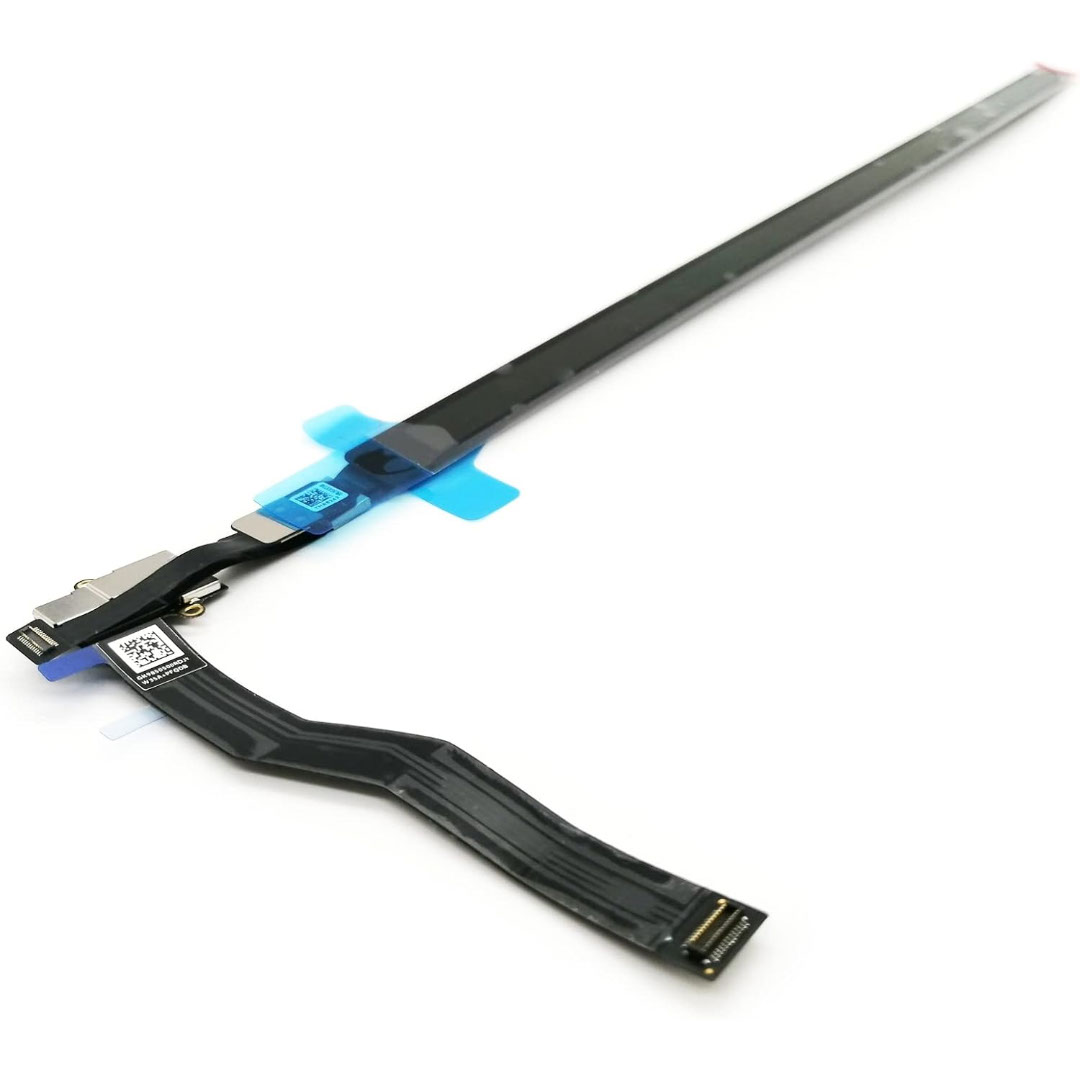

Genuine-spec touchpad flex cable for MacBook Pro 15″ (Model A1990, 2018–2019, Intel)—essential for restoring full Force Touch functionality, haptic feedback, and precise multi-touch gesture control during trackpad repair or replacement. Compatible With: MacBook Pro 15-inch (2018 & 2019, Model A1990, Model Identifiers MacBookPro15,2) with Intel Core i7/i9 processors. Part Type: Touchpad flex cable only — does not include the trackpad housing, Taptic Engine, or mounting hardware. This is the OEM-style ribbon cable that connects the trackpad to the logic board. Function: Transmits: Touch input coordinates Force Touch pressure data Haptic feedback signals to the Taptic Engine Enables full macOS gesture support: Force Click, three-finger lookup, swipe navigation, pinch-to-zoom, and smooth cursor tracking. Touch input coordinates Force Touch pressure data Haptic feedback signals to the Taptic Engine Enables full macOS gesture support: Force Click, three-finger lookup, swipe navigation, pinch-to-zoom, and smooth cursor tracking. OEM-Quality Build: Matches Apple’s original specifications in: Cable length and routing path Connector pitch and ZIF latch design EMI shielding and flex durability Cable length and routing path Connector pitch and ZIF latch design EMI shielding and flex durability Common Use Cases: Replacing a torn, creased, or liquid-damaged original flex cable Completing a trackpad replacement when the original cable is unusable Fixing intermittent trackpad behavior, loss of Force Touch, or complete unresponsiveness Replacing a torn, creased, or liquid-damaged original flex cable Completing a trackpad replacement when the original cable is unusable Fixing intermittent trackpad behavior, loss of Force Touch, or complete unresponsiveness Installation Note: Requires full bottom case removal and battery disconnection. Cable routes under internal components near the right speaker and logic board. Connects via a ZIF (Zero Insertion Force) socket—must be aligned carefully and latched gently. Recommended for experienced or certified technicians only. Requires full bottom case removal and battery disconnection. Cable routes under internal components near the right speaker and logic board. Connects via a ZIF (Zero Insertion Force) socket—must be aligned carefully and latched gently. Recommended for experienced or certified technicians only.

The Moxom MX-ST16 is a 12-in-1 safety power strip with 4 AC outlets, 7 USB-A ports, and 1 USB-C PD port. It supports up to 2500W / 10A total load and provides fast USB charging (PD 20W + QC 18W), making it a practical charging hub for home, office, and desk setups. ⚡ 12-in-1 Multi-Output Design: 4 AC sockets + 7 USB-A + 1 USB-C PD allow powering and charging many devices at once. 🔋 Fast USB Charging: USB-C PD up to 20W for modern phones and tablets. QC fast-charge up to 18W on supported USB-A ports. Smart IC balances output across ports for safe, efficient charging. 🔋 Fast USB Charging: USB-C PD up to 20W for modern phones and tablets. QC fast-charge up to 18W on supported USB-A ports. Smart IC balances output across ports for safe, efficient charging. 🛡️ Multi-Safety Protection: Overload protection, surge/over-voltage protection, over-current and overheating protection, plus foreign-object detection. 👶 Child-Safety Shutters: Safety doors on AC outlets reduce accidental contact. ⏻ One-Key Master Switch: Single button controls all outlets for easy power cut-off. 📏 Long Extension Cord: About 2 meters for flexible placement. 🧊 Heat-Resistant Build: ABS + PC construction designed for durability under continuous load.

The Arzopa A1 is an ultra-slim, lightweight 15.6-inch portable monitor engineered for seamless travel productivity and entertainment. Delivering crisp Full HD imagery on a premium IPS panel with integrated eye care features, it provides a hassle-free plug-and-play experience using dual full-function USB-C and Mini HDMI inputs. Complete with a built-in adjustable kickstand, it is the perfect dual-screen companion for laptops, smartphones, and gaming consoles. ✅ Full Specifications: Model: ARZOPA Type-C Portable Monitor (ARZOPA-A1) Interface / Connection: Multi-Port Input Panel: 2 x USB Type-C Full Function Ports (Supports concurrent video transmission, data, and power delivery) 1 x Mini HDMI Port (Video signal input only) 1 x 3.5mm Headphone / Audio Output Interface Interface / Connection: Multi-Port Input Panel: 2 x USB Type-C Full Function Ports (Supports concurrent video transmission, data, and power delivery) 1 x Mini HDMI Port (Video signal input only) 1 x 3.5mm Headphone / Audio Output Interface Performance / Screen Quality: Panel Type: IPS (In-Plane Switching) display with 178° wide viewing angles Resolution: Full HD 1920 x 1080p Refresh Rate: 60Hz Aspect Ratio: 16:9 Brightness: 300 cd/m² Contrast Ratio: 1200:1 Display Colors: 262K (8-bit) Color Gamut: 45% NTSC / 72% sRGB space coverage Performance / Screen Quality: Panel Type: IPS (In-Plane Switching) display with 178° wide viewing angles Resolution: Full HD 1920 x 1080p Refresh Rate: 60Hz Aspect Ratio: 16:9 Brightness: 300 cd/m² Contrast Ratio: 1200:1 Display Colors: 262K (8-bit) Color Gamut: 45% NTSC / 72% sRGB space coverage Display Technology: Features built-in HDR rendering technology to boost dynamic contrast alongside a Low Blue Light comfort filter to reduce eye fatigue. Audio: Dual built-in stereo speakers (1W x 2 configuration). Material & Build: Premium, durable metal housing constructed out of a sleek aluminum alloy framework. Design & Form Factor: Ultra-thin bezel layout boasting an integrated adjustable smart kickstand for multi-angle landscape deployment. Power Setup: Driverless plug-and-play architecture. Operates without an internal battery; runs on host device power distribution via USB-C or requires an external 5V/3A power input adapter. Compatibility: Fully compatible with MacBooks, Windows PCs/Laptops, Chromebooks, USB-C supported Android smartphones, and modern gaming consoles (Nintendo Switch, Xbox Series X/S, PS4, PS5). Dimensions: Approx. 355.6 x 220.9 x 9.14 mm (Ultra-slim 0.36-inch profile) Weight: Approx. 725 to 735 grams (1.6 lbs lightweight chassis)

HomBreez 10″ Desk Air Circulator Fan with Remote, 90° +90° Oscillating Table Fan, Quiet Portable Battery Powered Fan for Bedroom, Home, Office, 12 Speeds, 12H Timer About this item Powerful Air Circulation – This air circulation fan provides cool air throughout your entire room, ensuring every corner enjoys refreshing airflow and enhancing your home comfort. Long-lasting Rechargeable Battery – The oscillating fan features a built-in high-capacity battery, lasting up to 12 hours on the minimum wind speed and 3 hours on the maximum wind speed, allowing you to enjoy extended cooling without frequent recharging. Ultra-Quiet Operation – This desk fan utilizes advanced noise reduction technology, operating at less than 20 dB at the minimum wind speed and below 48 dB at the maximum wind speed, ensuring a peaceful environment for rest and work. Full Range Oscillation – Capable of 90° left and right, and 90° up and down oscillation, it evenly distributes cool air throughout the room, covering a wider area. Smart Remote Control – The included remote allows you to effortlessly adjust 12-speed settings and set a timer for up to 12 hours, giving you convenient control without needing to get up.

This 5-meter VGA to VGA cable provides a stable analog video connection between PCs, laptops, monitors, and projectors. With a male-to-male design and durable build, it’s ideal for offices, classrooms, and home setups needing a longer VGA extension. The VGA to VGA 5-meter cable is designed to connect computers, laptops, DVRs, or other VGA-enabled devices to monitors, TVs, or projectors. Its extended length makes it perfect for conference rooms, classrooms, and setups where the display is far from the source device. Built with reliable connectors and shielding, it ensures stable signal transmission for clear video output. 5-Meter Length for flexible long-distance connection VGA Male to VGA Male standard 15-pin connector Stable Video Signal for consistent display output Compatible with Monitors & Projectors ideal for presentations Durable Cable Build for long-term use Easy Plug & Play no drivers required Suitable for any device with a VGA port, including desktops, laptops, monitors, projectors, and older display systems. Perfect for presentations, office setups, classrooms, and extended-distance connections.

Designed by Apple Deeper, richer bass tones Greater protection from sweat and water Control music and video playback Answer and end calls Works with all devices that have a Lightning connector and support iOS 10 or later, including iPod touch, iPad, and iPhone

WiWU ZM‑901 – Sturdy foldable aluminum stand with adjustable angles and silicone pads, weighing just 900 g.Enhances posture, airflow, and workspace ergonomics while staying compact and travel-friendly. Model: WiWU ZM‑901 Material: Metal (aluminum/carbon steel) frame with silicone pads for grip Dimensions (Folded): 260 × 225.5 × 53 mm Package Size: 290 × 250 × 50 mm Net Weight: Approx. 900 g Compatibility: Fits laptops, tablets, and smartphones up to ~17 ” (some listings note 15.6″ limit, but device capacity varies) Features: Adjustable angle configuration, detachable foldable design for portability, silicone surface pads for anti-slip and vibration reduction Build & Design: Durable yet lightweight, crafted to enhance airflow and promote ergonomic posture

Dell Latitude 5400 — business-class laptop built for reliability and productivity.• Intel Core i5 8th Gen • 8 GB RAM • 256 GB SSD • 14” FHD TouchscreenWindows | Durable Design | Backlit Keyboard

WiWU WI‑C052 Converter – Compact aluminum adapter enables OTG and fast PD-style charging (≈27 W) with USB‑C/Lightning on USB‑A ports.Supports high-speed 10 Gbps data transfer, is plug‑and‑play, and works across phones, tablets, and laptops. Functionality: OTG-capable USB-A to USB-C (A→C) Data Transfer: Supports USB 3.2 (up to 10 Gbps) and backward compatible with USB 3.0/2.0 Fast Charging: Supports PD profile fast charging (up to ~27W Apple PD equivalent) without triggering charge pop-ups Build: Durable aluminum-alloy shell with silicone lanyard design for portability and heat dissipation Compatibility: Works with smartphones, tablets, laptops—enabling USB-A peripherals, USB-C or Lightning cables Plug & Play: No drivers required; reversible connector design Portability: Lightweight, compact—easy to carry

WiWU T22 Earbuds – Stylish TWS earbuds with TFT display case, Bluetooth 6.0, ANC (-23 dB), 4 hrs playback, and in-ear detection.Sleek, feature-rich, and comfortable — ideal for mobile users who want touch control and immersive sound. Model: WiWU T22 Display & Controls: Charging case includes vibrant TFT/LCD screen with touch controls for playback, ANC toggle, and battery levels Bluetooth: JL 7003D8 chipset, Bluetooth 6.0 (alias V6 or 5.4) for stable, low-latency connection up to 10 m Noise Reduction: Active Noise Cancellation at –23 dB Battery: Earbuds: 30 mAh each; Charging case: 300 mAh; ~4 hrs music, ~3 hrs talk (at ~80% volume); ~50 hrs standby Charging: USB‑C, ~1 hr to full charge Other Features: In-ear detection (auto play/pause), Hi-Fi audio, ergonomic fit, compact design

Used OEM Original Apple Logic Board Working, 2018 Model 2.7Ghz I7 251gb 16gb (A1989) + Original Touch ID, Tested using latest industry hardware diagnostic software, Fresh pull from fully Working nearly new unit. SPECIFICATION:

Dominate the battlefield with the Genius Scorpion M705, featuring a high-precision 7200 DPI sensor and striking 7-color breathing RGB lighting. Built with a durable braided cable and 6 programmable buttons, it’s the ultimate entry-level weapon for gamers seeking speed, style, and reliability. The Genius Scorpion M705 is designed to provide gamers with a competitive edge without compromising on comfort. Equipped with an optical sensor that reaches up to 7200 DPI, it ensures smooth and accurate tracking across various surfaces. Its ergonomic right-handed shape and lightweight build reduce wrist strain during marathon sessions, while the integrated 32K memory allows you to take your custom macros and profiles wherever you go. Adjustable 7200 DPI Sensor: Seamlessly switch between six sensitivity levels (800/1600/2400/3200/4800/7200 DPI) to match your game’s pace, from high-speed movement to pixel-perfect sniping. Dynamic RGB Breathing Effects: Enhance your gaming atmosphere with 7 dazzling LED colors that pulse with a “breathing” effect. You can easily adjust the lighting mode using the DPI + Forward/Backward shortcuts. 6 Programmable Buttons: Fully customize your controls. Assign macros, shortcut keys, or specific in-game commands to the 6 buttons to execute complex actions with a single click. Built-in 32K Memory: Save your settings directly on the mouse. Your custom profiles and button assignments stay with you, even when switching to a different PC. Professional Durability: Features a 1.8-meter braided USB cable that prevents tangling and increases the lifespan of the device, ensuring a stable, low-latency connection. Sensor Type: Optical Resolution: 800 – 7,200 DPI Number of Buttons: 6 (Programmable) Illumination: 7-Color RGB Breathing LED Interface: USB Wired Cable: 1.8m Braided Cable Internal Memory: 32K Dimensions: 120.2 x 72.7 x 39.6 mm Weight: Approx. 120g (including cable) Compatibility: Windows 8, 10, 11 or later What’s in the Box Compatibility: Windows 8, 10, 11 or later What’s in the Box Genius Scorpion M705 Gaming Mouse Multi-language Quick Guide

Remax F21 Ruiyal Series – Oscillating water‑cooling fan with 4,000 mAh battery, digital display, and 6 wind levels.Portable and stylish small-table fan with 3 oscillation modes and mist spray cooling. Model: Remax F21 Ruiyal Series Water‑Cooling Oscillating Fan (White) Battery & Power: Built‑in 4,000 mAh battery; USB‑C rechargeable (details unspecified) Cooling Method: Water‑cooling spray system with turbine-style fan blades Wind Speed: 6 adjustable speed levels Oscillation: 3 movement modes—approx. 45°, 90°, or 120° Display & Controls: Digital display showing mode, speed, and battery indicators Dimensions & Weight: Compact tabletop size, ~868 g Power Consumption: Around 8W rated power

MacBook Pro 15″ Top case A1990 2018 2019 MacBook Pro 15″ A1990 MacBookPro15,1 Mid 2018: MR932LL/A or MR962LL/A (2.2 GHz Core i7) MacBookPro15,1 Mid 2018: MR942LL/A or MR972LL/A (2.6 GHz Core i7) MacBookPro15,3 Mid 2018: BTO/CTO (2.6 GHz Core i7) MacBookPro15,3 Mid 2018: BTO/CTO (2.9 GHz Core i9)

The TeamGroup CX2 1TB SSD is a reliable 2.5-inch SATA III solid-state drive designed to upgrade laptops and desktops with faster boot times, smoother performance, and quiet operation. Using 3D NAND flash, it delivers consistent speed and improved durability compared to traditional hard drives. ⚡ SATA III Performance: Delivers fast everyday speeds for system boot, app loading, and file transfers compared to HDDs. 💾 1TB Capacity: Ample storage for OS, software, games, and large media files. 🧠 3D NAND Flash: Improves stability, efficiency, and lifespan versus older NAND types. 🔇 Silent & Shock-Resistant: No moving parts, making it quiet and more durable for laptops and mobile use. 🌡️ Low Power Consumption: Helps extend laptop battery life and reduces heat. 🛠️ Easy Upgrade: Standard 2.5″ 7mm design fits most SATA laptops and desktops.

Genuine-spec keyboard replacement for MacBook Pro 13″ (Model A2251, 2020) — choose US QWERTY or UK QWERTY (with £ symbol). Features Apple’s reliable Magic Keyboard with scissor-switch mechanism, backlighting, and precise OEM fit. Compatible With: MacBook Pro 13-inch (2020, Two Thunderbolt Ports, Model A2251, Model Identifier MacBookPro16,1) with Intel Core i5/i7 processors. Layout Options (select at purchase): US Layout: Standard QWERTY with wide Enter key, @ above 2, # above 3, and full function row. UK Layout: QWERTY with £ symbol, tall vertical Enter key, @ accessed via right Alt, and UK-specific punctuation. US Layout: Standard QWERTY with wide Enter key, @ above 2, # above 3, and full function row. UK Layout: QWERTY with £ symbol, tall vertical Enter key, @ accessed via right Alt, and UK-specific punctuation. Keyboard Type: Apple’s Magic Keyboard with scissor-switch mechanism—offering improved durability, quieter typing, and 1mm key travel compared to Butterfly keyboards. Integrated Features: Full backlit keys for low-light environments Ambient light sensor support OEM-style flex cable pre-attached for direct connection to the logic board Full backlit keys for low-light environments Ambient light sensor support OEM-style flex cable pre-attached for direct connection to the logic board Precision Build: Engineered to match Apple’s exact dimensions, key spacing, and top-case curvature—ensures seamless visual and functional integration. Installation Note: The keyboard is factory-glued into the top case. Replacement requires full disassembly, careful adhesive removal, and professional re-adhesion. Recommended for experienced or certified repair technicians only.

Genuine-spec touchpad flex cable for MacBook Pro 13″ (Model A1502, Mid 2014)—restores full trackpad functionality, including precise cursor control and physical click response. Essential for repairing unresponsive or erratic trackpad behavior. Compatible With: MacBook Pro 13-inch (Mid 2014, Model A1502, Model Identifier MacBookPro11,1) with Intel Core i5/i7 processors and Retina display. Part Type: Touchpad flex cable only — does not include the trackpad housing, button mechanism, or mounting hardware. This is the ribbon cable that connects the trackpad to the logic board. Function: Transmits cursor movement and click signals (left/right physical clicks) Supports standard multi-touch gestures (two-finger scroll, tap-to-click, pinch-to-zoom) ⚠️ Note: This model uses a physical click mechanism—not Force Touch (no haptic feedback or pressure sensitivity). Transmits cursor movement and click signals (left/right physical clicks) Supports standard multi-touch gestures (two-finger scroll, tap-to-click, pinch-to-zoom) ⚠️ Note: This model uses a physical click mechanism—not Force Touch (no haptic feedback or pressure sensitivity). OEM-Quality Build: Matches Apple’s original in: Cable length and routing path Connector type and pin alignment Insulation and flexibility for long-term reliability Cable length and routing path Connector type and pin alignment Insulation and flexibility for long-term reliability Common Use Cases: Replacing a torn, frayed, or corroded original flex cable Fixing: Unresponsive or intermittent trackpad Cursor jumping or drifting Click function failure (left or right) Complete trackpad disconnect Replacing a torn, frayed, or corroded original flex cable Fixing: Unresponsive or intermittent trackpad Cursor jumping or drifting Click function failure (left or right) Complete trackpad disconnect Unresponsive or intermittent trackpad Cursor jumping or drifting Click function failure (left or right) Complete trackpad disconnect Installation Note: Requires bottom case removal and battery disconnect. Connects via a ZIF (Zero Insertion Force) socket on the logic board—do not force. Cable routes under the battery; handle with care to avoid strain. Suitable for intermediate to advanced DIYers or technicians. Requires bottom case removal and battery disconnect. Connects via a ZIF (Zero Insertion Force) socket on the logic board—do not force. Cable routes under the battery; handle with care to avoid strain. Suitable for intermediate to advanced DIYers or technicians.

WiWU WM108 Wimice Dual‑Mode Mouse – Bluetooth 5.0 and 2.4 GHz wireless mouse with 800/1200/1600 DPI, silent clicks, and ergonomic ABS housing.Long battery life (~6 months standby), USB dongle & silent design—ideal for travel, office, and quiet environments. Model: WiWU Wimice WM108 Connection Modes: Bluetooth 5.0 2.4 GHz wireless via USB dongle Connection Modes: Bluetooth 5.0 2.4 GHz wireless via USB dongle DPI Settings: 800 / 1,200 / 1,600 DPI (adjustable) Buttons: 3 standard buttons + clickable scroll wheel (4 keys total) Range: Up to 10 m wireless connectivity Material/Design: Lightweight (67–130 g, depending on source), ergonomic ABS plastic body, magnetic base or “super magnetic absorption” design Operating Range: ≈10 m Silent Clicks: Quiet operation—silent key action Dimensions: Approx. 108 × 64 × 36 mm Weight: 67 g cited by Star Tech and 130 g by others—likely lighter in official spec Compatibility: Windows, macOS, Linux, Android, etc. Plug-and-play, no driver needed

Genuine-spec touchpad flex cable for MacBook Pro 13″ (Model A2338, 2020, Apple M1)—essential for restoring full Force Touch functionality, haptic feedback, and precise multi-touch gesture control during trackpad repair or replacement. Compatible With: MacBook Pro 13-inch (2020, Model A2338, Model Identifier MacBookPro17,1) with Apple M1 chip (2 Thunderbolt ports). Part Type: Touchpad flex cable only — does not include the trackpad housing, Taptic Engine, or mounting hardware. This is the OEM-style ribbon cable that connects the trackpad to the logic board. Function: Transmits: Touch input coordinates Force Touch pressure data Haptic feedback signals to the Taptic Engine Enables full macOS gesture support: Force Click, three-finger lookup, swipe navigation, pinch-to-zoom, and smooth cursor tracking. Touch input coordinates Force Touch pressure data Haptic feedback signals to the Taptic Engine Enables full macOS gesture support: Force Click, three-finger lookup, swipe navigation, pinch-to-zoom, and smooth cursor tracking. OEM-Quality Build: Matches Apple’s original specifications in: Cable length and routing Connector pitch and ZIF latch design EMI shielding and flex durability Cable length and routing Connector pitch and ZIF latch design EMI shielding and flex durability Common Use Cases: Replacing a torn, creased, or liquid-damaged original flex cable Completing a trackpad replacement when the original cable is compromised Fixing intermittent trackpad behavior, loss of Force Touch, or complete unresponsiveness Replacing a torn, creased, or liquid-damaged original flex cable Completing a trackpad replacement when the original cable is compromised Fixing intermittent trackpad behavior, loss of Force Touch, or complete unresponsiveness Installation Note: Requires full bottom case removal and battery disconnection. Cable routes under internal components near the right speaker and logic board. Connects via a ZIF (Zero Insertion Force) socket—must be aligned carefully and latched gently. Recommended for experienced or certified technicians only. Requires full bottom case removal and battery disconnection. Cable routes under internal components near the right speaker and logic board. Connects via a ZIF (Zero Insertion Force) socket—must be aligned carefully and latched gently. Recommended for experienced or certified technicians only. Important Compatibility Notes: ✅ Only for A2338 (13″, M1, 2020) ❌ Not compatible with: Intel-based A2251 / A2289 (2020) MacBook Air M1 (A2337) Any MacBook Air or 14″/16″ MacBook Pro ✅ Only for A2338 (13″, M1, 2020) ❌ Not compatible with: Intel-based A2251 / A2289 (2020) MacBook Air M1 (A2337) Any MacBook Air or 14″/16″ MacBook Pro Intel-based A2251 / A2289 (2020) MacBook Air M1 (A2337) Any MacBook Air or 14″/16″ MacBook Pro

