
Get fully equipped with the Fantech P31 Hero Bundle, featuring a high-performance K515 Shikari RGB Keyboard, a precision VX9 Kanata Gaming Mouse, and a high-traction Vigil MP356 Mousepad. This all-in-one starter kit is designed to deliver a professional gaming experience with stunning RGB aesthetics and reliable durability. The Fantech P31 Hero Bundle is the ultimate “ready-to-play” solution for gamers who want quality peripherals in one cohesive package. Centered around the Shikari K515 membrane keyboard and the lightweight Kanata VX9 mouse, this bundle provides the tactile feedback and tracking precision needed for competitive gaming. Completing the setup is the Vigil MP356 control-type mousepad, ensuring your movements are smooth, stable, and accurate. K515 Shikari RGB Keyboard: A full-sized 104-key membrane keyboard featuring 6-key anti-ghosting and vibrant rainbow RGB illumination. Its floating keycap design is both stylish and easy to clean. Kanata VX9 Gaming Mouse: Lightweight (77g) and ergonomic, the VX9 is equipped with a high-accuracy sensor adjustable from 400 to 3,600 DPI, Huano switches rated for 5 million clicks, and 7 dynamic lighting effects. Vigil MP356 Mousepad: A premium control-surface mousepad (350x300mm) with anti-fray stitched edges and a non-slip rubber base to keep your gear firmly in place during intense matches. Plug & Play Simplicity: No complex drivers needed; simply plug into your USB ports and start gaming immediately across Windows or macOS systems. Integrated Multimedia Controls: Easily manage your volume and media playback directly from the keyboard without tabbing out of your game. Keyboard Model: K515 Shikari (Membrane, 104 Keys, RGB) Mouse Model: Kanata VX9 (Optical, 400–3,600 DPI, 7 Buttons) Mousepad Model: Vigil MP356 (Control Surface, 350 x 300 x 4mm) Interface: USB 2.0 Wired Cable Length: 1.8m (Mouse) / 1.5m (Keyboard) Compatibility: Windows 7/8/10/11, macOS, Linux 1 x K515 Shikari Gaming Keyboard 1 x Kanata VX9 Gaming Mouse 1 x Vigil MP356 Mousepad User Manuals

OEM-quality trackpad replacement (without flex cable) for MacBook Air 13″ (Model A2179, 2020)—available in Space Gray and Silver finishes—engineered for precise Force Touch performance, smooth multi-touch gestures, and seamless visual integration. Compatible With: MacBook Air 13-inch (2020, Model A2179) with Intel Core i3/i5/i7 processors (non-M1). Part Type: Trackpad only—does not include the flex cable, Taptic Engine, or mounting hardware. Designed for technicians who will reuse the original internal components. Color Options: Space Gray: Matches Space Gray and Midnight finishes Silver: Matches Silver and Starlight finishes (Note: “Z1” typically refers to Apple’s internal regional/part code—this listing covers standard OEM trackpads for A2179.) Space Gray: Matches Space Gray and Midnight finishes Silver: Matches Silver and Starlight finishes (Note: “Z1” typically refers to Apple’s internal regional/part code—this listing covers standard OEM trackpads for A2179.) Force Touch Capable: Fully supports pressure-sensitive input and haptic feedback when paired with the original Taptic Engine and logic board—ensuring full macOS gesture functionality. Precision Build: Mirror-smooth glass surface with exact curvature, texture, and micro-click mechanism matching Apple’s original design for consistent tracking and tactile response. Installation Requirements: Requires full bottom case disassembly and careful transfer of the original flex cable and Taptic Engine. Proper adhesive application is critical for structural integrity and sensor alignment. Recommended for professional or experienced repair technicians only. Important: This is a bare trackpad assembly—not a plug-and-play module. Functionality depends on correct integration with original electronics.

Boost your daily productivity with the Lenovo ThinkPad E14 Gen 2, featuring a powerful 11th Gen Intel Core i5 processor. With flexible configurations of up to 16GB RAM and a fast 512GB NVMe SSD, this 14-inch business laptop offers the perfect blend of performance, security, and legendary ThinkPad durability

Laptop Charger for HP 90W 19.5V 4.62A (Blue Tip) Pavilion 17 15-E 17-E 14-E 15-AK Series Touchsmart Sleekbook M6-K M7-J 17-J M6 M7 709986-004 709986-002 753560-001 710413-001 PPP012D-S AC Adapter

MacBook Pro A2485 2021 – 16.2" XDR display, Apple M1 Pro (10-core CPU / 16-core GPU), 32 GB memory, 512 GB SSD.Top-tier creative laptop with blazing performance, superb display, and professional I/O – built for demanding workflows.

Laptop Battery Compatible for A31N1519 Battery for ASUS X540S X540L X540SA X540S X540LA-SI302 A540 F540 R540LA About this item Compatible model no. :- a31n1519, asus x540s x540l x540sa x540s x540la-si302 a540 f540 r540la Warranty not covered if defects due to external causes, accidental, physical or liquid damage, cut, burnt, misuse and missing warranty stickers or labels Battery capacity/power capability (mah/wattage) may be different from the reference picture but a backup of the battery will be the same as the original Please match your product with the image provided before placing the order for any help please get in touch with us.

BATTERY ACER AS16A5K AS16A8K Battery for Acer Aspire E5-523 E5-553 E5-576 E5-774G N16Q2 E5-576G E5-575G E5-475 F5-573 E5-575-52JF E5-575-33BM E5-575G-76YK E5-575-54SM E5-575G-57D4 E5-576-392H E5-575-54E8 4ICR19/66 About this item 【Battery type】 Voltage:14.8V; Capacity: 2200mAh /33Wh Color:black 【Note】It is not compatible with E5-575G-53VG, E5-575G-549D,E5-575G-5341,E5-575G-33BM, E5-575G-51VI. Before placing an order, please ensure your old battery’s model is AS16A5K, KAS16A7K, and AS16A8K (14.8V 4-cell). Please do not order this battery if your old battery’s model is s AS16B5J or AS16B8J (10.95V /11.1V 6-cell). They can not replace each other 【Compatible 】Laptop Models for Acer Aspire E15 E5-475 E5-475G E5-523 E5-523G E5-553 E5-553G E5-575 E5-575G E5-575T E5-575TG E5-576 E5-576G E5-774 E5-774G F5-573 F5-573G F5-573T F5-771 F5-771G Series E5-575-52IF E5-575-53EJ E5-575G-59EE E5-575G-53VG E5-575G-57KJ E5-575-74RC E5-575-72N3 E5-575G-52RJ E576G-5762 E5-575G-53VG E5-575G-549D E5-575G-5341 E5-575G-33BM E5-575G-51VI E5-575G-59EE E5-575G-59GV E5-575G-765N E5-575G-76YK 【Compatible Part Number】AS16A5K AS16A7K AS16A8K 4ICR19/66 N16Q1 N16Q2 KT.00605.002 KT.00405.001 KT.00407.004 KT.0040G.007 【Security】All our products are Certified by CE, and FCC for safety. Strict guidelines for compatibility, and standards compliance for environment safety.

The Lenovo ThinkPad P50s is a business-class 15.6-inch mobile workstation that pairs a 6th-generation Intel Core i7 dual-core processor with a dedicated NVIDIA Quadro M500M 2 GB graphics card, 16 GB of RAM and a 256 GB SSD. It’s designed for professionals who need workstation capability in a relatively slim and portable form-factor.

A1466 Laptop Replacement Battery for MacBook Air 13 inch A1466 (Mid 2012, Mid 2013,Early 2014, Early 2015,2017) A1369(Late 2010,Mid 2011 Version) High Performance 7200mAh fits A1496 A1405 A1377 A1496 A1405 A1377 Macbook Air Battery: 7200mAh/55Wh, Voltage: 7.6V, can up to 500 charging cycles; (Compatible with 7.4V/53.28Wh) Manufacturing standards are the same as those of the original battery supplier Replacement For: Macbook Air 13-inch A1466 battery (2017, Early 2015, Early 2014, Mid 2013), A1369 battery (Late 2010, Mid 2011). EMC Applicable number: 2469 2559 2392 2632 2925 3178 (“Ctrl” + “F” to find your models), But note: Not for MacBook Air 11″ A1465, A1495, A1406, A1370 10 years of professional production: Introduce American high-end battery chips, low power design to reach long battery life. Built-in circuit protection ensures battery both safety and stability. Offer Over-charge & over-discharge& short-circuit protection. Certified safe By UL/ CE/ FCC and RoHS. Compatible With MacBook Air 13 inch Computer Model: MC503LL/A, MC504LL/A, MC965LL/A, MC966LL/A, MD231LL/A, MD232LL/A, MD760LL/A, MD761LL/A, MD760LL/B, MD761LL/B, MJVE2LL/A, MJVG2LL/A, MC503LL/A, 【Please Check Your MacBook Model correctly match our battery. You can access this information on your computer by Logo on the upper left corner of the MacBook screen–> About this Mac】

WiWU A821CH 8‑in‑1 Stand & Dock – A foldable aluminum laptop stand with a built-in 8‑port USB‑C dock (two USB‑A, two USB‑C, HDMI 4K30, SD/TF, Gigabit Ethernet, PD 100 W).Enhances comfort, cooling, and functionality—perfect for decluttered, professional work setups. Model: WiWU A821CH Design: Sturdy aluminum alloy stand with foldable, portable design, hollow surface for cooling, and silicone pads to prevent slips Dimensions & Weight: Compact when folded (~400 g in aluminum) Docking Hub Ports: 2 × USB-C ports 2 × USB‑A 3.0 ports 1 × HDMI (up to 4K@30 Hz) SD + micro‑SD card slots 1 × RJ‑45 Gigabit Ethernet (1000 Mbps) Docking Hub Ports: 2 × USB-C ports 2 × USB‑A 3.0 ports 1 × HDMI (up to 4K@30 Hz) SD + micro‑SD card slots 1 × RJ‑45 Gigabit Ethernet (1000 Mbps) Power Delivery: USB-C PD 3.0 supports up to 100 W—can charge a laptop while using other ports Connectivity: HDMI supports up to 4K@30 Hz; Ethernet up to Gigabit speed Stand Features: Detachable base—can use stand and hub together or separately, with adjustable ergonomic angles and vents for airflow Durability: Aluminum alloy with frosted texture, scratch-resistant finish, tested to executive standards

MacBook Pro 13″ Retina A1989 / A2159 (2018-2019) Display Assembly (Silver) MacBook Pro 13″ Touch Bar 2019z A1989 (EMC 3214 MacBookPro15,2) 2.3 GHz A1989 (EMC 3214 MacBookPro15,2) 2.7 GHz MacBook Pro 13″ Touch Bar 2019 A1989 (EMC 3358 MacBookPro15,2) 2.4 GHz A1989 (EMC 3358 MacBookPro15,2) 2.8 Ghz MacBook Pro 13″ Two Thunderbolt Ports 2019 A2159 (EMC 3301 MacBookPro15,4) 1.4 GHz A2159 (EMC 3301 MacBookPro15,4) 1.7 GHz

BATTERY ASUS A41-X550E X450 X450e X450j X450jf X550e X550z X550za X750j X750ja X751 X751m A450j A450jf A450e F751la F751ma F751mj R751 R752 F751 K751 P750L P750L Series About this item Gomarty:100% Brand NEW, Battery Type: Li-ion Voltage: 15V Capacity: 2600MAH Cells: 4-cell Color: Black, High-Quality Battery for ASUS; Gomarty has registered a U.S. Trademark and the serial number is 87155272 Battery Models: A41-X550E Laptop Battery for Asus X450 X450E X450J X450JF X751M X751MA-DB01Q X751MA X751L X750JA This laptop Battery works with ASUS D451V D451E K450V K550E K550D K550DP F450 F450C F450V F450E F450J F450JF F751 F751L F751LA F751LAV F751LB F751LD F751LDV F751LJ F751LK F751LN F751LX F751M F751MA F751MD F751MJ A450 A450C A450V A450E A450J A450JF Series 0B110-00220000M. Grade A cells ensure fast charges and low power consumption, while built-in circuit protection ensures safety and stability. Customer Questions: If you have any questions, you can contact us. We will respond within 24 hours.

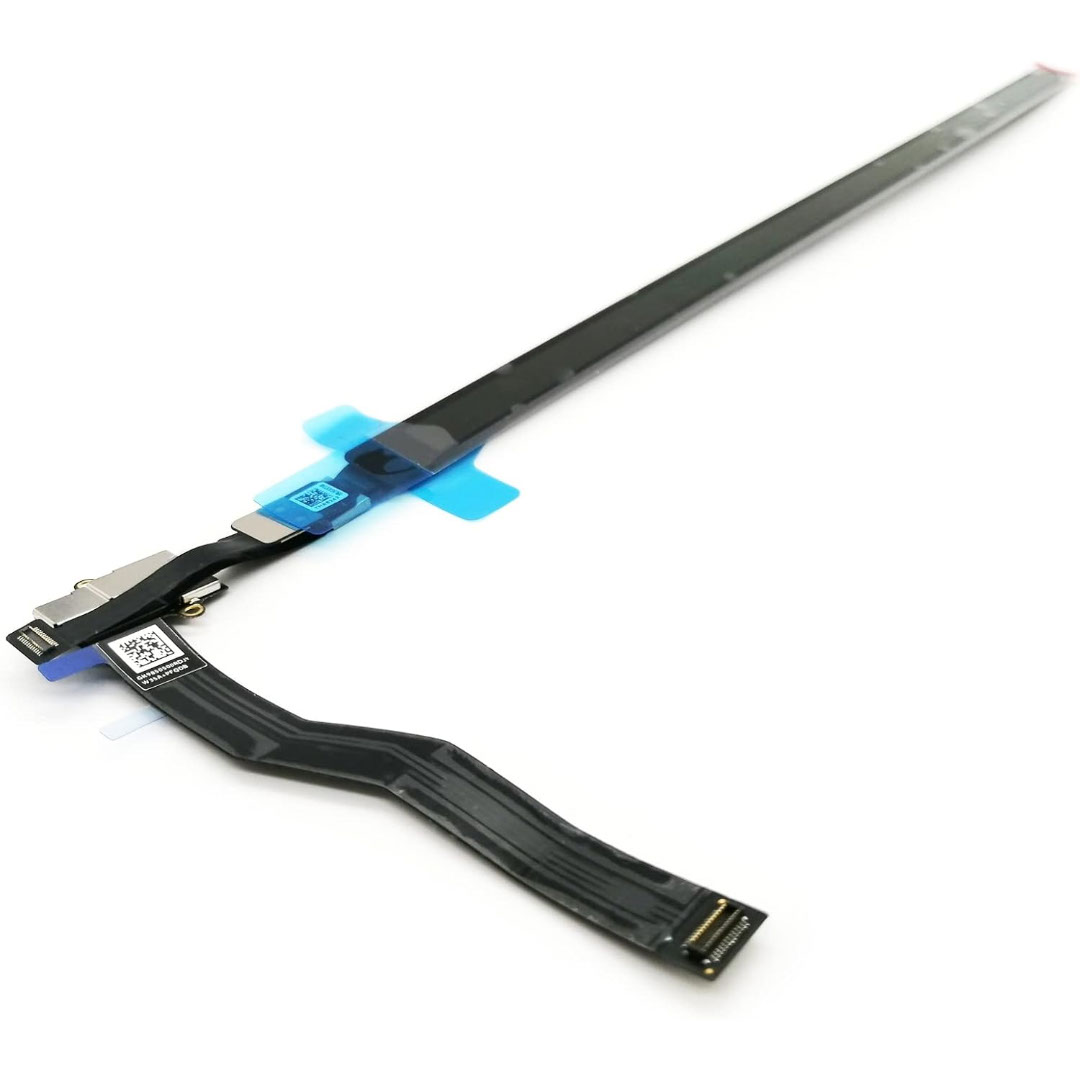
Genuine-spec touchpad flex cable for MacBook Pro 15″ (Model A2941, 2023, Apple M2)—restores full Force Touch functionality, haptic feedback, and precise multi-touch gesture control during trackpad repair or replacement. Compatible With: MacBook Pro 15-inch (2023, Model A2941) with Apple M2 chip (Model Identifier: MacBookPro19,1) Part Type: Touchpad flex cable only — does not include the trackpad housing, Taptic Engine, or mounting hardware. This is the OEM-style ribbon cable that connects the trackpad to the logic board. Function: Transmits: Touch input coordinates Force Touch pressure data Haptic feedback signals to the Taptic Engine Enables full macOS gesture support: Force Click, three-finger lookup, swipe navigation, pinch-to-zoom, and smooth cursor tracking. Touch input coordinates Force Touch pressure data Haptic feedback signals to the Taptic Engine Enables full macOS gesture support: Force Click, three-finger lookup, swipe navigation, pinch-to-zoom, and smooth cursor tracking. OEM-Quality Build: Matches Apple’s original specifications in: Cable length and routing path Connector pitch and ZIF latch design EMI shielding and flex durability Cable length and routing path Connector pitch and ZIF latch design EMI shielding and flex durability Common Use Cases: Replacing a torn, creased, or liquid-damaged original flex cable Completing a trackpad replacement when the original cable is compromised Fixing intermittent trackpad behavior, loss of Force Touch, or complete unresponsiveness Replacing a torn, creased, or liquid-damaged original flex cable Completing a trackpad replacement when the original cable is compromised Fixing intermittent trackpad behavior, loss of Force Touch, or complete unresponsiveness Installation Note: Requires full bottom case removal and battery disconnection. Cable routes under internal components near the right speaker and logic board. Connects via a ZIF (Zero Insertion Force) socket—must be aligned carefully and latched gently. Recommended for experienced or certified technicians only. Requires full bottom case removal and battery disconnection. Cable routes under internal components near the right speaker and logic board. Connects via a ZIF (Zero Insertion Force) socket—must be aligned carefully and latched gently. Recommended for experienced or certified technicians only.

External Seagate 2TB/4TB HDD Expansion Portable Drive Easily store and access 2TB/4TB of content on the go with Seagate Expansion Portable hard drive This external hard drive for Windows computers makes backup a snap just drag and drop To get set up, connect the portable hard drive to your Windows computer for automatic recognition no software required This USB drive provides plug and play simplicity with the included 18 inch USB 3.0 cable Enjoy long term peace of mind with the included one year limited warranty

Apple 96W USB Type-C Power Adapter | MX0J2

Compact and stylish with a zinc alloy shell, the SatcOp 8‑in‑1 USB‑C Multiport Dock delivers essential ports—Ethernet, HDMI, USB, card readers, and charging—in one portable adapter. Ideal for powering your laptop while expanding connectivity on the go. 🖥️ HDMI Port – Connect to external displays in Full HD or 4K (depending on your host device). 🌐 RJ45 Ethernet Port – Provides stable wired internet access with gigabit-speed support. ⚡ USB-C PD Charging – Power your laptop while using other ports (up to 87W pass-through). 🔌 USB 3.0 & USB 2.0 Ports – Connect flash drives, external storage, keyboards, and mice. 💾 SD & TF Card Readers – Quick access to camera and device storage cards. 🧊 Material – Premium zinc alloy casing for durability and efficient heat dissipation. 💼 Design – Slim, lightweight, and perfect for travel, home, or office setups. 💻 Compatibility – Works with most USB-C laptops, including Windows, macOS, Chrome OS, and select Android tablets.

Genuine-spec keyboard replacement for MacBook Air 13″ (Model A2179, 2020, Intel) — choose US QWERTY or UK QWERTY (with £ symbol). Features Apple’s reliable scissor-switch mechanism, backlighting, and OEM-fit design for seamless performance and aesthetics. Compatible With: MacBook Air 13-inch (2020, Model A2179, EMC 3597) with Intel Core i3/i5/i7 processors (non-M1). Layout Options (select at purchase): US Layout: Standard QWERTY with wide Enter key, @ above 2, # above 3, and full inverted-T arrow keys. UK Layout: QWERTY with £ symbol, tall vertical Enter key, @ accessed via right Alt, and UK-specific punctuation—matches Apple’s official UK regional configuration. US Layout: Standard QWERTY with wide Enter key, @ above 2, # above 3, and full inverted-T arrow keys. UK Layout: QWERTY with £ symbol, tall vertical Enter key, @ accessed via right Alt, and UK-specific punctuation—matches Apple’s official UK regional configuration. Keyboard Type: Traditional scissor-switch mechanism (not Butterfly, not Magic Keyboard)—robust, tactile, and serviceable, with good key travel and proven durability. Integrated Features: Full backlit keys for low-light use Ambient light sensor compatibility OEM-style ribbon cable pre-attached for direct logic board connection Full backlit keys for low-light use Ambient light sensor compatibility OEM-style ribbon cable pre-attached for direct logic board connection Precision Build: Molded to exact Apple specifications—ensures flush mounting, consistent key alignment, and seamless integration into the original top case. Installation Note: Keyboard is screw-mounted with light adhesive—more accessible than glued Butterfly/Magic keyboards. Requires top case access and battery disconnect. Suitable for intermediate DIYers or professional technicians. Important: This is keyboard only—does not include the top case, battery, trackpad, or logic board. Not compatible with M1 MacBook Air (A2337/A2338) or M2 models (A2681/A2941). This is keyboard only—does not include the top case, battery, trackpad, or logic board. Not compatible with M1 MacBook Air (A2337/A2338) or M2 models (A2681/A2941). Model Verification: Confirm your device is MacBook Air A2179 (13″, Intel, 2020) via > About This Mac > Model Identifier (e.g., MacBookAir9,1).

COMPACT AND WIRELESS Enjoy the freedom of wireless with this versatile combo. The compact keyboard is equipped with a number pad ideal for data entry, calculations and navigation, so you can get more work done in less space. The ambidextrous mouse delivers smooth tracking and scrolling, for easy navigation -at home or at work. COMPACT AND WIRELESS Enjoy the freedom of wireless with this versatile combo. The compact keyboard is equipped with a number pad ideal for data entry, calculations and navigation, so you can get more work done in less space. The ambidextrous mouse delivers smooth tracking and scrolling, for easy navigation -at home or at work. Height: 112 mm Width: 381 mm Depth: 17.78 mm Weight: 320 g Height: 107 mm Width: 60 mm Depth: 40 mm Weight: 112 g 10-Key Number pad Music Controls Up to 5 million keystrokes (excludes number lock key) Key type: Deep-profile Spill-resistant 2Tested under limited conditions (maximum of 60 ml liquid spillage). Do not immerse the keyboard in liquid. 2 AAA batteries (Alkaline Batteries) Sensor Technology: Smooth Optical Tracking Number of Buttons: 3 (Left/Right-click, Middle click) Scrolling: line-by-line Scroll Wheel: Yes, optical 2 AA batteries (Alkaline batteries) Windows® 10,11 or later ChromeOS An available USB ports

Genuine-spec touchpad flex cable for MacBook Pro 15″ (Model A1706 – 2017 and A1989 – 2018/2019)—restores full Force Touch functionality, haptic feedback, and precise multi-touch gesture control during trackpad repair or replacement. Compatible With: MacBook Pro 15″ (2017) – Model A1706 (Model Identifier: MacBookPro14,3) MacBook Pro 15″ (2018–2019) – Model A1989 (Model Identifier: MacBookPro15,2) ✅ Note: Apple used the same trackpad assembly and flex cable across both A1706 and A1989 15″ models—making this part interchangeable between them. MacBook Pro 15″ (2017) – Model A1706 (Model Identifier: MacBookPro14,3) MacBook Pro 15″ (2018–2019) – Model A1989 (Model Identifier: MacBookPro15,2) ✅ Note: Apple used the same trackpad assembly and flex cable across both A1706 and A1989 15″ models—making this part interchangeable between them. ✅ Note: Apple used the same trackpad assembly and flex cable across both A1706 and A1989 15″ models—making this part interchangeable between them. Part Type: Touchpad flex cable only — does not include the trackpad housing, Taptic Engine, or mounting hardware. This is the OEM-style ribbon cable connecting the trackpad to the logic board. Function: Transmits: Touch input coordinates Force Touch pressure data Haptic feedback signals to the Taptic Engine Enables full macOS gesture support: Force Click, three-finger lookup, swipe navigation, pinch-to-zoom, and smooth cursor tracking. Touch input coordinates Force Touch pressure data Haptic feedback signals to the Taptic Engine Enables full macOS gesture support: Force Click, three-finger lookup, swipe navigation, pinch-to-zoom, and smooth cursor tracking. OEM-Quality Build: Matches Apple’s original in: Cable length and routing Connector pitch and ZIF latch design EMI shielding and flex durability Cable length and routing Connector pitch and ZIF latch design EMI shielding and flex durability Common Use Cases: Replacing a torn, creased, or liquid-damaged original flex cable Completing a trackpad replacement when the original cable is compromised Fixing intermittent trackpad behavior, loss of Force Touch, or complete unresponsiveness Replacing a torn, creased, or liquid-damaged original flex cable Completing a trackpad replacement when the original cable is compromised Fixing intermittent trackpad behavior, loss of Force Touch, or complete unresponsiveness Installation Note: Requires full bottom case removal and battery disconnection. Cable routes under internal components near the right speaker and logic board. Connects via a ZIF (Zero Insertion Force) socket—must be aligned carefully and latched gently. Recommended for experienced or certified technicians only. Requires full bottom case removal and battery disconnection. Cable routes under internal components near the right speaker and logic board. Connects via a ZIF (Zero Insertion Force) socket—must be aligned carefully and latched gently. Recommended for experienced or certified technicians only.

Genuine-spec touchpad flex cable for MacBook Pro 16″ (Model A2485, 2021, M1 Pro/Max)—critical for restoring full Force Touch functionality, haptic feedback, and precise multi-touch gesture control during trackpad repairs. Compatible With: MacBook Pro 16-inch (2021, Model A2485) with Apple M1 Pro or M1 Max chip (Model Identifiers: MacBookPro18,1 / MacBookPro18,2). Part Type: Touchpad flex cable only—does not include the trackpad, Taptic Engine, or mounting hardware. This is the OEM-style ribbon cable that connects the trackpad to the logic board. Function: Transmits touch coordinates, Force Touch pressure data, and haptic feedback signals—essential for macOS gestures (e.g., pinch-to-zoom, Force Click, three-finger lookup) and Taptic Engine operation. OEM-Quality Construction: Precisely replicated to Apple’s original specifications—including cable length, connector type, EMI shielding, and flex routing—ensuring signal integrity and long-term reliability. Common Use Cases: Replacing a torn, frayed, or liquid-damaged original flex cable Completing a trackpad replacement when the original cable is compromised Fixing intermittent trackpad behavior, lost Force Touch, or complete unresponsiveness Replacing a torn, frayed, or liquid-damaged original flex cable Completing a trackpad replacement when the original cable is compromised Fixing intermittent trackpad behavior, lost Force Touch, or complete unresponsiveness Installation Note: Requires full disassembly of the bottom case and careful routing around the battery and logic board. Connectors use ZIF (Zero Insertion Force) sockets—must be aligned and latched gently. Recommended for certified or professional repair technicians only.
