
The HP P24V G5 FHD VA monitor delivers clear and vibrant visuals with its 24‑inch Full HD display. As a result, it makes everyday computing, work tasks, and media viewing more enjoyable with sharp detail and rich colors. In addition, the VA panel provides wide viewing angles, so the image stays consistent even when you move around your desk. Furthermore, this monitor includes fast response times that help reduce motion blur when watching videos or casual gaming. It also offers essential connectivity options, making it easy to connect laptops, desktops, or media players without adapter hassles. Therefore, it fits well in both home and office setups. Overall, the HP P24V G5 strikes a good balance between performance and practicality, giving users dependable display quality at an affordable level. Specifications: 24″ Full HD VA display with wide viewing angles Clear visuals and vibrant colors Fast response for smooth motion Essential connectivity for multiple devices Ideal for everyday work and entertainment use

The Samsung 27″ Odyssey G3 G30D FHD 180Hz Gaming Monitor LS27DG302 delivers smooth and responsive visuals with a Full HD (1920 × 1080) resolution and a 180 Hz refresh rate, which enhances motion clarity in fast‑paced games and videos. Additionally, it features a 1 ms (MPRT) response time for minimal motion blur, helping reduce ghosting during competitive play. The ergonomic stand allows tilt, swivel, pivot, and height adjustments for flexible viewing positions. Moreover, the monitor supports AMD FreeSync technology that helps reduce screen tearing and stuttering by synchronizing the display refresh rate with compatible GPUs. Therefore, gaming scenes and action appear more fluid. It also includes features such as Black Equalizer for improved visibility in dark areas and Virtual Aim Point for on‑screen crosshair alignment. Furthermore, the Odyssey G3 has a 3‑sided borderless design that maximizes the viewing area and supports easy multi‑monitor setups. Eye Saver Mode and Flicker Free technology help reduce eye fatigue during long sessions. The monitor connects via HDMI 2.0 and DisplayPort 1.4 for flexible device compatibility. Specifications: 27″ Full HD (1920 × 1080) resolution for clear, detailed visuals 180 Hz refresh rate with 1 ms (MPRT) response for smoother motion and minimal blur AMD FreeSync technology reduces tearing and stuttering for fluid gameplay Ergonomic stand with tilt, swivel, pivot, and height adjustments for flexible viewing 3‑sided borderless design with Eye Saver Mode and Flicker Free technology

HP 135W Multifunction Laser Print Speed: Fast and efficient printing with 20ppm. Printing Technology: Utilizes laser printing technology for precise and professional-quality documents. Multifunction Capability: All-in-one functionality for printing, scanning, and copying needs. Connectivity Options: Offers both wired and wireless connectivity options for versatile use. Compact Design: Space-saving design ideal for home offices and small workspaces. User-Friendly Interface: Easy-to-use interface for seamless operation. Energy Efficiency: Designed with energy-saving features to promote sustainability. Ideal for Home and Small Offices: Tailored for users seeking a compact and capable solution for their printing needs. Click for more info

WiWU Linker 721HD Hub – Compact USB-C hub with 7 ports including 100W PD, dual USB-A, USB-C data, HDMI 4K60, and dual SD/TF slots.Aluminum body, plug‑and‑play compatibility with MacBooks and modern USB‑C devices—ideal for laptop expansion. Model: Linker 721HD (WiWU) Material: Aluminum-alloy shell Ports: 2 × USB‑A 3.1 1 × USB‑C 3.1 (data) 1 × USB‑C PD power delivery (up to 100 W) 1 × HDMI (4K @ 60 Hz) SD card slot + micro‑SD (TF) slot (USB 3.0 speed) Ports: 2 × USB‑A 3.1 1 × USB‑C 3.1 (data) 1 × USB‑C PD power delivery (up to 100 W) 1 × HDMI (4K @ 60 Hz) SD card slot + micro‑SD (TF) slot (USB 3.0 speed) Cable: Fixed USB‑C male cable (approx. 15 cm) Compatibility: Plug-and-play with USB-C/Thunderbolt 3/4 devices (MacBook, XPS, Chromebooks, mobile devices with DP-Alt Mode) Design: Compact, space gray finish optimized for travel/work setups Weight: ~150 g

Are you in the market for a reliable and budget-friendly monitor? Let’s delve into the Lenovo 27″ IPS 75Hz LED Monitor, a promising display that caters to both work and entertainment needs. Beginning with its size, the generous 27-inch screen provides an immersive viewing experience without overwhelming your workspace. The IPS technology ensures vibrant colors and wide viewing angles for optimal visual enjoyment. With a refresh rate of 75Hz, this monitor strikes a balance between smooth performance and affordability. Whether you’re working on spreadsheets, watching videos, or gaming casually, the 75Hz refresh rate ensures fluid on-screen motion. The LED backlighting technology not only contributes to energy efficiency but also enhances contrast, delivering deep blacks and bright whites. This feature is particularly advantageous for photo and video editing tasks, providing a more accurate representation of colors. Connecting peripherals is a breeze with the monitor’s versatile ports, including HDMI and VGA. This compatibility ensures seamless integration with various devices, from laptops to gaming consoles, offering flexibility for different usage scenarios. Lenovo’s commitment to user comfort is evident in the adjustable stand. Tilt and swivel functions allow you to find the optimal viewing angle, reducing eye strain during extended use. In terms of affordability, the Lenovo 27″ IPS 75Hz LED Monitor stands out as a cost-effective option without compromising on performance. It strikes a commendable balance between essential features and budget-conscious pricing. In conclusion, if you’re in search of a dependable 27-inch monitor that delivers on performance and affordability, the Lenovo IPS 75Hz LED Monitor is a worthy contender. Elevate your viewing experience without breaking the bank. Specifications: Display : 27″ IPS Resolution : FHD (1920×1080) Response Rate : Up to 4ms Refresh Rate : 75Hz

Digital Device Laptop Keyboard Compatible for MacBook AIR 13″ A1369 A1466 (MID 2011- MID 2017) US Layout 【Unique】Pls see detail compatible models in description below. 【Safe】Easy for you replace your faulty, cracked or broken keyboard ,seller remind that you should replace the keyboard in the off state. All pictures are taken from the real item, please check carefully before bidding, Replacement and high quality, Replace your faulty, cracked or broken keyboard. Each keyboard is tested before shipping Compatibility: MacBook Air 13″ A1369 Mid 2011: MC965LL/A (1.7 GHz Core i5) Mid 2011: MC966LL/A (1.7 GHz Core i5) Mid 2011: MD226LL/A (1.8 GHz Core i7) Compatibility: MacBook Air 13″ A1466 Mid 2012: MD231LL/A (1.8 GHz Core i5) Mid 2012: MD232LL/A (1.8 GHz Core i5) Mid 2012: MD232LL/A (2.0 GHz Core i7) Mid 2013: MD760LL/A (1.3 GHz Core i5) Mid 2013: MD761LL/A (1.3 GHz Core i5) Mid 2013: MD761LL/A (1.7 GHz Core i7) Early 2014: MD760LL/B (1.4 GHz Core i5) Early 2014: MD761LL/B (1.4 GHz Core i5) Early 2014: MD761LL/B (1.7 GHz Core i7) Compatibility: Early 2015: MJVE2LL/A (1.6 GHz Core i5 or 2.2 GHz Core i7) Early 2015: MJVG2LL/A (1.6 GHz Core i5 or 2.2 GHz Core i7) Identifying Numbers APN #: 661-6059, 661-6635, 661-7480

Are you in search of a gaming monitor that takes your gaming experience to the next level? Look no further than the Samsung 32″ 165Hz Gaming Monitor. This monitor is packed with features that deliver smooth gameplay and stunning visuals, making it the perfect choice for gamers. Transitioning to its core, the Samsung Gaming Monitor boasts a high refresh rate of 165Hz, ensuring fluid motion and reduced screen tearing for an ultra-smooth gaming experience. Whether you’re playing fast-paced action games or immersing yourself in the latest AAA titles, this monitor keeps up with the action without missing a beat. Its 32-inch display provides ample screen real estate for immersive gaming sessions. With vibrant colors and crisp details, every game comes to life on this monitor, pulling you into the heart of the action. Furthermore, the Samsung 32″ 165Hz Gaming Monitor features a sleek and modern design that complements any gaming setup. With slim bezels and a minimalist aesthetic, this monitor not only enhances your gaming experience but also adds a touch of style to your gaming rig. Connectivity is key, and this monitor offers a range of ports including HDMI and DisplayPort, allowing you to connect to your gaming PC, console, and other devices with ease. Whether you’re gaming solo or with friends, stay connected and ready to play at a moment’s notice. In summary, the Samsung 32″ 165Hz Gaming Monitor is the ultimate choice for gamers seeking high performance and immersive visuals. Upgrade your gaming setup today and experience gaming like never before with this top-of-the-line monitor. Specifications: Display : 32″ IPS Resolution : 2,560 x 1,440 Refresh Rate : 165Hz Response Rate : 1ms (GTG)

The ViewSonic VX2779A-HD-PRO 27″ FHD 240Hz Gaming Monitor delivers ultra-smooth visuals for fast games. It features a 27-inch IPS panel that offers wide viewing angles and rich color. Moreover, the high 240 Hz refresh rate helps motion look fluid and responsive in action titles. This gaming monitor supports Full HD 1920×1080 resolution for crisp images and clear details. Additionally, the 1 ms response time (MPRT) reduces blur and ghosting in fast scenes. Adaptive sync tech like AMD FreeSync and NVIDIA G-SYNC compatibility helps cut screen tearing and stutter. The ViewSonic VX2779A-HD-PRO also includes HDR10 support to boost contrast and color depth for games and videos. Furthermore, anti-glare coating and low blue light help reduce eye strain during long play sessions. Multiple ports make setup easy with two HDMI and one DisplayPort connection. This monitor works well for competitive gaming, esports, and general entertainment. Therefore, it suits both PC gamers and console players. Finally, it combines speed, quality visuals, and versatile connectivity for everyday gaming use. Specifications: 27″ IPS panel with 1920×1080 Full HD resolution 240 Hz refresh rate and 1 ms (MPRT) response time HDR10 support and wide 178° viewing angles Connectivity: 2× HDMI 1.4 + 1× DisplayPort 1.4 Eye-care features: anti-glare, low blue light, and flicker-free

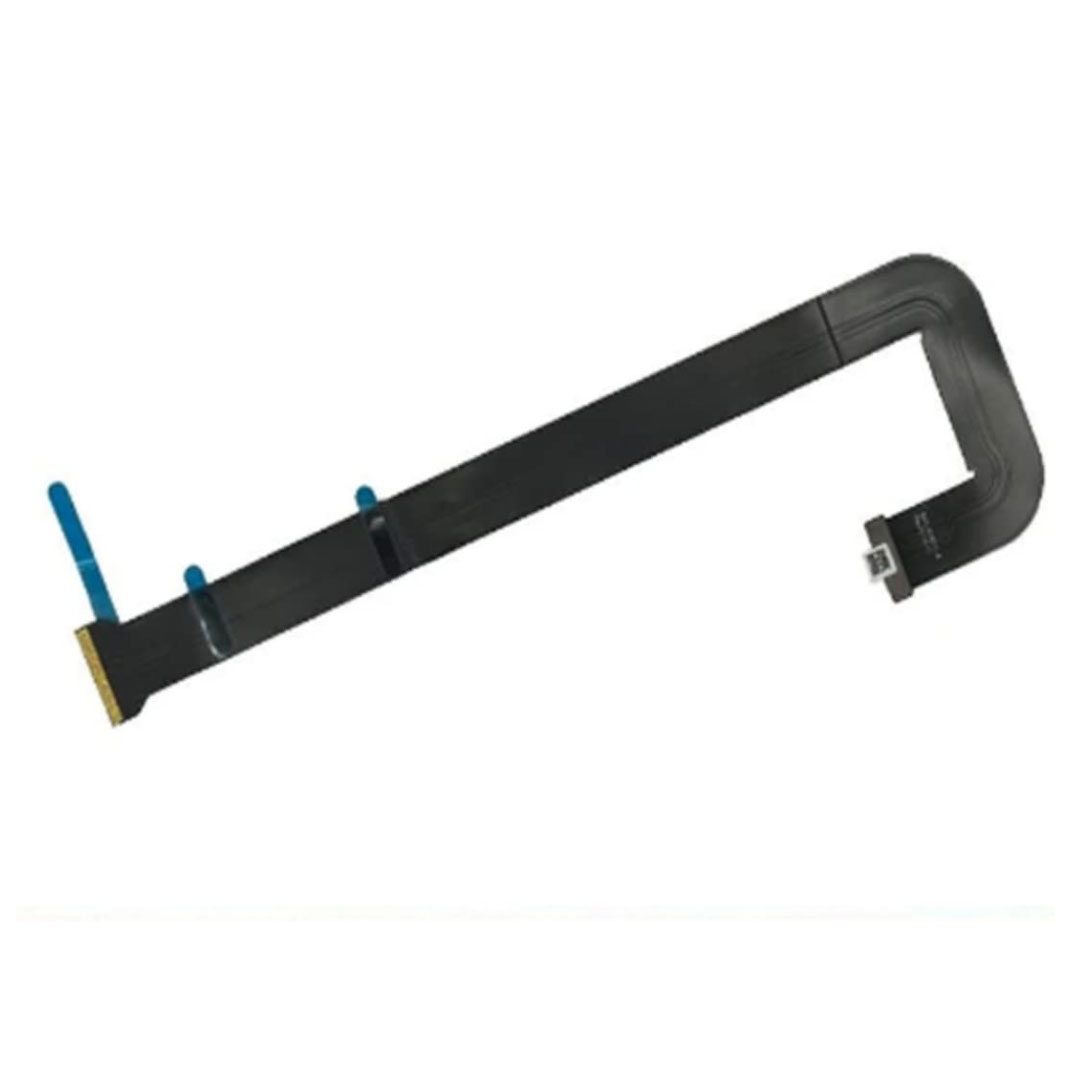
Genuine-spec touchpad flex cable for MacBook Pro 13″ with Touch Bar (Model A1708, 2016–2017)—restores full Force Touch functionality, haptic feedback, and precise multi-touch gesture control during trackpad repair or replacement. Compatible With: MacBook Pro 13″ (2016) – Model A1708 (Model Identifier: MacBookPro13,1) MacBook Pro 13″ (2017) – Model A1708 (Model Identifier: MacBookPro14,1) (Both years share the same internal trackpad assembly and flex cable.) MacBook Pro 13″ (2016) – Model A1708 (Model Identifier: MacBookPro13,1) MacBook Pro 13″ (2017) – Model A1708 (Model Identifier: MacBookPro14,1) (Both years share the same internal trackpad assembly and flex cable.) Part Type: Touchpad flex cable only — does not include the trackpad housing, Taptic Engine, or mounting hardware. This is the OEM-style ribbon cable that connects the trackpad to the logic board. Function: Transmits: Touch input coordinates Force Touch pressure data Haptic feedback signals to the Taptic Engine Enables full macOS gesture support: Force Click, three-finger lookup, swipe navigation, pinch-to-zoom, and smooth cursor tracking. Touch input coordinates Force Touch pressure data Haptic feedback signals to the Taptic Engine Enables full macOS gesture support: Force Click, three-finger lookup, swipe navigation, pinch-to-zoom, and smooth cursor tracking. OEM-Quality Build: Matches Apple’s original specifications in: Cable length and routing path Connector pitch and ZIF latch design EMI shielding and flex durability Cable length and routing path Connector pitch and ZIF latch design EMI shielding and flex durability Common Use Cases: Replacing a torn, creased, or liquid-damaged original flex cable Completing a trackpad replacement when the original cable is compromised Fixing intermittent trackpad behavior, loss of Force Touch, or complete unresponsiveness Replacing a torn, creased, or liquid-damaged original flex cable Completing a trackpad replacement when the original cable is compromised Fixing intermittent trackpad behavior, loss of Force Touch, or complete unresponsiveness Installation Note: Requires full bottom case removal and battery disconnection. Cable routes under internal components near the right speaker and logic board. Connects via a ZIF (Zero Insertion Force) socket—must be aligned carefully and latched gently. Recommended for experienced or certified technicians only. Requires full bottom case removal and battery disconnection. Cable routes under internal components near the right speaker and logic board. Connects via a ZIF (Zero Insertion Force) socket—must be aligned carefully and latched gently. Recommended for experienced or certified technicians only.

HP SPro 322pe Monitor Overview The HP SPro 322pe is a professional Full HD monitor built for daily business use. It delivers reliable performance and a clean design. As a result, it fits perfectly in offices and work-from-home setups. 21.5-Inch Full HD Display This monitor features a 21.5-inch Full HD resolution. Therefore, text appears sharp and easy to read. Moreover, images look clear and balanced. Because of this, it supports productivity tasks with ease. In addition, the compact size saves desk space. As a result, it works well in smaller work areas. Smooth and Stable Visual Experience The HP SPro 322pe offers smooth and stable visuals. Therefore, everyday tasks feel comfortable. In addition, scrolling and browsing look natural. This makes it suitable for long working hours. Eye Comfort for Long Sessions This monitor includes eye comfort features. As a result, it helps reduce eye fatigue. Moreover, the anti-glare screen improves visibility. Therefore, users stay focused throughout the day. Connectivity and Ease of Use The HP SPro 322pe includes essential connectivity options. As a result, it connects easily to most PCs. Moreover, setup is quick and straightforward. This saves time and effort. Professional Design and Flexibility The monitor features a simple and professional design. In addition, it supports VESA mounting. As a result, users can customize their workspace layout. Ideal for Office and Business Use This monitor focuses on efficiency and reliability. Moreover, it supports daily workloads without distraction. In conclusion, it is a solid choice for professional environments. Specifications: Display : 21.45″ VA Resolution : FHD (1920 X 1080) Connectivity: 1x HDMI 1.4, 1x VGA. Performance: 100Hz refresh rate for smooth motion, 5ms GtG response time.

Genuine-spec touchpad flex cable for MacBook Pro 15″ (Model A2941, 2023, Apple M2)—restores full Force Touch functionality, haptic feedback, and precise multi-touch gesture control during trackpad repair or replacement. Compatible With: MacBook Pro 15-inch (2023, Model A2941) with Apple M2 chip (Model Identifier: MacBookPro19,1) Part Type: Touchpad flex cable only — does not include the trackpad housing, Taptic Engine, or mounting hardware. This is the OEM-style ribbon cable that connects the trackpad to the logic board. Function: Transmits: Touch input coordinates Force Touch pressure data Haptic feedback signals to the Taptic Engine Enables full macOS gesture support: Force Click, three-finger lookup, swipe navigation, pinch-to-zoom, and smooth cursor tracking. Touch input coordinates Force Touch pressure data Haptic feedback signals to the Taptic Engine Enables full macOS gesture support: Force Click, three-finger lookup, swipe navigation, pinch-to-zoom, and smooth cursor tracking. OEM-Quality Build: Matches Apple’s original specifications in: Cable length and routing path Connector pitch and ZIF latch design EMI shielding and flex durability Cable length and routing path Connector pitch and ZIF latch design EMI shielding and flex durability Common Use Cases: Replacing a torn, creased, or liquid-damaged original flex cable Completing a trackpad replacement when the original cable is compromised Fixing intermittent trackpad behavior, loss of Force Touch, or complete unresponsiveness Replacing a torn, creased, or liquid-damaged original flex cable Completing a trackpad replacement when the original cable is compromised Fixing intermittent trackpad behavior, loss of Force Touch, or complete unresponsiveness Installation Note: Requires full bottom case removal and battery disconnection. Cable routes under internal components near the right speaker and logic board. Connects via a ZIF (Zero Insertion Force) socket—must be aligned carefully and latched gently. Recommended for experienced or certified technicians only. Requires full bottom case removal and battery disconnection. Cable routes under internal components near the right speaker and logic board. Connects via a ZIF (Zero Insertion Force) socket—must be aligned carefully and latched gently. Recommended for experienced or certified technicians only.

The Dell OptiPlex 7050 Micro combines compact design and solid performance with an Intel Core i5 6th Gen processor, DDR4 RAM options, and SSD storage options. Ideal for business and home use, it delivers reliable speed, energy efficiency, and space-saving desktop performance.

The MSI MAG274CXF 27″ 280 Hz Gaming Monitor delivers ultra‑smooth visuals for fast‑paced games.It features a curved 1500R screen that pulls you into action.Moreover, the rapid VA panel supports a 280 Hz refresh rate for fluid motion. This monitor has a 27‑inch Full HD (1920×1080) display with crisp detail.Additionally, it provides a fast 0.5 ms response time to reduce blur and ghosting.AMD FreeSync Premium technology helps prevent screen tearing for smoother gameplay. The MSI MAG274CXF also includes HDR Ready support to enhance color and brightness.Furthermore, the anti‑glare surface helps reduce reflections in bright rooms.The wide 178° viewing angles make content look great from many positions. This gaming monitor offers multiple ports for easy connections.There are two HDMI 2.0b ports and one DisplayPort 1.2a for multiple devices.It also features a headphone‑out port for quick audio access. The MSI MAG274CXF fits many setups with tilt adjustment and VESA mount support.Therefore, it works for desks, battlestations, and wall mounts.Finally, this monitor combines speed, comfort, and quality for gamers and media lovers alike Specifications: 27″ Full HD (1920×1080) curved screen (1500R) 280 Hz refresh rate and 0.5 ms response time AMD FreeSync Premium support 2× HDMI 2.0b + 1× DisplayPort 1.2a ports HDR Ready with anti‑glare coating Height Adjustable Contrast Ratio:4000:1 2 HDMI| 1 Display port| 1 Audio Out

Fast-charging feature available on select iPhone and iPad models.

The HyperX Pulsefire Haste 2 Core Wireless is an ultra-lightweight, high-performance gaming mouse designed for speed, precision, and long-lasting comfort. Featuring dual-mode wireless connectivity and an operating weight of just 70 grams, it delivers low-latency competitive gaming powered by a single AAA battery. ✅ Full Specifications: Model: HyperX Pulsefire Haste 2 Core Wireless (White Edition / 8R2E7AA) Interface / Connection: Dual Wireless Connection Modes: High-speed 2.4GHz Wireless (via included USB-A nano receiver) Bluetooth 5.2 (Power-efficient mode for casual use and multi-device pairing) Interface / Connection: Dual Wireless Connection Modes: High-speed 2.4GHz Wireless (via included USB-A nano receiver) Bluetooth 5.2 (Power-efficient mode for casual use and multi-device pairing) Performance & Sensor: Sensor Type: HyperX Custom Core Optical Sensor Max Resolution: Up to 12,000 DPI DPI Presets: 400 / 800 / 1600 / 3200 DPI Tracking Speed: 300 IPS Acceleration: 35G Polling Rate: Up to 1,000Hz (1ms response time) Performance & Sensor: Sensor Type: HyperX Custom Core Optical Sensor Max Resolution: Up to 12,000 DPI DPI Presets: 400 / 800 / 1600 / 3200 DPI Tracking Speed: 300 IPS Acceleration: 35G Polling Rate: Up to 1,000Hz (1ms response time) Switches & Durability: Main Left/Right Switches: Tactile TTC Gold Switches Switch Lifespan: Rated for up to 20 million clicks Total Buttons: 6 programmable buttons (including 2 thumb side buttons) Switches & Durability: Main Left/Right Switches: Tactile TTC Gold Switches Switch Lifespan: Rated for up to 20 million clicks Total Buttons: 6 programmable buttons (including 2 thumb side buttons) Material & Build: Durable solid-upper shell with low-friction PTFE skates for seamless gliding across cloth mouse pads Design & Form Factor: Lightweight, symmetrical ergonomic frame suitable for various grip styles (palm, claw, fingertip) Lighting Effects: Customizable onboard LED RGB lighting Battery & Power: Battery Type: User-replaceable, 1x AAA Alkaline Battery Battery Life: Up to 100 hours (on 2.4GHz mode) or up to 200 hours (on Bluetooth mode) Battery & Power: Battery Type: User-replaceable, 1x AAA Alkaline Battery Battery Life: Up to 100 hours (on 2.4GHz mode) or up to 200 hours (on Bluetooth mode) Security & Software: Fully compatible with HyperX NGENUITY software for button remapping, macro recording, and custom RGB profile management Compatibility: PC, Xbox Series X|S, Xbox One, PlayStation 5 (PS5), PlayStation 4 (PS4), and Mac Dimensions: Approx. 124.3 x 66.8 x 38.2 mm Weight: Mouse Only: Approx. 60 grams Operating Weight (with AAA battery): Approx. 70 grams Weight: Mouse Only: Approx. 60 grams Operating Weight (with AAA battery): Approx. 70 grams

Battery Replacement for A1819 MacBook Pro 13" A1706 Late 2016 Mid 2017 MLH12LL MLH12LL/A MLH12LL/A MPXV2LL MPXV2LL/A MPXV2LL/A Battery Replacement for A1819 MacBook Pro 13″ A1706 Late 2016 Mid 2017 MLH12LL MLH12LL/A MLH12LL/A MPXV2LL MPXV2LL/A MPXV2LL/A 【Technical Details:】 Model Number: A1819; Battery type: Li-ion; Voltage: 11.1V; Capacity: 4300mAh 49.02Wh,Condition: brand new 【Compatible with:】 Mid 2017 MacBook Pro 13-inch Series: MacBook Pro 13 inch Touch A1706(Mid 2017); MacBook Pro 13 inch A1706(EMC 3163) (Mid 2017); MacBook Pro 13-inch MPXV2LL/A or MPXW2LL/A or MPXX2LL/A or MPXY2LL/A 【Compatible with:】MacBook Pro 13 inch Touch A1706(Late 2016); MacBook Pro 13 inch A1706(EMC 3071) (Late 2016); MacBook Pro 13-inch MLH12LL/A or MLVP2LL/A or MNQF2LL/A or MNQG2LL/A 【Compatible with:】2016 2017 MacBook Pro 13″ Four Thunderbolt 3 Ports A1706 model: MacBook Pro 13″ Touch i5 2.9GHz A1706(Late 2016); MacBook Pro 13″ Touch i5 3.1GHz A1706(Late 2016); MacBook Pro 13″ Touch i5 3.1GHz A1706(Mid 2017); MacBook Pro 13″ Touch i5 3.3GHz A1706(Mid 2017); MacBook Pro 13″ Touch i7 3.3GHz A1706(Late 2016); MacBook Pro 13″ Touch i7 3.5GHz A1706(Mid 2017)

The Lexar NM620 2TB NVMe SSD delivers exceptional read speeds up to 3,300 MB/s and write speeds up to 3,000 MB/s through its PCIe Gen3x4 NVMe 1.4 interface. Built with 3D NAND Flash and a compact M.2 2280 form factor, it offers fast, efficient, and reliable storage for gaming, video editing, and professional workloads. The Lexar NM620 2TB M.2 2280 NVMe SSD is engineered for users who need high-performance storage without compromise. Using PCIe Gen3x4 lanes and the NVMe 1.4 protocol, it provides up to six times faster transfer speeds than SATA SSDs. Its slim, cable-free design makes it an ideal upgrade for desktops, laptops, and ultrabooks that demand higher data throughput and improved responsiveness. ⚡ High-Speed NVMe Performance: Delivers sequential read/write speeds up to 3,300 MB/s / 3,000 MB/s for faster system boot-ups, game loading, and large-file transfers. 💾 Large 2 TB Capacity: Provides ample storage for 4K media, applications, and high-volume project files. 🔋 Power-Efficient Design: Optimized for lower power draw, helping extend laptop battery life and reduce operating temperatures. 🔒 Advanced Data Protection: Utilizes LDPC (Low-Density Parity-Check) and end-to-end data path protection for accurate, consistent data integrity. 🧊 Compact Form Factor: The M.2 2280 design supports easy installation in modern systems without cables. 🧠 3D NAND Architecture: Ensures improved endurance, sustained performance, and stability during intensive workloads. 🧰 Durability Tested: Resistant to shock and vibration for dependable performance across a range of operating environments.

WiWU A821CH 8‑in‑1 Stand & Dock – A foldable aluminum laptop stand with a built-in 8‑port USB‑C dock (two USB‑A, two USB‑C, HDMI 4K30, SD/TF, Gigabit Ethernet, PD 100 W).Enhances comfort, cooling, and functionality—perfect for decluttered, professional work setups. Model: WiWU A821CH Design: Sturdy aluminum alloy stand with foldable, portable design, hollow surface for cooling, and silicone pads to prevent slips Dimensions & Weight: Compact when folded (~400 g in aluminum) Docking Hub Ports: 2 × USB-C ports 2 × USB‑A 3.0 ports 1 × HDMI (up to 4K@30 Hz) SD + micro‑SD card slots 1 × RJ‑45 Gigabit Ethernet (1000 Mbps) Docking Hub Ports: 2 × USB-C ports 2 × USB‑A 3.0 ports 1 × HDMI (up to 4K@30 Hz) SD + micro‑SD card slots 1 × RJ‑45 Gigabit Ethernet (1000 Mbps) Power Delivery: USB-C PD 3.0 supports up to 100 W—can charge a laptop while using other ports Connectivity: HDMI supports up to 4K@30 Hz; Ethernet up to Gigabit speed Stand Features: Detachable base—can use stand and hub together or separately, with adjustable ergonomic angles and vents for airflow Durability: Aluminum alloy with frosted texture, scratch-resistant finish, tested to executive standards

BenQ Board Essential RE7504N 75” 4K UHD Interactive Flat Panel is a large interactive display designed for education and business collaboration. It supports touch input, built-in Android system, and 4K resolution for presentations and group work. It features a 75-inch IPS panel with 3840 × 2160 4K UHD resolution. Therefore, it delivers sharp visuals and wide viewing angles. In addition, it supports up to 40-point multi-touch for group interaction. Moreover, it runs Android (EDLA-supported system depending on region). As a result, users can run apps, whiteboard tools, and content directly on the display without a PC. The screen includes anti-glare coating. Therefore, it stays readable in bright rooms. In addition, it supports 4K 60Hz output for smooth visuals. Furthermore, it includes HDMI, USB, LAN, and OPS slot connectivity. As a result, it works with laptops, external PCs, and modular systems. It also includes built-in speakers for basic audio output. Therefore, it supports lessons and meetings without external speakers. Finally, the BenQ RE7504N provides a large interactive 4K workspace for classrooms and business collaboration. Specifications: Display: 75-inch IPS panel with 3840×2160 4K UHD resolution Touch: Up to 40-point multi-touch support System: Android-based interactive platform (EDLA support depending on region) Connectivity: HDMI, USB, LAN, and OPS slot support Display: Anti-glare screen with 4K 60Hz output for smooth visuals

