
DELL 357F9 11.1V or 11.4V 74Wh Battery For DELL Inspiron 15 5000 Gaming 5576 5577 ,15 7000 Gaming 7557 7559 7566 7567 Laptops Alternant Part Number: 357F9 71JF4 0GFJ6 071FJ4 00GFJ6 P65F001 P57F003 About this item Battery Type:6 cell Li-Polymer Best Quality Voltage &Capacity :11.1V 74Wh 6330mAh , 11.4V 74Wh 6480mAh SANISI Concept: The customer is god, Product Quality and Service must be perfect! We will let every customer feel satisfied Package Contents: 1 pcs Brand New Battery

A reliable, budget-friendly Genius KM-100SE wired keyboard and mouse combo featuring a spill-resistant keyboard, ergonomic design, and plug-and-play USB connectivity—ideal for home, office, or classroom use. Spill-resistant design with drainage holes to protect against accidental liquid damage Quiet, low-profile keys with standard layout (including numeric keypad) for comfortable typing Durable construction with a lifespan of up to 10 million keystrokes Integrated wrist rest for improved ergonomics during long sessions Ambidextrous 3-button design with scroll wheel 1000 DPI optical sensor for smooth, precise tracking on most surfaces Ergonomic shape for comfortable right- or left-handed use Plug-and-play USB connection—no drivers required Compatible with Windows, macOS, Linux, and ChromeOS 1.5-meter braided cable for tangle resistance and durability

GAMDIAS XC3 (2g, incl. Cleaning Wipe and Scraper) - Ultimate Performance Thermal Paste for CPU, GPU, consoles, laptops, high thermal conductivity, long durability, non-conductive, non-capacitive GAMDIAS XC3 (2g, incl. Cleaning Wipe and Scraper) – Ultimate Performance Thermal Paste for CPU, GPU, consoles, laptops, high thermal conductivity, long durability, non-conductive, non-capacitive PERFORMANCE THERMAL COMPOUND: XC3 is an easy-to-apply thermal paste that features high-quality thermal compounds with nano-diamond particles that allow excellent conductivity to lower thermals and push your PC to the limit. HIGH THERMAL CONDUCTIVITY: XC3 ensures exceptional heat dissipation by utilizing high conductivity nanoparticles and lowering thermal impedance between the CPU and cooler with its nano-diamond particles. VERSATILE APPLICATION: The compound provides a stable working status from -50°C to 220°C. SAFE AND STABLE: Without electrically conductive materials,the grease eliminates the risk of short-circuiting or discharging. APPLICATION KIT: The paste comes in a luer lock syringe, with a cleaning wipe and scraper included in the product pack for convenience.

Material: Plastic + Mesh fabric Bluetooth version/chipset: 5.4/ATS2853 Transmission Distance: 12M Working voltage: 18.5V Impedance: 4Ω Speaker power: Tweeter: 50W * 2 Subwoofer: 200W Battery (mAh):30000mAH/18.5V*6000;18650/2000mA*15; 3 in series and 5 in parallel Charging time: about 3 hours Calling: 20 hours Music playback: 12 hours Standby time: 6 months 1.5.4 wireless, fast, stable, and efficient connection, excellent sound quality 2 . Sound Card/Karaoke/wireless speaker, all in one, built-in DSP, multiple EQ settings, support internal monitoring/recording/live streaming function, 433/360° omnidirectional remote control (can work through walls) 3. Efficient speakers and power amplifier for loud sound and high-fidelity music playback 4,30000mAh power bank (18.5V*6000mAh; 18650/2000mA*15; 3 in series and 5 in parallel), colorful lights available in various modes, controllable flashing lights CTN GW: 18.5kg ± 0.2kg Carton size: 50.5 * 44.2 * 39cm

Battery Model: A1493 A1502 Replacement Laptop Battery for MacBook Pro Retina 13 Inch Late 2013 Mid 2014 ; MacBook Pro A1493 A1582 Battery EMC 2678 2875 2835 ME864 ME865 100% Brand New, Battery Type: Li-Polymer; Capacity: 71.8Wh; Voltage:11.34V; Package include two free screwdriver Compatible:A1502 A1493 (Only for Late 2013, Mid 2014 Version) Apple MacBook Pro 13″ Retina ME864LL/A ME866LL/A ,MacBook Pro “Core i5″ 2.4/2.5 13” Late 2013 Retina Overcharger and Discharger Circuit Protection, CE-/FCC-/RoHS-Certified for safety.

Feature Specification Packaging and Delivery Details Power Source Battery Selling Units Single item Number of Loudspeaker Enclosure 1 Single package size 19X22X10 cm Cabinet Material Plastic Single gross weight 0.600 kg Display Screen NO Built-in Microphone NO Brand Name Remax Model Number RB-X1 Remax Worldwide Store 9300+ Remax Support Video to see the product and testing Product Name Outdoor Wireless Speaker Color Black Logo Accept Customized Logo Intelligent Personal Assistant None

The Apple Magic Mouse (USB-C version) is a sleek, minimalist multi-touch wireless mouse built for Mac users. It offers smooth gesture support, Bluetooth connectivity and a built-in rechargeable battery — a great choice if you prefer a clean desk setup and full compatibility with macOS and iPadOS. General Name: Magic Mouse (USB-C) — part of Apple’s pointing-device lineup. Wireless connectivity: Bluetooth. Rechargeable battery: built-in, no disposable AA cells. Charging / port: USB-C port (bottom of mouse) for pairing and charging. Compatibility: Requires a Mac with macOS 15.1 or later, or an iPad with iPadOS 18.1 or later. Size & Weight Height: ~0.85 inch (2.16 cm) Width: ~2.25 inch (5.71 cm) Depth: ~4.47 inch (11.35 cm) Weight: ~0.22 pound (0.099 kg) (varies slightly by manufacturing) Features Multi-Touch surface: supports gestures such as swiping between pages, scrolling through documents, zooming. Glide / foot design: optimized for smooth movement across desktop surfaces. Rechargeable battery life: about a month or more between charges (typical use) per Apple spec. Used Condition ConsiderationsSince you’re specifying a used unit: Check for wear on the bottom feet / skates — these degrade and affect glide. Verify battery capacity / health (rechargeable batteries age). Confirm the port is functioning (USB-C) and Bluetooth connectivity is stable. Look for signs of excessive surface scratches on the multi-touch top — may impair gestures. Ensure the firmware / Mac recognizes it fully (gestures working). Upgradability / Limitations Not user-upgradable: You cannot replace the internal battery or change internals easily. Design limitation: The USB-C port remains on the bottom of the mouse, meaning you cannot use it while charging unless you flip it. This design is still criticized. Ergonomics: The flat, low-profile design is stylish but may not suit extended-use comfort for some users.

The 45W MagSafe 2 Power Adapter features a magnetic DC connector so if someone should trip over it, the cord disconnects harmlessly and your MacBook Air stays put safely. It also helps prevent fraying or weakening of the cables over time. In addition, the magnetic DC helps guide the plug into the system for a quick and secure connection. The 45W MagSafe 2 Power Adapter features a magnetic DC connector so if someone should trip over it, the cord disconnects harmlessly and your MacBook Air stays put safely. It also helps prevent fraying or weakening of the cables over time. In addition, the magnetic DC helps guide the plug into the system for a quick and secure connection. When the connection is secure, an LED located at the head of the DC connector lights up; an amber light lets you know that your notebook is charging, while a green light tells you that you have a full charge. An AC cord is provided with the adapter for maximum cord length, while the AC wall adapter (also provided) gives you an even easier and more compact way to travel. Designed to be the perfect traveling companion, the adapter has a clever design which allows the DC cable to be wound neatly around itself for easy cable storage. This power adapter recharges the lithium polymer battery while the system is off, on, or in sleep mode. It also powers the system if you choose to operate without a battery. Compatible only with MacBook Air featuring MagSafe 2 power port. Knowing which specific Mac model you have is important. If you are running OS X Lion (10.7) or later go to the “” menu at the top left of your screen, choose “About this Mac” then click the “More Info…” button. Your Mac model and generation will be displayed. If you are running an earlier version of OS X, you can enter your serial number here to find out which model you have. Mac Models MacBook Air (13-inch, Early 2015 – 2017) MacBook Air (11-inch, Early 2015)

OEM-quality trackpad replacement (without flex cable) for MacBook Air 13″ (Model A1932, 2018–2019) in Gold finish—engineered for precise Force Touch response, smooth multi-touch gestures, and perfect color-matched integration with the original chassis. Compatible With: MacBook Air 13-inch (2018 & 2019, Model A1932, Model Identifiers MacBookAir8,1) with Intel Core i5/i7 processors. Part Type: Trackpad only—does not include the flex cable, Taptic Engine, or mounting hardware. Designed for technicians who will reuse the original internal components. Finish: Gold—specifically matched to the Gold variant of the A1932 MacBook Air for seamless aesthetic continuity. Force Touch Support: Fully compatible with pressure-sensitive input and haptic feedback when paired with the original Taptic Engine and logic board—ensuring full macOS gesture functionality (e.g., Force Click, Look Up, pressure-sensitive navigation). Precision Build: Smooth glass surface with exact curvature, texture, and micro-click mechanism matching Apple’s original design for consistent tracking accuracy and tactile feel. Installation Requirements: Requires full bottom case disassembly and careful transfer of the original flex cable and Taptic Engine. Adhesive must be applied precisely to maintain structural integrity and sensor alignment. Recommended for professional or experienced repair technicians only.

The Cudy WR1300 AC1200 Router delivers fast and stable internet with dual-band WiFi speeds up to 1200Mbps. Designed for home and office use, it features Gigabit ports for high-speed wired connections and reliable coverage for streaming, gaming, and everyday browsing. AC1200 Dual Band WiFi – Combined speeds of up to 1200Mbps (300Mbps on 2.4GHz + 867Mbps on 5GHz) for smooth streaming and online gaming. Gigabit Ethernet Ports – Ultra-fast LAN/WAN ports ensure maximum wired performance for PCs, consoles, and smart TVs. Wide Coverage – Equipped with high-gain antennas to provide strong and stable WiFi signal throughout your home or office. Multiple Operating Modes – Supports Router, Access Point, and Repeater modes for flexible network setup. Easy Setup & Management – Simple web interface for quick installation and control. Secure Connection – Advanced wireless security with WPA/WPA2 encryption to keep your network safe. 1 × Gigabit WAN Port 4 × Gigabit LAN Ports Wi-Fi 2.4GHz & 5GHz Dual Band Ethernet (RJ45) Wireless Security (WPA/WPA2)

Sklon Ski Boot Bag – Expandable 55–65 L backpack with waterproof fabric, separate boot space, and padded carry system.Ideal for skiing and snowboarding gear transport with hands-free comfort and smart compartment layout. Model: Sklon10 Ski Boot Bag Backpack Capacity: 55 L (expandable to 65 L via integrated zipper) Dimensions: Approx. 34.9 cm × 30.5 cm × 53.3 cm (13.75″ × 12″ × 21″) Weight: Around 1.9 kg Material: Water-resistant polyester and nylon soft-shell build Compartments: Dedicated boot section to isolate wet gear Helmet and goggle compartments Multiple internal and external zippered pockets Compartments: Dedicated boot section to isolate wet gear Helmet and goggle compartments Multiple internal and external zippered pockets External Features: Adjustable straps to carry skis or snowboard Compact foldable design for storage External Features: Adjustable straps to carry skis or snowboard Compact foldable design for storage Comfort: Ergonomic padded shoulder straps Cushioned back panel Top and side grab handles Comfort: Ergonomic padded shoulder straps Cushioned back panel Top and side grab handles Use Case: Designed for skiing, snowboarding, or as a multi-use travel pack

REMAX RT-E601 1200MAH TIME II SERIES EYE-CARING LED LAMP Function— Use the power key to turn on/ off the lamp. Tap the power key to adjust the brightness of the lamp (brightest-normal-dimmest-off) four steps are easy to use. When folding the design lamp holder and arm can rotate the angle within a range of 180 degrees up-down adjustment. Press and hold “Mode” Set” Up” Donkey enter normal time mode, alarm clock and snooze mode, birthday reminder mode timer mode, and temperature mode. Time changes 12 hours/24 hours mode and adjusting the hours, minutes, year, month,t,h, and day. Temperature can change to Celsius or Fahrenheit. The red light will be on when it starts charging, and the red light will go out when it is fully charged. Material—ABS+PC Rated voltage—DC5V /0.5A lighting Mode—Direct glow Key Type—Touch key Luminous flux—250m Color rendering index—>80 Rated power—4W Battery Capacity—1200mAh Weight—346g Charging port—Micro SIZE—87*87*263mmCharging time—4-4:30hour Working time—3:30hour

0G74G Laptop Battery Replacement for Dell Latitude 5300 2-in-1 5310 7300 7400 Series Notebook OG74G 02PFPW 2PFPW 3KF82 8JYHH 11.4V 42Wh 3-Cell About this item Specification: Battery type: Li-ion. Color: Black. Voltage: 11.4V. Capacity: 42Wh/3Cell. New from Manufacturer Replace Part Number: For MXV9V 0G74G 00G74G 2PFPW 3KF82 8JYHH Compatible Models: Replacement for Dell Latitude 5300 E5300 / 5300 2-in-1 / 5310 E5310 / 5310 2-in-1 / 7300 E7300 / 7400 E7400 Series (Important Note: NOT fit for latitude 7400 2-in-1 Series) Note: The Dell laptop models on this product page are compatible with 2 battery models: 0G74G (42Wh 3-Cell 11.4V) , MXV9V(60Wh 4-Cell 7.6V). Please open the back cover of your laptop to check the original battery size and capacity before placing an order. Make sure that the battery model you need is 0G74G (42Wh 3-Cell 11.4V). Note: If the new battery is not recognized during the initial installation, please reinstall and check if the interface is fully connected. Discharge the new battery to 10-20% (not 0%), then charge and cycle 3-4 times to wake up the new battery

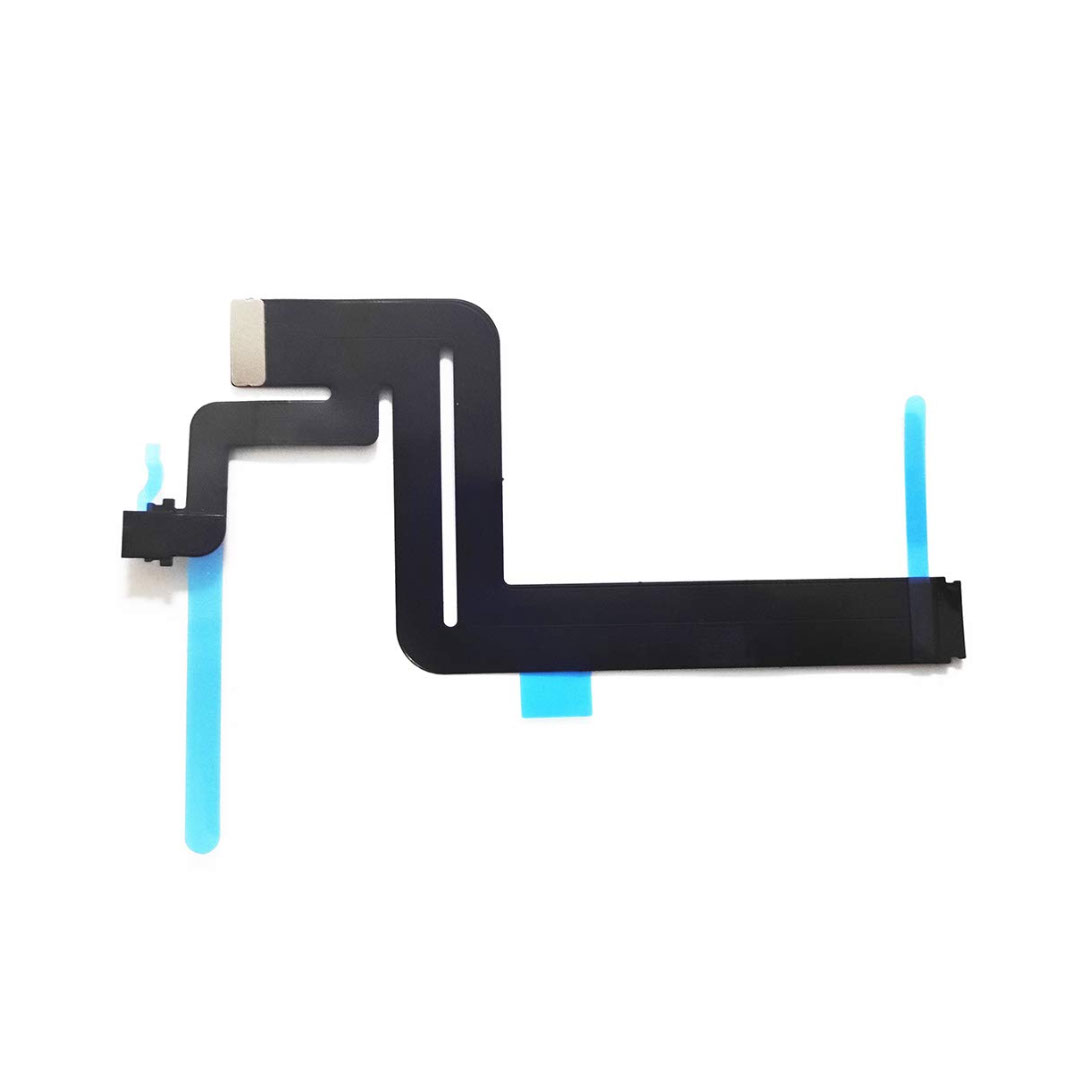
Genuine-spec touchpad flex cable for MacBook Air 13″ (Model A1534, Early 2015)—essential for restoring full trackpad functionality, including precise cursor control and physical click response, during repair or replacement. Compatible With: MacBook Air 13-inch (Early 2015, Model A1534, Model Identifier MacBookAir7,2). Part Type: Touchpad flex cable only—does not include the trackpad housing, button mechanism, or mounting brackets. This is the ribbon cable that connects the trackpad to the logic board. Function: Carries input signals from the trackpad to the logic board—critical for cursor movement, tap-to-click, and primary/secondary physical click functionality. (Note: This model uses a physical click mechanism, not Force Touch—so no haptic feedback or pressure-sensing.) OEM-Quality Construction: Matches Apple’s original cable in length, connector type, and shielding—ensures reliable signal transmission and long-term durability. Common Use Cases: Replacing a torn, frayed, or damaged original flex cable Completing a trackpad replacement when the original cable is compromised Fixing erratic cursor movement, unresponsive trackpad, or loss of click function Replacing a torn, frayed, or damaged original flex cable Completing a trackpad replacement when the original cable is compromised Fixing erratic cursor movement, unresponsive trackpad, or loss of click function Installation Note: Requires bottom case removal and careful disconnect/reconnect of the ZIF (Zero Insertion Force) connector on the logic board. The cable routes under the battery—handle with care. Suitable for intermediate to advanced DIYers or technicians.

WiWU WM108 Wimice Dual‑Mode Mouse – Bluetooth 5.0 and 2.4 GHz wireless mouse with 800/1200/1600 DPI, silent clicks, and ergonomic ABS housing.Long battery life (~6 months standby), USB dongle & silent design—ideal for travel, office, and quiet environments. Model: WiWU Wimice WM108 Connection Modes: Bluetooth 5.0 2.4 GHz wireless via USB dongle Connection Modes: Bluetooth 5.0 2.4 GHz wireless via USB dongle DPI Settings: 800 / 1,200 / 1,600 DPI (adjustable) Buttons: 3 standard buttons + clickable scroll wheel (4 keys total) Range: Up to 10 m wireless connectivity Material/Design: Lightweight (67–130 g, depending on source), ergonomic ABS plastic body, magnetic base or “super magnetic absorption” design Operating Range: ≈10 m Silent Clicks: Quiet operation—silent key action Dimensions: Approx. 108 × 64 × 36 mm Weight: 67 g cited by Star Tech and 130 g by others—likely lighter in official spec Compatibility: Windows, macOS, Linux, Android, etc. Plug-and-play, no driver needed

HyperX Pulsefire Core (4P4F8AA) – RGB gaming mouse with PixArt sensor, 6,200 DPI, and 7 programmable buttons.Lightweight, ergonomic design perfect for gamers seeking precision and durability. Model: HyperX Pulsefire Core (4P4F8AA) Sensor Type: PixArt PAW3327 Optical Sensor DPI Range: 800 – 6,200 DPI (adjustable in software) Polling Rate: 1000 Hz Tracking Speed: Up to 220 IPS Acceleration: 30G Buttons: 7 programmable buttons Switch Type: Durable switches rated for up to 20 million clicks Lighting: Customizable RGB lighting (logo zone) Grip Style: Palm or claw grip Design: Ergonomic, right-handed shape with textured side grips Weight: Approx. 87g (without cable) Cable Length: 1.8 meters (braided USB cable) Software Support: HyperX NGENUITY for DPI, RGB, and button customization Compatibility: Windows 10, 8.1, 8, 7

SanDisk Ultra Dual Drive Luxe – SDDDC4 – Premium 2-in-1 all-metal flash drive featuring both USB Type-C and Type-A connectors. Effortlessly move files between your USB Type-C smartphone, tablets, and Macs, and USB Type-A computers with high-speed USB 3.1 Gen 1 performance. ✅ Full Specifications: Model: SanDisk Ultra Dual Drive Luxe USB Type-C (SDDDC4) Interface: USB 3.1 Gen 1 (Dual connectors: USB Type-C and USB Type-A) Read Speed: Up to 150MB/s Capacity Options: 128GB Material: Elegant and durable all-metal swivel casing Design: 2-in-1 swivel design to protect connectors and includes a keyring hole for portability Security/Software: SanDisk Memory Zone app for automatic photo backup (available on Google Play) Compatibility: Windows, macOS, and USB Type-C enabled smartphones/tablets Dimensions: Approx. 44.41 x 12.10 x 8.60 mm Weight: Approx. 17.2 grams

OEM-quality left and right loudspeaker replacement pair for MacBook Pro 15″ (Models A1707 – 2016/2017 and A1990 – 2018/2019)—restores rich, balanced stereo sound with precision acoustic tuning and seamless fit. Compatible With: MacBook Pro 15″ (2016) – Model A1707 (MacBookPro13,2) MacBook Pro 15″ (2017) – Model A1707 (MacBookPro14,2) MacBook Pro 15″ (2018) – Model A1990 (MacBookPro15,2) MacBook Pro 15″ (2019) – Model A1990 (MacBookPro15,2) (Note: Apple used the same speaker assembly across all four years of the 15″ Touch Bar MacBook Pro.) MacBook Pro 15″ (2016) – Model A1707 (MacBookPro13,2) MacBook Pro 15″ (2017) – Model A1707 (MacBookPro14,2) MacBook Pro 15″ (2018) – Model A1990 (MacBookPro15,2) MacBook Pro 15″ (2019) – Model A1990 (MacBookPro15,2) (Note: Apple used the same speaker assembly across all four years of the 15″ Touch Bar MacBook Pro.) Includes: Complete left and right speaker units with pre-attached flex cables and mounting brackets—ready for direct installation. Audio Performance: Engineered to match Apple’s original high-fidelity stereo system—delivers deep bass, clear mids, and crisp highs with wide soundstage and distortion-free playback. OEM Build Quality: Precision-molded housings, correct grille patterns, and exact cable routing ensure secure fit, no rattling, and full compatibility with macOS audio calibration. Common Use Cases: Replaces speakers damaged by liquid spills, physical impact, or wear (e.g., muffled sound, no audio from one side, crackling, or complete failure). Installation Note: Requires full display and logic board access. Speakers are secured with adhesive and screws in tight compartments. Recommended for certified or experienced technicians only. Important: This speaker pair is exclusive to 15″ Touch Bar MacBook Pro models (A1707/A1990). Not compatible with 13″ models (A1708/A1989), 16″ MacBook Pro (A2141), or non-Touch Bar MacBooks. This speaker pair is exclusive to 15″ Touch Bar MacBook Pro models (A1707/A1990). Not compatible with 13″ models (A1708/A1989), 16″ MacBook Pro (A2141), or non-Touch Bar MacBooks. Model Verification: Confirm your device via > About This Mac > Model Identifier (e.g., MacBookPro13,2 or MacBookPro15,2).

A compact and reliable pre-owned Lenovo ThinkPad L390 with 13.3" display, 8th Gen Core i7, 8GB RAM, and 256GB SSD—ideal for mobile professionals and students who need performance and portability in a durable business laptop.

Genuine-spec touchpad flex cable for MacBook Pro 15″ (Model A1707, 2016–2017)—restores full Force Touch functionality, haptic feedback, and precise multi-touch gesture control during trackpad repair or replacement. Compatible With: MacBook Pro 15″ (2016) – Model A1707 (Model Identifier: MacBookPro13,2) MacBook Pro 15″ (2017) – Model A1707 (Model Identifier: MacBookPro14,2) MacBook Pro 15″ (2016) – Model A1707 (Model Identifier: MacBookPro13,2) MacBook Pro 15″ (2017) – Model A1707 (Model Identifier: MacBookPro14,2) Part Type: Touchpad flex cable only — does not include the trackpad housing, Taptic Engine, or mounting hardware. This is the OEM-style ribbon cable that connects the trackpad to the logic board. Function: Transmits: Touch input coordinates Force Touch pressure data Haptic feedback signals to the Taptic Engine Enables full macOS gesture support: Force Click, three-finger lookup, swipe navigation, pinch-to-zoom, and smooth cursor tracking. Touch input coordinates Force Touch pressure data Haptic feedback signals to the Taptic Engine Enables full macOS gesture support: Force Click, three-finger lookup, swipe navigation, pinch-to-zoom, and smooth cursor tracking. OEM-Quality Build: Matches Apple’s original specifications in: Cable length and routing path Connector pitch and ZIF latch design EMI shielding and flex durability Cable length and routing path Connector pitch and ZIF latch design EMI shielding and flex durability Common Use Cases: Replacing a torn, creased, or liquid-damaged original flex cable Completing a trackpad replacement when the original cable is compromised Fixing intermittent trackpad behavior, loss of Force Touch, or complete unresponsiveness Replacing a torn, creased, or liquid-damaged original flex cable Completing a trackpad replacement when the original cable is compromised Fixing intermittent trackpad behavior, loss of Force Touch, or complete unresponsiveness Installation Note: Requires full bottom case removal and battery disconnection. Cable routes under internal components near the right speaker and logic board. Connects via a ZIF (Zero Insertion Force) socket—must be aligned carefully and latched gently. Recommended for experienced or certified technicians only. Requires full bottom case removal and battery disconnection. Cable routes under internal components near the right speaker and logic board. Connects via a ZIF (Zero Insertion Force) socket—must be aligned carefully and latched gently. Recommended for experienced or certified technicians only.
