
lenovo battery L15L2PB4 L15L2PB5 Laptop Battery for Lenovo IdeaPad 310-15ISK 310-15IKB 310-15ABR 310-15IAP 310 Touch-15IKB/15ISK 510-15ISK 510-15IKB L15C2PB5 L15M2PB5 L15M2PB3 L15C2PB3 L15C2PB7 L15S2TB0 7.6V 30Wh About this item Battery type: Li-ion; Voltage: 7.6V/7.72V; Capacity: 30Wh/39Wh Compatible Models: Fit for Lenovo IdeaPad 510-15IKB/510-15ISK Series; IdeaPad 310 Touch-15IKB/310 Touch-15ISK Series; IdeaPad 310-15ABR/310-15IAP/310-15IKB/310-15ISK Series Replace Part Numbers: L15L2PB4 L15L2PB5 L15C2PB5 L15M2PB5 L15M2PB3 L15C2PB3 L15C2PB7 L15S2TB0 L15S2TBO 5B10K88299 8S5B10K88299 2ICP6/54/90 2ICP6/55/90 100% New from Manufacturer. Up to 500 recharge cycles over the life of the battery. The actual operation time will depend on how much electricity the device requires and how you use it.

OEM-quality trackpad replacement (without flex cable) for MacBook Air 13″ (Model A2179, 2020)—available in Space Gray and Silver finishes—engineered for precise Force Touch performance, smooth multi-touch gestures, and seamless visual integration. Compatible With: MacBook Air 13-inch (2020, Model A2179) with Intel Core i3/i5/i7 processors (non-M1). Part Type: Trackpad only—does not include the flex cable, Taptic Engine, or mounting hardware. Designed for technicians who will reuse the original internal components. Color Options: Space Gray: Matches Space Gray and Midnight finishes Silver: Matches Silver and Starlight finishes (Note: “Z1” typically refers to Apple’s internal regional/part code—this listing covers standard OEM trackpads for A2179.) Space Gray: Matches Space Gray and Midnight finishes Silver: Matches Silver and Starlight finishes (Note: “Z1” typically refers to Apple’s internal regional/part code—this listing covers standard OEM trackpads for A2179.) Force Touch Capable: Fully supports pressure-sensitive input and haptic feedback when paired with the original Taptic Engine and logic board—ensuring full macOS gesture functionality. Precision Build: Mirror-smooth glass surface with exact curvature, texture, and micro-click mechanism matching Apple’s original design for consistent tracking and tactile response. Installation Requirements: Requires full bottom case disassembly and careful transfer of the original flex cable and Taptic Engine. Proper adhesive application is critical for structural integrity and sensor alignment. Recommended for professional or experienced repair technicians only. Important: This is a bare trackpad assembly—not a plug-and-play module. Functionality depends on correct integration with original electronics.

The SAMSUNG 27A804UJN Monitor delivers sharp visuals with 4K UHD resolution and IPS technology. First, it provides accurate colors and wide viewing angles for work and entertainment. The monitor features a 27-inch display, 60Hz refresh rate, and 300 nits brightness. In addition, it includes HDMI and DisplayPort for easy connection to multiple devices. Moreover, the adjustable stand supports height and tilt for better comfort. Therefore, users can enjoy clear images, smooth performance, and a flexible setup for daily use. Specifications: 27″ UHD 3840 x 2160 resolution delivers sharp and detailed images IPS panel provides accurate colors and wide viewing angles 60Hz refresh rate ensures smooth performance for daily tasks HDMI and DisplayPort enable easy connection to multiple devices Height and tilt adjustment improves comfort and viewing position

The ViewSonic VG2456 24″ FHD 60Hz Monitor delivers clear visuals for office tasks and daily computer use. Its Full HD resolution shows sharp text and clean image details. The 24-inch screen offers enough space for multitasking and focused work. This makes it a strong choice for desks at home or work. Moreover, the ViewSonic VG2456 24″ FHD 60Hz Monitor features a stable 60 Hz refresh rate. This keeps everyday motion smooth and comfortable. Scrolling, typing, and video playback remain steady and easy on the eyes. As a result, long work hours feel more relaxed. In addition, the monitor uses an IPS panel for wide viewing angles. Colors stay accurate even when viewed from the side. This helps during meetings, teamwork, and shared screen moments. The image remains clear from different positions. Furthermore, the ViewSonic VG2456 24″ FHD 60Hz Monitor includes strong eye comfort features. The low blue light mode helps reduce eye strain during long sessions. The flicker-free design supports healthy viewing all day. These features add comfort for daily use. Also, the monitor offers modern connection options. It supports USB-C, HDMI, DisplayPort, and Ethernet connection through one display. This allows single-cable laptop charging and data transfer. Desk setup becomes clean and simple. In addition, the ergonomic stand allows full adjustment. You can change height, tilt, swivel, and rotation easily. Portrait mode is useful for reading and coding. This improves posture and workspace comfort. Moreover, the slim bezel design gives a clean and modern look. It fits smoothly into business and home offices. The professional style keeps your desk looking organized and neat. Overall, the ViewSonic VG2456 24″ FHD 60Hz Monitor delivers comfort, clarity, and stable daily performance. It supports smooth work hours and simple connectivity. This monitor is ideal for office users, students, and professionals who need reliability and ease of use. Specifications: Display : 24″ IPS Resolution : FHD 1920 x 1080 Refresh Rate : 60Hz Response Time : 5ms

A space-saving pre-owned Lenovo ThinkCentre M920z all-in-one desktop with 24-inch display, 8th Gen Core i5, RAM upgrade options, and SSD storage options. Ideal for offices, education, and home use with clean design and reliable performance.

OEM-quality trackpad replacement (without flex cable) for MacBook Pro 14″ (Model A2442, 2021, M1 Pro/Max) in Space Gray finish—engineered for precise Force Touch response, smooth multi-touch gestures, and seamless integration with the original chassis. Compatible With: MacBook Pro 14-inch (2021, Model A2442) with Apple M1 Pro or M1 Max chip. Part Type: Trackpad only—does not include the flex cable, Taptic Engine, or mounting brackets. Designed for professional technicians who will reuse or transfer the original internal components. Finish: Space Gray—matches the Space Gray MacBook Pro 14″ for flawless aesthetic continuity. (Note: Apple uses color-matched trackpads, and Space Gray units require this specific finish.) Force Touch Support: Fully compatible with pressure-sensitive input and haptic feedback when paired with the original Taptic Engine and logic board—ensuring full macOS gesture functionality. Precision Engineering: Features the same glass surface texture, curvature, and micro-click mechanism as Apple’s original—delivering consistent tracking accuracy and tactile feel. Installation Requirements: Requires complete bottom case disassembly and careful transfer of the original flex cable and Taptic Engine. Proper adhesive application is critical to maintain structural integrity and sensor alignment. Recommended for certified or experienced repair technicians only.

product name : AOpen 24″ Curved LED Monitor Dive deep into the game and immerse yourself in super sharp colors with the FHD 1800R curved display. Get lag free entertainment with AMD® Radeon FreeSync™, 144Hz refresh rate, and a 4ms response time of the AOpen 24″ Curved LED Monitor. Experience more cinematic, immersive gameplay and reduced eye strain with a sleek-looking 1800R curved screen. With Radeon FreeSync™, the monitor’s framerate is synced with that of the graphics card, which eliminates screen tearing and delivers an ultra-smooth gaming experience. Enjoy clearer, more immersive gameplay without blurring thanks to a rapid response time of 4ms. Protect your eyes from unnecessary strain by utilizing BlueLightShield™ technology. Eliminate annoying screen flicker and reduce the risk of eye strain with Flickerless™ technology. AOpen 24″ Curved LED Monitor Color Black Display Size 23.6 Active Display Area(mm) 521.4×293.28 Panel type VA Max. Resolution and Refresh Rate DVI-D/DP: 1920×1080 @144Hz HDMI: 1920×1080 @120Hz Glare NA Response Time 4ms Contrast Ratio 100 million:1 max (ACM) Brightness 250(cd/m2) Viewing Angle 178°(H),178°(V) Colors 16.7M Color gamut 84% NTSC Bits 8Bit Input Signal DVI+HDMI+Displayport VESA Wall Mounting NA Speaker NA Power Supply (100 – 240 V) External Tilt -5°~ 20° Specifications: Experience more cinematic, immersive gameplay and reduced eye strain with a sleek-looking 1800R curved screen. 144Hz refresh rate, and a 4ms response time Experience ultra-smooth gameplay with faster frame rendering and lower input lag with a rapid refresh rate of 144Hz. manufacturer link 1 year warranty

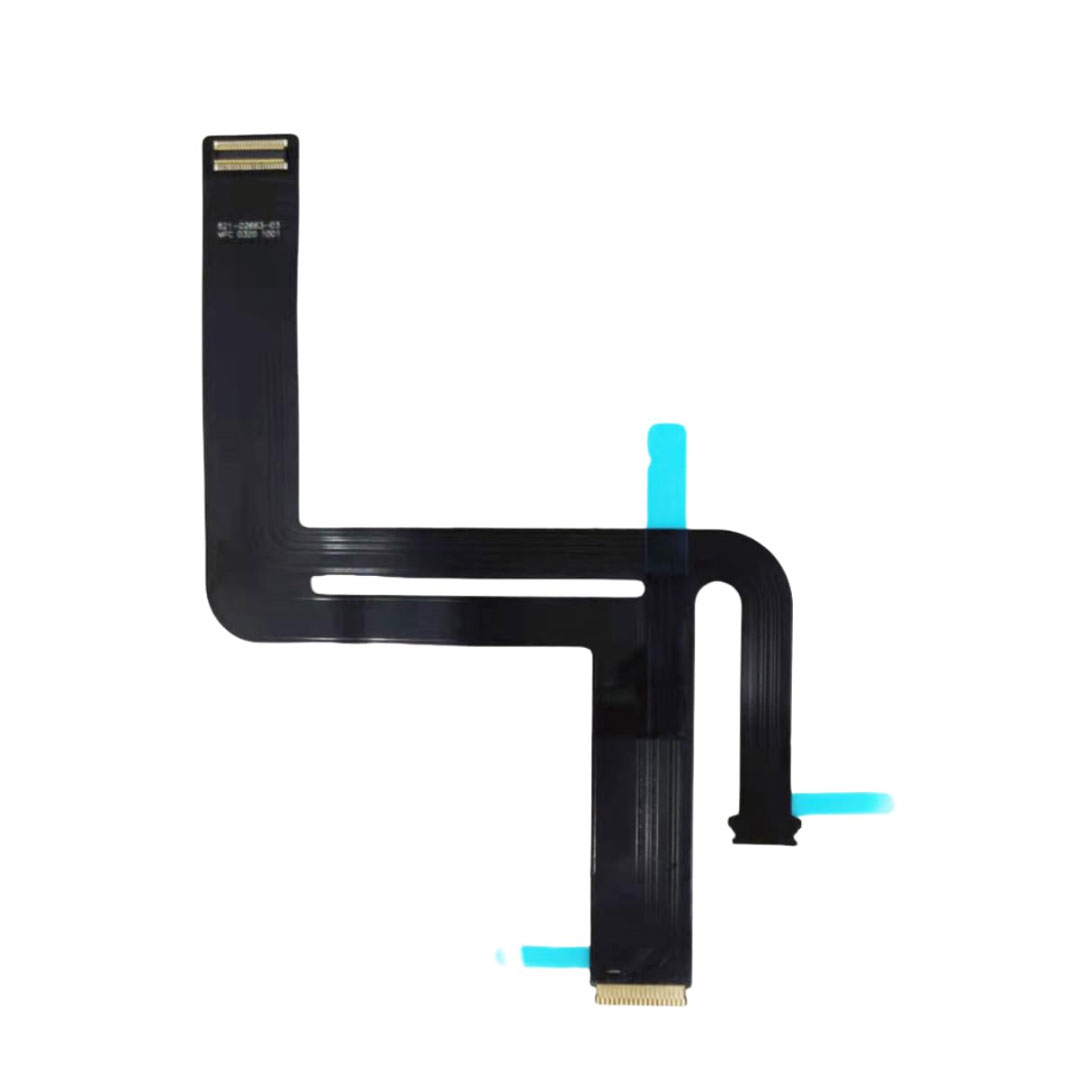
Genuine-spec touchpad flex cable for MacBook Pro 13″ (Model A2338, 2020, Apple M1)—essential for restoring full Force Touch functionality, haptic feedback, and precise multi-touch gesture control during trackpad repair or replacement. Compatible With: MacBook Pro 13-inch (2020, Model A2338, Model Identifier MacBookPro17,1) with Apple M1 chip (2 Thunderbolt ports). Part Type: Touchpad flex cable only — does not include the trackpad housing, Taptic Engine, or mounting hardware. This is the OEM-style ribbon cable that connects the trackpad to the logic board. Function: Transmits: Touch input coordinates Force Touch pressure data Haptic feedback signals to the Taptic Engine Enables full macOS gesture support: Force Click, three-finger lookup, swipe navigation, pinch-to-zoom, and smooth cursor tracking. Touch input coordinates Force Touch pressure data Haptic feedback signals to the Taptic Engine Enables full macOS gesture support: Force Click, three-finger lookup, swipe navigation, pinch-to-zoom, and smooth cursor tracking. OEM-Quality Build: Matches Apple’s original specifications in: Cable length and routing Connector pitch and ZIF latch design EMI shielding and flex durability Cable length and routing Connector pitch and ZIF latch design EMI shielding and flex durability Common Use Cases: Replacing a torn, creased, or liquid-damaged original flex cable Completing a trackpad replacement when the original cable is compromised Fixing intermittent trackpad behavior, loss of Force Touch, or complete unresponsiveness Replacing a torn, creased, or liquid-damaged original flex cable Completing a trackpad replacement when the original cable is compromised Fixing intermittent trackpad behavior, loss of Force Touch, or complete unresponsiveness Installation Note: Requires full bottom case removal and battery disconnection. Cable routes under internal components near the right speaker and logic board. Connects via a ZIF (Zero Insertion Force) socket—must be aligned carefully and latched gently. Recommended for experienced or certified technicians only. Requires full bottom case removal and battery disconnection. Cable routes under internal components near the right speaker and logic board. Connects via a ZIF (Zero Insertion Force) socket—must be aligned carefully and latched gently. Recommended for experienced or certified technicians only. Important Compatibility Notes: ✅ Only for A2338 (13″, M1, 2020) ❌ Not compatible with: Intel-based A2251 / A2289 (2020) MacBook Air M1 (A2337) Any MacBook Air or 14″/16″ MacBook Pro ✅ Only for A2338 (13″, M1, 2020) ❌ Not compatible with: Intel-based A2251 / A2289 (2020) MacBook Air M1 (A2337) Any MacBook Air or 14″/16″ MacBook Pro Intel-based A2251 / A2289 (2020) MacBook Air M1 (A2337) Any MacBook Air or 14″/16″ MacBook Pro

The LG UltraGear 24″ 180Hz Gaming Monitor delivers exceptional performance for gamers seeking speed and visual precision. Its 23.8-inch Full HD IPS display ensures sharp images and vibrant colors from wide viewing angles. With a rapid 180Hz refresh rate and 1ms (GtG) response time, this monitor minimizes motion blur, providing smooth gameplay even in fast-paced scenarios. These features give you a competitive edge by allowing quicker reactions during intense gaming sessions. The monitor supports HDR10 and covers 99% of the sRGB color spectrum, enhancing visual immersion with rich and accurate colors. This ensures that game environments appear more lifelike and engaging. Equipped with both NVIDIA G-SYNC and AMD FreeSync technologies, the UltraGear monitor reduces screen tearing and stuttering. This compatibility ensures a seamless gaming experience across various graphics cards. Its virtually borderless design on three sides offers an immersive viewing experience, making it ideal for multi-monitor setups. The sleek aesthetics complement any gaming or workstation setup. Additional gaming features like Black Stabilizer, Crosshair, and FPS Counter provide enhanced visibility and targeting precision. These tools assist in identifying enemies and maintaining focus during gameplay. The monitor includes both HDMI and DisplayPort inputs, offering flexibility in connectivity options for different devices. This ensures compatibility with various gaming consoles and PCs. In summary, the LG UltraGear 24″ 180Hz Gaming Monitor combines high-speed performance, vivid visuals, and gamer-centric features, making it a solid choice for both casual and competitive gamers. Specifications: Display : 24″ VA Resolution : FHD 1920 x 1080 Refresh Rate : 180Hz Response Rate : 5ms GTG

Looking to enhance your visual experience? The AOC 22B3HM 21″ 75Hz Monitor is here to elevate your viewing pleasure. With its sleek design and impressive features, it’s the perfect addition to any setup. First and foremost, let’s talk about clarity. The AOC 22B3HM boasts a vibrant 21-inch display that delivers crisp and clear visuals. Whether you’re watching movies, browsing the web, or gaming, every detail will pop with vividness. Transitioning to performance, this monitor offers a smooth and seamless viewing experience with its 75Hz refresh rate. Say goodbye to motion blur and hello to fluid motion, whether you’re scrolling through content or gaming. Moreover, its slim bezel design provides an immersive viewing experience, allowing you to focus entirely on the content at hand. Get ready to dive into your favorite movies and games like never before. In addition, the monitor’s adjustable stand offers ergonomic comfort, allowing you to find the perfect viewing angle for extended use. Say goodbye to neck strain and hello to comfortable viewing for hours on end. Furthermore, with multiple connectivity options, including HDMI and VGA ports, the AOC 22B3HM ensures compatibility with a wide range of devices. Connect your gaming console, PC, or laptop effortlessly and enjoy your content in style. In conclusion, the AOC 22B3HM 21″ 75Hz Monitor is a game-changer in the world of displays. With its stunning visuals, smooth performance, and ergonomic design, it’s the perfect choice for anyone looking to enhance their viewing experience. Upgrade your setup today and immerse yourself in the world of vibrant visuals. Check out other option here! Specifications: Display : 21.5″ VA Resolution : 1920 x 1080 (FHD) Refresh Rate : 75Hz Response Rate : 4ms

A1953 A1990 Battery Replacement for MacBook Pro 15″ Mid 2018 2019 EMC 3215 EMC 3359 Touch Bar MV902LL/A MV912LL/A MV922LL/A MV932LL/A MV942LL/A MV952LL/A MV962LL/A MV972LL/A MV902B/A MR962LL/A 【Specification】Voltage: 11.4V. Capacity: 83.6Wh 7336mAh. Battery Type: Li-ion. Condition:100% New from Manufacturer. Condition: Brand new, from high quality materials, top circuit boards and smart chip. 【Compatible Part Number】A1953 A1990 (EMC 3215) A1990 (EMC 3359) 020-02391 820-01095 080-333-400 2217-2548 MacBookPro15,1 MacBookPro15,3. 【Compatible Laptop Models】Battery replacement for MacBook Pro (15-inch, Model A1990, Mid 2018, Mid 2019) : MR962LL/A, MR972LL/A, MR932LL/A, MR942LL/A, MV922LL/A, MV932LL/A, MV902LL/A, MV912LL/A, MV942LL/A, MV952LL/A, MV962LL/A, MV972LL/A, MR952LL/A, MV902xx/A, MV912, MV922, MV932, MV942, MV952, MR932, MR942, MR952, MR962, MR972, MUQH2. 【ANTIEE Promise】Everyone of our replacement batteries has tested with strict quality control standards to ensure the true capacity, stable current and low self-discharge. All ANTIEE batteries are UL / CE / FCC / RoHS Certified for safety, we are confident in the performance of the replacement battery.

Mini Slim Wired USB Numeric Digital Keyboard Number Pad (18 Keys) Numeric Keypad for Laptop,18 Key USB Keypad, Numerical Keypad Wired Portable Ultra Slim Mini Numpad External Numbers Keyboard Pad for Laptop PC Computer Desktop Surface pro Notebook

Samsung Lebanon 32″ LS32C390EAMXUE The Samsung Lebanon 32″ Introducing the boldest curve ever This , born from years of and the future of monitor technology. Easy on the eyes In tol monitors that have less curve, 1000R fits the human field of view for less eye strain. A clinical study at Seoul National University Hospital shows that the closer to 1000R, the more it limits eye fatigue. Visionary Minimalism Next-generation design. The striking aesthetic is by a backside and premium-quality slim metal stand. The result is a monitor that won’t just catch eyes. but complements any interior, too. What Gamers Want Welcome to your new playground. AMD FreeSync delivers seamless gaming, while 75Hz makes scenes smooth. This flawless imagery comes together with Game Mode and the renowned 1000R curve for Focused Comfort Protect your eyes and do more. The T55’s advanced eye comfort technology reduces eye strain for more comfortable Flicker Free technology continuously removes tiring and irritating screen flicker, while Eye Saver Mode minimizes emitted blue light. Your eyes stay fresh longer. Ready to Entertain Connect to all your favorite devices with a convenient HDMI, DP, and D-Sub triple interface. The built-in 5 Watt speakers make it even easier lost in your favorite movies or TV shows, without plugging in a speaker. Easy on the eyes with 1000R curved screen Minimalist design with the borderless display, fabric-textured backside and slim metal stand Realistic immersion with the renowned 1000R curve and game-related features Running a monitor self-test is a simple and effective way to check the health and functionality of your computer monitor. The purpose of this test is to diagnose any potential issues with the monitor, such as dead pixels, color accuracy, contrast, or brightness problems. Power off both your computer and the monitor. 2Disconnect the signal cable from the back of the computer. 3Power on the monitor. Specifications: Specifications Screen Curvature1000R Active Display Size (HxV) (mm)698.4×392.85 Flat / CurvedCurved Screen Size (Class)32 3 year warranty Manufacturer Link

The Samsung Customizable Frame 65″ uses a 65-inch 4K UHD LCD panel with 3840 × 2160 resolution. It is designed for both TV viewing and wall-mounted art display use. The display supports 4K upscaling for lower-resolution content. As a result, non-4K video appears closer to 4K detail on the screen. In addition, it supports HDR formats for compatible content, which improves contrast between bright and dark areas. The TV runs Samsung Tizen OS. Therefore, users access streaming apps, smart features, and connected services through a standard interface. It also supports Wi-Fi and Bluetooth for wireless devices. Connectivity includes HDMI ports, USB ports, Ethernet LAN, and optical audio output. It supports external devices such as gaming consoles, sound systems, and media players. This model uses a frame-style design with interchangeable bezels. It allows customization of the outer frame to match room décor. It also supports an Art Mode that displays images when the TV is not actively in use. Specifications: 65-inch 4K UHD LCD panel (3840 × 2160 resolution) 4K upscaling for lower-resolution content HDR support for compatible content Tizen OS smart platform with apps and streaming Interchangeable bezels with Art Mode display feature VG-SCFA65BWBRU , VG-SCFA65TKBRU

Specifications : Display Diagonal Viewing Size 86.27 cm 34.14 inches Preset Display Area (H x V) 799.80 mm x 344.80 mm 31.49″ x 13.18″ 267773.04 sq-mm (415.01 sq-inches) Panel Type In-Plane switching Technology Display Screen Coating Antiglare with hard-coating 3H Maximum Preset Resolution 3440 x 1440 at 60Hz Viewing Angles 178° vertical / 178° horizontal Pixel Pitch 0.233 mm x 0.233 mm Pixel Per Inch (PPI) 109 Contrast Ratio 1,000 to 1 (typical) Aspect Ratio 21:9 Backlight Technology LED edgelight system Brightness 300 cd/m² (typical) Response time 8 ms for NORMAL mode 5 ms for FAST mode Adjustability Height adjustable (115 mm), Tilt (-5° to 21°) Swivel (-30° to 30°) Pivot (N/A) PbP / PiP PbP (Yes) PiP (Yes) Daisy Chain Availability No Dell Display Manager Compatibility Yes, Easy Arrange and other key features Remote Asset Management Yes, via Dell Command Monitor Specifications – Service / Support Details 3-Year Advanced Exchange Service and Limited Hardware Warranty Color Support Color Gamut (typical): 99.9% sRGB, CIE1976 (90%), CIE1931 (75%) Color Depth: 1.074 Billion colors Color Calibration Accurancy Delta E < 3 (average) Color Calibration with X-rite colorimeter No Built-in Devices USB 3.0 super-speed hub (with 2 x USB 3.0 upstream port) 4 x USB 3.0 downstream ports Security Security lock slot (cable lock sold separately) Anti-theft stand lock slot (to panel) Compliant Standards BFR/PVC-free (Halogen-free) excluding external cables Meets NFPA 99 leakage current requirements Arsenic-Free glass and Mercury-Free for the panel only Product Safety, EMC and Environmental Datasheets Dell Regulatory Compliance Home Page Dell and the Environment Flat Panel Mount Interface VESA (100 mm) Audio Output 1 x Audio line-out Connectivity 2 x HDMI 2.0 (HDCP 2.2) 1 x DP 1.2 (HDCP 2.2) 2 x USB 3.0 Upstream port 2 x USB 3.0 Downstream port (side) 2 x USB 3.0 Downstream port (bottom) 1 x USB Type-C (DisplayPort DP1.2 Alternate Mode, Power Delivery up to 90W (Typical), and USB 2.0) Dimensions & Weight Height with stand (Compressed ~ Extended) 417.0 mm ~ 532.0 mm 16.42″ ~ 20.94″ Width 813.6 mm 32.03″ Depth 226.4 mm 8.91″ Height without stand 363.7 mm 14.32″ Width without stand 813.6 mm 32.03″ Depth without stand 58.4 mm 2.30″ Weight (panel only – for VESA mount) 8.2 kg 18.07 lb Weight (with packaging) 16.0 kg 35.27 lb Power Voltage Required 100 VAC to 240 VAC / 50 Hz or 60 Hz + 3 Hz / 3 A (typical) Power Consumption (Operational) 54 W (typical) 250 W (maximum)** Power Consumption Stand by / Sleep Less than 0.5W **Maximum power consumption with max luminance, and USB active. Environmental Operating Conditions Temperature Range Operating: 0°C to 40°C (32°F to 104°F) Non-operating: –20°C to 60°C (–4°F to 140°F) Humidity Range Operating: 10% to 80% (non-condensing) Non-Operating: 5% to 90% (non-condensing) Altitude Operating: 5,000 m (16,404 ft) max Non-Operating: 12,192 m (40,000 ft) max In The Box Monitor, Stand Riser, Stand Base 1 x Power cable 1 X DP Cable (DP to DP) 1 X USB Type-C Cable (C to C) 1 x HDMI Cable 1 x USB 3.0 upstream cable Quick setup guide Safety, Environmental, and Regulatory Information Factory Calibration Report 1 Year Warranty manufacturer link

Are you in search of a monitor to help you boost productivity at your workplace or home office? Well, look no further than the MSI PRO MP2412 monitor. It’s a cost-effective and user-friendly solution that caters to your professional needs. First and foremost, the MSI PRO MP2412 boasts a 23.8-inch display, providing ample screen space for your tasks. Whether you’re working on documents, spreadsheets, or simply browsing the web, this monitor offers a comfortable and efficient workspace. In addition, the Full HD resolution ensures sharp and clear visuals. As a result, it’s easier to read text, view images, and watch videos with outstanding clarity. To further enhance your working experience, the monitor is equipped with anti-glare technology. This allows you to work for extended periods without straining your eyes. Furthermore, this feature comes in handy even in well-lit environments. Connectivity is a breeze with the VGA and HDMI ports. These ports accommodate various devices, including laptops, desktops, and more. As a result, this flexibility ensures that you can seamlessly switch between work and personal tasks. The MSI PRO MP2412 features a sleek, space-saving design that can effortlessly integrate into any office or home office setup. Its slim and stylish appearance adds a touch of sophistication to your workspace. For ergonomic comfort, the monitor offers tilt adjustability. You can easily find the perfect viewing angle for your specific needs, reducing discomfort during extended work hours. Specifications: Display: 23.8″ Full HD (1920×1080) Performance: 100Hz Refresh Rate, 1ms MPRT Response Time, 4000:1 Contrast Ratio. Connectivity: HDMI 1.4b, DisplayPort 1.2a, Audio Out.

Are you in search of a high-performance gaming monitor? Look no further! The MSI MPG 274URF QD 27″ 160Hz gaming monitor is here to elevate your gaming experience. This monitor combines cutting-edge technology with sleek design to provide an unbeatable gaming setup. Firstly, let’s talk about the impressive display. The 27-inch screen size offers ample viewing space, making every detail pop. The Quantum Dot technology ensures vibrant and accurate colors, enhancing the overall visual experience. In addition, the 160Hz refresh rate is a game-changer. It ensures smooth and fluid motion, reducing blur and lag. This is essential for fast-paced games where every millisecond counts. With the MSI MPG 274URF QD, you can stay ahead of the competition. Moreover, the 1ms response time minimizes input lag. This allows for quick reactions and precise movements, crucial for competitive gaming. Every action you take will be instantaneously reflected on the screen, providing a seamless gaming experience. Furthermore, this gaming monitor supports HDR, delivering stunning contrast and brightness. You will enjoy deeper blacks and brighter whites, bringing your games to life. The detailed shadows and highlights will immerse you in the game world like never before. Comfort is also a key feature of the MSI MPG 274URF QD. The ergonomic design allows you to adjust the height, tilt, and swivel to find the perfect viewing angle. This ensures you can game comfortably for hours without straining your neck or eyes. Additionally, the monitor comes with multiple connectivity options. Easily connect your PC, console, or other devices with the available HDMI, DisplayPort, and USB ports. This versatility makes it a great addition to any gaming setup. In conclusion, the MSI MPG 274URF QD 27″ 160Hz gaming monitor offers superior performance and stunning visuals. Whether you’re a casual gamer or a professional, this monitor will enhance your gaming experience. Upgrade your setup today and enjoy the best in gaming technology! Specifications: Display : 27″ Rapid IPS Resolution : 3840×2160 (UHD) Refresh Rate : 160Hz Response Rate : 0.5ms

Acer Nitro VG252QXbmiipx Gaming G-SYNC Screen size 31.5 Inches Display resolution maximum 1920 x 1080 Connectivity technology HDMI Aspect ratio 16:9 Specific uses for product Gaming Response time 4 Milliseconds Resolution FHD 1080p Number of HDMI Ports 2 Image brightness 400 cd/m² Voltage 240 Volts

The Alienware AW2725DF 27″ 360Hz OLED Gaming Monitor is built for gamers who demand top performance and rich visuals. It features a 27-inch QHD (2560 x 1440) display, offering clear detail and vibrant colors. This monitor uses a Quantum Dot OLED panel, which delivers deep blacks, bright highlights, and true-to-life colors. With a 360Hz refresh rate and 0.03ms response time, motion is silky smooth and incredibly sharp. It covers 99.3% of the DCI-P3 color range, making every game look vivid and accurate. It also supports HDR with DisplayHDR True Black 400, enhancing contrast and brightness in dark scenes. For connections, it offers two DisplayPort 1.4, one HDMI 2.1, four USB 3.2 Gen 1 ports, and a USB-C port with 15W power delivery. This gives you plenty of options for plugging in accessories and charging devices. The stand supports height, tilt, swivel, and pivot adjustments, so you can game comfortably for hours. It’s also VESA mount compatible, allowing flexible setups to fit your space. Extra features include AlienFX lighting for customization and gaming overlays that offer helpful tools during play. A built-in USB hub and cable management system help keep your desk neat. In short, the Alienware AW2725DF combines a fast OLED panel, ultra-high refresh rate, and stunning color accuracy, making it perfect for competitive and immersive gaming. Specifications: Display : 27″ QD-OLED Resolution : QHD 2560 x 1440 Refresh Rate : 360Hz Response Time : 0.03ms

Are you in the market for a gaming monitor that delivers top-notch performance without breaking the bank? Look no further than the MSI Optix MAG272CQR. In this comprehensive review, we’ll explore the features that make this monitor stand out. To start with, the MSI Optix MAG272CQR boasts a stunning 27-inch curved display, providing an immersive gaming experience. The curvature enhances your field of view, pulling you deeper into the game. Equipped with a 2560 x 1440 Quad HD resolution, this monitor delivers crisp and detailed visuals. Dive into your favorite games with clarity and precision, experiencing every detail as the developers intended. The 165Hz refresh rate ensures buttery-smooth gameplay, reducing motion blur for a competitive edge. Combined with a 1ms response time, the MSI Optix MAG272CQR is a stellar choice for fast-paced gaming scenarios. Adaptive Sync technology minimizes screen tearing and stuttering, creating a seamless and enjoyable gaming experience. Whether you’re into FPS, RPG, or MOBA games, this monitor adapts to your playstyle. Connectivity is a breeze with multiple ports, including HDMI and DisplayPort, providing versatility for various devices. The adjustable stand allows you to find the perfect viewing angle, ensuring comfort during those marathon gaming sessions. In summary, the MSI Optix MAG272CQR is a gaming monitor that ticks all the boxes – immersive display, high resolution, fast refresh rate, and adaptive sync technology. Elevate your gaming experience without breaking the bank. Make the smart choice with the MSI Optix MAG272CQR. Specifications: Size : 27″ Curve : 1500R Refresh Rate : 165Hz Response Time : 1ms
