
13" Mid-2017 Apple MacBook Pro A1708 Logic Board 16Gb 2.3Ghz i5 13″ Mid-2017 Apple MacBook Pro A1708 Logic Board 16Gb 2.3Ghz i5

OEM-quality trackpad replacement (without flex cable) for MacBook Air 13″ (Model A2179, 2020)—available in Space Gray and Silver finishes—engineered for precise Force Touch performance, smooth multi-touch gestures, and seamless visual integration. Compatible With: MacBook Air 13-inch (2020, Model A2179) with Intel Core i3/i5/i7 processors (non-M1). Part Type: Trackpad only—does not include the flex cable, Taptic Engine, or mounting hardware. Designed for technicians who will reuse the original internal components. Color Options: Space Gray: Matches Space Gray and Midnight finishes Silver: Matches Silver and Starlight finishes (Note: “Z1” typically refers to Apple’s internal regional/part code—this listing covers standard OEM trackpads for A2179.) Space Gray: Matches Space Gray and Midnight finishes Silver: Matches Silver and Starlight finishes (Note: “Z1” typically refers to Apple’s internal regional/part code—this listing covers standard OEM trackpads for A2179.) Force Touch Capable: Fully supports pressure-sensitive input and haptic feedback when paired with the original Taptic Engine and logic board—ensuring full macOS gesture functionality. Precision Build: Mirror-smooth glass surface with exact curvature, texture, and micro-click mechanism matching Apple’s original design for consistent tracking and tactile response. Installation Requirements: Requires full bottom case disassembly and careful transfer of the original flex cable and Taptic Engine. Proper adhesive application is critical for structural integrity and sensor alignment. Recommended for professional or experienced repair technicians only. Important: This is a bare trackpad assembly—not a plug-and-play module. Functionality depends on correct integration with original electronics.

OEM-quality trackpad replacement (without flex cable) for MacBook Pro 14″ (Model A2442, 2021, M1 Pro/Max) in Silver finish—designed for precise Force Touch performance, seamless gesture control, and perfect visual integration with the original chassis. Compatible With: MacBook Pro 14-inch (2021, Model A2442) with Apple M1 Pro or M1 Max chip. Part Type: Trackpad only—does not include the flex cable, Taptic Engine, or mounting hardware. Intended for professional technicians who will reuse the original internal components. Finish: Silver—matches the Silver and Space Gray top/bottom case (Apple uses the same trackpad finish across both color variants for this model). Force Touch Capable: Fully supports pressure-sensitive input and haptic feedback when paired with the original Taptic Engine and logic board—ensuring full macOS gesture and functionality support. OEM Precision: Features the same glass surface, curvature, and micro-click mechanism as Apple’s original—delivering consistent tracking accuracy and tactile response. Installation Requirements: Requires complete bottom case removal and careful transfer of the original flex cable and Taptic Engine. Adhesive must be applied precisely to maintain structural integrity and sensor alignment. Recommended for certified or experienced repair professionals only.

Arabic Silicone Keyboard Skin Cover for MacBook Pro 13" A1708 Without Touch bar and MacBook 12" A1534 with Retina Display US Layout (Black) Arabic Silicone Keyboard Skin Cover for MacBook Pro 13″ A1708 Without Touch bar and MacBook 12″ A1534 with Retina Display US Layout (Black) About this item Arabic language silicone keyboard skin, US version, perfect fit for your MacBook 12″ A1534, which was released in 2015 & new MacBook Pro 13-Inch 13″ Model A1708 without/no Touch Bar, which was released in 2016; Do not fit for Europe Version MacBook Handmade Skin – XSKN is the original Manufacturer of these “Keyboard Art Skin” silicone covers. They are durable, thin and soft with a cashmere feel. The keys fit snug over the keyboard, smooth surface treatment, suit for regular laptop user who types a lot and quickly Each XSKN silicone skin is heat molded to ensure, each color is paints taking hand screened using silicone paint which is heat fuses into the silicone keyboard skin to become one, making it Soft, ultra-thin, durable and easy to washable High quality silicone raw material assure no extension with longtime using. Every detail clearly prinited, imported ink keep it looking good, rubber coating help to remain in good condition Aside from being beautiful they protect your keyboard from spills, crumbs, animal hair and dust. Washable, can be cleaned easily

The TeamGroup CX2 1TB SSD is a reliable 2.5-inch SATA III solid-state drive designed to upgrade laptops and desktops with faster boot times, smoother performance, and quiet operation. Using 3D NAND flash, it delivers consistent speed and improved durability compared to traditional hard drives. ⚡ SATA III Performance: Delivers fast everyday speeds for system boot, app loading, and file transfers compared to HDDs. 💾 1TB Capacity: Ample storage for OS, software, games, and large media files. 🧠 3D NAND Flash: Improves stability, efficiency, and lifespan versus older NAND types. 🔇 Silent & Shock-Resistant: No moving parts, making it quiet and more durable for laptops and mobile use. 🌡️ Low Power Consumption: Helps extend laptop battery life and reduces heat. 🛠️ Easy Upgrade: Standard 2.5″ 7mm design fits most SATA laptops and desktops.

A1618 Replacement Battery for MacBook Pro 15 Inch Retina A1398 (Early 2015), Laptop A1494 A1618 Replacement Battery Capacity: 8440mAh/95.03Wh 11.26V, Battery Type: Li-Polymer 【Package include: 1pcs – OEM laptop replacement battery for macbook air 13 inch, 2pcs – screwdrivers, 1pcs – Professional installation instructions】 【Operating life and certification】UL-/CE-/FCC-/RoHS-Certified/PSE Report for safety. Cobalt Proportion: >98%. Upgrade chip — Up to 1500+ recharge cycles over the life of the battery, Long operating time after charging full with 8440mAh real high capacity, same with original battery A1494/A1618 【Premium Electric Core】Japan Newest 4.0 upgraded OEM Battery for macbook pro 15 Inch A1398 (Late 2013, Mid 2014, Early 2015). Better circuit board, multiple command chip control, keep the battery stable charge and discharge.Over charger and discharger (short-circuit) protection, ensure fast charges and low power consumption 【Compatibility】 MacBook pro 15” Retina A1398 (Late 2013, Mid 2014, Early 2015) ME293 ME294 MGXA2 MGXC2 MJLQ2 MJLT2 MJLU2. Please check the picture to get more detail

MacBook Pro 15″ Top case A1990 2018 2019 MacBook Pro 15″ A1990 MacBookPro15,1 Mid 2018: MR932LL/A or MR962LL/A (2.2 GHz Core i7) MacBookPro15,1 Mid 2018: MR942LL/A or MR972LL/A (2.6 GHz Core i7) MacBookPro15,3 Mid 2018: BTO/CTO (2.6 GHz Core i7) MacBookPro15,3 Mid 2018: BTO/CTO (2.9 GHz Core i9)

Apple 60W MagSafe Power Adapter (for MacBook and 13-inch MacBook Pro) The 60 Watt MagSafe Power Adapter features a magnetic DC connector that ensures your power cable will disconnect if it experiences undue strain and helps prevent fraying or weakening of the cables over time. In addition, the magnetic DC helps guide the plug into the system for a quick and secure connection. When the connection is secure, an LED located at the head of the DC connector will light up; an amber light lets you know that your portable is charging, while a green light tells you that you have a full charge. An AC lead is provided with the adapter for maximum lead length, while the AC wall adapter (also provided) gives users an even easier and more compact way to travel. Designed to be the perfect travelling companion, the adapter has a clever design that allows the DC cable to be wound neatly around itself for easy cable storage. This power adapter recharges the lithium polymer battery while the system is off, on, or in sleep mode. It also powers the system if you choose to operate without a battery. Compatible with MacBook and 13-inch MacBook Pro. See this article for more details about choosing the right one. Knowing which specific Mac model you have is important. If you are running OS X Lion (10.7) or later, go to the “” menu at the top left of your screen, choose “About this Mac” then click the “More Info…” button. Your Mac model and generation will be displayed. If you are running an earlier version of OS X, you can enter your serial number here to find out which model you have.

BATTERY TOSHIBA PA5185U-1BRS Laptop Battery for Toshiba Satellite C50 C55 C55D C55T L55 L55D L55T Series fit C55-B5200 C55-B5270 C55D-B5310 PA5184U-1BRS PA5186U-1BRS PA5195U-1BRS Battery Type: Li-ion Capacity: 2800Mah Voltage: 14.4V Cells: 4-cell Fit Model: Toshiba Satellite PA5185-1BRS PA5184U-1BRS PA5184-1BRS PA5186-1BRS PA5195-1BRS PA5185U1BRS PA5185U PA5185 PA5195U PA5184 Battery Compatible: Toshiba Satellite C55-B5302 C55-B5299 C55-B5287 C55-B5272 C55-B5270 C55-B5200 C55-B5101 C55-B5100 C55D-B5319 C55D-B5310 C55D-B5241 C55D-B5219 C55D-B5214 C55D-B5212 C55D-B5206 C55D-B5203 C55T-B5349 C55T-B5110 C55T-B5230 C55T-B5109 L55-B5294 L55-B5284 L55-B5276 Battery 100% New from Manufacturer. Up to 500 recharge cycles over the life of the battery. CE-/FCC-Certified for safety If you have any questions, please feel free to contact us, our professional service team will provide you with the most guaranteed support

WiWU S500 Foldable Lightweight Plastic Laptop Stand Description WiWU S500 Foldable Lightweight Plastic Laptop Stand Brand: wiwu Material: ABS+Aluminum alloy Foldable Height Adjustment. Laptop stand with foldable technology, light weight, easy to carry Adjustable from 20 to 40 degrees and height adjustable from 3.15 to 5.12 inches. There are 6 corners Compatible with laptops (11 inch-15 inch) Macbook, iMac, ipad, Microsoft Surface PR, Thinkpad, Lenovo, Dell, HP and more. With anti-slip rubber pad

2022 Original New 13" A2681 LCD Screen for MacBook Air M2 EMC 4074 A2681 LCD Screen Replacement 2022 Original New 13″ A2681 LCD Screen for MacBook Air M2 EMC 4074 A2681 LCD Screen Replacement Compatible Model: For MacBook Air 13″ M2 A2681 Screen Display Replacement 2022 Year (Silver) Item Condition: New; Screen Size: 13.6″; Resolution: 2560×1664; Color: Silver.(This is the display replacement accessory is not a laptop) Note: Please be careful to take the screen out of the box. This product should be very careful when installed, we are not responsible for the damage in the process of installation. Please confirm the model and color before buying, do not buy the wrong product. If you have any questions, please get in touch with us.

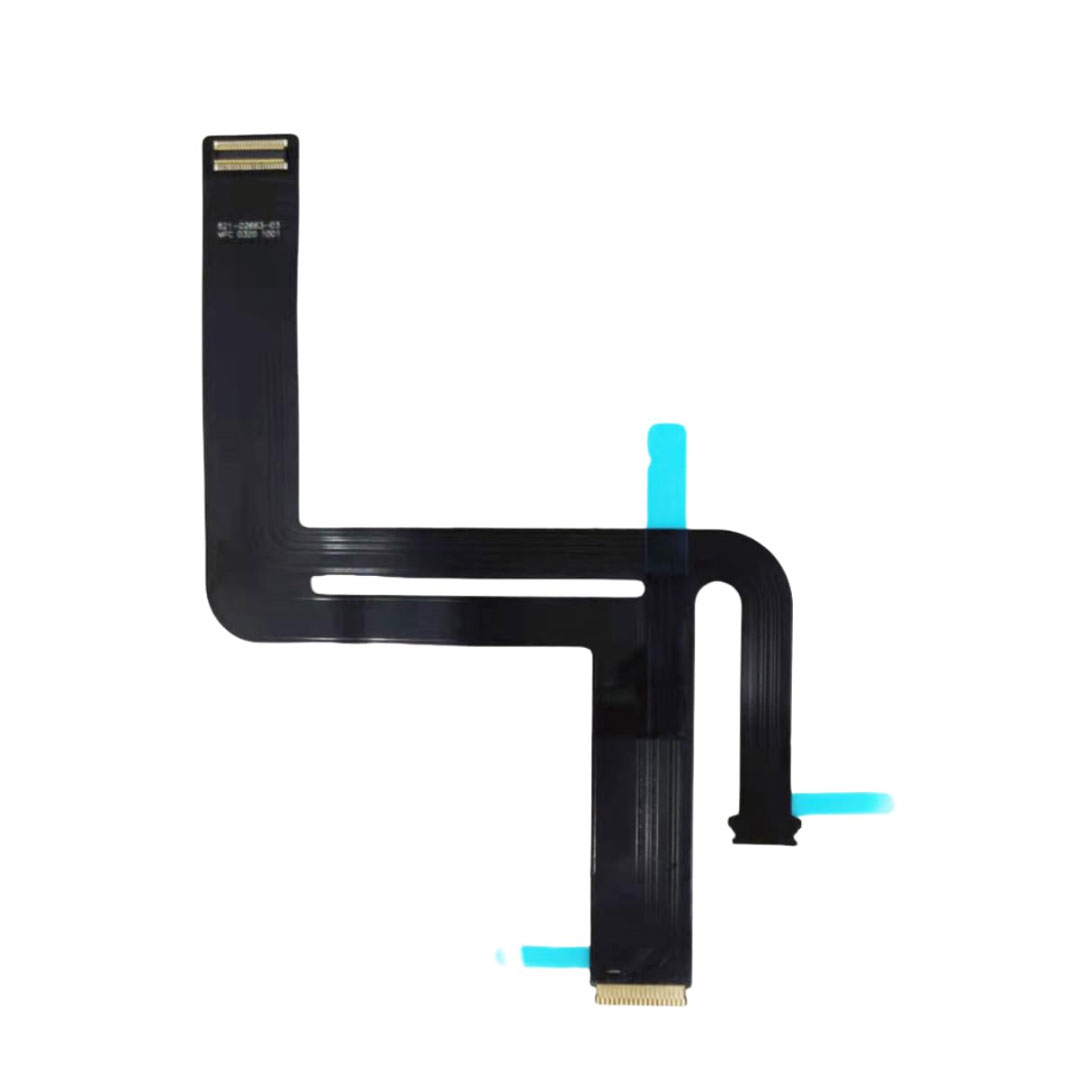
Genuine-spec touchpad flex cable for MacBook Pro 13″ with Touch Bar (Model A1708, 2016–2017)—restores full Force Touch functionality, haptic feedback, and precise multi-touch gesture control during trackpad repair or replacement. Compatible With: MacBook Pro 13″ (2016) – Model A1708 (Model Identifier: MacBookPro13,1) MacBook Pro 13″ (2017) – Model A1708 (Model Identifier: MacBookPro14,1) (Both years share the same internal trackpad assembly and flex cable.) MacBook Pro 13″ (2016) – Model A1708 (Model Identifier: MacBookPro13,1) MacBook Pro 13″ (2017) – Model A1708 (Model Identifier: MacBookPro14,1) (Both years share the same internal trackpad assembly and flex cable.) Part Type: Touchpad flex cable only — does not include the trackpad housing, Taptic Engine, or mounting hardware. This is the OEM-style ribbon cable that connects the trackpad to the logic board. Function: Transmits: Touch input coordinates Force Touch pressure data Haptic feedback signals to the Taptic Engine Enables full macOS gesture support: Force Click, three-finger lookup, swipe navigation, pinch-to-zoom, and smooth cursor tracking. Touch input coordinates Force Touch pressure data Haptic feedback signals to the Taptic Engine Enables full macOS gesture support: Force Click, three-finger lookup, swipe navigation, pinch-to-zoom, and smooth cursor tracking. OEM-Quality Build: Matches Apple’s original specifications in: Cable length and routing path Connector pitch and ZIF latch design EMI shielding and flex durability Cable length and routing path Connector pitch and ZIF latch design EMI shielding and flex durability Common Use Cases: Replacing a torn, creased, or liquid-damaged original flex cable Completing a trackpad replacement when the original cable is compromised Fixing intermittent trackpad behavior, loss of Force Touch, or complete unresponsiveness Replacing a torn, creased, or liquid-damaged original flex cable Completing a trackpad replacement when the original cable is compromised Fixing intermittent trackpad behavior, loss of Force Touch, or complete unresponsiveness Installation Note: Requires full bottom case removal and battery disconnection. Cable routes under internal components near the right speaker and logic board. Connects via a ZIF (Zero Insertion Force) socket—must be aligned carefully and latched gently. Recommended for experienced or certified technicians only. Requires full bottom case removal and battery disconnection. Cable routes under internal components near the right speaker and logic board. Connects via a ZIF (Zero Insertion Force) socket—must be aligned carefully and latched gently. Recommended for experienced or certified technicians only.

Smooth, precise, and completely wireless. The Apple Magic Trackpad brings the best laptop navigation to your desktop. Available in both White and Black, it features a large glass surface, Force Touch technology for deeper control, and a modern USB-C port for easy charging. It connects instantly to your Mac or iPad and keeps running for a month or more on a single charge. Make navigating your computer effortless with the Apple Magic Trackpad (A3120). Designed with a wide, smooth glass surface, it lets you swipe, scroll, and zoom using the same natural hand gestures you use on a laptop. It is the perfect tool to keep your desk clean and your workflow productive. Key Features: Force Touch: Built-in sensors know how hard you press, letting you click deeper to open previews, look up definitions, and reveal hidden menus. Large Glass Surface: The spacious edge-to-edge design gives you plenty of room to scroll through large documents or edit photos comfortably. Updated with USB-C: Now features a universal USB-C port for charging and pairing, matching all your modern cables. Long Battery Life: The built-in rechargeable battery lasts about a month or more before needing a quick recharge. Easy Setup: Pairs automatically with your Mac via Bluetooth right out of the box, with no complicated configuration needed. Sleek Colors: Choose between classic White or premium Black to perfectly match your desktop setup. Specifications at a Glance: Model: A3120 Colors: White / Black Connection: Wireless / Bluetooth / USB-C Surface: Premium Edge-to-Edge Glass Compatibility: Mac and iPad

Genuine-spec touchpad flex cable for MacBook Pro 13″ (Model A2289, 2020, Intel)—restores full Force Touch functionality, haptic feedback, and preci multi-touch gesture control. OEM-quality replacement for damaged or faulty original cables. Compatible With: MacBook Pro 13-inch (2020, Four Thunderbolt Ports, Model A2289, Model Identifier MacBookPro16,2) with Intel Core i5/i7 processors. Part Type: Touchpad flex cable only — does not include the trackpad housing, Taptic Engine, or mounting hardware. This is the OEM-style ribbon cable that connects the trackpad to the logic board. Function: Transmits: Touch input coordinates Force Touch pressure data Haptic feedback signals to the Taptic Engine Enables full macOS gesture support: Force Click, three-finger lookup, swipe navigation, pinch-to-zoom, and smooth cursor tracking. Touch input coordinates Force Touch pressure data Haptic feedback signals to the Taptic Engine Enables full macOS gesture support: Force Click, three-finger lookup, swipe navigation, pinch-to-zoom, and smooth cursor tracking. OEM-Quality Build: Matches Apple’s original specifications in: Cable length and routing path Connector pitch and ZIF latch design EMI shielding and flex durability Cable length and routing path Connector pitch and ZIF latch design EMI shielding and flex durability Common Use Cases: Replacing a torn, creased, or liquid-damaged original flex cable Completing a trackpad replacement when the original cable is unusable Fixing: Intermittent or erratic trackpad behavior Loss of Force Touch or haptic feedback Complete trackpad unresponsiveness Replacing a torn, creased, or liquid-damaged original flex cable Completing a trackpad replacement when the original cable is unusable Fixing: Intermittent or erratic trackpad behavior Loss of Force Touch or haptic feedback Complete trackpad unresponsiveness Intermittent or erratic trackpad behavior Loss of Force Touch or haptic feedback Complete trackpad unresponsiveness Installation Note: Requires full bottom case removal and battery disconnection. Cable routes under internal components (speaker, logic board)—must follow original path. Connects via ZIF (Zero Insertion Force) socket—align carefully, never force. Recommended for experienced or certified technicians only. Requires full bottom case removal and battery disconnection. Cable routes under internal components (speaker, logic board)—must follow original path. Connects via ZIF (Zero Insertion Force) socket—align carefully, never force. Recommended for experienced or certified technicians only. Important Compatibility Notes: ✅ Only for A2289 (13″, 4 Thunderbolt ports, 2020, Intel) ❌ Not compatible with: A2251 (2 Thunderbolt ports, 2020) A2338 (M1 MacBook Pro, 2020) Any MacBook Air or 14″/16″ MacBook Pro ✅ Only for A2289 (13″, 4 Thunderbolt ports, 2020, Intel) ❌ Not compatible with: A2251 (2 Thunderbolt ports, 2020) A2338 (M1 MacBook Pro, 2020) Any MacBook Air or 14″/16″ MacBook Pro A2251 (2 Thunderbolt ports, 2020) A2338 (M1 MacBook Pro, 2020) Any MacBook Air or 14″/16″ MacBook Pro

Genuine-spec keyboard replacement for MacBook Pro 13″ (Model A2289, 2020) — available in US QWERTY or UK QWERTY (with £ symbol). Features Apple’s scissor-switch Magic Keyboard, backlighting, and OEM-fit design for reliable performance and seamless installation. Compatible With: MacBook Pro 13-inch (2020, Four Thunderbolt Ports, Model A2289, Model Identifier MacBookPro16,2) with Intel Core i5/i7 processors. Layout Options (select at purchase): US Layout: Standard QWERTY with wide Enter key, @ above 2, and # above 3. UK Layout: QWERTY with £ symbol, tall vertical Enter key, @ on right Alt, and UK-specific punctuation. US Layout: Standard QWERTY with wide Enter key, @ above 2, and # above 3. UK Layout: QWERTY with £ symbol, tall vertical Enter key, @ on right Alt, and UK-specific punctuation. Keyboard Type: Apple’s Magic Keyboard with scissor-switch mechanism—quieter, more stable, and more durable than earlier Butterfly designs. Integrated Features: Full backlighting for low-light use Ambient light sensor compatibility OEM-style flex cable pre-attached for direct logic board connection Full backlighting for low-light use Ambient light sensor compatibility OEM-style flex cable pre-attached for direct logic board connection Build & Fit: Engineered to exact Apple specifications—ensures perfect alignment, consistent key height, and flush integration into the original top case. Installation Note: Keyboard is glued into the top case and requires full disassembly, careful adhesive removal, and professional re-adhesion. Recommended for experienced or certified technicians only.

This replacement touchpad for MacBook Air A2179 comes in Rose Gold and is sold without the flex cable. Perfect for restoring smooth trackpad performance, it’s ideal for repair technicians and users replacing a damaged or non-working touchpad. The MacBook Air A2179 Touchpad (Rose Gold) is a high-quality replacement part designed to restore full trackpad functionality to your laptop. Whether your original touchpad is unresponsive, physically damaged, or experiencing tracking issues, this replacement provides a reliable solution. Please note that this unit is without the flex cable, meaning it requires the original flex or a separate replacement flex for installation. Ideal for repair shops and technicians, it ensures smooth navigation and precise control. Compatible with MacBook Air A2179 Rose Gold Color Match for original look and finish Replacement Touchpad Only (without flex cable) Restores Smooth Trackpad Functionality Precision Tracking & Gesture Support (when installed correctly) Ideal for Repairs & Replacements High-Quality Build designed for durability and long use Designed specifically for Apple MacBook Air A2179 models. Recommended for technicians and repair shops or users replacing a faulty touchpad. Ensure compatibility before purchase and note that a flex cable is required for installation.

The 85W MagSafe 2 Power Adapter features a magnetic DC connector so if someone should trip over it, the cord disconnects harmlessly and your MacBook Pro stays put safely. It also helps prevent fraying or weakening of the cables over time. In addition, the magnetic DC helps guide the plug into the system for a quick and secure connection. The 85W MagSafe 2 Power Adapter features a magnetic DC connector so if someone should trip over it, the cord disconnects harmlessly and your MacBook Pro stays put safely. It also helps prevent fraying or weakening of the cables over time. In addition, the magnetic DC helps guide the plug into the system for a quick and secure connection. When the connection is secure, an LED located at the head of the DC connector lights up; an amber light lets you know that your notebook is charging, while a green light tells you that you have a full charge. An AC cord is provided with the adapter for maximum cord length, while the AC wall adapter (also provided) gives you an even easier and more compact way to travel. Designed to be the perfect traveling companion, the adapter has a clever design which allows the DC cable to be wound neatly around itself for easy cable storage. Compatible with MacBook Pro with 13-inch Retina display. See this article for more details about choosing the right one. Knowing which specific Mac model you have is important. If you are running OS X Lion (10.7) or later go to the “” menu at the top left of your screen, choose “About this Mac” then click the “More Info…” button. Your Mac model and generation will be displayed. If you are running an earlier version of OS X, you can enter your serial number here to find out which model you have. COMPATIBILITY Mac Models: MacBook Pro (Retina, 13-inch, Late 2012 – 2015)

Apple MacBook Pro 13” (2015) — reliable performance and classic MacBook design.• Intel Core i5 • 8 GB RAM • 128 GB SSD • Retina DisplaymacOS | Backlit Keyboard

Genuine-spec US layout keyboard replacement for MacBook Pro 13″ (Model A1502, Mid 2014)—featuring durable scissor-switch keys, backlighting, and OEM-fit design for reliable performance and easy installation. Compatible With: MacBook Pro 13-inch (Mid 2014, Model A1502, Model Identifier MacBookPro11,1) with Retina display. Layout: Standard US English (QWERTY) with full-size keys, inverted-T arrow keys, and dedicated function row (F1–F12). Keyboard Type: Traditional scissor-switch mechanism—offers good key travel, tactile feedback, and proven long-term reliability (pre-Butterfly design). Integrated Features: Backlit keys for low-light environments, ambient light sensor compatibility, and original-style ribbon cable connector for direct logic board attachment. Build & Fit: Precision-molded to match Apple’s exact dimensions and mounting points—ensures flush integration into the top case with consistent key alignment. Installation Note: Keyboard is secured with screws and light adhesive—more serviceable than later glued models. Requires top case access and battery disconnection. Suitable for intermediate DIYers or professional technicians.

Apple MacBook Pro 15” (2018) — professional-grade performance for creative power users.• Intel Core i9 • 32 GB RAM • 500 GB SSD • 4 GB Dedicated GraphicsRetina Display | macOS |
