
The Samsung 32″ 60Hz Smart Monitor M5 M50D is an all-in-one solution for work, entertainment, and streaming. Whether you need a monitor for productivity or to watch your favorite shows, this monitor has you covered. With a 32-inch Full HD display, the Samsung M5 M50D delivers crisp and clear visuals for both work and play. Its 60Hz refresh rate ensures smooth motion, whether you’re working on documents, browsing, or streaming videos. What makes the Samsung M5 truly smart is its built-in smart features. With access to popular streaming apps like Netflix, YouTube, and more, you can enjoy entertainment without needing a computer. Simply connect to Wi-Fi and start streaming your favorite content. This smart monitor also features Samsung DeX, allowing you to connect your smartphone for a full desktop experience. It’s perfect for multitasking and increasing productivity without needing additional hardware. With its slim design and minimalist stand, the Samsung 32″ Smart Monitor M5 fits seamlessly into any workspace or home setup. The monitor’s versatile connectivity includes HDMI and USB ports, making it easy to connect your devices. In addition to its smart features, the Samsung M5 M50D offers Adaptive Picture technology. This adjusts the screen brightness based on ambient lighting, reducing eye strain and making viewing comfortable at any time of day. In conclusion, the Samsung 32″ 60Hz Smart Monitor M5 M50D offers a versatile solution for work, entertainment, and streaming. Upgrade your setup with this smart monitor and enjoy a seamless, all-in-one experience. Specifications: Display : 32″ VA Resolution : FHD (1920×1080) Refresh Rate : 60Hz Response Time : 4ms GTG

27-inch UHD 4K IPS display DCI-P3 95% (Typ.) VESA DisplayHDR™ 400 AMD FreeSync™ Dynamic Action Sync, Black Stabilizer Tilt, Height and Pivot Adjustable Stand DISPLAY Size (Inch) 27 Size (cm) 68.4 Resolution 3840 x 2160 Panel Type IPS Aspect Ratio 16:9 Pixel Pitch 0.1554 x 0.1554 Brightness (Min.) 320 cd/m² Brightness (Typ.) 400 cd/m² Color Gamut (Typ.) DCI-P3 95% (CIE1976) Color Depth (Number of Colors) 1.07B Contrast Ratio (Min.) 1000:1 Contrast Ratio (Typ.) 1200:1 Response Time 5ms (GtG at Faster) Viewing Angle (CR≥10) 178º(R/L), 178º(U/D) Surface Treatment Anti-Glare HDR HDR 10 Yes VESA DisplayHDR™ DisplayHDR™ 400 HDR Effect Yes COLOR & CALIBRATION Wide Color Gamut Yes Color Calibrated Yes FEATURES Flicker safe Yes Reader Mode Yes Color Weakness Yes Super Resolution+ Yes RADEON FreeSync™ Yes Black Stabilizer Yes Dynamic Action Sync Yes Smart Energy Saving Yes SOFTWARE APPLICATION Dual Controller Yes OnScreen Control (LG Screen Manager) Yes CONNECTIVITY HDMI Yes (2ea) HDMI (Max. Resolution at Hz) 3840×2160@60Hz DisplayPort Yes(1ea) DP Version 1.4 DP (Max. Resolution at Hz) 3840×2160@60Hz Headphone Out Yes POWER Type External Power(Adapter) AC Input 100~240V (50/60Hz) Power Consumption (Typ.) 40W Power Consumption (Max.) 44W Power Consumption (Energy Star) 24W Power Consumption (Sleep Mode) 0.5W Power Consumption (DC Off) Less than 0.3W MECHANICAL Display Position Adjustments Tilt/Height/Pivot Wall Mountable 100 x 100 mm DIMENSIONS/WEIGHT Dimension with Stand (W x H x D) 613.5 x 569.3 x 239.3 mm (Up) 613.5 x 459.3 x 239.3 mm (Down) Dimension without Stand (W x H x D) 613.5 x 363.5 x 45.4 mm Dimension in Shiping (W x H x D) 694 x 496 x 212 mm Weight with Stand 5.6kg Weight without Stand 3.8kg Weight in Shipping 9kg 3 Years Warranty manufacturer link

The MSI Optix G32CQ4 E2 32″ Monitor delivers immersive visuals and smooth performance for gaming, work, and entertainment. Its large 32‑inch screen provides plenty of space for multitasking, movies, and gaming sessions. Moreover, the curved design wraps the display slightly around your field of view, enhancing immersion and reducing eye strain during long use. This monitor features a clear and detailed display that brings games, videos, and content to life with vivid colors and contrast. Additionally, its high refresh rate helps reduce motion blur, making gameplay feel smoother and more responsive. The sleek and modern design fits easily into gaming setups, home offices, and creative workspaces. The MSI Optix G32CQ4 E2 includes multiple connectivity options, allowing you to connect PCs, laptops, and consoles with ease. Furthermore, ergonomic tilt adjustment helps you find a comfortable viewing angle during extended sessions. Therefore, it is ideal for gamers, students, and professionals who want a versatile and immersive display. Finally, it combines large‑screen comfort, smooth visuals, and practical design for everyday use. Specifications: Display : 31.5″ VA Resolution : 2560 x 1440 (WQHD) Refresh Rate : 170Hz Response Rate : 1ms Curvature : 1500R

The Dell OptiPlex 3040 Micro delivers dependable business performance in a compact, energy-efficient design. Featuring an Intel Core i5 6th Gen processor, 8GB DDR3L RAM, and SSD storage options, it is built for smooth multitasking, fast startups, and reliable operation in professional environments.

Reliable, secure, and built for productivity—the Lenovo ThinkPad T14 features a 10th Gen Intel Core i5 processor, 16GB RAM, and a fast 256GB SSD in a durable,14-inch business laptop.

A compact and durable pre-owned Dell Latitude 7480 with 14" display, 6th Gen Core i5, 8GB RAM, and 128GB SSD—ideal for light office tasks, students, or as a secure secondary business device.

REMAX RT-E601 1200MAH TIME II SERIES EYE-CARING LED LAMP Function— Use the power key to turn on/ off the lamp. Tap the power key to adjust the brightness of the lamp (brightest-normal-dimmest-off) four steps are easy to use. When folding the design lamp holder and arm can rotate the angle within a range of 180 degrees up-down adjustment. Press and hold “Mode” Set” Up” Donkey enter normal time mode, alarm clock and snooze mode, birthday reminder mode timer mode, and temperature mode. Time changes 12 hours/24 hours mode and adjusting the hours, minutes, year, month,t,h, and day. Temperature can change to Celsius or Fahrenheit. The red light will be on when it starts charging, and the red light will go out when it is fully charged. Material—ABS+PC Rated voltage—DC5V /0.5A lighting Mode—Direct glow Key Type—Touch key Luminous flux—250m Color rendering index—>80 Rated power—4W Battery Capacity—1200mAh Weight—346g Charging port—Micro SIZE—87*87*263mmCharging time—4-4:30hour Working time—3:30hour

OEM-quality touchpad replacement for MacBook Air 13.6″ (Model A2681, 2022)—available in Gray, Gold, Silver, and Blue to match your original chassis color. Precision-engineered for seamless Force Touch performance and smooth gesture control. Compatible With: MacBook Air 13.6-inch (2022, Model A2681) with M2 chip—includes all color variants: Space Gray, Gold, Silver, and Midnight Blue. Part Type: Touchpad only—does not include the flex cable, connector, or mounting brackets. Intended for technicians reusing the original cable or transferring it during repair. Color-Matched Finish: Available in all four official A2681 colors to maintain aesthetic consistency with your MacBook’s lower case. Force Touch Support: Full compatibility with Force Touch gestures, haptic feedback, and multi-touch functionality (requires original Taptic Engine and logic board). OEM Build Quality: Matches Apple’s original surface texture, curvature, and responsiveness—ensures consistent click feel and tracking accuracy. Installation Note: Requires careful transfer of the original flex cable and Taptic Engine (if not already attached). Full bottom case disassembly is necessary. Recommended for professional repair technicians.

✅ Full Specifications: Model: A4Tech HS-30i Type: Over-Ear Stereo Headset Connectivity: 1 x 3.5mm Combo Jack (for audio + mic) Speaker Driver Unit: 40mm Microphone: Built-in adjustable boom mic Noise-canceling for clear voice capture Frequency Response: Speaker: 20Hz – 20kHz Microphone: 100Hz – 10kHz Impedance: 32 Ohms Sensitivity: Speaker: 105dB ± 3dB Microphone: -58dB ± 3dB Cable Length: Approx. 2 meters Design Features: Adjustable headband Soft ear cushions for long-term comfort Compatibility: PC, laptop, mobile (with combo jack)


Gain the competitive advantage with the Bloody ES7, featuring a high-performance 6000 CPI PixArt Optical Engine. With ultra-fast 1ms click response and customizable 16.8 million color RGB lighting, this mouse is built for gamers who demand precision, speed, and comfort in every match. The A4Tech Bloody ES7 is a professional-grade esports tool designed to translate every hand movement into on-screen action with 1:1 tracking accuracy. Driven by the reliable PixArt Optical Engine, it eliminates “angle snapping” and artificial corrections, ensuring your aim remains raw and precise. Its ergonomic symmetrical shape supports various grip styles, while the anti-sweat matte finish ensures you stay in control even during the most intense gaming sessions. PixArt Optical Engine (6000 CPI): High-precision tracking with 5-level adjustable sensitivity (1000/1200/1600/2000/6000 CPI). Fine-tune your control via software to suit any game genre. Lightning-Fast 1ms Response: Equipped with ahead-of-the-curve technology, the ES7 reacts instantly to your clicks, providing the low-latency performance required for competitive play. Vibrant RGB Lighting: Immerse yourself in your gaming setup with 16.8 million customizable RGB colors and dynamic lighting effects. Customizable “M” Button: The dedicated M button can be programmed via software to execute complex macros or combined functions, putting more power at your fingertips. Extreme Durability: Built to last, the primary buttons are rated for over 10 million clicks, and the high-quality scroll wheel is tested for over 500,000 scrolls. Braided 1.8m Cable: The robust, tangle-free braided cable ensures a stable connection and long-term durability against wear and tear. Sensor: PixArt Optical Engine Resolution: 100 – 6,000 CPI Report Rate: 125 – 1,000 Hz (Adjustable) Key Response: 1 ms Acceleration: 15 g Tracking Speed: 45 ips Frame Speed: 6,000 fps Buttons: 7 Buttons Memory: 256K Onboard Memory Interface: USB Wired (1.8m Cable) System Requirements: Windows 7/8/8.1/10/11 or later Bloody ES7 Esports Gaming Mouse Quick Start Guide

Genuine-spec touchpad flex cable for MacBook Pro 13″ (Model A2289, 2020, Intel)—restores full Force Touch functionality, haptic feedback, and preci multi-touch gesture control. OEM-quality replacement for damaged or faulty original cables. Compatible With: MacBook Pro 13-inch (2020, Four Thunderbolt Ports, Model A2289, Model Identifier MacBookPro16,2) with Intel Core i5/i7 processors. Part Type: Touchpad flex cable only — does not include the trackpad housing, Taptic Engine, or mounting hardware. This is the OEM-style ribbon cable that connects the trackpad to the logic board. Function: Transmits: Touch input coordinates Force Touch pressure data Haptic feedback signals to the Taptic Engine Enables full macOS gesture support: Force Click, three-finger lookup, swipe navigation, pinch-to-zoom, and smooth cursor tracking. Touch input coordinates Force Touch pressure data Haptic feedback signals to the Taptic Engine Enables full macOS gesture support: Force Click, three-finger lookup, swipe navigation, pinch-to-zoom, and smooth cursor tracking. OEM-Quality Build: Matches Apple’s original specifications in: Cable length and routing path Connector pitch and ZIF latch design EMI shielding and flex durability Cable length and routing path Connector pitch and ZIF latch design EMI shielding and flex durability Common Use Cases: Replacing a torn, creased, or liquid-damaged original flex cable Completing a trackpad replacement when the original cable is unusable Fixing: Intermittent or erratic trackpad behavior Loss of Force Touch or haptic feedback Complete trackpad unresponsiveness Replacing a torn, creased, or liquid-damaged original flex cable Completing a trackpad replacement when the original cable is unusable Fixing: Intermittent or erratic trackpad behavior Loss of Force Touch or haptic feedback Complete trackpad unresponsiveness Intermittent or erratic trackpad behavior Loss of Force Touch or haptic feedback Complete trackpad unresponsiveness Installation Note: Requires full bottom case removal and battery disconnection. Cable routes under internal components (speaker, logic board)—must follow original path. Connects via ZIF (Zero Insertion Force) socket—align carefully, never force. Recommended for experienced or certified technicians only. Requires full bottom case removal and battery disconnection. Cable routes under internal components (speaker, logic board)—must follow original path. Connects via ZIF (Zero Insertion Force) socket—align carefully, never force. Recommended for experienced or certified technicians only. Important Compatibility Notes: ✅ Only for A2289 (13″, 4 Thunderbolt ports, 2020, Intel) ❌ Not compatible with: A2251 (2 Thunderbolt ports, 2020) A2338 (M1 MacBook Pro, 2020) Any MacBook Air or 14″/16″ MacBook Pro ✅ Only for A2289 (13″, 4 Thunderbolt ports, 2020, Intel) ❌ Not compatible with: A2251 (2 Thunderbolt ports, 2020) A2338 (M1 MacBook Pro, 2020) Any MacBook Air or 14″/16″ MacBook Pro A2251 (2 Thunderbolt ports, 2020) A2338 (M1 MacBook Pro, 2020) Any MacBook Air or 14″/16″ MacBook Pro

LG UltraFine 27 inch 4K UHD IPS Monitor 27US550-W is designed for clear visuals, accurate colors, and daily productivity. It features a 27-inch IPS display with 4K UHD resolution for detailed viewing. Additionally, it supports HDR10 and up to 90% DCI-P3 color coverage. Therefore, it works well for office tasks, content viewing, and creative work. The LG UltraFine 27 inch 4K UHD IPS Monitor 27US550-W delivers 3840 x 2160 resolution with a 60Hz refresh rate and 5ms response time. Moreover, it includes 300 nits typical brightness and a 1000:1 contrast ratio for balanced image quality. It offers two HDMI ports, one DisplayPort, and a headphone out for flexible connectivity. In addition, the stand supports tilt, height, swivel, and pivot adjustment for better comfort. Furthermore, the monitor includes features like Flicker Safe, Reader Mode, Black Stabilizer, and LG Switch for multitasking. As a result, users can improve comfort and workflow during long work sessions. It also supports VESA 100 x 100 mm wall mounting for flexible desk setups. Specifications: 27-inch IPS display with 3840 x 2160 4K UHD resolution HDR10 support with up to 90% DCI-P3 color gamut 60Hz refresh rate with 5ms response time 2 HDMI ports, 1 DisplayPort, and headphone out Tilt, height, swivel, and pivot adjustable stand

The Moxom MX-ST16 is a 12-in-1 safety power strip with 4 AC outlets, 7 USB-A ports, and 1 USB-C PD port. It supports up to 2500W / 10A total load and provides fast USB charging (PD 20W + QC 18W), making it a practical charging hub for home, office, and desk setups. ⚡ 12-in-1 Multi-Output Design: 4 AC sockets + 7 USB-A + 1 USB-C PD allow powering and charging many devices at once. 🔋 Fast USB Charging: USB-C PD up to 20W for modern phones and tablets. QC fast-charge up to 18W on supported USB-A ports. Smart IC balances output across ports for safe, efficient charging. 🔋 Fast USB Charging: USB-C PD up to 20W for modern phones and tablets. QC fast-charge up to 18W on supported USB-A ports. Smart IC balances output across ports for safe, efficient charging. 🛡️ Multi-Safety Protection: Overload protection, surge/over-voltage protection, over-current and overheating protection, plus foreign-object detection. 👶 Child-Safety Shutters: Safety doors on AC outlets reduce accidental contact. ⏻ One-Key Master Switch: Single button controls all outlets for easy power cut-off. 📏 Long Extension Cord: About 2 meters for flexible placement. 🧊 Heat-Resistant Build: ABS + PC construction designed for durability under continuous load.

New 01AV423 01AV424 01AV422 SB10K97579 SB10K97581 11.4V 24Wh 2080mAh Laptop Battery Compatible with Lenovo ThinkPad T470 61 Series Notebook About this item Condition: New Voltage: 11.4V Capacity: 24Wh/2100mAh Replace Part Number: 01AV423 01AV424 SB10K97581 01AV422 SB10K97579 Fit for: LENOVO Thinkpad T470 T570 P51S 61 Series Laptop

Used OEM Original Apple Logic Board Working, 2019 Model 2.7Ghz I7 251gb 16gb (A1989) + Original Touch ID, Tested using latest industry hardware diagnostic software, Fresh pull from fully Working nearly new unit. SPECIFICATION:

The ViewSonic 23″ 60Hz Monitor is perfect for work, gaming, and entertainment. With its clear and vibrant display, you can enjoy all your favorite activities with stunning visuals. This monitor features a Full HD resolution of 1920×1080 pixels, ensuring sharp and detailed images. Whether you’re editing photos, watching movies, or browsing the web, the ViewSonic 23″ 60Hz Monitor delivers an impressive visual experience. With a 60Hz refresh rate, the ViewSonic 23″ Monitor provides smooth and fluid motion. This makes it ideal for gaming and fast-paced videos, reducing blur and ensuring you don’t miss any action. The ViewSonic 23″ 60Hz Monitor has a slim and sleek design that fits perfectly on any desk. Its narrow bezel adds to its modern look and allows for a more immersive viewing experience. Featuring multiple connectivity options, including HDMI and VGA ports, the ViewSonic 23″ 60Hz Monitor is compatible with a variety of devices. This makes it easy to connect your computer, gaming console, or other multimedia devices. Designed with user comfort in mind, the ViewSonic 23″ 60Hz Monitor includes a flicker-free display and blue light filter. These features help reduce eye strain during extended use, allowing you to work or play for longer periods comfortably. In conclusion, the ViewSonic 23″ 60Hz Monitor offers excellent performance, vibrant visuals, and user-friendly features. Upgrade to this monitor today and enjoy a superior viewing experience for all your needs. Specifications: Display : 23″ IPS Resolution : FHD 1920 x 1080 Refresh Rate : 60Hz Response Rate : 6ms GTG

Are you in the market for a gaming monitor that delivers top-notch performance without breaking the bank? Look no further than the MSI Optix MAG272CQR. In this comprehensive review, we’ll explore the features that make this monitor stand out. To start with, the MSI Optix MAG272CQR boasts a stunning 27-inch curved display, providing an immersive gaming experience. The curvature enhances your field of view, pulling you deeper into the game. Equipped with a 2560 x 1440 Quad HD resolution, this monitor delivers crisp and detailed visuals. Dive into your favorite games with clarity and precision, experiencing every detail as the developers intended. The 165Hz refresh rate ensures buttery-smooth gameplay, reducing motion blur for a competitive edge. Combined with a 1ms response time, the MSI Optix MAG272CQR is a stellar choice for fast-paced gaming scenarios. Adaptive Sync technology minimizes screen tearing and stuttering, creating a seamless and enjoyable gaming experience. Whether you’re into FPS, RPG, or MOBA games, this monitor adapts to your playstyle. Connectivity is a breeze with multiple ports, including HDMI and DisplayPort, providing versatility for various devices. The adjustable stand allows you to find the perfect viewing angle, ensuring comfort during those marathon gaming sessions. In summary, the MSI Optix MAG272CQR is a gaming monitor that ticks all the boxes – immersive display, high resolution, fast refresh rate, and adaptive sync technology. Elevate your gaming experience without breaking the bank. Make the smart choice with the MSI Optix MAG272CQR. Specifications: Size : 27″ Curve : 1500R Refresh Rate : 165Hz Response Time : 1ms

The MagSafe 3 Charging Cable delivers fast, secure, and convenient magnetic charging for compatible MacBook Pro and MacBook Air models—designed by Apple for effortless connection and optimal power delivery. Magnetic, Snap-On Design: Connects effortlessly with a strong magnet and safely detaches if tugged—helping prevent your MacBook from falling if someone trips over the cable. Compatible With: MacBook Pro (14-inch and 16-inch, 2021 and later) and MacBook Air (2022 and later models with MagSafe 3 port). Fast Charging Support: Works with compatible Apple USB-C power adapters (e.g., 67W, 96W) to enable fast charging on supported MacBooks. Reversible Connector: Plug it in either way—no need to check orientation. LED Charging Indicator: Built-in light shows charging status (amber = charging, green = fully charged). Durable Braided Cable: Reinforced for everyday use while maintaining flexibility and a premium feel. Apple-Engineered Precision: Designed to seamlessly integrate with your MacBook for reliable, efficient power delivery and optimal thermal performance. Note: Power adapter sold separately—this listing includes only the MagSafe 3 charging cabl

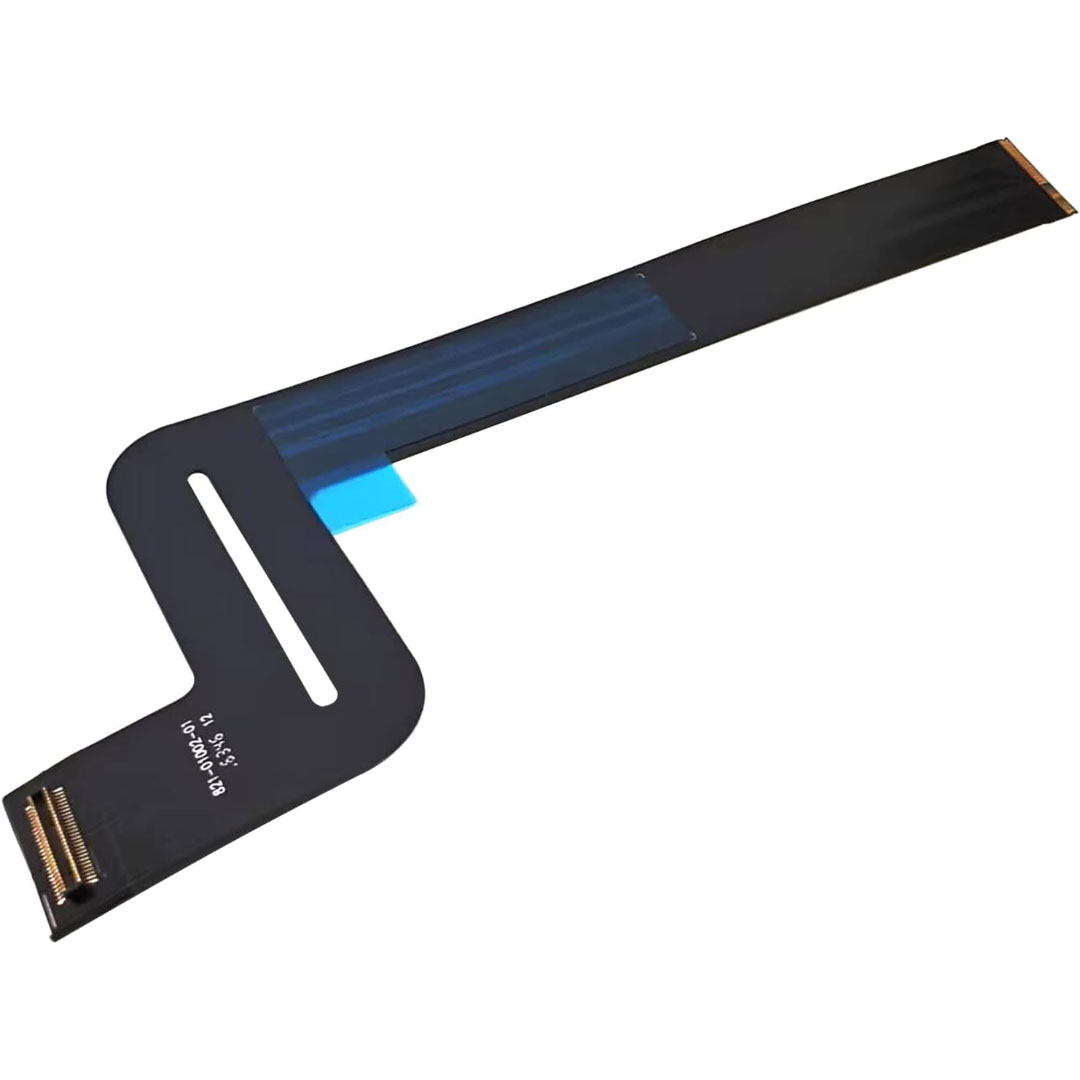
Genuine-spec touchpad flex cable for Apple’s 12-inch MacBook (Model A1534, Early 2015 / Early 2016 / Mid 2017)—essential for restoring full Force Touch trackpad functionality, haptic feedback, and multi-touch gesture support. Compatible With: MacBook 12″ (Early 2015) – 1.1GHz Core M MacBook 12″ (Early 2016) – 1.1GHz/1.3GHz Core M MacBook 12″ (Mid 2017) – 1.2GHz/1.3GHz Core m3/i5/i7 All share Model Number A1534 and Model Identifier MacBook8,1 / MacBook9,1 / MacBook10,1 respectively. MacBook 12″ (Early 2015) – 1.1GHz Core M MacBook 12″ (Early 2016) – 1.1GHz/1.3GHz Core M MacBook 12″ (Mid 2017) – 1.2GHz/1.3GHz Core m3/i5/i7 All share Model Number A1534 and Model Identifier MacBook8,1 / MacBook9,1 / MacBook10,1 respectively. Part Type: Touchpad flex cable only—does not include the trackpad housing, Taptic Engine, or mounting brackets. This is the ribbon cable that connects the Force Touch trackpad to the logic board. Function: Critical for Force Touch functionality—transmits pressure-sensitive input, multi-touch gestures (e.g., pinch, swipe, Force Click), and haptic feedback signals to the Taptic Engine. OEM-Quality Construction: Precisely matches Apple’s original in length, connector pitch, shielding, and routing—ensures reliable signal integrity and compatibility with macOS. Common Use Cases: Replacing a torn, creased, or liquid-damaged flex cable Restoring unresponsive or erratic trackpad behavior Completing a trackpad replacement when the original cable is unusable Replacing a torn, creased, or liquid-damaged flex cable Restoring unresponsive or erratic trackpad behavior Completing a trackpad replacement when the original cable is unusable Installation Note: Requires full bottom case removal and delicate disconnection of the ZIF connector. The cable routes tightly under the battery—extreme care is required. Recommended for experienced or certified technicians only.
