
Apple MacBook Pro 15” (2018) — professional-grade performance for creative power users.• Intel Core i9 • 32 GB RAM • 500 GB SSD • 4 GB Dedicated GraphicsRetina Display | macOS |

Remax F41 6″ Wireless Clamp Fan – USB‑C rechargeable (4,000 mAh), 4 speeds, 720° rotation, up to 3 hrs runtime.Modular 3‑in‑1 design with detachable grille, washable parts, and night‑light feature. Model: Remax F41 6-inch Wireless Air Circulating Clamp Fan Power & Battery: Rechargeable 4,000 mAh battery; USB-C charging (~3 hours to full charge), offers ~3 hours continuous use at high speeds Operation Modes: 4 fan speeds, 3‑in‑1 usage (desktop, clamp, or hanging), 720° wide-angle rotation Design Features: Detachable, washable grille plus built-in warm night light Care Tips: Recharge every two months if unused; avoid inserting objects into blades

WiWU WM108 Wimice Dual‑Mode Mouse – Bluetooth 5.0 and 2.4 GHz wireless mouse with 800/1200/1600 DPI, silent clicks, and ergonomic ABS housing.Long battery life (~6 months standby), USB dongle & silent design—ideal for travel, office, and quiet environments. Model: WiWU Wimice WM108 Connection Modes: Bluetooth 5.0 2.4 GHz wireless via USB dongle Connection Modes: Bluetooth 5.0 2.4 GHz wireless via USB dongle DPI Settings: 800 / 1,200 / 1,600 DPI (adjustable) Buttons: 3 standard buttons + clickable scroll wheel (4 keys total) Range: Up to 10 m wireless connectivity Material/Design: Lightweight (67–130 g, depending on source), ergonomic ABS plastic body, magnetic base or “super magnetic absorption” design Operating Range: ≈10 m Silent Clicks: Quiet operation—silent key action Dimensions: Approx. 108 × 64 × 36 mm Weight: 67 g cited by Star Tech and 130 g by others—likely lighter in official spec Compatibility: Windows, macOS, Linux, Android, etc. Plug-and-play, no driver needed

LB-LINK BL-WN510BT – Compact USB Bluetooth 5.1 adapter with up to 20m range and support for multiple device types.Ideal for connecting headsets, gamepads, and more to PCs with strong, stable wireless performance. Model: LB-LINK BL-WN510BT Bluetooth Version: Bluetooth 5.1 (backward compatible with 5.0/4.2/4.0/3.0/2.0) Interface: USB 2.0 (Plug-and-Play) Operating Range: Up to 20 meters (unobstructed) Data Transfer Rate: Up to 3 Mbps Supported Profiles: A2DP, HSP, HFP, AVRCP, HID, PAN, FTP, SPP, etc. OS Compatibility: Windows 7 / 8 / 8.1 / 10 / 11 (Driver may be required for Win 7) Not natively compatible with macOS or Linux OS Compatibility: Windows 7 / 8 / 8.1 / 10 / 11 (Driver may be required for Win 7) Not natively compatible with macOS or Linux Functions: Enables PC or laptop Bluetooth connection with headsets, keyboards, mice, speakers, gamepads, printers, etc. Supports dual-mode Bluetooth (BR/EDR and LE) Functions: Enables PC or laptop Bluetooth connection with headsets, keyboards, mice, speakers, gamepads, printers, etc. Supports dual-mode Bluetooth (BR/EDR and LE) Power Consumption: Low Energy (LE) support for improved efficiency Security: Enhanced encryption and pairing features for secure connections Size: Ultra-compact nano design Weight: Less than 5g Plug & Play: Driver-free on Windows 10 and 11

Genuine Apple MacBook Pro 15" (A1707) LCD display assembly in Space Gray—professionally removed from original units and tested for full functionality. Ideal for high-quality repairs with OEM clarity and color accuracy. Genuine Apple MacBook Pro 15″ (A1707) LCD display assembly in Space Gray—professionally removed from original units and tested for full functionality. Ideal for high-quality repairs with OEM clarity and color accuracy. Model Compatibility: Designed exclusively for MacBook Pro 15-inch (2016–2017 models, A1707). Original Apple Display: Not a third-party or replica—this is an authentic Apple Retina display assembly carefully pulled from verified MacBook Pro units. Retina Display Quality: 15.4-inch LED-backlit screen with 2880 x 1800 resolution, P3 wide color gamut, and True Tone support (if originally equipped) for vibrant, true-to-life visuals. Complete Assembly Included: Comes with LCD panel, front glass, integrated FaceTime HD camera, ambient light sensor, and full bezel—ready for direct installation. Space Gray Finish: Matches the original Space Gray MacBook Pro chassis for seamless aesthetic integration. Professionally Inspected: Each unit is tested for dead pixels, backlight uniformity, discoloration, and physical integrity to ensure reliable performance. “Pulled” Condition: Removed from a genuine, used MacBook Pro—fully functional with OEM performance, but not brand new. No cracks or major blemishes. Ideal for Repair Professionals: Trusted by technicians and refurbishers who require factory-level display quality and compatibility.

Compact, affordable all-in-one inkjet printer for home and small office use—print, scan, and copy in color with easy wireless setup, mobile printing, and HP’s efficient ink system.

GSAN GS-3021 POS All in One Touch 15.6" - Intel i5 - 8GB - 128GB SSD with Customer Display Main Board: POS motherboard CPU: I5-3RD GEN Memory: DDR3 8GB Hard Disk: 128GB Power: External power supply Input: 110V-240V 50/63Hz 2A Output: 12V DC 8A 96W MAX Interface: 6 USB port 1 LAN port

Specifications Feature Value Feature Value Input/Output Other Sound Mode Extra Bass Mode Category Speakers Use Other Input Power (W) 25-49W Voice Control No Waterproof Yes Support APP No Intelligent Personal Assistant None Audio Crossover Full-Range Number of Loudspeaker Enclosures 2 Power Source None Channels 2 (2.0) Battery Yes Communication USB Speaker Type Portable Cabinet Material Plastic Brand Name QUCAA Origin Mainland China Certification CE

MacBook Pro A1706 / A1708 Display Assembly (Space Gray) Compatibility : MacBook Pro 2017 13″ A1708 (EMC 3164 MacBookPro14,1) 2.3 GHz A1708 (EMC 3164 MacBookPro14,1) 2.5 GHz A1706 (EMC 3163 MacBookPro14,2) 3.1 GHz A1706 (EMC 3163 MacBookPro14,2) 3.3 GHz A1706 (EMC 3163 MacBookPro14,2) 3.5 GHz MacBook Pro 2016 13″ A1706 (EMC 3071 MacBookPro13,2) 2.9 GHz A1706 (EMC 3071 MacBookPro13,2) 3.1 GHz A1706 (EMC 3071 MacBookPro13,2) 3.3 GHz A1708 (EMC 2978 MacBookPro13,1) 2.0 GHz A1708 (EMC 2978 MacBookPro13,1) 2.4 GHz

Genuine-spec touchpad flex cable for MacBook Pro 15″ (Model A1707, 2016–2017)—restores full Force Touch functionality, haptic feedback, and precise multi-touch gesture control during trackpad repair or replacement. Compatible With: MacBook Pro 15″ (2016) – Model A1707 (Model Identifier: MacBookPro13,2) MacBook Pro 15″ (2017) – Model A1707 (Model Identifier: MacBookPro14,2) MacBook Pro 15″ (2016) – Model A1707 (Model Identifier: MacBookPro13,2) MacBook Pro 15″ (2017) – Model A1707 (Model Identifier: MacBookPro14,2) Part Type: Touchpad flex cable only — does not include the trackpad housing, Taptic Engine, or mounting hardware. This is the OEM-style ribbon cable that connects the trackpad to the logic board. Function: Transmits: Touch input coordinates Force Touch pressure data Haptic feedback signals to the Taptic Engine Enables full macOS gesture support: Force Click, three-finger lookup, swipe navigation, pinch-to-zoom, and smooth cursor tracking. Touch input coordinates Force Touch pressure data Haptic feedback signals to the Taptic Engine Enables full macOS gesture support: Force Click, three-finger lookup, swipe navigation, pinch-to-zoom, and smooth cursor tracking. OEM-Quality Build: Matches Apple’s original specifications in: Cable length and routing path Connector pitch and ZIF latch design EMI shielding and flex durability Cable length and routing path Connector pitch and ZIF latch design EMI shielding and flex durability Common Use Cases: Replacing a torn, creased, or liquid-damaged original flex cable Completing a trackpad replacement when the original cable is compromised Fixing intermittent trackpad behavior, loss of Force Touch, or complete unresponsiveness Replacing a torn, creased, or liquid-damaged original flex cable Completing a trackpad replacement when the original cable is compromised Fixing intermittent trackpad behavior, loss of Force Touch, or complete unresponsiveness Installation Note: Requires full bottom case removal and battery disconnection. Cable routes under internal components near the right speaker and logic board. Connects via a ZIF (Zero Insertion Force) socket—must be aligned carefully and latched gently. Recommended for experienced or certified technicians only. Requires full bottom case removal and battery disconnection. Cable routes under internal components near the right speaker and logic board. Connects via a ZIF (Zero Insertion Force) socket—must be aligned carefully and latched gently. Recommended for experienced or certified technicians only.

PCE M8-700 UPS (line-interactive) — 700 VA / 360 W backup unit for 220–240 V input. Protects PCs, routers, small electronics from outages and voltage swings. The PCE M8-700 is a line-interactive UPS designed for home or small office use. It provides backup power, voltage regulation (AVR), surge protection, and supports automatic switching during outages. Ideal for desktop PCs, network gear, monitors, or point-of-sale systems. Features & Capabilities Line-interactive topology: regulates input voltage without switching to battery when voltage fluctuates mildly. Automatic Voltage Regulation (AVR) to correct undervolt/overvolt conditions. Simulated (stepped) sine wave output in battery mode. Surge, overload, short circuit, discharge protections built in. Cold start capability (ability to power on from battery with no mains) LED + audible alarms for status (battery mode, overload, fault) USB / RS232 interface in some variants for power management (shutdown, monitoring) Technical Specifications What “Input 220–240 VAC, 50/60 Hz, 3.7 A” Means (and Caveats) If the specification you’re giving is “3.7 A” at input, that corresponds to a maximum input current draw when the UPS is handling a heavy load or during charging cycles. At 230 V × 3.7 A ≈ 850 W of input capacity. The unit’s 360 W output means there’s overhead for losses, inverter inefficiency, battery charging, etc. The UPS must operate within the stated voltage and frequency ranges — if input is too low or too high, it may switch to battery or go into protection mode.

Replacement Keyboard for MacBook Pro 13" inch A1706 & MacBook Pro 15" inch A1707 Touch Bar (for Late 2016 mid 2017 Year) Replacement Keyboard for MacBook Pro 13″ inch A1706 & MacBook Pro 15″ inch A1707 Touch Bar (for Late 2016 mid 2017 Year) 【Compatibility】This replacement keyboard is Compatible with original MacBook Pro 13″ inch A1706 & MacBook Pro 15″ inch A1707 Touch Bar (for Late 2016 mid 2017 Year) Laptop. 【Compatible Part Numbers】661-06377 【Compatible MBP Numbers】A1706 series :MacBook Pro 13 inch 2017 MacBookPro14,2 & MacBook Pro 13 2016 MacBookPro13,2 MNQF2LL/A MNQG2LL/A MLH12LL/A MLVP2LL/A etc A1707 series:MacBook Pro 15 inch 2016 MacBookPro13,3 & MacBook Pro 15 inch 2017 MacBookPro14,3 Release June 2017 MPTR2LL/A MPTU2LL/A MPTT2LL/A MPTV2LL/A Release October 2016 MLH32LL/A MLW72LL/A MLH42LL/A MLW82LL/A

✅ Full Specifications: Model: A4Tech Bloody GR370 Interface / Connection: Triple-Connection Mode: 2.4GHz Wireless (via USB-A Nano Receiver for ultra-low latency) Bluetooth v5.0 (For mobile devices and tablets) 3.5mm Wired Mode (Includes 4-pin 3.5mm audio cable for zero-power use) Audio Technology: 50mm M.O.C.I. Hybrid Diaphragm Drivers (Reduces high-frequency distortion and delivers clear, punchy bass) Performance / Speed: 2.4GHz “Sync-to-Life” low-latency technology (comparable to wired performance) Frequency Response: 20Hz – 20kHz Microphone: Detachable Unidirectional Noise-Canceling Microphone with LED mute indicator Material & Build: Lightweight headband design with soft, protein leather ear pads for extended gaming sessions Design & Form Factor: Over-ear, ergonomic closed-back design with integrated volume and mute controls on the earcup Battery Life: Built-in 1050mAh lithium battery providing up to 45 hours of playback time (depending on volume levels) Compatibility: PC, Mac, PlayStation (PS4/PS5), Nintendo Switch, Android, and iOS Dimensions: Approx. 195 x 100 x 205 mm Weight: Approx. 290 grams

LENOVO 11.1V or 11.4V 24Wh 68 Laptop Battery 0C52861 45N1124 45N1775 45N1126 45N1127 For Lenovo ThinkPad X240 X240S X250 X260 X270 T440 T440S T450 T450S T460 T460P T470P T550 T560 W550 L450 L460 About this item Battery Type: 3-Cell Lithium-Ion Voltage &Capacity :11.1V 24Wh 2.09AH or 11.4V 24Wh 2.06Ah , in fact , 11.1V is same as 11.4V , because one cell voltage is 3.7V or 3.8V . SANISI Concept: The customer is god, Product Quality and Service must be perfect! We will let every customer feel satisfied Package Contents: 1 pcs Brand New Battery

A1932 A2179 A1965 Battery for MacBook Air 13″ Retina (2018 2019, Early 2020) EMC 3184 3302 MRE82 MRE92 MVFH2 MWTJ2 MVH22 MVFM2 MVFK2 MREE2 MREC2 MREA2 MREF2 MUQT2 MUQU2 MacBookAir8,1 8,2 9,1 📄【Specification】Voltage: 11.4V. Capacity: 49.9Wh 4379mAh. Battery Type: Li-Polymer. Condition: Brand new, from high quality materials, top circuit boards and smart chip. 🔋【Replace Part Number】A1965 A1932(EMC 3184) A2179(EMC 3302) 3ICP4/63/119 MacBookAir8,1 MacBookAir8,2 MacBookAir9,1. 💻【Compatible Models】Only fit for MacBook Air 13″ (Model A1932 & Model A2179) Release 2018 2019 2020, fit for MRE82LL/A, MVFH2LL/A, MVFM2LL/A, MVFK2LL/A, MVFJ2LL/A, MVFN2LL/A, MVFL2LL/A, MREE2LL/A, MREC2LL/A, MREA2LL/A, MREF2LL/A, MRE92LL/A, MWTJ2LL/A, MVH22LL/A, MVH52LL/A, MVH42LL/A, MWTL2LL/A, MWTK2LL/A. Please kindly check the model number at the bottom of your laptop (A****). NOT FIT FOR MODEL A2337. 💻【ANTIEE Promise】Each products has undergone rigorous testing to ensure the correct voltage, circuit protection, stable current, low self-discharge and CE / FCC / RoHS Certified for safety. About 500 recharge cycles over the life.

HyperX Pulsefire Core (4P4F8AA) – RGB gaming mouse with PixArt sensor, 6,200 DPI, and 7 programmable buttons.Lightweight, ergonomic design perfect for gamers seeking precision and durability. Model: HyperX Pulsefire Core (4P4F8AA) Sensor Type: PixArt PAW3327 Optical Sensor DPI Range: 800 – 6,200 DPI (adjustable in software) Polling Rate: 1000 Hz Tracking Speed: Up to 220 IPS Acceleration: 30G Buttons: 7 programmable buttons Switch Type: Durable switches rated for up to 20 million clicks Lighting: Customizable RGB lighting (logo zone) Grip Style: Palm or claw grip Design: Ergonomic, right-handed shape with textured side grips Weight: Approx. 87g (without cable) Cable Length: 1.8 meters (braided USB cable) Software Support: HyperX NGENUITY for DPI, RGB, and button customization Compatibility: Windows 10, 8.1, 8, 7

FAVOURITE WIRELESS COMBO MK270 Wireless Combo brings together the convenience and comfort of a full-sized keyboard with a sculpted, compact mouse. With media keys, a number pad and precise cursor control to make your work a whole lot smoother. Plus, the lag-free wireless makes setup easy and saves space on your desk. No wonder this is the world best selling combo!7Based on independent sales data (in units) including all the models of the MK270 family for wireless combo aggregated from major global markets including Canada, China, France, Germany, Indonesia, Republic of Korea, Russian Federation, Sweden, Taiwan, Turkey, UK, US (Nov'19 - Nov'20 period). Retail channel only. FAVOURITE WIRELESS COMBO MK270 Wireless Combo brings together the convenience and comfort of a full-sized keyboard with a sculpted, compact mouse. With media keys, a number pad and precise cursor control to make your work a whole lot smoother. Plus, the lag-free wireless makes setup easy and saves space on your desk. No wonder this is the world best selling combo!7Based on independent sales data (in units) including all the models of the MK270 family for wireless combo aggregated from major global markets including Canada, China, France, Germany, Indonesia, Republic of Korea, Russian Federation, Sweden, Taiwan, Turkey, UK, US (Nov’19 – Nov’20 period). Retail channel only. Height: 5.87 in (149 mm) Width: 17.36 in (441 mm) Depth: 0.71 in (18 mm) Weight: 17.57 oz (498 g) Height: 3.90 in (99 mm) Width: 2.36 in (60 mm) Depth: 1.54 in (39 mm) Weight: 2.65 oz (75.2 g) Height: 0.74 in (18.7 mm) Width: 0.57 in (14.4 mm) Depth: 0.26 in (6.6 mm) Weight: 0.07 oz (2 g) Spill-resistant design 2Tested under limited conditions (maximum of 60 ml liquid spillage). Do not immerse the keyboard in liquid. Adjustable keyboard height 10-Key Number pad Key type: deep profile Caps lock indicator light On/Off power switch 2 AAA batteries(Alkaline Battery) Battery life: 36 months 3Keyboard battery life calculation based on an estimated two million keystrokes/year in an office environment. User experience may vary. Mouse battery life may vary based on user and computing conditions. Sensor technology: Smooth Optical tracking Number of buttons: 3 (Left/Right-click, Middle click) Scrolling: line-by-line Scroll Wheel: Yes, 2D, optical Connect/Power: On/Off power button 1 AA battery(Alkaline Battery) Battery life: 12 months 4Keyboard battery life calculation based on an estimated two million keystrokes/year in an office environment. User experience may vary. Mouse battery life may vary based on user and computing conditions. Mouse plastics: 49% post-consumer recycled material 5Excludes plastic in printed wiring assembly (PWA), receiver and packaging. Keyboard plastics: 54% post-consumer recycled material 6Excludes plastic in printed wiring assembly (PWA), receiver and packaging. An available USB port ChromeOS Windows 10,11 or later

Genuine-spec touchpad flex cable for MacBook Pro 13″ (Model A1502, Mid 2014)—restores full trackpad functionality, including precise cursor control and physical click response. Essential for repairing unresponsive or erratic trackpad behavior. Compatible With: MacBook Pro 13-inch (Mid 2014, Model A1502, Model Identifier MacBookPro11,1) with Intel Core i5/i7 processors and Retina display. Part Type: Touchpad flex cable only — does not include the trackpad housing, button mechanism, or mounting hardware. This is the ribbon cable that connects the trackpad to the logic board. Function: Transmits cursor movement and click signals (left/right physical clicks) Supports standard multi-touch gestures (two-finger scroll, tap-to-click, pinch-to-zoom) ⚠️ Note: This model uses a physical click mechanism—not Force Touch (no haptic feedback or pressure sensitivity). Transmits cursor movement and click signals (left/right physical clicks) Supports standard multi-touch gestures (two-finger scroll, tap-to-click, pinch-to-zoom) ⚠️ Note: This model uses a physical click mechanism—not Force Touch (no haptic feedback or pressure sensitivity). OEM-Quality Build: Matches Apple’s original in: Cable length and routing path Connector type and pin alignment Insulation and flexibility for long-term reliability Cable length and routing path Connector type and pin alignment Insulation and flexibility for long-term reliability Common Use Cases: Replacing a torn, frayed, or corroded original flex cable Fixing: Unresponsive or intermittent trackpad Cursor jumping or drifting Click function failure (left or right) Complete trackpad disconnect Replacing a torn, frayed, or corroded original flex cable Fixing: Unresponsive or intermittent trackpad Cursor jumping or drifting Click function failure (left or right) Complete trackpad disconnect Unresponsive or intermittent trackpad Cursor jumping or drifting Click function failure (left or right) Complete trackpad disconnect Installation Note: Requires bottom case removal and battery disconnect. Connects via a ZIF (Zero Insertion Force) socket on the logic board—do not force. Cable routes under the battery; handle with care to avoid strain. Suitable for intermediate to advanced DIYers or technicians. Requires bottom case removal and battery disconnect. Connects via a ZIF (Zero Insertion Force) socket on the logic board—do not force. Cable routes under the battery; handle with care to avoid strain. Suitable for intermediate to advanced DIYers or technicians.

OEM-quality trackpad replacement (without flex cable) for MacBook Air 13″ (Model A1932, 2018–2019) in Gold finish—engineered for precise Force Touch response, smooth multi-touch gestures, and perfect color-matched integration with the original chassis. Compatible With: MacBook Air 13-inch (2018 & 2019, Model A1932, Model Identifiers MacBookAir8,1) with Intel Core i5/i7 processors. Part Type: Trackpad only—does not include the flex cable, Taptic Engine, or mounting hardware. Designed for technicians who will reuse the original internal components. Finish: Gold—specifically matched to the Gold variant of the A1932 MacBook Air for seamless aesthetic continuity. Force Touch Support: Fully compatible with pressure-sensitive input and haptic feedback when paired with the original Taptic Engine and logic board—ensuring full macOS gesture functionality (e.g., Force Click, Look Up, pressure-sensitive navigation). Precision Build: Smooth glass surface with exact curvature, texture, and micro-click mechanism matching Apple’s original design for consistent tracking accuracy and tactile feel. Installation Requirements: Requires full bottom case disassembly and careful transfer of the original flex cable and Taptic Engine. Adhesive must be applied precisely to maintain structural integrity and sensor alignment. Recommended for professional or experienced repair technicians only.

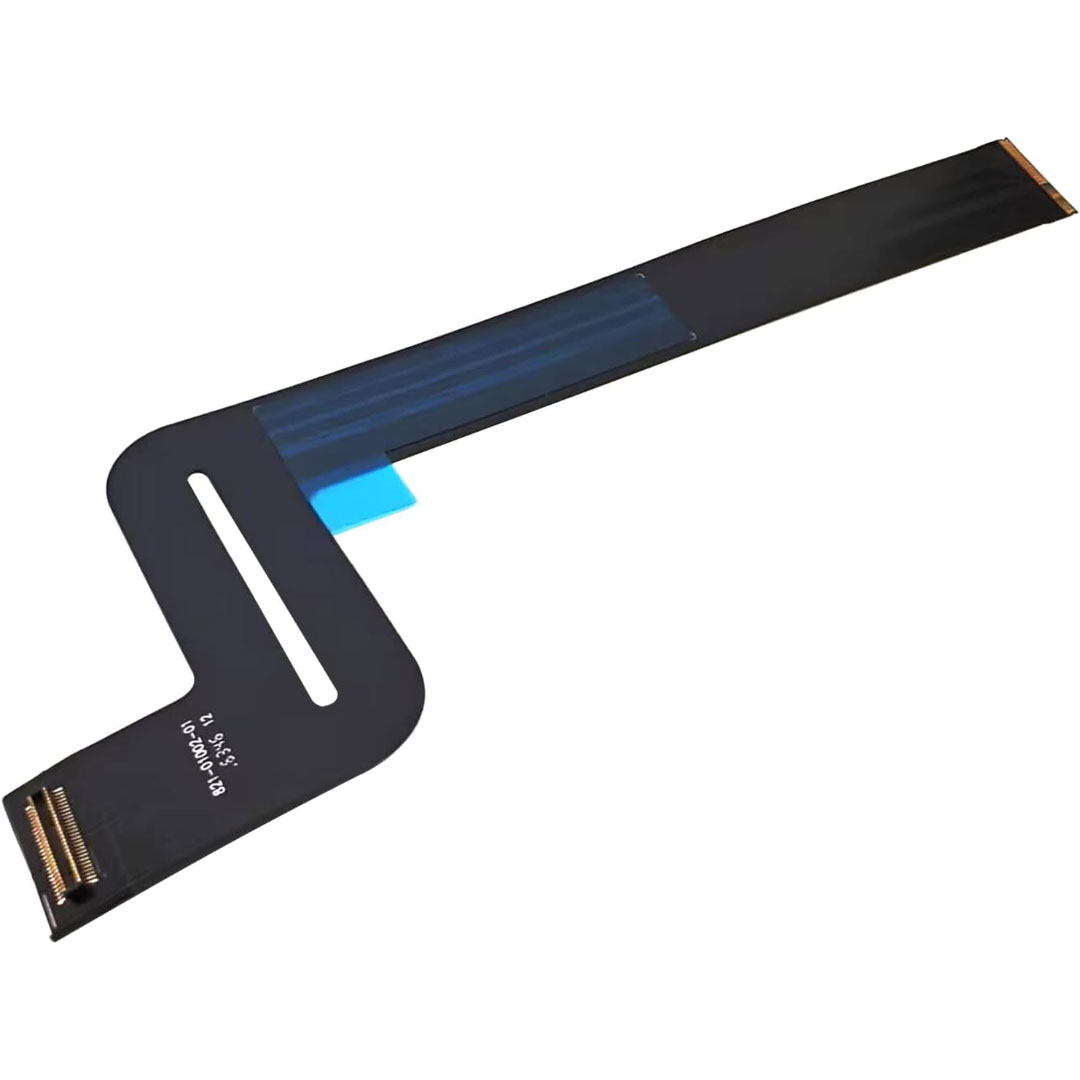
Genuine-spec touchpad flex cable for Apple’s 12-inch MacBook (Model A1534, Early 2015 / Early 2016 / Mid 2017)—essential for restoring full Force Touch trackpad functionality, haptic feedback, and multi-touch gesture support. Compatible With: MacBook 12″ (Early 2015) – 1.1GHz Core M MacBook 12″ (Early 2016) – 1.1GHz/1.3GHz Core M MacBook 12″ (Mid 2017) – 1.2GHz/1.3GHz Core m3/i5/i7 All share Model Number A1534 and Model Identifier MacBook8,1 / MacBook9,1 / MacBook10,1 respectively. MacBook 12″ (Early 2015) – 1.1GHz Core M MacBook 12″ (Early 2016) – 1.1GHz/1.3GHz Core M MacBook 12″ (Mid 2017) – 1.2GHz/1.3GHz Core m3/i5/i7 All share Model Number A1534 and Model Identifier MacBook8,1 / MacBook9,1 / MacBook10,1 respectively. Part Type: Touchpad flex cable only—does not include the trackpad housing, Taptic Engine, or mounting brackets. This is the ribbon cable that connects the Force Touch trackpad to the logic board. Function: Critical for Force Touch functionality—transmits pressure-sensitive input, multi-touch gestures (e.g., pinch, swipe, Force Click), and haptic feedback signals to the Taptic Engine. OEM-Quality Construction: Precisely matches Apple’s original in length, connector pitch, shielding, and routing—ensures reliable signal integrity and compatibility with macOS. Common Use Cases: Replacing a torn, creased, or liquid-damaged flex cable Restoring unresponsive or erratic trackpad behavior Completing a trackpad replacement when the original cable is unusable Replacing a torn, creased, or liquid-damaged flex cable Restoring unresponsive or erratic trackpad behavior Completing a trackpad replacement when the original cable is unusable Installation Note: Requires full bottom case removal and delicate disconnection of the ZIF connector. The cable routes tightly under the battery—extreme care is required. Recommended for experienced or certified technicians only.
