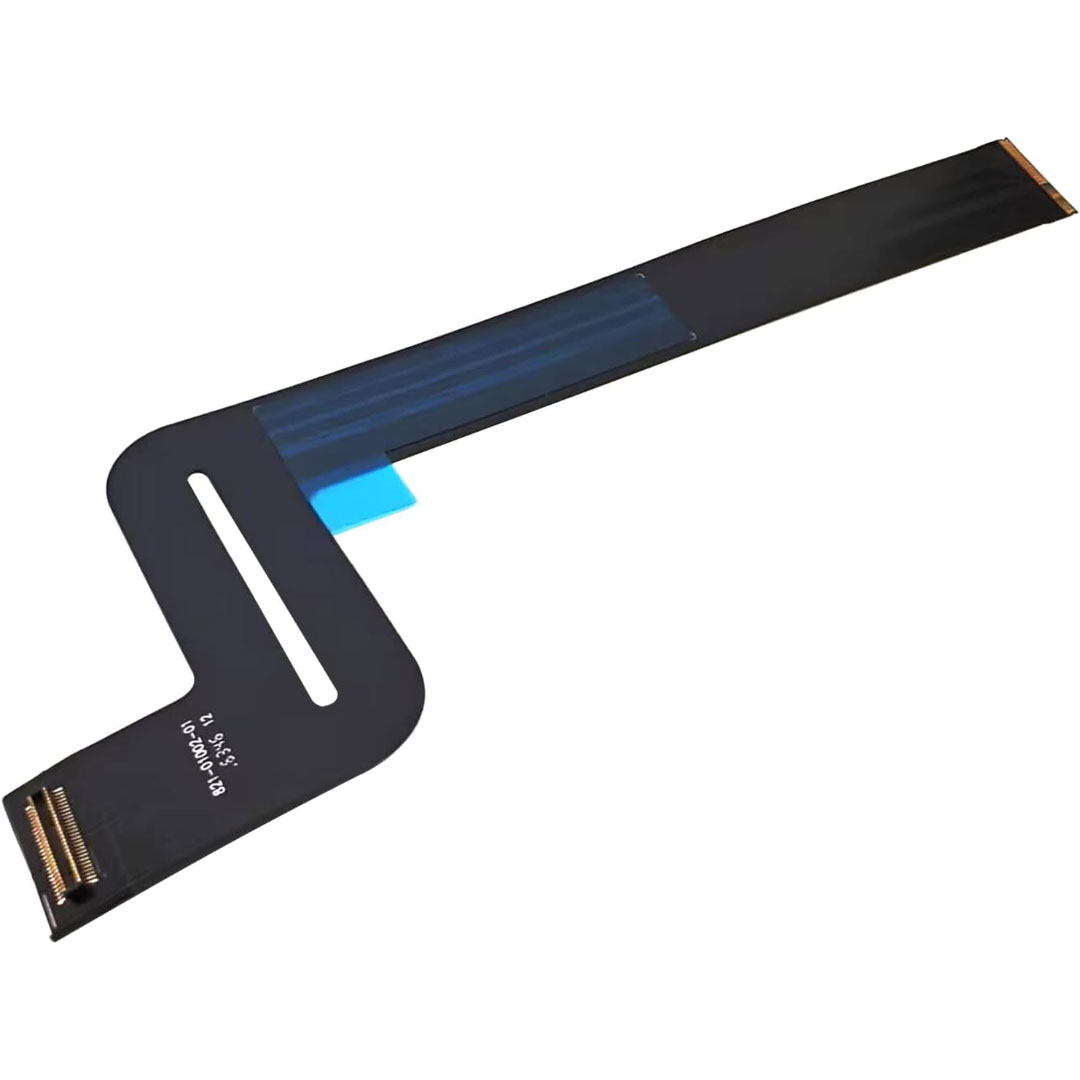

Professional battery testing flex cable for MacBook Pro 15″ (Model A1990, 2018–2019)—used by technicians to bypass a faulty battery or diagnose power-on issues without permanent battery removal. Enables safe logic board testing and troubleshooting. This is not a replacement battery cable—it’s a diagnostic tool used in repair workflows. It mimics the battery’s presence by providing the necessary SMBus signal and power-enable lines to the logic board, allowing the MacBook to: Power on without a battery installed Test logic board functionality independently Diagnose whether a no-power issue is caused by the battery or logic board MacBook Pro 15″ (2018–2019) Model: A1990 Model Identifiers: MacBookPro15,2 Chip: Intel Core i7/i9 Model: A1990 Model Identifiers: MacBookPro15,2 Chip: Intel Core i7/i9 ⚠️ Not compatible with A1707 (2016–2017), A2159 (16″), or any M1/M2 models. Simulates battery presence via correct SMBus resistance and ID signals Includes power-enable circuitry matching Apple’s safety protocol Pre-terminated with OEM-style connector for A1990 logic board Allows safe bench testing of logic boards during repair Diagnosing “no power, no fan spin, no display” issues Verifying if a logic board powers on without risking a shorted battery Testing after liquid damage or DC-in board replacement Avoiding unnecessary battery replacements during diagnostics Not for permanent installation—intended for temporary diagnostic use only Does not charge or store power—requires connected USB-C power adapter to operate Must be used with a known-good power adapter (87W recommended) Not a consumer part—designed for professional repair shops and technicians

Genuine-quality keyboard and touchpad connection board (also known as the keyboard flex cable or I/O board) for the 2022 MacBook Pro 14″ (Model A2681)—essential for restoring full keyboard and Touch ID functionality during repairs. Compatible With: MacBook Pro 14-inch (2022, M2 Pro/M2 Max models, Apple Model A2681). Function: This internal connection board links the keyboard, Touch ID sensor, and touchpad to the logic board—critical for proper operation of input devices. Includes: Keyboard flex cable assembly with integrated Touch ID sensor and touchpad connector (exact configuration matches Apple’s original design). Common Use Cases: Replacing after liquid damage, physical impact, or keyboard/touchpad failure; often required when the built-in keyboard or power button (with Touch ID) stops responding. OEM-Spec Quality: Built to match Apple’s original specifications for fit, signal integrity, and durability—ensures seamless integration and reliable performance. Installation Note: Requires precision disassembly of the MacBook’s lower case and display. Recommended for experienced technicians or certified repair centers.

Genuine-spec keyboard replacement for MacBook Pro 14" & 16" (2021–2025, M1 Pro/Max to M4 Pro/Max)—available in US QWERTY or UK QWERTY (with £ symbol). Features Apple’s Magic Keyboard with scissor-switch mechanism, full backlighting, and precise OEM fit. Genuine-spec keyboard replacement for MacBook Pro 14″ & 16″ (2021–2025, M1 Pro/Max to M4 Pro/Max)—available in US QWERTY or UK QWERTY (with £ symbol). Features Apple’s Magic Keyboard with scissor-switch mechanism, full backlighting, and precise OEM fit. US Layout: Wide Enter key @ above 2, # above 3 Standard inverted-T arrow keys Wide Enter key @ above 2, # above 3 Standard inverted-T arrow keys UK Layout: Tall vertical Enter key £ symbol on key 3 @ accessed via Right Alt + 2 Matches Apple’s official UK regional configuration Tall vertical Enter key £ symbol on key 3 @ accessed via Right Alt + 2 Matches Apple’s official UK regional configuration Keyboard Type: Apple Magic Keyboard with scissor-switch mechanism Backlighting: Full per-key white backlight with ambient light sensor support Function Row: Full-height physical function keys (F1–F12) with macOS shortcut toggling Build Quality: OEM-grade keycaps, consistent actuation force, and precise top-case alignment

Fast-charging feature available on select iPhone and iPad models.

The Cudy AC1200 dual band WiFi extender boosts and extends your wireless coverage with speeds up to 1200Mbps across 2.4GHz and 5GHz bands. Ideal for eliminating dead zones, it provides stronger and more stable WiFi for streaming, gaming, and online work in every corner of your home or office. The Cudy AC1200 Dual Band WiFi Extender is designed to expand your existing WiFi network and deliver stronger coverage where your router signal is weak. With support for both 2.4GHz and 5GHz frequencies, it provides balanced performance for browsing, streaming, video calls, and gaming. Easy to set up and compatible with most routers, this extender is the perfect solution for improving WiFi connectivity in homes, offices, and multi-room spaces. AC1200 Dual Band Speed: Up to 1200Mbps total for smooth browsing and streaming 2.4GHz + 5GHz Support: Better performance and reduced interference Eliminates WiFi Dead Zones: Extends coverage to hard-to-reach rooms Stable Connection: Ideal for HD streaming, gaming, and online meetings Universal Compatibility: Works with most WiFi routers and access points Easy Setup: Simple installation with WPS / web configuration (model dependent) Compact Plug-In Design: Saves space and fits easily in any outlet Multiple Modes: Extender / Access Point (depending on model) Perfect for homes, offices, cafés, and apartments needing stronger WiFi coverage. Works with most routers and improves signal strength for devices like smartphones, laptops, smart TVs, consoles, and IP cameras.

Genuine-spec touchpad flex cable for MacBook Pro 13″ (Model A2338, 2020, Apple M1)—essential for restoring full Force Touch functionality, haptic feedback, and precise multi-touch gesture control during trackpad repair or replacement. Compatible With: MacBook Pro 13-inch (2020, Model A2338, Model Identifier MacBookPro17,1) with Apple M1 chip (2 Thunderbolt ports). Part Type: Touchpad flex cable only — does not include the trackpad housing, Taptic Engine, or mounting hardware. This is the OEM-style ribbon cable that connects the trackpad to the logic board. Function: Transmits: Touch input coordinates Force Touch pressure data Haptic feedback signals to the Taptic Engine Enables full macOS gesture support: Force Click, three-finger lookup, swipe navigation, pinch-to-zoom, and smooth cursor tracking. Touch input coordinates Force Touch pressure data Haptic feedback signals to the Taptic Engine Enables full macOS gesture support: Force Click, three-finger lookup, swipe navigation, pinch-to-zoom, and smooth cursor tracking. OEM-Quality Build: Matches Apple’s original specifications in: Cable length and routing Connector pitch and ZIF latch design EMI shielding and flex durability Cable length and routing Connector pitch and ZIF latch design EMI shielding and flex durability Common Use Cases: Replacing a torn, creased, or liquid-damaged original flex cable Completing a trackpad replacement when the original cable is compromised Fixing intermittent trackpad behavior, loss of Force Touch, or complete unresponsiveness Replacing a torn, creased, or liquid-damaged original flex cable Completing a trackpad replacement when the original cable is compromised Fixing intermittent trackpad behavior, loss of Force Touch, or complete unresponsiveness Installation Note: Requires full bottom case removal and battery disconnection. Cable routes under internal components near the right speaker and logic board. Connects via a ZIF (Zero Insertion Force) socket—must be aligned carefully and latched gently. Recommended for experienced or certified technicians only. Requires full bottom case removal and battery disconnection. Cable routes under internal components near the right speaker and logic board. Connects via a ZIF (Zero Insertion Force) socket—must be aligned carefully and latched gently. Recommended for experienced or certified technicians only. Important Compatibility Notes: ✅ Only for A2338 (13″, M1, 2020) ❌ Not compatible with: Intel-based A2251 / A2289 (2020) MacBook Air M1 (A2337) Any MacBook Air or 14″/16″ MacBook Pro ✅ Only for A2338 (13″, M1, 2020) ❌ Not compatible with: Intel-based A2251 / A2289 (2020) MacBook Air M1 (A2337) Any MacBook Air or 14″/16″ MacBook Pro Intel-based A2251 / A2289 (2020) MacBook Air M1 (A2337) Any MacBook Air or 14″/16″ MacBook Pro

Genuine-spec touchpad flex cable for MacBook Pro 14″ (Model A2442, 2021, M1 Pro/Max)—essential for restoring full Force Touch functionality, haptic feedback, and precise multi-touch gesture control. Compatible With: MacBook Pro 14-inch (2021, Model A2442) with Apple M1 Pro or M1 Max chip (Model Identifiers: MacBookPro18,3 / MacBookPro18,4). Part Type: Touchpad flex cable only—does not include the trackpad, Taptic Engine, or mounting brackets. This is the OEM-style ribbon cable that connects the trackpad to the logic board. Function: Carries touch input, Force Touch pressure data, and haptic feedback signals—critical for macOS trackpad gestures, Force Click, and Taptic Engine responsiveness. OEM-Quality Build: Matches Apple’s original flex circuit in length, connector pitch, shielding, and bend geometry—ensures reliable signal transmission and durability under repeated use. Common Use Cases: Replacing a damaged, torn, or corroded original flex cable Completing a trackpad replacement when the original cable is unusable Fixing intermittent trackpad issues, unresponsiveness, or loss of Force Touch Replacing a damaged, torn, or corroded original flex cable Completing a trackpad replacement when the original cable is unusable Fixing intermittent trackpad issues, unresponsiveness, or loss of Force Touch Installation Note: Requires full bottom case removal and careful routing beneath internal components. Connectors use ZIF (Zero Insertion Force) sockets—must be seated properly without force. Recommended for certified or highly experienced technicians only.

RK61 RGB Mechanical Keyboard – Compact 60% keyboard with Blue switches, tri-mode (Bluetooth/2.4GHz/Wired), and vibrant RGB.Perfect for minimal desk setups and wireless performance with a unique W-W-B color design. Model: Royal Kludge RK61 Layout: 60% compact (61 keys, no numpad or F-row) Switch Type: Blue Mechanical Switches (clicky + tactile feedback) Backlight: RGB with multiple lighting modes & effects Connection Modes (3C): Bluetooth 5.0 – Pair with up to 3 devices Wired USB-C – For gaming and charging 2.4GHz Wireless (on 3-mode models) Connection Modes (3C): Bluetooth 5.0 – Pair with up to 3 devices Wired USB-C – For gaming and charging 2.4GHz Wireless (on 3-mode models) Battery: 1450mAh rechargeable battery Keycaps: ABS double-shot (W-W-B colorway: White-White-Black) Hot-Swappable: No (unless stated on specific variant) Compatibility: Windows, macOS, Android, iOS Anti-Ghosting: Full N-Key rollover Software Support: RK software for key remapping and RGB control (Windows only) Build Material: ABS plastic case, plastic plate Cable: Detachable USB-C cable included Dimensions: Approx. 290 x 100 x 40 mm Weight: ~500g

The 60W MagSafe 2 Power Adapter features a magnetic DC connector so if someone should trip over it, the cord disconnects harmlessly and your MacBook Pro stays put safely. It also helps prevent fraying or weakening of the cables over time. In addition, the magnetic DC helps guide the plug into the system for a quick and secure connection. The 60W MagSafe 2 Power Adapter features a magnetic DC connector so if someone should trip over it, the cord disconnects harmlessly and your MacBook Pro stays put safely. It also helps prevent fraying or weakening of the cables over time. In addition, the magnetic DC helps guide the plug into the system for a quick and secure connection. When the connection is secure, an LED located at the head of the DC connector lights up; an amber light lets you know that your notebook is charging, while a green light tells you that you have a full charge. An AC cord is provided with the adapter for maximum cord length, while the AC wall adapter (also provided) gives you an even easier and more compact way to travel. Designed to be the perfect traveling companion, the adapter has a clever design which allows the DC cable to be wound neatly around itself for easy cable storage. Compatible with MacBook Pro with 13-inch Retina display. See this article for more details about choosing the right one. Knowing which specific Mac model you have is important. If you are running OS X Lion (10.7) or later go to the “” menu at the top left of your screen, choose “About this Mac” then click the “More Info…” button. Your Mac model and generation will be displayed. If you are running an earlier version of OS X, you can enter your serial number here to find out which model you have. COMPATIBILITY Mac Models: MacBook Pro (Retina, 13-inch, Late 2012 – 2015)

A rugged and versatile pre-owned Lenovo ThinkPad T460 with 14" touchscreen, 6th Gen Core i5, 8GB RAM, and 256GB SSD—ideal for professionals who need durability, touch functionality, and reliable business performance.

Genuine Apple MacBook Pro 15″ (A1990) display assembly—carefully removed from original units and tested for quality. Perfect for repairs or replacements with full OEM clarity and color accuracy. Model Compatibility: Designed exclusively for MacBook Pro 15-inch (2018–2019 models, A1990). Original Apple Display: Not a third-party or replica—this is a genuine Apple Retina display assembly pulled from verified MacBook Pro units. Retina Quality: Features a 15.4-inch LED-backlit Retina display with 2880 x 1800 resolution, True Tone technology, and P3 wide color gamut for vibrant, accurate visuals. Includes Full Assembly: Complete with front glass, LCD panel, camera module, ambient light sensor, and bezel—ready for direct installation. Professionally Tested: Each unit undergoes visual and functional inspection to ensure no dead pixels, discoloration, or backlight bleeding. Condition: “Pulled” means it was removed from a working or used MacBook Pro—cosmetically clean with full functionality, but not brand new. Ideal for Repair Technicians: Perfect for screen replacements, device refurbishment, or parts resellers requiring OEM-level quality.

lenovo battery L16L2PB2 L16M2PB1 L16S2PB2 L16C2PB2 Laptop Notebook Battery for Lenovo 5000-15 2ICP6/55/90 Series 7.4V 30Wh 4050mAh About this item Condition: New Voltage: 7.4V Capacity: 30Wh/4050mAh Replace Part Number: L16M2PB1 L16L2PB2 L16M2PB2 L16S2PB1 L16L2PB3 L16C2PB1 L17L2PF1 L17M2PB7 L16C2PB2 L16L2PB1 L16M2PB3 2ICP6/55/90 Fit For: Lenovo 5000-15 Series Raise the battery life: 1: After receiving the battery, Please charge it fully, discharge it to around 10, and do it three times. 2: If you don’t use the battery for a long time, please charge and discharge it once a month

lenovo battery L14M3P24 11.1V 45Wh 4050mAh L14M3P24 Battery COMPATIBLE L14S3P24 L14M3P24 L16M3P24 LAPTOP BATTERY FOR LENOVO IDEAPAD XIAOXIN 700 R720 Y700-14ISK Y520-15IKB Y720-14ISK SERIES 4 Cell Laptop Battery About this item Condition: New Voltage: 11.1V Capacity: 45Wh/4050mAh Replace Part Number: L14M3P24 L14S3P24 Fit For: Lenovo Ideapad 700 Ideapad 700 Series The Package Includes 1X L14M3P24 battery. Before purchasing, please open the laptop’s back cover to confirm the battery model and capacity. Raise the battery life: 1:After receiving the battery, Please charge it fully, then discharge it to around 10%, and do it three times. 2:If you don’t use the battery for a long time, please charge and discharge it once a month

Kingston NV3 1TB NVMe SSD — ultra-fast PCIe 4.0 storage in a compact M.2 form.• Read up to 6,000 MB/s • Write up to 4,000 MB/s • 320 TBW enduranceForm Factor: M.2 2280 | Interface: PCIe 4.0 x4 | Warranty: 5-year limitedSKU: SNV3S/1000G Full Details: The Kingston NV3 PCIe 4.0 NVMe M.2 1TB SSD gives you ultra-fast performance and reliable storage for laptops and desktops. Built with PCIe 4.0 technology, it delivers read speeds up to 6,000 MB/s and write speeds up to 4,000 MB/s, making it perfect for gaming, content creation, or simply speeding up your system. PCIe 4.0 × 4 NVMe interface for lightning-fast speed Compact M.2 2280 design for easy installation Up to 6,000 MB/s read and 4,000 MB/s write speeds 1TB capacity for games, media, and apps Low power use and heat for better efficiency Works with most modern desktops and laptops that support M.2 NVMe (PCIe) drives. Backward compatible with PCIe 3.0 systems (at lower speeds). Kingston NV3 1TB M.2 NVMe SSD Quick start/warranty guide

7.4V 51WH Laptop Battery G5M10 for DELL Latitude E5450 E5550 Notebook 15.6" G5M10 8V5GX R9XM9 WYJC2 1KY05-SIKER 7.4V 51WH Laptop Battery G5M10 for DELL Latitude E5450 E5550 Notebook 15.6″ G5M10 8V5GX R9XM9 WYJC2 1KY05-SIKER About this item Battery type: Li-ion Capacity:7.4V 51WH 100% New Manufacturer Features 100% Brand Replacement New battery

Experience the perfect balance of performance and value with the Lenovo ThinkPad E14 Gen 1. Powered by a reliable 10th Gen Intel Core i5 processor, 16GB RAM, and a spacious 512GB NVMe SSD, this 14-inch laptop is built to handle professional multitasking with the signature durability of the ThinkPad line.

The MSI PRO MP252L features a 25-inch Full HD IPS display with a smooth 120Hz refresh rate and 1ms MPRT response time. Equipped with HDMI and DisplayPort connectivity plus eye-care technology, it’s ideal for productivity, study, and everyday use. The MSI PRO MP252L is a professional-grade monitor designed for office work, learning, and home use. Its 25-inch Full HD IPS panel delivers sharp visuals and accurate colors, while the 120Hz refresh rate ensures smoother scrolling and motion. With versatile connectivity options, it easily integrates into modern and legacy setups. 25” Full HD Display (1920×1080): Clear and detailed visuals for work and entertainment. IPS Panel Technology: Wide viewing angles and consistent color accuracy. 120Hz Refresh Rate: Smoother visuals compared to standard 60Hz monitors. 1ms MPRT Response Time: Reduces motion blur for improved clarity. Eye Care Technology: Anti-Flicker and Less Blue Light reduce eye strain. 1× HDMI Port: Easy connection to laptops, desktops, and media devices. 1× DisplayPort: Stable and high-quality video signal for modern systems. Headphone Out: Convenient audio output for headphones or external speakers. Built with MSI’s trusted quality standards, the PRO MP252L features a durable yet sleek design that fits perfectly in professional and home environments.

A sleek and secure pre-owned Dell Latitude 7490 with 14" display, 8th Gen Core i5, 8GB RAM, and 128GB SSD—designed for business professionals who need portability, durability, and enterprise-grade performance.

A reliable pre-owned Dell Latitude 5400 with 14" display, 8th Gen Core i5, 16GB RAM, and 512GB SSD—ideal for business users and students seeking solid performance, security, and durability in a compact form.

Genuine-spec touchpad flex cable for MacBook Pro 15″ (Model A1707, 2016–2017)—restores full Force Touch functionality, haptic feedback, and precise multi-touch gesture control during trackpad repair or replacement. Compatible With: MacBook Pro 15″ (2016) – Model A1707 (Model Identifier: MacBookPro13,2) MacBook Pro 15″ (2017) – Model A1707 (Model Identifier: MacBookPro14,2) MacBook Pro 15″ (2016) – Model A1707 (Model Identifier: MacBookPro13,2) MacBook Pro 15″ (2017) – Model A1707 (Model Identifier: MacBookPro14,2) Part Type: Touchpad flex cable only — does not include the trackpad housing, Taptic Engine, or mounting hardware. This is the OEM-style ribbon cable that connects the trackpad to the logic board. Function: Transmits: Touch input coordinates Force Touch pressure data Haptic feedback signals to the Taptic Engine Enables full macOS gesture support: Force Click, three-finger lookup, swipe navigation, pinch-to-zoom, and smooth cursor tracking. Touch input coordinates Force Touch pressure data Haptic feedback signals to the Taptic Engine Enables full macOS gesture support: Force Click, three-finger lookup, swipe navigation, pinch-to-zoom, and smooth cursor tracking. OEM-Quality Build: Matches Apple’s original specifications in: Cable length and routing path Connector pitch and ZIF latch design EMI shielding and flex durability Cable length and routing path Connector pitch and ZIF latch design EMI shielding and flex durability Common Use Cases: Replacing a torn, creased, or liquid-damaged original flex cable Completing a trackpad replacement when the original cable is compromised Fixing intermittent trackpad behavior, loss of Force Touch, or complete unresponsiveness Replacing a torn, creased, or liquid-damaged original flex cable Completing a trackpad replacement when the original cable is compromised Fixing intermittent trackpad behavior, loss of Force Touch, or complete unresponsiveness Installation Note: Requires full bottom case removal and battery disconnection. Cable routes under internal components near the right speaker and logic board. Connects via a ZIF (Zero Insertion Force) socket—must be aligned carefully and latched gently. Recommended for experienced or certified technicians only. Requires full bottom case removal and battery disconnection. Cable routes under internal components near the right speaker and logic board. Connects via a ZIF (Zero Insertion Force) socket—must be aligned carefully and latched gently. Recommended for experienced or certified technicians only.
