
Compact and stylish with a zinc alloy shell, the SatcOp 8‑in‑1 USB‑C Multiport Dock delivers essential ports—Ethernet, HDMI, USB, card readers, and charging—in one portable adapter. Ideal for powering your laptop while expanding connectivity on the go. 🖥️ HDMI Port – Connect to external displays in Full HD or 4K (depending on your host device). 🌐 RJ45 Ethernet Port – Provides stable wired internet access with gigabit-speed support. ⚡ USB-C PD Charging – Power your laptop while using other ports (up to 87W pass-through). 🔌 USB 3.0 & USB 2.0 Ports – Connect flash drives, external storage, keyboards, and mice. 💾 SD & TF Card Readers – Quick access to camera and device storage cards. 🧊 Material – Premium zinc alloy casing for durability and efficient heat dissipation. 💼 Design – Slim, lightweight, and perfect for travel, home, or office setups. 💻 Compatibility – Works with most USB-C laptops, including Windows, macOS, Chrome OS, and select Android tablets.

Arabic Language Silicone Keyboard Cover Skin for MacBook Air 13" Macbook Pro with / without Retina Display 13"15" 17" MC184LL/B, NOT COMPATIBLE WITH NEW MacBook Air 13” A1932 (Black) Arabic Language Silicone Keyboard Cover Skin for MacBook Air 13″ Macbook Pro with / without Retina Display 13″15″ 17″ MC184LL/B, NOT COMPATIBLE WITH NEW MacBook Air 13” A1932 (Black) About this item Only compatible with MacBook Air 13″ (Model: A1369 & A1466) , MacBook Pro 13-Inch with DVD Drive (Model: A1278), Pro 13 inch with Retina Display (Model: A1425 & A1502), Pro 15 inch with DVD Drive (Model: A1286), Pro 15 inch with Retina Display (Model: A1398), Pro 17 inch (Model: A1297) and Apple Wireless Bluetooth Keyboard MC184LL/B (A1314). NOT COMPATIBLE WITH NEWEST MacBook Air 13″ 2018 (Model: A1932) Fit for American Version( “Enter” key is a rectangle), DO NOT FIT FOR Europe Version (“Enter” key looks like “7”) Extra slim silicone skin, made it easier for typing. Soft silicone can ELIMINATE THE SOUND when typing FLEXIBLE, WASHABLE, easy to apply and remove for cleaning or disinfecting. Manufactured to the highest quality available, Ultra thin design lets you open and close your computer without any affection

slim, lightweight, and powerful—the Lenovo ThinkPad T490s combines 8th Gen Intel Core i5 performance, 8GB ,16GB RAM, and a fast 256GB SSD in a premium, portable chassis built for mobile professionals.

Get fully equipped with the Fantech P31 Hero Bundle, featuring a high-performance K515 Shikari RGB Keyboard, a precision VX9 Kanata Gaming Mouse, and a high-traction Vigil MP356 Mousepad. This all-in-one starter kit is designed to deliver a professional gaming experience with stunning RGB aesthetics and reliable durability. The Fantech P31 Hero Bundle is the ultimate “ready-to-play” solution for gamers who want quality peripherals in one cohesive package. Centered around the Shikari K515 membrane keyboard and the lightweight Kanata VX9 mouse, this bundle provides the tactile feedback and tracking precision needed for competitive gaming. Completing the setup is the Vigil MP356 control-type mousepad, ensuring your movements are smooth, stable, and accurate. K515 Shikari RGB Keyboard: A full-sized 104-key membrane keyboard featuring 6-key anti-ghosting and vibrant rainbow RGB illumination. Its floating keycap design is both stylish and easy to clean. Kanata VX9 Gaming Mouse: Lightweight (77g) and ergonomic, the VX9 is equipped with a high-accuracy sensor adjustable from 400 to 3,600 DPI, Huano switches rated for 5 million clicks, and 7 dynamic lighting effects. Vigil MP356 Mousepad: A premium control-surface mousepad (350x300mm) with anti-fray stitched edges and a non-slip rubber base to keep your gear firmly in place during intense matches. Plug & Play Simplicity: No complex drivers needed; simply plug into your USB ports and start gaming immediately across Windows or macOS systems. Integrated Multimedia Controls: Easily manage your volume and media playback directly from the keyboard without tabbing out of your game. Keyboard Model: K515 Shikari (Membrane, 104 Keys, RGB) Mouse Model: Kanata VX9 (Optical, 400–3,600 DPI, 7 Buttons) Mousepad Model: Vigil MP356 (Control Surface, 350 x 300 x 4mm) Interface: USB 2.0 Wired Cable Length: 1.8m (Mouse) / 1.5m (Keyboard) Compatibility: Windows 7/8/10/11, macOS, Linux 1 x K515 Shikari Gaming Keyboard 1 x Kanata VX9 Gaming Mouse 1 x Vigil MP356 Mousepad User Manuals

A well-equipped pre-owned Dell Latitude 5410 with 14" display, 10th Gen Core i5, 16GB RAM, and 512GB SSD—delivering strong performance, security, and portability for business and professional use.

A space-saving pre-owned Lenovo ThinkCentre M920z all-in-one desktop with 24-inch display, 8th Gen Core i5, RAM upgrade options, and SSD storage options. Ideal for offices, education, and home use with clean design and reliable performance.

✅ Full Specifications: Model: HyperX Cloud II Headphone Type: Over-Ear, Closed-Back Gaming Headset Connection: Wired USB for PC/Mac 3.5mm jack for consoles & mobile Drivers: 53mm Neodymium Surround Sound: Virtual 7.1 Surround Sound (via USB sound card) Frequency Response: Headphones: 15Hz – 25kHz Microphone: 50Hz – 18kHz Impedance: 60 Ohms Sound Pressure Level: 98 ± 3 dB Microphone: Detachable noise-canceling mic TeamSpeak & Discord certified Build: Aluminum frame Memory foam ear cushions Leatherette or velour ear pads Cable Length: 1m headset cable 2m extension with USB control box Compatibility: PC, Mac, PS4, PS5, Xbox (via 3.5mm), Nintendo Switch, Mobile

256GB SSD Apple Macbook Pro Air 2013 2014 2015 A1502 A1398 A1466 A1465 | Samsung MZ-JPU512T/A06 | 655-1805D ORIGINAL APPLE PART (Apple sources their SSD’s for MacBooks from Samsung) A1502 – A1398 – A1465 – A1466 100% TESTED WORKING Please check compatibility below before you make your purchase: COMPATIBILITY: MacBook Pro Retina Late 2013 – Mid-2015 MacBookPro11,1 (A1502) – ME864LL/A, ME866LL/A, ME867LL/A, MGX72LL/A, MGX92LL/A, & MGXD2LL/A MacBookPro11,2 (A1398) – ME293LL/A & MGXA2LL/A MacBookPro11,3 (A1398) – ME294LL/A, ME874LL/A, MGXC2LL/A, & MGXG2LL/A MacBookPro11,4 (A1398) – MJLQ2LL/A MacBookPro11,5 (A1398) – MJLT2LL/A & MJLU2LL/A MacBookPro12,1 (A1502) – MF839LL/A, MF841LL/A, & MF843LL/A MacBook Air Mid-2013 – Late 2015 MacBookAir6,1 (A1465) – MD711LL/A, MD760LL/A, MD711LL/B, & MF067LL/A MacBookAir6,2 (A1466) – MD760LL/A, MD760LL/B, & MF068LL/A MacBookAir7,1 (A1465) – MJMVM2LL/A MacBookAir7,2 (A1466) – MJVE2LL/A Model Identifier: Samsung Manufacturer Part# MZ-JPU512T/A06

BATTERY DELL 6MT4T CYDZ 62W 7.6V Laptop Battery Compatible with Dell Latitude 5470 E5470 155570 E5570 3510 M3510 7V69Y, TXF9M, 79VRK, 07V69Y, 0HK6DV, 079VRK, 0TXF9M About this item 6MT4T Voltage: 7.6V, Capacity: 62Wh Compatible Part Number: 7V69Y, TXF9M, 79VRK, 07V69Y, 0HK6DV, 079VRK, 0TXF9M Compatible for Dell Latitude 14 Series 5470 E5470 155570 E5570 Series Compatible for Dell Latitude 15 Series Precision 15 3510 M3510.

Battery Replacement for A1819 MacBook Pro 13" A1706 Late 2016 Mid 2017 MLH12LL MLH12LL/A MLH12LL/A MPXV2LL MPXV2LL/A MPXV2LL/A Battery Replacement for A1819 MacBook Pro 13″ A1706 Late 2016 Mid 2017 MLH12LL MLH12LL/A MLH12LL/A MPXV2LL MPXV2LL/A MPXV2LL/A 【Technical Details:】 Model Number: A1819; Battery type: Li-ion; Voltage: 11.1V; Capacity: 4300mAh 49.02Wh,Condition: brand new 【Compatible with:】 Mid 2017 MacBook Pro 13-inch Series: MacBook Pro 13 inch Touch A1706(Mid 2017); MacBook Pro 13 inch A1706(EMC 3163) (Mid 2017); MacBook Pro 13-inch MPXV2LL/A or MPXW2LL/A or MPXX2LL/A or MPXY2LL/A 【Compatible with:】MacBook Pro 13 inch Touch A1706(Late 2016); MacBook Pro 13 inch A1706(EMC 3071) (Late 2016); MacBook Pro 13-inch MLH12LL/A or MLVP2LL/A or MNQF2LL/A or MNQG2LL/A 【Compatible with:】2016 2017 MacBook Pro 13″ Four Thunderbolt 3 Ports A1706 model: MacBook Pro 13″ Touch i5 2.9GHz A1706(Late 2016); MacBook Pro 13″ Touch i5 3.1GHz A1706(Late 2016); MacBook Pro 13″ Touch i5 3.1GHz A1706(Mid 2017); MacBook Pro 13″ Touch i5 3.3GHz A1706(Mid 2017); MacBook Pro 13″ Touch i7 3.3GHz A1706(Late 2016); MacBook Pro 13″ Touch i7 3.5GHz A1706(Mid 2017)

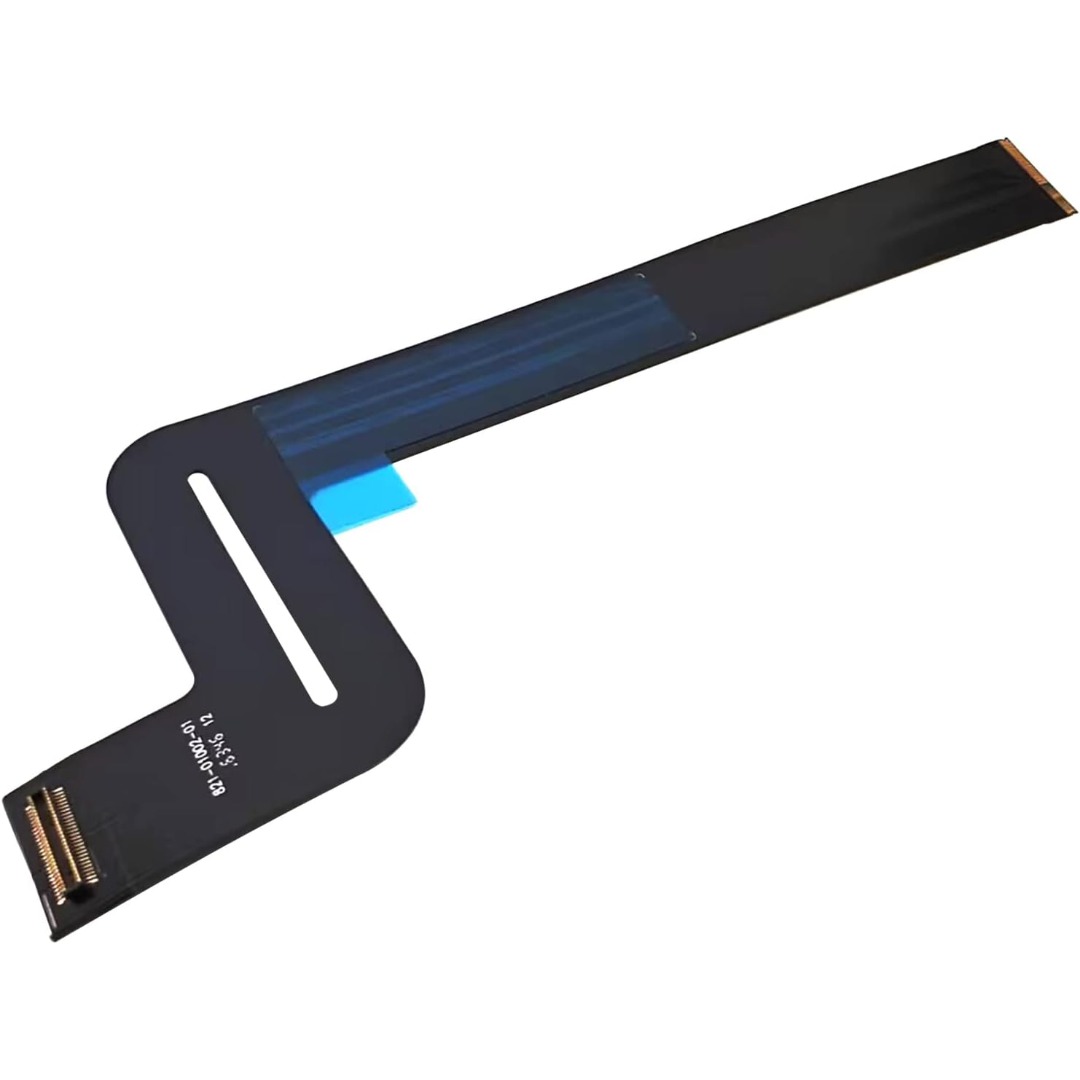
Genuine-spec touchpad flex cable for MacBook Air 13″ (Model A1534, Early 2015)—essential for restoring full trackpad functionality, including precise cursor control and physical click response, during repair or replacement. Compatible With: MacBook Air 13-inch (Early 2015, Model A1534, Model Identifier MacBookAir7,2). Part Type: Touchpad flex cable only—does not include the trackpad housing, button mechanism, or mounting brackets. This is the ribbon cable that connects the trackpad to the logic board. Function: Carries input signals from the trackpad to the logic board—critical for cursor movement, tap-to-click, and primary/secondary physical click functionality. (Note: This model uses a physical click mechanism, not Force Touch—so no haptic feedback or pressure-sensing.) OEM-Quality Construction: Matches Apple’s original cable in length, connector type, and shielding—ensures reliable signal transmission and long-term durability. Common Use Cases: Replacing a torn, frayed, or damaged original flex cable Completing a trackpad replacement when the original cable is compromised Fixing erratic cursor movement, unresponsive trackpad, or loss of click function Replacing a torn, frayed, or damaged original flex cable Completing a trackpad replacement when the original cable is compromised Fixing erratic cursor movement, unresponsive trackpad, or loss of click function Installation Note: Requires bottom case removal and careful disconnect/reconnect of the ZIF (Zero Insertion Force) connector on the logic board. The cable routes under the battery—handle with care. Suitable for intermediate to advanced DIYers or technicians.

Genuine-spec touchpad flex cable for MacBook Pro 14″ (Model A2442, 2021, M1 Pro/Max)—essential for restoring full Force Touch functionality, haptic feedback, and precise multi-touch gesture control. Compatible With: MacBook Pro 14-inch (2021, Model A2442) with Apple M1 Pro or M1 Max chip (Model Identifiers: MacBookPro18,3 / MacBookPro18,4). Part Type: Touchpad flex cable only—does not include the trackpad, Taptic Engine, or mounting brackets. This is the OEM-style ribbon cable that connects the trackpad to the logic board. Function: Carries touch input, Force Touch pressure data, and haptic feedback signals—critical for macOS trackpad gestures, Force Click, and Taptic Engine responsiveness. OEM-Quality Build: Matches Apple’s original flex circuit in length, connector pitch, shielding, and bend geometry—ensures reliable signal transmission and durability under repeated use. Common Use Cases: Replacing a damaged, torn, or corroded original flex cable Completing a trackpad replacement when the original cable is unusable Fixing intermittent trackpad issues, unresponsiveness, or loss of Force Touch Replacing a damaged, torn, or corroded original flex cable Completing a trackpad replacement when the original cable is unusable Fixing intermittent trackpad issues, unresponsiveness, or loss of Force Touch Installation Note: Requires full bottom case removal and careful routing beneath internal components. Connectors use ZIF (Zero Insertion Force) sockets—must be seated properly without force. Recommended for certified or highly experienced technicians only.

Genuine-spec touchpad flex cable for MacBook Air 13.6″ (Model A2681, 2022, M2)—essential for restoring full Force Touch functionality, haptic feedback, and multi-touch gesture support when replacing or repairing the trackpad assembly. Compatible With: MacBook Air 13.6-inch (2022, Model A2681) with Apple M2 chip (all colors: Silver, Space Gray, Starlight, Midnight). Part Type: Touchpad flex cable only—does not include the trackpad, Taptic Engine, or mounting hardware. This is the ribbon cable assembly that connects the trackpad to the logic board. Function: Transmits touch input, Force Touch pressure data, and haptic feedback signals between the trackpad and logic board—critical for macOS gesture recognition and Taptic Engine operation. OEM-Quality Construction: Matches Apple’s original flex circuit in length, connector type, shielding, and bend radius—ensures reliable signal integrity and long-term durability. Common Use Cases: Replacing a torn, frayed, or damaged original flex cable Completing a trackpad replacement when the original cable was compromised Repairing unresponsive or erratic trackpad behavior caused by cable failure Replacing a torn, frayed, or damaged original flex cable Completing a trackpad replacement when the original cable was compromised Repairing unresponsive or erratic trackpad behavior caused by cable failure Installation Note: Requires full bottom case disassembly and careful routing under the battery and logic board. Connectors use ZIF (Zero Insertion Force) sockets—do not force. Recommended for experienced or certified technicians only.

Arabic Silicone Keyboard Skin Cover for MacBook Pro 13" A1708 Without Touch bar and MacBook 12" A1534 with Retina Display US Layout (Black) Arabic Silicone Keyboard Skin Cover for MacBook Pro 13″ A1708 Without Touch bar and MacBook 12″ A1534 with Retina Display US Layout (Black) About this item Arabic language silicone keyboard skin, US version, perfect fit for your MacBook 12″ A1534, which was released in 2015 & new MacBook Pro 13-Inch 13″ Model A1708 without/no Touch Bar, which was released in 2016; Do not fit for Europe Version MacBook Handmade Skin – XSKN is the original Manufacturer of these “Keyboard Art Skin” silicone covers. They are durable, thin and soft with a cashmere feel. The keys fit snug over the keyboard, smooth surface treatment, suit for regular laptop user who types a lot and quickly Each XSKN silicone skin is heat molded to ensure, each color is paints taking hand screened using silicone paint which is heat fuses into the silicone keyboard skin to become one, making it Soft, ultra-thin, durable and easy to washable High quality silicone raw material assure no extension with longtime using. Every detail clearly prinited, imported ink keep it looking good, rubber coating help to remain in good condition Aside from being beautiful they protect your keyboard from spills, crumbs, animal hair and dust. Washable, can be cleaned easily

Apple Magic Mouse: Wireless, Bluetooth, Rechargeable. Works with Mac or iPad; Multi-Touch Surface - White (Pre-Owned) Apple Magic Mouse: Wireless, Bluetooth, Rechargeable. Works with Mac or iPad; Multi-Touch Surface – White (Pre-Owned) About this item WIRELESS, RECHARGEABLE CONVENIENCE — Magic Mouse connects wirelessly to your device via Bluetooth. And the rechargeable internal battery means no loose batteries to replace. WORKS WITH MAC OR IPAD — It’s ready to go right out of the box and pairs quickly with your Mac or iPad so you can get to work right away. SWIPE AND SCROLL ON THE MULTI-TOUCH SURFACE — The Multi-Touch surface allows you to perform simple gestures such as swiping and scrolling. And an optimized foot design lets Magic Mouse glide smoothly across your desk. GO WEEKS WITHOUT CHARGING — The incredibly long-lasting internal battery will power your Magic Mouse for about a month or more between charges. Comes with a woven USB-C to Lightning Cable that lets you pair and charge by connecting to a USB-C port on your Mac or iPad. SYSTEM REQUIREMENTS — Requires a Bluetooth-enabled Mac with OS X 10.11 or later or an iPad with iPadOS 13.4 or later.

Genuine-spec touchpad flex cable for MacBook Air 13″ (Model A1932, 2018–2019)—essential for restoring full Force Touch functionality, haptic feedback, and precise multi-touch gesture control during trackpad repair or replacement. Compatible With: MacBook Air 13-inch (2018 & 2019, Model A1932, Model Identifier MacBookAir8,1) with Intel Core i5/i7 processors. Part Type: Touchpad flex cable only—does not include the trackpad housing, Taptic Engine, or mounting hardware. This is the OEM-style ribbon cable that connects the trackpad to the logic board. Function: Transmits touch input, Force Touch pressure data, and haptic feedback signals—critical for macOS gestures like Force Click, three-finger lookup, pinch-to-zoom, and smooth cursor tracking. OEM-Quality Build: Matches Apple’s original in length, connector pitch, EMI shielding, and flexibility—ensures reliable signal integrity and long-term durability. Common Use Cases: Replacing a torn, creased, or liquid-damaged original flex cable Completing a trackpad replacement when the original cable is unusable Fixing intermittent trackpad behavior, loss of Force Touch, or complete unresponsiveness Replacing a torn, creased, or liquid-damaged original flex cable Completing a trackpad replacement when the original cable is unusable Fixing intermittent trackpad behavior, loss of Force Touch, or complete unresponsiveness Installation Note: Requires full bottom case removal and careful routing beneath the battery. The cable connects via a ZIF (Zero Insertion Force) socket on the logic board—must be properly aligned and latched without force. Recommended for experienced or certified technicians. Important: This is flex cable only—not a complete trackpad assembly. Must be used with the original or compatible A1932 trackpad and Taptic Engine. Not compatible with MacBook Air M1 (A2337/A2338), M2 (A2681/A2941), or any MacBook Pro model. This is flex cable only—not a complete trackpad assembly. Must be used with the original or compatible A1932 trackpad and Taptic Engine. Not compatible with MacBook Air M1 (A2337/A2338), M2 (A2681/A2941), or any MacBook Pro model.

Reliable, secure, and built for productivity—the Lenovo ThinkPad T14 features a 10th Gen Intel Core i5 processor, 16GB RAM, and a fast 256GB SSD in a durable,14-inch business laptop.

A robust Beurotika cash drawer featuring a 450mm metal body, secure 3-position lock, and compatibility with most POS systems—ideal for retail, restaurants, and small businesses. Secure 3-position key lock: Open, locked, and release-to-print modes for controlled access 6 coin slots + 4 bill compartments: Organized layout for efficient cash handling Heavy-duty steel construction: Reinforced frame and smooth slide rails for daily reliability Standard RJ12 interface: Compatible with most POS systems (e.g., Epson, HP, Bixolon, and Beurotika receipt printers) Auto-open trigger: Automatically opens when connected to a compatible receipt printer during transactions Bottom cable entry: Keeps wiring neat and protected

Genuine-spec Touch Bar assembly with integrated flex cable for 2020 MacBook Pro 13″ models (A2251, A2289, A2338)—restores full Touch ID and Touch Bar functionality with OEM-level fit and performance. Compatible With: MacBook Pro 13″ (2020): A2251 (Intel Core i5/i7, two Thunderbolt ports) A2289 (Intel Core i5/i7, four Thunderbolt ports) A2338 (Apple M1 chip, two Thunderbolt ports) MacBook Pro 13″ (2020): A2251 (Intel Core i5/i7, two Thunderbolt ports) A2289 (Intel Core i5/i7, four Thunderbolt ports) A2338 (Apple M1 chip, two Thunderbolt ports) A2251 (Intel Core i5/i7, two Thunderbolt ports) A2289 (Intel Core i5/i7, four Thunderbolt ports) A2338 (Apple M1 chip, two Thunderbolt ports) Includes: Complete Touch Bar module with integrated flex cable, Touch ID sensor, and ambient light sensor—ready for direct connection to the logic board. Functionality: Fully restores dynamic Touch Bar controls, system functions, app shortcuts, and Touch ID (fingerprint authentication and power button). OEM-Quality Build: Matches Apple’s original design in responsiveness, finish, and sensor alignment—ensures seamless integration with macOS. Color Options: Available in Space Gray and Silver to match your MacBook’s top case (confirm your model’s color before ordering). Installation Note: Requires full top case disassembly and careful handling of adhesive and connectors. The flex cable routes under the speakers and connects near the logic board—precision is essential. Recommended for experienced technicians.

