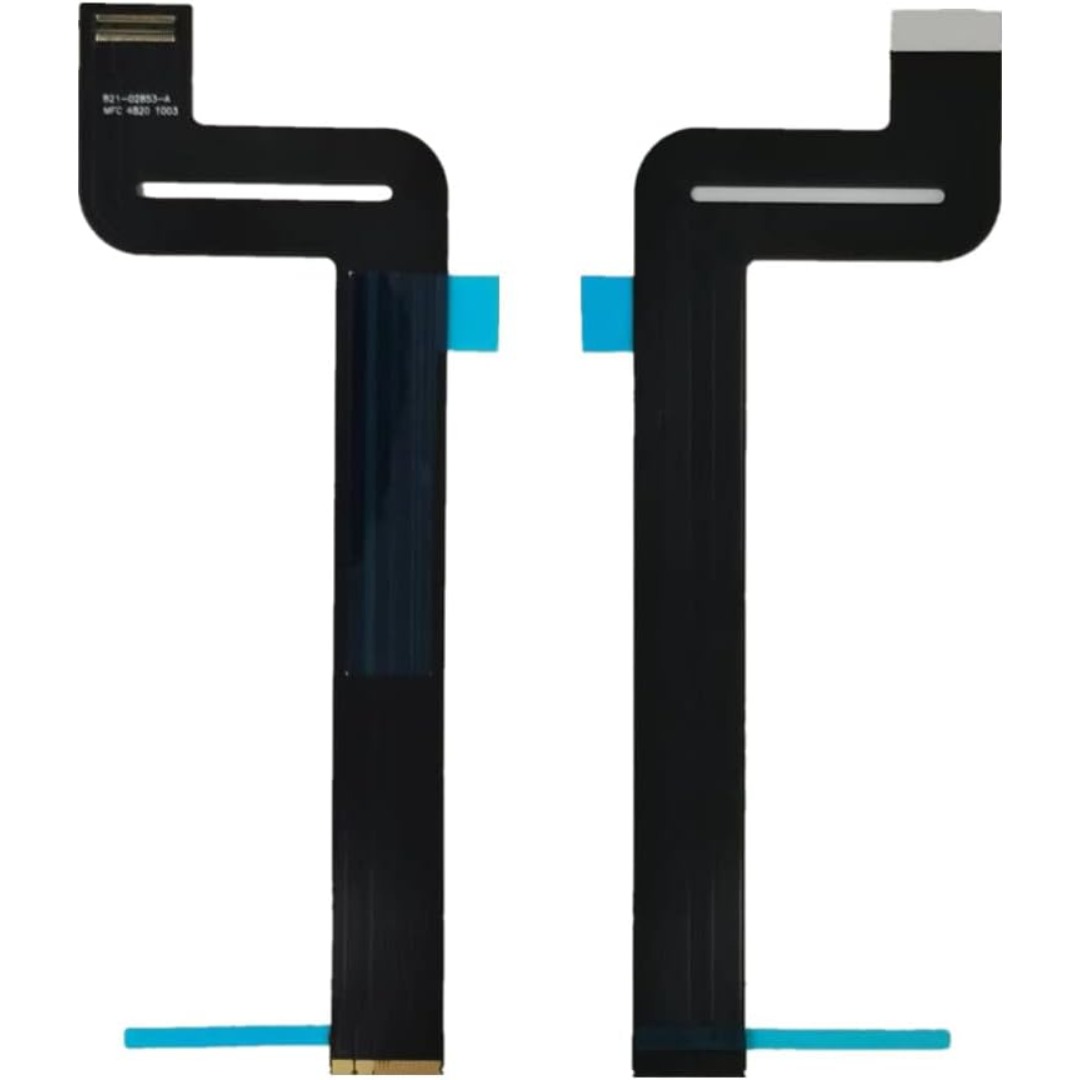

Genuine-spec touchpad flex cable for MacBook Pro 13″ with Touch Bar (Model A1708, 2016–2017)—restores full Force Touch functionality, haptic feedback, and precise multi-touch gesture control during trackpad repair or replacement. Compatible With: MacBook Pro 13″ (2016) – Model A1708 (Model Identifier: MacBookPro13,1) MacBook Pro 13″ (2017) – Model A1708 (Model Identifier: MacBookPro14,1) (Both years share the same internal trackpad assembly and flex cable.) MacBook Pro 13″ (2016) – Model A1708 (Model Identifier: MacBookPro13,1) MacBook Pro 13″ (2017) – Model A1708 (Model Identifier: MacBookPro14,1) (Both years share the same internal trackpad assembly and flex cable.) Part Type: Touchpad flex cable only — does not include the trackpad housing, Taptic Engine, or mounting hardware. This is the OEM-style ribbon cable that connects the trackpad to the logic board. Function: Transmits: Touch input coordinates Force Touch pressure data Haptic feedback signals to the Taptic Engine Enables full macOS gesture support: Force Click, three-finger lookup, swipe navigation, pinch-to-zoom, and smooth cursor tracking. Touch input coordinates Force Touch pressure data Haptic feedback signals to the Taptic Engine Enables full macOS gesture support: Force Click, three-finger lookup, swipe navigation, pinch-to-zoom, and smooth cursor tracking. OEM-Quality Build: Matches Apple’s original specifications in: Cable length and routing path Connector pitch and ZIF latch design EMI shielding and flex durability Cable length and routing path Connector pitch and ZIF latch design EMI shielding and flex durability Common Use Cases: Replacing a torn, creased, or liquid-damaged original flex cable Completing a trackpad replacement when the original cable is compromised Fixing intermittent trackpad behavior, loss of Force Touch, or complete unresponsiveness Replacing a torn, creased, or liquid-damaged original flex cable Completing a trackpad replacement when the original cable is compromised Fixing intermittent trackpad behavior, loss of Force Touch, or complete unresponsiveness Installation Note: Requires full bottom case removal and battery disconnection. Cable routes under internal components near the right speaker and logic board. Connects via a ZIF (Zero Insertion Force) socket—must be aligned carefully and latched gently. Recommended for experienced or certified technicians only. Requires full bottom case removal and battery disconnection. Cable routes under internal components near the right speaker and logic board. Connects via a ZIF (Zero Insertion Force) socket—must be aligned carefully and latched gently. Recommended for experienced or certified technicians only.

Features Stylish and compact Bluetooth speaker, easy to carry. Supports wireless connectivity via Bluetooth. True Wireless Stereo (TWS): Connect two speakers simultaneously. Durable ABS plastic material with a fabric-covered front panel. Built-in microphone for hands-free calls. LED indicator to display working status. Water-resistant with an IPX7 rating. Continuous playback for 8-12 hours (depending on volume). 5-watt speaker delivering Hi-Fi audio quality. On-speaker controls for music playback and volume adjustment. Built-in battery with Type-C charging port for easy recharging. Technical Specifications Bluetooth Version: V5.4 Transmission Distance: 10 meters Rated Power: 5W Driver Unit: 40mm Input: DC5V Battery Capacity: 1200mAh Charging Time: 2 hours Playback Time: 8-12 hours (depending on volume)

CI03 CI03XL Battery for HP ProBook 640 G2 645 G2 650 G2 655 G2, ProBook 640 G3 645 G3 650 G3 655 G3 Laptop, P/N: HSTNN-UB6Q HSTNN-LB6T HSTNN-PB6K 801554-001 About this item 【BATTERY SPECIFICATIONS】 Type: Li-ion ‖ Capacity: 48Wh ‖ Voltage: 11.4V ‖ Model: CI03XL 【COMPATIBLE LAPTOP MODEL】For ProBook 640 G2, ProBook 640 G3, ProBook 645 G2, ProBook 645 G3, ProBook 650 G2, ProBook 650 G3, ProBook 655 G2, ProBook 655 G3 Notebook. 【PART NUMBER】CI03, CI03XL, C103XL, CIO3XL, CI03048XL, CIO3, HSTNN-UB6Q, HSTNN-LB6T, HSTNN-PB6K, HSTNN-UB6Q, HSTNN-DB7N, HSTNN-I66C-4, HSTNN-I66C-5U, HSTNN-I66C-5H, HSTNN-I67C-4, HSTNN-I67C-5, 801517-221, 801517-222, 801517-231, 801517-232, 801517-241, 801517-242, 801517-421, 801517-422,801517-541, 801517-831, 801554-001. 【MULTIPLE PRETCTION】 Don’t fall into buying cheap and unsafe batteries. All our batteries are certified by CE, and FCC for safety. Bulit-in circuit protection ensures both safety and stability.

A high-efficiency pre-owned HP EliteBook 865 G9 with 16" display, AMD Ryzen 7 6850U, 16GB RAM, 512GB SSD, and integrated AMD Radeon 680M graphics—ideal for business professionals seeking all-day battery life, strong performance, and enterprise security.

HyperX Pulsefire Core (4P4F8AA) – RGB gaming mouse with PixArt sensor, 6,200 DPI, and 7 programmable buttons.Lightweight, ergonomic design perfect for gamers seeking precision and durability. Model: HyperX Pulsefire Core (4P4F8AA) Sensor Type: PixArt PAW3327 Optical Sensor DPI Range: 800 – 6,200 DPI (adjustable in software) Polling Rate: 1000 Hz Tracking Speed: Up to 220 IPS Acceleration: 30G Buttons: 7 programmable buttons Switch Type: Durable switches rated for up to 20 million clicks Lighting: Customizable RGB lighting (logo zone) Grip Style: Palm or claw grip Design: Ergonomic, right-handed shape with textured side grips Weight: Approx. 87g (without cable) Cable Length: 1.8 meters (braided USB cable) Software Support: HyperX NGENUITY for DPI, RGB, and button customization Compatibility: Windows 10, 8.1, 8, 7

Genuine-spec touchpad flex cable for MacBook Pro 13″ (Model A1502, Mid 2014)—restores full trackpad functionality, including precise cursor control and physical click response. Essential for repairing unresponsive or erratic trackpad behavior. Compatible With: MacBook Pro 13-inch (Mid 2014, Model A1502, Model Identifier MacBookPro11,1) with Intel Core i5/i7 processors and Retina display. Part Type: Touchpad flex cable only — does not include the trackpad housing, button mechanism, or mounting hardware. This is the ribbon cable that connects the trackpad to the logic board. Function: Transmits cursor movement and click signals (left/right physical clicks) Supports standard multi-touch gestures (two-finger scroll, tap-to-click, pinch-to-zoom) ⚠️ Note: This model uses a physical click mechanism—not Force Touch (no haptic feedback or pressure sensitivity). Transmits cursor movement and click signals (left/right physical clicks) Supports standard multi-touch gestures (two-finger scroll, tap-to-click, pinch-to-zoom) ⚠️ Note: This model uses a physical click mechanism—not Force Touch (no haptic feedback or pressure sensitivity). OEM-Quality Build: Matches Apple’s original in: Cable length and routing path Connector type and pin alignment Insulation and flexibility for long-term reliability Cable length and routing path Connector type and pin alignment Insulation and flexibility for long-term reliability Common Use Cases: Replacing a torn, frayed, or corroded original flex cable Fixing: Unresponsive or intermittent trackpad Cursor jumping or drifting Click function failure (left or right) Complete trackpad disconnect Replacing a torn, frayed, or corroded original flex cable Fixing: Unresponsive or intermittent trackpad Cursor jumping or drifting Click function failure (left or right) Complete trackpad disconnect Unresponsive or intermittent trackpad Cursor jumping or drifting Click function failure (left or right) Complete trackpad disconnect Installation Note: Requires bottom case removal and battery disconnect. Connects via a ZIF (Zero Insertion Force) socket on the logic board—do not force. Cable routes under the battery; handle with care to avoid strain. Suitable for intermediate to advanced DIYers or technicians. Requires bottom case removal and battery disconnect. Connects via a ZIF (Zero Insertion Force) socket on the logic board—do not force. Cable routes under the battery; handle with care to avoid strain. Suitable for intermediate to advanced DIYers or technicians.

90W AC Charger Replacement for HP EliteDesk 705 G1 G2 G4 705 800 G5 Desktop Mini ProOne 400 G4 G5 23.8-inch All-in-One ProOne 400 G2 G3 G4 G5 460 G2 G3 480 G2 G3 20-inch All-in-One

MacBook Pro 13″ Retina A1989 / A2159 (2018-2019) Display Assembly (Silver) MacBook Pro 13″ Touch Bar 2019z A1989 (EMC 3214 MacBookPro15,2) 2.3 GHz A1989 (EMC 3214 MacBookPro15,2) 2.7 GHz MacBook Pro 13″ Touch Bar 2019 A1989 (EMC 3358 MacBookPro15,2) 2.4 GHz A1989 (EMC 3358 MacBookPro15,2) 2.8 Ghz MacBook Pro 13″ Two Thunderbolt Ports 2019 A2159 (EMC 3301 MacBookPro15,4) 1.4 GHz A2159 (EMC 3301 MacBookPro15,4) 1.7 GHz

Premium non-slip rubber feet designed to fit MacBook Pro models A1398, A1425, and A1502—restoring grip, stability, and base protection with a perfect OEM-style fit. Keep your MacBook Pro firmly in place with these high-quality skid-proof rubber feet, precision-made for MacBook Pro 13″ and 15″ Retina models: A1398 (15″ Retina, 2012–2015) A1425 (13″ Retina, 2012–2013) A1502 (13″ Retina, 2014–2015) These replacement feet replicate Apple’s original design, offering excellent traction on smooth surfaces like glass, wood, or metal desks—preventing slips during typing or transport. Crafted from soft yet durable silicone-rubber, they also cushion your laptop’s base, reducing scratches and minimizing vibration noise. Each set includes all necessary feet (typically 5 per unit) with strong pre-applied adhesive for quick, secure installation. The matte black finish matches your MacBook Pro’s sleek bottom case for a seamless look. Perfect for replacing worn, missing, or damaged feet due to age, cleaning, or accidental removal. A simple, cost-effective way to restore both function and finish to your MacBook Pro. Installation Tip: Clean the foot areas thoroughly with isopropyl alcohol and let dry before applying. Lightly warming the adhesive (with a hairdryer or fingers) can improve bonding.

The Moxom MX-ST05 Safety Power Strip combines 4 AC outlets with 8 USB charging ports (6×USB-A + 2×USB-C). It supports up to 2500W / 10A total load and delivers 17W USB fast charging, making it a compact all-in-one power and charging hub for home or office use. ⚡ 12-in-1 Power Hub: 4 AC sockets plus 8 USB ports let you power and charge many devices at once. 🔌 High Power Capacity: Handles up to 10A / 2500W total output for laptops, monitors, chargers, and appliances. 🔋 USB Fast Charging: 6×USB-A + 2×USB-C deliver up to 5V/3.4A (17W max total) for phones, tablets, earbuds, and accessories. 🛡️ Safety Protection: Built-in protection against over-voltage, over-current, overheating, and foreign-object detection. ⏻ Main Power Switch: One-touch on/off button to cut power safely to all connected devices. 🧊 Durable Build: Made from ABS + PC materials for heat resistance and long-term durability. 📏 Long Cable: Comes with about 1.8–2.0m cord for flexible placement.

Genuine-spec touchpad flex cable compatible with both MacBook Air A2179 (Intel, 2020) and A2337 (M1, 2020)—restores full Force Touch functionality, haptic feedback, and precise multi-touch gesture control during trackpad repair or replacement. Compatible With: MacBook Air 13″ (2020, Intel) – Model A2179 (Model Identifier: MacBookAir9,1) MacBook Air 13″ (2020, Apple M1) – Model A2337 (Model Identifier: MacBookAir10,1) MacBook Air 13″ (2020, Intel) – Model A2179 (Model Identifier: MacBookAir9,1) MacBook Air 13″ (2020, Apple M1) – Model A2337 (Model Identifier: MacBookAir10,1) ✅ Important Note: Despite different processors (Intel vs. M1), Apple used the same trackpad assembly and flex cable in both A2179 and A2337. This makes the flex cable fully interchangeable between the two models. Part Type: Touchpad flex cable only — does not include the trackpad housing, Taptic Engine, or mounting hardware. This is the OEM-style ribbon cable that connects the trackpad to the logic board. Function: Transmits: Touch input coordinates Force Touch pressure data Haptic feedback signals to the Taptic Engine Enables full macOS gesture support: Force Click, three-finger lookup, swipe navigation, pinch-to-zoom, and smooth cursor tracking. Touch input coordinates Force Touch pressure data Haptic feedback signals to the Taptic Engine Enables full macOS gesture support: Force Click, three-finger lookup, swipe navigation, pinch-to-zoom, and smooth cursor tracking. OEM-Quality Build: Matches Apple’s original specifications in: Cable length and routing path Connector pitch and ZIF latch design EMI shielding and flex durability Cable length and routing path Connector pitch and ZIF latch design EMI shielding and flex durability Common Use Cases: Replacing a torn, creased, or liquid-damaged original flex cable Completing a trackpad replacement when the original cable is compromised Fixing intermittent trackpad behavior, loss of Force Touch, or complete unresponsiveness Replacing a torn, creased, or liquid-damaged original flex cable Completing a trackpad replacement when the original cable is compromised Fixing intermittent trackpad behavior, loss of Force Touch, or complete unresponsiveness Installation Note: Requires full bottom case removal and battery disconnection. Cable routes under the right side of the battery and logic board. Connects via a ZIF (Zero Insertion Force) socket—align carefully and latch gently. Recommended for experienced or certified technicians only. Requires full bottom case removal and battery disconnection. Cable routes under the right side of the battery and logic board. Connects via a ZIF (Zero Insertion Force) socket—align carefully and latch gently. Recommended for experienced or certified technicians only.

The Lenovo ThinkPad T470s features an Intel Core i5 7th Gen processor, 8GB RAM, and a fast 256GB SSD for smooth everyday performance. With a durable business-grade build and non-touch 14″ display, it’s ideal for professionals, students, and productivity tasks.

Reliability meets value in this pre-owned ThinkPad E14 Gen 2. Equipped with the AMD Ryzen 5 4500U 6-core processor, 8GB RAM, and a 512GB NVMe SSD, this laptop is built for students and professionals who need a durable, high-performance machine for everyday multitasking.

The Lenovo ThinkPad P50s is a business-class 15.6-inch mobile workstation that pairs a 6th-generation Intel Core i7 dual-core processor with a dedicated NVIDIA Quadro M500M 2 GB graphics card, 16 GB of RAM and a 256 GB SSD. It’s designed for professionals who need workstation capability in a relatively slim and portable form-factor.

The 45W MagSafe 2 Power Adapter features a magnetic DC connector so if someone should trip over it, the cord disconnects harmlessly and your MacBook Air stays put safely. It also helps prevent fraying or weakening of the cables over time. In addition, the magnetic DC helps guide the plug into the system for a quick and secure connection. The 45W MagSafe 2 Power Adapter features a magnetic DC connector so if someone should trip over it, the cord disconnects harmlessly and your MacBook Air stays put safely. It also helps prevent fraying or weakening of the cables over time. In addition, the magnetic DC helps guide the plug into the system for a quick and secure connection. When the connection is secure, an LED located at the head of the DC connector lights up; an amber light lets you know that your notebook is charging, while a green light tells you that you have a full charge. An AC cord is provided with the adapter for maximum cord length, while the AC wall adapter (also provided) gives you an even easier and more compact way to travel. Designed to be the perfect traveling companion, the adapter has a clever design which allows the DC cable to be wound neatly around itself for easy cable storage. This power adapter recharges the lithium polymer battery while the system is off, on, or in sleep mode. It also powers the system if you choose to operate without a battery. Compatible only with MacBook Air featuring MagSafe 2 power port. Knowing which specific Mac model you have is important. If you are running OS X Lion (10.7) or later go to the “” menu at the top left of your screen, choose “About this Mac” then click the “More Info…” button. Your Mac model and generation will be displayed. If you are running an earlier version of OS X, you can enter your serial number here to find out which model you have. Mac Models MacBook Air (13-inch, Early 2015 – 2017) MacBook Air (11-inch, Early 2015)

BATTERY TOSHIBA PA5136U-1BRS for Toshiba Portege Z30 Z30-A Z30-A1301 Series PA5136U Tablet Rechargeable Notebook Battery Pack 14.8V 3380mAh About this item Battery type: Voltage: 14.8V Capacity: 3380 mAh(52Wh) Cells: 4-cell Li-Polymer 100% New from Manufacturer Full Compatible for Part# PA5136U-1BRS,500+ recharge cycles over Every battery has passed factory testing; CE-/FCC-/RoHS-Certified ensures safety. Grade A cells battery; Quality assurance This compatibility list is non-exhaustive, if your original part# or your laptop model NO is not included in the compatibility list, but our battery may still fit your laptop. Please feel free to contact us to confirm the compatibility

Genuine-spec touchpad flex cable for MacBook Air 13″ (Model A1932, 2018–2019)—essential for restoring full Force Touch functionality, haptic feedback, and precise multi-touch gesture control during trackpad repair or replacement. Compatible With: MacBook Air 13-inch (2018 & 2019, Model A1932, Model Identifier MacBookAir8,1) with Intel Core i5/i7 processors. Part Type: Touchpad flex cable only—does not include the trackpad housing, Taptic Engine, or mounting hardware. This is the OEM-style ribbon cable that connects the trackpad to the logic board. Function: Transmits touch input, Force Touch pressure data, and haptic feedback signals—critical for macOS gestures like Force Click, three-finger lookup, pinch-to-zoom, and smooth cursor tracking. OEM-Quality Build: Matches Apple’s original in length, connector pitch, EMI shielding, and flexibility—ensures reliable signal integrity and long-term durability. Common Use Cases: Replacing a torn, creased, or liquid-damaged original flex cable Completing a trackpad replacement when the original cable is unusable Fixing intermittent trackpad behavior, loss of Force Touch, or complete unresponsiveness Replacing a torn, creased, or liquid-damaged original flex cable Completing a trackpad replacement when the original cable is unusable Fixing intermittent trackpad behavior, loss of Force Touch, or complete unresponsiveness Installation Note: Requires full bottom case removal and careful routing beneath the battery. The cable connects via a ZIF (Zero Insertion Force) socket on the logic board—must be properly aligned and latched without force. Recommended for experienced or certified technicians. Important: This is flex cable only—not a complete trackpad assembly. Must be used with the original or compatible A1932 trackpad and Taptic Engine. Not compatible with MacBook Air M1 (A2337/A2338), M2 (A2681/A2941), or any MacBook Pro model. This is flex cable only—not a complete trackpad assembly. Must be used with the original or compatible A1932 trackpad and Taptic Engine. Not compatible with MacBook Air M1 (A2337/A2338), M2 (A2681/A2941), or any MacBook Pro model.

New A1932 A2179 A2337 DC in Power Jack Connector for Macbook Air 13" Type-C USB-C Power 821-01658-A 2018 2019 2020 Year New A1932 A2179 A2337 DC in Power Jack Connector for Macbook Air 13″ Type-C USB-C Power 821-01658-A 2018 2019 2020 Year About this item New A1932 A2179 A2337 DC Jack Power DC-in Board for MacBook Retina 13″ DC Power Jack Board We have good after-sales services. We share the latest information on laptop spare parts in the Chinese market with all our customers. This is NOT an easy job for someone with no technical skills in Disassembling or Assembling a laptop, So only purchase this item if you know how to install it. Each DC Board is tested before shipping and working.

About this item 📱 Versatile Connectivity: Connect effortlessly with Bluetooth 4.2 to your smartphones, iPads, and computers. Also supports U disk, TF card (up to 32G), AUX input, and FM radio for versatile playback options. 📲 🔊 Powerful Sound with Heavy Bass: Enjoy rich, high-volume stereo sound with a powerful 20W output and a built-in heavy subwoofer, delivering an immersive audio experience for your home. 🎶 📻 Built-in FM Radio: Stay tuned to your favorite stations with the built-in FM radio feature, ensuring you never miss out on the latest news, music, and more. 📡 📞 Hands-Free Calling: Equipped with a clear call feature, this speaker allows you to answer phone calls directly through the speaker without lifting your phone. Perfect for multitasking! 🗣️ 📞 Hands-Free Calling: Equipped with a clear call feature, this speaker allows you to answer phone calls directly through the speaker without lifting your phone. Perfect for multitasking! 🗣️

Experience flagship performance with this pre-owned ThinkPad E14 Gen 2. Driven by an 11th Gen Intel Core i7 processor, 16GB RAM, and a 512GB NVMe SSD, this 14-inch laptop delivers high-speed responsiveness and modern features like Thunderbolt 4 for the ultimate professional setup.
