
Premium-grade trackpad replacement for MacBook Air 13″ M1 (Model A2338, 2020)—available in Silver and Space Gray—engineered to OEM specifications for flawless Force Touch response, smooth gesture control, and seamless aesthetic integration. Compatible With: MacBook Air 13-inch (2020, Model A2338) with Apple M1 chip. Part Type: Trackpad only—does not include the flex cable, Taptic Engine, or mounting brackets. Designed for professional technicians who will reuse original internal components. Finish Options: Silver: Matches Silver and Starlight MacBook Air finishes. Space Gray: Matches Space Gray and Midnight models for perfect color continuity. Silver: Matches Silver and Starlight MacBook Air finishes. Space Gray: Matches Space Gray and Midnight models for perfect color continuity. Force Touch Capable: Fully supports pressure-sensitive input and haptic feedback when paired with the original Taptic Engine and logic board—no loss of functionality. Precision Craftsmanship: Mirror-polished glass surface with exact curvature, texture, and click mechanism matching Apple’s original design for consistent performance and feel. Installation Requirements: Requires full bottom case disassembly and careful transfer of the original flex cable and Taptic Engine. Adhesive must be applied precisely to maintain structural integrity and sensor alignment. For professional use only.

Non-slip, skid-proof rubber feet designed to perfectly fit MacBook Air models A1466, A1369, and A1370—restoring grip, stability, and protection for your laptop’s base. Keep your MacBook Air steady and scratch-free with these high-quality replacement rubber feet, engineered to match the original Apple design for MacBook Air models A1466 (2010–2017), A1369 (11″ 2010–2011), and A1370 (11″ 2011–2015). These skid-proof rubber feet provide excellent traction on desks, tables, and other smooth surfaces, preventing unwanted sliding during typing or use. Made from durable, soft-touch silicone-rubber material, they also help protect your laptop’s bottom case from scratches and reduce vibration noise. Each set includes all necessary feet (typically 5 per MacBook Air model) with pre-applied adhesive for easy, secure installation. The matte black finish blends seamlessly with your MacBook’s original aesthetic. Ideal for restoring worn, missing, or damaged feet—whether due to age, cleaning, or accidental removal—this is a simple, affordable way to maintain your MacBook’s functionality and appearance. Note: Surface must be clean and dry for optimal adhesion. For best results, gently warm the adhesive before applying.

HP M24f Monitor Overview The HP M24f is a 24-inch Full HD monitor designed for work and everyday use. It offers a slim design and reliable performance. As a result, it suits offices, home setups, and students. 24-Inch Full HD Display This monitor features a 24-inch Full HD resolution. Therefore, text appears sharp and easy to read. Moreover, images look clear and well balanced. Because of this, it supports long working sessions comfortably. In addition, the wide viewing angles improve screen visibility. As a result, content stays clear from different positions. Smooth Visual Performance The HP M24f delivers smooth visuals for daily tasks. As a result, scrolling and browsing feel natural. Furthermore, the display maintains consistent brightness. This improves overall viewing comfort. Eye Comfort and Anti-Glare Screen This monitor includes eye comfort features. Therefore, it helps reduce eye strain. In addition, the anti-glare coating minimizes reflections. As a result, users can work comfortably in bright rooms. Connectivity and Compatibility The HP M24f includes HDMI and VGA ports. As a result, it connects easily to modern and older devices. Moreover, setup is quick and simple. Therefore, users can start working right away. Slim Design and Mounting Options The monitor features a sleek and modern design. In addition, it supports VESA mounting. As a result, users can save desk space and customize layouts. Ideal for Daily Use This monitor focuses on clarity and reliability. Moreover, it suits office work, browsing, and media viewing. In conclusion, the HP M24f offers a balanced and efficient display solution. Specifications: 60.5 cm (23.8) FHD (1920 x 1080) Sustainable; Adaptive Sync; Eyesafe® Certified; IPS panel 1 VGA; 1 HDMI 1.4 (with HDCP support)

90W Adapter Laptop Charger for Toshiba Satellite L305 L305D L455 L505 L505D L635 L645 L655 L655D L745 L755 L775 L855 L875 A105 A135 C655 C675 C850 C855; PA3714U-1ACA PA5035U-1ACA Power Cord

Are you seeking a more immersive and intuitive computing experience? Look no further than the ViewSonic 22” IR Touch Monitor. This cutting-edge display redefines interaction with its seamless touch functionality. Let’s start with responsiveness. The IR touch technology ensures swift and accurate touch responses, making navigation a breeze. Whether you’re scrolling through documents or playing interactive games, every touch is effortlessly detected. Additionally, the monitor’s sleek design and compact size make it perfect for any workspace. Its slim bezel and adjustable stand provide versatility, allowing you to customize your viewing angle for maximum comfort. Transitioning to visuals, prepare to be captivated by vibrant colors and sharp details. The Full HD resolution delivers crisp images, whether you’re watching movies, browsing photos, or working on creative projects. Furthermore, the monitor’s anti-glare coating reduces reflections, ensuring clear visibility even in brightly lit environments. Say goodbye to distracting glare and hello to uninterrupted viewing pleasure. Moreover, connectivity options such as HDMI and VGA ensure compatibility with a wide range of devices, from laptops to gaming consoles. Seamlessly switch between tasks or devices with ease, enhancing productivity and convenience. In conclusion, the ViewSonic 22” IR Touch Monitor offers an unparalleled touch experience. With its responsive touch technology, stunning visuals, and versatile design, it’s the perfect addition to any home or office setup. Upgrade your interaction today and discover a new level of computing convenience. Specifications: Display : 22″ Panel Type : TN Resolution : 1920×1080 FHD Response Time : 5ms Refresh Rate : 75Hz

The LG 24″ FHD IPS 120Hz HDR10 Monitor – Slim Stand | 24U411A-B delivers crisp visuals and smooth motion for work and play. This monitor brings vibrant colors and sharp detail to all your content. Moreover, its 120Hz refresh rate makes motion feel fluid and responsive. Therefore, it suits gamers, students, and home office users alike. First, the full HD resolution ensures clear images on a 24-inch screen. Text looks sharp, videos pop, and games appear more alive. In addition, the IPS panel provides wide viewing angles so colors stay consistent from any seat. This helps when friends or family watch together. Also, the HDR10 support enhances brightness and contrast for richer scenes. Next, the fast 120Hz refresh rate makes motion smooth in games and video. Low frame drops mean play feels more responsive. Meanwhile, everyday tasks like scrolling and navigating menus feel quicker. As a result, overall screen performance feels natural and enjoyable for all day use. The slim stand design saves desk space and adds modern style to your setup. It fits neatly with any décor and keeps the workspace clean. Additionally, tilt adjustments help you find a comfortable viewing angle. This makes long work or play sessions easier on your neck and eyes. Connectivity includes essential ports so you can link laptops, desktops, and consoles easily. Plug and play means simple setup with few steps. Furthermore, built-in speakers provide basic sound without extra devices attached. This gives extra convenience when audio isn’t your main focus. Overall, the LG 24″ FHD IPS 120Hz HDR10 Monitor – Slim Stand | 24U411A-B combines smooth performance, vivid color, and practical design. It offers great value for users who want quality visuals and fluid motion without complexity. Manufacturer link Specifications: Display : 24″ IPS Resolution : 1920 x 1080 Refresh Rate : 120Hz Response Rate : 5ms

Used OEM Original Apple Logic Board Working, A1706 Late 2017 Mode 3.3 GHz i7 256gb 16gb RAM Tested using latest industry hardware diagnostic software, Fresh pull from full unit.

BenQ Board Essential RE7504N 75” 4K UHD Interactive Flat Panel is a large interactive display designed for education and business collaboration. It supports touch input, built-in Android system, and 4K resolution for presentations and group work. It features a 75-inch IPS panel with 3840 × 2160 4K UHD resolution. Therefore, it delivers sharp visuals and wide viewing angles. In addition, it supports up to 40-point multi-touch for group interaction. Moreover, it runs Android (EDLA-supported system depending on region). As a result, users can run apps, whiteboard tools, and content directly on the display without a PC. The screen includes anti-glare coating. Therefore, it stays readable in bright rooms. In addition, it supports 4K 60Hz output for smooth visuals. Furthermore, it includes HDMI, USB, LAN, and OPS slot connectivity. As a result, it works with laptops, external PCs, and modular systems. It also includes built-in speakers for basic audio output. Therefore, it supports lessons and meetings without external speakers. Finally, the BenQ RE7504N provides a large interactive 4K workspace for classrooms and business collaboration. Specifications: Display: 75-inch IPS panel with 3840×2160 4K UHD resolution Touch: Up to 40-point multi-touch support System: Android-based interactive platform (EDLA support depending on region) Connectivity: HDMI, USB, LAN, and OPS slot support Display: Anti-glare screen with 4K 60Hz output for smooth visuals

Laptop Battery for Acer E5-573 Battery for Acer AL15A32, Acer Aspire E5-422, Aspire E5-522, Aspire V3-574 Laptops. About this item Compatible For Preferred Model : Acer Aspire V3-574G E5-473G E5-573G E5-553G E5-522 Warranty Not Covered if Defects due to External Causes, Accidental, Physical or Liquid Damage, Cut, Burnt, Misuse and Missing Warranty Stickers or Labels. Battery Capacity/Power Capability (mAh/Wattage) be different From The Reference Picture But the Backup of the Battery Will Be the Same As the Original Please Match Your Product With The Image Provided Before Placing The Order

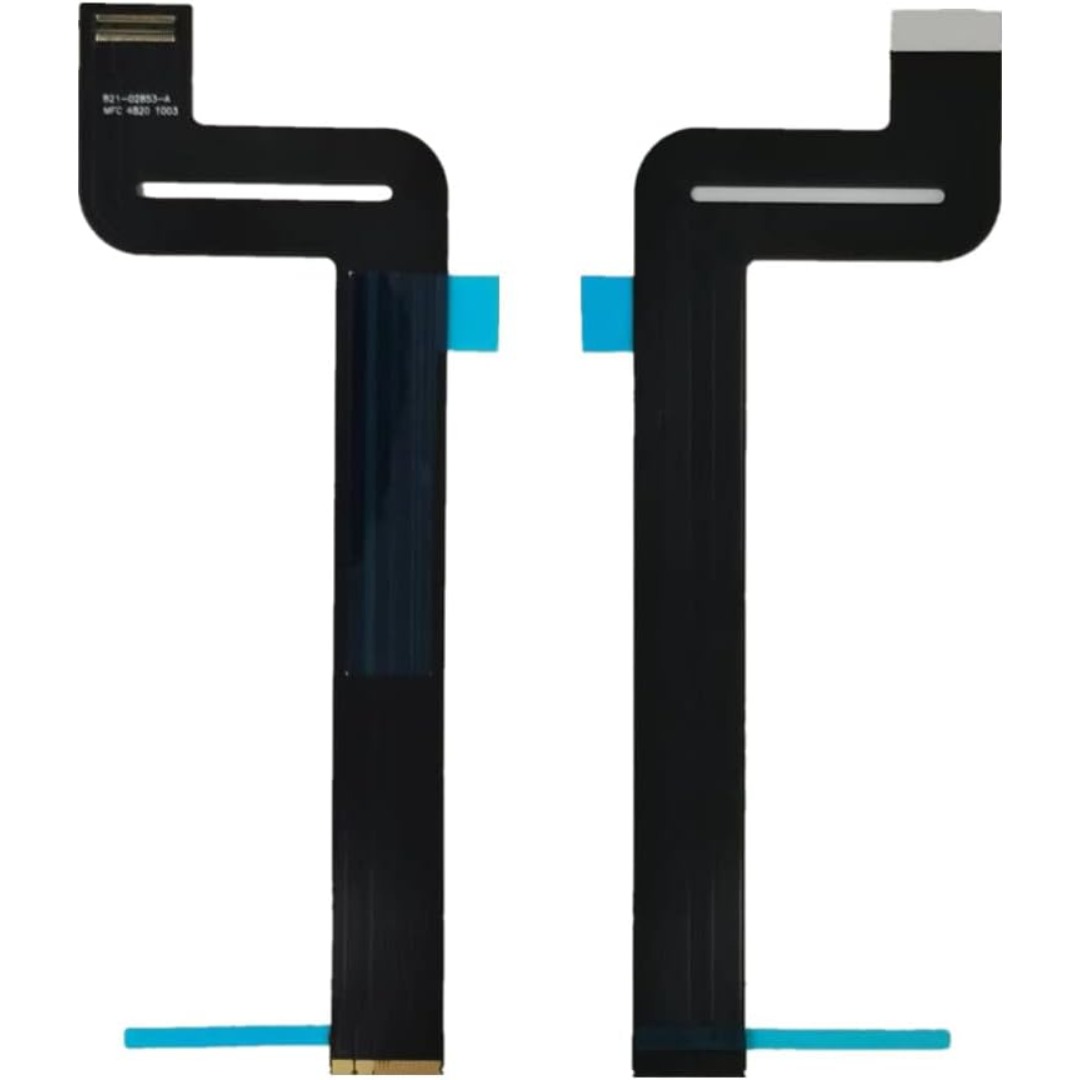
Genuine-spec touchpad flex cable for MacBook Pro 15″ (Model A1706 – 2017 and A1989 – 2018/2019)—restores full Force Touch functionality, haptic feedback, and precise multi-touch gesture control during trackpad repair or replacement. Compatible With: MacBook Pro 15″ (2017) – Model A1706 (Model Identifier: MacBookPro14,3) MacBook Pro 15″ (2018–2019) – Model A1989 (Model Identifier: MacBookPro15,2) ✅ Note: Apple used the same trackpad assembly and flex cable across both A1706 and A1989 15″ models—making this part interchangeable between them. MacBook Pro 15″ (2017) – Model A1706 (Model Identifier: MacBookPro14,3) MacBook Pro 15″ (2018–2019) – Model A1989 (Model Identifier: MacBookPro15,2) ✅ Note: Apple used the same trackpad assembly and flex cable across both A1706 and A1989 15″ models—making this part interchangeable between them. ✅ Note: Apple used the same trackpad assembly and flex cable across both A1706 and A1989 15″ models—making this part interchangeable between them. Part Type: Touchpad flex cable only — does not include the trackpad housing, Taptic Engine, or mounting hardware. This is the OEM-style ribbon cable connecting the trackpad to the logic board. Function: Transmits: Touch input coordinates Force Touch pressure data Haptic feedback signals to the Taptic Engine Enables full macOS gesture support: Force Click, three-finger lookup, swipe navigation, pinch-to-zoom, and smooth cursor tracking. Touch input coordinates Force Touch pressure data Haptic feedback signals to the Taptic Engine Enables full macOS gesture support: Force Click, three-finger lookup, swipe navigation, pinch-to-zoom, and smooth cursor tracking. OEM-Quality Build: Matches Apple’s original in: Cable length and routing Connector pitch and ZIF latch design EMI shielding and flex durability Cable length and routing Connector pitch and ZIF latch design EMI shielding and flex durability Common Use Cases: Replacing a torn, creased, or liquid-damaged original flex cable Completing a trackpad replacement when the original cable is compromised Fixing intermittent trackpad behavior, loss of Force Touch, or complete unresponsiveness Replacing a torn, creased, or liquid-damaged original flex cable Completing a trackpad replacement when the original cable is compromised Fixing intermittent trackpad behavior, loss of Force Touch, or complete unresponsiveness Installation Note: Requires full bottom case removal and battery disconnection. Cable routes under internal components near the right speaker and logic board. Connects via a ZIF (Zero Insertion Force) socket—must be aligned carefully and latched gently. Recommended for experienced or certified technicians only. Requires full bottom case removal and battery disconnection. Cable routes under internal components near the right speaker and logic board. Connects via a ZIF (Zero Insertion Force) socket—must be aligned carefully and latched gently. Recommended for experienced or certified technicians only.

Ready to elevate your digital workspace to new heights? Meet the ViewSonic 27″ 60Hz Touch Monitor TD2760, designed to revolutionize your computing experience. With its intuitive touch functionality, this monitor offers unparalleled convenience and versatility. Transitioning smoothly between tasks is effortless with the TD2760’s responsive touch screen. Whether you’re browsing the web, editing documents, or creating digital art, interaction feels natural and intuitive. Furthermore, its expansive 27-inch display provides ample screen real estate for multitasking and immersive viewing experiences. Dive into your work or entertainment content with crisp, clear visuals and vibrant colors. Moreover, the TD2760’s ergonomic design ensures comfortable viewing for extended periods. Easily adjust the monitor’s tilt angle to suit your preferred working position, reducing strain on your neck and eyes. In addition, connectivity options such as HDMI and USB-C offer seamless compatibility with a variety of devices, including laptops, desktops, and smartphones. Effortlessly mirror or extend your screen to enhance productivity or share content with ease. Transitioning to the touch aspect, the TD2760’s precise touch response allows for accurate input, whether you’re tapping, swiping, or drawing. Navigate menus, annotate documents, or play touchscreen-enabled games with unparalleled precision and responsiveness. In conclusion, the ViewSonic 27″ 60Hz Touch Monitor TD2760 is a game-changer for digital professionals and enthusiasts alike. With its seamless touch functionality, expansive display, and ergonomic design, it redefines the way you interact with your digital world. Upgrade your workspace today and experience the difference firsthand. Specifications: Display : 27″ VA Resolution : FHD(1920×1080) Refresh Rate : 60Hz Response Rate : 6ms

MacBook Pro Retina 13' Early 2015 A1502 i5 8GB Logic Board MacBook Pro Retina 13′ Early 2015 A1502 i5 8GB Logic Board

Looking for a top-notch monitor to enhance your computing experience? The MSI Pro MP275Q 27″ 100Hz Monitor is the perfect choice. This monitor offers superior performance and stunning visuals, making it ideal for both work and play. Firstly, the 27-inch screen provides ample space for multitasking. Whether you’re working on multiple documents or enjoying a movie, the large display ensures you have all the room you need. The Full HD resolution delivers sharp and clear images, enhancing every detail. The 100Hz refresh rate is a standout feature of this monitor. It provides smooth and fluid visuals, which is particularly beneficial for gaming and video playback. You won’t experience any stuttering or lag, ensuring a seamless viewing experience. Another advantage of the MSI Pro MP275Q is its wide color gamut. This feature ensures vibrant and accurate colors, making it perfect for tasks that require color precision, such as photo editing or graphic design. Your projects will look exactly as you intend them to. Moreover, the monitor includes advanced eye care technology. It reduces blue light emission and flicker, helping to minimize eye strain during long periods of use. This makes it an excellent choice for professionals who spend hours in front of their screens. Connectivity is also a breeze with the MSI Pro MP275Q. It features multiple input options, including HDMI and DisplayPort, allowing you to connect various devices effortlessly. This flexibility ensures compatibility with your existing setup. In conclusion, the MSI Pro MP275Q 27″ 100Hz Monitor offers a superior viewing experience with its large screen, high refresh rate, vibrant colors, and eye care technology. Upgrade your setup today and enjoy enhanced performance and stunning visuals. Specifications: Display : 27″ IPS Resolution : 2560 x 1440 (WQHD) Refresh Rate : 100Hz Response Rate : 1ms MRPT

The Alienware AW2723DF 27″ 280Hz Gaming Monitor is made for gamers who want smooth performance and sharp visuals. It features a 27-inch Fast IPS screen with QHD resolution (2560 x 1440) for detailed and vibrant images. With a 240Hz native refresh rate, overclockable to 280Hz via DisplayPort, it delivers incredibly fluid motion. Its 1ms response time keeps gameplay sharp, reducing blur during intense action. It supports AMD FreeSync Premium Pro and is G-SYNC compatible, helping to eliminate screen tearing and stuttering. This ensures a smooth experience across all types of games. The display offers 100% sRGB and 95% DCI-P3 color coverage, making colors rich and lifelike. It also supports HDR with 600-nit brightness, which improves contrast and light detail. For connectivity, it includes two HDMI 2.0 ports, one DisplayPort 1.4, four USB 3.2 Gen 1 ports, and audio out, giving you flexible connection options. A built-in USB hub helps manage your accessories with ease. The stand supports height, tilt, swivel, and pivot adjustments for ergonomic comfort. You can also mount it using VESA compatibility, giving you more control over your setup. Extra features include AlienFX lighting, Picture-in-Picture (PiP) and Picture-by-Picture (PbP) modes. These tools enhance your multitasking and customization. In short, the Alienware AW2723DF is a powerful gaming monitor that combines speed, color accuracy, and versatility for both competitive play and creative work. Specifications: Display : 27″ Fast IPS Resolution : QHD 2560 x 1440 Refresh Rate : 280Hz Response Time : 1ms

Digital Device Laptop Keyboard Compatible for MacBook AIR 13″ A1369 A1466 (MID 2011- MID 2017) US Layout 【Unique】Pls see detail compatible models in description below. 【Safe】Easy for you replace your faulty, cracked or broken keyboard ,seller remind that you should replace the keyboard in the off state. All pictures are taken from the real item, please check carefully before bidding, Replacement and high quality, Replace your faulty, cracked or broken keyboard. Each keyboard is tested before shipping Compatibility: MacBook Air 13″ A1369 Mid 2011: MC965LL/A (1.7 GHz Core i5) Mid 2011: MC966LL/A (1.7 GHz Core i5) Mid 2011: MD226LL/A (1.8 GHz Core i7) Compatibility: MacBook Air 13″ A1466 Mid 2012: MD231LL/A (1.8 GHz Core i5) Mid 2012: MD232LL/A (1.8 GHz Core i5) Mid 2012: MD232LL/A (2.0 GHz Core i7) Mid 2013: MD760LL/A (1.3 GHz Core i5) Mid 2013: MD761LL/A (1.3 GHz Core i5) Mid 2013: MD761LL/A (1.7 GHz Core i7) Early 2014: MD760LL/B (1.4 GHz Core i5) Early 2014: MD761LL/B (1.4 GHz Core i5) Early 2014: MD761LL/B (1.7 GHz Core i7) Compatibility: Early 2015: MJVE2LL/A (1.6 GHz Core i5 or 2.2 GHz Core i7) Early 2015: MJVG2LL/A (1.6 GHz Core i5 or 2.2 GHz Core i7) Identifying Numbers APN #: 661-6059, 661-6635, 661-7480

The Maxfree S2 14″ Portable Laptop Screen Extender lets you expand your workspace with dual or triple displays. First, it connects easily via USB-C or HDMI to your laptop. The screen features full HD resolution, anti-glare technology, and a slim, lightweight design for portability. In addition, it supports multiple monitor setups, boosting productivity for work, gaming, or streaming. Moreover, its adjustable stand and foldable design make it easy to carry and set up anywhere. Therefore, users can enjoy a seamless multi-screen experience without compromising desk space or mobility. Specifications: 14″ full HD screen provides sharp visuals for work and entertainment USB-C and HDMI connectivity support dual or triple monitor setups Slim, lightweight design ensures portability and easy setup Adjustable stand and foldable design for versatile positioning Compatible with laptops and devices for seamless multi-screen productivity

Are you seeking a versatile solution for your presentation and collaboration needs? Look no further than the BenQ RE03A 75″ Board Essential. This cutting-edge interactive whiteboard redefines productivity and engagement in meeting rooms and classrooms alike. With its expansive 75-inch display, the BenQ RE03A offers ample space for showcasing your ideas and content. Whether you’re delivering a presentation, brainstorming with colleagues, or teaching a class, this interactive board provides a captivating canvas for your creativity. Transitioning to functionality, the BenQ RE03A boasts intuitive touch controls that make navigation and interaction effortless. Its responsive touch technology ensures smooth and precise input, allowing you to annotate, draw, and manipulate content with ease. Furthermore, the board’s seamless connectivity options enable seamless integration with your existing devices and software. Whether you’re using a laptop, tablet, or smartphone, the BenQ RE03A ensures compatibility and flexibility for all your presentation needs. In addition, collaboration features such as screen sharing and real-time annotation foster teamwork and idea exchange among participants. Break down communication barriers and enhance productivity with the BenQ RE03A’s collaborative tools. Moreover, the board’s durable construction and anti-glare surface ensure reliability and visibility even in brightly lit environments. Say goodbye to distractions and glare, and hello to clear, crisp visuals every time. In conclusion, the BenQ RE03A 75″ Board Essential is a game-changer for presentations and collaboration. With its large display, intuitive controls, and collaborative features, it empowers users to deliver impactful presentations and foster teamwork like never before. Upgrade your meeting room or classroom with the BenQ RE03A and unlock new possibilities for productivity and engagement. Specifications: Screen Size : 75″ Panel Type : IPS Resolution : UHD 3840×2160 Response Time : 8ms

A lightweight and efficient pre-owned Lenovo ThinkPad T14s Gen 2 with 14" display, AMD Ryzen 5 5650U, 16GB RAM, and 256GB SSD—delivering strong performance, all-day battery life, and premium portability for professionals and students.

Dell 24 Monitor – E2422HN Functional, space-saving design Convenient connectivity: Connect to current and legacy systems via HDMI, VGA and DP ports. Maximize your desktop: Cut clutter with space-saving features like a compact stand and improved cable management that hides cables while complementing any workspace. Clean, simple design: A slim bezel adds a modern look. Adapts to your needs: Make your workspace your own with VESA-compatible mounts and stands. manufacturer link 1 Year Warranty

A reliable pre-owned Lenovo ThinkPad T460 with 14" display, 6th Gen Core i5, 8GB RAM, and 256GB SSD—built for durability, security, and everyday business productivity.
