
WiWU Skin Zero Sleeve – Ultra-thin Lycra laptop case with faux-fur lining and scratch-resistant protection, available in multiple sizes.Sleek, featherlight, and travel-ready for everyday carry without the bulk. Model: WiWU Skin Zero Sleeve Sizes: Available for 13″, 14″, and 16″ laptops Material: Eco-friendly water-resistant Lycra exterior Interior: Faux-fur lining to protect against scratches and minor bumps Design: Ultra-slim profile that fits easily into backpacks or briefcases Weight: Approximately 280–330 g, depending on size Colors: Black, Gray, Purple, Burgundy Closure: Secure magnetic or zipper closure (varies by version) Features: Lightweight, minimal branding, soft internal cushioning, stylish and durable build

Late 2019 Apple MacBook Pro with 2.4GHz Intel Core i9 (16 inch, 16GB, 1TB SSD) 4GB AMD Radeon Pro 5500M Space Gray

Original 13.3-inch LCD display assembly for MacBook Air A1466, pulled from a working unit. OEM, drop-in replacement for cracked or nonfunctional screens—ideal for restoring perfect visuals. This is a genuine Apple LCD display assembly for the MacBook Air model A1466 (mid-2013 to ~2017). It was removed from a working machine (“pulled”) and tested. It’s intended to replace failed, cracked, or damaged screens with an OEM original part. Key Features & Functionality Factory original LCD panel with LED backlight Includes glass, mounting frame, hinges, display cable Calibrated by Apple for color accuracy, brightness, contrast Tested for display quality, backlight uniformity, dead or stuck pixels Fits directly in A1466 models with correct alignment and cable interface Specifications Important Notes & Caveats Must ensure your MacBook is A1466 — wrong model = mismatch in frame, mounting, cable. As a used component, there may be light cosmetic wear or micro-scratches. Always test before full installation (connect the cable, boot, check display and backlight). Be careful handling: glass is fragile and the flex cable is delicate. Alignment and screw placement are critical — incorrect installation can damage the new screen.

BATTERY DELL 6MT4T CYDZ 62W 7.6V Laptop Battery Compatible with Dell Latitude 5470 E5470 155570 E5570 3510 M3510 7V69Y, TXF9M, 79VRK, 07V69Y, 0HK6DV, 079VRK, 0TXF9M About this item 6MT4T Voltage: 7.6V, Capacity: 62Wh Compatible Part Number: 7V69Y, TXF9M, 79VRK, 07V69Y, 0HK6DV, 079VRK, 0TXF9M Compatible for Dell Latitude 14 Series 5470 E5470 155570 E5570 Series Compatible for Dell Latitude 15 Series Precision 15 3510 M3510.

Genuine-spec touchpad flex cable for MacBook Pro 13″ (Model A1502, Mid 2014)—restores full trackpad functionality, including precise cursor control and physical click response. Essential for repairing unresponsive or erratic trackpad behavior. Compatible With: MacBook Pro 13-inch (Mid 2014, Model A1502, Model Identifier MacBookPro11,1) with Intel Core i5/i7 processors and Retina display. Part Type: Touchpad flex cable only — does not include the trackpad housing, button mechanism, or mounting hardware. This is the ribbon cable that connects the trackpad to the logic board. Function: Transmits cursor movement and click signals (left/right physical clicks) Supports standard multi-touch gestures (two-finger scroll, tap-to-click, pinch-to-zoom) ⚠️ Note: This model uses a physical click mechanism—not Force Touch (no haptic feedback or pressure sensitivity). Transmits cursor movement and click signals (left/right physical clicks) Supports standard multi-touch gestures (two-finger scroll, tap-to-click, pinch-to-zoom) ⚠️ Note: This model uses a physical click mechanism—not Force Touch (no haptic feedback or pressure sensitivity). OEM-Quality Build: Matches Apple’s original in: Cable length and routing path Connector type and pin alignment Insulation and flexibility for long-term reliability Cable length and routing path Connector type and pin alignment Insulation and flexibility for long-term reliability Common Use Cases: Replacing a torn, frayed, or corroded original flex cable Fixing: Unresponsive or intermittent trackpad Cursor jumping or drifting Click function failure (left or right) Complete trackpad disconnect Replacing a torn, frayed, or corroded original flex cable Fixing: Unresponsive or intermittent trackpad Cursor jumping or drifting Click function failure (left or right) Complete trackpad disconnect Unresponsive or intermittent trackpad Cursor jumping or drifting Click function failure (left or right) Complete trackpad disconnect Installation Note: Requires bottom case removal and battery disconnect. Connects via a ZIF (Zero Insertion Force) socket on the logic board—do not force. Cable routes under the battery; handle with care to avoid strain. Suitable for intermediate to advanced DIYers or technicians. Requires bottom case removal and battery disconnect. Connects via a ZIF (Zero Insertion Force) socket on the logic board—do not force. Cable routes under the battery; handle with care to avoid strain. Suitable for intermediate to advanced DIYers or technicians.

Haixun F20 Barcode Reader – USB 2D handheld scanner supports QR, PDF417, and 1D barcodes.Fast and reliable for retail, inventory, and logistics with plug-and-play setup. Model: Haixun F20 Type: 2D Handheld Barcode Scanner Supported Codes: 1D: EAN-13, UPC-A, Code 39, Code 128, Codabar, etc. 2D: QR Code, PDF417, DataMatrix, etc. Supported Codes: 1D: EAN-13, UPC-A, Code 39, Code 128, Codabar, etc. 2D: QR Code, PDF417, DataMatrix, etc. Sensor Type: CMOS imaging sensor Interface: USB (Plug and Play, no driver needed) Scan Mode: Manual trigger / Continuous / Auto-sensing Scan Speed: Up to 300 scans/sec Resolution: ≥ 4mil (0.1mm) Light Source: Red LED + White fill light Compatibility: Windows, Android, macOS, Linux Design: Ergonomic grip for long use Durable ABS plastic body Design: Ergonomic grip for long use Durable ABS plastic body Cable Length: Approx. 1.5 – 2 meters Power Supply: 5V (via USB) Applications: Retail, Warehouse, POS, Inventory, Logistics

New A1932 A2179 A2337 DC in Power Jack Connector for Macbook Air 13" Type-C USB-C Power 821-01658-A 2018 2019 2020 Year New A1932 A2179 A2337 DC in Power Jack Connector for Macbook Air 13″ Type-C USB-C Power 821-01658-A 2018 2019 2020 Year About this item New A1932 A2179 A2337 DC Jack Power DC-in Board for MacBook Retina 13″ DC Power Jack Board We have good after-sales services. We share the latest information on laptop spare parts in the Chinese market with all our customers. This is NOT an easy job for someone with no technical skills in Disassembling or Assembling a laptop, So only purchase this item if you know how to install it. Each DC Board is tested before shipping and working.

Original replacement touchpad for MacBook Air A2442, available in Silver and Space Gray. Perfect for fixing unresponsive or damaged trackpads and restoring smooth cursor control and gesture functionality. The Original MacBook Air A2442 Touchpad is a genuine replacement part designed to restore full trackpad performance and functionality. If your MacBook Air trackpad is not clicking, not responding, or physically damaged, this original touchpad provides a reliable solution with smooth tracking and accurate gesture support. Available in Silver and Space Gray, it matches the original laptop finish for a clean professional repair. Original / Genuine Touchpad for MacBook Air A2442 Available in Silver and Space Gray Restores smooth cursor control and multi-touch gestures Reliable clicking and accurate tracking performance Perfect for repair and replacement of damaged trackpads High-quality build for long-term use ✔ MacBook Air 13-inch (2021 / 2022) A2442 Compatible with MacBook Air A2442 models only. Please confirm the model number on the bottom cover before purchase to ensure a correct fit.

Remax F21 Ruiyal Series – Oscillating water‑cooling fan with 4,000 mAh battery, digital display, and 6 wind levels.Portable and stylish small-table fan with 3 oscillation modes and mist spray cooling. Model: Remax F21 Ruiyal Series Water‑Cooling Oscillating Fan (White) Battery & Power: Built‑in 4,000 mAh battery; USB‑C rechargeable (details unspecified) Cooling Method: Water‑cooling spray system with turbine-style fan blades Wind Speed: 6 adjustable speed levels Oscillation: 3 movement modes—approx. 45°, 90°, or 120° Display & Controls: Digital display showing mode, speed, and battery indicators Dimensions & Weight: Compact tabletop size, ~868 g Power Consumption: Around 8W rated power

A high-performance pre-owned MacBook Pro 15" (2015) with a stunning Retina display, upgraded 16GB RAM, 128GB SSD, and powerful 2GB dedicated graphics—ideal for developers, creatives, and power users seeking reliable Apple performance.

WiWU ZM‑901 – Sturdy foldable aluminum stand with adjustable angles and silicone pads, weighing just 900 g.Enhances posture, airflow, and workspace ergonomics while staying compact and travel-friendly. Model: WiWU ZM‑901 Material: Metal (aluminum/carbon steel) frame with silicone pads for grip Dimensions (Folded): 260 × 225.5 × 53 mm Package Size: 290 × 250 × 50 mm Net Weight: Approx. 900 g Compatibility: Fits laptops, tablets, and smartphones up to ~17 ” (some listings note 15.6″ limit, but device capacity varies) Features: Adjustable angle configuration, detachable foldable design for portability, silicone surface pads for anti-slip and vibration reduction Build & Design: Durable yet lightweight, crafted to enhance airflow and promote ergonomic posture

Experience elite performance with the Lenovo ThinkPad E14 Gen 3, powered by the AMD Ryzen 7 5700U 8-core processor. Featuring 16GB RAM, a lightning-fast 512GB NVMe SSD, and a professional 14-inch FHD display, this laptop is engineered for high-level productivity and military-grade durability.

The HP ProLiant DL360 Gen9 is a powerful 1U rack server equipped with 2x Intel Xeon E5-2660 v3 processors, 64GB DDR4 RAM, and 8x 300GB SAS 2.5-inch drives for fast and reliable storage. Ideal for virtualization, enterprise workloads, and data center deployments.

WiWU S500 Foldable Lightweight Plastic Laptop Stand Description WiWU S500 Foldable Lightweight Plastic Laptop Stand Brand: wiwu Material: ABS+Aluminum alloy Foldable Height Adjustment. Laptop stand with foldable technology, light weight, easy to carry Adjustable from 20 to 40 degrees and height adjustable from 3.15 to 5.12 inches. There are 6 corners Compatible with laptops (11 inch-15 inch) Macbook, iMac, ipad, Microsoft Surface PR, Thinkpad, Lenovo, Dell, HP and more. With anti-slip rubber pad

Genuine-spec touchpad flex cable for Apple’s 12-inch MacBook (Model A1534, Early 2015 / Early 2016 / Mid 2017)—essential for restoring full Force Touch trackpad functionality, haptic feedback, and multi-touch gesture support. Compatible With: MacBook 12″ (Early 2015) – 1.1GHz Core M MacBook 12″ (Early 2016) – 1.1GHz/1.3GHz Core M MacBook 12″ (Mid 2017) – 1.2GHz/1.3GHz Core m3/i5/i7 All share Model Number A1534 and Model Identifier MacBook8,1 / MacBook9,1 / MacBook10,1 respectively. MacBook 12″ (Early 2015) – 1.1GHz Core M MacBook 12″ (Early 2016) – 1.1GHz/1.3GHz Core M MacBook 12″ (Mid 2017) – 1.2GHz/1.3GHz Core m3/i5/i7 All share Model Number A1534 and Model Identifier MacBook8,1 / MacBook9,1 / MacBook10,1 respectively. Part Type: Touchpad flex cable only—does not include the trackpad housing, Taptic Engine, or mounting brackets. This is the ribbon cable that connects the Force Touch trackpad to the logic board. Function: Critical for Force Touch functionality—transmits pressure-sensitive input, multi-touch gestures (e.g., pinch, swipe, Force Click), and haptic feedback signals to the Taptic Engine. OEM-Quality Construction: Precisely matches Apple’s original in length, connector pitch, shielding, and routing—ensures reliable signal integrity and compatibility with macOS. Common Use Cases: Replacing a torn, creased, or liquid-damaged flex cable Restoring unresponsive or erratic trackpad behavior Completing a trackpad replacement when the original cable is unusable Replacing a torn, creased, or liquid-damaged flex cable Restoring unresponsive or erratic trackpad behavior Completing a trackpad replacement when the original cable is unusable Installation Note: Requires full bottom case removal and delicate disconnection of the ZIF connector. The cable routes tightly under the battery—extreme care is required. Recommended for experienced or certified technicians only.

7CJRC Laptop Battery for Dell Latitude 7470 7270 E7270 E7470 Series 21X15 021X15 KNM09 0KNM09 TX283 0TX283 451-BBSW 451-BBWR 11.4V 42Wh 3-Cell About this item Battery type: Li-ion; Voltage: 11.4V; Capacity: 42Wh; Cells: 3-cell Compatible Models: Fit for Dell Latitude 7470 7270 E7470 E7270 Series Replace Part Numbers: 7CJRC KNM09 0KNM09 21X15 021X15 TX283 0TX283 451-BBSW 451-BBWR V6VMN 100% New from Manufacturer. Up to 500 recharge cycles over the life of the battery. The actual operation time will depend on how much electricity is required by the device and how you use it

Genuine-spec touchpad flex cable for MacBook Pro 15″ (Model A2941, 2023, Apple M2)—restores full Force Touch functionality, haptic feedback, and precise multi-touch gesture control during trackpad repair or replacement. Compatible With: MacBook Pro 15-inch (2023, Model A2941) with Apple M2 chip (Model Identifier: MacBookPro19,1) Part Type: Touchpad flex cable only — does not include the trackpad housing, Taptic Engine, or mounting hardware. This is the OEM-style ribbon cable that connects the trackpad to the logic board. Function: Transmits: Touch input coordinates Force Touch pressure data Haptic feedback signals to the Taptic Engine Enables full macOS gesture support: Force Click, three-finger lookup, swipe navigation, pinch-to-zoom, and smooth cursor tracking. Touch input coordinates Force Touch pressure data Haptic feedback signals to the Taptic Engine Enables full macOS gesture support: Force Click, three-finger lookup, swipe navigation, pinch-to-zoom, and smooth cursor tracking. OEM-Quality Build: Matches Apple’s original specifications in: Cable length and routing path Connector pitch and ZIF latch design EMI shielding and flex durability Cable length and routing path Connector pitch and ZIF latch design EMI shielding and flex durability Common Use Cases: Replacing a torn, creased, or liquid-damaged original flex cable Completing a trackpad replacement when the original cable is compromised Fixing intermittent trackpad behavior, loss of Force Touch, or complete unresponsiveness Replacing a torn, creased, or liquid-damaged original flex cable Completing a trackpad replacement when the original cable is compromised Fixing intermittent trackpad behavior, loss of Force Touch, or complete unresponsiveness Installation Note: Requires full bottom case removal and battery disconnection. Cable routes under internal components near the right speaker and logic board. Connects via a ZIF (Zero Insertion Force) socket—must be aligned carefully and latched gently. Recommended for experienced or certified technicians only. Requires full bottom case removal and battery disconnection. Cable routes under internal components near the right speaker and logic board. Connects via a ZIF (Zero Insertion Force) socket—must be aligned carefully and latched gently. Recommended for experienced or certified technicians only.

Mini Slim Wired USB Numeric Digital Keyboard Number Pad (18 Keys) Numeric Keypad for Laptop,18 Key USB Keypad, Numerical Keypad Wired Portable Ultra Slim Mini Numpad External Numbers Keyboard Pad for Laptop PC Computer Desktop Surface pro Notebook

DELL Battery YRDD6 Laptop for replaceable Dell Inspiron 7586 5482 5485 5491 3310 2-in-1 3493 3582 3593 3793 5493 5593 5480 5590 5591 5594 5598 15 3583 3584 Vostro 3491 5481 5581 5490 5590 VM732 About this item Battery Type: 3cell Li-Polymer Voltage &Capacity : 11.4V 42WH Safeguard features against incorrect voltage, short circuit, internal overheating 100% Brand new ,Grade A cells battery; Quality assurance;every battery has passed factory testing; 500+ recharge cycles over

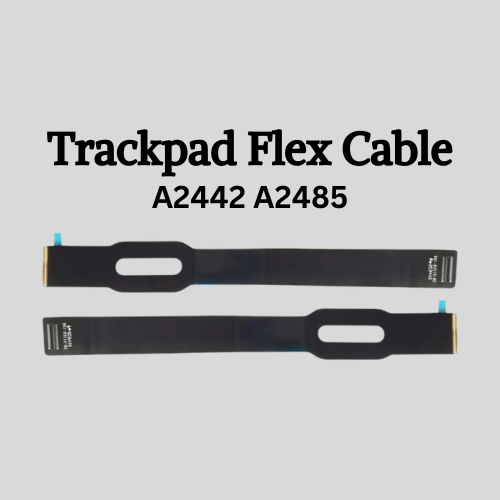
Genuine-spec touchpad flex cable for MacBook Pro 16″ (Model A2141, 2019, Intel)—essential for restoring full Force Touch functionality, haptic feedback, and precise multi-touch gesture control during trackpad repair or replacement. Compatible With: MacBook Pro 16-inch (2019, Model A2141) with Intel Core i7/i9 processors (Model Identifier: MacBookPro16,1) (Note: A2141 is the non-base configuration of the 2019 16″ MacBook Pro—typically higher-end Intel models.) Part Type: Touchpad flex cable only—does not include the trackpad housing, Taptic Engine, or mounting hardware. This is the OEM-style ribbon cable that connects the trackpad to the logic board. Function: Transmits touch coordinates, Force Touch pressure data, and haptic feedback signals—critical for macOS gestures (e.g., Force Click, three-finger lookup, pinch-to-zoom) and Taptic Engine responsiveness. OEM-Quality Construction: Replicated to Apple’s exact specifications—including cable length, connector pitch, EMI shielding, and bend radius—ensuring reliable signal integrity and long-term durability. Common Use Cases: Replacing a torn, creased, or liquid-damaged original flex cable Completing a trackpad replacement when the original cable is compromised Fixing intermittent trackpad behavior, loss of Force Touch, or complete unresponsiveness Replacing a torn, creased, or liquid-damaged original flex cable Completing a trackpad replacement when the original cable is compromised Fixing intermittent trackpad behavior, loss of Force Touch, or complete unresponsiveness Installation Note: Requires full disassembly of the bottom case, speaker removal, and careful routing beneath the battery and logic board. Connectors use ZIF (Zero Insertion Force) sockets—must be aligned and latched gently. Recommended for certified or professional repair technicians only. Important: This is flex cable only—not a complete trackpad assembly. Must be used with the original or compatible A2141 trackpad and Taptic Engine. Not compatible with M1 MacBook Pro 16″ (A2485), 14″ models (A2442), or any MacBook Air. This is flex cable only—not a complete trackpad assembly. Must be used with the original or compatible A2141 trackpad and Taptic Engine. Not compatible with M1 MacBook Pro 16″ (A2485), 14″ models (A2442), or any MacBook Air. Model Verification: Confirm your device is MacBook Pro A2141 (16″, 2019, Intel) via > About This Mac > Model Identifier (should read MacBookPro16,1).
