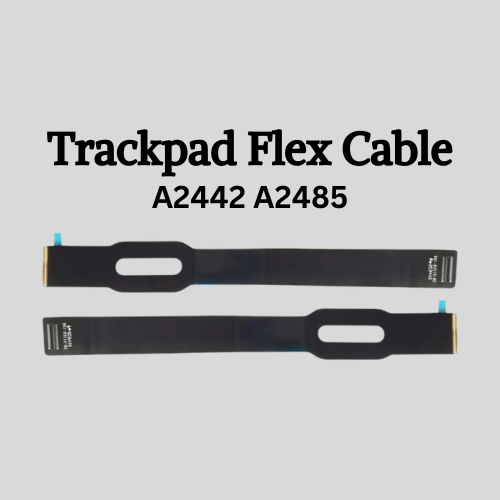

Genuine-spec touchpad flex cable for MacBook Pro 15″ (Model A1707, 2016–2017)—restores full Force Touch functionality, haptic feedback, and precise multi-touch gesture control during trackpad repair or replacement. Compatible With: MacBook Pro 15″ (2016) – Model A1707 (Model Identifier: MacBookPro13,2) MacBook Pro 15″ (2017) – Model A1707 (Model Identifier: MacBookPro14,2) MacBook Pro 15″ (2016) – Model A1707 (Model Identifier: MacBookPro13,2) MacBook Pro 15″ (2017) – Model A1707 (Model Identifier: MacBookPro14,2) Part Type: Touchpad flex cable only — does not include the trackpad housing, Taptic Engine, or mounting hardware. This is the OEM-style ribbon cable that connects the trackpad to the logic board. Function: Transmits: Touch input coordinates Force Touch pressure data Haptic feedback signals to the Taptic Engine Enables full macOS gesture support: Force Click, three-finger lookup, swipe navigation, pinch-to-zoom, and smooth cursor tracking. Touch input coordinates Force Touch pressure data Haptic feedback signals to the Taptic Engine Enables full macOS gesture support: Force Click, three-finger lookup, swipe navigation, pinch-to-zoom, and smooth cursor tracking. OEM-Quality Build: Matches Apple’s original specifications in: Cable length and routing path Connector pitch and ZIF latch design EMI shielding and flex durability Cable length and routing path Connector pitch and ZIF latch design EMI shielding and flex durability Common Use Cases: Replacing a torn, creased, or liquid-damaged original flex cable Completing a trackpad replacement when the original cable is compromised Fixing intermittent trackpad behavior, loss of Force Touch, or complete unresponsiveness Replacing a torn, creased, or liquid-damaged original flex cable Completing a trackpad replacement when the original cable is compromised Fixing intermittent trackpad behavior, loss of Force Touch, or complete unresponsiveness Installation Note: Requires full bottom case removal and battery disconnection. Cable routes under internal components near the right speaker and logic board. Connects via a ZIF (Zero Insertion Force) socket—must be aligned carefully and latched gently. Recommended for experienced or certified technicians only. Requires full bottom case removal and battery disconnection. Cable routes under internal components near the right speaker and logic board. Connects via a ZIF (Zero Insertion Force) socket—must be aligned carefully and latched gently. Recommended for experienced or certified technicians only.

New BT04XL 14.8V 52WH Notebook Battery for HP EliteBook Folio 9470 9470M 9480m Ultrabook BT04 BA06 HSTNN-IB3Z HSTNN-I10C 687945-001 H4Q47AA 687517-241 HSTNN-DB3Z 687517-171 BA06XL H4Q48AA About this item Battery type: Li-ion; Capacity: 52WH; Voltage: 14.8V; Cells: 6-cell. The battery compatible with P/N.: Spare 687517-171 687517-241 687945-001 696621-001; EliteBook Folio 9470 9470M 9480 9480M Series; fits HSTNN-DB3Z HSTNN-IB3Z HSTNN-I10C 687517-1C1 BT04 BT04XL BA06 BA06XL H4Q47AA H4Q48AA 100% New from Manufacturer. Up to 500 recharge cycles over the life of the battery. Grade A cells ensure fast charges and low power consumption. Grade A cells ensure fast charges and low power consumption; Built-in circuit protection ensures both safety and stability. Brand new from Manufacturer. Up to 500 recharge cycles over the life of the battery. Operation time for standard batteries: Around1.5~3.5 hours, the actual operation time will depend on how much electricity is required by the device and how you use it.

Experience premium mobility and intuitive control with the pre-owned ThinkPad T490s. Featuring a powerful Intel Core i5 8th Gen processor, 16GB RAM, and a 256GB NVMe SSD, this ultra-slim professional laptop stands out with its responsive FHD Touchscreen for a more interactive and efficient workflow.

TP-Link 8 Port Gigabit Ethernet Network Switch | Plug and Play | Desktop or Wall-Mount | Plastic Case Ethernet Splitter | Fanless | Traffic Optimization | Unmanaged (TL-SG1008D),Black About this item PLUG-AND-PLAY – Easy setup with no configuration or no software needed ETHERNET SPLITTER – Connectivity to your router or modem router for additional wired connections (laptop, gaming console, printer, etc) 8 Ports GIGABIT ETHERNET – 8 10/100/1000 Mbps Gigabit auto-negotiation RJ45 ports greatly expand network capacity COST EFFECTIVE – Fanless Quiet Design, Desktop design RELIABLE – IEEE 802.3x flow control provides reliable data transfer UP to 80% Power Saving – Automatically adjusts power consumption according to the link status and cable length AUTO-NEGOTIATION – Supports Auto-MDI/MDIX, eliminating the need for crossover cables

Razer DeathAdder Essential – Ergonomic wired gaming mouse with 6,400 DPI sensor and 5 programmable buttons.Trusted for its comfort, precision, and durable build—perfect for casual and competitive gaming. Model: Razer DeathAdder Essential (Black) Sensor Type: Optical DPI: Up to 6,400 DPI (adjustable) Buttons: 5 independently programmable Hyperesponse buttons Switches: Razer Mechanical Switches rated for up to 10 million clicks Tracking Speed: Up to 220 inches per second (IPS) Acceleration: 30G Design: Ergonomic right-handed design Grip Style: Palm grip (with textured side grips) Lighting: Single-color green backlight (Razer logo) Polling Rate: 1000 Hz Cable: Standard USB wired, 1.8 meters (rubber cable) Compatibility: Windows 7, 8, 10, 11 (Razer Synapse support) Weight: Approx. 96g (excluding cable) Software Support: Razer Synapse (for customization & macros)

MacBook Pro A1708 Battery A1713 for MacBook Pro 13 Inch A1708 Late 2016 Mid 2017 (EMC 2978 3164), A2171 Laptop Replacement Battery for MacBook Pro 13 Inch A2159 (2019) A2289 (2020) A2338 (2020) 【Macbook pro 13 Inch battery A1713 & A2171 Battery Specification】– Voltage: 11.4V. Capacity: 54.5Wh / 4781mAh, Battery Type: Li-ion 【Newest 4.0 upgraded OEM Battery for Apple macbook pro】– Japan High Performance Electric Core. Cobalt Proportion: >98%. Upgrade chip. Up to 1500+ recharge cycles over the life of the battery. Overcharger and Discharger Circuit Protection, Ensure fast charges and low power consumption, UL-/CE-/FCC-/RoHS-Certified for safety 【Replacement Battery A1713 for A1708 Macbook pro 13 inch】– A1708 Macbook pro 13” Late 2016: MacBook Pro 13-Inch “Core i5” 2.0 & MacBook Pro 13-Inch “Core i7” 2.4 (MacBookPro13,1, EMC2978, MLL42xx/A, MLUQ2xx/A). — A1708 Macbook pro 13” Mid 2017: MacBook Pro 13-Inch “Core i5” 2.3 & MacBook Pro 13-Inch “Core i7” 2.5 (MacBookPro14,1, EMC3164, MPXQ2xx/A, MPXR2xx/A, MPXT2xx/A, MPXU2xx/A) 【Replacement Battery A2171 for A2159 & A2289 & A2338 Macbook pro 13 inch】– A2159 Macbook pro 13” 2019: MacBook Pro 13-Inch “Core i5” 1.4 Touch & “Core i7” 1.7 Touch (MacBookPro15,4, EMC3301, MUHN2xx/A, MUHP2xx/A, MUHQ2xx/A, MUHR2xx/A, MUHR2xx/B). — A2289 Year 2020: MacBook Pro 13-Inch “Core i5” 1.4 & “Core i7” 1.7 (MacBookPro16,3, EMC 3456, MXK32xx/A, MXK52xx/A, MXK62xx/A, MXK72xx/A). — A2338 Year 2020: MacBook Pro 13-Inch “M1” 8-Core 3.2 (MacBookPro17,1, EMC3578, MYDA2LL/A*)

OEM-quality trackpad replacement (without flex cable) for MacBook Air 13″ (Model A1932, 2018–2019) in Gold finish—engineered for precise Force Touch response, smooth multi-touch gestures, and perfect color-matched integration with the original chassis. Compatible With: MacBook Air 13-inch (2018 & 2019, Model A1932, Model Identifiers MacBookAir8,1) with Intel Core i5/i7 processors. Part Type: Trackpad only—does not include the flex cable, Taptic Engine, or mounting hardware. Designed for technicians who will reuse the original internal components. Finish: Gold—specifically matched to the Gold variant of the A1932 MacBook Air for seamless aesthetic continuity. Force Touch Support: Fully compatible with pressure-sensitive input and haptic feedback when paired with the original Taptic Engine and logic board—ensuring full macOS gesture functionality (e.g., Force Click, Look Up, pressure-sensitive navigation). Precision Build: Smooth glass surface with exact curvature, texture, and micro-click mechanism matching Apple’s original design for consistent tracking accuracy and tactile feel. Installation Requirements: Requires full bottom case disassembly and careful transfer of the original flex cable and Taptic Engine. Adhesive must be applied precisely to maintain structural integrity and sensor alignment. Recommended for professional or experienced repair technicians only.

WIWU GENIUS COMBO SET BAG WITH MOUSE AND MOUSE PAD FOR 14" LAPTOP/ULTRABOOK - BLACK WIWU GENIUS COMBO SET BAG WITH MOUSE AND MOUSE PAD FOR 14″ LAPTOP/ULTRABOOK – BLACK Details: Material: plaid polyester + metal Mouse: single mode 2.4G Product weight: 14 inch / 465g Product size: 14 inches: 35*25*2cm Handbag+mouse+mouse pad Front layer multi-pocket design Better help classify items Waterproof fabric

Genuine-spec touchpad flex cable for MacBook Pro 13″ (Model A2251, 2020, Intel)—essential for restoring full Force Touch functionality, haptic feedback, and precise multi-touch gesture control during trackpad repair or replacement. Compatible With: MacBook Pro 13-inch (2020, Two Thunderbolt Ports, Model A2251, Model Identifier MacBookPro16,1) with Intel Core i5/i7 processors. Part Type: Touchpad flex cable only—does not include the trackpad housing, Taptic Engine, or mounting hardware. This is the OEM-style ribbon cable that connects the trackpad to the logic board. Function: Transmits: Precise touch coordinates Force Touch pressure data Haptic feedback signals to the Taptic Engine Enables full macOS gesture support including Force Click, three-finger lookup, swipe navigation, and inertial scrolling. Precise touch coordinates Force Touch pressure data Haptic feedback signals to the Taptic Engine Enables full macOS gesture support including Force Click, three-finger lookup, swipe navigation, and inertial scrolling. OEM-Quality Build: Matches Apple’s original specifications in: Cable length and routing Connector pitch and ZIF latch design EMI shielding and flex durability Cable length and routing Connector pitch and ZIF latch design EMI shielding and flex durability Common Use Cases: Replacing a torn, creased, or liquid-damaged original flex Completing a trackpad replacement when the original cable is compromised Fixing intermittent trackpad behavior, loss of Force Touch, or complete unresponsiveness Replacing a torn, creased, or liquid-damaged original flex Completing a trackpad replacement when the original cable is compromised Fixing intermittent trackpad behavior, loss of Force Touch, or complete unresponsiveness Installation Note: Requires full bottom case removal and partial disassembly (including battery disconnect). Cable routes under the right speaker and logic board—must be seated in original retention channels. Connects via ZIF (Zero Insertion Force) socket—align carefully and latch gently. Recommended for experienced or certified technicians only. Requires full bottom case removal and partial disassembly (including battery disconnect). Cable routes under the right speaker and logic board—must be seated in original retention channels. Connects via ZIF (Zero Insertion Force) socket—align carefully and latch gently. Recommended for experienced or certified technicians only.

VSTAR UA150 1500VA UPS | Simulated Sine Wave Output | 230V | 24VDC Battery System | 50/60Hz Auto Sensing | Compact Design | Black Color | Model UPS-UA150 Robust 1500VA Power CapacityThe VSTAR UA150 delivers 1500VA of reliable backup power to safeguard your essential electronics, including PCs, servers, routers, and security systems. Dual Voltage CompatibilitySupports 110/120V or 220/230/240V input, making it ideal for use in a variety of international voltage environments. Stable 230V Output with AVR FunctionalityMaintains a consistent 230VAC output, protecting connected devices from voltage fluctuations and surges. Simulated Sine Wave OutputProvides a simulated sine wave waveform suitable for most common electronics, especially during normal backup operations. Auto-Sensing FrequencyAutomatically detects 50Hz or 60Hz power sources, adapting to your electrical environment without manual adjustments. Compact, Space-Saving DesignMeasuring just 353 x 149.3 x 162 mm, the UA150 fits neatly on or under desks, in server cabinets, or against walls. Reliable 24VDC Battery SystemOperates on a 24VDC internal battery configuration, delivering longer runtimes and better reliability during outages. Universal Output SocketsEquipped with IEC-style or universal output sockets that are compatible with a wide range of devices. Sleek Black FinishA clean and modern black color allows it to blend seamlessly into professional or home environments. Ideal for Home or OfficeProtects critical electronics, telecom gear, and POS systems from data loss and downtime.

✅ Full Specifications: Model: HyperX Cloud II Headphone Type: Over-Ear, Closed-Back Gaming Headset Connection: Wired USB for PC/Mac 3.5mm jack for consoles & mobile Drivers: 53mm Neodymium Surround Sound: Virtual 7.1 Surround Sound (via USB sound card) Frequency Response: Headphones: 15Hz – 25kHz Microphone: 50Hz – 18kHz Impedance: 60 Ohms Sound Pressure Level: 98 ± 3 dB Microphone: Detachable noise-canceling mic TeamSpeak & Discord certified Build: Aluminum frame Memory foam ear cushions Leatherette or velour ear pads Cable Length: 1m headset cable 2m extension with USB control box Compatibility: PC, Mac, PS4, PS5, Xbox (via 3.5mm), Nintendo Switch, Mobile

Reliable, compact, and business-focused—the Dell Latitude 5310 features a 10th Gen Intel Core i5 processor, 8GB RAM, and a fast 256GB SSD in a lightweight 13.3-inch design built for everyday productivity.

Apple Magic Keyboard - A1644 Wireless Bluetooth - UK English Layout Apple Magic Keyboard – A1644 Wireless Bluetooth – UK English Layout

WiWU A821CH 8‑in‑1 Stand & Dock – A foldable aluminum laptop stand with a built-in 8‑port USB‑C dock (two USB‑A, two USB‑C, HDMI 4K30, SD/TF, Gigabit Ethernet, PD 100 W).Enhances comfort, cooling, and functionality—perfect for decluttered, professional work setups. Model: WiWU A821CH Design: Sturdy aluminum alloy stand with foldable, portable design, hollow surface for cooling, and silicone pads to prevent slips Dimensions & Weight: Compact when folded (~400 g in aluminum) Docking Hub Ports: 2 × USB-C ports 2 × USB‑A 3.0 ports 1 × HDMI (up to 4K@30 Hz) SD + micro‑SD card slots 1 × RJ‑45 Gigabit Ethernet (1000 Mbps) Docking Hub Ports: 2 × USB-C ports 2 × USB‑A 3.0 ports 1 × HDMI (up to 4K@30 Hz) SD + micro‑SD card slots 1 × RJ‑45 Gigabit Ethernet (1000 Mbps) Power Delivery: USB-C PD 3.0 supports up to 100 W—can charge a laptop while using other ports Connectivity: HDMI supports up to 4K@30 Hz; Ethernet up to Gigabit speed Stand Features: Detachable base—can use stand and hub together or separately, with adjustable ergonomic angles and vents for airflow Durability: Aluminum alloy with frosted texture, scratch-resistant finish, tested to executive standards

A robust Beurotika cash drawer featuring a 450mm metal body, secure 3-position lock, and compatibility with most POS systems—ideal for retail, restaurants, and small businesses. Secure 3-position key lock: Open, locked, and release-to-print modes for controlled access 6 coin slots + 4 bill compartments: Organized layout for efficient cash handling Heavy-duty steel construction: Reinforced frame and smooth slide rails for daily reliability Standard RJ12 interface: Compatible with most POS systems (e.g., Epson, HP, Bixolon, and Beurotika receipt printers) Auto-open trigger: Automatically opens when connected to a compatible receipt printer during transactions Bottom cable entry: Keeps wiring neat and protected

MARSRIVA Smart Mini DC UPS KP2 Series | 18 Watts 10000mAh | 0ms AC to DC Transfer | Flame Retardant | Wall Mount Slots | 1 x Passive PoE, 2 x DC and 1 x USB Output Ports | KP2 BLACK Keep Wi-Fi Power On Output:18W (Max.) or 30W (Max.) ● With 1 * Passive PoE, 2 * DC and 1 * USB output ports, DC UPS can power up multiple devices simultaneously. ● AC to DC 0ms transfer technology keeps your devices working when electricity is ON/OFF shifting. ● With wall-mount slots on the back, DC UPS can be mounted on the wall easily. ● Air cooling system provides maximum heat dissipation, ensuring the long-term stability of UPS. ● V-0 flame retardant product housing secures you and your property. ● 16000mAh high-capacity battery (KP2 Plus, KP2 Ultra) provides longer backup time. ● 30W high-power output (KP2 Pro, KP2 Ultra) provides better compatibility.

A1989 Battery Replacement, A1964 Battery for MacBook Pro 13″ A1989 (Mid 2018 2019) A2251(2020 Release) EMC 3214 3358 3348 MR9Q2LL/A MR9R2LL/A MR9T2LL/A MR9U2LL/A MR9V2LL/A MV962LL/A MV9A2LL/A 【Specification】Voltage: 11.41V. Capacity: 58Wh/ 5086mAh. Battery Type: Li-ion. Condition: Brand new, from high quality materials, top circuit boards and smart chip. 【Compatible Part Number】A1964 A1989 A1989(EMC 3214) A1989(EMC 3358) A2251(EMC 3348) 020-02497 616-00419. 【Compatible Laptop Models】MacBook Pro 13-Inch model A1989 (Mid 2018, Mid 2019) , A2251(2020 Release), Order No MR9Q2LL/A MR9R2LL/A MR9T2LL/A MR9U2LL/A MR9V2LL/A MV962LL/A MV972LL/A MV982LL/A MV992LL/A MV9A2LL/A MWP72LL/A MWP82LL/A MWP42LL/A MWP52LL/A MWP62LL/A MR9Q2 MR9R2 MR9T2 MR9U2 MR9V2 MV962 MV972 MV982 MV992 MV9A2 MWP62. 【Note】The tools are included. Double-sided tape is attached to the back of the battery, but NO battery installation instruction. The MBP battery is difficult to disassemble, we suggest you search for related installation videos or find a technician for help.

The SHL-R320 is a high-speed, dual-protocol M.2 SSD external enclosure featuring a durable aluminum casing for excellent heat dissipation. Supporting both NVMe and SATA protocols, it provides an easy, pocket-sized solution to convert internal solid-state drives into ultra-fast portable storage. ✅ Full Specifications: Model: M.2 SSD Hard Drive Enclosure Case (SHL-R320) Interface: USB 3.1 Gen 2 Type-C (Backward compatible with USB 3.0 / USB 2.0) Protocol Support: Dual Protocol — Supports both NVMe PCIe (M-Key / B+M Key) and NGFF SATA (B+M Key) Transmission Speed: NVMe: Up to 10Gbps SATA/NGFF: Up to 6Gbps Transmission Speed: NVMe: Up to 10Gbps SATA/NGFF: Up to 6Gbps Drive Size Compatibility: Supports M.2 SSD sizes 2230 / 2242 / 2260 / 2280 Capacity Support: Supports up to 2TB (and higher depending on drive configurations) Material: Premium Aluminum Alloy shell for enhanced durability and thermal cooling Design: Slim, compact, and lightweight pocket-sized form factor Features: Tool-free/screw installation layout (varies by kit variation) and built-in UASP protocol support for accelerated transmission. Compatibility: Windows 11 / 10 / 7, macOS / iOS, Linux, Android (with OTG support), and Smart TVs Dimensions: Approx. 119 x 38 x 13 mm

Lexar NM620 1TB SSD, M.2 2280 PCIe Gen3x4 NVMe 1.4 Internal SSD, Up to 3500MB/s Read, 3000MB/s Write, 3D NAND Flash Internal Solid State Drive for PC Enthusiasts and Gamers (LNM620X001T-RNNNG) About this item High-speed PCIe Gen3x4 interface: Lexar 1TB SSD up to 3500MB/s read and 3000MB/s write – NVMe 1.4 is supported. Lexar Internal SSD M.2 2280 form factor with 3D NAND Lexar Solid state drive maintains 6x the speed of a SATA-based SSD. Lexar SSD is ideal for PC enthusiasts and gamers. Lexar Internal solid state drive is shock and vibration-resistant without moving parts.

Non-slip, skid-proof rubber feet designed to perfectly fit MacBook Air models A1466, A1369, and A1370—restoring grip, stability, and protection for your laptop’s base. Keep your MacBook Air steady and scratch-free with these high-quality replacement rubber feet, engineered to match the original Apple design for MacBook Air models A1466 (2010–2017), A1369 (11″ 2010–2011), and A1370 (11″ 2011–2015). These skid-proof rubber feet provide excellent traction on desks, tables, and other smooth surfaces, preventing unwanted sliding during typing or use. Made from durable, soft-touch silicone-rubber material, they also help protect your laptop’s bottom case from scratches and reduce vibration noise. Each set includes all necessary feet (typically 5 per MacBook Air model) with pre-applied adhesive for easy, secure installation. The matte black finish blends seamlessly with your MacBook’s original aesthetic. Ideal for restoring worn, missing, or damaged feet—whether due to age, cleaning, or accidental removal—this is a simple, affordable way to maintain your MacBook’s functionality and appearance. Note: Surface must be clean and dry for optimal adhesion. For best results, gently warm the adhesive before applying.
