
HP M24f Monitor Overview The HP M24f is a 24-inch Full HD monitor designed for work and everyday use. It offers a slim design and reliable performance. As a result, it suits offices, home setups, and students. 24-Inch Full HD Display This monitor features a 24-inch Full HD resolution. Therefore, text appears sharp and easy to read. Moreover, images look clear and well balanced. Because of this, it supports long working sessions comfortably. In addition, the wide viewing angles improve screen visibility. As a result, content stays clear from different positions. Smooth Visual Performance The HP M24f delivers smooth visuals for daily tasks. As a result, scrolling and browsing feel natural. Furthermore, the display maintains consistent brightness. This improves overall viewing comfort. Eye Comfort and Anti-Glare Screen This monitor includes eye comfort features. Therefore, it helps reduce eye strain. In addition, the anti-glare coating minimizes reflections. As a result, users can work comfortably in bright rooms. Connectivity and Compatibility The HP M24f includes HDMI and VGA ports. As a result, it connects easily to modern and older devices. Moreover, setup is quick and simple. Therefore, users can start working right away. Slim Design and Mounting Options The monitor features a sleek and modern design. In addition, it supports VESA mounting. As a result, users can save desk space and customize layouts. Ideal for Daily Use This monitor focuses on clarity and reliability. Moreover, it suits office work, browsing, and media viewing. In conclusion, the HP M24f offers a balanced and efficient display solution. Specifications: Display: 23.8-inch IPS panel with 178-degree ultra-wide viewing angles. Resolution: FHD (1920 X 1080) at 75Hz refresh rate. Visual Quality: 300 nits brightness, 1000:1 contrast ratio, and 99% sRGB color gamut for accurate, vibrant, and consistent colors. Gaming/Performance: AMD Free Sync technology reduces screen tearing and stuttering

Apple 96W USB Type-C Power Adapter | MX0J2

The Samsung Odyssey G5 32″ 180Hz Gaming Monitor takes your gaming experience to a whole new level. Designed for gamers, it delivers stunning visuals and exceptional performance to keep you ahead of the competition. The ultra-fast 180Hz refresh rate ensures buttery-smooth gameplay. Whether you’re playing fast-paced shooters or exploring open-world adventures, the Samsung Odyssey G5 eliminates lag and motion blur for seamless action. Featuring a 1ms response time, the Samsung Odyssey G5 provides ultra-fast reactions, giving you the edge you need in competitive gaming. Every movement and input is captured instantly, making the difference between victory and defeat. The QHD resolution of the Samsung Odyssey G5 delivers stunning clarity and sharpness. With 1.7 times the pixel density of Full HD, you’ll enjoy incredibly detailed graphics and vibrant colors that make your games look their best. AMD FreeSync Premium technology ensures tear-free gaming, synchronizing the refresh rate of your monitor with your GPU for smooth performance. It reduces screen tearing and stuttering for a more fluid gameplay experience. In conclusion, the Samsung Odyssey G5 32″ 180Hz Gaming Monitor offers the perfect combination of speed, clarity, and immersion. Elevate your gaming setup with this high-performance monitor and enjoy an unbeatable experience in every game. Specifications: Display : 32″ IPS Resolution : QHD (2,560 x 1,440) Refresh Rate : 180Hz Response Time : 1ms GTG

C21N1509 Laptop Battery Replacement for Asus Vivobook X556UA X556UB X556UF X556UJ X556UQ X556UQK X556UR X556UV K556U K556UA K556UB K556UF K556UJ K556UQ K556UR A556U A556UA A556UB A556UF(7.6V 38Wh) About this item Battery Type: Li-ion Voltage: 7.6V Capacity:38Wh Compatible Part Number: C21N1509 C21N15WZ C21PQ9H 0B200-01750000 Fits Model:Asus Vivobook X556 X556U X556UA X556UB X556UF X556UJ X556UQ X556UR X556UV K556 K556U K556UA K556UB K556UF K556UJ K556UQ K556UR K556UV F556U F556UA F556UB F556UF F556UJ F556UQ F556UR F556UV A556U A556UA A556UB A556UF A556UJ A556UQ A556UR A556UV Series New from Manufacturer. CE-/FCC-/RoHS-Certified for safety.

Ultra Thin Arabic Keyboard Cover Skin for MacBook Pro 13 Inch 2022 2021 2020 (Apple M2 Chip/Apple M1 Chip A2338/A2289/A2251) and 2019 MacBook Pro 16 Inch (Model A2141) Protector (Black) Ultra Thin Arabic Keyboard Cover Skin for MacBook Pro 13 Inch 2022 2021 2020 (Apple M2 Chip/Apple M1 Chip A2338/A2289/A2251) and 2019 MacBook Pro 16 Inch (Model A2141) Protector (Black) About this item [√] COMPATIBLE WITH: (1) 2022 MacBook Pro 13-Inch with Apple M2 processor, (2) MacBook Pro 13-Inch 2021 2020 with Apple M1 processor (model: A2338), (3) MacBook Pro 13-Inch Early 2020 released (model: A2289/A2251) and (4) 2019 MacBook Pro 16-Inch (model: A2141) [√] MORE PROTECTION for KEYBOARD: waterproof, dust-proof and dirt-proof design can prevent liquid, dust, cigarette ash, biscuit crumbs falling onto your keyboard to affect your keyboard’s life. [√] ACCURATE KEYS: every key is specially molded, manufactured to the quality available. Flexible, this cover is easy to apply and remove for cleaning or disinfecting. [√] 0.26 MM/0.1 IN THICKNESS: ultra thin silicone keyboard cover skin, made it easier for typing. Soft keyboard protector can weaken the sound in typing. [√] 100% CUSTOMER SERVICE and MONEY BACK GUARANTEE: if you are not fully satisfied with the products you received, please feel free to contact us. We will provide you with a 100% customer service and money back guarantee.

The MSI MAG 272F X24 is a 27‑inch FHD gaming monitor made for fast and fluid gameplay. It delivers vibrant Full HD visuals with a rapid 240 Hz refresh rate. Furthermore, its fast 0.5 ms response time helps reduce motion blur and ghosting for clearer action. This monitor uses Adaptive‑Sync technology, which improves smoothness and reduces tearing during high‑speed gaming. In addition, its panel offers wide viewing angles and consistent color performance, helping players see details clearly from different positions. Moreover, the display includes multiple connectivity options such as DisplayPort and HDMI, allowing easy setup with gaming PCs and consoles. Ergonomic adjustments support tilt and height changes for comfortable long sessions. As a result, the MSI MAG 272F X24 enhances both competitive play and casual gaming experiences. Specifications: 27‑inch FHD (1920 × 1080) display with 240 Hz refresh rate 0.5 ms response time for reduced motion blur Adaptive‑Sync for smooth gaming performance Multiple connectivity options including DisplayPort and HDMI Ergonomic tilt and height adjustment for comfortable use

Dominate the battlefield with the Genius Scorpion M705, featuring a high-precision 7200 DPI sensor and striking 7-color breathing RGB lighting. Built with a durable braided cable and 6 programmable buttons, it’s the ultimate entry-level weapon for gamers seeking speed, style, and reliability. The Genius Scorpion M705 is designed to provide gamers with a competitive edge without compromising on comfort. Equipped with an optical sensor that reaches up to 7200 DPI, it ensures smooth and accurate tracking across various surfaces. Its ergonomic right-handed shape and lightweight build reduce wrist strain during marathon sessions, while the integrated 32K memory allows you to take your custom macros and profiles wherever you go. Adjustable 7200 DPI Sensor: Seamlessly switch between six sensitivity levels (800/1600/2400/3200/4800/7200 DPI) to match your game’s pace, from high-speed movement to pixel-perfect sniping. Dynamic RGB Breathing Effects: Enhance your gaming atmosphere with 7 dazzling LED colors that pulse with a “breathing” effect. You can easily adjust the lighting mode using the DPI + Forward/Backward shortcuts. 6 Programmable Buttons: Fully customize your controls. Assign macros, shortcut keys, or specific in-game commands to the 6 buttons to execute complex actions with a single click. Built-in 32K Memory: Save your settings directly on the mouse. Your custom profiles and button assignments stay with you, even when switching to a different PC. Professional Durability: Features a 1.8-meter braided USB cable that prevents tangling and increases the lifespan of the device, ensuring a stable, low-latency connection. Sensor Type: Optical Resolution: 800 – 7,200 DPI Number of Buttons: 6 (Programmable) Illumination: 7-Color RGB Breathing LED Interface: USB Wired Cable: 1.8m Braided Cable Internal Memory: 32K Dimensions: 120.2 x 72.7 x 39.6 mm Weight: Approx. 120g (including cable) Compatibility: Windows 8, 10, 11 or later What’s in the Box Compatibility: Windows 8, 10, 11 or later What’s in the Box Genius Scorpion M705 Gaming Mouse Multi-language Quick Guide

BenQ RE8604 86” 4K UHD Interactive Flat Panel is a large interactive display designed for classrooms, meeting rooms, and training environments. It supports touch interaction, built-in Android system, and 4K resolution for collaboration and presentations. It features an 86-inch IPS panel with 3840 × 2160 4K UHD resolution. Therefore, it delivers sharp visuals and wide viewing angles for group use. In addition, it supports up to 40-point multi-touch input for writing and collaboration. Moreover, it runs an Android-based system (EDLA-supported depending on configuration). As a result, users can open apps, use whiteboard tools, and present content directly on the display without an external PC. The display includes anti-glare glass. Therefore, it remains readable in bright environments. In addition, it supports 4K 60Hz output for smooth visuals during presentations and video playback. Furthermore, it includes HDMI, USB, USB-C, LAN, and OPS slot connectivity. As a result, it works with laptops, external PCs, and modular computing systems. It also includes built-in speakers for classroom and meeting audio. Therefore, it supports presentations without extra sound systems. Finally, the BenQ RE8604 delivers a large 4K interactive workspace with multi-touch control and flexible connectivity for education and business use. Specifications: Display: 86-inch IPS panel with 3840×2160 4K UHD resolution Touch: Up to 40-point multi-touch support for collaboration System: Android-based interactive platform (EDLA support depending on model) Connectivity: HDMI, USB, USB-C, LAN, and OPS slot Display: Anti-glare screen with 4K 60Hz smooth output

Are you ready to take your gaming to the next level? Dive into the realm of ViewSonic VX2718-P-MHD gaming monitors, where affordability meets exceptional performance for an unmatched gaming experience. Firstly, enjoy crystal-clear visuals with ViewSonic’s high-resolution displays. Immerse yourself in the action with vibrant colors and sharp images, providing a gaming experience like never before. Transition smoothly between scenes with ViewSonic’s quick response times. Say goodbye to lag and motion blur, ensuring you stay ahead in the game and never miss a critical moment. Explore a range of sizes to suit your gaming setup. From compact options for cozy spaces to larger displays for a cinematic experience, ViewSonic has a gaming monitor to fit your preferences. Achieve optimal comfort with customizable settings. ViewSonic VX2718-P-MHD gaming monitors offer adjustable brightness, contrast, and color settings, allowing you to tailor the display to your liking and reduce eye strain during extended gaming sessions. In conclusion, elevate your gaming setup without breaking the bank. ViewSonic VX2718-P-MHD gaming monitors provide the perfect blend of affordability and top-notch performance, delivering a visually stunning and responsive gaming journey. Level up your gaming experience with ViewSonic today! Specifications: Resolution : FHD Display : 27″ Refresh Rate : 180Hz Response Time : 1ms 3 years warranty

The LG UltraFine 27-Inch 4K UHD IPS Monitor | 27U730A is a professional-grade display designed for content creation, office productivity, and multimedia entertainment. It features a 27-inch UHD 4K (3840 × 2160) IPS panel that delivers sharp image quality, wide viewing angles, and detailed visuals for everyday work and creative projects. The monitor supports DCI-P3 90% color gamut and HDR10, helping deliver accurate colors and improved contrast for photo editing, video production, and content consumption. Therefore, it is well suited for users who require reliable color performance. It includes USB Type-C connectivity with up to 90W Power Delivery, allowing a compatible laptop to receive video, data, and charging through a single cable. In addition, the monitor provides HDMI, DisplayPort, and USB ports for flexible device connectivity. The ergonomic stand supports height, tilt, swivel, and pivot adjustments for improved comfort during long working sessions. Moreover, the three-side virtually borderless design helps create a clean and modern workspace. Built-in speakers further simplify desk setups by reducing the need for external audio devices. As a result, the LG UltraFine 27U730A offers a complete solution for productivity and creative workflows. Specifications: 27-inch UHD 4K (3840 × 2160) IPS display DCI-P3 90% color gamut with HDR10 USB-C with 90W Power Delivery Height, tilt, swivel, and pivot adjustments HDMI, DisplayPort, USB hub, and built-in speakers

Display Panel Size (inch) : 27 Aspect Ratio : 16:9 Display Viewing Area (H x V) : 597.888 x 336.312 mm Display Surface : Non-Glare Backlight Type : LED Panel Type : IPS Viewing Angle (CR≧10, H/V) : 178°/ 178° Pixel Pitch : 0.311mm Resolution : 1920×1080 Color Space (sRGB) : 100% Brightness (Typ.) : 250cd/㎡ Contrast Ratio (Typ.) : 1000:1 ASUS Smart Contrast Ratio (ASCR) : 100000000:1 Display Colors : 16.7M Response Time : 1ms MPRT Refresh Rate (Max) : 144Hz Flicker-free : Yes Video Feature Trace Free Technology : Yes GameVisual : Yes Color Temp. Selection : Yes(4 modes) GamePlus : Yes HDCP : Yes VRR Technology : FreeSync™ Premium GameFast Input technology : Yes Shadow Boost : Yes Low Blue Light : Yes Audio Feature Speaker : Yes(2Wx2) I/O Ports DisplayPort 1.2 x 1 HDMI(v1.4) x 2 Earphone Jack : Yes Signal Frequency Digital Signal Frequency : HDMI: 30~160 KHz (H) / 48~ 144 Hz (V) DisplayPort: 30~160 KHz (H) / 48~144 Hz (V) Power Consumption Power Consumption : <18W* Power Saving Mode : <0.5W Power Off Mode : <0.3W Voltage : 100-240V, 50/60Hz Mechanical Design Tilt : Yes (+22° ~ -5°) VESA Wall Mounting : 75x75mm Kensington Lock : Yes Dimensions (Esti.) Phys. Dimension with Stand (W x H x D) : 612.6x431x213 mm Phys. Dimension without Stand (W x H x D) : 612.6 x 362.5 x 37.7 mm Box Dimension (W x H x D) : 692 x 499 x 183 mm Weight (Esti.) Net Weight with Stand : 3.9 Kg Net Weight without Stand : 3.5 Kg Gross Weight : 6.1 Kg Accessories (vary by regions) DisplayPort cable HDMI cable Power adapter Power cord Quick start guide Warranty Card 90LM05S1-B01E70 manufacturer link

Used, original 35 W USB-C charger for Mac — reliable Apple power adapter (dual USB-C) for charging your Mac and other devices. This is an authentic Apple 35 W USB-C power adapter (dual-port) — used but tested. It’s built to charge MacBooks, iPhones, iPads, and other USB-C devices. Though lower wattage than larger Mac adapters, it works well for light use or supplemental charging. Features & Behavior Dual USB-C ports: can charge two devices simultaneously Intelligent power distribution: if both ports are used, the output splits evenly (~17.5 W each) USB Power Delivery support across standard profiles (5V, 9V, 15V, 20V) Accepts input 100-240V AC, so usable worldwide (with correct plug) Compact form factor in one variant, or standard “duckhead” plug style in another Specifications Strengths & Limitations Pros Authentic Apple unit — safer and more reliable than generic chargers Dual ports give flexibility — charge phone + Mac concurrently Portable and suitable for travel (universal voltage) Cons 35 W is low for MacBook Pro under load — might not maintain charging during heavy use When both ports used, power is halved (~17.5 W each) Used condition may include wear, scuffs, or reduced efficiency

Samsung S24D300 24″ Essential S3 Monitor offers a 24‑inch Full HD (1920 × 1080) IPS display for clear and detailed visuals. Additionally, it provides a smooth experience with up to 100 Hz refresh rate, which can show motion more fluidly than standard 60 Hz panels. The flat screen and simple design make it suitable for home, study, or office use. Moreover, it includes Eye Saver Mode and Flicker Free technology to help reduce eye strain during long sessions. Therefore, users can stay comfortable while working, browsing, or watching content. The monitor provides basic connectivity options with HDMI and VGA ports. Furthermore, its slim bezel enhances a modern setup and fits well with other devices. In addition, the tilt‑adjustable stand allows users to set a comfortable viewing angle. Samsung backs the product with a three‑year warranty for added peace of mind. Specifications: Display : 24″ IPS Resolution : 1920 x 1080 FHD Refresh Rate : 100Hz Response Rate : 5ms

Remax F27 Fonzyr Desktop Fan – 5 W rechargeable fan with 360° adjustable airflow and multi-installation options.Compact (187×206 mm), lightweight, with fast Type-C charging (~2 h) and built-in 1,200 mAh battery. Model: Remax F27 Fonzyr Series Circulation Desktop Fan Power: 5 W, operates on 5 V/1 A power supply Rotation: 360° adjustable airflow for full-range ventilation Battery: Built-in 1,200 mAh rechargeable battery; Type-C charging, ~2 hours charging time Dimensions & Build: Approx. 187 × 206 mm, lightweight ABS plastic housing (~697 g) Installation: Designed for desktop use, wall mounting, or hanging—ideal for multi-location placement

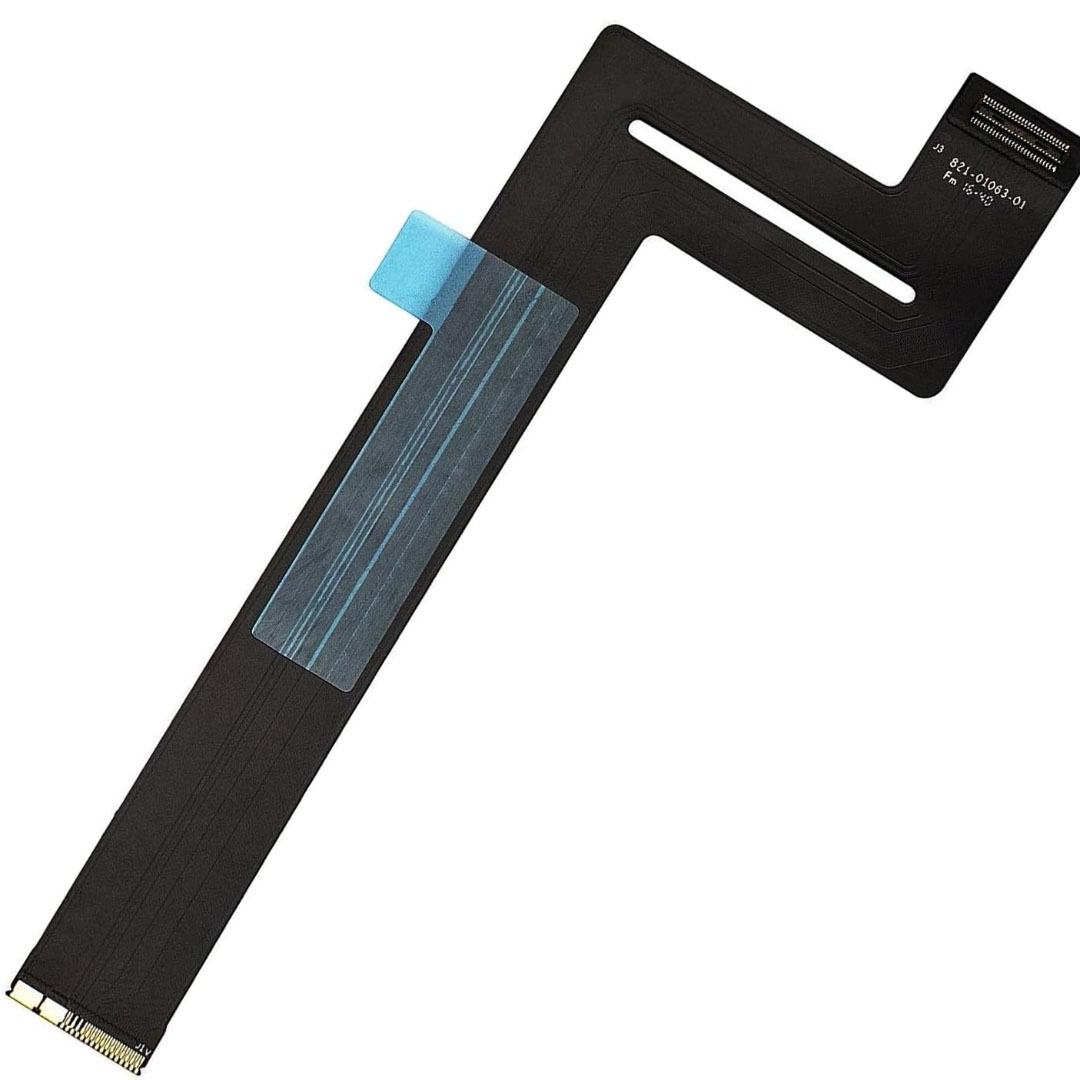
Genuine-spec touchpad flex cable for MacBook Pro 14″ (Model A2442, 2021, M1 Pro/Max)—essential for restoring full Force Touch functionality, haptic feedback, and precise multi-touch gesture control. Compatible With: MacBook Pro 14-inch (2021, Model A2442) with Apple M1 Pro or M1 Max chip (Model Identifiers: MacBookPro18,3 / MacBookPro18,4). Part Type: Touchpad flex cable only—does not include the trackpad, Taptic Engine, or mounting brackets. This is the OEM-style ribbon cable that connects the trackpad to the logic board. Function: Carries touch input, Force Touch pressure data, and haptic feedback signals—critical for macOS trackpad gestures, Force Click, and Taptic Engine responsiveness. OEM-Quality Build: Matches Apple’s original flex circuit in length, connector pitch, shielding, and bend geometry—ensures reliable signal transmission and durability under repeated use. Common Use Cases: Replacing a damaged, torn, or corroded original flex cable Completing a trackpad replacement when the original cable is unusable Fixing intermittent trackpad issues, unresponsiveness, or loss of Force Touch Replacing a damaged, torn, or corroded original flex cable Completing a trackpad replacement when the original cable is unusable Fixing intermittent trackpad issues, unresponsiveness, or loss of Force Touch Installation Note: Requires full bottom case removal and careful routing beneath internal components. Connectors use ZIF (Zero Insertion Force) sockets—must be seated properly without force. Recommended for certified or highly experienced technicians only.

Looking for a high-quality monitor to elevate your viewing experience? Meet the BenQ EW3270U 32″ 4K HDR Monitor. With its impressive 4K resolution, every detail comes to life with stunning clarity. Firstly, let’s talk about the brilliance of HDR technology. Experience richer colors and deeper contrasts that make images and videos pop off the screen. Whether you’re watching movies, gaming, or editing photos, HDR brings content to life like never before. Moreover, the spacious 32-inch screen provides ample space for multitasking and immersive entertainment. Whether you’re working on spreadsheets or enjoying your favorite games, you’ll appreciate the expansive display and crisp visuals. Additionally, the BenQ EW3270U offers advanced eye care features to reduce eye strain during long hours of use. With flicker-free technology and low blue light modes, you can enjoy extended viewing sessions comfortably. Furthermore, connectivity options abound with multiple ports, including HDMI, DisplayPort, and USB-C. Easily connect your devices and enjoy seamless integration with laptops, desktops, gaming consoles, and more. In conclusion, the BenQ EW3270U 32″ 4K HDR Monitor is the perfect choice for those seeking superior visual quality and immersive viewing experiences. Whether you’re a professional creator or a casual user, this monitor delivers unmatched performance and versatility. Upgrade your setup today and see the difference for yourself. Specifications: Display : 31.5″ VA HDR 10 Resolution : 4K UHD Refresh Rate : 60Hz Response Rate : 4 ms Built-in Speaker : 2Wx2

Late 2019 Apple MacBook Pro with 2.4GHz Intel Core i9 (16 inch, 16GB, 1TB SSD) 4GB AMD Radeon Pro 5500M Space Gray

OEM-quality trackpad replacement (without flex cable) for MacBook Pro 13″ (Models A2251 and A2289, 2020) in Silver finish—engineered for precise Force Touch response, smooth multi-touch gestures, and seamless integration with the original chassis. Compatible With: MacBook Pro 13″ (2020, Two Thunderbolt Ports) – Model A2251 (Intel Core i5/i7) MacBook Pro 13″ (2020, Four Thunderbolt Ports) – Model A2289 (Intel Core i5/i7) (Note: Both models share the same trackpad assembly despite port differences.) MacBook Pro 13″ (2020, Two Thunderbolt Ports) – Model A2251 (Intel Core i5/i7) MacBook Pro 13″ (2020, Four Thunderbolt Ports) – Model A2289 (Intel Core i5/i7) (Note: Both models share the same trackpad assembly despite port differences.) Part Type: Trackpad only—does not include the flex cable, Taptic Engine, or mounting hardware. Designed for technicians who will reuse the original internal components. Finish: Silver—matches the Silver MacBook Pro 13″ top and bottom case for perfect aesthetic continuity. Force Touch Support: Fully compatible with pressure-sensitive input and haptic feedback when paired with the original Taptic Engine and logic board—ensuring full macOS gesture functionality (e.g., Force Click, Lookup, Pressure-sensitive drawing). Precision Build: Features the same glass surface texture, curvature, and micro-click mechanism as Apple’s original—delivering consistent tracking accuracy and tactile feel. Installation Requirements: Requires full bottom case disassembly and careful transfer of the original flex cable and Taptic Engine. Adhesive must be applied precisely to maintain structural rigidity and sensor alignment. Recommended for certified or experienced repair technicians only.

A rugged and versatile pre-owned Lenovo ThinkPad T480 with 14" touchscreen, 8th Gen Core i5, 8GB RAM, and 256GB SSD—ideal for professionals who need durability, security, and touch-enabled productivity.

Genuine-spec touchpad flex cable for MacBook Pro 15″ (Model A1707, 2016–2017)—restores full Force Touch functionality, haptic feedback, and precise multi-touch gesture control during trackpad repair or replacement. Compatible With: MacBook Pro 15″ (2016) – Model A1707 (Model Identifier: MacBookPro13,2) MacBook Pro 15″ (2017) – Model A1707 (Model Identifier: MacBookPro14,2) MacBook Pro 15″ (2016) – Model A1707 (Model Identifier: MacBookPro13,2) MacBook Pro 15″ (2017) – Model A1707 (Model Identifier: MacBookPro14,2) Part Type: Touchpad flex cable only — does not include the trackpad housing, Taptic Engine, or mounting hardware. This is the OEM-style ribbon cable that connects the trackpad to the logic board. Function: Transmits: Touch input coordinates Force Touch pressure data Haptic feedback signals to the Taptic Engine Enables full macOS gesture support: Force Click, three-finger lookup, swipe navigation, pinch-to-zoom, and smooth cursor tracking. Touch input coordinates Force Touch pressure data Haptic feedback signals to the Taptic Engine Enables full macOS gesture support: Force Click, three-finger lookup, swipe navigation, pinch-to-zoom, and smooth cursor tracking. OEM-Quality Build: Matches Apple’s original specifications in: Cable length and routing path Connector pitch and ZIF latch design EMI shielding and flex durability Cable length and routing path Connector pitch and ZIF latch design EMI shielding and flex durability Common Use Cases: Replacing a torn, creased, or liquid-damaged original flex cable Completing a trackpad replacement when the original cable is compromised Fixing intermittent trackpad behavior, loss of Force Touch, or complete unresponsiveness Replacing a torn, creased, or liquid-damaged original flex cable Completing a trackpad replacement when the original cable is compromised Fixing intermittent trackpad behavior, loss of Force Touch, or complete unresponsiveness Installation Note: Requires full bottom case removal and battery disconnection. Cable routes under internal components near the right speaker and logic board. Connects via a ZIF (Zero Insertion Force) socket—must be aligned carefully and latched gently. Recommended for experienced or certified technicians only. Requires full bottom case removal and battery disconnection. Cable routes under internal components near the right speaker and logic board. Connects via a ZIF (Zero Insertion Force) socket—must be aligned carefully and latched gently. Recommended for experienced or certified technicians only.
