
A4Tech Wireless Keyboard & Mouse Combo USB | 3000N

Size 34″ Display Type IPS Color Gamut (Typ.) sRGB 99% (CIE1931) Color Depth (Number of Colors) 16.7M Pixel Pitch (mm) 0.312 x 0.310 mm Response Time (GTG) 5ms (GtG at Faster), 1ms MBR Refresh Rate 75Hz Aspect Ratio 21:9 Display Resolution UW-FHD Resolution 2560 x 1080 Brightness 400cd/m² Contrast Ratio 1000:1 Viewing Angle 178º (R/L), 178º (U/D) Surface Treatment Anti-Glare INPUT/OUTPUT HDMI Yes x 1 DisplayPort Yes x 1 USB Type-C Yes (DP Alternate Mode) Headphone Out Yes POWER Type Adapter Input 100-240 Vac, 50/60Hz Power Save/Sleep Mode (Max.) Less than 0.5W DC Off (Max.) Less than 0.3W Power Consumption (Typ.) 30W Power Consumption (Max.) 40W SPECIAL FEATURES Color Weakness Mode Yes Adaptive Sync AMD FreeSync™ Black Stabilizer® Yes Dynamic Action Sync® Yes Crosshair® Yes Flicker Safe Yes Smart Energy Saving Yes Reader Mode Yes Super Resolution+ Yes Color Calibrated Yes Dual Controller Yes OnScreen Control (OSC) Yes HDR (High Dynamic Range) HDR10 VESA DisplayHDR™ DisplayHDR™ 400 HDR Effect Yes Auto Input Switch Yes Motion Blur Reduction Technology Yes FreeSync (Low Frame Compensation) Yes 1ms Motion Blur Reduction Yes SOUND Speaker No Built-in Speaker DIMENSIONS/WEIGHTS With Stand (WxHxD) 32.2″ x 22.4″ x 9.4″ (Up), 32.2″ x 18.0″ x 9.4″ (Down) Without Stand (WxHxD) 32.2” x 14.4” x 1.8” Shipping Dimensions (WxHxD) 37.0″ x 20.3″ x 8.6″ With Stand Weight 17.4 lbs Without Stand Weight 13.2 lbs Shipping Weight 24.0 lbs STAND Display Position Adjustments Tilt/Height CABINET/ACCESSORIES Wall Mount Size (mm) 100 x 100 mm HDMI Yes 3 Years Warranty manufacturer link

Keyboard for Macbook Pro A1502 ,A1582,A1493 13" Inch Retina Year 2013,2014,2015 Part no ME864 ME864LL/A ME866LL/A APN: 661-8154, 661-02361, 818-4278 Black US Layout Keyboard for Macbook Pro A1502 ,A1582,A1493 13″ Inch Retina Year 2013,2014,2015 Part no ME864 ME864LL/A ME866LL/A APN: 661-8154, 661-02361, 818-4278 Black US Layout Compatibility: FOR MB Pro Retina 13″ A1502 Late 2013: ME864LL/A (2.4 Core i5) Late 2013: ME866LL/A (2.6 Core i5) Late 2013: ME866LL/A (2.8 Core i7) Mid 2014: MGX72LL/A (2.6 Core i5) Mid 2014: MGX92LL/A (2.8 Core i5) Mid 2014: MGX92LL/A (3.0 Core i7) Early 2015: MF839LL/A (2.7 GHz Core i5) Early 2015: MF841LL/A (2.9 GHz Core i5) Early 2015: MF843LL/A (3.1 GHz Core i7) Identifying Numbers APN: 661-8154, 661-02361, 818-4278 Compatible part numbers: ME864 ME865 ME866 MF839 MF841 MF843 MGX72 MGX92 (Layout US) Related Part #: 661-8154, 661-02361, 818-4278 High Quality Laptop Keyboard. 100% Compatible with your brand.

The MSI Pro MP161 E2 15.6″ 60Hz Portable Monitor is a lightweight and versatile display for professionals and gamers. It offers a compact design, making it easy to carry anywhere. This portable monitor features a 15.6-inch Full HD display with a resolution of 1920 x 1080. The 60Hz refresh rate ensures smooth visuals for work, entertainment, and gaming. The IPS panel delivers vibrant colors and wide viewing angles. With ultra-slim bezels, the MSI Pro MP161 E2 provides a sleek and modern look. It enhances your workspace without taking up too much space. The anti-glare screen ensures comfortable viewing in different lighting conditions. The portable monitor supports multiple connectivity options, including USB-C and Mini HDMI. This allows easy connection to laptops, tablets, and gaming consoles. Plug-and-play functionality makes setup quick and hassle-free. Weighing only 0.75 kg, the MSI Pro MP161 E2 15.6″ 60Hz Portable Monitor is perfect for travel. Its ultra-slim profile fits easily into bags, making it ideal for remote work or presentations. The built-in stand allows flexible positioning for better comfort. You can adjust the screen angle for the best viewing experience. The durable design ensures long-term reliability. With low blue light technology, this portable monitor reduces eye strain during extended use. It is perfect for professionals who spend hours in front of a screen. In conclusion, the MSI Pro MP161 E2 15.6″ 60Hz Portable Monitor is a great choice for those needing a secondary display. Its lightweight design, excellent visuals, and versatile connectivity make it ideal for work and entertainment. Specifications: Display : 15.6″ IPS Resolution : 1920×1080 FHD Refresh Rate : 60Hz Response Rate : 4ms Speaker : 1.5W x2

The Lenovo L24E-30 24″ 60Hz Monitor offers a perfect blend of style and performance for your computing needs. Whether you’re working, gaming, or streaming, this monitor delivers an exceptional visual experience. With its 24-inch Full HD display, the Lenovo L24E-30 provides crisp and clear visuals. Enjoy stunning detail and vibrant colors that bring your content to life, whether you’re editing photos or watching videos. The 60Hz refresh rate of the Lenovo L24E-30 ensures smooth and fluid motion, reducing screen tearing and ghosting. This makes it ideal for fast-paced games and dynamic videos, offering a more immersive experience. Designed with a slim and sleek profile, the Lenovo L24E-30 adds a modern touch to any workspace. Its narrow bezels create a seamless multi-monitor setup, allowing you to expand your view effortlessly. Featuring AMD FreeSync technology, the Lenovo L24E-30 synchronizes the monitor’s refresh rate with your graphics card. This reduces screen stuttering and provides a smoother gaming experience, even during intense action scenes. The Lenovo L24E-30 24″ 60Hz Monitor is equipped with multiple connectivity options, including HDMI and VGA ports. This ensures compatibility with a wide range of devices, making it a versatile addition to your setup. For comfortable viewing, the Lenovo L24E-30 includes eye-care features like low blue light and flicker-free technology. These features help reduce eye strain during long hours of use, enhancing your overall comfort. In conclusion, the Lenovo L24E-30 24″ 60Hz Monitor combines stylish design, smooth performance, and eye-care features for an outstanding viewing experience. Upgrade to the Lenovo L24E-30 today and enjoy enhanced productivity and entertainment. Specifications: Display : 24″ VA Resolution : FHD 1920 x 1080 Refresh Rate : 60Hz Response Rate : 4ms

The Samsung S27D300 is a 27-inch monitor designed to deliver clear and vibrant visuals for both work and entertainment. With a Full HD resolution of 1920 x 1080 pixels, it ensures sharp and detailed images. The monitor features an IPS panel, providing consistent and accurate colors across wide viewing angles. Its 100Hz refresh rate offers smoother motion, reducing blur during fast-paced scenes. The monitor supports 16.7 million colors, ensuring accurate color reproduction. Connectivity options include one HDMI port and one VGA (D-Sub) port, allowing compatibility with various devices. It also features tilt adjustment, enabling users to find a comfortable viewing angle. In terms of power consumption, the monitor uses approximately 25W during typical operation. It operates within a voltage range of 100 – 240 V at 50 – 60 Hz. Measuring 24.1 inches in width, 7.9 inches in depth, and 18.5 inches in height with the stand, the monitor weighs 6.4 pounds. Without the stand, it measures 24.1 inches in width, 1.4 inches in depth, and 14.2 inches in height. The Samsung S27D300 is a reliable choice for users seeking a monitor that balances performance and affordability, suitable for both home and office use. Specifications: Display : 27″ Resolution : 1920 x 1080 FHD Refresh Rate : 100Hz Response Rate : 5ms

A lightweight and efficient pre-owned Lenovo ThinkPad T14s Gen 2 with 14" display, AMD Ryzen 5 5650U, 16GB RAM, and 512GB SSD—featuring integrated AMD Radeon graphics for smooth productivity and all-day battery life in a premium ultraportable.

The Dell Latitude 5410 is a dependable, enterprise-grade 14-inch business laptop built for smooth multitasking and daily office productivity. Powered by a 10th Generation Intel Core i5 processor and fast SSD storage, this pre-owned Grade-B unit offers excellent performance value with minor, visible cosmetic wear on the outer chassis.

OEM-quality trackpad replacement (without flex cable) for MacBook Pro 14″ (Model A2442, 2021, M1 Pro/Max) in Space Gray finish—engineered for precise Force Touch response, smooth multi-touch gestures, and seamless integration with the original chassis. Compatible With: MacBook Pro 14-inch (2021, Model A2442) with Apple M1 Pro or M1 Max chip. Part Type: Trackpad only—does not include the flex cable, Taptic Engine, or mounting brackets. Designed for professional technicians who will reuse or transfer the original internal components. Finish: Space Gray—matches the Space Gray MacBook Pro 14″ for flawless aesthetic continuity. (Note: Apple uses color-matched trackpads, and Space Gray units require this specific finish.) Force Touch Support: Fully compatible with pressure-sensitive input and haptic feedback when paired with the original Taptic Engine and logic board—ensuring full macOS gesture functionality. Precision Engineering: Features the same glass surface texture, curvature, and micro-click mechanism as Apple’s original—delivering consistent tracking accuracy and tactile feel. Installation Requirements: Requires complete bottom case disassembly and careful transfer of the original flex cable and Taptic Engine. Proper adhesive application is critical to maintain structural integrity and sensor alignment. Recommended for certified or experienced repair technicians only.

Arabic Silicone Keyboard Skin Cover for MacBook Pro 13" A1708 Without Touch bar and MacBook 12" A1534 with Retina Display US Layout (Black) Arabic Silicone Keyboard Skin Cover for MacBook Pro 13″ A1708 Without Touch bar and MacBook 12″ A1534 with Retina Display US Layout (Black) About this item Arabic language silicone keyboard skin, US version, perfect fit for your MacBook 12″ A1534, which was released in 2015 & new MacBook Pro 13-Inch 13″ Model A1708 without/no Touch Bar, which was released in 2016; Do not fit for Europe Version MacBook Handmade Skin – XSKN is the original Manufacturer of these “Keyboard Art Skin” silicone covers. They are durable, thin and soft with a cashmere feel. The keys fit snug over the keyboard, smooth surface treatment, suit for regular laptop user who types a lot and quickly Each XSKN silicone skin is heat molded to ensure, each color is paints taking hand screened using silicone paint which is heat fuses into the silicone keyboard skin to become one, making it Soft, ultra-thin, durable and easy to washable High quality silicone raw material assure no extension with longtime using. Every detail clearly prinited, imported ink keep it looking good, rubber coating help to remain in good condition Aside from being beautiful they protect your keyboard from spills, crumbs, animal hair and dust. Washable, can be cleaned easily

Looking for a monitor that delivers unparalleled visual performance? Look no further than the ViewSonic ColorPro 32″ 4K Monitor. With its cutting-edge technology and sleek design, it’s the ultimate choice for professionals and enthusiasts alike. Featuring a stunning 32-inch 4K display, this monitor brings your content to life with breathtaking clarity and detail. Whether you’re editing photos, designing graphics, or watching movies, every pixel pops with vivid color and crisp definition. Moreover, the ViewSonic ColorPro monitor is calibrated to deliver precise color accuracy, making it ideal for graphic design, photography, and video editing. Say goodbye to color distortion and enjoy true-to-life hues that enhance your creative workflow. But it’s not just about visuals—the ViewSonic ColorPro monitor also offers exceptional functionality. With advanced connectivity options like HDMI, DisplayPort, and USB-C, you can easily connect your devices for seamless multitasking. Additionally, the monitor’s ergonomic design ensures comfortable viewing during long hours of use. Adjustable tilt, swivel, and height settings allow you to find the perfect position for maximum productivity and comfort. In summary, the ViewSonic ColorPro 32″ 4K Monitor combines stunning visuals, precise color accuracy, and versatile connectivity to deliver an unparalleled viewing experience. Whether you’re a professional creator or a discerning enthusiast, elevate your display with ViewSonic ColorPro. Specifications: Display : 32″ IPS Resolution : 3840 x 2160 UHD Refresh Rate : 60Hz Response Rate : 5ms

Are you in need of a reliable monitor for your daily tasks? Look no further than the ViewSonic 24″ 60Hz monitor. With its sleek design and impressive features, it’s the perfect companion for work, gaming, and entertainment. First and foremost, let’s talk about the display quality. This monitor boasts a 24-inch screen size, providing ample space for multitasking without compromising clarity. Whether you’re editing documents, watching videos, or playing games, every detail is crisp and clear. Furthermore, with a refresh rate of 60Hz, you’ll experience smooth and fluid motion in fast-paced scenes. Say goodbye to motion blur and enjoy seamless gameplay, smooth scrolling, and lag-free video playback. In addition, the ViewSonic monitor offers versatile connectivity options. With HDMI and VGA inputs, you can easily connect to your PC, laptop, gaming console, or other devices. Switch between tasks effortlessly and enjoy hassle-free setup. Moreover, ergonomic design features ensure comfortable viewing for extended periods. Adjustable tilt allows you to find the perfect angle for your workspace, reducing eye strain and fatigue. Enhance your productivity and comfort with this user-friendly monitor. In conclusion, the ViewSonic 24″ 60Hz monitor combines superior display quality, smooth performance, and versatile connectivity in a sleek and ergonomic design. Whether you’re working, gaming, or watching movies, elevate your viewing experience with ViewSonic. Specifications: Display : 24″ IPS Resolution : 1920×1080 FHD Refresh Rate : 60Hz Response Rate : 5ms

Logitech G403 HERO – Ergonomic wired gaming mouse with HERO 25K sensor and ultra-precise 25,600 DPI tracking.Delivers pro-grade performance with customizable RGB, 6 buttons, and optional weight tuning. ✅ Full Specifications: Model: Logitech G403 HERO Sensor: HERO 25K Optical Sensor DPI: 100 – 25,600 DPI (adjustable with no smoothing, acceleration, or filtering) Polling Rate: 1000 Hz (1ms response time) Tracking Speed: >400 IPS Acceleration: >40G Buttons: 6 programmable buttons (including 2 side buttons) Switches: Mechanical with metal spring button tensioning (rated for 20M+ clicks) Lighting: RGB Lighting (logo and scroll wheel, customizable via G HUB) Weight: Approx. 87g (mouse only) + 10g optional weight Grip Style: Palm and claw grip support Cable: 2.1 meters (standard rubber cable) Build: Ergonomic right-handed design with rubber side grips Software: Logitech G HUB (for DPI, lighting, macros, and profiles) Compatibility: Windows 7 or later, macOS 10.11 or later, Chrome OS Onboard Memory: Yes (save DPI and button settings directly to the mouse)

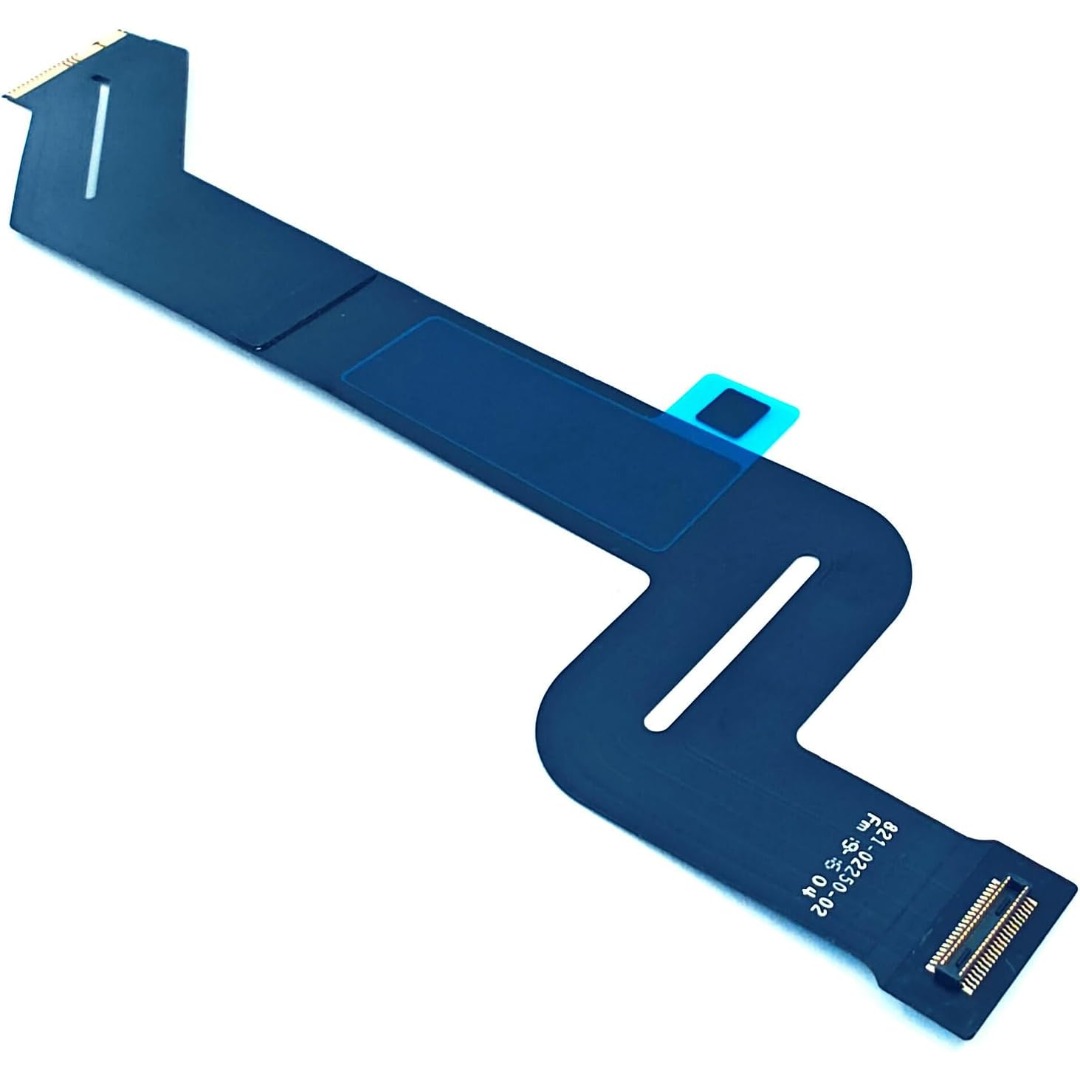
Genuine-spec touchpad flex cable for MacBook Pro 15″ (Model A1706 – 2017 and A1989 – 2018/2019)—restores full Force Touch functionality, haptic feedback, and precise multi-touch gesture control during trackpad repair or replacement. Compatible With: MacBook Pro 15″ (2017) – Model A1706 (Model Identifier: MacBookPro14,3) MacBook Pro 15″ (2018–2019) – Model A1989 (Model Identifier: MacBookPro15,2) ✅ Note: Apple used the same trackpad assembly and flex cable across both A1706 and A1989 15″ models—making this part interchangeable between them. MacBook Pro 15″ (2017) – Model A1706 (Model Identifier: MacBookPro14,3) MacBook Pro 15″ (2018–2019) – Model A1989 (Model Identifier: MacBookPro15,2) ✅ Note: Apple used the same trackpad assembly and flex cable across both A1706 and A1989 15″ models—making this part interchangeable between them. ✅ Note: Apple used the same trackpad assembly and flex cable across both A1706 and A1989 15″ models—making this part interchangeable between them. Part Type: Touchpad flex cable only — does not include the trackpad housing, Taptic Engine, or mounting hardware. This is the OEM-style ribbon cable connecting the trackpad to the logic board. Function: Transmits: Touch input coordinates Force Touch pressure data Haptic feedback signals to the Taptic Engine Enables full macOS gesture support: Force Click, three-finger lookup, swipe navigation, pinch-to-zoom, and smooth cursor tracking. Touch input coordinates Force Touch pressure data Haptic feedback signals to the Taptic Engine Enables full macOS gesture support: Force Click, three-finger lookup, swipe navigation, pinch-to-zoom, and smooth cursor tracking. OEM-Quality Build: Matches Apple’s original in: Cable length and routing Connector pitch and ZIF latch design EMI shielding and flex durability Cable length and routing Connector pitch and ZIF latch design EMI shielding and flex durability Common Use Cases: Replacing a torn, creased, or liquid-damaged original flex cable Completing a trackpad replacement when the original cable is compromised Fixing intermittent trackpad behavior, loss of Force Touch, or complete unresponsiveness Replacing a torn, creased, or liquid-damaged original flex cable Completing a trackpad replacement when the original cable is compromised Fixing intermittent trackpad behavior, loss of Force Touch, or complete unresponsiveness Installation Note: Requires full bottom case removal and battery disconnection. Cable routes under internal components near the right speaker and logic board. Connects via a ZIF (Zero Insertion Force) socket—must be aligned carefully and latched gently. Recommended for experienced or certified technicians only. Requires full bottom case removal and battery disconnection. Cable routes under internal components near the right speaker and logic board. Connects via a ZIF (Zero Insertion Force) socket—must be aligned carefully and latched gently. Recommended for experienced or certified technicians only.

Model: Cozy Classic Case Material: Waterproof 900D polyester+ Micro Fiber+ Faux fur lining Waterproof material Anti-scratch fur lining Durabl& Smooth YKK zipper Patent anti-drop strip inside Net weight: 14inch/560g, 16inch/650g 14 inch: 35.5*25*4.5cm 16 inch: 39.5*27*4.5 WiWU Cozy Classic Laptop Sleeve Protect your investment with the WiWU Cozy Classic, a premium laptop sleeve that balances elegant aesthetics with rugged, everyday protection. Shockproof Security: Engineered with a specialized 360° anti-drop border and reinforced corners to safeguard your device against accidental falls and impacts. Weatherproof Shield: Made from high-density waterproof polyester, ensuring your laptop remains completely dry and safe from spills or rain. Scratch-Free Interior: Features a luxurious, soft faux-fur lining that cushions your device and prevents surface scratches during transport. Travel-Ready Design: Ultra-slim and lightweight with a sturdy, retractable handle, making it easy to carry alone or slip into a larger bag. Extra Storage: Includes a spacious front zippered pocket to neatly organize your charger, mouse, and cables alongside your laptop. Available for: 14″ | 16″ Models

Used, original 35 W USB-C charger for Mac — reliable Apple power adapter (dual USB-C) for charging your Mac and other devices. This is an authentic Apple 35 W USB-C power adapter (dual-port) — used but tested. It’s built to charge MacBooks, iPhones, iPads, and other USB-C devices. Though lower wattage than larger Mac adapters, it works well for light use or supplemental charging. Features & Behavior Dual USB-C ports: can charge two devices simultaneously Intelligent power distribution: if both ports are used, the output splits evenly (~17.5 W each) USB Power Delivery support across standard profiles (5V, 9V, 15V, 20V) Accepts input 100-240V AC, so usable worldwide (with correct plug) Compact form factor in one variant, or standard “duckhead” plug style in another Specifications Strengths & Limitations Pros Authentic Apple unit — safer and more reliable than generic chargers Dual ports give flexibility — charge phone + Mac concurrently Portable and suitable for travel (universal voltage) Cons 35 W is low for MacBook Pro under load — might not maintain charging during heavy use When both ports used, power is halved (~17.5 W each) Used condition may include wear, scuffs, or reduced efficiency

WIWU Osun PU Leather Backpack – Stylish and compact bag crafted from water-resistant PU leather; fits 15.6″ laptops yet weighs only ~387 g.Offers organized storage, durable build, and comfy straps—perfect for daily commutes, work, or travel. Model: WIWU Osun PU Leather Notebook Backpack Material: Water-resistant 1680D polyester exterior with upscale PU leather finish Laptop Compartment: Padded sleeve fits up to 15.6″ laptops, shock-resistant protection Design: Compact “mini” size (26.5 × 21 × 6 cm), yet offers large internal capacity Pockets: Front zip pocket for phone and accessories; interior organization for tech and essentials Comfort: Adjustable padded shoulder straps, soft and skin-friendly inner lining Weight: Approximately 387 g (including packing) Extras: Sleek metal WIWU logo; suitable for travel, business, daily commuting

A high-efficiency pre-owned HP EliteBook 865 G9 with 16" display, AMD Ryzen 7 6850U, 16GB RAM, 512GB SSD, and integrated AMD Radeon 680M graphics—ideal for business professionals seeking all-day battery life, strong performance, and enterprise security.

HP E24 G5 FHD Monitor If you’re in the market for an affordable yet high-quality monitor for your everyday computing needs, look no further than the HP E24 G5 FHD Monitor. This versatile monitor is designed to meet your requirements without breaking the bank. The HP E24 G5 features a Full High Definition (FHD) display, ensuring that you’ll enjoy sharp and vivid visuals whether you’re working on documents, streaming content, or engaging in light gaming. With its 24-inch screen size, this monitor strikes a balance between providing adequate screen real estate for multitasking and conserving desk space. It’s an ideal addition to compact workstations. Setting up the E24 G5 is a breeze, thanks to its user-friendly interface and easy connectivity options. You can swiftly connect it to your PC or laptop and start your computing tasks without any hassle. The monitor’s design is both sleek and functional, making it a practical addition to any workspace. Its compact and modern appearance easily complements your existing setup. Whether you’re a student, professional, or home user, the HP E24 G5 delivers reliable performance without straining your budget. It’s a cost-effective choice that doesn’t compromise on quality. Specifications: 23.8″ FHD (1920 x 1080 @ 75 Hz) Flat IPS with Edge-lit 1 HDMI 1.4, 1 DisplayPort™ 1.2 Tilt and Height Adjustable, Pivot, Swivel Stand, VESA Mountable On-screen controls, Anti-glare, HP Eye Ease

Genuine-spec touchpad flex cable for Apple’s 12-inch MacBook (Model A1534, Early 2015 / Early 2016 / Mid 2017)—essential for restoring full Force Touch trackpad functionality, haptic feedback, and multi-touch gesture support. Compatible With: MacBook 12″ (Early 2015) – 1.1GHz Core M MacBook 12″ (Early 2016) – 1.1GHz/1.3GHz Core M MacBook 12″ (Mid 2017) – 1.2GHz/1.3GHz Core m3/i5/i7 All share Model Number A1534 and Model Identifier MacBook8,1 / MacBook9,1 / MacBook10,1 respectively. MacBook 12″ (Early 2015) – 1.1GHz Core M MacBook 12″ (Early 2016) – 1.1GHz/1.3GHz Core M MacBook 12″ (Mid 2017) – 1.2GHz/1.3GHz Core m3/i5/i7 All share Model Number A1534 and Model Identifier MacBook8,1 / MacBook9,1 / MacBook10,1 respectively. Part Type: Touchpad flex cable only—does not include the trackpad housing, Taptic Engine, or mounting brackets. This is the ribbon cable that connects the Force Touch trackpad to the logic board. Function: Critical for Force Touch functionality—transmits pressure-sensitive input, multi-touch gestures (e.g., pinch, swipe, Force Click), and haptic feedback signals to the Taptic Engine. OEM-Quality Construction: Precisely matches Apple’s original in length, connector pitch, shielding, and routing—ensures reliable signal integrity and compatibility with macOS. Common Use Cases: Replacing a torn, creased, or liquid-damaged flex cable Restoring unresponsive or erratic trackpad behavior Completing a trackpad replacement when the original cable is unusable Replacing a torn, creased, or liquid-damaged flex cable Restoring unresponsive or erratic trackpad behavior Completing a trackpad replacement when the original cable is unusable Installation Note: Requires full bottom case removal and delicate disconnection of the ZIF connector. The cable routes tightly under the battery—extreme care is required. Recommended for experienced or certified technicians only.
