
Fast-charging feature available on select iPhone and iPad models.

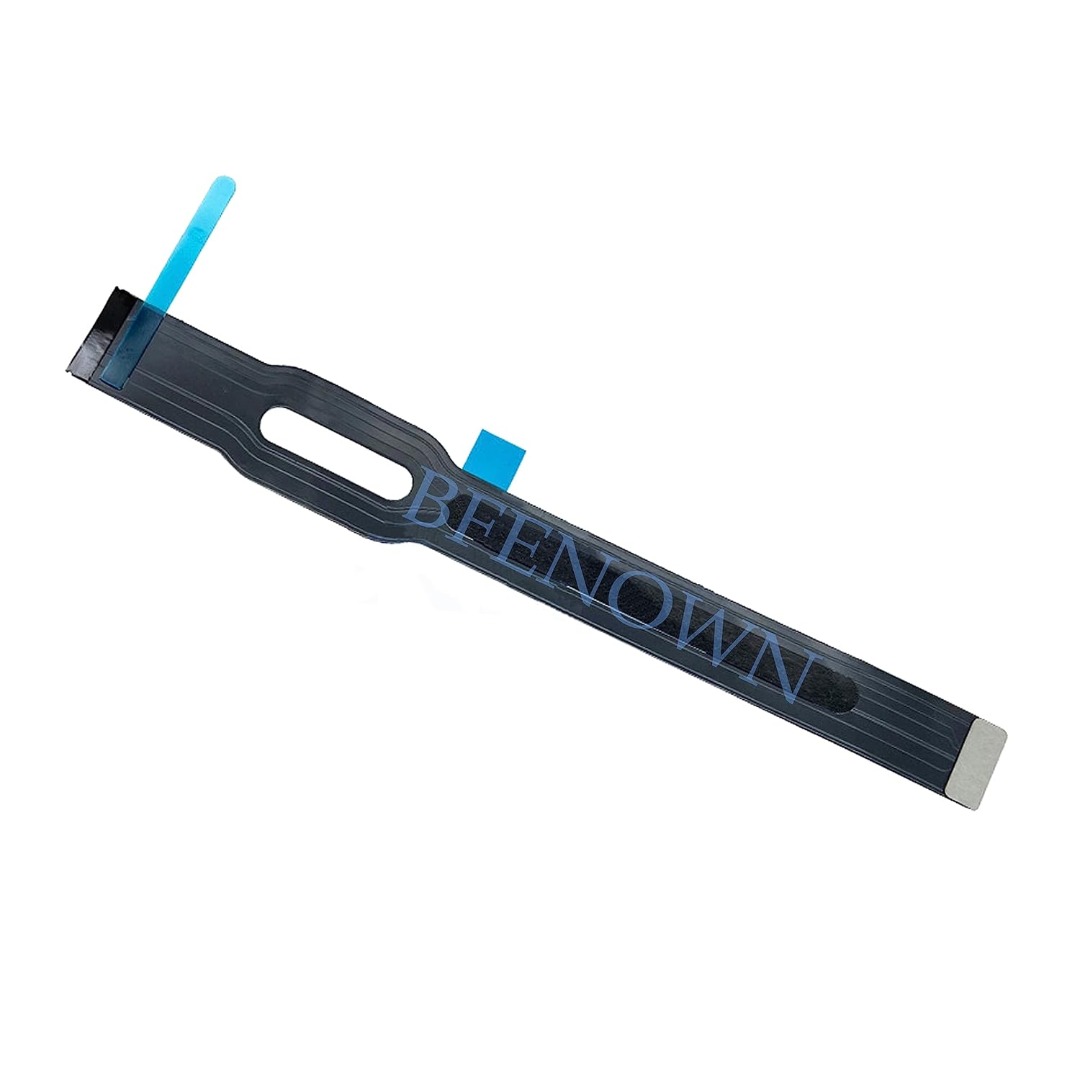
Genuine-spec touchpad flex cable compatible with both MacBook Air A2179 (Intel, 2020) and A2337 (M1, 2020)—restores full Force Touch functionality, haptic feedback, and precise multi-touch gesture control during trackpad repair or replacement. Compatible With: MacBook Air 13″ (2020, Intel) – Model A2179 (Model Identifier: MacBookAir9,1) MacBook Air 13″ (2020, Apple M1) – Model A2337 (Model Identifier: MacBookAir10,1) MacBook Air 13″ (2020, Intel) – Model A2179 (Model Identifier: MacBookAir9,1) MacBook Air 13″ (2020, Apple M1) – Model A2337 (Model Identifier: MacBookAir10,1) ✅ Important Note: Despite different processors (Intel vs. M1), Apple used the same trackpad assembly and flex cable in both A2179 and A2337. This makes the flex cable fully interchangeable between the two models. Part Type: Touchpad flex cable only — does not include the trackpad housing, Taptic Engine, or mounting hardware. This is the OEM-style ribbon cable that connects the trackpad to the logic board. Function: Transmits: Touch input coordinates Force Touch pressure data Haptic feedback signals to the Taptic Engine Enables full macOS gesture support: Force Click, three-finger lookup, swipe navigation, pinch-to-zoom, and smooth cursor tracking. Touch input coordinates Force Touch pressure data Haptic feedback signals to the Taptic Engine Enables full macOS gesture support: Force Click, three-finger lookup, swipe navigation, pinch-to-zoom, and smooth cursor tracking. OEM-Quality Build: Matches Apple’s original specifications in: Cable length and routing path Connector pitch and ZIF latch design EMI shielding and flex durability Cable length and routing path Connector pitch and ZIF latch design EMI shielding and flex durability Common Use Cases: Replacing a torn, creased, or liquid-damaged original flex cable Completing a trackpad replacement when the original cable is compromised Fixing intermittent trackpad behavior, loss of Force Touch, or complete unresponsiveness Replacing a torn, creased, or liquid-damaged original flex cable Completing a trackpad replacement when the original cable is compromised Fixing intermittent trackpad behavior, loss of Force Touch, or complete unresponsiveness Installation Note: Requires full bottom case removal and battery disconnection. Cable routes under the right side of the battery and logic board. Connects via a ZIF (Zero Insertion Force) socket—align carefully and latch gently. Recommended for experienced or certified technicians only. Requires full bottom case removal and battery disconnection. Cable routes under the right side of the battery and logic board. Connects via a ZIF (Zero Insertion Force) socket—align carefully and latch gently. Recommended for experienced or certified technicians only.

Dell 19.5V 4.62A 90 Watt Replacement Laptop Adapter/Charger New Small Pin 4.5 x 3.0 mm for Dell Latitude 3500 3379 3400 3301 3590 3490 7370, RWHHR, 450-AECO (Power Cord Included)

Genuine-quality replacement A1989 battery testing flex cable—brand new and ready for professional MacBook Pro 15" (2018–2019) battery diagnostics and repairs. Genuine-quality replacement A1989 battery testing flex cable—brand new and ready for professional MacBook Pro 15″ (2018–2019) battery diagnostics and repairs. This is a brand-new A1989 Battery Testing Flex Cable, designed specifically for use in MacBook Pro 15-inch models from 2018 and 2019 (A1989) during battery replacement or diagnostic procedures. The flex cable connects the battery to the logic board’s test points, allowing technicians to verify battery health, voltage, and communication before final reassembly—ensuring safe and accurate repairs. Made with high-quality materials and precise engineering, this flex cable matches OEM specifications for fit, function, and reliability. It’s an essential tool for certified repair shops, independent technicians, and advanced DIYers performing battery servicing on T2-chip MacBook Pro models. Please note: This is not a full battery—it is the small flex cable used during battery testing and installation. Proper handling and ESD-safe practices are recommended during installation. Compatible with: MacBook Pro 15″ (2018, A1989) MacBook Pro 15″ (2019, A1989)

The Stylus Pen is an active capacitive stylus pen designed for smooth and precise writing on all capacitive touchscreens. Featuring a superfine copper nib, palm rejection, and rechargeable battery, it’s perfect for note-taking, drawing, and everyday touchscreen use with iPads, iPhones, tablets, and smartphones. The Superfine Nib Active Capacitive Stylus Pen (Silver) is built for users who want accurate and smooth writing on touchscreens without needing Bluetooth or an app. Its superfine elastic copper tip provides delicate strokes while helping protect your screen from scratches. With palm rejection support, rechargeable battery, and one-click operation, it’s ideal for students, professionals, and creators using iPads, iPhones, and other capacitive touchscreen devices. Superfine Copper Nib for smooth writing and accurate strokes Palm Rejection Technology for comfortable writing experience No Bluetooth / No App Required – one-click operation Rechargeable Battery with up to 10 hours working time Magnetic Cap Design prevents loss and keeps the pen protected Compatible with iOS & All Capacitive Touchscreens Lightweight & Portable ideal for travel, school, and office use Compatible with all capacitive touchscreen devices, including iPad Pro, iPad Mini, iPad Air, and iPhones (11 series and earlier generations), plus most Android tablets and touchscreen phones.

The Apple Magic Mouse (USB-C version) is a sleek, minimalist multi-touch wireless mouse built for Mac users. It offers smooth gesture support, Bluetooth connectivity and a built-in rechargeable battery — a great choice if you prefer a clean desk setup and full compatibility with macOS and iPadOS. General Name: Magic Mouse (USB-C) — part of Apple’s pointing-device lineup. Wireless connectivity: Bluetooth. Rechargeable battery: built-in, no disposable AA cells. Charging / port: USB-C port (bottom of mouse) for pairing and charging. Compatibility: Requires a Mac with macOS 15.1 or later, or an iPad with iPadOS 18.1 or later. Size & Weight Height: ~0.85 inch (2.16 cm) Width: ~2.25 inch (5.71 cm) Depth: ~4.47 inch (11.35 cm) Weight: ~0.22 pound (0.099 kg) (varies slightly by manufacturing) Features Multi-Touch surface: supports gestures such as swiping between pages, scrolling through documents, zooming. Glide / foot design: optimized for smooth movement across desktop surfaces. Rechargeable battery life: about a month or more between charges (typical use) per Apple spec. Used Condition ConsiderationsSince you’re specifying a used unit: Check for wear on the bottom feet / skates — these degrade and affect glide. Verify battery capacity / health (rechargeable batteries age). Confirm the port is functioning (USB-C) and Bluetooth connectivity is stable. Look for signs of excessive surface scratches on the multi-touch top — may impair gestures. Ensure the firmware / Mac recognizes it fully (gestures working). Upgradability / Limitations Not user-upgradable: You cannot replace the internal battery or change internals easily. Design limitation: The USB-C port remains on the bottom of the mouse, meaning you cannot use it while charging unless you flip it. This design is still criticized. Ergonomics: The flat, low-profile design is stylish but may not suit extended-use comfort for some users.

7CJRC Laptop Battery for Dell Latitude 7470 7270 E7270 E7470 Series 21X15 021X15 KNM09 0KNM09 TX283 0TX283 451-BBSW 451-BBWR 11.4V 42Wh 3-Cell About this item Battery type: Li-ion; Voltage: 11.4V; Capacity: 42Wh; Cells: 3-cell Compatible Models: Fit for Dell Latitude 7470 7270 E7470 E7270 Series Replace Part Numbers: 7CJRC KNM09 0KNM09 21X15 021X15 TX283 0TX283 451-BBSW 451-BBWR V6VMN 100% New from Manufacturer. Up to 500 recharge cycles over the life of the battery. The actual operation time will depend on how much electricity is required by the device and how you use it

BATTERY ACER AS16A5K AS16A8K Battery for Acer Aspire E5-523 E5-553 E5-576 E5-774G N16Q2 E5-576G E5-575G E5-475 F5-573 E5-575-52JF E5-575-33BM E5-575G-76YK E5-575-54SM E5-575G-57D4 E5-576-392H E5-575-54E8 4ICR19/66 About this item 【Battery type】 Voltage:14.8V; Capacity: 2200mAh /33Wh Color:black 【Note】It is not compatible with E5-575G-53VG, E5-575G-549D,E5-575G-5341,E5-575G-33BM, E5-575G-51VI. Before placing an order, please ensure your old battery’s model is AS16A5K, KAS16A7K, and AS16A8K (14.8V 4-cell). Please do not order this battery if your old battery’s model is s AS16B5J or AS16B8J (10.95V /11.1V 6-cell). They can not replace each other 【Compatible 】Laptop Models for Acer Aspire E15 E5-475 E5-475G E5-523 E5-523G E5-553 E5-553G E5-575 E5-575G E5-575T E5-575TG E5-576 E5-576G E5-774 E5-774G F5-573 F5-573G F5-573T F5-771 F5-771G Series E5-575-52IF E5-575-53EJ E5-575G-59EE E5-575G-53VG E5-575G-57KJ E5-575-74RC E5-575-72N3 E5-575G-52RJ E576G-5762 E5-575G-53VG E5-575G-549D E5-575G-5341 E5-575G-33BM E5-575G-51VI E5-575G-59EE E5-575G-59GV E5-575G-765N E5-575G-76YK 【Compatible Part Number】AS16A5K AS16A7K AS16A8K 4ICR19/66 N16Q1 N16Q2 KT.00605.002 KT.00405.001 KT.00407.004 KT.0040G.007 【Security】All our products are Certified by CE, and FCC for safety. Strict guidelines for compatibility, and standards compliance for environment safety.

Specification Details Input/Output Other Battery Capacity (mAh) 5000 Number of Devices Connectable Simultaneously 1 Touch Screen No Sound Mode Stereo Sound Mode Category Speakers Use Camping Tweeter Material Other Bluetooth Version 5.0 Input Power (W) 25-49 W Voice Control Yes Frequency Range 80 Hz – 20 KHz Display Screen No Waterproof Yes Support APP Yes Support Memory Card Yes Material Plastic Playback Function MP3, FLAC, APE, WAV Remote Control No Intelligent Personal Assistant Built-in Microphone Yes Audio Crossover Full-Range Number of Loudspeaker Enclosures 2 Power Source Battery PMPO 40 W Channels 1.1 Communication Audio Line Speaker Type Portable Cabinet Material Plastic Brand Name YIBOLANG Origin Mainland China Certification CE

Product Name WiWU Dual USB Quick Wall Charger 20W Fast Charging For Smart PhoneColorWhiteFeature& Photos

Genuine-spec touchpad flex cable for MacBook Pro 15″ (Model A1990, 2018–2019, Intel)—essential for restoring full Force Touch functionality, haptic feedback, and precise multi-touch gesture control during trackpad repair or replacement. Compatible With: MacBook Pro 15-inch (2018 & 2019, Model A1990, Model Identifiers MacBookPro15,2) with Intel Core i7/i9 processors. Part Type: Touchpad flex cable only — does not include the trackpad housing, Taptic Engine, or mounting hardware. This is the OEM-style ribbon cable that connects the trackpad to the logic board. Function: Transmits: Touch input coordinates Force Touch pressure data Haptic feedback signals to the Taptic Engine Enables full macOS gesture support: Force Click, three-finger lookup, swipe navigation, pinch-to-zoom, and smooth cursor tracking. Touch input coordinates Force Touch pressure data Haptic feedback signals to the Taptic Engine Enables full macOS gesture support: Force Click, three-finger lookup, swipe navigation, pinch-to-zoom, and smooth cursor tracking. OEM-Quality Build: Matches Apple’s original specifications in: Cable length and routing path Connector pitch and ZIF latch design EMI shielding and flex durability Cable length and routing path Connector pitch and ZIF latch design EMI shielding and flex durability Common Use Cases: Replacing a torn, creased, or liquid-damaged original flex cable Completing a trackpad replacement when the original cable is unusable Fixing intermittent trackpad behavior, loss of Force Touch, or complete unresponsiveness Replacing a torn, creased, or liquid-damaged original flex cable Completing a trackpad replacement when the original cable is unusable Fixing intermittent trackpad behavior, loss of Force Touch, or complete unresponsiveness Installation Note: Requires full bottom case removal and battery disconnection. Cable routes under internal components near the right speaker and logic board. Connects via a ZIF (Zero Insertion Force) socket—must be aligned carefully and latched gently. Recommended for experienced or certified technicians only. Requires full bottom case removal and battery disconnection. Cable routes under internal components near the right speaker and logic board. Connects via a ZIF (Zero Insertion Force) socket—must be aligned carefully and latched gently. Recommended for experienced or certified technicians only.

Genuine Apple MagSafe 3 charging cable (2-meter length), originally shipped with MacBook Pro 14"/16" (2021, M1 Pro/Max) and MacBook Pro 16" (2023, M2/M3 Max). Used but fully functional, tested for safe power delivery and data handshake with Apple laptops. Compatibility: MacBook Pro 14″ (2021–2023, M1 Pro/Max, M2 Pro/Max, M3 Pro/Max) MacBook Pro 16″ (2021–2023, M1 Max, M2 Max, M3 Max) Works with Apple 67W, 96W, and 140W USB-C Power Adapters (sold separately) MacBook Pro 14″ (2021–2023, M1 Pro/Max, M2 Pro/Max, M3 Pro/Max) MacBook Pro 16″ (2021–2023, M1 Max, M2 Max, M3 Max) Works with Apple 67W, 96W, and 140W USB-C Power Adapters (sold separately) Connector Type: MagSafe 3 (magnetic, tri-oval tip) on laptop end USB-C on power adapter end MagSafe 3 (magnetic, tri-oval tip) on laptop end USB-C on power adapter end Cable Length: 2 meters (≈6.6 feet) – longer than the standard 1.8m cable, ideal for flexible desk or bedside setups. Condition: Original Apple cable, previously used but fully tested: No fraying, kinks, or exposed wires MagSafe 3 connector intact with strong magnetic hold Charges MacBook at full rated speed (supports up to 140W with compatible adapter) Passes Apple’s authentication handshake (no “Not Supported” warnings) No fraying, kinks, or exposed wires MagSafe 3 connector intact with strong magnetic hold Charges MacBook at full rated speed (supports up to 140W with compatible adapter) Passes Apple’s authentication handshake (no “Not Supported” warnings) What’s Included: MagSafe 3 to USB-C cable only Power adapter NOT included MagSafe 3 to USB-C cable only Power adapter NOT included Why Choose This: Cost-effective alternative to buying new 100% genuine Apple—no third-party risks (overheating, slow charging, compatibility errors) Ideal for backup, travel, or replacing a damaged original cable Cost-effective alternative to buying new 100% genuine Apple—no third-party risks (overheating, slow charging, compatibility errors) Ideal for backup, travel, or replacing a damaged original cable

Remax F41 6″ Wireless Clamp Fan – USB‑C rechargeable (4,000 mAh), 4 speeds, 720° rotation, up to 3 hrs runtime.Modular 3‑in‑1 design with detachable grille, washable parts, and night‑light feature. Model: Remax F41 6-inch Wireless Air Circulating Clamp Fan Power & Battery: Rechargeable 4,000 mAh battery; USB-C charging (~3 hours to full charge), offers ~3 hours continuous use at high speeds Operation Modes: 4 fan speeds, 3‑in‑1 usage (desktop, clamp, or hanging), 720° wide-angle rotation Design Features: Detachable, washable grille plus built-in warm night light Care Tips: Recharge every two months if unused; avoid inserting objects into blades

The Genius KM-100SE is a reliable wired keyboard and mouse combo featuring a full-size 104-key layout and USB plug-and-play connection. Ideal for office, business, and everyday home use, it delivers comfortable typing and smooth mouse control with stable performance. The Genius KM-100SE Keyboard & Mouse Combo is a practical and durable solution for users who need dependable performance for daily work. The full-size keyboard offers a comfortable typing experience with a standard layout that’s perfect for productivity, while the wired optical mouse ensures smooth and accurate cursor control. With USB plug-and-play setup, it works instantly with laptops and desktop PCs—no drivers needed. Full-Size 104-Key Keyboard for efficient and comfortable typing Wired USB Connection for stable, lag-free performance Plug & Play Setup – no software or drivers required Comfortable Key Spacing ideal for long office sessions Wired Optical Mouse Included for smooth and accurate tracking Durable Design suitable for daily professional use Ideal for Office & Home – work, study, and general computing Perfect for business offices, schools, home users, and laptop/desktop setups needing a simple, reliable wired keyboard and mouse set. Compatible with most computers supporting USB.

Remax F27 Fonzyr Desktop Fan – 5 W rechargeable fan with 360° adjustable airflow and multi-installation options.Compact (187×206 mm), lightweight, with fast Type-C charging (~2 h) and built-in 1,200 mAh battery. Model: Remax F27 Fonzyr Series Circulation Desktop Fan Power: 5 W, operates on 5 V/1 A power supply Rotation: 360° adjustable airflow for full-range ventilation Battery: Built-in 1,200 mAh rechargeable battery; Type-C charging, ~2 hours charging time Dimensions & Build: Approx. 187 × 206 mm, lightweight ABS plastic housing (~697 g) Installation: Designed for desktop use, wall mounting, or hanging—ideal for multi-location placement

Smooth, precise, and completely wireless. The Apple Magic Trackpad brings the best laptop navigation to your desktop. Available in both White and Black, it features a large glass surface, Force Touch technology for deeper control, and a modern USB-C port for easy charging. It connects instantly to your Mac or iPad and keeps running for a month or more on a single charge. Make navigating your computer effortless with the Apple Magic Trackpad (A3120). Designed with a wide, smooth glass surface, it lets you swipe, scroll, and zoom using the same natural hand gestures you use on a laptop. It is the perfect tool to keep your desk clean and your workflow productive. Key Features: Force Touch: Built-in sensors know how hard you press, letting you click deeper to open previews, look up definitions, and reveal hidden menus. Large Glass Surface: The spacious edge-to-edge design gives you plenty of room to scroll through large documents or edit photos comfortably. Updated with USB-C: Now features a universal USB-C port for charging and pairing, matching all your modern cables. Long Battery Life: The built-in rechargeable battery lasts about a month or more before needing a quick recharge. Easy Setup: Pairs automatically with your Mac via Bluetooth right out of the box, with no complicated configuration needed. Sleek Colors: Choose between classic White or premium Black to perfectly match your desktop setup. Specifications at a Glance: Model: A3120 Colors: White / Black Connection: Wireless / Bluetooth / USB-C Surface: Premium Edge-to-Edge Glass Compatibility: Mac and iPad

Reliable, compact, and business-focused—the Dell Latitude 5310 features a 10th Gen Intel Core i5 processor, 8GB RAM, and a fast 256GB SSD in a lightweight 13.3-inch design built for everyday productivity.

REMAX K10 Ryusic Series Type C One-to-Two Live-Stream Wireless Microphone Lossless Sound Quality: This microphone is equipped with an advanced chip for effective noise reduction, minimizing background noise, and delivering clear, high-fidelity sound. True 2.4GHz Wireless Technology: Operates with a proprietary 2.4GHz transmission protocol that offers stable, real-time audio transmission with ultra-low latency (<20ms), enhancing performance. Long-lasting Battery Life: Powered by an 80mAh polymer battery, the microphone consumes low power and provides up to 6-8 hours of continuous working time. Broad Device Compatibility: Compatible with a variety of devices, including smartphones, tablets, computers, and cameras, offering versatile recording solutions. Portable and Compact Design: Featuring a fingertip-sized form factor, this microphone is designed to be lightweight, compact, and easy to carry, making it ideal for both everyday and professional use. Omnidirectional Pickup: With a 360° omnidirectional microphone pickup, sound is captured evenly from all directions, ensuring comprehensive sound coverage for every recording. Material: ABS Battery Capacity: 80mAh Rated Voltage: 3.7V Charging Time: 1-1.5 hours Charging Port: Type-C Working Time: 6-8 hours Transmission Protocol: 2.4GHz proprietary Latency: Ultra-low latency of <20ms; receiver consumption of <25mA Frequency Response: 20Hz-20kHz Sensitivity: -30dB Signal-to-Noise Ratio: -65dB Transmission Distance: 20 meters Microphone Pickup: 360° omnidirectional

Genuine-spec touchpad flex cable for MacBook Air 13.6″ (Model A2681, 2022, M2)—essential for restoring full Force Touch functionality, haptic feedback, and multi-touch gesture support when replacing or repairing the trackpad assembly. Compatible With: MacBook Air 13.6-inch (2022, Model A2681) with Apple M2 chip (all colors: Silver, Space Gray, Starlight, Midnight). Part Type: Touchpad flex cable only—does not include the trackpad, Taptic Engine, or mounting hardware. This is the ribbon cable assembly that connects the trackpad to the logic board. Function: Transmits touch input, Force Touch pressure data, and haptic feedback signals between the trackpad and logic board—critical for macOS gesture recognition and Taptic Engine operation. OEM-Quality Construction: Matches Apple’s original flex circuit in length, connector type, shielding, and bend radius—ensures reliable signal integrity and long-term durability. Common Use Cases: Replacing a torn, frayed, or damaged original flex cable Completing a trackpad replacement when the original cable was compromised Repairing unresponsive or erratic trackpad behavior caused by cable failure Replacing a torn, frayed, or damaged original flex cable Completing a trackpad replacement when the original cable was compromised Repairing unresponsive or erratic trackpad behavior caused by cable failure Installation Note: Requires full bottom case disassembly and careful routing under the battery and logic board. Connectors use ZIF (Zero Insertion Force) sockets—do not force. Recommended for experienced or certified technicians only.

