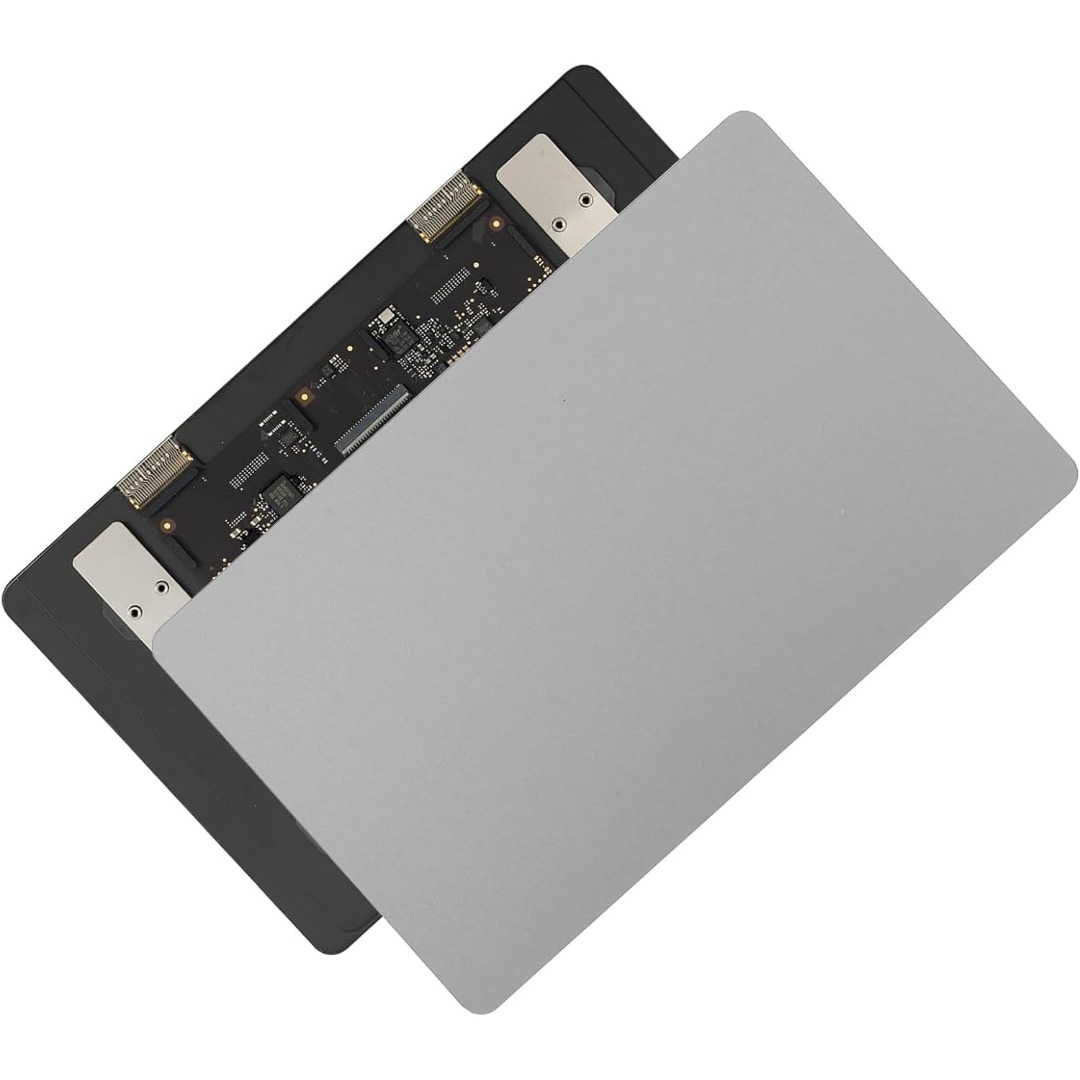

OEM-quality trackpad replacement (without flex cable) for MacBook Air 13″ (Model A1932, 2018–2019) in Gold finish—engineered for precise Force Touch response, smooth multi-touch gestures, and perfect color-matched integration with the original chassis. Compatible With: MacBook Air 13-inch (2018 & 2019, Model A1932, Model Identifiers MacBookAir8,1) with Intel Core i5/i7 processors. Part Type: Trackpad only—does not include the flex cable, Taptic Engine, or mounting hardware. Designed for technicians who will reuse the original internal components. Finish: Gold—specifically matched to the Gold variant of the A1932 MacBook Air for seamless aesthetic continuity. Force Touch Support: Fully compatible with pressure-sensitive input and haptic feedback when paired with the original Taptic Engine and logic board—ensuring full macOS gesture functionality (e.g., Force Click, Look Up, pressure-sensitive navigation). Precision Build: Smooth glass surface with exact curvature, texture, and micro-click mechanism matching Apple’s original design for consistent tracking accuracy and tactile feel. Installation Requirements: Requires full bottom case disassembly and careful transfer of the original flex cable and Taptic Engine. Adhesive must be applied precisely to maintain structural integrity and sensor alignment. Recommended for professional or experienced repair technicians only.

A31N1319 A41N1308 A41 Battery for Asus X451 X551 X451C X451CA X551C X551CA X551CA-SX024H X551CA-SX029H X551CA-DH21 X551CA-0051A2117U D550 0B110-00250100 About this item Fully compatible with your original battery, brand new from Professional Manufacturer, CE RoHS certified, grade A cells ensure fast charges and low power consumption; Built-in circuit protection ensures safety and stability. Expected operation time: 1.5-3 hours. This may vary depending on the device type and how it is used. Fits models: X451 X551 X451C X451CA X551C X551CA A41 D550 X45li9c X551CA-0051A2117U X551CA-DH21 X551CA-SX024H X551CA-SX029H Compatible Part Numbers 0B110-00250100 A41N1308 A31LJ91 A31N1319 A41N1308 X45LI9C YU12008-13007D YU12125-13002 More Part numbers of compatible batteries and Computers are listed in the Product Description

WIWU S400 Aluminum Laptop Stand Portable, Adjustable and Foldable - Silver WIWU S400 Aluminum Laptop Stand Portable, Adjustable and Foldable – Silver

The Lenovo 65W Round-Tip AC Adapter (AU) provides reliable and efficient power for compatible Lenovo laptops. Designed with a round-tip connector and Australian plug, it’s perfect as a replacement or travel charger. ⚡ 65W Power Output: Delivers stable and efficient charging for Lenovo laptops and notebooks. 🔌 Round-Tip Connector: Designed specifically for Lenovo models using the classic round charging port. 🇦🇺 AU Power Plug: Built for Australian power outlets — ideal for home, office, and travel use in AU regions. 👜 Compact & Portable: Lightweight design makes it easy to carry in a bag or backpack. 🔒 Safe Charging: Features over-voltage, over-current, and short-circuit protection. 🛠️ OEM-Compatible: Works with a wide range of ThinkPad, ThinkBook, and IdeaPad models using round-tip charging.

WiWU Infinite USB‑C to HDMI Adapter (HB004) – Sleek aluminum dongle offering 4K@60Hz output over USB‑C (DP Alt‑Mode), plug-and-play with no drivers needed.Compact, portable, and reliable—a must-have for mobile productivity, gaming, and media streaming. Model: WiWU Infinite USB‑C to HDMI Adapter (HB004) Video Output: HDMI 2.0, supports up to 4K @ 60 Hz resolution Material & Weight: Robust aluminum alloy body, compact, weighs ~69 g Compatibility: Plug-and-play connector works with USB‑C devices supporting DP Alt‑Mode—compatible with laptops, smartphones, tablets, consoles Design & Build: Slim, portable, durable—no driver/software required Use Cases: Ideal for mirroring/extending screens for presentations, streaming, gaming

Sklon Ski Boot Bag – Expandable 55–65 L backpack with waterproof fabric, separate boot space, and padded carry system.Ideal for skiing and snowboarding gear transport with hands-free comfort and smart compartment layout. Model: Sklon10 Ski Boot Bag Backpack Capacity: 55 L (expandable to 65 L via integrated zipper) Dimensions: Approx. 34.9 cm × 30.5 cm × 53.3 cm (13.75″ × 12″ × 21″) Weight: Around 1.9 kg Material: Water-resistant polyester and nylon soft-shell build Compartments: Dedicated boot section to isolate wet gear Helmet and goggle compartments Multiple internal and external zippered pockets Compartments: Dedicated boot section to isolate wet gear Helmet and goggle compartments Multiple internal and external zippered pockets External Features: Adjustable straps to carry skis or snowboard Compact foldable design for storage External Features: Adjustable straps to carry skis or snowboard Compact foldable design for storage Comfort: Ergonomic padded shoulder straps Cushioned back panel Top and side grab handles Comfort: Ergonomic padded shoulder straps Cushioned back panel Top and side grab handles Use Case: Designed for skiing, snowboarding, or as a multi-use travel pack

Genuine-spec touchpad flex cable compatible with both MacBook Air A2179 (Intel, 2020) and A2337 (M1, 2020)—restores full Force Touch functionality, haptic feedback, and precise multi-touch gesture control during trackpad repair or replacement. Compatible With: MacBook Air 13″ (2020, Intel) – Model A2179 (Model Identifier: MacBookAir9,1) MacBook Air 13″ (2020, Apple M1) – Model A2337 (Model Identifier: MacBookAir10,1) MacBook Air 13″ (2020, Intel) – Model A2179 (Model Identifier: MacBookAir9,1) MacBook Air 13″ (2020, Apple M1) – Model A2337 (Model Identifier: MacBookAir10,1) ✅ Important Note: Despite different processors (Intel vs. M1), Apple used the same trackpad assembly and flex cable in both A2179 and A2337. This makes the flex cable fully interchangeable between the two models. Part Type: Touchpad flex cable only — does not include the trackpad housing, Taptic Engine, or mounting hardware. This is the OEM-style ribbon cable that connects the trackpad to the logic board. Function: Transmits: Touch input coordinates Force Touch pressure data Haptic feedback signals to the Taptic Engine Enables full macOS gesture support: Force Click, three-finger lookup, swipe navigation, pinch-to-zoom, and smooth cursor tracking. Touch input coordinates Force Touch pressure data Haptic feedback signals to the Taptic Engine Enables full macOS gesture support: Force Click, three-finger lookup, swipe navigation, pinch-to-zoom, and smooth cursor tracking. OEM-Quality Build: Matches Apple’s original specifications in: Cable length and routing path Connector pitch and ZIF latch design EMI shielding and flex durability Cable length and routing path Connector pitch and ZIF latch design EMI shielding and flex durability Common Use Cases: Replacing a torn, creased, or liquid-damaged original flex cable Completing a trackpad replacement when the original cable is compromised Fixing intermittent trackpad behavior, loss of Force Touch, or complete unresponsiveness Replacing a torn, creased, or liquid-damaged original flex cable Completing a trackpad replacement when the original cable is compromised Fixing intermittent trackpad behavior, loss of Force Touch, or complete unresponsiveness Installation Note: Requires full bottom case removal and battery disconnection. Cable routes under the right side of the battery and logic board. Connects via a ZIF (Zero Insertion Force) socket—align carefully and latch gently. Recommended for experienced or certified technicians only. Requires full bottom case removal and battery disconnection. Cable routes under the right side of the battery and logic board. Connects via a ZIF (Zero Insertion Force) socket—align carefully and latch gently. Recommended for experienced or certified technicians only.

Original Apple - 87W USB-C Power Adapter - White | MNF82LL/A | A1719 Original Apple – 87W USB-C Power Adapter – White | MNF82LL/A | A1719 The Apple 87W USB-C Power Adapter (Model A1719) is designed to provide fast and efficient charging for a variety of Apple devices. Key Features: High Power Output: Delivers up to 87 watts of power, suitable for charging larger devices like the 15-inch MacBook Pro. Versatile Charging: Supports multiple output voltages—20.2V at 4.3A, 9V at 3A, and 5.2V at 2.4A—allowing it to charge a range of USB-C–enabled devices. chargerlab.com Versatile Charging: Supports multiple output voltages—20.2V at 4.3A, 9V at 3A, and 5.2V at 2.4A—allowing it to charge a range of USB-C–enabled devices. Compact Design: Its sleek and portable build makes it convenient for use at home, in the office, or while traveling. Compatibility: While this adapter is compatible with any USB-C–enabled device, Apple recommends pairing it with the 15-inch MacBook Pro with Thunderbolt 3 (USB-C) ports for optimal charging performance.

EarPods with Lightning Connector (Apple Original Product , White) Designed by Apple Deeper, richer bass tones Greater protection from sweat and water Control music and video playback Answer and end calls Works with all devices that have a Lightning connector and support iOS 10 or later, including iPod touch, iPad, and iPhone

The Apple Magic Mouse (USB-C version) is a sleek, minimalist multi-touch wireless mouse built for Mac users. It offers smooth gesture support, Bluetooth connectivity and a built-in rechargeable battery — a great choice if you prefer a clean desk setup and full compatibility with macOS and iPadOS. General Name: Magic Mouse (USB-C) — part of Apple’s pointing-device lineup. Wireless connectivity: Bluetooth. Rechargeable battery: built-in, no disposable AA cells. Charging / port: USB-C port (bottom of mouse) for pairing and charging. Compatibility: Requires a Mac with macOS 15.1 or later, or an iPad with iPadOS 18.1 or later. Size & Weight Height: ~0.85 inch (2.16 cm) Width: ~2.25 inch (5.71 cm) Depth: ~4.47 inch (11.35 cm) Weight: ~0.22 pound (0.099 kg) (varies slightly by manufacturing) Features Multi-Touch surface: supports gestures such as swiping between pages, scrolling through documents, zooming. Glide / foot design: optimized for smooth movement across desktop surfaces. Rechargeable battery life: about a month or more between charges (typical use) per Apple spec. Used Condition ConsiderationsSince you’re specifying a used unit: Check for wear on the bottom feet / skates — these degrade and affect glide. Verify battery capacity / health (rechargeable batteries age). Confirm the port is functioning (USB-C) and Bluetooth connectivity is stable. Look for signs of excessive surface scratches on the multi-touch top — may impair gestures. Ensure the firmware / Mac recognizes it fully (gestures working). Upgradability / Limitations Not user-upgradable: You cannot replace the internal battery or change internals easily. Design limitation: The USB-C port remains on the bottom of the mouse, meaning you cannot use it while charging unless you flip it. This design is still criticized. Ergonomics: The flat, low-profile design is stylish but may not suit extended-use comfort for some users.

Meetion Wireless Optical Mouse, Black | R547 DPI switch button Resolution 800/1200/1600dpi 2.4GHz USB Nano receiver included (range-up to 10m)

Genuine-spec touchpad flex cable for MacBook Pro 13″ with Touch Bar (Model A1708, 2016–2017)—restores full Force Touch functionality, haptic feedback, and precise multi-touch gesture control during trackpad repair or replacement. Compatible With: MacBook Pro 13″ (2016) – Model A1708 (Model Identifier: MacBookPro13,1) MacBook Pro 13″ (2017) – Model A1708 (Model Identifier: MacBookPro14,1) (Both years share the same internal trackpad assembly and flex cable.) MacBook Pro 13″ (2016) – Model A1708 (Model Identifier: MacBookPro13,1) MacBook Pro 13″ (2017) – Model A1708 (Model Identifier: MacBookPro14,1) (Both years share the same internal trackpad assembly and flex cable.) Part Type: Touchpad flex cable only — does not include the trackpad housing, Taptic Engine, or mounting hardware. This is the OEM-style ribbon cable that connects the trackpad to the logic board. Function: Transmits: Touch input coordinates Force Touch pressure data Haptic feedback signals to the Taptic Engine Enables full macOS gesture support: Force Click, three-finger lookup, swipe navigation, pinch-to-zoom, and smooth cursor tracking. Touch input coordinates Force Touch pressure data Haptic feedback signals to the Taptic Engine Enables full macOS gesture support: Force Click, three-finger lookup, swipe navigation, pinch-to-zoom, and smooth cursor tracking. OEM-Quality Build: Matches Apple’s original specifications in: Cable length and routing path Connector pitch and ZIF latch design EMI shielding and flex durability Cable length and routing path Connector pitch and ZIF latch design EMI shielding and flex durability Common Use Cases: Replacing a torn, creased, or liquid-damaged original flex cable Completing a trackpad replacement when the original cable is compromised Fixing intermittent trackpad behavior, loss of Force Touch, or complete unresponsiveness Replacing a torn, creased, or liquid-damaged original flex cable Completing a trackpad replacement when the original cable is compromised Fixing intermittent trackpad behavior, loss of Force Touch, or complete unresponsiveness Installation Note: Requires full bottom case removal and battery disconnection. Cable routes under internal components near the right speaker and logic board. Connects via a ZIF (Zero Insertion Force) socket—must be aligned carefully and latched gently. Recommended for experienced or certified technicians only. Requires full bottom case removal and battery disconnection. Cable routes under internal components near the right speaker and logic board. Connects via a ZIF (Zero Insertion Force) socket—must be aligned carefully and latched gently. Recommended for experienced or certified technicians only.

Genuine-spec battery flex cable for MacBook Pro models A2159 (16", 2019), A1708 (13", 2016–2017), and A2338 (13", 2020 M1)—restores critical communication between the battery and logic board for proper power-on, charging, and macOS battery status. Genuine-spec battery flex cable for MacBook Pro models A2159 (16″, 2019), A1708 (13″, 2016–2017), and A2338 (13″, 2020 M1)—restores critical communication between the battery and logic board for proper power-on, charging, and macOS battery status. Carries SMBus (System Management Bus) signals from the battery to the logic board Enables: Accurate battery percentage and health reporting in macOS Proper charging control (start/stop, thermal throttling) Power-on capability (MacBooks will not boot without this connection) Prevention of “Battery Not Charging” or “Service Battery” errors Accurate battery percentage and health reporting in macOS Proper charging control (start/stop, thermal throttling) Power-on capability (MacBooks will not boot without this connection) Prevention of “Battery Not Charging” or “Service Battery” errors MacBook won’t turn on (even with a good battery) Battery shows “–%”, 0%, or “Not Charging” Random shutdowns under load macOS displays “No Battery Available” Logic board powers fans or lights but no display output Battery flex cable only (with OEM-style connector and strain relief) ❌ Does not include: battery, logic board, or trackpad Requires full bottom case removal and battery disconnection Connects via a ZIF or press-fit socket on the logic board Must be routed precisely to avoid tension or micro-tears Highly recommended for experienced or certified technicians—improper installation can cause permanent power or battery communication failure

The 85W MagSafe 2 Power Adapter features a magnetic DC connector so if someone should trip over it, the cord disconnects harmlessly and your MacBook Pro stays put safely. It also helps prevent fraying or weakening of the cables over time. In addition, the magnetic DC helps guide the plug into the system for a quick and secure connection. The 85W MagSafe 2 Power Adapter features a magnetic DC connector so if someone should trip over it, the cord disconnects harmlessly and your MacBook Pro stays put safely. It also helps prevent fraying or weakening of the cables over time. In addition, the magnetic DC helps guide the plug into the system for a quick and secure connection. When the connection is secure, an LED located at the head of the DC connector lights up; an amber light lets you know that your notebook is charging, while a green light tells you that you have a full charge. An AC cord is provided with the adapter for maximum cord length, while the AC wall adapter (also provided) gives you an even easier and more compact way to travel. Designed to be the perfect traveling companion, the adapter has a clever design which allows the DC cable to be wound neatly around itself for easy cable storage. Compatible with MacBook Pro with 13-inch Retina display. See this article for more details about choosing the right one. Knowing which specific Mac model you have is important. If you are running OS X Lion (10.7) or later go to the “” menu at the top left of your screen, choose “About this Mac” then click the “More Info…” button. Your Mac model and generation will be displayed. If you are running an earlier version of OS X, you can enter your serial number here to find out which model you have. COMPATIBILITY Mac Models: MacBook Pro (Retina, 13-inch, Late 2012 – 2015)

The Cudy M1200 AC1200 Mesh WiFi System provides seamless whole-home coverage with stable dual-band speeds up to 1200Mbps. Designed to eliminate dead zones, it delivers smooth roaming, strong signal performance, and reliable connectivity for homes and offices. AC1200 Dual Band WiFi – Combined speeds of up to 1200Mbps (300Mbps on 2.4GHz + 867Mbps on 5GHz) for streaming, browsing, and gaming. Whole-Home Mesh Coverage – Multiple units work together to create a single seamless network, eliminating WiFi dead zones. Seamless Roaming – Automatically connects your devices to the strongest signal as you move around your home. Gigabit Ethernet Ports – High-speed wired connections for smart TVs, gaming consoles, and PCs. Easy Setup & Management – Quick installation and control through a user-friendly interface or mobile app. Flexible Expansion – Easily add more mesh units to extend coverage anytime. Stable & Reliable Performance – Designed for multiple connected devices with consistent speed and signal strength. Gigabit Ethernet Ports (WAN/LAN) Dual Band WiFi (2.4GHz & 5GHz) Mesh Networking Technology WiFi Roaming Support Wireless Security (WPA/WPA2)

WiWU Minimalist Laptop Handbag – Lightweight, water-resistant bag with soft interior padding, shock protection, and dual compartments.Available in 14″ and 15.6″ sizes, perfect for secure and stylish daily laptop carry. Model: WiWU Minimalist Laptop Handbag Material: Water-resistant polyester exterior with a soft faux-fur padded interior Available Sizes: 14″ and 15.6″ versions to accommodate most laptops Protection: Built-in anti-collision padding and 360° all-around corner protection Compartments: Main laptop compartment (soft-lined) Front organizer section with inner pockets for cables, chargers, phone, and accessories Compartments: Main laptop compartment (soft-lined) Front organizer section with inner pockets for cables, chargers, phone, and accessories Carrying Options: Top handles for hand carry Detachable shoulder strap Luggage strap for trolley attachment Carrying Options: Top handles for hand carry Detachable shoulder strap Luggage strap for trolley attachment Design Features: Durable YKK zippers, reinforced corners, slim profile Weight: Approx. 703 g (14″), 884 g (15.6″) Use Case: Ideal for work, study, travel, and everyday protection of devices

Genuine-spec touchpad flex cable for MacBook Air 13″ (Model A1534, Early 2015)—essential for restoring full trackpad functionality, including precise cursor control and physical click response, during repair or replacement. Compatible With: MacBook Air 13-inch (Early 2015, Model A1534, Model Identifier MacBookAir7,2). Part Type: Touchpad flex cable only—does not include the trackpad housing, button mechanism, or mounting brackets. This is the ribbon cable that connects the trackpad to the logic board. Function: Carries input signals from the trackpad to the logic board—critical for cursor movement, tap-to-click, and primary/secondary physical click functionality. (Note: This model uses a physical click mechanism, not Force Touch—so no haptic feedback or pressure-sensing.) OEM-Quality Construction: Matches Apple’s original cable in length, connector type, and shielding—ensures reliable signal transmission and long-term durability. Common Use Cases: Replacing a torn, frayed, or damaged original flex cable Completing a trackpad replacement when the original cable is compromised Fixing erratic cursor movement, unresponsive trackpad, or loss of click function Replacing a torn, frayed, or damaged original flex cable Completing a trackpad replacement when the original cable is compromised Fixing erratic cursor movement, unresponsive trackpad, or loss of click function Installation Note: Requires bottom case removal and careful disconnect/reconnect of the ZIF (Zero Insertion Force) connector on the logic board. The cable routes under the battery—handle with care. Suitable for intermediate to advanced DIYers or technicians.

WiWU Factory Customize Eco-friendly Laptop Handbag Laptop bag for Macbook Air Pro

A4Tech KRS-8372 USB Keyboard QWERTY English Black
WiWU Infinite USB‑C to HDMI Adapter (HB004) – Sleek aluminum dongle offering 4K@60Hz output over USB‑C (DP Alt‑Mode), plug-and-play with no drivers needed.Compact, portable, and reliable—a must-have for mobile productivity, gaming, and media streaming. Model: WiWU Infinite USB‑C to HDMI Adapter (HB004) Video Output: HDMI 2.0, supports up to 4K @ 60 Hz resolution Material & Weight: Robust aluminum alloy body, compact, weighs ~69 g Compatibility: Plug-and-play connector works with USB‑C devices supporting DP Alt‑Mode—compatible with laptops, smartphones, tablets, consoles Design & Build: Slim, portable, durable—no driver/software required Use Cases: Ideal for mirroring/extending screens for presentations, streaming, gaming
