
About this item Noise-cancelling microphone reduces room noise for clearer Internet calls Full stereo sound for your music, movies and games Rotating microphone boom can be worn on your left or right side Adjustable headband gives you a customized fit Works with Windows 10 or later, Windows 8, Windows 7, Windows Vista, Mac OS X 10.5 or later, Chrome OS, Linux Kernel 2.6+ and iOS or Android devices

The Alienware AW2724HF 27″ 360Hz Gaming Monitor is built for serious gamers who want speed and clarity. It features a 27-inch Full HD Fast IPS display with sharp visuals and wide viewing angles. With a 360Hz refresh rate via DisplayPort and up to 255Hz through HDMI, the monitor delivers smooth motion in fast-paced games. A 0.5ms response time reduces blur, making every action look sharp and clear. The monitor supports AMD FreeSync Premium and VESA Adaptive-Sync, helping eliminate screen tearing for smoother gameplay. It also covers 99% of the sRGB color range and supports HDR10, offering rich and vibrant visuals. It comes with plenty of ports, including two DisplayPort 1.4, one HDMI 1.4, four USB 3.2 Gen 1 ports, and one USB upstream. This gives you flexible options to connect accessories and gaming gear. The stand is fully adjustable with options to tilt, swivel, pivot, and adjust height for better comfort. It also supports VESA mounting, allowing you to set it up the way you want. The design features thin bezels, making it great for multi-monitor setups. It also includes game-enhancing tools like crosshair overlays and display modes to give players an edge. Overall, the Alienware AW2724HF combines high refresh rates, fast response, and rich visuals in a sleek and adjustable design, perfect for competitive and casual gamers alike. Specifications: Display : 27″ Fast IPS Resolution : 1920×1080 FHD Refresh Rate : 360Hz Response Time : 0.5ms

A1932 A2179 A1965 Battery for MacBook Air 13″ Retina (2018 2019, Early 2020) EMC 3184 3302 MRE82 MRE92 MVFH2 MWTJ2 MVH22 MVFM2 MVFK2 MREE2 MREC2 MREA2 MREF2 MUQT2 MUQU2 MacBookAir8,1 8,2 9,1 📄【Specification】Voltage: 11.4V. Capacity: 49.9Wh 4379mAh. Battery Type: Li-Polymer. Condition: Brand new, from high quality materials, top circuit boards and smart chip. 🔋【Replace Part Number】A1965 A1932(EMC 3184) A2179(EMC 3302) 3ICP4/63/119 MacBookAir8,1 MacBookAir8,2 MacBookAir9,1. 💻【Compatible Models】Only fit for MacBook Air 13″ (Model A1932 & Model A2179) Release 2018 2019 2020, fit for MRE82LL/A, MVFH2LL/A, MVFM2LL/A, MVFK2LL/A, MVFJ2LL/A, MVFN2LL/A, MVFL2LL/A, MREE2LL/A, MREC2LL/A, MREA2LL/A, MREF2LL/A, MRE92LL/A, MWTJ2LL/A, MVH22LL/A, MVH52LL/A, MVH42LL/A, MWTL2LL/A, MWTK2LL/A. Please kindly check the model number at the bottom of your laptop (A****). NOT FIT FOR MODEL A2337. 💻【ANTIEE Promise】Each products has undergone rigorous testing to ensure the correct voltage, circuit protection, stable current, low self-discharge and CE / FCC / RoHS Certified for safety. About 500 recharge cycles over the life.

AOC Screen 23.8″ VA Panel Model name 24B2XHM Panel 23.8″ (VA) Pixel Pitch (mm) 0.2745 (H) × 0.2745 (V) Effective Viewing Area (mm) 527.04 (H) × 296.46 (V) Brightness (typical) 250 cd/m² Contrast Ratio 3000 : 1 (Typical) 20 Million : 1 (DCR) Response Time 6ms (GtG (BW)) Viewing Angle 178° (H) / 178° (V) (CR > 10) Color Gamut NTSC 80% (CIE1976) / sRGB 101% (CIE1931) Color Accuracy – Optimum Resolution 1920 × 1080 @ 75Hz – HDMI 1920 × 1080 @ 60Hz – VGA Display Colors 16.7 Million Signal Input VGA × 1, HDMI 1.4 × 1 HDCP Version – USB Hub no Power Supply 19V DC, 1.31A Power Consumption (typical) 21W Speakers no Line in & Earphone – Wall-Mount 100mm × 100mm Adjustable Stand Tilt: -5° ~ 20° Product without Stand (mm) 320.94 (H) × 539.47 (W) × 37.6 (D) Product with Stand (mm) 418.35 (H) × 539.47 (W) × 170.94 (D) Product without Stand (kg) 2.41 Product with Stand (kg) 2.73 Cabinet Color Black Regulatory Approvals CE / FCC Specifications: AOC Screen 23.8″ VA Model name 24B2XHM Panel 23.8″ (VA) Pixel Pitch (mm) 0.2745 (H) × 0.2745 (V) Effective Viewing Area (mm) 527.04 (H) × 296.46 (V) 1 Year Warranty Manufacturer Link

The BenQ Zowie 24″ 144Hz Gaming Monitor is designed for competitive gamers seeking smooth and responsive gameplay. With a 144Hz refresh rate, it reduces motion blur and ensures fluid visuals, giving players a competitive edge. As a result, fast-paced games feel more precise and immersive. Equipped with an optimized response time, this monitor minimizes input lag, allowing accurate control for first-person shooters, MOBAs, and action games. In addition, its 24-inch panel delivers vivid colors and sharp details, enhancing both gaming and multimedia experiences. The ergonomic design includes height, tilt, and swivel adjustments, providing comfortable viewing during long sessions. Furthermore, the monitor features low blue light and flicker-free technology, reducing eye strain over extended playtime. Connectivity is versatile with DisplayPort and HDMI options, making it compatible with PCs and consoles alike. Moreover, the monitor’s minimalist design complements any gaming setup without distractions. Therefore, it suits both professional eSports players and casual gamers who demand performance and reliability. Overall, the BenQ Zowie 24″ 144Hz Gaming Monitor balances speed, visual clarity, and ergonomic comfort, making it a top choice for competitive and everyday gaming. Specifications: Display : 24″ Resolution : FHD Refresh Rate : 144Hz

RAM CRUCIAL 8GB 2666 DDR4 NOTEBOOK About this item Improve your system’s responsiveness, run apps faster and multitask with ease Good Quality with a high end Crucial RAM CB8GS2666 8GB DDR4 2666 MHz Laptop Memory Easy to use

Samsung Odyssey OLED G5 G50SF 180Hz Monitor delivers sharp visuals and smooth gameplay for demanding players. It features a 27-inch QHD display with OLED technology. As a result, colors appear vibrant and contrast looks deep and realistic. Moreover, the QD-OLED panel enhances brightness and color accuracy. It supports a wide color range and Pantone validation for precise tones. In addition, HDR10 improves contrast and highlights for a more immersive experience. Furthermore, the 180Hz refresh rate and 0.03ms response time ensure fast and fluid motion. This helps reduce blur and improve reaction speed during gameplay. NVIDIA G-Sync compatibility and AMD FreeSync also reduce tearing and stutter. Finally, Samsung Odyssey OLED G5 G50SF 180Hz Monitor includes gaming tools like Black Equalizer and Virtual Aim Point. These features improve visibility and accuracy. Therefore, players gain better control in every match. Specifications: 27-inch QHD (2560×1440) OLED display with vibrant colors and deep contrast 180Hz refresh rate with ultra-fast 0.03ms response time for smooth gameplay HDR10 support for improved brightness, contrast, and image depth NVIDIA G-Sync Compatible and AMD FreeSync for tear-free gaming Gaming features including Black Equalizer and Virtual Aim Point for better visibility

The ViewSonic 22″ 75Hz Monitor offers a superb viewing experience with its high-quality display. Whether you’re working, gaming, or watching videos, this monitor delivers vibrant and crisp visuals. With Full HD 1080p resolution, the ViewSonic 22″ 75Hz Monitor provides sharp and clear images. Enjoy your favorite content with stunning detail and lifelike colors, making every viewing session a pleasure. The 75Hz refresh rate ensures smooth and fluid motion, reducing screen tearing and stuttering. This makes the ViewSonic 22″ 75Hz Monitor ideal for gaming and fast-paced videos, enhancing your overall experience. Designed for comfort and convenience, this monitor features an anti-glare screen to reduce eye strain. The ViewSonic 22″ 75Hz Monitor also has a flicker-free technology and blue light filter, ensuring a comfortable viewing experience even during extended use. Connectivity is a breeze with the ViewSonic 22″ 75Hz Monitor. It comes with HDMI and VGA ports, allowing you to connect a variety of devices with ease. Whether it’s your computer, gaming console, or media player, this monitor has you covered. The sleek and modern design of the ViewSonic 22″ 75Hz Monitor complements any workspace or gaming setup. Its slim profile and minimalistic stand make it a stylish addition to your desk, saving space without compromising on performance. In conclusion, the ViewSonic 22″ 75Hz Monitor combines high resolution, smooth refresh rate, and ergonomic design for an exceptional viewing experience. Upgrade to the ViewSonic 22″ 75Hz Monitor today and enjoy superior performance and style. Specifications: Display : 22″ IPS Resolution : FHD 1920 x 1080 Refresh Rate : 75Hz Response Rate : 5ms GTG

The MSI PRO MP275 E2 27″ 120Hz Business Monitor is designed for professionals who need a smooth and clear display. It offers excellent visuals, making work more efficient. This 27-inch business monitor features a Full HD resolution of 1920 x 1080 pixels. The large screen provides ample workspace for multitasking and productivity. The 120Hz refresh rate ensures smooth visuals, reducing screen tearing and lag. With Adaptive Sync technology, this monitor delivers a stutter-free experience. It adjusts refresh rates to match the display output. This helps in reducing motion blur, making scrolling and video playback smoother. The MSI PRO MP275 E2 27″ 120Hz Business Monitor has an anti-glare panel, reducing eye strain during long hours of work. It also includes Low Blue Light technology, which minimizes harmful blue light emissions. This makes it ideal for extended screen use. Its wide 178° viewing angles ensure a clear display from any position. The frameless design provides a modern look and allows for a multi-monitor setup without gaps. Connectivity options include HDMI and VGA ports, making it compatible with various devices. It is easy to set up with laptops, desktops, and other office equipment. The MSI PRO MP275 E2 is also VESA-mount compatible, allowing users to mount it on a wall or monitor arm. This helps in creating a clutter-free workspace. With a sleek and professional design, this business monitor is perfect for offices, home setups, and professionals who need a reliable display. Specifications: Display : 27″ IPS Resolution : 1920 x 1080 (FHD) Refresh Rate : 120Hz Response Rate : 1ms

Xprinter XP-80T 80mm Thermal Receipt Printer Press to download driver: XPrinter Driver Setup V7.77

The BenQ Zowie 24″ 144Hz Gaming Monitor is designed for competitive gamers seeking smooth and responsive gameplay. With a 144Hz refresh rate, it reduces motion blur and ensures fluid visuals, giving players a competitive edge. As a result, fast-paced games feel more precise and immersive. Equipped with an optimized response time, this monitor minimizes input lag, allowing accurate control for first-person shooters, MOBAs, and action games. In addition, its 24-inch panel delivers vivid colors and sharp details, enhancing both gaming and multimedia experiences. The ergonomic design includes height, tilt, and swivel adjustments, providing comfortable viewing during long sessions. Furthermore, the monitor features low blue light and flicker-free technology, reducing eye strain over extended playtime. Connectivity is versatile with DisplayPort and HDMI options, making it compatible with PCs and consoles alike. Moreover, the monitor’s minimalist design complements any gaming setup without distractions. Therefore, it suits both professional eSports players and casual gamers who demand performance and reliability. Overall, the BenQ Zowie 24″ 144Hz Gaming Monitor balances speed, visual clarity, and ergonomic comfort, making it a top choice for competitive and everyday gaming. Specifications: Display : 24″ Resolution : FHD Refresh Rate : 144Hz

Enhance Your Viewing Experience with the HP FHD 27” Monitor | V27i In today’s digital age, having a reliable and clear monitor is essential. The HP FHD 27” Monitor | V27i delivers. Transitioning from your old monitor to the V27i is straightforward, even if you’re not tech-savvy. This 27-inch monitor offers a spacious screen, perfect for work, entertainment, and everyday tasks. Its user-friendly interface ensures anyone can use it without complicated settings. The V27i provides crisp and clear visuals with Full HD resolution, enhancing your viewing experience. With its sleek and minimalist design, it complements any workspace or home setup. The monitor’s energy-efficient design saves power and reduces your environmental impact. In summary, the HP FHD 27” Monitor | V27i offers a simple and impressive solution for your computing needs. Elevate your viewing experience with this accessible and reliable display. you can always check here and if you like to see more options you can always check here! Specifications: HP V27i G5 FHD Monitor (65P64AS) Display size (diagonal) 68.6 cm (27″) Low blue light Yes (TÜV certified) Panel bit depth 8 bit (6 bit + FRC) Pixels per inch (ppi) 82 ppi Resolution (maximum) FHD (1920 x 1080 @ 75 Hz) 1 year warranty

Remax F27 Fonzyr Desktop Fan – 5 W rechargeable fan with 360° adjustable airflow and multi-installation options.Compact (187×206 mm), lightweight, with fast Type-C charging (~2 h) and built-in 1,200 mAh battery. Model: Remax F27 Fonzyr Series Circulation Desktop Fan Power: 5 W, operates on 5 V/1 A power supply Rotation: 360° adjustable airflow for full-range ventilation Battery: Built-in 1,200 mAh rechargeable battery; Type-C charging, ~2 hours charging time Dimensions & Build: Approx. 187 × 206 mm, lightweight ABS plastic housing (~697 g) Installation: Designed for desktop use, wall mounting, or hanging—ideal for multi-location placement

The LG 34U530A-W 34″ WFHD IPS 100Hz Monitor delivers wide and immersive visuals that enhance work, entertainment, and gaming experiences. Its 34-inch ultra-wide display provides a larger view area that helps with multitasking, productivity, and movie watching. Moreover, the WFHD resolution ensures clear and detailed images so you can see content with accuracy and sharpness. This monitor features an IPS panel that offers wide viewing angles and consistent color performance, making it suitable for creative work, office tasks, and everyday use. Additionally, the 100Hz refresh rate delivers smoother motion during gaming and video playback compared to standard displays. The sleek white design fits easily into modern home and office setups without taking up too much space. The LG 34U530A-W includes multiple connectivity options that allow you to connect laptops, desktops, and other devices with ease. Furthermore, its ergonomic tilt adjustment helps maintain comfortable viewing during long sessions. Therefore, it is ideal for home users, students, professionals, and gamers who want a versatile monitor. Finally, it combines immersive wide visuals, smooth performance, and user-friendly design for everyday use. Specifications: 34″ ultra-wide WFHD monitor IPS panel with wide viewing angles 100Hz refresh rate for smoother motion Sleek design with versatile connectivity Comfortable for work, entertainment, and gaming

Lenovo ThinkVision T32h-20 61F1GAT2EU The Lenovo ThinkVision T32h-20 .Do more than just optimize your productivity . with the ThinkVision T32h-20 monitor. An enhanced view of and easy navigation. through documents, spreadsheets, or designs on this sleek display that complements your modern workspace. Its vast 31.5-inch screen with QHD resolution delivers more screen real estate with higher clarity than FHD, making data-intensive work, number crunching, and content editing a breeze. The one-cable solution USB Type-C, HDMI, and DP ports provide multiple interface options. Integrated with Smart Power, the USB Type-C also doubles up. as a charger for dynamic consumption and intelligent power management. Top Features 31.5″QHD (2560 x 1440) 3-side Near-edgeless display USB Type-C one cable solution HDMI, DP ports with USB hub Ergonomic and space-saving design & UE Specifications Brightness 350 cd/m2 Contrast ratio 1000:1 Connection type 1 x USB Type-C Gen1 (DP1.2 Alt Mode)4 x USB 3.1 Gen1 ports (Downstream, incl. 1 x BC) Panel type In-Plane Switching Display stand Lift, Tilt, Pivot, Swivel EU energy class E Power requirement AC 100 to 240 V (50-60 Hz) Brand ThinkVision Anti-reflex Yes Color calibration accuracy Yes Color coverage 99% sRGB Color depth 10-bit Color support 1.07 Billion Measure without packaging 235.0 x 469.4 x 714.6 mm, 9.25 x 18.48 x 28.13 inches Gentle on the eyes Yes Screen dimensions (without foot) 714.6 x 426.0 x 51.0 mm, 28.13 x 16.77 x 2.01 inches Height adjustable Yes Kensington lock Yes Almost borderless Yes Sound bar support (optional) Yes Power consumption 28 W Typ. 138 W Max. TCO Edge 2.0 Display weight (without foot) 6.78 kg, 14.95 lbs. Weight with packaging 12.96 kg, 28.57 lbs. Weight without packaging 9.85 kg, 21.72 lbs. Description The Lenovo ThinkVision T32h-20’s large display can be used to open and work on several documents at once Its near bezel-less design fits into any modern workplace. Integrated USB Type-C dock with charging function up to 75 W (1 x USB 3.1 Type-C upstream. 4 x USB 3.1 Type-A downstream) – Smart Power for energy – TÜV Rheinland Eye Comfort Specifications: Specifications Product name Lenovo ThinkVision T32h-20 Monitor Product type Desktop monitor Display Display size 81.3 cm (32.0″) Physical resolution 2.560 x 1.440 WQHD Aspect ratio 16:9 Contrast 1000:1 Brightness 350 cd/m² Panel technology IPS Viewing angle (horizontal / vertical) 178° / 178° Response time 6 ms Display surface Matt Backlight White LED 1 year warranty

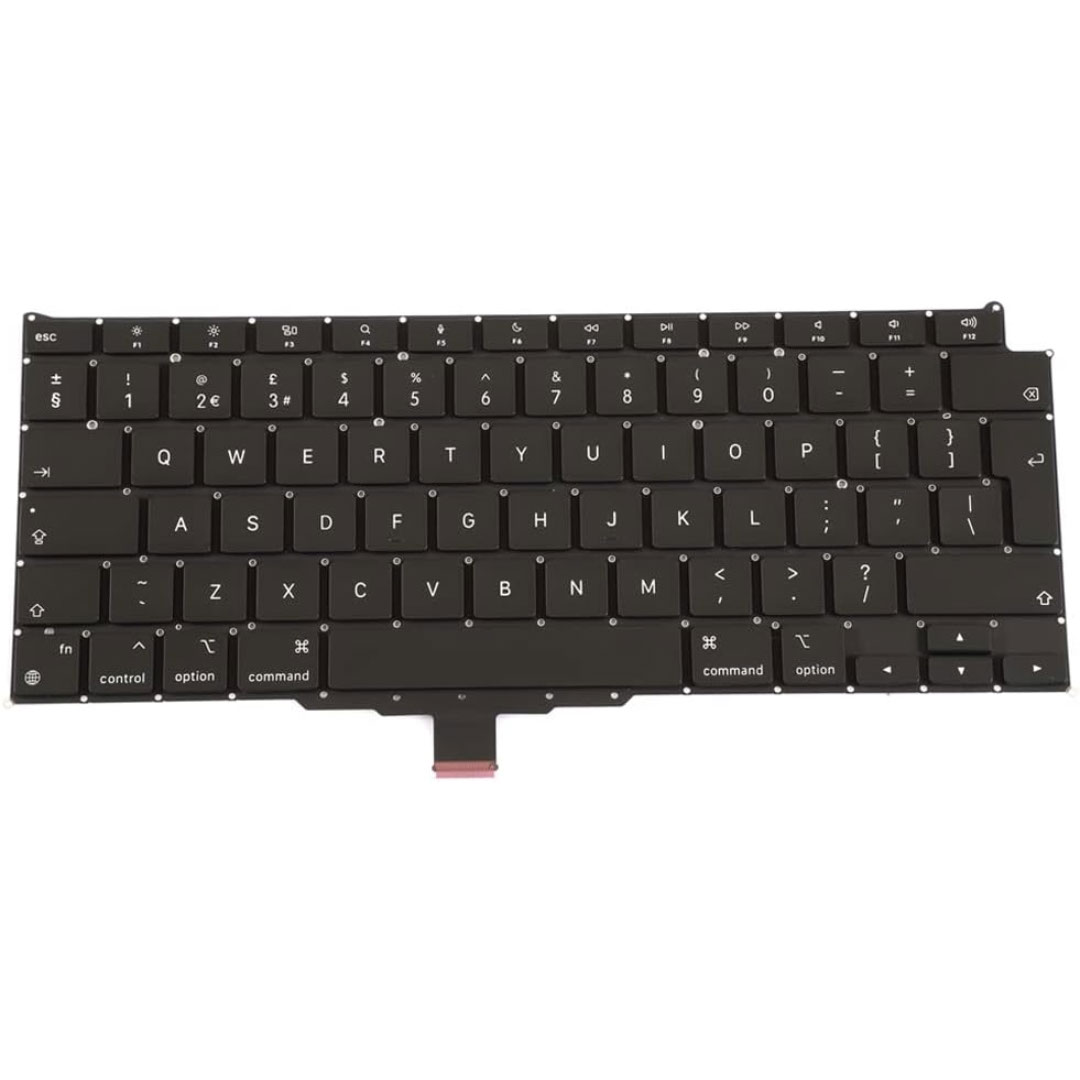
Genuine-spec keyboard replacement for MacBook Air 13″ (Model A2179, 2020, Intel) — choose US QWERTY or UK QWERTY (with £ symbol). Features Apple’s reliable scissor-switch mechanism, backlighting, and OEM-fit design for seamless performance and aesthetics. Compatible With: MacBook Air 13-inch (2020, Model A2179, EMC 3597) with Intel Core i3/i5/i7 processors (non-M1). Layout Options (select at purchase): US Layout: Standard QWERTY with wide Enter key, @ above 2, # above 3, and full inverted-T arrow keys. UK Layout: QWERTY with £ symbol, tall vertical Enter key, @ accessed via right Alt, and UK-specific punctuation—matches Apple’s official UK regional configuration. US Layout: Standard QWERTY with wide Enter key, @ above 2, # above 3, and full inverted-T arrow keys. UK Layout: QWERTY with £ symbol, tall vertical Enter key, @ accessed via right Alt, and UK-specific punctuation—matches Apple’s official UK regional configuration. Keyboard Type: Traditional scissor-switch mechanism (not Butterfly, not Magic Keyboard)—robust, tactile, and serviceable, with good key travel and proven durability. Integrated Features: Full backlit keys for low-light use Ambient light sensor compatibility OEM-style ribbon cable pre-attached for direct logic board connection Full backlit keys for low-light use Ambient light sensor compatibility OEM-style ribbon cable pre-attached for direct logic board connection Precision Build: Molded to exact Apple specifications—ensures flush mounting, consistent key alignment, and seamless integration into the original top case. Installation Note: Keyboard is screw-mounted with light adhesive—more accessible than glued Butterfly/Magic keyboards. Requires top case access and battery disconnect. Suitable for intermediate DIYers or professional technicians. Important: This is keyboard only—does not include the top case, battery, trackpad, or logic board. Not compatible with M1 MacBook Air (A2337/A2338) or M2 models (A2681/A2941). This is keyboard only—does not include the top case, battery, trackpad, or logic board. Not compatible with M1 MacBook Air (A2337/A2338) or M2 models (A2681/A2941). Model Verification: Confirm your device is MacBook Air A2179 (13″, Intel, 2020) via > About This Mac > Model Identifier (e.g., MacBookAir9,1).

Genuine-spec touchpad flex cable for MacBook Pro 13″ (Model A2289, 2020, Intel)—restores full Force Touch functionality, haptic feedback, and preci multi-touch gesture control. OEM-quality replacement for damaged or faulty original cables. Compatible With: MacBook Pro 13-inch (2020, Four Thunderbolt Ports, Model A2289, Model Identifier MacBookPro16,2) with Intel Core i5/i7 processors. Part Type: Touchpad flex cable only — does not include the trackpad housing, Taptic Engine, or mounting hardware. This is the OEM-style ribbon cable that connects the trackpad to the logic board. Function: Transmits: Touch input coordinates Force Touch pressure data Haptic feedback signals to the Taptic Engine Enables full macOS gesture support: Force Click, three-finger lookup, swipe navigation, pinch-to-zoom, and smooth cursor tracking. Touch input coordinates Force Touch pressure data Haptic feedback signals to the Taptic Engine Enables full macOS gesture support: Force Click, three-finger lookup, swipe navigation, pinch-to-zoom, and smooth cursor tracking. OEM-Quality Build: Matches Apple’s original specifications in: Cable length and routing path Connector pitch and ZIF latch design EMI shielding and flex durability Cable length and routing path Connector pitch and ZIF latch design EMI shielding and flex durability Common Use Cases: Replacing a torn, creased, or liquid-damaged original flex cable Completing a trackpad replacement when the original cable is unusable Fixing: Intermittent or erratic trackpad behavior Loss of Force Touch or haptic feedback Complete trackpad unresponsiveness Replacing a torn, creased, or liquid-damaged original flex cable Completing a trackpad replacement when the original cable is unusable Fixing: Intermittent or erratic trackpad behavior Loss of Force Touch or haptic feedback Complete trackpad unresponsiveness Intermittent or erratic trackpad behavior Loss of Force Touch or haptic feedback Complete trackpad unresponsiveness Installation Note: Requires full bottom case removal and battery disconnection. Cable routes under internal components (speaker, logic board)—must follow original path. Connects via ZIF (Zero Insertion Force) socket—align carefully, never force. Recommended for experienced or certified technicians only. Requires full bottom case removal and battery disconnection. Cable routes under internal components (speaker, logic board)—must follow original path. Connects via ZIF (Zero Insertion Force) socket—align carefully, never force. Recommended for experienced or certified technicians only. Important Compatibility Notes: ✅ Only for A2289 (13″, 4 Thunderbolt ports, 2020, Intel) ❌ Not compatible with: A2251 (2 Thunderbolt ports, 2020) A2338 (M1 MacBook Pro, 2020) Any MacBook Air or 14″/16″ MacBook Pro ✅ Only for A2289 (13″, 4 Thunderbolt ports, 2020, Intel) ❌ Not compatible with: A2251 (2 Thunderbolt ports, 2020) A2338 (M1 MacBook Pro, 2020) Any MacBook Air or 14″/16″ MacBook Pro A2251 (2 Thunderbolt ports, 2020) A2338 (M1 MacBook Pro, 2020) Any MacBook Air or 14″/16″ MacBook Pro

Original replacement touchpad for MacBook Air A2442, available in Silver and Space Gray. Perfect for fixing unresponsive or damaged trackpads and restoring smooth cursor control and gesture functionality. The Original MacBook Air A2442 Touchpad is a genuine replacement part designed to restore full trackpad performance and functionality. If your MacBook Air trackpad is not clicking, not responding, or physically damaged, this original touchpad provides a reliable solution with smooth tracking and accurate gesture support. Available in Silver and Space Gray, it matches the original laptop finish for a clean professional repair. Original / Genuine Touchpad for MacBook Air A2442 Available in Silver and Space Gray Restores smooth cursor control and multi-touch gestures Reliable clicking and accurate tracking performance Perfect for repair and replacement of damaged trackpads High-quality build for long-term use ✔ MacBook Air 13-inch (2021 / 2022) A2442 Compatible with MacBook Air A2442 models only. Please confirm the model number on the bottom cover before purchase to ensure a correct fit.

OEM-quality trackpad replacement (without flex cable) for MacBook Air 13″ (Model A1932, 2018–2019) in Gold finish—engineered for precise Force Touch response, smooth multi-touch gestures, and perfect color-matched integration with the original chassis. Compatible With: MacBook Air 13-inch (2018 & 2019, Model A1932, Model Identifiers MacBookAir8,1) with Intel Core i5/i7 processors. Part Type: Trackpad only—does not include the flex cable, Taptic Engine, or mounting hardware. Designed for technicians who will reuse the original internal components. Finish: Gold—specifically matched to the Gold variant of the A1932 MacBook Air for seamless aesthetic continuity. Force Touch Support: Fully compatible with pressure-sensitive input and haptic feedback when paired with the original Taptic Engine and logic board—ensuring full macOS gesture functionality (e.g., Force Click, Look Up, pressure-sensitive navigation). Precision Build: Smooth glass surface with exact curvature, texture, and micro-click mechanism matching Apple’s original design for consistent tracking accuracy and tactile feel. Installation Requirements: Requires full bottom case disassembly and careful transfer of the original flex cable and Taptic Engine. Adhesive must be applied precisely to maintain structural integrity and sensor alignment. Recommended for professional or experienced repair technicians only.

Genuine-spec Touch Bar assembly with integrated flex cable for 2020 MacBook Pro 13″ models (A2251, A2289, A2338)—restores full Touch ID and Touch Bar functionality with OEM-level fit and performance. Compatible With: MacBook Pro 13″ (2020): A2251 (Intel Core i5/i7, two Thunderbolt ports) A2289 (Intel Core i5/i7, four Thunderbolt ports) A2338 (Apple M1 chip, two Thunderbolt ports) MacBook Pro 13″ (2020): A2251 (Intel Core i5/i7, two Thunderbolt ports) A2289 (Intel Core i5/i7, four Thunderbolt ports) A2338 (Apple M1 chip, two Thunderbolt ports) A2251 (Intel Core i5/i7, two Thunderbolt ports) A2289 (Intel Core i5/i7, four Thunderbolt ports) A2338 (Apple M1 chip, two Thunderbolt ports) Includes: Complete Touch Bar module with integrated flex cable, Touch ID sensor, and ambient light sensor—ready for direct connection to the logic board. Functionality: Fully restores dynamic Touch Bar controls, system functions, app shortcuts, and Touch ID (fingerprint authentication and power button). OEM-Quality Build: Matches Apple’s original design in responsiveness, finish, and sensor alignment—ensures seamless integration with macOS. Color Options: Available in Space Gray and Silver to match your MacBook’s top case (confirm your model’s color before ordering). Installation Note: Requires full top case disassembly and careful handling of adhesive and connectors. The flex cable routes under the speakers and connects near the logic board—precision is essential. Recommended for experienced technicians.
