
Professional battery testing flex cable for MacBook Pro 15″ (Model A1990, 2018–2019)—used by technicians to bypass a faulty battery or diagnose power-on issues without permanent battery removal. Enables safe logic board testing and troubleshooting. This is not a replacement battery cable—it’s a diagnostic tool used in repair workflows. It mimics the battery’s presence by providing the necessary SMBus signal and power-enable lines to the logic board, allowing the MacBook to: Power on without a battery installed Test logic board functionality independently Diagnose whether a no-power issue is caused by the battery or logic board MacBook Pro 15″ (2018–2019) Model: A1990 Model Identifiers: MacBookPro15,2 Chip: Intel Core i7/i9 Model: A1990 Model Identifiers: MacBookPro15,2 Chip: Intel Core i7/i9 ⚠️ Not compatible with A1707 (2016–2017), A2159 (16″), or any M1/M2 models. Simulates battery presence via correct SMBus resistance and ID signals Includes power-enable circuitry matching Apple’s safety protocol Pre-terminated with OEM-style connector for A1990 logic board Allows safe bench testing of logic boards during repair Diagnosing “no power, no fan spin, no display” issues Verifying if a logic board powers on without risking a shorted battery Testing after liquid damage or DC-in board replacement Avoiding unnecessary battery replacements during diagnostics Not for permanent installation—intended for temporary diagnostic use only Does not charge or store power—requires connected USB-C power adapter to operate Must be used with a known-good power adapter (87W recommended) Not a consumer part—designed for professional repair shops and technicians

DELL 357F9 11.1V or 11.4V 74Wh Battery For DELL Inspiron 15 5000 Gaming 5576 5577 ,15 7000 Gaming 7557 7559 7566 7567 Laptops Alternant Part Number: 357F9 71JF4 0GFJ6 071FJ4 00GFJ6 P65F001 P57F003 About this item Battery Type:6 cell Li-Polymer Best Quality Voltage &Capacity :11.1V 74Wh 6330mAh , 11.4V 74Wh 6480mAh SANISI Concept: The customer is god, Product Quality and Service must be perfect! We will let every customer feel satisfied Package Contents: 1 pcs Brand New Battery

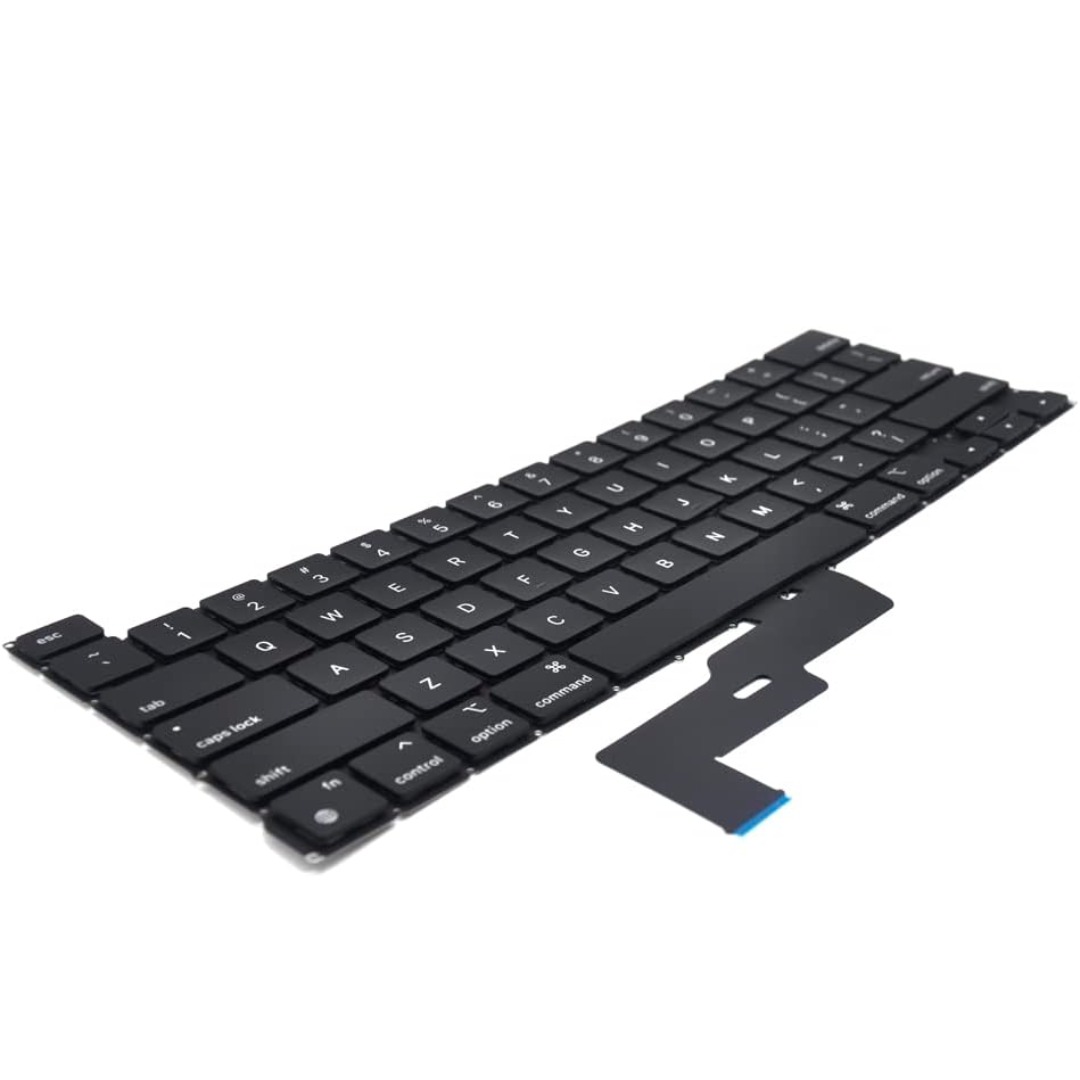
Genuine-spec keyboard replacement for MacBook Pro 13″ (Model A2289, 2020) — available in US QWERTY or UK QWERTY (with £ symbol). Features Apple’s scissor-switch Magic Keyboard, backlighting, and OEM-fit design for reliable performance and seamless installation. Compatible With: MacBook Pro 13-inch (2020, Four Thunderbolt Ports, Model A2289, Model Identifier MacBookPro16,2) with Intel Core i5/i7 processors. Layout Options (select at purchase): US Layout: Standard QWERTY with wide Enter key, @ above 2, and # above 3. UK Layout: QWERTY with £ symbol, tall vertical Enter key, @ on right Alt, and UK-specific punctuation. US Layout: Standard QWERTY with wide Enter key, @ above 2, and # above 3. UK Layout: QWERTY with £ symbol, tall vertical Enter key, @ on right Alt, and UK-specific punctuation. Keyboard Type: Apple’s Magic Keyboard with scissor-switch mechanism—quieter, more stable, and more durable than earlier Butterfly designs. Integrated Features: Full backlighting for low-light use Ambient light sensor compatibility OEM-style flex cable pre-attached for direct logic board connection Full backlighting for low-light use Ambient light sensor compatibility OEM-style flex cable pre-attached for direct logic board connection Build & Fit: Engineered to exact Apple specifications—ensures perfect alignment, consistent key height, and flush integration into the original top case. Installation Note: Keyboard is glued into the top case and requires full disassembly, careful adhesive removal, and professional re-adhesion. Recommended for experienced or certified technicians only.

WiWU 14-inch & 15.6-inch Minimalist Laptop Sleeve for Macbook Air 2020 Protective Case Minimalist Laptop Sleeve Water resistant polyester+ Fax fur lining Ultra slim design with front pocket Including packing weight:14inch 280g/15.6inch 320g WiWU 14-inch & 15.6-inch Minimalist Laptop Sleeve for Macbook Air 2020 Protective Case

Logitech C270 HD webcam — 720p USB camera with built-in mic and automatic light correction. Solid pick for video calls, remote work, or basic streaming. This is the Logitech C270 HD Webcam, a budget plug-and-play USB camera suited for everyday video calls. It doesn’t strive for professional streaming quality, but it reliably handles meeting needs, student calls, or backup cam duties. Key Features & Functionality Records video in HD 720p at 30 fps Fixed focus lens (no autofocus) Built-in mono microphone with noise reduction (captures voice clearly in standard environments) Automatic light correction (RightLight / similar tech) to adjust in low or uneven lighting Universal mounting clip: works on laptop lids, monitors, or can sit on a shelf USB 2.0 interface, 1.5 m (≈ 5 ft) cable length Technical Specifications Strengths & Limitations Pros: Reliable and easy to set up: plug and play Good for video calls in decent lighting Noise suppression in mic helps reduce background hiss Affordable alternative if your built-in camera fails Cons: Only 720p — not ideal for high quality streaming Fixed focus — manual adjusting can’t zoom/focus No privacy shutter (you may need stickers or external cover) Color and sharpness aren’t top tier under weak light

Non-slip, skid-proof rubber feet designed to perfectly fit MacBook Air models A1466, A1369, and A1370—restoring grip, stability, and protection for your laptop’s base. Keep your MacBook Air steady and scratch-free with these high-quality replacement rubber feet, engineered to match the original Apple design for MacBook Air models A1466 (2010–2017), A1369 (11″ 2010–2011), and A1370 (11″ 2011–2015). These skid-proof rubber feet provide excellent traction on desks, tables, and other smooth surfaces, preventing unwanted sliding during typing or use. Made from durable, soft-touch silicone-rubber material, they also help protect your laptop’s bottom case from scratches and reduce vibration noise. Each set includes all necessary feet (typically 5 per MacBook Air model) with pre-applied adhesive for easy, secure installation. The matte black finish blends seamlessly with your MacBook’s original aesthetic. Ideal for restoring worn, missing, or damaged feet—whether due to age, cleaning, or accidental removal—this is a simple, affordable way to maintain your MacBook’s functionality and appearance. Note: Surface must be clean and dry for optimal adhesion. For best results, gently warm the adhesive before applying.

The Lexar NS100 512GB SSD is a 2.5-inch SATA III solid-state drive built to upgrade laptops and desktops with faster boot times, smoother app loading, and silent operation. It uses reliable flash storage to deliver a clear performance boost over traditional hard drives. ⚡ Faster System Performance: Significantly improves boot speed, application loading, and file transfers versus HDDs. 💾 512GB Storage Capacity: Ideal for OS, software, documents, and everyday multimedia. 🧠 SATA III 6Gb/s Interface: Provides stable, high-speed performance and is backward compatible with SATA II/I systems. 🔇 Silent & Shock-Resistant: No moving parts, making it quieter and more durable for laptops and mobile use. 🌡️ Low Power Consumption: Helps reduce heat and extend laptop battery life. 🛠️ Easy Installation: Standard 2.5″ 7mm design fits most laptops and desktops.

Specifications Input/Output USB Sound Mode Live Sound Mode, Standard Mode Category Speakers Use HOME Bluetooth Version 5.0 Input Power (W) <25 W Active Noise-Cancellation PASSIVE Wi-Fi Music Apple Music Voice Control No Frequency Range 100Hz-20kHz Output Power 35W Display Screen No Waterproof No Support APP Yes Support Memory Card Yes Material Plastic Playback Function MP3 Remote Control No Support Apt-x No Intelligent Personal Assistant None Display Screen No Built-in Microphone No Audio Crossover Full-Range Number of Loudspeaker Enclosure 1 Power Source Battery PMPO 25W Channels 2 (2.0) Feature Play Video, Wireless Subwoofer, Wireless Rear Speakers Battery Yes Communication AUX, USB, Bluetooth Speaker Type Portable Cabinet Material Plastic Brand Name SwYiSm Origin Mainland China Certification CE Function 1 Wireless Bluetooth Function 2 Originality Function 3 Vintage Kerosene Lamp Function 4 Decorative Lamp

Designed by Apple Deeper, richer bass tones Greater protection from sweat and water Control music and video playback Answer and end calls Works with all devices that have a Lightning connector and support iOS 10 or later, including iPod touch, iPad, and iPhone

Genuine-spec touchpad flex cable for MacBook Pro 15″ (Model A1706 – 2017 and A1989 – 2018/2019)—restores full Force Touch functionality, haptic feedback, and precise multi-touch gesture control during trackpad repair or replacement. Compatible With: MacBook Pro 15″ (2017) – Model A1706 (Model Identifier: MacBookPro14,3) MacBook Pro 15″ (2018–2019) – Model A1989 (Model Identifier: MacBookPro15,2) ✅ Note: Apple used the same trackpad assembly and flex cable across both A1706 and A1989 15″ models—making this part interchangeable between them. MacBook Pro 15″ (2017) – Model A1706 (Model Identifier: MacBookPro14,3) MacBook Pro 15″ (2018–2019) – Model A1989 (Model Identifier: MacBookPro15,2) ✅ Note: Apple used the same trackpad assembly and flex cable across both A1706 and A1989 15″ models—making this part interchangeable between them. ✅ Note: Apple used the same trackpad assembly and flex cable across both A1706 and A1989 15″ models—making this part interchangeable between them. Part Type: Touchpad flex cable only — does not include the trackpad housing, Taptic Engine, or mounting hardware. This is the OEM-style ribbon cable connecting the trackpad to the logic board. Function: Transmits: Touch input coordinates Force Touch pressure data Haptic feedback signals to the Taptic Engine Enables full macOS gesture support: Force Click, three-finger lookup, swipe navigation, pinch-to-zoom, and smooth cursor tracking. Touch input coordinates Force Touch pressure data Haptic feedback signals to the Taptic Engine Enables full macOS gesture support: Force Click, three-finger lookup, swipe navigation, pinch-to-zoom, and smooth cursor tracking. OEM-Quality Build: Matches Apple’s original in: Cable length and routing Connector pitch and ZIF latch design EMI shielding and flex durability Cable length and routing Connector pitch and ZIF latch design EMI shielding and flex durability Common Use Cases: Replacing a torn, creased, or liquid-damaged original flex cable Completing a trackpad replacement when the original cable is compromised Fixing intermittent trackpad behavior, loss of Force Touch, or complete unresponsiveness Replacing a torn, creased, or liquid-damaged original flex cable Completing a trackpad replacement when the original cable is compromised Fixing intermittent trackpad behavior, loss of Force Touch, or complete unresponsiveness Installation Note: Requires full bottom case removal and battery disconnection. Cable routes under internal components near the right speaker and logic board. Connects via a ZIF (Zero Insertion Force) socket—must be aligned carefully and latched gently. Recommended for experienced or certified technicians only. Requires full bottom case removal and battery disconnection. Cable routes under internal components near the right speaker and logic board. Connects via a ZIF (Zero Insertion Force) socket—must be aligned carefully and latched gently. Recommended for experienced or certified technicians only.

OEM-quality trackpad replacement (without flex cable) for MacBook Pro 13″ (Models A2251 and A2289, 2020) in Silver finish—engineered for precise Force Touch response, smooth multi-touch gestures, and seamless integration with the original chassis. Compatible With: MacBook Pro 13″ (2020, Two Thunderbolt Ports) – Model A2251 (Intel Core i5/i7) MacBook Pro 13″ (2020, Four Thunderbolt Ports) – Model A2289 (Intel Core i5/i7) (Note: Both models share the same trackpad assembly despite port differences.) MacBook Pro 13″ (2020, Two Thunderbolt Ports) – Model A2251 (Intel Core i5/i7) MacBook Pro 13″ (2020, Four Thunderbolt Ports) – Model A2289 (Intel Core i5/i7) (Note: Both models share the same trackpad assembly despite port differences.) Part Type: Trackpad only—does not include the flex cable, Taptic Engine, or mounting hardware. Designed for technicians who will reuse the original internal components. Finish: Silver—matches the Silver MacBook Pro 13″ top and bottom case for perfect aesthetic continuity. Force Touch Support: Fully compatible with pressure-sensitive input and haptic feedback when paired with the original Taptic Engine and logic board—ensuring full macOS gesture functionality (e.g., Force Click, Lookup, Pressure-sensitive drawing). Precision Build: Features the same glass surface texture, curvature, and micro-click mechanism as Apple’s original—delivering consistent tracking accuracy and tactile feel. Installation Requirements: Requires full bottom case disassembly and careful transfer of the original flex cable and Taptic Engine. Adhesive must be applied precisely to maintain structural rigidity and sensor alignment. Recommended for certified or experienced repair technicians only.

Genuine-spec touchpad flex cable for MacBook Pro 15″ (Model A1990, 2018–2019, Intel)—essential for restoring full Force Touch functionality, haptic feedback, and precise multi-touch gesture control during trackpad repair or replacement. Compatible With: MacBook Pro 15-inch (2018 & 2019, Model A1990, Model Identifiers MacBookPro15,2) with Intel Core i7/i9 processors. Part Type: Touchpad flex cable only — does not include the trackpad housing, Taptic Engine, or mounting hardware. This is the OEM-style ribbon cable that connects the trackpad to the logic board. Function: Transmits: Touch input coordinates Force Touch pressure data Haptic feedback signals to the Taptic Engine Enables full macOS gesture support: Force Click, three-finger lookup, swipe navigation, pinch-to-zoom, and smooth cursor tracking. Touch input coordinates Force Touch pressure data Haptic feedback signals to the Taptic Engine Enables full macOS gesture support: Force Click, three-finger lookup, swipe navigation, pinch-to-zoom, and smooth cursor tracking. OEM-Quality Build: Matches Apple’s original specifications in: Cable length and routing path Connector pitch and ZIF latch design EMI shielding and flex durability Cable length and routing path Connector pitch and ZIF latch design EMI shielding and flex durability Common Use Cases: Replacing a torn, creased, or liquid-damaged original flex cable Completing a trackpad replacement when the original cable is unusable Fixing intermittent trackpad behavior, loss of Force Touch, or complete unresponsiveness Replacing a torn, creased, or liquid-damaged original flex cable Completing a trackpad replacement when the original cable is unusable Fixing intermittent trackpad behavior, loss of Force Touch, or complete unresponsiveness Installation Note: Requires full bottom case removal and battery disconnection. Cable routes under internal components near the right speaker and logic board. Connects via a ZIF (Zero Insertion Force) socket—must be aligned carefully and latched gently. Recommended for experienced or certified technicians only. Requires full bottom case removal and battery disconnection. Cable routes under internal components near the right speaker and logic board. Connects via a ZIF (Zero Insertion Force) socket—must be aligned carefully and latched gently. Recommended for experienced or certified technicians only.

A lightweight and efficient pre-owned Lenovo ThinkPad T14s Gen 2 with 14" display, AMD Ryzen 5 5650U, 16GB RAM, and 512GB SSD—featuring integrated AMD Radeon graphics for smooth productivity and all-day battery life in a premium ultraportable.

A4tech KR-85 Natural A Rounded Edge Ergonomical Keyboard

Genuine-spec touchpad flex cable for MacBook Pro 13″ (Model A2251, 2020, Intel)—essential for restoring full Force Touch functionality, haptic feedback, and precise multi-touch gesture control during trackpad repair or replacement. Compatible With: MacBook Pro 13-inch (2020, Two Thunderbolt Ports, Model A2251, Model Identifier MacBookPro16,1) with Intel Core i5/i7 processors. Part Type: Touchpad flex cable only—does not include the trackpad housing, Taptic Engine, or mounting hardware. This is the OEM-style ribbon cable that connects the trackpad to the logic board. Function: Transmits: Precise touch coordinates Force Touch pressure data Haptic feedback signals to the Taptic Engine Enables full macOS gesture support including Force Click, three-finger lookup, swipe navigation, and inertial scrolling. Precise touch coordinates Force Touch pressure data Haptic feedback signals to the Taptic Engine Enables full macOS gesture support including Force Click, three-finger lookup, swipe navigation, and inertial scrolling. OEM-Quality Build: Matches Apple’s original specifications in: Cable length and routing Connector pitch and ZIF latch design EMI shielding and flex durability Cable length and routing Connector pitch and ZIF latch design EMI shielding and flex durability Common Use Cases: Replacing a torn, creased, or liquid-damaged original flex Completing a trackpad replacement when the original cable is compromised Fixing intermittent trackpad behavior, loss of Force Touch, or complete unresponsiveness Replacing a torn, creased, or liquid-damaged original flex Completing a trackpad replacement when the original cable is compromised Fixing intermittent trackpad behavior, loss of Force Touch, or complete unresponsiveness Installation Note: Requires full bottom case removal and partial disassembly (including battery disconnect). Cable routes under the right speaker and logic board—must be seated in original retention channels. Connects via ZIF (Zero Insertion Force) socket—align carefully and latch gently. Recommended for experienced or certified technicians only. Requires full bottom case removal and partial disassembly (including battery disconnect). Cable routes under the right speaker and logic board—must be seated in original retention channels. Connects via ZIF (Zero Insertion Force) socket—align carefully and latch gently. Recommended for experienced or certified technicians only.

The Cudy M1200 AC1200 Mesh WiFi System provides seamless whole-home coverage with stable dual-band speeds up to 1200Mbps. Designed to eliminate dead zones, it delivers smooth roaming, strong signal performance, and reliable connectivity for homes and offices. AC1200 Dual Band WiFi – Combined speeds of up to 1200Mbps (300Mbps on 2.4GHz + 867Mbps on 5GHz) for streaming, browsing, and gaming. Whole-Home Mesh Coverage – Multiple units work together to create a single seamless network, eliminating WiFi dead zones. Seamless Roaming – Automatically connects your devices to the strongest signal as you move around your home. Gigabit Ethernet Ports – High-speed wired connections for smart TVs, gaming consoles, and PCs. Easy Setup & Management – Quick installation and control through a user-friendly interface or mobile app. Flexible Expansion – Easily add more mesh units to extend coverage anytime. Stable & Reliable Performance – Designed for multiple connected devices with consistent speed and signal strength. Gigabit Ethernet Ports (WAN/LAN) Dual Band WiFi (2.4GHz & 5GHz) Mesh Networking Technology WiFi Roaming Support Wireless Security (WPA/WPA2)

Soft Silicone Arabic Language Keyboard Cover Skin Compatible with MacBook Pro 13 inch and 15 inch with Touch Bar Models: A2159 / A1989 / A1990 / A1706/ A1707 - Release 2019 2018 2017 2016 - Black Soft Silicone Arabic Language Keyboard Cover Skin Compatible with MacBook Pro 13 inch and 15 inch with Touch Bar Models: A2159 / A1989 / A1990 / A1706/ A1707 – Release 2019 2018 2017 2016 – Black Perfect compatible for MacBook Pro 13 inch with Touch Bar (models: A2159, A1989, A1706 – MUHN2LL/A, MUHQ2LL/A, MUHP2LL/A, MUHR2LL/A, MV962LL/A, MV992LL/A, MV972LL/A, MV9A2LL/A, MR9Q2LL/A, MR9R2LL/A, MPXV2LL/A, MPXX2LL/A, MPXW2LL/A, MPXY2LL/A, MNQF2LL/A, MNQG2LL/A, MLH12LL/A, MLVP2LL/A — MacBook Pro 15 inch with Touch Bar, models: A1990, A1707 – MV902LL/A, MV922LL/A, MV912LL/A, MV932LL/A, MR932LL/A, MR942LL/A, MPTR2LL/A, MPTU2LL/A, MPTT2LL/A, MPTV2LL/A, MLH32LL/A, MLW72LL/A, MLH42LL/A. Please compare your MacBook keyboard layout and model with product pictures to avoid of buying incompatible one! Any compatible issues, please feel free to contact us at any time. NOTICE: If the “Enter/Return” key looks like Arabic number “7”, this product will not fit your laptop! It ONLY fits US version, the “Enter” key is a rectangle. – Please check the model number “A1xxx” on the back of your MacBook before you purchase this keyboard cover! Arabic Language, super soft silicone, touches smooth and comfortable, This ultra thin keyboard protector helps protect your laptop keyboard against spills, dust, coffee, tea or liquor, and other contaminants because of waterproof and dustproof design. Durable, removable and washable. Easy to apply and remove for cleaning or disinfecting. Extra slim silicone skin, made it easier for typing. Keywords are clearly printed on the keyboard cover.

POUT E3 Angle - Adjustable Angled Ergonomic Laptop Stand Riser - Notebook Computer Holder Compatible w/MacBook Air Pro Dell HP & More 11"-17" Laptops - Foldable & Portable w/ 5 Angles (Silver) POUT E3 Angle – Adjustable Angled Ergonomic Laptop Stand Riser – Notebook Computer Holder Compatible w/MacBook Air Pro Dell HP & More 11″-17″ Laptops – Foldable & Portable w/ 5 Angles (Silver)

Original 13.3-inch LCD display assembly for MacBook Air A1466, pulled from a working unit. OEM, drop-in replacement for cracked or nonfunctional screens—ideal for restoring perfect visuals. This is a genuine Apple LCD display assembly for the MacBook Air model A1466 (mid-2013 to ~2017). It was removed from a working machine (“pulled”) and tested. It’s intended to replace failed, cracked, or damaged screens with an OEM original part. Key Features & Functionality Factory original LCD panel with LED backlight Includes glass, mounting frame, hinges, display cable Calibrated by Apple for color accuracy, brightness, contrast Tested for display quality, backlight uniformity, dead or stuck pixels Fits directly in A1466 models with correct alignment and cable interface Specifications Important Notes & Caveats Must ensure your MacBook is A1466 — wrong model = mismatch in frame, mounting, cable. As a used component, there may be light cosmetic wear or micro-scratches. Always test before full installation (connect the cable, boot, check display and backlight). Be careful handling: glass is fragile and the flex cable is delicate. Alignment and screw placement are critical — incorrect installation can damage the new screen.

Apple Magic Keyboard - A1644 Wireless Bluetooth - UK English Layout Apple Magic Keyboard – A1644 Wireless Bluetooth – UK English Layout
