
Are you in the market for a reliable and budget-friendly monitor? Let’s delve into the Lenovo 27″ IPS 75Hz LED Monitor, a promising display that caters to both work and entertainment needs. Beginning with its size, the generous 27-inch screen provides an immersive viewing experience without overwhelming your workspace. The IPS technology ensures vibrant colors and wide viewing angles for optimal visual enjoyment. With a refresh rate of 75Hz, this monitor strikes a balance between smooth performance and affordability. Whether you’re working on spreadsheets, watching videos, or gaming casually, the 75Hz refresh rate ensures fluid on-screen motion. The LED backlighting technology not only contributes to energy efficiency but also enhances contrast, delivering deep blacks and bright whites. This feature is particularly advantageous for photo and video editing tasks, providing a more accurate representation of colors. Connecting peripherals is a breeze with the monitor’s versatile ports, including HDMI and VGA. This compatibility ensures seamless integration with various devices, from laptops to gaming consoles, offering flexibility for different usage scenarios. Lenovo’s commitment to user comfort is evident in the adjustable stand. Tilt and swivel functions allow you to find the optimal viewing angle, reducing eye strain during extended use. In terms of affordability, the Lenovo 27″ IPS 75Hz LED Monitor stands out as a cost-effective option without compromising on performance. It strikes a commendable balance between essential features and budget-conscious pricing. In conclusion, if you’re in search of a dependable 27-inch monitor that delivers on performance and affordability, the Lenovo IPS 75Hz LED Monitor is a worthy contender. Elevate your viewing experience without breaking the bank. Specifications: Display : 27″ IPS Resolution : FHD (1920×1080) Response Rate : Up to 4ms Refresh Rate : 75Hz

Acer Nitro QG241YBII 23.6 Inch Gaming Monitor LED Full Hd Screen Size 23.8 Inches Display Resolution Maximum 1920×1080 Brand Acer Special Feature Full HD Refresh Rate 75 Hz Specifications: Acer Nitro QG241YBII 23.6 Inch Gaming Monitor LED Full Hd Screen Size 23.8 Inches Display Resolution Maximum 1920×1080 Brand Acer Special Feature Full HD Refresh Rate 75 Hz

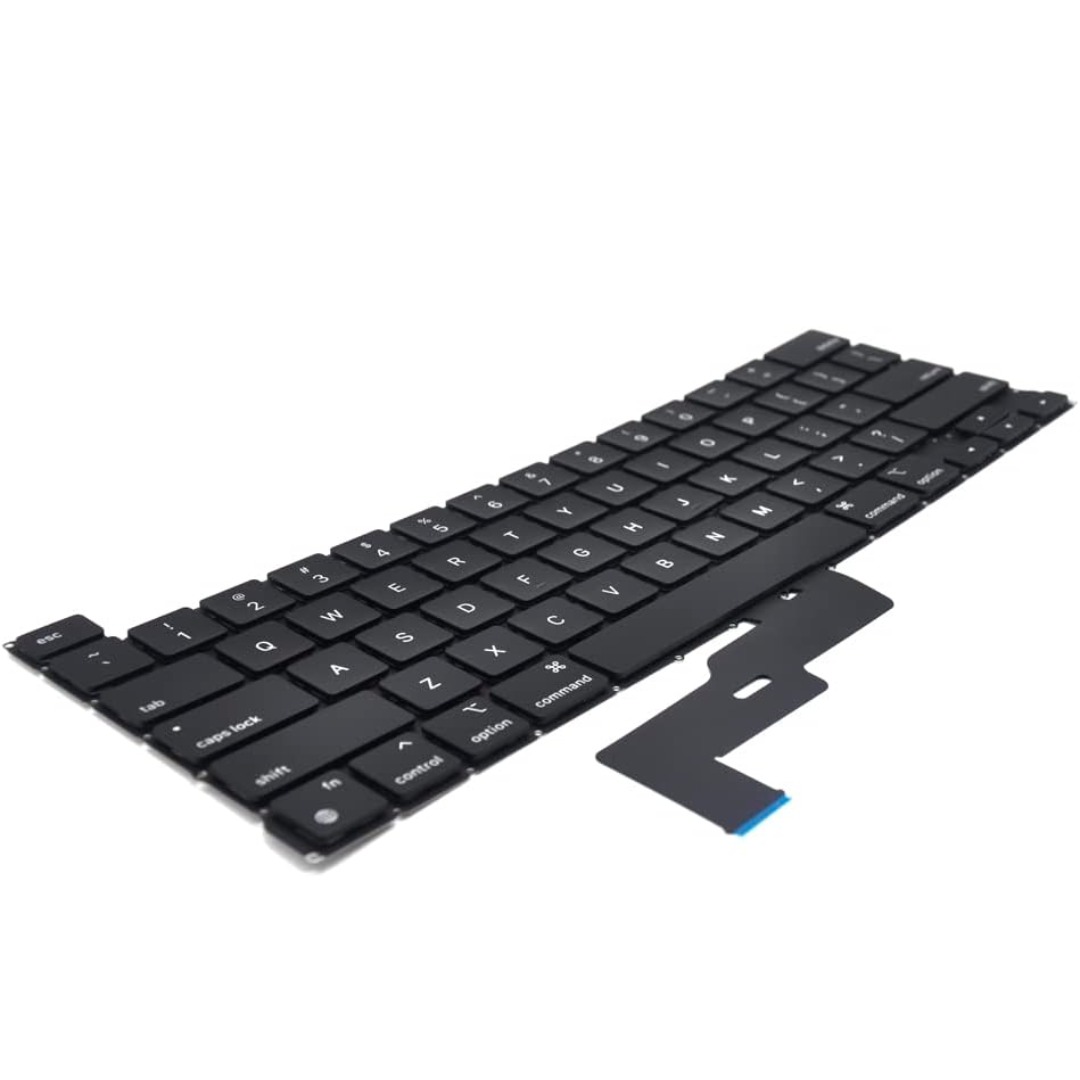
Brand-new UK-layout keyboard replacement (Z1 Black) for MacBook Air models with M2, M3, and M4 chips (13.6″ and 15″, 2023–2025). Compatible with A2681 and A2941—precision-engineered for seamless fit and reliable typing performance. This is a brand-new, high-quality keyboard replacement designed specifically for the latest MacBook Air models featuring Apple’s M2, M3, and M4 chips (released 2023–2025). It fits both the 13.6-inch (Model A2681) and 15-inch (Model A2941) MacBook Air variants and comes in the sleek Z1 Black (Space Black) finish with a UK English layout (including the £ symbol and correct key positioning). Engineered to match Apple’s original specifications, this keyboard ensures a responsive, quiet, and comfortable typing experience with consistent key travel and tactile feedback. It includes the full top case assembly with integrated backlighting, function keys, and Touch ID sensor cutout (sensor not included), making it ideal for professional repairs or replacements after liquid damage, wear, or key failure. Installation requires technical expertise and proper tools due to the integrated nature of the MacBook Air’s top case design. Recommended for certified technicians or experienced repair professionals. Important Notes: This is a keyboard + top case assembly, not just keycaps. Touch ID sensor is not included—you must transfer your original sensor to maintain functionality. Compatible only with MacBook Air M2 (2022–2023), M3 (2023–2024), and M4 (2024–2025) models in 13.6″ (A2681) and 15″ (A2941) sizes. Color: Z1 Black (Space Black) – matches official Apple Space Black finish. Layout: UK English (ISO) – features the correct “£” key and shifted Enter key.

Are you ready to take your gaming to the next level? Meet the Asus ROG Swift PG278QR monitor, the ultimate gaming companion. With its cutting-edge features and sleek design, it’s the perfect choice for gamers seeking excellence. Firstly, let’s talk about the mesmerizing visuals. With a blazing-fast refresh rate and NVIDIA G-SYNC technology, this monitor delivers smooth, tear-free gameplay that will immerse you in every virtual world. Say goodbye to stuttering and lagging! Moreover, the WQHD resolution ensures crisp, detailed images that bring your games to life. Whether you’re exploring vast open worlds or engaging in intense firefights, every scene will be rendered with stunning clarity and precision. But the Asus ROG Swift PG278QR isn’t just about visuals—it’s also designed for comfort and convenience. The ergonomic stand allows you to adjust the height, tilt, swivel, and pivot for the perfect viewing angle, reducing strain during extended gaming sessions. Furthermore, connectivity options abound with DisplayPort 1.2 and HDMI ports, ensuring compatibility with a wide range of devices. Whether you’re gaming on your PC, console, or streaming media from your favorite device, the Asus ROG Swift PG278QR has you covered. In conclusion, if you’re serious about gaming, the Asus ROG Swift PG278QR monitor is a game-changer. Elevate your gaming experience with stunning visuals, smooth gameplay, and unmatched comfort. Get ready to unlock gaming excellence like never before! Specifications: Display : 27″ TN Resolution : 2k(2560×1440) Refresh Rate : 165Hz Response Rate : 1ms

The Acer V246HQL 24″ 60Hz Monitor is a perfect choice for work, study, and entertainment. It delivers clear visuals with a full HD resolution. The 24-inch screen provides a comfortable viewing experience for long hours. With a 60Hz refresh rate, this monitor ensures smooth performance for daily tasks. It is great for browsing, office work, and watching videos. The 5ms response time reduces motion blur, making images sharper. The Acer V246HQL features LED-backlit technology, offering bright and vivid colors. It enhances contrast and clarity for a better viewing experience. The anti-glare screen minimizes reflections, making it easy on the eyes. This 24-inch monitor supports Full HD 1920 x 1080 resolution. It delivers sharp images with great detail. Whether for work or entertainment, this resolution ensures high-quality visuals. The Acer V246HQL 24″ 60Hz Monitor includes VGA and HDMI ports for flexible connectivity. You can easily connect it to computers, laptops, and other devices. The tiltable stand allows you to adjust the screen for better comfort. Designed for efficiency, this monitor has low power consumption. It is Energy Star certified, helping to reduce electricity costs. It is an eco-friendly choice for home and office use. The Acer V246HQL 24″ 60Hz Monitor is built with eye-care technology. It includes Flicker-Free and Blue Light Filter features. These help reduce eye strain during long hours of use. Its slim and modern design makes it a great addition to any workspace. It fits easily on desks, saving space while providing a high-quality display. In conclusion, the Acer V246HQL 24″ 60Hz Monitor is a reliable and budget-friendly option. It offers excellent performance for everyday tasks with clear visuals and comfortable viewing. Specifications: Display : 24″ VA Resolution : 1920×1080 Refresh Rate : 60Hz Response Rate : 5ms

Genuine-spec touchpad flex cable compatible with both MacBook Air A2179 (Intel, 2020) and A2337 (M1, 2020)—restores full Force Touch functionality, haptic feedback, and precise multi-touch gesture control during trackpad repair or replacement. Compatible With: MacBook Air 13″ (2020, Intel) – Model A2179 (Model Identifier: MacBookAir9,1) MacBook Air 13″ (2020, Apple M1) – Model A2337 (Model Identifier: MacBookAir10,1) MacBook Air 13″ (2020, Intel) – Model A2179 (Model Identifier: MacBookAir9,1) MacBook Air 13″ (2020, Apple M1) – Model A2337 (Model Identifier: MacBookAir10,1) ✅ Important Note: Despite different processors (Intel vs. M1), Apple used the same trackpad assembly and flex cable in both A2179 and A2337. This makes the flex cable fully interchangeable between the two models. Part Type: Touchpad flex cable only — does not include the trackpad housing, Taptic Engine, or mounting hardware. This is the OEM-style ribbon cable that connects the trackpad to the logic board. Function: Transmits: Touch input coordinates Force Touch pressure data Haptic feedback signals to the Taptic Engine Enables full macOS gesture support: Force Click, three-finger lookup, swipe navigation, pinch-to-zoom, and smooth cursor tracking. Touch input coordinates Force Touch pressure data Haptic feedback signals to the Taptic Engine Enables full macOS gesture support: Force Click, three-finger lookup, swipe navigation, pinch-to-zoom, and smooth cursor tracking. OEM-Quality Build: Matches Apple’s original specifications in: Cable length and routing path Connector pitch and ZIF latch design EMI shielding and flex durability Cable length and routing path Connector pitch and ZIF latch design EMI shielding and flex durability Common Use Cases: Replacing a torn, creased, or liquid-damaged original flex cable Completing a trackpad replacement when the original cable is compromised Fixing intermittent trackpad behavior, loss of Force Touch, or complete unresponsiveness Replacing a torn, creased, or liquid-damaged original flex cable Completing a trackpad replacement when the original cable is compromised Fixing intermittent trackpad behavior, loss of Force Touch, or complete unresponsiveness Installation Note: Requires full bottom case removal and battery disconnection. Cable routes under the right side of the battery and logic board. Connects via a ZIF (Zero Insertion Force) socket—align carefully and latch gently. Recommended for experienced or certified technicians only. Requires full bottom case removal and battery disconnection. Cable routes under the right side of the battery and logic board. Connects via a ZIF (Zero Insertion Force) socket—align carefully and latch gently. Recommended for experienced or certified technicians only.

The HP V28 4K Monitor delivers sharp and vivid visuals for work and entertainment.It features a 28-inch 4K UHD display that shows lifelike detail and rich color.Moreover, the slim design fits well on desks at home and in office setups. This monitor uses an advanced panel for wide viewing angles and consistent color from different positions.Additionally, the 4K resolution brings out clear text and crisp images for videos and photos.Anti-glare coating helps reduce reflections in bright lighting. The HP V28 4K also includes HDMI and DisplayPort inputs for flexible connectivity.Furthermore, tilt adjustment lets you find a comfortable viewing angle.Low blue light and flicker-free features help reduce eye strain during long use. This display suits professionals, content creators, and home users alike.Therefore, it supports productivity, creative work, and media streaming.Finally, it combines high picture quality, versatile connections, and comfort features for everyday use. Specifications: 28″ 4K UHD (3840 × 2160) panel HDMI + DisplayPort ports for flexible connection Anti-glare coating for comfortable viewing Tilt-adjustable stand for ergonomic use Wide viewing angles for consistent color

Display Panel Size (inch) : 27 Aspect Ratio : 16:9 Display Viewing Area (H x V) : 597.888 x 336.312 mm Display Surface : Non-Glare Backlight Type : LED Panel Type : IPS Viewing Angle (CR≧10, H/V) : 178°/ 178° Pixel Pitch : 0.311mm Resolution : 1920×1080 Color Space (sRGB) : 100% Brightness (Typ.) : 250cd/㎡ Contrast Ratio (Typ.) : 1000:1 ASUS Smart Contrast Ratio (ASCR) : 100000000:1 Display Colors : 16.7M Response Time : 1ms MPRT Refresh Rate (Max) : 144Hz Flicker-free : Yes Video Feature Trace Free Technology : Yes GameVisual : Yes Color Temp. Selection : Yes(4 modes) GamePlus : Yes HDCP : Yes VRR Technology : FreeSync™ Premium GameFast Input technology : Yes Shadow Boost : Yes Low Blue Light : Yes Audio Feature Speaker : Yes(2Wx2) I/O Ports DisplayPort 1.2 x 1 HDMI(v1.4) x 2 Earphone Jack : Yes Signal Frequency Digital Signal Frequency : HDMI: 30~160 KHz (H) / 48~ 144 Hz (V) DisplayPort: 30~160 KHz (H) / 48~144 Hz (V) Power Consumption Power Consumption : <18W* Power Saving Mode : <0.5W Power Off Mode : <0.3W Voltage : 100-240V, 50/60Hz Mechanical Design Tilt : Yes (+22° ~ -5°) VESA Wall Mounting : 75x75mm Kensington Lock : Yes Dimensions (Esti.) Phys. Dimension with Stand (W x H x D) : 612.6x431x213 mm Phys. Dimension without Stand (W x H x D) : 612.6 x 362.5 x 37.7 mm Box Dimension (W x H x D) : 692 x 499 x 183 mm Weight (Esti.) Net Weight with Stand : 3.9 Kg Net Weight without Stand : 3.5 Kg Gross Weight : 6.1 Kg Accessories (vary by regions) DisplayPort cable HDMI cable Power adapter Power cord Quick start guide Warranty Card 90LM05S1-B01E70 manufacturer link

A premium pre-owned HP EliteOne 800 G2 all-in-one desktop with 23.8-inch display, 6th Gen Core i7, RAM upgrade options, and SSD storage options. Designed for business professionals who need performance, security, and a clean space-saving workstation.

The Philips 27″ 100Hz LCD Monitor is the perfect choice for work, entertainment, and gaming. It delivers smooth visuals with a high refresh rate, ensuring a seamless viewing experience. With a 100Hz refresh rate, this monitor provides fluid motion, reducing screen tearing and stuttering. Whether you’re watching videos or playing games, you can enjoy clear and sharp visuals. The Full HD resolution ensures crisp details and vibrant colors for an immersive experience. The Philips 27″ 100Hz LCD Monitor features an ultra-slim design that enhances your workspace. Its narrow bezels provide a sleek, modern look, making it perfect for multi-monitor setups. The adjustable stand allows you to find the most comfortable viewing position. Setting up this monitor is easy with multiple connectivity options, including HDMI and VGA ports. It’s compatible with laptops, desktops, and gaming consoles, offering flexibility for different devices. Eye strain is reduced thanks to Philips’ Flicker-Free technology and LowBlue Mode. These features provide a more comfortable viewing experience, especially during long hours of use. Whether you’re working or gaming, your eyes will feel less fatigued. Energy efficiency is another key benefit of the Philips 27″ LCD Monitor. It consumes less power while delivering high performance, making it an eco-friendly choice for your home or office. Upgrade your display today and enjoy smoother visuals, vibrant colors, and ergonomic comfort. The Philips 27″ 100Hz LCD Monitor is a great addition to any setup. Specifications: Display : 27″ VA Resolution : 1920 x 1080 FHD Refresh Rate : 100Hz Response Rate : 4ms

Genuine-spec touchpad flex cable for MacBook Pro 13″ (Model A2251, 2020, Intel)—essential for restoring full Force Touch functionality, haptic feedback, and precise multi-touch gesture control during trackpad repair or replacement. Compatible With: MacBook Pro 13-inch (2020, Two Thunderbolt Ports, Model A2251, Model Identifier MacBookPro16,1) with Intel Core i5/i7 processors. Part Type: Touchpad flex cable only—does not include the trackpad housing, Taptic Engine, or mounting hardware. This is the OEM-style ribbon cable that connects the trackpad to the logic board. Function: Transmits: Precise touch coordinates Force Touch pressure data Haptic feedback signals to the Taptic Engine Enables full macOS gesture support including Force Click, three-finger lookup, swipe navigation, and inertial scrolling. Precise touch coordinates Force Touch pressure data Haptic feedback signals to the Taptic Engine Enables full macOS gesture support including Force Click, three-finger lookup, swipe navigation, and inertial scrolling. OEM-Quality Build: Matches Apple’s original specifications in: Cable length and routing Connector pitch and ZIF latch design EMI shielding and flex durability Cable length and routing Connector pitch and ZIF latch design EMI shielding and flex durability Common Use Cases: Replacing a torn, creased, or liquid-damaged original flex Completing a trackpad replacement when the original cable is compromised Fixing intermittent trackpad behavior, loss of Force Touch, or complete unresponsiveness Replacing a torn, creased, or liquid-damaged original flex Completing a trackpad replacement when the original cable is compromised Fixing intermittent trackpad behavior, loss of Force Touch, or complete unresponsiveness Installation Note: Requires full bottom case removal and partial disassembly (including battery disconnect). Cable routes under the right speaker and logic board—must be seated in original retention channels. Connects via ZIF (Zero Insertion Force) socket—align carefully and latch gently. Recommended for experienced or certified technicians only. Requires full bottom case removal and partial disassembly (including battery disconnect). Cable routes under the right speaker and logic board—must be seated in original retention channels. Connects via ZIF (Zero Insertion Force) socket—align carefully and latch gently. Recommended for experienced or certified technicians only.

Specifications Feature Value Feature Value Input/Output Other Sound Mode Extra Bass Mode Category Speakers Use Other Input Power (W) 25-49W Voice Control No Waterproof Yes Support APP No Intelligent Personal Assistant None Audio Crossover Full-Range Number of Loudspeaker Enclosures 2 Power Source None Channels 2 (2.0) Battery Yes Communication USB Speaker Type Portable Cabinet Material Plastic Brand Name QUCAA Origin Mainland China Certification CE

The MSI Pro MP241X 24″ monitor delivers clear visuals and reliable performance for work and home use. It is built for everyday tasks, browsing, and media viewing. First, this monitor features a 24-inch Full HD display with vibrant colors and sharp details. As a result, your screen content looks crisp and easy to read. In addition, the MSI Pro MP241X 24″ offers a wide viewing angle for shared viewing. Therefore, multiple people can see clear images from different positions. The sleek and slim design makes this monitor look modern on any desk. Also, it takes up minimal space. Moreover, this monitor supports anti-flicker and reduced blue light technology. So, your eyes feel more comfortable during long sessions. Because it uses HDMI and VGA inputs, it connects easily to many devices. Thus, setup stays simple with laptops and desktops. The MSI Pro MP241X 24″ provides consistent performance for work apps and video watching. This makes everyday computing smooth and enjoyable. Furthermore, the stand offers tilt adjustment for better viewing angles. So, you can find the most comfortable position for your eyes. Compared to lower-resolution screens, this Full HD panel shows clearer details. Therefore, text and graphics look sharper and more accurate. It works well for office tasks, video streaming, and school work. Thus, it fits many daily needs. Installation is fast and beginner-friendly with plug-and-play support. As a result, you can start using it right away. The MSI Pro MP241X 24″ also supports stable refresh performance for smoother visuals. This improves motion during videos and general use. Also, the slim bezels help reduce distraction and provide a clean look. Therefore, your workspace stays neat and focused. In conclusion, this monitor offers clear visuals, comfort features, and easy connectivity. Overall, it is a strong choice for work, school, or entertainment. If you want a reliable and sharp 24″ screen, this model is worth choosing. Specifications: Display: 24-inch VA panel, Full HD (1920×1080), 16:9 aspect ratio. Performance: 75Hz refresh rate, 4ms (GTG) response time, 1000:1/3000:1 contrast Connectivity: HDMI™ 1.4b & D-Sub (VGA) ports for versatile device connection

The MSI PRO MP251 E2 24.5″ 120Hz Monitor is designed for smooth performance and vibrant visuals. It offers a fast 120Hz refresh rate, providing a fluid viewing experience for work and entertainment. Whether you’re working on tasks or watching videos, this monitor delivers clear and sharp visuals. With a 24.5-inch Full HD display, the MSI PRO MP251 E2 provides stunning image quality. The high resolution ensures crisp details, making it perfect for productivity and multimedia use. The IPS panel technology enhances color accuracy and wide viewing angles, ensuring consistent colors from any angle. The fast 120Hz refresh rate helps reduce motion blur and provides smoother visuals. This makes it great for video editing, casual gaming, and multitasking. You’ll experience a more responsive display that enhances your workflow. Setting up the MSI PRO MP251 E2 24.5″ 120Hz Monitor is easy. It comes with multiple connectivity options, including HDMI and DisplayPort, allowing you to connect your devices effortlessly. Whether you’re using a PC, laptop, or gaming console, this monitor fits perfectly into your setup. The monitor also features an eye-care design with flicker-free technology and a low blue light mode. This helps reduce eye strain, making it ideal for long hours of work or study. Its slim and modern design blends seamlessly into any workspace, saving desk space while enhancing your setup. The adjustable stand allows you to find the perfect viewing angle for comfort and productivity. Upgrade your display with the MSI PRO MP251 E2 24.5″ 120Hz Monitor and enjoy a smooth and vibrant visual experience. Specifications: Display : 24.5″ IPS Screen : FHD (1920×1080) Refresh Rate : 120Hz Response Rate : 1ms

The Apildella 14″ Triple Laptop Screen Extender gives your laptop three screens for better productivity. It allows you to work faster and more comfortably. The extender adds two extra displays around your laptop screen. This creates a wider workspace for all your tasks. Moreover, the Apildella Triple Laptop Screen Extender offers clear and bright visuals. Each screen delivers sharp quality for work, gaming, and media. The colors stay consistent across all panels. This helps you focus on your tasks with ease. In addition, the screens connect through simple USB-C or HDMI. The setup process is quick, and you can start using it instantly. There is no need for heavy software. This makes the extender ideal for travel and office use. Furthermore, the Apildella 14″ Triple Laptop Screen Extender works with many laptops. It supports Windows, macOS, and some mobile devices. This wide compatibility makes it useful for students, creators, and professionals. It helps you multitask with less stress. Also, the extender features a foldable and lightweight design. You can pack it in your laptop bag easily. It fits well in small workspaces. This makes it great for remote work and travel. The Apildella Triple Laptop Screen Extender also allows adjustable viewing angles. You can tilt the screens to get a comfortable view. This helps reduce eye strain during long hours of use. It improves your overall productivity. Overall, the Apildella 14″ Triple Laptop Screen Extender gives you more space, better multitasking, and stronger efficiency. It upgrades your laptop into a full workstation instantly. It is perfect for work, study, design, and streaming anywhere you go. Specifications: Display : 14″ Resolution : FHD 1920×1080 Refresh Rate : 60Hz Compatible with 13″ to 17″ laptops, windows/mac

The MSI PRO MP275W E2 27″ 120Hz Business Monitor is designed to enhance productivity with smooth visuals and eye-care features. It features a 27-inch Full HD IPS panel, delivering clear images and wide viewing angles for everyday work tasks. With a 120Hz refresh rate, the monitor provides smoother motion compared to standard displays. This makes it ideal not only for business use but also for light entertainment. The MSI PRO MP275W E2 27″ 120Hz Business Monitor ensures reduced motion blur and a more comfortable viewing experience. The monitor supports Anti-Flicker and Less Blue Light technologies, helping to reduce eye strain during long hours of use. These features are especially useful in office settings or remote work environments. Thanks to its built-in speakers, users can enjoy basic audio without needing external accessories. The MSI PRO MP275W E2 27″ 120Hz Business Monitor also includes HDMI and VGA ports, offering compatibility with modern and older devices. Its sleek, minimal design fits easily into any workspace, whether at home or in an office. The adjustable tilt function allows users to set the screen at the most comfortable viewing angle. This monitor is also VESA mount compatible, making it easy to attach to a monitor arm or wall mount. It supports a clutter-free setup that boosts workspace efficiency. In conclusion, the MSI PRO MP275W E2 27″ 120Hz Business Monitor offers smooth performance, comfort-focused features, and modern connectivity in a professional package. It’s ideal for business users who value quality and simplicity. Specifications: Display : 27″ IPS Resolution : 1920 x 1080 (FHD) Refresh Rate : 120Hz Response Time : 1ms (MPRT) / 4ms (GtG) Speaker : 2x 2W

Genuine-spec Touch Bar assembly with integrated flex cable for 2020 MacBook Pro 13″ models (A2251, A2289, A2338)—restores full Touch ID and Touch Bar functionality with OEM-level fit and performance. Compatible With: MacBook Pro 13″ (2020): A2251 (Intel Core i5/i7, two Thunderbolt ports) A2289 (Intel Core i5/i7, four Thunderbolt ports) A2338 (Apple M1 chip, two Thunderbolt ports) MacBook Pro 13″ (2020): A2251 (Intel Core i5/i7, two Thunderbolt ports) A2289 (Intel Core i5/i7, four Thunderbolt ports) A2338 (Apple M1 chip, two Thunderbolt ports) A2251 (Intel Core i5/i7, two Thunderbolt ports) A2289 (Intel Core i5/i7, four Thunderbolt ports) A2338 (Apple M1 chip, two Thunderbolt ports) Includes: Complete Touch Bar module with integrated flex cable, Touch ID sensor, and ambient light sensor—ready for direct connection to the logic board. Functionality: Fully restores dynamic Touch Bar controls, system functions, app shortcuts, and Touch ID (fingerprint authentication and power button). OEM-Quality Build: Matches Apple’s original design in responsiveness, finish, and sensor alignment—ensures seamless integration with macOS. Color Options: Available in Space Gray and Silver to match your MacBook’s top case (confirm your model’s color before ordering). Installation Note: Requires full top case disassembly and careful handling of adhesive and connectors. The flex cable routes under the speakers and connects near the logic board—precision is essential. Recommended for experienced technicians.

The Samsung Crystal UHD U8000F 43″ 4K Tizen OS Smart TV UA43U8000FUXTW uses a 43-inch LCD panel with 3840 × 2160 resolution. It delivers standard 4K output for everyday viewing, streaming, and console use in smaller rooms. Samsung uses the Crystal Processor 4K for image processing and upscaling. As a result, lower-resolution content converts closer to 4K quality on the display. In addition, the TV supports HDR10 and HDR10+, which improve contrast between bright and dark areas for compatible content. The display runs at a 60 Hz refresh rate. Also, Motion Xcelerator reduces blur during fast motion scenes such as sports and action content. Samsung equips the TV with Tizen OS. Therefore, users access streaming apps, SmartThings integration, and smart features through a responsive interface. Connectivity includes HDMI ports, USB ports, Wi-Fi, Bluetooth, Ethernet LAN, and optical audio output. In addition, the TV supports ALLM for basic console gaming responsiveness. This model focuses on 4K resolution, standard HDR performance, and essential smart TV features without advanced gaming or local dimming technology. Specifications: 43-inch LCD panel with 3840 × 2160 4K UHD resolution Crystal Processor 4K with upscaling support HDR10 and HDR10+ compatibility 60 Hz refresh rate with Motion Xcelerator Tizen OS with HDMI, USB, Wi-Fi, Bluetooth, Ethernet connectivity

The Samsung 85″ Crystal UHD U8000F 4K Smart TV UA85U8000FUXTW uses a 3840 × 2160 (4K UHD) LCD panel designed for large-screen viewing. It focuses on screen size and basic 4K playback rather than advanced display features. It uses Samsung’s Crystal Processor 4K for image processing and upscaling. This processor converts lower-resolution video to near-4K output on the screen. It also supports HDR10 and HDR10+ for compatible content, which increases contrast range between bright and dark areas. The native refresh rate is 60 Hz. It includes Motion Xcelerator to reduce blur in fast motion scenes such as sports and games. The TV runs Samsung Tizen OS. This system provides access to streaming apps, web browsing, and SmartThings integration. It also supports voice assistants depending on region and setup. For connectivity, it includes HDMI ports, USB ports, Wi-Fi, Bluetooth, Ethernet LAN, and optical audio output. It also supports features like ALLM for basic gaming responsiveness. Overall, this model is a large 4K Crystal UHD TV focused on size, standard smart features, and basic HDR performance without local dimming or advanced gaming hardware. Specifications: 85-inch LCD panel with 3840 × 2160 4K UHD resolution Crystal Processor 4K with upscaling support HDR10 and HDR10+ compatibility 60 Hz native refresh rate with Motion Xcelerator Tizen OS with HDMI, USB, Wi-Fi, Bluetooth, Ethernet connectivity

Looking for a reliable monitor that combines performance and affordability? The BenQ GW2780 monitor might be your perfect choice, offering an array of features to enhance your visual experience. To begin with, the GW2780 boasts a sleek design that seamlessly blends with any workspace. Its slim bezels create a borderless display, providing an immersive viewing experience for work or entertainment. Equipped with a 27-inch Full HD display, the monitor delivers crisp and clear visuals. Whether you’re working on spreadsheets, watching videos, or gaming, the GW2780 ensures sharp images and vibrant colors. The In-Plane Switching (IPS) technology ensures wide viewing angles, allowing you to enjoy consistent colors and brightness from any angle. Say goodbye to distorted colors and limited viewing positions. Eye strain is a thing of the past with the BenQ GW2780. The Low Blue Light technology reduces harmful blue light emissions, and the flicker-free feature eliminates screen flickering, providing a comfortable viewing experience for extended periods. Connectivity is a breeze with the multiple ports, including HDMI and VGA. Easily link your monitor to various devices such as laptops, desktops, and gaming consoles. The user-friendly design ensures a hassle-free setup. The BenQ GW2780 monitor not only prioritizes performance but also energy efficiency. Energy Star certification reflects its commitment to reducing environmental impact, making it an eco-friendly choice. In summary, the BenQ GW2780 monitor offers a winning combination of affordability and top-notch features. Elevate your viewing experience with this reliable display solution that caters to your entertainment and productivity needs effortlessly. Specifications: Display : 27″ IPS Resolution : 1920×1080 IPS Response Time : 5ms Refresh Rate : 60hz
