
The MSI MAG E18 32-inch curved gaming monitor delivers smooth performance and immersive visuals for modern gaming setups. It features a wide display that enhances focus and creates a more engaging experience. Therefore, users can enjoy both casual and competitive gameplay with better visual coverage. Moreover, the WQHD resolution provides clear and detailed images for games and multimedia. The curved design improves viewing comfort and keeps content within your natural field of view. In addition, the 180Hz refresh rate ensures fluid motion during fast-paced scenes. The fast 0.5ms response time reduces motion blur and improves clarity in action sequences. As a result, players gain better control and precision. Furthermore, the panel maintains consistent colors and wide viewing angles, which enhances overall visual quality. In addition, adaptive sync support helps eliminate screen tearing and stuttering. This creates a more stable and enjoyable gaming experience. The monitor also includes multiple connectivity options, allowing easy integration with gaming systems and PCs. MSI MAG E18 32 monitor offers a strong balance of speed, clarity, and immersion. MSI MAG E18 32 monitor is a reliable choice for gamers who want smooth performance and consistent visuals. Specifications: 32-inch WQHD (2560 × 1440) curved display 180Hz refresh rate for smooth gameplay 0.5ms response time for reduced motion blur Curved panel for immersive viewing experience Multiple connectivity ports for flexible setup

The MSI G244PF E2 Gaming Monitor features a 23.8″ Rapid IPS panel with Full HD (1920 x 1080) resolution and a high 180Hz refresh rate. This delivers quick and smooth visuals for responsive gaming and everyday use. It also provides a fast 1ms Gray‑to‑Gray response time, which reduces motion blur in fast‑moving games. Adaptive‑Sync technology helps reduce screen tearing and stuttering for fluid gameplay. The monitor includes Night Vision for better detail in dark areas, anti‑flicker and less blue light features to lower eye strain. Wide 178° horizontal and vertical viewing angles keep colors consistent from different positions. The fully adjustable stand lets you tilt, swivel, pivot, and change height for ergonomic comfort. The MSI G244PF E2 Gaming Monitor is ideal for users who want smooth, responsive visuals and ergonomic adjustability. Specifications: 23.8″ Full HD Rapid IPS panel with wide viewing angles 180Hz refresh rate for smooth and responsive visuals 1ms Gray‑to‑Gray response time to reduce motion blur Adaptive‑Sync technology to minimize screen tearing Adjustable stand with tilt, swivel, pivot, and height options

Introducing the LG MyView Smart Monitor – your all-in-one display solution for work, entertainment, and everything in between. With its innovative features and user-friendly interface, this monitor redefines convenience and efficiency. First and foremost, versatility is the name of the game. Whether you’re working on spreadsheets, streaming your favorite shows, or gaming with friends, the MyView Smart Monitor adapts effortlessly to your needs. Transitioning between tasks is seamless thanks to its intuitive interface and quick response times. Say goodbye to cluttered desktops and hello to a streamlined workflow that maximizes productivity. Moreover, connectivity options abound. From wireless casting to multiple input ports, the MyView Smart Monitor ensures compatibility with a wide range of devices. Whether you’re using a laptop, tablet, or smartphone, connecting is hassle-free. In addition, ergonomic design features such as adjustable stands and eye-care technology prioritize your comfort and well-being during extended use. Say goodbye to eye strain and discomfort – the MyView Smart Monitor has your back. Furthermore, its sleek and modern design adds a touch of sophistication to any space, whether it’s your home office or entertainment center. Elevate your surroundings with a display that not only performs but also complements your aesthetic. In conclusion, the LG MyView Smart Monitor is more than just a display – it’s a versatile companion that enhances every aspect of your digital life. Experience the convenience, efficiency, and style it brings to the table, and unlock a world of possibilities today. Specifications: Display : 27″ IPS Resolution : 1920 x 1080 Refresh Rate : 60Hz Response Rate : 5ms GTG Speaker : 5W x2

The MSI MAG 273QP QD-OLED X24 is a stunning gaming monitor with sharp visuals and smooth performance. This display brings vibrant colors and deep contrasts to every game and movie. Moreover, its QD-OLED panel delivers lifelike pictures that feel rich and alive. Therefore, it fits well for gamers, creators, and everyday users. First, the screen quality is excellent with bright highlights and deep blacks. Every scene looks clear and detailed, making games more immersive. In addition, the wide color range enhances photos and videos. This means visual content feels more real and exciting on this screen. Also, the display offers consistent colors from different viewing angles. Next, the refresh rate is fast, so motion stays smooth and fluid. This helps with fast games and video content. Furthermore, adaptive sync technology reduces screen tearing for a better experience. As a result, gaming feels responsive and enjoyable without lag or blur. Players will notice sharper movement in games. The design is sleek and modern with thin bezels. Therefore, it looks great on any desk and feels like a premium setup. Also, the stand is adjustable for height and tilt. This makes long sessions more comfortable and easy to position. Meanwhile, the built-in speakers add basic audio without extra devices. Connectivity is strong with multiple ports for peripherals. You can easily connect consoles, PCs, and other gadgets. Moreover, the monitor supports high bandwidth for crisp image output. This makes it ready for current and future hardware demands. Overall, the MSI MAG 273QP QD-OLED X24 delivers top visuals, fluid performance, and practical features. It combines quality display and functionality in one package. For gamers and creators alike, this monitor is a smart choice for sharp graphics and smooth play. Specifications: Display : 27″ QD-OLED Resolution : 2560 x 1440 (WQHD) Refresh Rate : 240Hz Response Rate : 0.03ms (GTG)

Logitech MK120 Wired USB Keyboard Mouse Desktop Combo Height: 6.10 in (155 mm) Width: 17.72 in (450 mm) Depth: 0.93 in (23.5 mm) Weight: 19.4 oz (550 g) Cable length: 4.9 ft (150 cm) Height: 4.45 in (113 mm) Width: 2.44 in (62 mm) Depth: 1.50 in (38 mm) Weight: 3.17 oz (90 g) Cable length: 70.87 in (180 cm) Spill-resistant design 1Tested under limited conditions (maximum of 60 ml liquid spillage). Do not immerse the keyboard in liquid. Adjustable keyboard height 10-Key Number pad Caps lock indicator light Num lock indicator light Up to 10 million keystrokes (excludes number lock key) Key type: Deep profile Sensor Technology: Optical tracking Number of Buttons: 3 (Left/Right-click, Middle click) Scrolling: line-by-line Scroll Wheel: Yes, optical Mouse plastics: 72% post-consumer recycled material 2Excludes plastic in cable assembly, printed wiring assembly (PWA) and packaging. Keyboard plastics: 54% post-consumer recycled material 3Excludes plastic in cable assembly, printed wiring assembly (PWA) and packaging. Windows® 10,11 or later Two available USB ports

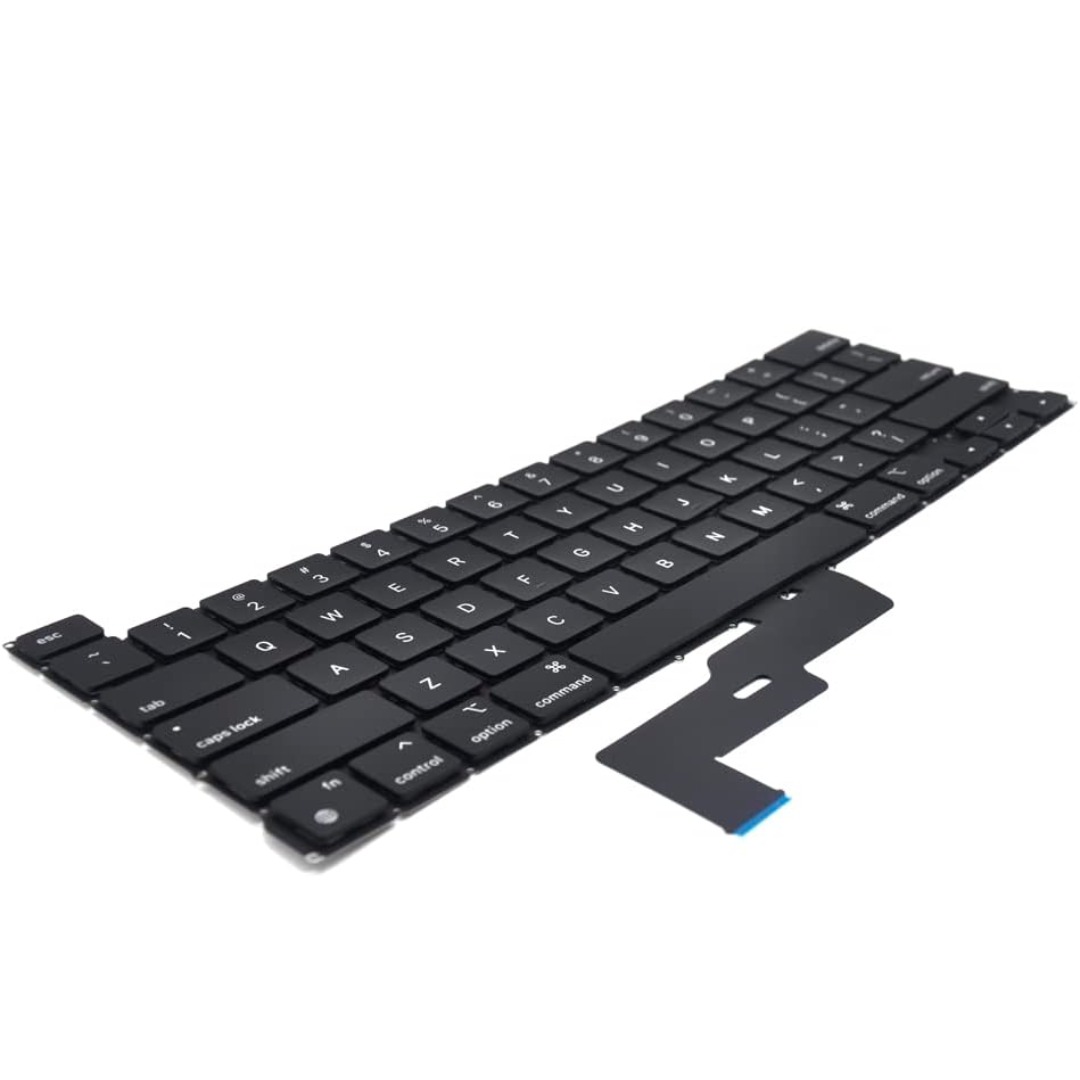
Keyboard Compatible for MacBook PRO Retina 15″ A1398 (Late 2013-MID 2015) US Layout Compatibility: MacBook Pro Retina 15″ A1398 Late 2013 (IG): ME293LL/A (2.0 Core i7) Late 2013 (IG): ME293LL/A (2.3 Core i7) Late 2013 (IG): ME293LL/A (2.6 Core i7) Mid 2014 (IG): MGXA2LL/A (2.2 Core i7) Mid 2014 (IG): MGXA2LL/A (2.5 Core i7) Mid 2014 (IG): MGXA2LL/A (2.8 Core i7) Late 2013 (DG): ME294LL/A (2.3 Core i7) Late 2013 (DG): ME294LL/A (2.6 Core i7) Compatibility: Mid 2014 (DG): MGXC2LL/A (2.5 Core i7) Mid 2014 (DG): MGXC2LL/A (2.8 Core i7) Mid 2015 (IG): MJLQ2LL/A (2.2 GHz Core i7) Mid 2015 (IG): MJLQ2LL/A BTO (2.5 GHz Core i7) Mid 2015 (IG): MJLQ2LL/A BTO (2.8 GHz Core i7) Mid 2015 (DG): MJLT2LL/A (2.5 GHz Core i7) Mid 2015 (DG): MJLT2LL/A BTO (2.8 GHz Core i7) Identifying Numbers APN: 661-6532, 661-8311,661-02536 Specification】The keyboard is without frame! pls see detail compatible model in descrirption. Safe】Easy for you replace your faulty,cracked or broken keyboard ,seller remind that you should replace the keyboard in the off state. All pictures are taken from the real item, please check carefully before biddingReplacement and high quality,Replace your faulty, cracked or broken keyboard Replacement and high quality,Replace your faulty, cracked or broken keyboard Each keyboard is tested before shipping Please contact us if you have any question or problems.

The Apple Magic Mouse (USB-C version) is a sleek, minimalist multi-touch wireless mouse built for Mac users. It offers smooth gesture support, Bluetooth connectivity and a built-in rechargeable battery — a great choice if you prefer a clean desk setup and full compatibility with macOS and iPadOS. General Name: Magic Mouse (USB-C) — part of Apple’s pointing-device lineup. Wireless connectivity: Bluetooth. Rechargeable battery: built-in, no disposable AA cells. Charging / port: USB-C port (bottom of mouse) for pairing and charging. Compatibility: Requires a Mac with macOS 15.1 or later, or an iPad with iPadOS 18.1 or later. Size & Weight Height: ~0.85 inch (2.16 cm) Width: ~2.25 inch (5.71 cm) Depth: ~4.47 inch (11.35 cm) Weight: ~0.22 pound (0.099 kg) (varies slightly by manufacturing) Features Multi-Touch surface: supports gestures such as swiping between pages, scrolling through documents, zooming. Glide / foot design: optimized for smooth movement across desktop surfaces. Rechargeable battery life: about a month or more between charges (typical use) per Apple spec. Used Condition ConsiderationsSince you’re specifying a used unit: Check for wear on the bottom feet / skates — these degrade and affect glide. Verify battery capacity / health (rechargeable batteries age). Confirm the port is functioning (USB-C) and Bluetooth connectivity is stable. Look for signs of excessive surface scratches on the multi-touch top — may impair gestures. Ensure the firmware / Mac recognizes it fully (gestures working). Upgradability / Limitations Not user-upgradable: You cannot replace the internal battery or change internals easily. Design limitation: The USB-C port remains on the bottom of the mouse, meaning you cannot use it while charging unless you flip it. This design is still criticized. Ergonomics: The flat, low-profile design is stylish but may not suit extended-use comfort for some users.

Remax F21 Ruiyal Series – Oscillating water‑cooling fan with 4,000 mAh battery, digital display, and 6 wind levels.Portable and stylish small-table fan with 3 oscillation modes and mist spray cooling. Model: Remax F21 Ruiyal Series Water‑Cooling Oscillating Fan (White) Battery & Power: Built‑in 4,000 mAh battery; USB‑C rechargeable (details unspecified) Cooling Method: Water‑cooling spray system with turbine-style fan blades Wind Speed: 6 adjustable speed levels Oscillation: 3 movement modes—approx. 45°, 90°, or 120° Display & Controls: Digital display showing mode, speed, and battery indicators Dimensions & Weight: Compact tabletop size, ~868 g Power Consumption: Around 8W rated power

Tabletop Desk Metal Stand for lPad/Tablet/Mobile Phones-Adjustable Multi Angle Long Arm-Device 3.5~10.6 inches- Office, Home, Watching Movie, Drawing, Live Streaming Stand Holder is suitable for tablets and cell phones whose size of 3.5 to 10.6 inches. 【Flexible】- stand mount with long arm can adjust freely in multi angle. Its head can be rotated 360 degrees. That’s stable and durable. 【Many suitable occasions】- Play online recipes, Baking Crafting Demo Video. In bedroom: Enjoy your free time to watch online movies, videos, browsing, YouTube, TikTok etc. In office: Participate in online meeting, and as a desk organizer to clean the office environment. 【Strong design】-Tablet Stand adjustable has a high-end metal extended arm and a clamp clip that can be easily operated with one hand and a charging hole reserved. 【LIVE stream equipment】- Place the tablet and cell phone stand on the desktop and then you can live streaming showing upper body that very convenient to avoid blurring caused by hand-shake..

External Seagate 2TB/4TB HDD Expansion Portable Drive Easily store and access 2TB/4TB of content on the go with Seagate Expansion Portable hard drive This external hard drive for Windows computers makes backup a snap just drag and drop To get set up, connect the portable hard drive to your Windows computer for automatic recognition no software required This USB drive provides plug and play simplicity with the included 18 inch USB 3.0 cable Enjoy long term peace of mind with the included one year limited warranty

Acer KA222Qbi The Acer KA222Qbi entry-level series provide a superb user experience and don’t compromise . on quality. With a choice of display size and a ZeroFrame. design it is ideal for use in homes and offices. Whether it’s running productivity apps or playing games this monitor has it all. Viewable Screen Size Acer KA222Qbi 54.6 cm (21.5″) Aspect Ratio 16:9 Response Time 1 ms VRB Backlight Technology LED Horizontal Viewing Angle 178° Vertical Viewing Angle 178° Panel Technology In-plane Switching (IPS) Technology Frequency (Horizontal/Vertical) 30KHz-85KHz/48Hz-75Hz Pixel Pitch 0.25 mm Tilt Angle -5° to 15° Maximum Adjustable Height No Video Maximum Resolution 1920 x 1080 Native Contrast Ratio 1,000:1 Dynamic Contrast Ratio 100,000,000:1 Colour Supported 16.7 Million Colours Colour Depth 8-bit Color Gamut 72% NTSC Dynamic Contrast Ratio 100,000,000:1 Brightness 250 cd/m² Tearing Prevention Technology AMD FreeSync™ (HDMI VRR) Interfaces/Ports Acer KA222Qbi VGA Yes HDMI Yes Power Description Standby Power Consumption (Energy Star) 270 mW Off-Mode Power Consumption (Energy Star) 210 mW Operating Power Consumption (Energy Star) 15.50 W Miscellaneous Environmental Certification MPR II Package Contents 1 x KA222Q Widescreen LCD Monitor 1 x Power Cord(EURO/UK) 1 x VGA Cable Physical Characteristics Colour Black VESA Mount Compatible Yes VESA Mount Standard 100 x 100 Height 295 mm Width 490 mm Depth 65 mm Weight (Approximate) 3.09 kg Weight with Stand (Approximate) 3.44 kg Specifications: Specifications 21.5″ ZeroFrame FreeSync 1ms, IPS 1 year warranty

Specifications : Display Diagonal Viewing Size 86.27 cm 34.14 inches Preset Display Area (H x V) 799.80 mm x 344.80 mm 31.49″ x 13.18″ 267773.04 sq-mm (415.01 sq-inches) Panel Type In-Plane switching Technology Display Screen Coating Antiglare with hard-coating 3H Maximum Preset Resolution 3440 x 1440 at 60Hz Viewing Angles 178° vertical / 178° horizontal Pixel Pitch 0.233 mm x 0.233 mm Pixel Per Inch (PPI) 109 Contrast Ratio 1,000 to 1 (typical) Aspect Ratio 21:9 Backlight Technology LED edgelight system Brightness 300 cd/m² (typical) Response time 8 ms for NORMAL mode 5 ms for FAST mode Adjustability Height adjustable (115 mm), Tilt (-5° to 21°) Swivel (-30° to 30°) Pivot (N/A) PbP / PiP PbP (Yes) PiP (Yes) Daisy Chain Availability No Dell Display Manager Compatibility Yes, Easy Arrange and other key features Remote Asset Management Yes, via Dell Command Monitor Specifications – Service / Support Details 3-Year Advanced Exchange Service and Limited Hardware Warranty Color Support Color Gamut (typical): 99.9% sRGB, CIE1976 (90%), CIE1931 (75%) Color Depth: 1.074 Billion colors Color Calibration Accurancy Delta E < 3 (average) Color Calibration with X-rite colorimeter No Built-in Devices USB 3.0 super-speed hub (with 2 x USB 3.0 upstream port) 4 x USB 3.0 downstream ports Security Security lock slot (cable lock sold separately) Anti-theft stand lock slot (to panel) Compliant Standards BFR/PVC-free (Halogen-free) excluding external cables Meets NFPA 99 leakage current requirements Arsenic-Free glass and Mercury-Free for the panel only Product Safety, EMC and Environmental Datasheets Dell Regulatory Compliance Home Page Dell and the Environment Flat Panel Mount Interface VESA (100 mm) Audio Output 1 x Audio line-out Connectivity 2 x HDMI 2.0 (HDCP 2.2) 1 x DP 1.2 (HDCP 2.2) 2 x USB 3.0 Upstream port 2 x USB 3.0 Downstream port (side) 2 x USB 3.0 Downstream port (bottom) 1 x USB Type-C (DisplayPort DP1.2 Alternate Mode, Power Delivery up to 90W (Typical), and USB 2.0) Dimensions & Weight Height with stand (Compressed ~ Extended) 417.0 mm ~ 532.0 mm 16.42″ ~ 20.94″ Width 813.6 mm 32.03″ Depth 226.4 mm 8.91″ Height without stand 363.7 mm 14.32″ Width without stand 813.6 mm 32.03″ Depth without stand 58.4 mm 2.30″ Weight (panel only – for VESA mount) 8.2 kg 18.07 lb Weight (with packaging) 16.0 kg 35.27 lb Power Voltage Required 100 VAC to 240 VAC / 50 Hz or 60 Hz + 3 Hz / 3 A (typical) Power Consumption (Operational) 54 W (typical) 250 W (maximum)** Power Consumption Stand by / Sleep Less than 0.5W **Maximum power consumption with max luminance, and USB active. Environmental Operating Conditions Temperature Range Operating: 0°C to 40°C (32°F to 104°F) Non-operating: –20°C to 60°C (–4°F to 140°F) Humidity Range Operating: 10% to 80% (non-condensing) Non-Operating: 5% to 90% (non-condensing) Altitude Operating: 5,000 m (16,404 ft) max Non-Operating: 12,192 m (40,000 ft) max In The Box Monitor, Stand Riser, Stand Base 1 x Power cable 1 X DP Cable (DP to DP) 1 X USB Type-C Cable (C to C) 1 x HDMI Cable 1 x USB 3.0 upstream cable Quick setup guide Safety, Environmental, and Regulatory Information Factory Calibration Report 1 Year Warranty manufacturer link

The Moxom MX-ST05 Safety Power Strip combines 4 AC outlets with 8 USB charging ports (6×USB-A + 2×USB-C). It supports up to 2500W / 10A total load and delivers 17W USB fast charging, making it a compact all-in-one power and charging hub for home or office use. ⚡ 12-in-1 Power Hub: 4 AC sockets plus 8 USB ports let you power and charge many devices at once. 🔌 High Power Capacity: Handles up to 10A / 2500W total output for laptops, monitors, chargers, and appliances. 🔋 USB Fast Charging: 6×USB-A + 2×USB-C deliver up to 5V/3.4A (17W max total) for phones, tablets, earbuds, and accessories. 🛡️ Safety Protection: Built-in protection against over-voltage, over-current, overheating, and foreign-object detection. ⏻ Main Power Switch: One-touch on/off button to cut power safely to all connected devices. 🧊 Durable Build: Made from ABS + PC materials for heat resistance and long-term durability. 📏 Long Cable: Comes with about 1.8–2.0m cord for flexible placement.

Looking to take your gaming to the next level? Look no further than the LG 27″ 165Hz UltraGear monitor. This powerhouse display is your ticket to an immersive and smooth gaming experience. First and foremost, let’s talk about speed. With a blazing-fast 165Hz refresh rate, this monitor ensures buttery-smooth gameplay, free from motion blur or screen tearing. Get ready to react quicker and gain a competitive edge in every game. Transitioning to visuals, prepare to be amazed by the stunning clarity and vibrant colors of the UltraGear monitor. With a crisp 27-inch display and high-resolution capabilities, every detail pops off the screen, immersing you in your favorite games like never before. Moreover, the monitor’s advanced IPS panel technology ensures wide viewing angles and consistent color accuracy, so you can enjoy stunning visuals from any angle without distortion. But that’s not all – the UltraGear monitor is also packed with features to enhance your gaming experience. From customizable gaming modes to built-in crosshair overlays, it offers everything you need to optimize your gameplay to your preferences. Additionally, with support for HDR content, you can enjoy breathtaking visuals with enhanced contrast and brightness, bringing your games to life with stunning realism. In conclusion, the LG 27″ 165Hz UltraGear monitor is the ultimate gaming companion for enthusiasts seeking unparalleled performance and immersion. Elevate your gaming setup with this powerhouse display and experience gaming like never before. Specifications: Display : 27″ IPS Resolution : QHD (2560 x 1440) Refresh Rate : 165Hz Response Rate : 1ms GTG

The Samsung Neo QLED 8K QN900F TV delivers ultra-sharp visuals with advanced AI technology. First, it features 8K resolution for exceptional detail and clarity. In addition, the AI upscaling improves lower resolution content for a near 8K experience. Moreover, the glare-free screen reduces reflections for better viewing in bright rooms. Finally, the Neo QLED technology enhances brightness and contrast for lifelike images. The sleek design and smart features make it ideal for premium home entertainment. Specifications: 8K resolution for ultra-detailed and sharp picture quality AI upscaling improves lower resolution content to near 8K Glare-free screen reduces reflections for better visibility Neo QLED technology enhances brightness and contrast Smart TV features for streaming and easy content access

The Alienware AW2723DF 27″ 280Hz Gaming Monitor is made for gamers who want smooth performance and sharp visuals. It features a 27-inch Fast IPS screen with QHD resolution (2560 x 1440) for detailed and vibrant images. With a 240Hz native refresh rate, overclockable to 280Hz via DisplayPort, it delivers incredibly fluid motion. Its 1ms response time keeps gameplay sharp, reducing blur during intense action. It supports AMD FreeSync Premium Pro and is G-SYNC compatible, helping to eliminate screen tearing and stuttering. This ensures a smooth experience across all types of games. The display offers 100% sRGB and 95% DCI-P3 color coverage, making colors rich and lifelike. It also supports HDR with 600-nit brightness, which improves contrast and light detail. For connectivity, it includes two HDMI 2.0 ports, one DisplayPort 1.4, four USB 3.2 Gen 1 ports, and audio out, giving you flexible connection options. A built-in USB hub helps manage your accessories with ease. The stand supports height, tilt, swivel, and pivot adjustments for ergonomic comfort. You can also mount it using VESA compatibility, giving you more control over your setup. Extra features include AlienFX lighting, Picture-in-Picture (PiP) and Picture-by-Picture (PbP) modes. These tools enhance your multitasking and customization. In short, the Alienware AW2723DF is a powerful gaming monitor that combines speed, color accuracy, and versatility for both competitive play and creative work. Specifications: Display : 27″ Fast IPS Resolution : QHD 2560 x 1440 Refresh Rate : 280Hz Response Time : 1ms


TE03XL Battery TE03061XL for HP Omen 15-ax000:15-ax033dx 15-ax210nr 15-ax001ns;HP Pavilion 15-bc000:15-bc008tx and More 849910-850 849570-541 542 543 HSTNN-UB7A TPN-Q173-11.55V 61.6Wh 3-Cell About this item Specifications: – Battery type: Li-ion || Voltage: 11.55VV|| Capacity: 61.6Wh || Cells: 3-cell Compatible Models: – HP Omen 15-ax000:(15-ax000~15-ax099);HP Pavilion 15-BC000 Series (15-bc000~099;15-bc300~399) Replacement Part Number: – HP TE03XL HSTNN-UB7A TPN-Q173 TE03061XL 849910-850 849570-541 849570-542 849570-543 3ICP7/65/80Replacment Part Number: – HP TE03XL HSTNN-UB7A TPN-Q173 TE03061XL 849910-850 849570-541 849570-542 849570-543 3ICP7/65/80 Easy Installation: The replacement process is straightforward and provides our tools.

Genuine-spec touchpad flex cable for MacBook Air 13″ (Model A1534, Early 2015)—essential for restoring full trackpad functionality, including precise cursor control and physical click response, during repair or replacement. Compatible With: MacBook Air 13-inch (Early 2015, Model A1534, Model Identifier MacBookAir7,2). Part Type: Touchpad flex cable only—does not include the trackpad housing, button mechanism, or mounting brackets. This is the ribbon cable that connects the trackpad to the logic board. Function: Carries input signals from the trackpad to the logic board—critical for cursor movement, tap-to-click, and primary/secondary physical click functionality. (Note: This model uses a physical click mechanism, not Force Touch—so no haptic feedback or pressure-sensing.) OEM-Quality Construction: Matches Apple’s original cable in length, connector type, and shielding—ensures reliable signal transmission and long-term durability. Common Use Cases: Replacing a torn, frayed, or damaged original flex cable Completing a trackpad replacement when the original cable is compromised Fixing erratic cursor movement, unresponsive trackpad, or loss of click function Replacing a torn, frayed, or damaged original flex cable Completing a trackpad replacement when the original cable is compromised Fixing erratic cursor movement, unresponsive trackpad, or loss of click function Installation Note: Requires bottom case removal and careful disconnect/reconnect of the ZIF (Zero Insertion Force) connector on the logic board. The cable routes under the battery—handle with care. Suitable for intermediate to advanced DIYers or technicians.

Genuine-spec touchpad flex cable for MacBook Air 13″ (Model A1932, 2018–2019)—essential for restoring full Force Touch functionality, haptic feedback, and precise multi-touch gesture control during trackpad repair or replacement. Compatible With: MacBook Air 13-inch (2018 & 2019, Model A1932, Model Identifier MacBookAir8,1) with Intel Core i5/i7 processors. Part Type: Touchpad flex cable only—does not include the trackpad housing, Taptic Engine, or mounting hardware. This is the OEM-style ribbon cable that connects the trackpad to the logic board. Function: Transmits touch input, Force Touch pressure data, and haptic feedback signals—critical for macOS gestures like Force Click, three-finger lookup, pinch-to-zoom, and smooth cursor tracking. OEM-Quality Build: Matches Apple’s original in length, connector pitch, EMI shielding, and flexibility—ensures reliable signal integrity and long-term durability. Common Use Cases: Replacing a torn, creased, or liquid-damaged original flex cable Completing a trackpad replacement when the original cable is unusable Fixing intermittent trackpad behavior, loss of Force Touch, or complete unresponsiveness Replacing a torn, creased, or liquid-damaged original flex cable Completing a trackpad replacement when the original cable is unusable Fixing intermittent trackpad behavior, loss of Force Touch, or complete unresponsiveness Installation Note: Requires full bottom case removal and careful routing beneath the battery. The cable connects via a ZIF (Zero Insertion Force) socket on the logic board—must be properly aligned and latched without force. Recommended for experienced or certified technicians. Important: This is flex cable only—not a complete trackpad assembly. Must be used with the original or compatible A1932 trackpad and Taptic Engine. Not compatible with MacBook Air M1 (A2337/A2338), M2 (A2681/A2941), or any MacBook Pro model. This is flex cable only—not a complete trackpad assembly. Must be used with the original or compatible A1932 trackpad and Taptic Engine. Not compatible with MacBook Air M1 (A2337/A2338), M2 (A2681/A2941), or any MacBook Pro model.
