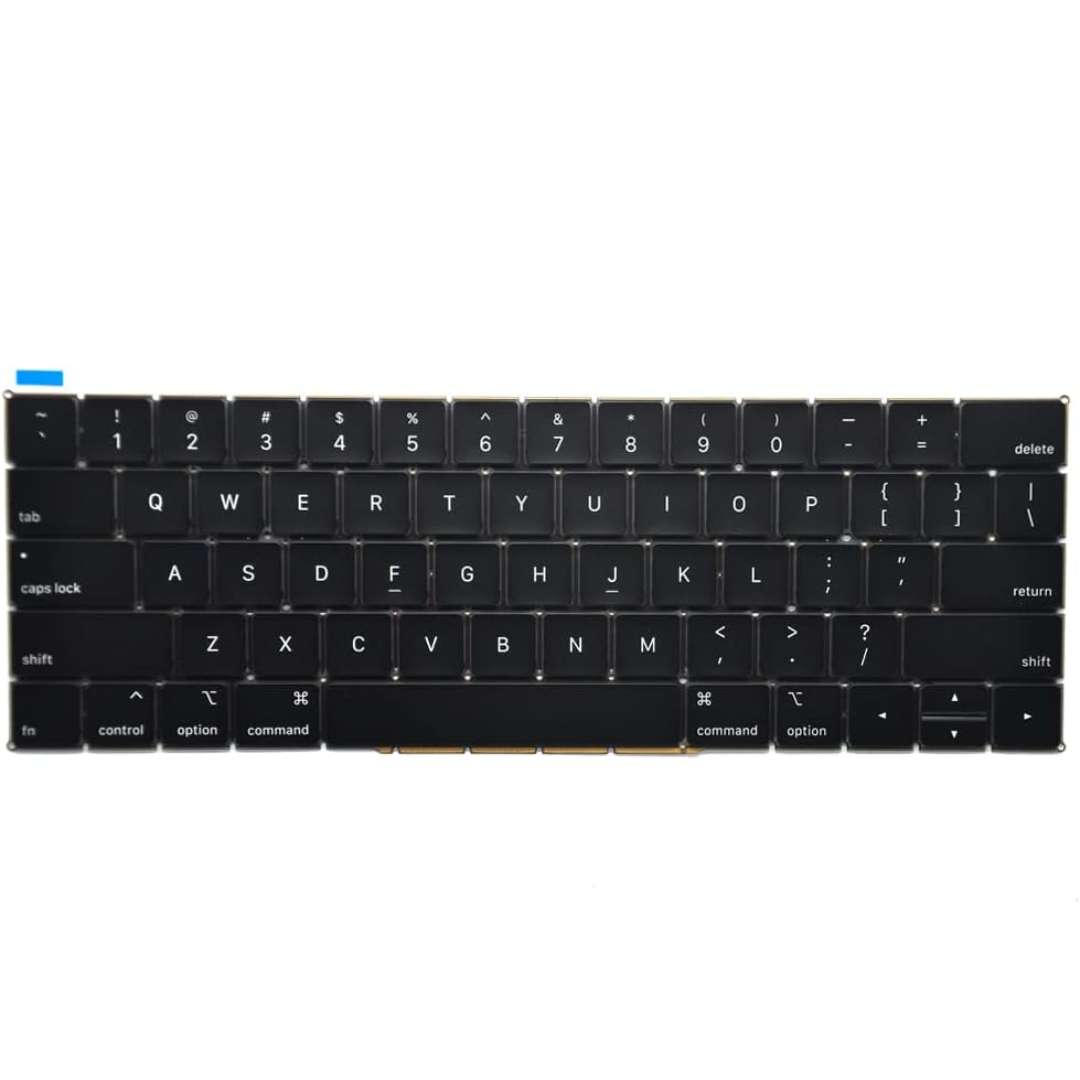

Genuine-spec keyboard replacement for MacBook Pro 13″ (Model A2289, 2020) — available in US QWERTY or UK QWERTY (with £ symbol). Features Apple’s scissor-switch Magic Keyboard, backlighting, and OEM-fit design for reliable performance and seamless installation. Compatible With: MacBook Pro 13-inch (2020, Four Thunderbolt Ports, Model A2289, Model Identifier MacBookPro16,2) with Intel Core i5/i7 processors. Layout Options (select at purchase): US Layout: Standard QWERTY with wide Enter key, @ above 2, and # above 3. UK Layout: QWERTY with £ symbol, tall vertical Enter key, @ on right Alt, and UK-specific punctuation. US Layout: Standard QWERTY with wide Enter key, @ above 2, and # above 3. UK Layout: QWERTY with £ symbol, tall vertical Enter key, @ on right Alt, and UK-specific punctuation. Keyboard Type: Apple’s Magic Keyboard with scissor-switch mechanism—quieter, more stable, and more durable than earlier Butterfly designs. Integrated Features: Full backlighting for low-light use Ambient light sensor compatibility OEM-style flex cable pre-attached for direct logic board connection Full backlighting for low-light use Ambient light sensor compatibility OEM-style flex cable pre-attached for direct logic board connection Build & Fit: Engineered to exact Apple specifications—ensures perfect alignment, consistent key height, and flush integration into the original top case. Installation Note: Keyboard is glued into the top case and requires full disassembly, careful adhesive removal, and professional re-adhesion. Recommended for experienced or certified technicians only.

Genuine-spec US layout keyboard replacement for MacBook Air 13″ (Model A2338, 2020)—featuring Apple’s reliable Magic Keyboard with scissor-switch mechanism, backlighting, and full OEM fit for seamless repair. Compatible With: MacBook Air 13-inch (2020, Model A2338) – includes both Intel Core i3/i5/i7 and M1 chip variants. Keyboard Type: Apple’s Magic Keyboard with scissor-switch mechanism—offering improved durability, quieter typing, and 1mm key travel compared to older Butterfly keyboards. Layout: Standard US English (QWERTY), with full-size keys, inverted-T arrow keys, and dedicated function row. Integrated Features: Backlit keys for low-light use, ambient light sensor compatibility, and original-style ribbon cable connector for direct logic board connection. Precision Fit: Engineered to match Apple’s exact dimensions and mounting points—ensures flush alignment within the original top case. Installation Note: The keyboard is adhered to the top case and requires careful removal and re-gluing. Full disassembly is needed. Recommended for skilled technicians or professional repair centers.

A dependable pre-owned Lenovo ThinkPad E560 with a spacious 15.6" display, 6th Gen Core i5 processor, 8GB RAM, and a roomy 1TB hard drive—ideal for office work, school, and everyday computing at great value.

Replacement Keyboard for MacBook Pro 13" inch A1706 & MacBook Pro 15" inch A1707 Touch Bar (for Late 2016 mid 2017 Year) Replacement Keyboard for MacBook Pro 13″ inch A1706 & MacBook Pro 15″ inch A1707 Touch Bar (for Late 2016 mid 2017 Year) 【Compatibility】This replacement keyboard is Compatible with original MacBook Pro 13″ inch A1706 & MacBook Pro 15″ inch A1707 Touch Bar (for Late 2016 mid 2017 Year) Laptop. 【Compatible Part Numbers】661-06377 【Compatible MBP Numbers】A1706 series :MacBook Pro 13 inch 2017 MacBookPro14,2 & MacBook Pro 13 2016 MacBookPro13,2 MNQF2LL/A MNQG2LL/A MLH12LL/A MLVP2LL/A etc A1707 series:MacBook Pro 15 inch 2016 MacBookPro13,3 & MacBook Pro 15 inch 2017 MacBookPro14,3 Release June 2017 MPTR2LL/A MPTU2LL/A MPTT2LL/A MPTV2LL/A Release October 2016 MLH32LL/A MLW72LL/A MLH42LL/A MLW82LL/A

Remax F27 Fonzyr Desktop Fan – 5 W rechargeable fan with 360° adjustable airflow and multi-installation options.Compact (187×206 mm), lightweight, with fast Type-C charging (~2 h) and built-in 1,200 mAh battery. Model: Remax F27 Fonzyr Series Circulation Desktop Fan Power: 5 W, operates on 5 V/1 A power supply Rotation: 360° adjustable airflow for full-range ventilation Battery: Built-in 1,200 mAh rechargeable battery; Type-C charging, ~2 hours charging time Dimensions & Build: Approx. 187 × 206 mm, lightweight ABS plastic housing (~697 g) Installation: Designed for desktop use, wall mounting, or hanging—ideal for multi-location placement

RK61 RGB Mechanical Keyboard – Compact 60% keyboard with Blue switches, tri-mode (Bluetooth/2.4GHz/Wired), and vibrant RGB.Perfect for minimal desk setups and wireless performance with a unique W-W-B color design. Model: Royal Kludge RK61 Layout: 60% compact (61 keys, no numpad or F-row) Switch Type: Blue Mechanical Switches (clicky + tactile feedback) Backlight: RGB with multiple lighting modes & effects Connection Modes (3C): Bluetooth 5.0 – Pair with up to 3 devices Wired USB-C – For gaming and charging 2.4GHz Wireless (on 3-mode models) Connection Modes (3C): Bluetooth 5.0 – Pair with up to 3 devices Wired USB-C – For gaming and charging 2.4GHz Wireless (on 3-mode models) Battery: 1450mAh rechargeable battery Keycaps: ABS double-shot (W-W-B colorway: White-White-Black) Hot-Swappable: No (unless stated on specific variant) Compatibility: Windows, macOS, Android, iOS Anti-Ghosting: Full N-Key rollover Software Support: RK software for key remapping and RGB control (Windows only) Build Material: ABS plastic case, plastic plate Cable: Detachable USB-C cable included Dimensions: Approx. 290 x 100 x 40 mm Weight: ~500g

Dominate the battlefield with the Genius Scorpion M705, featuring a high-precision 7200 DPI sensor and striking 7-color breathing RGB lighting. Built with a durable braided cable and 6 programmable buttons, it’s the ultimate entry-level weapon for gamers seeking speed, style, and reliability. The Genius Scorpion M705 is designed to provide gamers with a competitive edge without compromising on comfort. Equipped with an optical sensor that reaches up to 7200 DPI, it ensures smooth and accurate tracking across various surfaces. Its ergonomic right-handed shape and lightweight build reduce wrist strain during marathon sessions, while the integrated 32K memory allows you to take your custom macros and profiles wherever you go. Adjustable 7200 DPI Sensor: Seamlessly switch between six sensitivity levels (800/1600/2400/3200/4800/7200 DPI) to match your game’s pace, from high-speed movement to pixel-perfect sniping. Dynamic RGB Breathing Effects: Enhance your gaming atmosphere with 7 dazzling LED colors that pulse with a “breathing” effect. You can easily adjust the lighting mode using the DPI + Forward/Backward shortcuts. 6 Programmable Buttons: Fully customize your controls. Assign macros, shortcut keys, or specific in-game commands to the 6 buttons to execute complex actions with a single click. Built-in 32K Memory: Save your settings directly on the mouse. Your custom profiles and button assignments stay with you, even when switching to a different PC. Professional Durability: Features a 1.8-meter braided USB cable that prevents tangling and increases the lifespan of the device, ensuring a stable, low-latency connection. Sensor Type: Optical Resolution: 800 – 7,200 DPI Number of Buttons: 6 (Programmable) Illumination: 7-Color RGB Breathing LED Interface: USB Wired Cable: 1.8m Braided Cable Internal Memory: 32K Dimensions: 120.2 x 72.7 x 39.6 mm Weight: Approx. 120g (including cable) Compatibility: Windows 8, 10, 11 or later What’s in the Box Compatibility: Windows 8, 10, 11 or later What’s in the Box Genius Scorpion M705 Gaming Mouse Multi-language Quick Guide

256GB SSD Apple Macbook Pro Air 2013 2014 2015 A1502 A1398 A1466 A1465 | Samsung MZ-JPU512T/A06 | 655-1805D ORIGINAL APPLE PART (Apple sources their SSD’s for MacBooks from Samsung) A1502 – A1398 – A1465 – A1466 100% TESTED WORKING Please check compatibility below before you make your purchase: COMPATIBILITY: MacBook Pro Retina Late 2013 – Mid-2015 MacBookPro11,1 (A1502) – ME864LL/A, ME866LL/A, ME867LL/A, MGX72LL/A, MGX92LL/A, & MGXD2LL/A MacBookPro11,2 (A1398) – ME293LL/A & MGXA2LL/A MacBookPro11,3 (A1398) – ME294LL/A, ME874LL/A, MGXC2LL/A, & MGXG2LL/A MacBookPro11,4 (A1398) – MJLQ2LL/A MacBookPro11,5 (A1398) – MJLT2LL/A & MJLU2LL/A MacBookPro12,1 (A1502) – MF839LL/A, MF841LL/A, & MF843LL/A MacBook Air Mid-2013 – Late 2015 MacBookAir6,1 (A1465) – MD711LL/A, MD760LL/A, MD711LL/B, & MF067LL/A MacBookAir6,2 (A1466) – MD760LL/A, MD760LL/B, & MF068LL/A MacBookAir7,1 (A1465) – MJMVM2LL/A MacBookAir7,2 (A1466) – MJVE2LL/A Model Identifier: Samsung Manufacturer Part# MZ-JPU512T/A06

Apple Magic Mouse: Wireless, Bluetooth, Rechargeable. Works with Mac or iPad; Multi-Touch Surface - White (Pre-Owned) Apple Magic Mouse: Wireless, Bluetooth, Rechargeable. Works with Mac or iPad; Multi-Touch Surface – White (Pre-Owned) About this item WIRELESS, RECHARGEABLE CONVENIENCE — Magic Mouse connects wirelessly to your device via Bluetooth. And the rechargeable internal battery means no loose batteries to replace. WORKS WITH MAC OR IPAD — It’s ready to go right out of the box and pairs quickly with your Mac or iPad so you can get to work right away. SWIPE AND SCROLL ON THE MULTI-TOUCH SURFACE — The Multi-Touch surface allows you to perform simple gestures such as swiping and scrolling. And an optimized foot design lets Magic Mouse glide smoothly across your desk. GO WEEKS WITHOUT CHARGING — The incredibly long-lasting internal battery will power your Magic Mouse for about a month or more between charges. Comes with a woven USB-C to Lightning Cable that lets you pair and charge by connecting to a USB-C port on your Mac or iPad. SYSTEM REQUIREMENTS — Requires a Bluetooth-enabled Mac with OS X 10.11 or later or an iPad with iPadOS 13.4 or later.

Genuine-spec touchpad flex cable for MacBook Pro 13″ (Model A1502, Mid 2014)—restores full trackpad functionality, including precise cursor control and physical click response. Essential for repairing unresponsive or erratic trackpad behavior. Compatible With: MacBook Pro 13-inch (Mid 2014, Model A1502, Model Identifier MacBookPro11,1) with Intel Core i5/i7 processors and Retina display. Part Type: Touchpad flex cable only — does not include the trackpad housing, button mechanism, or mounting hardware. This is the ribbon cable that connects the trackpad to the logic board. Function: Transmits cursor movement and click signals (left/right physical clicks) Supports standard multi-touch gestures (two-finger scroll, tap-to-click, pinch-to-zoom) ⚠️ Note: This model uses a physical click mechanism—not Force Touch (no haptic feedback or pressure sensitivity). Transmits cursor movement and click signals (left/right physical clicks) Supports standard multi-touch gestures (two-finger scroll, tap-to-click, pinch-to-zoom) ⚠️ Note: This model uses a physical click mechanism—not Force Touch (no haptic feedback or pressure sensitivity). OEM-Quality Build: Matches Apple’s original in: Cable length and routing path Connector type and pin alignment Insulation and flexibility for long-term reliability Cable length and routing path Connector type and pin alignment Insulation and flexibility for long-term reliability Common Use Cases: Replacing a torn, frayed, or corroded original flex cable Fixing: Unresponsive or intermittent trackpad Cursor jumping or drifting Click function failure (left or right) Complete trackpad disconnect Replacing a torn, frayed, or corroded original flex cable Fixing: Unresponsive or intermittent trackpad Cursor jumping or drifting Click function failure (left or right) Complete trackpad disconnect Unresponsive or intermittent trackpad Cursor jumping or drifting Click function failure (left or right) Complete trackpad disconnect Installation Note: Requires bottom case removal and battery disconnect. Connects via a ZIF (Zero Insertion Force) socket on the logic board—do not force. Cable routes under the battery; handle with care to avoid strain. Suitable for intermediate to advanced DIYers or technicians. Requires bottom case removal and battery disconnect. Connects via a ZIF (Zero Insertion Force) socket on the logic board—do not force. Cable routes under the battery; handle with care to avoid strain. Suitable for intermediate to advanced DIYers or technicians.

Genuine-spec touchpad flex cable for MacBook Pro 15″ (Model A1990, 2018–2019, Intel)—essential for restoring full Force Touch functionality, haptic feedback, and precise multi-touch gesture control during trackpad repair or replacement. Compatible With: MacBook Pro 15-inch (2018 & 2019, Model A1990, Model Identifiers MacBookPro15,2) with Intel Core i7/i9 processors. Part Type: Touchpad flex cable only — does not include the trackpad housing, Taptic Engine, or mounting hardware. This is the OEM-style ribbon cable that connects the trackpad to the logic board. Function: Transmits: Touch input coordinates Force Touch pressure data Haptic feedback signals to the Taptic Engine Enables full macOS gesture support: Force Click, three-finger lookup, swipe navigation, pinch-to-zoom, and smooth cursor tracking. Touch input coordinates Force Touch pressure data Haptic feedback signals to the Taptic Engine Enables full macOS gesture support: Force Click, three-finger lookup, swipe navigation, pinch-to-zoom, and smooth cursor tracking. OEM-Quality Build: Matches Apple’s original specifications in: Cable length and routing path Connector pitch and ZIF latch design EMI shielding and flex durability Cable length and routing path Connector pitch and ZIF latch design EMI shielding and flex durability Common Use Cases: Replacing a torn, creased, or liquid-damaged original flex cable Completing a trackpad replacement when the original cable is unusable Fixing intermittent trackpad behavior, loss of Force Touch, or complete unresponsiveness Replacing a torn, creased, or liquid-damaged original flex cable Completing a trackpad replacement when the original cable is unusable Fixing intermittent trackpad behavior, loss of Force Touch, or complete unresponsiveness Installation Note: Requires full bottom case removal and battery disconnection. Cable routes under internal components near the right speaker and logic board. Connects via a ZIF (Zero Insertion Force) socket—must be aligned carefully and latched gently. Recommended for experienced or certified technicians only. Requires full bottom case removal and battery disconnection. Cable routes under internal components near the right speaker and logic board. Connects via a ZIF (Zero Insertion Force) socket—must be aligned carefully and latched gently. Recommended for experienced or certified technicians only.

COMPACT AND WIRELESS Enjoy the freedom of wireless with this versatile combo. The compact keyboard is equipped with a number pad ideal for data entry, calculations and navigation, so you can get more work done in less space. The ambidextrous mouse delivers smooth tracking and scrolling, for easy navigation -at home or at work. COMPACT AND WIRELESS Enjoy the freedom of wireless with this versatile combo. The compact keyboard is equipped with a number pad ideal for data entry, calculations and navigation, so you can get more work done in less space. The ambidextrous mouse delivers smooth tracking and scrolling, for easy navigation -at home or at work. Height: 112 mm Width: 381 mm Depth: 17.78 mm Weight: 320 g Height: 107 mm Width: 60 mm Depth: 40 mm Weight: 112 g 10-Key Number pad Music Controls Up to 5 million keystrokes (excludes number lock key) Key type: Deep-profile Spill-resistant 2Tested under limited conditions (maximum of 60 ml liquid spillage). Do not immerse the keyboard in liquid. 2 AAA batteries (Alkaline Batteries) Sensor Technology: Smooth Optical Tracking Number of Buttons: 3 (Left/Right-click, Middle click) Scrolling: line-by-line Scroll Wheel: Yes, optical 2 AA batteries (Alkaline batteries) Windows® 10,11 or later ChromeOS An available USB ports

Genuine-spec touchpad flex cable for MacBook Air 13″ (Model A1534, Early 2015)—essential for restoring full trackpad functionality, including precise cursor control and physical click response, during repair or replacement. Compatible With: MacBook Air 13-inch (Early 2015, Model A1534, Model Identifier MacBookAir7,2). Part Type: Touchpad flex cable only—does not include the trackpad housing, button mechanism, or mounting brackets. This is the ribbon cable that connects the trackpad to the logic board. Function: Carries input signals from the trackpad to the logic board—critical for cursor movement, tap-to-click, and primary/secondary physical click functionality. (Note: This model uses a physical click mechanism, not Force Touch—so no haptic feedback or pressure-sensing.) OEM-Quality Construction: Matches Apple’s original cable in length, connector type, and shielding—ensures reliable signal transmission and long-term durability. Common Use Cases: Replacing a torn, frayed, or damaged original flex cable Completing a trackpad replacement when the original cable is compromised Fixing erratic cursor movement, unresponsive trackpad, or loss of click function Replacing a torn, frayed, or damaged original flex cable Completing a trackpad replacement when the original cable is compromised Fixing erratic cursor movement, unresponsive trackpad, or loss of click function Installation Note: Requires bottom case removal and careful disconnect/reconnect of the ZIF (Zero Insertion Force) connector on the logic board. The cable routes under the battery—handle with care. Suitable for intermediate to advanced DIYers or technicians.

240W USB-C Original Charge Cable (2m) (Second Hand) This 2-meter charge cable—with USB-C connectors on both ends—is ideal for charging, syncing, and transferring data between USB-C devices. Pair the USB-C Charge Cable with a compatible USB-C power adapter to conveniently charge your devices from a wall outlet and take advantage of fast-charging capabilities. USB-C Power Adapters sold separately. 240W USB-C Original Charge Cable (2m) (Second Hand) This 2-meter charge cable—with USB-C connectors on both ends—is ideal for charging, syncing, and transferring data between USB-C devices. Pair the USB-C Charge Cable with a compatible USB-C power adapter to conveniently charge your devices from a wall outlet and take advantage of fast-charging capabilities. USB-C Power Adapters sold separately. This 2-metre charging cable is made with a woven design — with USB-C connectors on both ends — and is ideal for charging, syncing and transferring data between USB-C devices. It supports charging of up to 240 watts and transfers data at USB 2 rates. Pair the USB-C Charge Cable with a compatible USB-C power adapter to conveniently charge your devices from a power point and take advantage of fast-charging capabilities. USB-C power adapters sold separately.

A1990 Logic Board i7-16GB-512GB-4GB Intel 2.6 GHz Six Core i7 (I7-9750H) 16 GB RAM 512 GB SSD AMD Radeon Pro 555X 4GB Intel UHD Graphics 630 Intel 2.6 GHz Six Core i7 (I7-9750H) 16 GB RAM 512 GB SSD AMD Radeon Pro 555X 4GB Intel UHD Graphics 630

The Transcend TS8XDVDS-K is an ultra-slim, lightweight external portable DVD writer designed for laptops, ultrabooks, and thin desktop computers lacking internal optical drives. Offering fast 8X DVD and 24X CD read/write speeds, it provides a seamless plug-and-play solution for burning media, backing up critical data, and playing movies on the go without requiring an external power adapter. ✅ Full Specifications: Model: Transcend Extra Slim Portable DVD Drive (TS8XDVDS-K) – Black Edition Interface / Connection: Mini-USB to USB Type-A interface (Includes a specialized USB double-headed power/data cable) Performance / Speed: * DVD±R Read/Write: Up to 8X DVD±R DL (Double Layer) Read/Write: Up to 6X DVD-RAM Read/Write: Up to 5X CD-R/RW Read/Write: Up to 24X Performance / Speed: * DVD±R Read/Write: Up to 8X DVD±R DL (Double Layer) Read/Write: Up to 6X DVD-RAM Read/Write: Up to 5X CD-R/RW Read/Write: Up to 24X Capacity / Media Compatibility: Supports standard CD-R/RW, DVD±R, DVD±RW, DVD±R DL, and M-DISC long-term archival media formats. Material & Build: Durable, premium hard plastic housing with a sleek, rounded-edge aesthetic. Design & Form Factor: Extra-slim layout measuring just 13.9mm in thickness. Top-loading tray mechanism with an emergency manual eject hole. Power Setup: Fully USB bus-powered (No external power wall adapter required; draws power directly from host computer USB ports). Security & Software: Includes a free download of CyberLink Media Suite 10 (Media Writer) data burning software via registration. Supports TV Connectivity (allows plugging into supported smart TVs to play media files directly). Compatibility: Windows 11 / 10 / 8 / 7, macOS (10.7 and above), and Linux Dimensions: Approx. 142.8 x 148.0 x 13.9 mm (5.62″ x 5.83″ x 0.55″) Weight: Approx. 264 grams (0.58 lbs)

Apple 140W USB-C Power Adapter | MLYU3AM/A

A lightweight and efficient pre-owned Lenovo ThinkPad T14s Gen 2 with 14" display, AMD Ryzen 5 5650U, 16GB RAM, and 256GB SSD—delivering strong performance, all-day battery life, and premium portability for professionals and students.

WIWU GENIUS COMBO SET BAG WITH MOUSE AND MOUSE PAD FOR 14" LAPTOP/ULTRABOOK - BLACK WIWU GENIUS COMBO SET BAG WITH MOUSE AND MOUSE PAD FOR 14″ LAPTOP/ULTRABOOK – BLACK Details: Material: plaid polyester + metal Mouse: single mode 2.4G Product weight: 14 inch / 465g Product size: 14 inches: 35*25*2cm Handbag+mouse+mouse pad Front layer multi-pocket design Better help classify items Waterproof fabric

Genuine-spec US layout keyboard replacement for MacBook Pro (Model A1398, Late 2011–Mid 2012)—featuring durable scissor-switch keys, backlighting, and OEM-fit design for reliable typing and straightforward installation. Compatible With: MacBook Pro 13″: Late 2011 (Model A1278, but labeled A1398 in some regions) – Model Identifier MacBookPro8,1 MacBook Pro 15″: Early 2011, Late 2011, and Mid 2012 – Model Identifiers MacBookPro8,2 (15″ early/late 2011) and MacBookPro9,1 (15″ mid 2012) *(Note: “A1398” is primarily associated with the 15″ unibody MacBook Pro with Retina display (Mid 2012), which was the first Retina MacBook Pro.)* This keyboard fits the non-Retina 15″ A1398 (Mid 2012) and compatible Late 2011 models. MacBook Pro 13″: Late 2011 (Model A1278, but labeled A1398 in some regions) – Model Identifier MacBookPro8,1 MacBook Pro 15″: Early 2011, Late 2011, and Mid 2012 – Model Identifiers MacBookPro8,2 (15″ early/late 2011) and MacBookPro9,1 (15″ mid 2012) *(Note: “A1398” is primarily associated with the 15″ unibody MacBook Pro with Retina display (Mid 2012), which was the first Retina MacBook Pro.)* This keyboard fits the non-Retina 15″ A1398 (Mid 2012) and compatible Late 2011 models. Layout: Standard US English (QWERTY) with full-size keys, inverted-T arrow keys, and dedicated function row (F1–F12). Keyboard Type: Traditional scissor-switch mechanism—robust, tactile, and serviceable (pre-Butterfly era). Integrated Features: Backlit keys (adjustable brightness via F5/F6) OEM ribbon cable with ZIF connector Matches original key spacing and actuation force Backlit keys (adjustable brightness via F5/F6) OEM ribbon cable with ZIF connector Matches original key spacing and actuation force Build & Fit: Precision-molded plastic frame with exact screw mounts and alignment pegs—ensures secure, rattle-free installation in the top case. Installation Note: Keyboard is secured with screws and minimal adhesive. Requires full top case access and battery disconnect. Recommended for intermediate to advanced users or technicians.
