
Genuine-spec touchpad flex cable for MacBook Pro 15″ (Model A1706 – 2017 and A1989 – 2018/2019)—restores full Force Touch functionality, haptic feedback, and precise multi-touch gesture control during trackpad repair or replacement. Compatible With: MacBook Pro 15″ (2017) – Model A1706 (Model Identifier: MacBookPro14,3) MacBook Pro 15″ (2018–2019) – Model A1989 (Model Identifier: MacBookPro15,2) ✅ Note: Apple used the same trackpad assembly and flex cable across both A1706 and A1989 15″ models—making this part interchangeable between them. MacBook Pro 15″ (2017) – Model A1706 (Model Identifier: MacBookPro14,3) MacBook Pro 15″ (2018–2019) – Model A1989 (Model Identifier: MacBookPro15,2) ✅ Note: Apple used the same trackpad assembly and flex cable across both A1706 and A1989 15″ models—making this part interchangeable between them. ✅ Note: Apple used the same trackpad assembly and flex cable across both A1706 and A1989 15″ models—making this part interchangeable between them. Part Type: Touchpad flex cable only — does not include the trackpad housing, Taptic Engine, or mounting hardware. This is the OEM-style ribbon cable connecting the trackpad to the logic board. Function: Transmits: Touch input coordinates Force Touch pressure data Haptic feedback signals to the Taptic Engine Enables full macOS gesture support: Force Click, three-finger lookup, swipe navigation, pinch-to-zoom, and smooth cursor tracking. Touch input coordinates Force Touch pressure data Haptic feedback signals to the Taptic Engine Enables full macOS gesture support: Force Click, three-finger lookup, swipe navigation, pinch-to-zoom, and smooth cursor tracking. OEM-Quality Build: Matches Apple’s original in: Cable length and routing Connector pitch and ZIF latch design EMI shielding and flex durability Cable length and routing Connector pitch and ZIF latch design EMI shielding and flex durability Common Use Cases: Replacing a torn, creased, or liquid-damaged original flex cable Completing a trackpad replacement when the original cable is compromised Fixing intermittent trackpad behavior, loss of Force Touch, or complete unresponsiveness Replacing a torn, creased, or liquid-damaged original flex cable Completing a trackpad replacement when the original cable is compromised Fixing intermittent trackpad behavior, loss of Force Touch, or complete unresponsiveness Installation Note: Requires full bottom case removal and battery disconnection. Cable routes under internal components near the right speaker and logic board. Connects via a ZIF (Zero Insertion Force) socket—must be aligned carefully and latched gently. Recommended for experienced or certified technicians only. Requires full bottom case removal and battery disconnection. Cable routes under internal components near the right speaker and logic board. Connects via a ZIF (Zero Insertion Force) socket—must be aligned carefully and latched gently. Recommended for experienced or certified technicians only.

Are you in search of a high-quality monitor for work or play? Look no further than the ViewSonic VA3456-MHDJ. With its expansive 34-inch display and smooth 75Hz refresh rate, this monitor delivers an immersive viewing experience like no other. Firstly, let’s delve into the impressive display capabilities of the VA3456-MHDJ. With a spacious 34-inch screen and ultra-wide aspect ratio, you can enjoy stunning visuals with crisp detail and vibrant colors. Whether you’re editing photos, watching movies, or gaming, every image comes to life with remarkable clarity. Moreover, the 75Hz refresh rate ensures smooth and fluid performance, ideal for fast-paced gaming or multimedia content. Say goodbye to motion blur and screen tearing, and enjoy a seamless viewing experience with every frame. Additionally, the VA3456-MHDJ features versatile connectivity options to suit your needs. With HDMI, DisplayPort, and VGA inputs, you can easily connect to a variety of devices, including laptops, desktops, and gaming consoles. Switch between sources effortlessly and enjoy multimedia content from different sources with ease. Furthermore, this monitor is designed with your comfort in mind. The ergonomic stand offers tilt and height adjustment options, allowing you to find the perfect viewing position for extended use. Say goodbye to neck strain and discomfort, and enjoy hours of immersive viewing in total comfort. In conclusion, the ViewSonic VA3456-MHDJ 34″ 75Hz Monitor is the perfect choice for those seeking superior visual quality, smooth performance, and ergonomic design. Elevate your viewing experience and immerse yourself in stunning visuals with this impressive monitor. Specifications: Display : 34″ IPS Resolution : UWQHD 3440 x 1440 Refresh Rate : 75Hz Response Rate : 4ms GTG

GAMDIAS 7 Colour Backlit Gaming USB Mechanical Keyboard with 87 Keys, Blue Switches, Anti-ghosting, Multimedia Control Key with Metal Plate, Combo (Multicolour, Hermes E2) About this item Certified mechanical blue switches feature a 50 Million actuation lifecycle Neon Light Spectrum- 7 colors backlight Elegant metal plate mechanical keyboard for added durability N-key rollover Compact 87 Keys Keyboard : By using small tenkeyless keyboard can save the space, and also makes the keyboard and mouse to become closer, so you can maximize the comfort and accuracy of your operation

AOC Q27P3CW 27″ QHD monitor with webcam delivers a professional workspace solution with sharp visuals, built-in communication tools, and modern connectivity. It is designed for productivity, remote work, and multitasking environments. Additionally, it features a 27-inch QHD IPS display. This display provides 2560 × 1440 resolution, so it delivers clear detail and accurate colors for work and media. Moreover, it includes a 100Hz refresh rate and 4ms response time. As a result, it ensures smooth visuals and responsive performance during daily tasks. The monitor integrates a 5MP webcam with Windows Hello support. Therefore, it enables secure login and high-quality video calls without extra accessories. In addition, it offers USB-C connectivity with power delivery up to 90W. This allows a single cable to handle display, data, and charging for compatible laptops. Furthermore, it includes built-in dual 5W speakers, USB hub, RJ-45 Ethernet, and multiple display outputs. These features improve workspace efficiency and reduce cable clutter. AOC Q27P3CW 27″ QHD monitor with webcam provides a complete all-in-one display solution for professionals who need clarity, connectivity, and integrated communication tools. Specifications: 27-inch QHD IPS display with 2560 × 1440 resolution 5MP webcam with Windows Hello and built-in microphone USB-C with up to 90W power delivery and data transfer 100Hz refresh rate with 4ms response time Built-in dual 5W speakers, USB hub, and RJ-45 connectivity

The ASUS ROG Strix XG27ACMS 27” QHD 320Hz Gaming Monitor is a high-performance gaming display designed for ultra-smooth motion and fast response times. It uses a Fast IPS panel that delivers accurate colors and wide viewing angles for gaming and general use. It features a QHD (2560×1440) resolution, which provides sharp image detail and more screen space compared to Full HD. Therefore, it improves clarity for both competitive gaming and productivity tasks. The monitor supports a 320Hz refresh rate, which delivers extremely smooth motion in fast-paced games. In addition, it includes a very fast response time to reduce motion blur during rapid movement. It is designed for competitive gaming performance where speed and clarity matter. Moreover, it supports adaptive sync technology to reduce screen tearing and stuttering when paired with compatible GPUs. The display includes gaming-focused settings and on-screen controls for quick adjustments. As a result, users can optimize visuals based on different game types and preferences. Overall, the ASUS ROG Strix XG27ACMS is built for high refresh rate gaming, low latency performance, and sharp QHD visual quality. Specifications: 27-inch QHD (2560×1440) display 320Hz refresh rate Ultra-fast response time Fast IPS panel Adaptive sync technology

Are you ready to take your gaming to the next level? Dive into the realm of ViewSonic VX2718-P-MHD gaming monitors, where affordability meets exceptional performance for an unmatched gaming experience. Firstly, enjoy crystal-clear visuals with ViewSonic’s high-resolution displays. Immerse yourself in the action with vibrant colors and sharp images, providing a gaming experience like never before. Transition smoothly between scenes with ViewSonic’s quick response times. Say goodbye to lag and motion blur, ensuring you stay ahead in the game and never miss a critical moment. Explore a range of sizes to suit your gaming setup. From compact options for cozy spaces to larger displays for a cinematic experience, ViewSonic has a gaming monitor to fit your preferences. Achieve optimal comfort with customizable settings. ViewSonic VX2718-P-MHD gaming monitors offer adjustable brightness, contrast, and color settings, allowing you to tailor the display to your liking and reduce eye strain during extended gaming sessions. In conclusion, elevate your gaming setup without breaking the bank. ViewSonic VX2718-P-MHD gaming monitors provide the perfect blend of affordability and top-notch performance, delivering a visually stunning and responsive gaming journey. Level up your gaming experience with ViewSonic today! Specifications: Resolution : FHD Display : 27″ Refresh Rate : 180Hz Response Time : 1ms 3 years warranty

The ASUS ProArt PA329CRV 32″ 4K Professional Monitor delivers amazing clarity for creative work. It offers a large 32-inch screen with sharp 4K detail. Every image looks clean and accurate. This makes it ideal for editing and design projects. Moreover, the ASUS ProArt PA329CRV 32″ 4K Professional Monitor includes factory-calibrated color accuracy. It shows precise colors for photos, videos, and artwork. The wide color gamut helps you view rich and natural tones. This ensures professional results in every task. In addition, the monitor features HDR support. It improves brightness, contrast, and depth in your visuals. Your projects look more realistic and detailed. This boosts your productivity and viewing experience. Furthermore, the ASUS ProArt PA329CRV 32″ 4K Professional Monitor includes a USB-C port. It provides display output, data transfer, and power delivery. This makes your workspace cleaner and more organized. It is perfect for creators using laptops. Also, the monitor offers an ergonomic stand. You can tilt, turn, pivot, or adjust the height easily. This helps you work comfortably for long hours. The design supports healthy posture and better workflow. The slim and modern look of the ASUS ProArt PA329CRV 32″ 4K Professional Monitor fits any studio. The thin bezels make multi-monitor setups cleaner. The build quality feels strong and long lasting. This makes it a reliable tool for professionals. Overall, the ASUS ProArt PA329CRV 32″ 4K Professional Monitor delivers accuracy, clarity, and productivity in one display. It supports creative work with true-to-life colors and advanced features. It is a great choice for editors, designers, and photographers who need perfect visuals. Specifications: Display : 32″ IPS Resolution : 4K Refresh Rate : 60Hz Response Time : 5ms Fully Adjustable

The Samsung 22″ 75Hz Essential Monitor is designed to enhance your daily computing tasks with smooth performance and vibrant colors. Whether you’re working, watching videos, or browsing, this monitor delivers clear and crisp visuals. Featuring a 22-inch screen, this monitor provides ample display space for multitasking. With a 75Hz refresh rate, the Samsung 22″ Essential Monitor ensures fluid motion, reducing screen tearing and providing a smooth viewing experience. The Full HD resolution brings sharp details and vivid colors, making your videos and images look more lifelike. Whether for work or entertainment, you’ll enjoy a more immersive visual experience with the Samsung 22″ Essential Monitor. With its slim and sleek design, this monitor complements any workspace. It’s easy to set up, and the compact design saves valuable desk space. The monitor’s slim bezels also give it a modern, streamlined look. The Samsung Essential Monitor comes equipped with Eye Saver Mode and Flicker-Free technology, designed to reduce eye strain during long hours of use. This makes it ideal for both work and extended screen time. In addition, the monitor offers easy connectivity options, including HDMI and VGA ports, allowing you to connect a wide range of devices effortlessly. In conclusion, the Samsung 22″ 75Hz Essential Monitor is the perfect blend of performance, style, and convenience. Upgrade your viewing experience with smooth visuals and vivid colors for everyday use. Specifications: Display : 22″ VA Resolution : FHD (1920×1080) Refresh Rate : 75Hz Response Time : 5ms GTG

Genuine-spec US layout keyboard replacement for MacBook Pro (Model A1398, Late 2011–Mid 2012)—featuring durable scissor-switch keys, backlighting, and OEM-fit design for reliable typing and straightforward installation. Compatible With: MacBook Pro 13″: Late 2011 (Model A1278, but labeled A1398 in some regions) – Model Identifier MacBookPro8,1 MacBook Pro 15″: Early 2011, Late 2011, and Mid 2012 – Model Identifiers MacBookPro8,2 (15″ early/late 2011) and MacBookPro9,1 (15″ mid 2012) *(Note: “A1398” is primarily associated with the 15″ unibody MacBook Pro with Retina display (Mid 2012), which was the first Retina MacBook Pro.)* This keyboard fits the non-Retina 15″ A1398 (Mid 2012) and compatible Late 2011 models. MacBook Pro 13″: Late 2011 (Model A1278, but labeled A1398 in some regions) – Model Identifier MacBookPro8,1 MacBook Pro 15″: Early 2011, Late 2011, and Mid 2012 – Model Identifiers MacBookPro8,2 (15″ early/late 2011) and MacBookPro9,1 (15″ mid 2012) *(Note: “A1398” is primarily associated with the 15″ unibody MacBook Pro with Retina display (Mid 2012), which was the first Retina MacBook Pro.)* This keyboard fits the non-Retina 15″ A1398 (Mid 2012) and compatible Late 2011 models. Layout: Standard US English (QWERTY) with full-size keys, inverted-T arrow keys, and dedicated function row (F1–F12). Keyboard Type: Traditional scissor-switch mechanism—robust, tactile, and serviceable (pre-Butterfly era). Integrated Features: Backlit keys (adjustable brightness via F5/F6) OEM ribbon cable with ZIF connector Matches original key spacing and actuation force Backlit keys (adjustable brightness via F5/F6) OEM ribbon cable with ZIF connector Matches original key spacing and actuation force Build & Fit: Precision-molded plastic frame with exact screw mounts and alignment pegs—ensures secure, rattle-free installation in the top case. Installation Note: Keyboard is secured with screws and minimal adhesive. Requires full top case access and battery disconnect. Recommended for intermediate to advanced users or technicians.

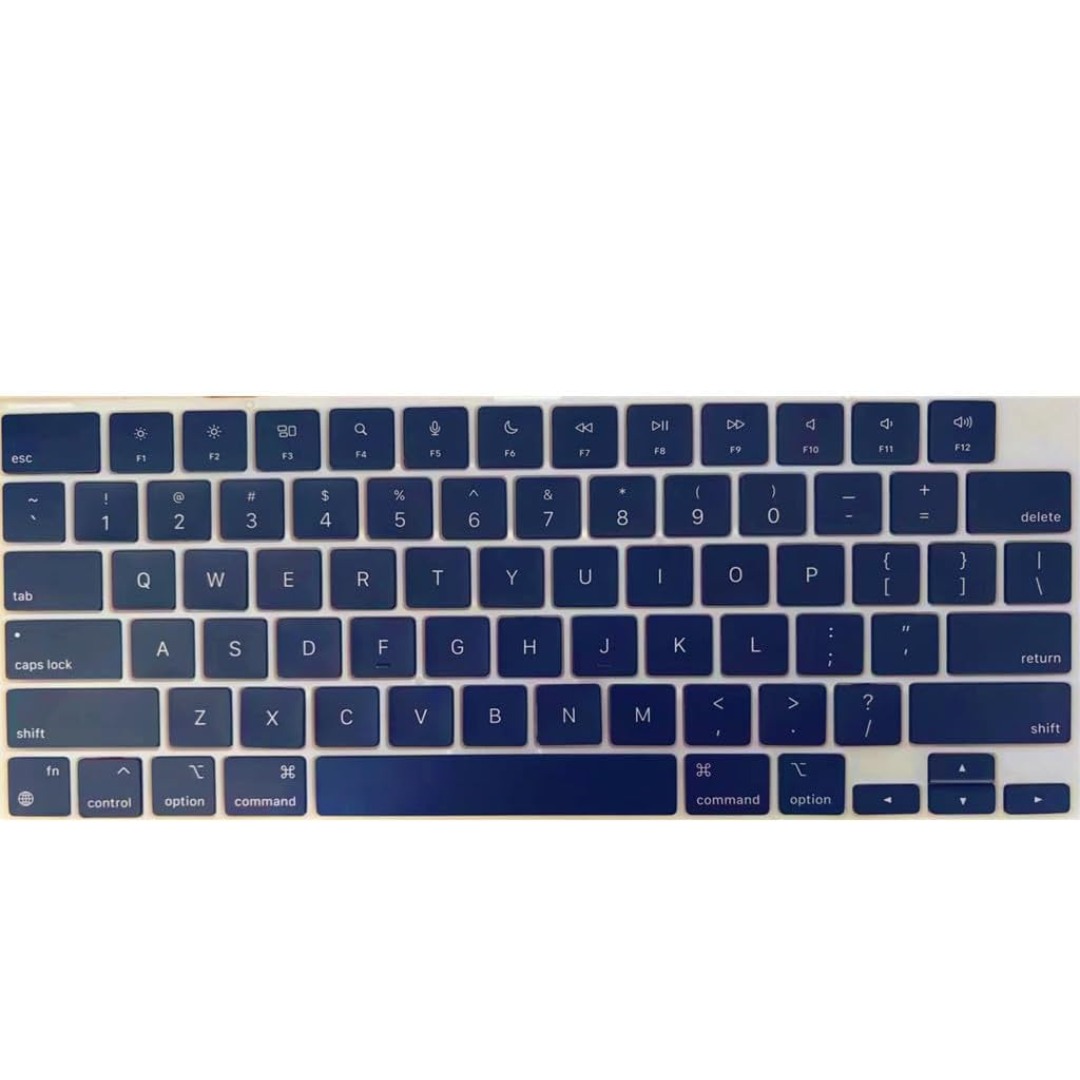
Genuine-spec bilingual UK/Arabic layout keyboard replacement for MacBook Pro 13″ (Model A1708, 2016–2017)—featuring Apple’s second-generation Butterfly mechanism, backlighting, and OEM fit for seamless typing in both English and Arabic. Compatible With: MacBook Pro 13-inch with Touch Bar (2016 & 2017 models, A1708, Model Identifiers MacBookPro13,1 / MacBookPro14,1). Layout: Bilingual UK/Arabic—primary legends in Arabic, secondary (top-left) legends in UK English (QWERTY). Includes £ symbol, Arabic numerals (٠١٢٣…), and standard Arabic character set aligned with Apple’s regional configuration. Keyboard Type: Apple’s 2nd-generation Butterfly mechanism—thin profile with reduced key travel; requires careful handling and clean environment during installation. Integrated Features: Backlit keys (essential for low-light use—legends remain legible) Ambient light sensor support Original-style ribbon cable connector for direct logic board attachment Backlit keys (essential for low-light use—legends remain legible) Ambient light sensor support Original-style ribbon cable connector for direct logic board attachment Build & Fit: Precision-engineered to match Apple’s original dimensions, key alignment, and top-case curvature—ensures consistent actuation and aesthetic continuity. Installation Note: Keyboard is fully glued into the top case. Replacement requires complete disassembly, meticulous adhesive removal, and professional re-gluing. Recommended for certified or highly experienced technicians only.

The Samsung 83-Inch OLED S85F 4K Vision AI Smart TV | QA83S85FAEXTW delivers a premium home cinema experience with a massive OLED display. It uses OLED technology that produces deep blacks, strong contrast, and rich colors. As a result, movies, sports, and games look more realistic and immersive on the large 83-inch screen. Samsung Vision AI enhances picture and sound in real time. It analyzes each scene and automatically adjusts brightness, color, and sharpness. Therefore, the viewing experience stays balanced and clear without manual tuning. In addition, AI upscaling improves lower-resolution content and upgrades it closer to 4K quality for better detail and clarity. The OLED panel uses self-lit pixels, so every part of the image is controlled individually. This improves detail in dark scenes while keeping bright areas accurate and vivid. HDR further expands contrast and color range, making visuals more lifelike. Fast motion also appears smoother, which improves sports and action viewing. Samsung’s Smart TV system provides easy access to streaming apps, gaming features, and smart home controls. It runs smoothly and responds quickly when switching between apps. In addition, the ultra-slim design with thin bezels gives the TV a modern and premium appearance that fits large living rooms and entertainment spaces. Overall, this Samsung OLED TV combines large-screen immersion, AI-powered optimization, and smart connectivity. It is designed for users who want a high-end cinematic viewing experience at home. Specifications: OLED technology delivers deep blacks and rich color accuracy 83-inch 4K display provides immersive large-screen viewing Vision AI optimizes picture and sound automatically in real time HDR enhances contrast, brightness, and color depth Smart TV platform supports streaming apps and smart features

Genuine Apple MagSafe 3 charging cable (2-meter length), originally shipped with MacBook Pro 14"/16" (2021, M1 Pro/Max) and MacBook Pro 16" (2023, M2/M3 Max). Used but fully functional, tested for safe power delivery and data handshake with Apple laptops. Compatibility: MacBook Pro 14″ (2021–2023, M1 Pro/Max, M2 Pro/Max, M3 Pro/Max) MacBook Pro 16″ (2021–2023, M1 Max, M2 Max, M3 Max) Works with Apple 67W, 96W, and 140W USB-C Power Adapters (sold separately) MacBook Pro 14″ (2021–2023, M1 Pro/Max, M2 Pro/Max, M3 Pro/Max) MacBook Pro 16″ (2021–2023, M1 Max, M2 Max, M3 Max) Works with Apple 67W, 96W, and 140W USB-C Power Adapters (sold separately) Connector Type: MagSafe 3 (magnetic, tri-oval tip) on laptop end USB-C on power adapter end MagSafe 3 (magnetic, tri-oval tip) on laptop end USB-C on power adapter end Cable Length: 2 meters (≈6.6 feet) – longer than the standard 1.8m cable, ideal for flexible desk or bedside setups. Condition: Original Apple cable, previously used but fully tested: No fraying, kinks, or exposed wires MagSafe 3 connector intact with strong magnetic hold Charges MacBook at full rated speed (supports up to 140W with compatible adapter) Passes Apple’s authentication handshake (no “Not Supported” warnings) No fraying, kinks, or exposed wires MagSafe 3 connector intact with strong magnetic hold Charges MacBook at full rated speed (supports up to 140W with compatible adapter) Passes Apple’s authentication handshake (no “Not Supported” warnings) What’s Included: MagSafe 3 to USB-C cable only Power adapter NOT included MagSafe 3 to USB-C cable only Power adapter NOT included Why Choose This: Cost-effective alternative to buying new 100% genuine Apple—no third-party risks (overheating, slow charging, compatibility errors) Ideal for backup, travel, or replacing a damaged original cable Cost-effective alternative to buying new 100% genuine Apple—no third-party risks (overheating, slow charging, compatibility errors) Ideal for backup, travel, or replacing a damaged original cable

Logic Board 1.6GHz Core i5 (i5-5250U), 8GB RAM Replacement for (Early 2015-2017)

Looking for a reliable monitor that combines performance and affordability? The BenQ GW2780 monitor might be your perfect choice, offering an array of features to enhance your visual experience. To begin with, the GW2780 boasts a sleek design that seamlessly blends with any workspace. Its slim bezels create a borderless display, providing an immersive viewing experience for work or entertainment. Equipped with a 27-inch Full HD display, the monitor delivers crisp and clear visuals. Whether you’re working on spreadsheets, watching videos, or gaming, the GW2780 ensures sharp images and vibrant colors. The In-Plane Switching (IPS) technology ensures wide viewing angles, allowing you to enjoy consistent colors and brightness from any angle. Say goodbye to distorted colors and limited viewing positions. Eye strain is a thing of the past with the BenQ GW2780. The Low Blue Light technology reduces harmful blue light emissions, and the flicker-free feature eliminates screen flickering, providing a comfortable viewing experience for extended periods. Connectivity is a breeze with the multiple ports, including HDMI and VGA. Easily link your monitor to various devices such as laptops, desktops, and gaming consoles. The user-friendly design ensures a hassle-free setup. The BenQ GW2780 monitor not only prioritizes performance but also energy efficiency. Energy Star certification reflects its commitment to reducing environmental impact, making it an eco-friendly choice. In summary, the BenQ GW2780 monitor offers a winning combination of affordability and top-notch features. Elevate your viewing experience with this reliable display solution that caters to your entertainment and productivity needs effortlessly. Specifications: Display : 27″ IPS Resolution : 1920×1080 IPS Response Time : 5ms Refresh Rate : 60hz

RK ROYAL KLUDGE RK61 Wireless 60% Mechanical Gaming Keyboard, Ultra-Compact 60 Keys Bluetooth Mechanical Keyboard with Programmable Software (Blue Switch, White) Model: RK ROYAL KLUDGE RK61 Layout: 60% compact layout (61 keys, no number pad or function row) Switch Type: Mechanical switches (Red – Linear, Blue – Clicky, Brown – Tactile) Connectivity: Bluetooth 5.0 (connects up to 3 devices) USB-C Wired Optional 2.4GHz Wireless (on some versions) Connectivity: Bluetooth 5.0 (connects up to 3 devices) USB-C Wired Optional 2.4GHz Wireless (on some versions) Backlight: RGB LED with 18+ lighting modes and effects Battery: 1450mAh rechargeable lithium battery Key Rollover: Full N-Key rollover, anti-ghosting Compatibility: Windows, macOS, Android, iOS Software Support: Key remapping and lighting customization (Windows only) Build Quality: ABS plastic frame, double-shot keycaps Dimensions: Approx. 290 x 100 x 40 mm Weight: ~500g Extras: Hot-swappable switch support (on select versions)

A1990 Logic Board i7-16GB-512GB-4GB Intel 2.6 GHz Six Core i7 (I7-9750H) 16 GB RAM 512 GB SSD AMD Radeon Pro 555X 4GB Intel UHD Graphics 630 Intel 2.6 GHz Six Core i7 (I7-9750H) 16 GB RAM 512 GB SSD AMD Radeon Pro 555X 4GB Intel UHD Graphics 630

OEM-quality trackpad replacement (without flex cable) for MacBook Pro 14″ (Model A2442, 2021, M1 Pro/Max) in Silver finish—designed for precise Force Touch performance, seamless gesture control, and perfect visual integration with the original chassis. Compatible With: MacBook Pro 14-inch (2021, Model A2442) with Apple M1 Pro or M1 Max chip. Part Type: Trackpad only—does not include the flex cable, Taptic Engine, or mounting hardware. Intended for professional technicians who will reuse the original internal components. Finish: Silver—matches the Silver and Space Gray top/bottom case (Apple uses the same trackpad finish across both color variants for this model). Force Touch Capable: Fully supports pressure-sensitive input and haptic feedback when paired with the original Taptic Engine and logic board—ensuring full macOS gesture and functionality support. OEM Precision: Features the same glass surface, curvature, and micro-click mechanism as Apple’s original—delivering consistent tracking accuracy and tactile response. Installation Requirements: Requires complete bottom case removal and careful transfer of the original flex cable and Taptic Engine. Adhesive must be applied precisely to maintain structural integrity and sensor alignment. Recommended for certified or experienced repair professionals only.

WiWU Linker 721HD Hub – Compact USB-C hub with 7 ports including 100W PD, dual USB-A, USB-C data, HDMI 4K60, and dual SD/TF slots.Aluminum body, plug‑and‑play compatibility with MacBooks and modern USB‑C devices—ideal for laptop expansion. Model: Linker 721HD (WiWU) Material: Aluminum-alloy shell Ports: 2 × USB‑A 3.1 1 × USB‑C 3.1 (data) 1 × USB‑C PD power delivery (up to 100 W) 1 × HDMI (4K @ 60 Hz) SD card slot + micro‑SD (TF) slot (USB 3.0 speed) Ports: 2 × USB‑A 3.1 1 × USB‑C 3.1 (data) 1 × USB‑C PD power delivery (up to 100 W) 1 × HDMI (4K @ 60 Hz) SD card slot + micro‑SD (TF) slot (USB 3.0 speed) Cable: Fixed USB‑C male cable (approx. 15 cm) Compatibility: Plug-and-play with USB-C/Thunderbolt 3/4 devices (MacBook, XPS, Chromebooks, mobile devices with DP-Alt Mode) Design: Compact, space gray finish optimized for travel/work setups Weight: ~150 g

Non-slip, skid-proof rubber feet designed to perfectly fit MacBook Air models A1466, A1369, and A1370—restoring grip, stability, and protection for your laptop’s base. Keep your MacBook Air steady and scratch-free with these high-quality replacement rubber feet, engineered to match the original Apple design for MacBook Air models A1466 (2010–2017), A1369 (11″ 2010–2011), and A1370 (11″ 2011–2015). These skid-proof rubber feet provide excellent traction on desks, tables, and other smooth surfaces, preventing unwanted sliding during typing or use. Made from durable, soft-touch silicone-rubber material, they also help protect your laptop’s bottom case from scratches and reduce vibration noise. Each set includes all necessary feet (typically 5 per MacBook Air model) with pre-applied adhesive for easy, secure installation. The matte black finish blends seamlessly with your MacBook’s original aesthetic. Ideal for restoring worn, missing, or damaged feet—whether due to age, cleaning, or accidental removal—this is a simple, affordable way to maintain your MacBook’s functionality and appearance. Note: Surface must be clean and dry for optimal adhesion. For best results, gently warm the adhesive before applying.

Elevate your game with the Logitech G102, featuring a high-precision 8,000 DPI sensor and vibrant Lightsync RGB lighting. Designed with a classic six-button layout and gaming-grade performance, it offers incredible accuracy and responsiveness for both competitive play and daily productivity. The Logitech G102 is engineered for speed, consistency, and comfort. At its core is a gaming-grade sensor that provides adjustable sensitivity, allowing you to tailor your control to your specific playstyle. Whether you are navigating complex spreadsheets or hitting precise headshots, the G102 delivers a seamless experience with a classic design trusted by gamers worldwide. Gaming-Grade 8,000 DPI Sensor: Experience ultra-precise tracking and consistent responsiveness. The sensitivity is fully adjustable from 200 to 8,000 DPI. Lightsync RGB Color Wave: Choose from vibrant animations or customize your own from approximately 16.8 million colors to match your setup’s aesthetic. Mechanical Spring Button Tensioning: The primary left and right buttons feature a metal spring tensioning system, providing crisp, reliable clicks and a premium feel. Classic 6-Button Design: A familiar, comfortable shape that allows you to play or work for hours without fatigue. Each button can be customized via software for specific in-game actions. On-the-Fly DPI Shifting: Cycle through up to five sensitivity settings with the press of a button, allowing you to switch from precision sniping to rapid movement instantly. Resolution: 200 – 8,000 DPI Connection Type: USB 2.0 (Wired) USB Data Format: 16 bits/axis USB Report Rate: 1000Hz (1ms) Microprocessor: 32-bit ARM Cable Length: 2.1 meters Compatibility: Windows 7 or later, macOS 10.13 or later, ChromeOS Logitech G102 Gaming Mouse User Documentation
