
MIC K9 WIRELESS ( LIGHTNING ) FOR IPHONE BLACK MICROPHONE MIC K9 WIRELESS ( LIGHTNING ) FOR IPHONE BLACK MICROPHONE 20M Connection distance for 360° RADIO Wireless lavalier microphone use 2.4G connection, which is more stable than the Bluetooth microphone, and the transmission distance can reach 65 feet without wires. Built-in omnidirectional condenser microphone, can capture sound in all directions, 360° wide-range recording, no dead ends, and avoid missing recording. Automatic Synchronization of Noise Reduction Mini lapel mic has advanced intelligent noise reduction technology and windshield, which can filter out most of the external noise and wind noise, and clearly present the recording content. It can synchronize the background music and human voice of the mobile phone in real time, reduce video post-processing, and provide professional full-band audio. 10H Working Time The wireless lavalier microphone has a built-in rechargeable battery, which can provide more than 10hours of battery life after about 2 hours of charging. The ultra-low delay of 0.015S ensures the synchronization of audio and video, bringing a better experience to your game live broadcast, and staying away from the trouble of delay.

The Lenovo Legion 27Q-10 is a 27-inch 2K gaming monitor designed for competitive and fast-paced gaming. First, its 2560 × 1440 resolution delivers sharp and detailed visuals. The 280Hz refresh rate ensures ultra-smooth motion and responsive gameplay for esports players. In addition, the 1ms response time minimizes ghosting and motion blur. Moreover, adaptive sync technology reduces screen tearing for seamless performance. The slim-bezel design fits neatly into any gaming setup. Furthermore, the adjustable tilt and height options provide ergonomic comfort during long sessions. Finally, the Lenovo Legion 27Q-10 combines 2K clarity, extreme refresh performance, and adaptive sync in one high-end gaming display. Overall, it is ideal for serious gamers and esports enthusiasts seeking competitive advantages. Specifications: 27″ 2560 × 1440 2K resolution 280Hz ultra-fast refresh rate 1ms rapid response time Adaptive sync for tear-free gaming Slim bezel with adjustable ergonomic stand

The Samsung 27″ Odyssey G3 G30D FHD 180Hz Gaming Monitor LS27DG302 delivers smooth and responsive visuals with a Full HD (1920 × 1080) resolution and a 180 Hz refresh rate, which enhances motion clarity in fast‑paced games and videos. Additionally, it features a 1 ms (MPRT) response time for minimal motion blur, helping reduce ghosting during competitive play. The ergonomic stand allows tilt, swivel, pivot, and height adjustments for flexible viewing positions. Moreover, the monitor supports AMD FreeSync technology that helps reduce screen tearing and stuttering by synchronizing the display refresh rate with compatible GPUs. Therefore, gaming scenes and action appear more fluid. It also includes features such as Black Equalizer for improved visibility in dark areas and Virtual Aim Point for on‑screen crosshair alignment. Furthermore, the Odyssey G3 has a 3‑sided borderless design that maximizes the viewing area and supports easy multi‑monitor setups. Eye Saver Mode and Flicker Free technology help reduce eye fatigue during long sessions. The monitor connects via HDMI 2.0 and DisplayPort 1.4 for flexible device compatibility. Specifications: 27″ Full HD (1920 × 1080) resolution for clear, detailed visuals 180 Hz refresh rate with 1 ms (MPRT) response for smoother motion and minimal blur AMD FreeSync technology reduces tearing and stuttering for fluid gameplay Ergonomic stand with tilt, swivel, pivot, and height adjustments for flexible viewing 3‑sided borderless design with Eye Saver Mode and Flicker Free technology

Genuine-spec touchpad flex cable compatible with both MacBook Air A2179 (Intel, 2020) and A2337 (M1, 2020)—restores full Force Touch functionality, haptic feedback, and precise multi-touch gesture control during trackpad repair or replacement. Compatible With: MacBook Air 13″ (2020, Intel) – Model A2179 (Model Identifier: MacBookAir9,1) MacBook Air 13″ (2020, Apple M1) – Model A2337 (Model Identifier: MacBookAir10,1) MacBook Air 13″ (2020, Intel) – Model A2179 (Model Identifier: MacBookAir9,1) MacBook Air 13″ (2020, Apple M1) – Model A2337 (Model Identifier: MacBookAir10,1) ✅ Important Note: Despite different processors (Intel vs. M1), Apple used the same trackpad assembly and flex cable in both A2179 and A2337. This makes the flex cable fully interchangeable between the two models. Part Type: Touchpad flex cable only — does not include the trackpad housing, Taptic Engine, or mounting hardware. This is the OEM-style ribbon cable that connects the trackpad to the logic board. Function: Transmits: Touch input coordinates Force Touch pressure data Haptic feedback signals to the Taptic Engine Enables full macOS gesture support: Force Click, three-finger lookup, swipe navigation, pinch-to-zoom, and smooth cursor tracking. Touch input coordinates Force Touch pressure data Haptic feedback signals to the Taptic Engine Enables full macOS gesture support: Force Click, three-finger lookup, swipe navigation, pinch-to-zoom, and smooth cursor tracking. OEM-Quality Build: Matches Apple’s original specifications in: Cable length and routing path Connector pitch and ZIF latch design EMI shielding and flex durability Cable length and routing path Connector pitch and ZIF latch design EMI shielding and flex durability Common Use Cases: Replacing a torn, creased, or liquid-damaged original flex cable Completing a trackpad replacement when the original cable is compromised Fixing intermittent trackpad behavior, loss of Force Touch, or complete unresponsiveness Replacing a torn, creased, or liquid-damaged original flex cable Completing a trackpad replacement when the original cable is compromised Fixing intermittent trackpad behavior, loss of Force Touch, or complete unresponsiveness Installation Note: Requires full bottom case removal and battery disconnection. Cable routes under the right side of the battery and logic board. Connects via a ZIF (Zero Insertion Force) socket—align carefully and latch gently. Recommended for experienced or certified technicians only. Requires full bottom case removal and battery disconnection. Cable routes under the right side of the battery and logic board. Connects via a ZIF (Zero Insertion Force) socket—align carefully and latch gently. Recommended for experienced or certified technicians only.

Genuine-spec touchpad flex cable for MacBook Pro 13″ (Model A1502, Mid 2014)—restores full trackpad functionality, including precise cursor control and physical click response. Essential for repairing unresponsive or erratic trackpad behavior. Compatible With: MacBook Pro 13-inch (Mid 2014, Model A1502, Model Identifier MacBookPro11,1) with Intel Core i5/i7 processors and Retina display. Part Type: Touchpad flex cable only — does not include the trackpad housing, button mechanism, or mounting hardware. This is the ribbon cable that connects the trackpad to the logic board. Function: Transmits cursor movement and click signals (left/right physical clicks) Supports standard multi-touch gestures (two-finger scroll, tap-to-click, pinch-to-zoom) ⚠️ Note: This model uses a physical click mechanism—not Force Touch (no haptic feedback or pressure sensitivity). Transmits cursor movement and click signals (left/right physical clicks) Supports standard multi-touch gestures (two-finger scroll, tap-to-click, pinch-to-zoom) ⚠️ Note: This model uses a physical click mechanism—not Force Touch (no haptic feedback or pressure sensitivity). OEM-Quality Build: Matches Apple’s original in: Cable length and routing path Connector type and pin alignment Insulation and flexibility for long-term reliability Cable length and routing path Connector type and pin alignment Insulation and flexibility for long-term reliability Common Use Cases: Replacing a torn, frayed, or corroded original flex cable Fixing: Unresponsive or intermittent trackpad Cursor jumping or drifting Click function failure (left or right) Complete trackpad disconnect Replacing a torn, frayed, or corroded original flex cable Fixing: Unresponsive or intermittent trackpad Cursor jumping or drifting Click function failure (left or right) Complete trackpad disconnect Unresponsive or intermittent trackpad Cursor jumping or drifting Click function failure (left or right) Complete trackpad disconnect Installation Note: Requires bottom case removal and battery disconnect. Connects via a ZIF (Zero Insertion Force) socket on the logic board—do not force. Cable routes under the battery; handle with care to avoid strain. Suitable for intermediate to advanced DIYers or technicians. Requires bottom case removal and battery disconnect. Connects via a ZIF (Zero Insertion Force) socket on the logic board—do not force. Cable routes under the battery; handle with care to avoid strain. Suitable for intermediate to advanced DIYers or technicians.

The LG 32UR500K-B 32 Inch Monitor delivers large-screen clarity and detailed visuals for work, entertainment, and everyday computing. Its spacious 32-inch display provides an immersive viewing experience, making it ideal for productivity, content consumption, and multitasking. Moreover, the high-resolution panel ensures sharp images and vibrant colors, allowing users to enjoy clear visuals across various applications. This monitor offers wide viewing angles and accurate color reproduction, making it suitable for office tasks, media editing, and home entertainment. Additionally, the sleek and modern design fits easily into professional or home setups while maximizing desk space efficiency. The large screen size also allows users to work with multiple windows comfortably without constant switching. The LG 32UR500K-B includes multiple connectivity options, making it easy to connect PCs, laptops, and consoles. Furthermore, ergonomic tilt adjustments allow comfortable viewing during long work or entertainment sessions. Therefore, it is perfect for professionals, students, and home users seeking performance and comfort. Finally, it combines large-screen immersion, clarity, and modern design for everyday use. Specifications: 32-inch monitor for work and entertainment High-resolution display for clear visuals Wide viewing angles and accurate colors Multiple connectivity options Sleek and modern design

Genuine-spec touchpad flex cable for MacBook Air 13″ (Model A1932, 2018–2019)—essential for restoring full Force Touch functionality, haptic feedback, and precise multi-touch gesture control during trackpad repair or replacement. Compatible With: MacBook Air 13-inch (2018 & 2019, Model A1932, Model Identifier MacBookAir8,1) with Intel Core i5/i7 processors. Part Type: Touchpad flex cable only—does not include the trackpad housing, Taptic Engine, or mounting hardware. This is the OEM-style ribbon cable that connects the trackpad to the logic board. Function: Transmits touch input, Force Touch pressure data, and haptic feedback signals—critical for macOS gestures like Force Click, three-finger lookup, pinch-to-zoom, and smooth cursor tracking. OEM-Quality Build: Matches Apple’s original in length, connector pitch, EMI shielding, and flexibility—ensures reliable signal integrity and long-term durability. Common Use Cases: Replacing a torn, creased, or liquid-damaged original flex cable Completing a trackpad replacement when the original cable is unusable Fixing intermittent trackpad behavior, loss of Force Touch, or complete unresponsiveness Replacing a torn, creased, or liquid-damaged original flex cable Completing a trackpad replacement when the original cable is unusable Fixing intermittent trackpad behavior, loss of Force Touch, or complete unresponsiveness Installation Note: Requires full bottom case removal and careful routing beneath the battery. The cable connects via a ZIF (Zero Insertion Force) socket on the logic board—must be properly aligned and latched without force. Recommended for experienced or certified technicians. Important: This is flex cable only—not a complete trackpad assembly. Must be used with the original or compatible A1932 trackpad and Taptic Engine. Not compatible with MacBook Air M1 (A2337/A2338), M2 (A2681/A2941), or any MacBook Pro model. This is flex cable only—not a complete trackpad assembly. Must be used with the original or compatible A1932 trackpad and Taptic Engine. Not compatible with MacBook Air M1 (A2337/A2338), M2 (A2681/A2941), or any MacBook Pro model.

Xprinter XP-80T 80mm Thermal Receipt Printer Press to download driver: XPrinter Driver Setup V7.77

The Lexar NM620 2TB NVMe SSD delivers exceptional read speeds up to 3,300 MB/s and write speeds up to 3,000 MB/s through its PCIe Gen3x4 NVMe 1.4 interface. Built with 3D NAND Flash and a compact M.2 2280 form factor, it offers fast, efficient, and reliable storage for gaming, video editing, and professional workloads. The Lexar NM620 2TB M.2 2280 NVMe SSD is engineered for users who need high-performance storage without compromise. Using PCIe Gen3x4 lanes and the NVMe 1.4 protocol, it provides up to six times faster transfer speeds than SATA SSDs. Its slim, cable-free design makes it an ideal upgrade for desktops, laptops, and ultrabooks that demand higher data throughput and improved responsiveness. ⚡ High-Speed NVMe Performance: Delivers sequential read/write speeds up to 3,300 MB/s / 3,000 MB/s for faster system boot-ups, game loading, and large-file transfers. 💾 Large 2 TB Capacity: Provides ample storage for 4K media, applications, and high-volume project files. 🔋 Power-Efficient Design: Optimized for lower power draw, helping extend laptop battery life and reduce operating temperatures. 🔒 Advanced Data Protection: Utilizes LDPC (Low-Density Parity-Check) and end-to-end data path protection for accurate, consistent data integrity. 🧊 Compact Form Factor: The M.2 2280 design supports easy installation in modern systems without cables. 🧠 3D NAND Architecture: Ensures improved endurance, sustained performance, and stability during intensive workloads. 🧰 Durability Tested: Resistant to shock and vibration for dependable performance across a range of operating environments.

The ViewSonic VG2781-5K 27″ 5K 60Hz Monitor delivers superb detail and sharp visuals for work, design, and media tasks. Its 5K screen shows images with clear definition and high clarity. The 27‑inch size gives you a large workspace for multitasking and creative projects. This helps you stay efficient and organized. Moreover, the ViewSonic VG2781-5K uses an IPS panel that provides accurate colors and wide viewing angles. Colors stay consistent from different angles. In addition, the monitor supports a high color gamut. It covers sRGB 100%, Adobe RGB ~98‑99%, and DCI‑P3 ~99%. This wide coverage helps create vivid, true‑to-life visuals. It is great for photo editing, video editing, and design work. You will enjoy bright and realistic colors. Furthermore, the ViewSonic VG2781-5K 27″ 5K 60Hz Monitor includes useful features for comfort and versatility. It supports HDR400 for enhanced contrast and brightness. Also, the monitor provides versatile connectivity. It includes two HDMI 2.1 ports, one DisplayPort 1.4, and dual USB‑C ports (one with up to 96 W power delivery). It also offers USB‑A, USB‑B, Ethernet (RJ45), and audio out. These options help you connect laptops, desktops, peripherals, or even use the monitor as a dock. The design of the ViewSonic VG2781-5K is modern, with a slim bezel and ergonomic adjustable stand. You can adjust height, tilt, swivel, and pivot to get a comfortable view. This makes it suitable for desks, studios, and professional workspaces. The built‑in speakers add extra convenience for calls and media. Overall, the ViewSonic VG2781-5K 27″ 5K 60Hz Monitor combines high resolution, accurate color, versatile connectivity, and ergonomic design. It improves your work, creative tasks, and daily use. It is ideal for designers, editors, professionals, and anyone who values image quality. Specifications: Display : 27″ IPS Resolution : 5120×2280 Refresh Rate : 60Hz Response Time : 5ms

MacBook Pro 13″ Retina A1989 / A2159 (2018-2019) Display Assembly (Silver) MacBook Pro 13″ Touch Bar 2019z A1989 (EMC 3214 MacBookPro15,2) 2.3 GHz A1989 (EMC 3214 MacBookPro15,2) 2.7 GHz MacBook Pro 13″ Touch Bar 2019 A1989 (EMC 3358 MacBookPro15,2) 2.4 GHz A1989 (EMC 3358 MacBookPro15,2) 2.8 Ghz MacBook Pro 13″ Two Thunderbolt Ports 2019 A2159 (EMC 3301 MacBookPro15,4) 1.4 GHz A2159 (EMC 3301 MacBookPro15,4) 1.7 GHz

A versatile wireless 2D barcode scanner with desk stand—Beurotika BS104WS supports auto-scan, continuous, and manual modes, with up to 200 scans per second and a 2000mAh rechargeable battery for all-day use. The Beurotika BS104WS is a high-performance wireless 2.4GHz 2D barcode scanner designed for retail, warehouse, logistics, and office environments. It comes with a convenient desktop stand for hands-free operation and features a 32-bit high-speed processor for fast, accurate decoding of 1D and 2D barcodes—including QR Code, Data Matrix, PDF417, and more Three scanning modes: Auto-scan, continuous scan, and manual trigger—ideal for different workflow needs Scanning speed: Up to 200 scans per second for rapid data capture Wireless range: Reliable 2.4GHz connection (via USB dongle) for cord-free mobility Built-in battery: 3.7V 2000mAh lithium-ion battery offering up to 16 hours of continuous use Ergonomic handheld design with desk stand for flexible countertop or portable use Plug-and-play setup via USB receiver—no drivers required for most systems

A dependable pre-owned Lenovo ThinkPad E560 with a spacious 15.6" display, 6th Gen Core i5 processor, 8GB RAM, and a roomy 1TB hard drive—ideal for office work, school, and everyday computing at great value.

Genuine-spec touchpad flex cable for MacBook Pro 13″ with Touch Bar (Model A1708, 2016–2017)—restores full Force Touch functionality, haptic feedback, and precise multi-touch gesture control during trackpad repair or replacement. Compatible With: MacBook Pro 13″ (2016) – Model A1708 (Model Identifier: MacBookPro13,1) MacBook Pro 13″ (2017) – Model A1708 (Model Identifier: MacBookPro14,1) (Both years share the same internal trackpad assembly and flex cable.) MacBook Pro 13″ (2016) – Model A1708 (Model Identifier: MacBookPro13,1) MacBook Pro 13″ (2017) – Model A1708 (Model Identifier: MacBookPro14,1) (Both years share the same internal trackpad assembly and flex cable.) Part Type: Touchpad flex cable only — does not include the trackpad housing, Taptic Engine, or mounting hardware. This is the OEM-style ribbon cable that connects the trackpad to the logic board. Function: Transmits: Touch input coordinates Force Touch pressure data Haptic feedback signals to the Taptic Engine Enables full macOS gesture support: Force Click, three-finger lookup, swipe navigation, pinch-to-zoom, and smooth cursor tracking. Touch input coordinates Force Touch pressure data Haptic feedback signals to the Taptic Engine Enables full macOS gesture support: Force Click, three-finger lookup, swipe navigation, pinch-to-zoom, and smooth cursor tracking. OEM-Quality Build: Matches Apple’s original specifications in: Cable length and routing path Connector pitch and ZIF latch design EMI shielding and flex durability Cable length and routing path Connector pitch and ZIF latch design EMI shielding and flex durability Common Use Cases: Replacing a torn, creased, or liquid-damaged original flex cable Completing a trackpad replacement when the original cable is compromised Fixing intermittent trackpad behavior, loss of Force Touch, or complete unresponsiveness Replacing a torn, creased, or liquid-damaged original flex cable Completing a trackpad replacement when the original cable is compromised Fixing intermittent trackpad behavior, loss of Force Touch, or complete unresponsiveness Installation Note: Requires full bottom case removal and battery disconnection. Cable routes under internal components near the right speaker and logic board. Connects via a ZIF (Zero Insertion Force) socket—must be aligned carefully and latched gently. Recommended for experienced or certified technicians only. Requires full bottom case removal and battery disconnection. Cable routes under internal components near the right speaker and logic board. Connects via a ZIF (Zero Insertion Force) socket—must be aligned carefully and latched gently. Recommended for experienced or certified technicians only.

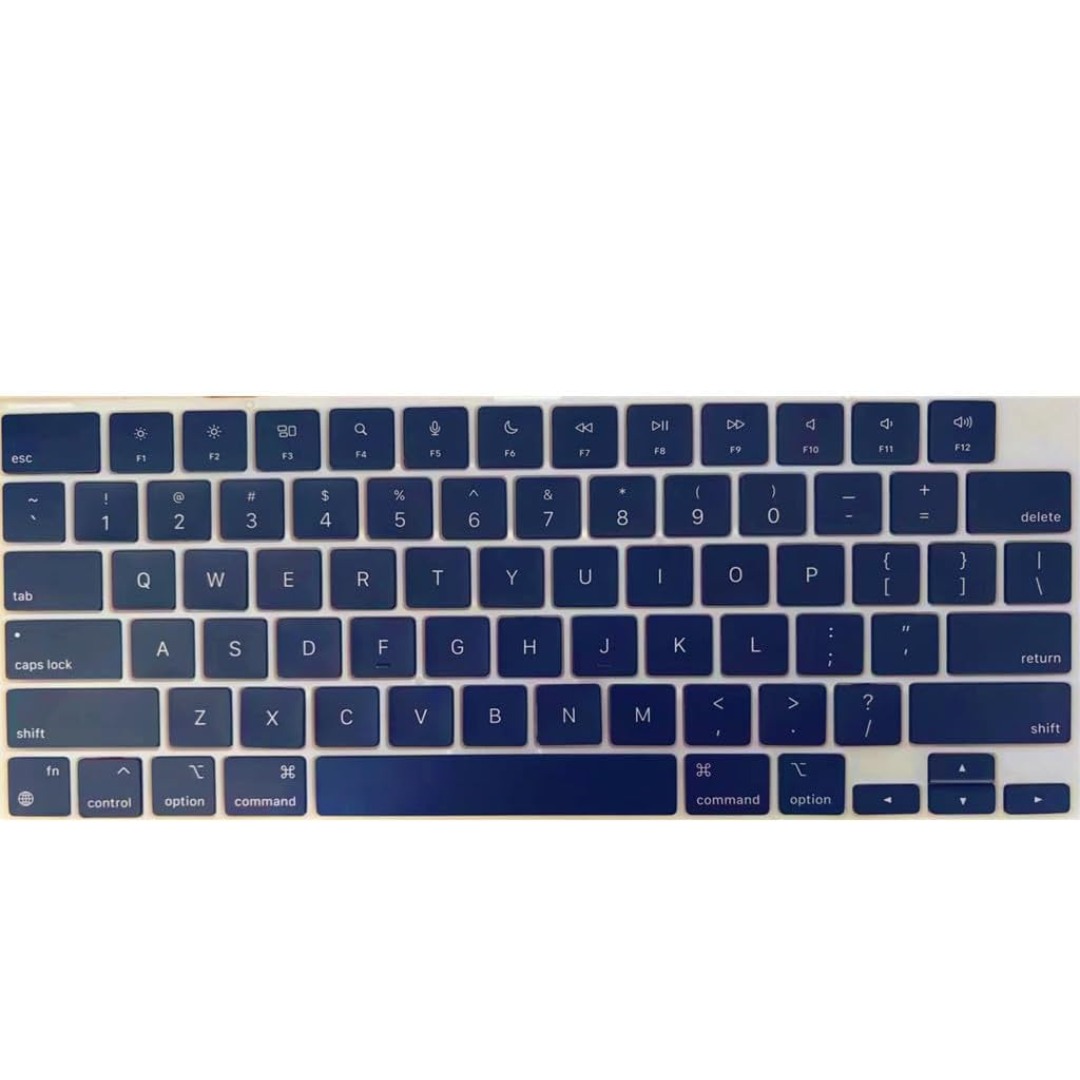
Genuine-spec US layout keyboard replacement for MacBook Pro (Model A1398, Late 2011–Mid 2012)—featuring durable scissor-switch keys, backlighting, and OEM-fit design for reliable typing and straightforward installation. Compatible With: MacBook Pro 13″: Late 2011 (Model A1278, but labeled A1398 in some regions) – Model Identifier MacBookPro8,1 MacBook Pro 15″: Early 2011, Late 2011, and Mid 2012 – Model Identifiers MacBookPro8,2 (15″ early/late 2011) and MacBookPro9,1 (15″ mid 2012) *(Note: “A1398” is primarily associated with the 15″ unibody MacBook Pro with Retina display (Mid 2012), which was the first Retina MacBook Pro.)* This keyboard fits the non-Retina 15″ A1398 (Mid 2012) and compatible Late 2011 models. MacBook Pro 13″: Late 2011 (Model A1278, but labeled A1398 in some regions) – Model Identifier MacBookPro8,1 MacBook Pro 15″: Early 2011, Late 2011, and Mid 2012 – Model Identifiers MacBookPro8,2 (15″ early/late 2011) and MacBookPro9,1 (15″ mid 2012) *(Note: “A1398” is primarily associated with the 15″ unibody MacBook Pro with Retina display (Mid 2012), which was the first Retina MacBook Pro.)* This keyboard fits the non-Retina 15″ A1398 (Mid 2012) and compatible Late 2011 models. Layout: Standard US English (QWERTY) with full-size keys, inverted-T arrow keys, and dedicated function row (F1–F12). Keyboard Type: Traditional scissor-switch mechanism—robust, tactile, and serviceable (pre-Butterfly era). Integrated Features: Backlit keys (adjustable brightness via F5/F6) OEM ribbon cable with ZIF connector Matches original key spacing and actuation force Backlit keys (adjustable brightness via F5/F6) OEM ribbon cable with ZIF connector Matches original key spacing and actuation force Build & Fit: Precision-molded plastic frame with exact screw mounts and alignment pegs—ensures secure, rattle-free installation in the top case. Installation Note: Keyboard is secured with screws and minimal adhesive. Requires full top case access and battery disconnect. Recommended for intermediate to advanced users or technicians.

Features: Advanced bluetooth Chip (V5.4): Enjoy seamless and robust connectivity with the latest bluetooth 5.4 technology, providing stable and efficient wireless performance. Superior Sound Quality: Experience immersive HiFi audio with powerful bass and clarity, courtesy of dual 52mm drivers paired with a bass diaphragm designed to deliver exceptional sound. Vibrant RGB Light Display: Half of the speaker surface displays dynamic and colorful RGB lights, creating a visually captivating experience that enhances your music enjoyment. Extended Battery Life: Benefits from extensive playtime powered by a 3000mAh battery, with up to 4 hours of continuous playback and an impressive 180 days of standby time. TWS Pairing: Effortlessly pair two speakers to achieve a rich, enveloping stereo sound that transforms any space into a lively audio environment. Multiple Playback Modes: Versatility at its best with multiple playback options, including FM radio, AUX input, TF card, and USB playback, ensuring you have endless ways to enjoy your favorite tunes.

The Samsung 43-Inch Full HD Smart TV UA43F6000FUXTW uses a 43-inch LCD panel with 1920 × 1080 resolution. It delivers standard Full HD picture quality for everyday TV viewing, streaming, and basic entertainment use. The display supports Full HD resolution, which shows clear and detailed images for HD content. In addition, Samsung picture processing improves lower-resolution sources to reduce noise and enhance clarity on the screen. The TV runs a native 60 Hz refresh rate. Also, motion processing helps reduce blur in fast-moving scenes such as sports and action content. Samsung equips this model with a Smart TV platform based on Tizen OS. Therefore, users can access streaming apps, online content, and basic smart features through a simple interface. Connectivity includes HDMI ports, USB ports, Wi-Fi, Bluetooth, Ethernet LAN, and optical audio output. In addition, the TV supports external devices such as game consoles, set-top boxes, and sound systems. This model focuses on Full HD resolution, essential smart TV functions, and basic connectivity without 4K resolution or advanced display processing features. Specifications: 43-inch LCD panel with 1920 × 1080 Full HD resolution 60 Hz native refresh rate display Tizen OS smart platform with streaming apps HDMI, USB, Wi-Fi, Bluetooth, Ethernet connectivity Supports external devices like consoles and media players

The MSI MPG 341CQPX QD-OLED Gaming Monitor features a 34-inch ultrawide screen with 3440 x 1440 resolution for immersive visuals. Its 1800R curve pulls you into the action and enhances your overall gaming experience. With a 240Hz refresh rate and 0.03ms response time, gameplay stays smooth, fast, and lag-free. Quantum Dot OLED technology brings vivid colors and rich contrast to every frame. This monitor covers 99.3% of the DCI-P3 color space for ultra-accurate color display. It supports HDR with a peak brightness of up to 1000 nits for brighter highlights and deeper blacks. The MSI MPG 341CQPX Gaming Monitor also includes advanced OLED care features to prevent screen burn-in. An anti-reflective coating reduces glare for clearer visuals in bright or dark environments. The fanless cooling system ensures quiet performance thanks to graphene film and a custom heatsink. You get two HDMI 2.1 ports, one DisplayPort 1.4a, and a USB-C port with 98W power delivery. Multiple USB-A and USB-B ports offer great flexibility for all your connected devices. A built-in KVM switch allows you to control multiple systems with one keyboard and mouse. Adjust the monitor’s height, tilt, and swivel to match your ideal viewing angle easily. Its modern and sleek design fits perfectly into any gaming or work setup. The MSI MPG 341CQPX QD-OLED Gaming Monitor delivers a premium, responsive, and immersive experience. It’s an ideal choice for gamers who want high performance and stunning visuals in one display. Specifications: Display : 34.18“ Resolution : 3440 x 1440 (UWQHD) Refresh Rate : 240Hz Response Rate : 0.03ms (GTG) Curvature : 1800R

2016 Apple 15" MacBook Pro Touch-Bar Logic Board 2.7Ghz i7 16Gb A1707 512GB , With Dual Graphics Radeon Pro 2016 Apple 15″ MacBook Pro Touch-Bar Logic Board 2.7Ghz i7 16Gb A1707 512GB , With Dual Graphics Radeon Pro

VSTAR UA150 1500VA UPS | Simulated Sine Wave Output | 230V | 24VDC Battery System | 50/60Hz Auto Sensing | Compact Design | Black Color | Model UPS-UA150 Robust 1500VA Power CapacityThe VSTAR UA150 delivers 1500VA of reliable backup power to safeguard your essential electronics, including PCs, servers, routers, and security systems. Dual Voltage CompatibilitySupports 110/120V or 220/230/240V input, making it ideal for use in a variety of international voltage environments. Stable 230V Output with AVR FunctionalityMaintains a consistent 230VAC output, protecting connected devices from voltage fluctuations and surges. Simulated Sine Wave OutputProvides a simulated sine wave waveform suitable for most common electronics, especially during normal backup operations. Auto-Sensing FrequencyAutomatically detects 50Hz or 60Hz power sources, adapting to your electrical environment without manual adjustments. Compact, Space-Saving DesignMeasuring just 353 x 149.3 x 162 mm, the UA150 fits neatly on or under desks, in server cabinets, or against walls. Reliable 24VDC Battery SystemOperates on a 24VDC internal battery configuration, delivering longer runtimes and better reliability during outages. Universal Output SocketsEquipped with IEC-style or universal output sockets that are compatible with a wide range of devices. Sleek Black FinishA clean and modern black color allows it to blend seamlessly into professional or home environments. Ideal for Home or OfficeProtects critical electronics, telecom gear, and POS systems from data loss and downtime.
