
Apple 60W MagSafe Power Adapter (for MacBook and 13-inch MacBook Pro) The 60 Watt MagSafe Power Adapter features a magnetic DC connector that ensures your power cable will disconnect if it experiences undue strain and helps prevent fraying or weakening of the cables over time. In addition, the magnetic DC helps guide the plug into the system for a quick and secure connection. When the connection is secure, an LED located at the head of the DC connector will light up; an amber light lets you know that your portable is charging, while a green light tells you that you have a full charge. An AC lead is provided with the adapter for maximum lead length, while the AC wall adapter (also provided) gives users an even easier and more compact way to travel. Designed to be the perfect travelling companion, the adapter has a clever design that allows the DC cable to be wound neatly around itself for easy cable storage. This power adapter recharges the lithium polymer battery while the system is off, on, or in sleep mode. It also powers the system if you choose to operate without a battery. Compatible with MacBook and 13-inch MacBook Pro. See this article for more details about choosing the right one. Knowing which specific Mac model you have is important. If you are running OS X Lion (10.7) or later, go to the “” menu at the top left of your screen, choose “About this Mac” then click the “More Info…” button. Your Mac model and generation will be displayed. If you are running an earlier version of OS X, you can enter your serial number here to find out which model you have.

Huawei IdeaHub B2 IHB2-65PU 65-inch conferencing display delivers an advanced all-in-one solution for modern meeting rooms. It combines a 4K UHD touchscreen with smart collaboration tools to enhance productivity and communication. As a result, teams can present, write, and share ideas seamlessly across multiple platforms. Moreover, the zero-gap laminated IPS panel ensures sharp visuals and precise touch response. The infrared multi-touch system supports up to 20 touch points, while low latency writing creates a smooth and natural pen experience. In addition, smart handwriting recognition and annotation features improve brainstorming and note-taking efficiency. Furthermore, the device includes dual WiFi connectivity and wide compatibility with Android, Windows, iOS, and macOS systems. The built-in speakers deliver clear audio, and the multiple front and rear ports provide flexible connectivity for various devices. Therefore, it is ideal for presentations, video conferencing, and collaborative workspaces. Huawei IdeaHub B2 65-inch display offers powerful performance, seamless connectivity, and intelligent collaboration features for professional environments. Specifications: 65-inch 4K UHD display with 3840 × 2160 resolution Supports up to 20 touch points with infrared technology Zero-gap laminated glass with D-LED backlight Quad-core CPU with 4GB RAM and 32GB storage Wide connectivity including HDMI, USB, Type-C, and OPS port

The Samsung Essential 24″ 75Hz Curved Monitor offers an immersive viewing experience for work, entertainment, or gaming. Its sleek design fits perfectly in any setup, adding style and functionality. This 24-inch curved monitor enhances your focus by wrapping the screen around your field of view. The curvature minimizes distractions, creating a more immersive and comfortable viewing experience. Whether you’re watching movies or multitasking, the curved design makes a difference. With a 75Hz refresh rate, this monitor ensures smooth visuals and reduced screen tearing. This feature is perfect for casual gamers and those who enjoy seamless video playback. The monitor’s Full HD resolution delivers crisp and vivid details, making everything look sharp and vibrant. The Samsung Essential 24″ 75Hz Curved Monitor comes equipped with Eye Saver Mode and Flicker-Free technology. These features reduce eye strain during extended use, helping you stay productive for longer. Whether you’re working or binge-watching, your eyes will thank you. Connectivity is simple with HDMI and VGA ports, allowing easy setup with various devices. Its compact stand provides stability and saves desk space, keeping your workstation tidy and organized. This monitor’s modern design and slim bezels make it a stylish addition to any desk. It’s lightweight and easy to adjust, offering flexibility for home or office use. Upgrade your visual experience today with the Samsung Essential 24″ 75Hz Curved Monitor. It’s an affordable and reliable choice for everyday use. Specifications: Display : 24″ VA Resolution : FHD (1920×1080) Curvature : 1800R Refresh Rate : 75Hz Response Rate : 4ms GTG

The Apple Magic Mouse (USB-C version) is a sleek, minimalist multi-touch wireless mouse built for Mac users. It offers smooth gesture support, Bluetooth connectivity and a built-in rechargeable battery — a great choice if you prefer a clean desk setup and full compatibility with macOS and iPadOS. General Name: Magic Mouse (USB-C) — part of Apple’s pointing-device lineup. Wireless connectivity: Bluetooth. Rechargeable battery: built-in, no disposable AA cells. Charging / port: USB-C port (bottom of mouse) for pairing and charging. Compatibility: Requires a Mac with macOS 15.1 or later, or an iPad with iPadOS 18.1 or later. Size & Weight Height: ~0.85 inch (2.16 cm) Width: ~2.25 inch (5.71 cm) Depth: ~4.47 inch (11.35 cm) Weight: ~0.22 pound (0.099 kg) (varies slightly by manufacturing) Features Multi-Touch surface: supports gestures such as swiping between pages, scrolling through documents, zooming. Glide / foot design: optimized for smooth movement across desktop surfaces. Rechargeable battery life: about a month or more between charges (typical use) per Apple spec. Used Condition ConsiderationsSince you’re specifying a used unit: Check for wear on the bottom feet / skates — these degrade and affect glide. Verify battery capacity / health (rechargeable batteries age). Confirm the port is functioning (USB-C) and Bluetooth connectivity is stable. Look for signs of excessive surface scratches on the multi-touch top — may impair gestures. Ensure the firmware / Mac recognizes it fully (gestures working). Upgradability / Limitations Not user-upgradable: You cannot replace the internal battery or change internals easily. Design limitation: The USB-C port remains on the bottom of the mouse, meaning you cannot use it while charging unless you flip it. This design is still criticized. Ergonomics: The flat, low-profile design is stylish but may not suit extended-use comfort for some users.

A versatile pre-owned Lenovo ThinkPad L13 Yoga Gen 1 with 13.3" touchscreen, 360° hinge, 10th Gen Core i7, 16GB RAM, and 512GB SSD—perfect for professionals who need flexibility, performance, and portability.

Genuine Apple sleep/wake sensor flex cable (Hall effect sensor) for MacBook Air 13.6″ (Model A2681, 2022, M2)—ensures automatic display sleep when the lid is closed and wake-on-open functionality. OEM part number 821-04129-02. Compatible With: MacBook Air 13.6-inch (2022, Model A2681) with Apple M2 chip (all colors: Silver, Space Gray, Starlight, Midnight). Apple Part Number: 821-04129-02 (exact OEM service part). Function: Contains the Hall effect sensor that detects the magnet in the MacBook Air’s display lid. This allows macOS to: Sleep the system when the lid is closed Wake instantly when opened Prevent false sleep/wake events during use Sleep the system when the lid is closed Wake instantly when opened Prevent false sleep/wake events during use Location: Mounted near the right side of the keyboard, adjacent to the battery and logic board. Common Failure Symptoms: MacBook doesn’t sleep when lid is closed MacBook wakes randomly in a bag “Lid closed” not recognized in macOS Requires manual sleep or power button use MacBook doesn’t sleep when lid is closed MacBook wakes randomly in a bag “Lid closed” not recognized in macOS Requires manual sleep or power button use Part Type: Flex cable with integrated Hall sensor—not just a cable, but a calibrated magnetic sensor module. Installation Note: Requires full bottom case removal and careful disconnection of the battery. The sensor is adhered near the I/O area—do not bend or puncture. Recommended for experienced technicians.

Genuine-spec battery flex cable for MacBook Pro models A2159 (16", 2019), A1708 (13", 2016–2017), and A2338 (13", 2020 M1)—restores critical communication between the battery and logic board for proper power-on, charging, and macOS battery status. Genuine-spec battery flex cable for MacBook Pro models A2159 (16″, 2019), A1708 (13″, 2016–2017), and A2338 (13″, 2020 M1)—restores critical communication between the battery and logic board for proper power-on, charging, and macOS battery status. Carries SMBus (System Management Bus) signals from the battery to the logic board Enables: Accurate battery percentage and health reporting in macOS Proper charging control (start/stop, thermal throttling) Power-on capability (MacBooks will not boot without this connection) Prevention of “Battery Not Charging” or “Service Battery” errors Accurate battery percentage and health reporting in macOS Proper charging control (start/stop, thermal throttling) Power-on capability (MacBooks will not boot without this connection) Prevention of “Battery Not Charging” or “Service Battery” errors MacBook won’t turn on (even with a good battery) Battery shows “–%”, 0%, or “Not Charging” Random shutdowns under load macOS displays “No Battery Available” Logic board powers fans or lights but no display output Battery flex cable only (with OEM-style connector and strain relief) ❌ Does not include: battery, logic board, or trackpad Requires full bottom case removal and battery disconnection Connects via a ZIF or press-fit socket on the logic board Must be routed precisely to avoid tension or micro-tears Highly recommended for experienced or certified technicians—improper installation can cause permanent power or battery communication failure

The MSI MAG 275QF X24 27″ 240Hz 2K Gaming Monitor offers fast refresh and crisp visuals. Firstly, it features a 27‑inch display with sharp 2560×1440 resolution. Also, the 240 Hz refresh rate guarantees smooth motion in fast games. Moreover, a 1 ms GtG response time delivers quick reaction during intense battles. In addition, it uses an IPS panel for vibrant colors and wide viewing angles. Furthermore, Adaptive‑Sync helps reduce screen tearing and visual stutter. Thus, you get clean and smooth gameplay at all times. Another highlight is the sturdy stand with tilt, height, and swivel adjustments. So, you can find your ideal ergonomic viewing position easily. Also, the monitor includes low‑blue‑light and anti‑flicker tech to protect your eyes. Therefore, long gaming sessions become less tiring and more comfortable. Plus, it offers DisplayPort and HDMI ports for easy multi‑device support. This lets you connect both gaming PC and console without hassle. The MSI MAG 275QF X24 features RGB ambient backlighting to enhance your setup. Hence, it creates an immersive lighting environment behind the screen. Also, the monitor’s slim bezels provide a sleek, modern look. Additionally, its on‑screen display is intuitive and easy to use. Moreover, MSI’s GameSense overlays show real‑time game info like FPS or timers. In short, these features give you an edge in competitive play. Furthermore, Night Vision mode brightens dark in‑game scenes without overexposure. Thus, you can spot enemies clearly even in shadowy maps. Also, the matte screen finish helps cut down glare from room lighting. As a result, you stay focused without distraction. The MSI MAG 275QF X24 delivers top performance at a 240 Hz refresh. To conclude, it is a smart choice for serious gamers seeking speed and quality. Finally, it balances fast gameplay, sharp visuals, and user comfort perfectly. Specifications: Display : 27″ Rapid IPS Resolution : 2560 x 1440 (WQHD) Refresh Rate : 240Hz Response Rate : 0.5ms (GTG)

Keyboard Compatible for MacBook PRO Retina 15″ A1398 (Late 2013-MID 2015) US Layout Compatibility: MacBook Pro Retina 15″ A1398 Late 2013 (IG): ME293LL/A (2.0 Core i7) Late 2013 (IG): ME293LL/A (2.3 Core i7) Late 2013 (IG): ME293LL/A (2.6 Core i7) Mid 2014 (IG): MGXA2LL/A (2.2 Core i7) Mid 2014 (IG): MGXA2LL/A (2.5 Core i7) Mid 2014 (IG): MGXA2LL/A (2.8 Core i7) Late 2013 (DG): ME294LL/A (2.3 Core i7) Late 2013 (DG): ME294LL/A (2.6 Core i7) Compatibility: Mid 2014 (DG): MGXC2LL/A (2.5 Core i7) Mid 2014 (DG): MGXC2LL/A (2.8 Core i7) Mid 2015 (IG): MJLQ2LL/A (2.2 GHz Core i7) Mid 2015 (IG): MJLQ2LL/A BTO (2.5 GHz Core i7) Mid 2015 (IG): MJLQ2LL/A BTO (2.8 GHz Core i7) Mid 2015 (DG): MJLT2LL/A (2.5 GHz Core i7) Mid 2015 (DG): MJLT2LL/A BTO (2.8 GHz Core i7) Identifying Numbers APN: 661-6532, 661-8311,661-02536 Specification】The keyboard is without frame! pls see detail compatible model in descrirption. Safe】Easy for you replace your faulty,cracked or broken keyboard ,seller remind that you should replace the keyboard in the off state. All pictures are taken from the real item, please check carefully before biddingReplacement and high quality,Replace your faulty, cracked or broken keyboard Replacement and high quality,Replace your faulty, cracked or broken keyboard Each keyboard is tested before shipping Please contact us if you have any question or problems.

The HUAWEI IdeaHub B2-65 is a 65-inch intelligent collaboration display designed for meetings, classrooms, and hybrid workspaces. It combines a 4K UHD interactive touchscreen with built-in conferencing tools to support smooth communication. Additionally, it enables writing, video meetings, and wireless sharing in one integrated device. Moreover, it features a 4K resolution screen with zero-gap bonding. Therefore, it delivers clear visuals and smooth touch interaction for presentations and collaboration. Furthermore, Huawei equips it with a 4K camera, 6-microphone array, and 30W speakers. So, it provides clear video, strong voice pickup, and balanced sound for meetings up to about 10 meters. In addition, it supports dual Wi-Fi connectivity and wireless projection. Therefore, users can share content easily from laptops, tablets, and phones without cables. It also includes an intelligent whiteboard for real-time writing and collaboration. Also, it supports both Android and optional Windows OPS system integration. So, it fits different office and enterprise IT setups. Overall, the Huawei IdeaHub B2-65 delivers a complete all-in-one collaboration solution with strong audio-visual performance, smart connectivity, and interactive meeting tools. Specifications: 65-inch 4K UHD interactive touchscreen 4K camera with intelligent conferencing support 6-microphone array with 10m pickup range Wireless projection and dual Wi-Fi support Integrated whiteboard for collaboration

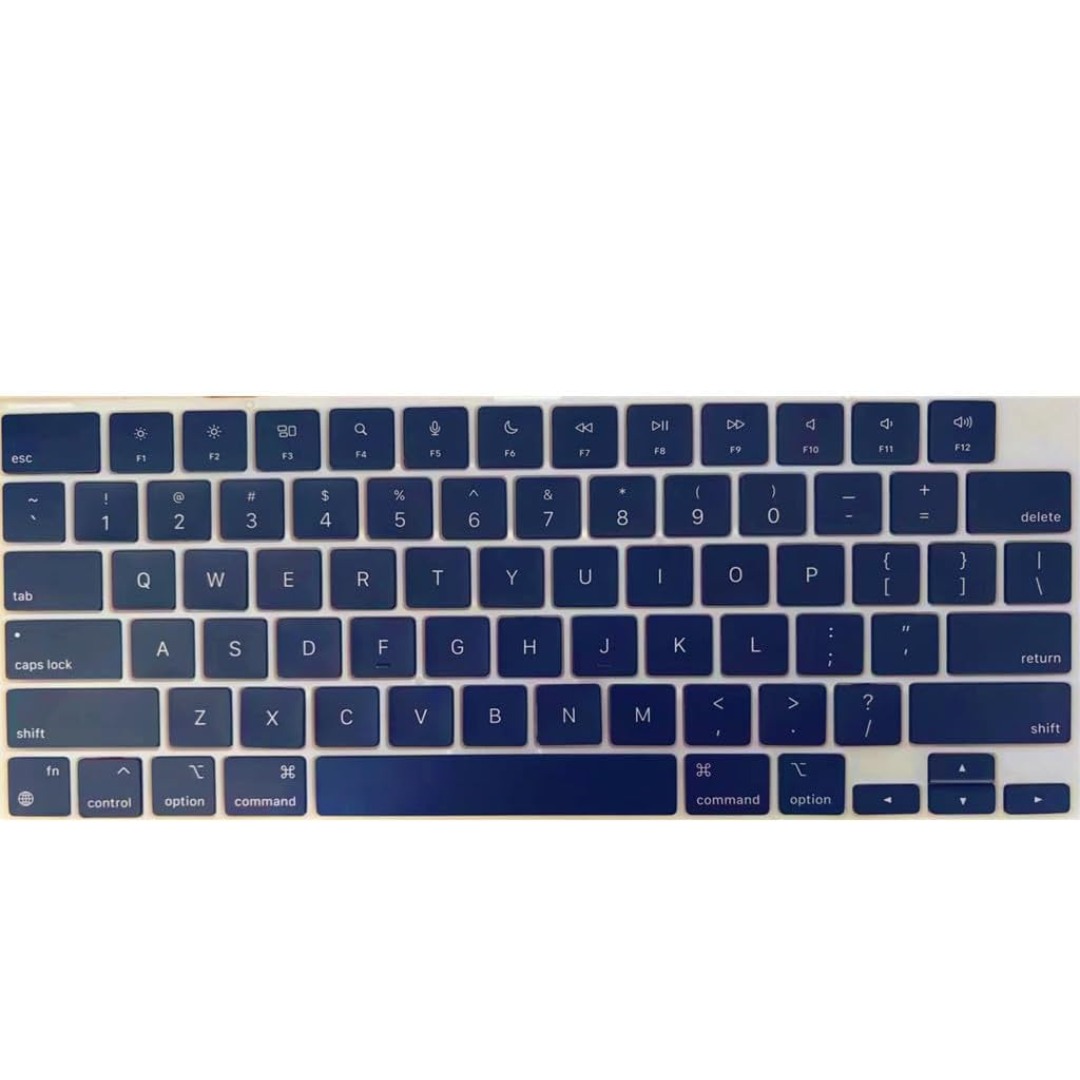
Genuine-spec keyboard replacement for MacBook Pro 13″ (Model A2251, 2020) — choose US QWERTY or UK QWERTY (with £ symbol). Features Apple’s reliable Magic Keyboard with scissor-switch mechanism, backlighting, and precise OEM fit. Compatible With: MacBook Pro 13-inch (2020, Two Thunderbolt Ports, Model A2251, Model Identifier MacBookPro16,1) with Intel Core i5/i7 processors. Layout Options (select at purchase): US Layout: Standard QWERTY with wide Enter key, @ above 2, # above 3, and full function row. UK Layout: QWERTY with £ symbol, tall vertical Enter key, @ accessed via right Alt, and UK-specific punctuation. US Layout: Standard QWERTY with wide Enter key, @ above 2, # above 3, and full function row. UK Layout: QWERTY with £ symbol, tall vertical Enter key, @ accessed via right Alt, and UK-specific punctuation. Keyboard Type: Apple’s Magic Keyboard with scissor-switch mechanism—offering improved durability, quieter typing, and 1mm key travel compared to Butterfly keyboards. Integrated Features: Full backlit keys for low-light environments Ambient light sensor support OEM-style flex cable pre-attached for direct connection to the logic board Full backlit keys for low-light environments Ambient light sensor support OEM-style flex cable pre-attached for direct connection to the logic board Precision Build: Engineered to match Apple’s exact dimensions, key spacing, and top-case curvature—ensures seamless visual and functional integration. Installation Note: The keyboard is factory-glued into the top case. Replacement requires full disassembly, careful adhesive removal, and professional re-adhesion. Recommended for experienced or certified repair technicians only.

The Samsung Crystal UHD U8000F 55″ 4K TV UA55U8000FUXTW uses a 55-inch LCD panel with 3840 × 2160 resolution. It delivers standard 4K output for everyday TV, streaming, and console use. Samsung uses the Crystal Processor 4K for image processing and upscaling. As a result, lower-resolution content converts closer to 4K quality on the screen. In addition, the TV supports HDR10 and HDR10+, which improve contrast between bright and dark areas. The display runs at a 60 Hz refresh rate. Also, Motion Xcelerator reduces blur during fast scenes such as sports and action content. Samsung equips the TV with Tizen OS. Therefore, users access streaming apps, SmartThings integration, and built-in smart functions through a simple interface. Connectivity includes HDMI ports, USB ports, Wi-Fi, Bluetooth, Ethernet LAN, and optical audio output. In addition, the TV supports ALLM for basic gaming response performance. This model focuses on 4K resolution, standard HDR support, and essential smart TV features without advanced gaming or local dimming systems. Specifications: 55-inch LCD panel with 3840 × 2160 4K UHD resolution Crystal Processor 4K with upscaling support HDR10 and HDR10+ compatibility 60 Hz refresh rate with Motion Xcelerator Tizen OS with HDMI, USB, Wi-Fi, Bluetooth, Ethernet connectivity

The ViewSonic VX2479-HD-PRO is a 24-inch monitor designed to deliver stunning visuals and smooth performance for gaming, work, or entertainment. Whether you’re streaming videos, editing documents, or playing your favorite games, this monitor ensures vibrant colors and sharp details. Featuring a Full HD resolution of 1920×1080 pixels, the ViewSonic VX2479 provides crystal-clear image quality. You can enjoy a high-definition viewing experience that brings your movies, games, and content to life. This monitor comes equipped with an IPS panel, which offers wide viewing angles and consistent color reproduction. Whether you’re looking at the screen from the side or straight on, the picture quality remains bright and accurate. The ViewSonic VX2479-HD-PRO also supports a 75Hz refresh rate, ensuring smooth and fluid visuals. This makes it ideal for fast-paced gaming and action-packed scenes, reducing motion blur and providing a more enjoyable experience. With multiple connectivity options, including HDMI and DisplayPort, the ViewSonic VX2479 offers easy connections to your PC, gaming console, or other devices. Switching between work and play is quick and hassle-free. Designed with a sleek, frameless design, this monitor adds a modern touch to any workspace or gaming setup. It is lightweight and easy to set up, making it perfect for both home and office use. In conclusion, the ViewSonic VX2479-HD-PRO offers a stunning blend of sharp visuals, vibrant colors, and smooth performance. Upgrade your setup with this versatile monitor and experience high-quality viewing for work and play. Specifications: Resolution : FHD Display : 24″ IPS Refresh Rate : 180Hz Response Time : 1ms

WiWU Pilot Backpack 15.6 inch Travelling Polyester Laptop Business School Travelling Backpack WiWU Pilot Backpack 15.6 inch Travelling Polyester Laptop Business School Travelling Backpack

The MSI MAG 244F 24″ 200 Hz Gaming Monitor delivers smooth visuals with super‑fast refresh rate. It features a full HD (1920×1080) IPS panel for vivid colors and wide viewing angles. Moreover, its 1 ms MPRT response time reduces motion blur during fast-paced gameplay. Also, the 200 Hz refresh rate ensures fluid motion in competitive games. In addition, the monitor supports Adaptive‑Sync to eliminate screen tearing and stutter. Besides that, the slim bezel design creates an immersive multi‑monitor setup. Furthermore, the adjustable stand allows tilt, height, and swivel customization. Therefore, users can find a comfortable viewing position effortlessly. It includes DisplayPort and HDMI inputs for flexible connectivity. Also, built‑in gaming presets offer easy optimization for different game genres. Plus, MSI’s Anti‑Flicker and Less Blue Light technologies reduce eye strain. Meanwhile, the monitor uses a VESA mount for wall or arm installation. Importantly, the sturdy stand delivers stable support during intense gaming sessions. Also, on‑screen crosshair overlays enhance accuracy in FPS games. Unlike standard monitors, this one targets e‑sports and fast‑reaction players. However, it still works well for streaming, editing, and productivity tasks. For example, racing, shooter, or fighting games feel more responsive and clear. Then, users connect cables, power on, and enjoy lag‑free visuals instantly. Moreover, the ergonomics support comfort during long gaming or desk sessions. As a result, performance gains combine with healthy posture support. Also, the display’s vivid contrast keeps dark and bright details visible. In addition, its low input lag provides competitive advantage in fast games. Therefore, gamers stay ahead with accurate and real‑time feedback. Also, the monitor’s sleek black design complements any gaming setup. Furthermore, MSI’s reliable build quality offers long‑term durability. Consequently, users gain both style and substance in one package. Also, all essential cables come in the box for easy setup. In conclusion, the MSI MAG 244F offers 200 Hz speed, IPS clarity, and gaming comfort. Finally, it’s a smart investment for serious gamers seeking fluid performance. Specifications: Display : 23.8” Rapid IPS Resolution : 1920 x 1080 (FHD) Refresh Rate : 200Hz Response Rate : 0.5ms

Philips 271V8W is a 27-inch Full HD LCD monitor designed for everyday use. It delivers a 1920 × 1080 resolution with a 75Hz refresh rate and IPS panel for wide viewing angles and consistent color performance. Additionally, it includes Adaptive Sync technology for smoother visuals and reduced screen tearing. Moreover, it supports Flicker-Free technology and LowBlue Mode to help reduce eye strain during long use. It also features an anti-glare coating for more comfortable viewing in bright environments. SmartContrast adjusts brightness and contrast based on displayed content for improved image clarity. The Philips 271V8W monitor provides a simple and reliable 27-inch IPS display experience with smooth 75Hz performance for daily tasks. Specifications: 27-inch IPS panel with Full HD 1920 × 1080 resolution 75Hz refresh rate for smooth daily visuals Adaptive Sync for reduced screen tearing Flicker-Free technology for eye comfort LowBlue Mode and anti-glare coating for reduced eye strain

LG 22 inch HD LCD Monitor E2290V is designed for clear visuals, slim styling, and daily home or office use. It features a 21.5-inch LED display with Full HD 1080p resolution for sharp picture quality. Additionally, it uses an ultra-slim 7.2mm design with LED backlighting. Therefore, it works well for productivity, media viewing, and general computer tasks. The LG 22 inch HD LCD Monitor E2290V delivers 1920 × 1080 resolution with a 5ms response time and 250 cd/m² brightness. Moreover, it includes a 10,000,000:1 dynamic contrast ratio for deeper image detail. It supports HDMI, DVI-D, D-Sub, and headphone out for flexible connectivity. Furthermore, the monitor includes tilt adjustment and anti-glare surface treatment for better comfort during long sessions. In addition, it supports Full HD viewing with 16.7 million colors and ENERGY STAR qualification. As a result, users get a stylish and practical display for everyday use. Specifications: 21.5-inch Full HD 1920 × 1080 LED display Ultra-slim 7.2mm monitor design 5ms response time with 250 cd/m² brightness HDMI, DVI-D, D-Sub, and headphone out Tilt adjustment with anti-glare screen surface

Designed by Apple Deeper, richer bass tones Greater protection from sweat and water Control music and video playback Answer and end calls Works with all devices that have a Lightning connector and support iOS 10 or later, including iPod touch, iPad, and iPhone

MLT-D111S MLT-D111L Toner Cartridge Replacement for Samsung 111S MLTD111L for Xpress SL-M2020W SL-M2070FW SL-M2070W M2020 M2024W M2026W M2070 Laser Printer (Black, 1-Pack)

Genuine-spec touchpad flex cable for MacBook Pro 13″ (Model A1502, Mid 2014)—restores full trackpad functionality, including precise cursor control and physical click response. Essential for repairing unresponsive or erratic trackpad behavior. Compatible With: MacBook Pro 13-inch (Mid 2014, Model A1502, Model Identifier MacBookPro11,1) with Intel Core i5/i7 processors and Retina display. Part Type: Touchpad flex cable only — does not include the trackpad housing, button mechanism, or mounting hardware. This is the ribbon cable that connects the trackpad to the logic board. Function: Transmits cursor movement and click signals (left/right physical clicks) Supports standard multi-touch gestures (two-finger scroll, tap-to-click, pinch-to-zoom) ⚠️ Note: This model uses a physical click mechanism—not Force Touch (no haptic feedback or pressure sensitivity). Transmits cursor movement and click signals (left/right physical clicks) Supports standard multi-touch gestures (two-finger scroll, tap-to-click, pinch-to-zoom) ⚠️ Note: This model uses a physical click mechanism—not Force Touch (no haptic feedback or pressure sensitivity). OEM-Quality Build: Matches Apple’s original in: Cable length and routing path Connector type and pin alignment Insulation and flexibility for long-term reliability Cable length and routing path Connector type and pin alignment Insulation and flexibility for long-term reliability Common Use Cases: Replacing a torn, frayed, or corroded original flex cable Fixing: Unresponsive or intermittent trackpad Cursor jumping or drifting Click function failure (left or right) Complete trackpad disconnect Replacing a torn, frayed, or corroded original flex cable Fixing: Unresponsive or intermittent trackpad Cursor jumping or drifting Click function failure (left or right) Complete trackpad disconnect Unresponsive or intermittent trackpad Cursor jumping or drifting Click function failure (left or right) Complete trackpad disconnect Installation Note: Requires bottom case removal and battery disconnect. Connects via a ZIF (Zero Insertion Force) socket on the logic board—do not force. Cable routes under the battery; handle with care to avoid strain. Suitable for intermediate to advanced DIYers or technicians. Requires bottom case removal and battery disconnect. Connects via a ZIF (Zero Insertion Force) socket on the logic board—do not force. Cable routes under the battery; handle with care to avoid strain. Suitable for intermediate to advanced DIYers or technicians.
