
product name : LG UltraGear 32″ Shipping Dimensions (WxHxD) 31.2″ x 8.9″ x 21.9″ Shipping Weight 22.3 lbs With Stand (WxHxD) 28.1″ x 23.6″ x 11.5″ (UP) 28.1″ x 19.3″ x 11.5″(Down) With Stand Weight 15.9 lbs Without Stand (WxHxD) 28.1″ x 16.9″ x 2″ Without Stand Weight 10.6 lbs iNPUT/OUTPUT DisplayPort Yes HDMI Yes Headphone Out Yes USB Down-stream Yes USB Up-stream Yes PICTURE QUALITY Aspect Ratio 16:9 Brightness 280cd (Min)/350cd (Typ) Color Depth (Number of Colors) 107 Color Gamut (Typ.) DCI-P3 98% (CIE1976) Contrast Ratio 700:1 (Min.), 1000:1 (Typ.) Display Type IPS Pixel Pitch (mm) 0.2724 x 0.2724 mm Refresh Rate 165hz (o/c 180hz) Resolution 2560 x 1440 Response Time (GTG) 1ms (GtG at Faster) Screen Size 32″ Surface Treatment Anti-Glare Viewing Angle 178˚(R/L), 178˚(U/D) POWER DC Off (Max) <0.3W Input 100-240 Vac, 50/60 Hz LG UltraGear 32″ Power Consumption (Max.) 65 W Power Consumption (Typ.) 48 W Power Save/Sleep Mode (Max) Less than 0.5W Type Adapter SOUND Speaker Yes LG UltraGear 32″ SPECIAL FEATURES Adaptive Sync AMD FreeSync™ Premium Auto Input Switch Yes Black Stabilizer® Yes Color Calibrated Yes Crosshair® Yes LG UltraGear 32″ Dynamic Action Sync® Yes Flicker Safe Yes FPS Counter Yes FreeSync (Low Frame Compensation) Yes HDR (High Dynamic Range) Yes HDR Effect Yes Motion Blur Reduction Technology Yes Nano IPS™ Technology Yes NVIDIA G-Sync™ Yes OnScreen Control (OSC) Yes Overclock Yes LG UltraGear 32″Reader Mode Yes Smart Energy Saving Yes User Define Key Yes Wide Color Gamut Yes STAND Display Position Adjustments Height, Pivot, Tilt Wall mount size (mm) 100 x 100 mm Specifications: 32″ FHD (1920 x 1080) Display 165Hz Refresh Rate An ultra-fast speed of 165Hz allows gamers to see the next frame quickly and makes image to appear smoothly. The gamers can respond quickly to opponents and aim at target easily.

The Samsung 32″ Essential S3 Curved Monitor LS32D392GAMXUE features a 32-inch VA panel with Full HD resolution (1920 × 1080). It uses a 1500R curved screen design that follows the natural field of view for a more immersive viewing experience. The monitor supports a refresh rate of up to 100Hz. As a result, motion appears smoother during everyday work, video playback, and casual gaming. In addition, the 4ms GTG response time helps reduce motion blur during fast-moving content. Samsung uses a VA panel with a typical 3000:1 contrast ratio and 250 cd/m² brightness. Therefore, the display delivers deeper blacks and improved contrast compared to many standard IPS and TN panels. The monitor also covers up to 95% of the sRGB color space. Eye Saver Mode and Flicker Free technology help reduce eye strain during extended use. Also, Game Mode adjusts image settings to improve visibility in darker scenes. Connectivity includes one HDMI 1.4 port, one D-Sub (VGA) port, and a headphone output. The monitor supports VESA 75 × 75 mm wall mounting and tilt adjustment from -2° to 22°. This model focuses on everyday productivity, media consumption, and general home use while providing a large curved display and higher-than-standard refresh rate. Specifications: 32-inch VA panel with Full HD (1920 × 1080) resolution 1500R curved screen design Up to 100Hz refresh rate 4ms GTG response time HDMI 1.4, D-Sub (VGA), and headphone connectivity

WiWU WM108 Wimice Dual‑Mode Mouse – Bluetooth 5.0 and 2.4 GHz wireless mouse with 800/1200/1600 DPI, silent clicks, and ergonomic ABS housing.Long battery life (~6 months standby), USB dongle & silent design—ideal for travel, office, and quiet environments. Model: WiWU Wimice WM108 Connection Modes: Bluetooth 5.0 2.4 GHz wireless via USB dongle Connection Modes: Bluetooth 5.0 2.4 GHz wireless via USB dongle DPI Settings: 800 / 1,200 / 1,600 DPI (adjustable) Buttons: 3 standard buttons + clickable scroll wheel (4 keys total) Range: Up to 10 m wireless connectivity Material/Design: Lightweight (67–130 g, depending on source), ergonomic ABS plastic body, magnetic base or “super magnetic absorption” design Operating Range: ≈10 m Silent Clicks: Quiet operation—silent key action Dimensions: Approx. 108 × 64 × 36 mm Weight: 67 g cited by Star Tech and 130 g by others—likely lighter in official spec Compatibility: Windows, macOS, Linux, Android, etc. Plug-and-play, no driver needed

slim, lightweight, and powerful—the Lenovo ThinkPad T490s combines 8th Gen Intel Core i5 performance, 8GB ,16GB RAM, and a fast 256GB SSD in a premium, portable chassis built for mobile professionals.

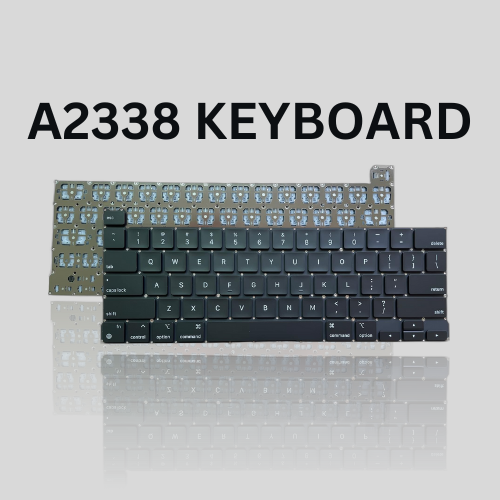
Genuine-spec touchpad flex cable for MacBook Pro 13″ (Model A2338, 2020, Apple M1)—essential for restoring full Force Touch functionality, haptic feedback, and precise multi-touch gesture control during trackpad repair or replacement. Compatible With: MacBook Pro 13-inch (2020, Model A2338, Model Identifier MacBookPro17,1) with Apple M1 chip (2 Thunderbolt ports). Part Type: Touchpad flex cable only — does not include the trackpad housing, Taptic Engine, or mounting hardware. This is the OEM-style ribbon cable that connects the trackpad to the logic board. Function: Transmits: Touch input coordinates Force Touch pressure data Haptic feedback signals to the Taptic Engine Enables full macOS gesture support: Force Click, three-finger lookup, swipe navigation, pinch-to-zoom, and smooth cursor tracking. Touch input coordinates Force Touch pressure data Haptic feedback signals to the Taptic Engine Enables full macOS gesture support: Force Click, three-finger lookup, swipe navigation, pinch-to-zoom, and smooth cursor tracking. OEM-Quality Build: Matches Apple’s original specifications in: Cable length and routing Connector pitch and ZIF latch design EMI shielding and flex durability Cable length and routing Connector pitch and ZIF latch design EMI shielding and flex durability Common Use Cases: Replacing a torn, creased, or liquid-damaged original flex cable Completing a trackpad replacement when the original cable is compromised Fixing intermittent trackpad behavior, loss of Force Touch, or complete unresponsiveness Replacing a torn, creased, or liquid-damaged original flex cable Completing a trackpad replacement when the original cable is compromised Fixing intermittent trackpad behavior, loss of Force Touch, or complete unresponsiveness Installation Note: Requires full bottom case removal and battery disconnection. Cable routes under internal components near the right speaker and logic board. Connects via a ZIF (Zero Insertion Force) socket—must be aligned carefully and latched gently. Recommended for experienced or certified technicians only. Requires full bottom case removal and battery disconnection. Cable routes under internal components near the right speaker and logic board. Connects via a ZIF (Zero Insertion Force) socket—must be aligned carefully and latched gently. Recommended for experienced or certified technicians only. Important Compatibility Notes: ✅ Only for A2338 (13″, M1, 2020) ❌ Not compatible with: Intel-based A2251 / A2289 (2020) MacBook Air M1 (A2337) Any MacBook Air or 14″/16″ MacBook Pro ✅ Only for A2338 (13″, M1, 2020) ❌ Not compatible with: Intel-based A2251 / A2289 (2020) MacBook Air M1 (A2337) Any MacBook Air or 14″/16″ MacBook Pro Intel-based A2251 / A2289 (2020) MacBook Air M1 (A2337) Any MacBook Air or 14″/16″ MacBook Pro

Genuine-spec touchpad flex cable compatible with both MacBook Air A2179 (Intel, 2020) and A2337 (M1, 2020)—restores full Force Touch functionality, haptic feedback, and precise multi-touch gesture control during trackpad repair or replacement. Compatible With: MacBook Air 13″ (2020, Intel) – Model A2179 (Model Identifier: MacBookAir9,1) MacBook Air 13″ (2020, Apple M1) – Model A2337 (Model Identifier: MacBookAir10,1) MacBook Air 13″ (2020, Intel) – Model A2179 (Model Identifier: MacBookAir9,1) MacBook Air 13″ (2020, Apple M1) – Model A2337 (Model Identifier: MacBookAir10,1) ✅ Important Note: Despite different processors (Intel vs. M1), Apple used the same trackpad assembly and flex cable in both A2179 and A2337. This makes the flex cable fully interchangeable between the two models. Part Type: Touchpad flex cable only — does not include the trackpad housing, Taptic Engine, or mounting hardware. This is the OEM-style ribbon cable that connects the trackpad to the logic board. Function: Transmits: Touch input coordinates Force Touch pressure data Haptic feedback signals to the Taptic Engine Enables full macOS gesture support: Force Click, three-finger lookup, swipe navigation, pinch-to-zoom, and smooth cursor tracking. Touch input coordinates Force Touch pressure data Haptic feedback signals to the Taptic Engine Enables full macOS gesture support: Force Click, three-finger lookup, swipe navigation, pinch-to-zoom, and smooth cursor tracking. OEM-Quality Build: Matches Apple’s original specifications in: Cable length and routing path Connector pitch and ZIF latch design EMI shielding and flex durability Cable length and routing path Connector pitch and ZIF latch design EMI shielding and flex durability Common Use Cases: Replacing a torn, creased, or liquid-damaged original flex cable Completing a trackpad replacement when the original cable is compromised Fixing intermittent trackpad behavior, loss of Force Touch, or complete unresponsiveness Replacing a torn, creased, or liquid-damaged original flex cable Completing a trackpad replacement when the original cable is compromised Fixing intermittent trackpad behavior, loss of Force Touch, or complete unresponsiveness Installation Note: Requires full bottom case removal and battery disconnection. Cable routes under the right side of the battery and logic board. Connects via a ZIF (Zero Insertion Force) socket—align carefully and latch gently. Recommended for experienced or certified technicians only. Requires full bottom case removal and battery disconnection. Cable routes under the right side of the battery and logic board. Connects via a ZIF (Zero Insertion Force) socket—align carefully and latch gently. Recommended for experienced or certified technicians only.

Looking for a top-notch monitor to enhance your computing experience? The MSI Pro MP275Q 27″ 100Hz Monitor is the perfect choice. This monitor offers superior performance and stunning visuals, making it ideal for both work and play. Firstly, the 27-inch screen provides ample space for multitasking. Whether you’re working on multiple documents or enjoying a movie, the large display ensures you have all the room you need. The Full HD resolution delivers sharp and clear images, enhancing every detail. The 100Hz refresh rate is a standout feature of this monitor. It provides smooth and fluid visuals, which is particularly beneficial for gaming and video playback. You won’t experience any stuttering or lag, ensuring a seamless viewing experience. Another advantage of the MSI Pro MP275Q is its wide color gamut. This feature ensures vibrant and accurate colors, making it perfect for tasks that require color precision, such as photo editing or graphic design. Your projects will look exactly as you intend them to. Moreover, the monitor includes advanced eye care technology. It reduces blue light emission and flicker, helping to minimize eye strain during long periods of use. This makes it an excellent choice for professionals who spend hours in front of their screens. Connectivity is also a breeze with the MSI Pro MP275Q. It features multiple input options, including HDMI and DisplayPort, allowing you to connect various devices effortlessly. This flexibility ensures compatibility with your existing setup. In conclusion, the MSI Pro MP275Q 27″ 100Hz Monitor offers a superior viewing experience with its large screen, high refresh rate, vibrant colors, and eye care technology. Upgrade your setup today and enjoy enhanced performance and stunning visuals. Specifications: Display : 27″ IPS Resolution : 2560 x 1440 (WQHD) Refresh Rate : 100Hz Response Rate : 1ms MRPT

The LG UltraWide 34″ 100Hz Curved Monitor offers an expansive 21:9 aspect ratio, providing ample screen space for multitasking and immersive viewing. Its 3440 x 1440 WQHD resolution delivers sharp and detailed visuals, enhancing both productivity and entertainment experiences. Featuring a curved display, this monitor ensures consistent color accuracy and wide viewing angles, making it ideal for creative professionals and gamers alike. The 100Hz refresh rate provides smooth motion, suitable for everyday tasks and casual gaming. Equipped with HDR10 support, the monitor enhances contrast and color range, bringing visuals to life with greater depth and realism. The sRGB 99% color gamut ensures vibrant and accurate colors, essential for photo and video editing. Connectivity options include USB Type-C, HDMI, and DisplayPort, allowing seamless integration with various devices. The USB Type-C port supports data transfer and power delivery, simplifying your workspace setup. The ergonomic stand offers height and tilt adjustments, enabling you to customize the monitor’s position for optimal comfort. Its sleek, virtually borderless design adds a modern touch to any workspace. In summary, the LG UltraWide 34″ 100Hz Curved Monitor combines high-resolution visuals, color accuracy, and ergonomic design, making it a versatile choice for professionals and enthusiasts. Specifications: Display : 34″ VA Resolution : 3440 x 1440 WQHD Refresh Rate : 100Hz Response Rate : 5ms GTG Curvature : 1800R

27-inch UHD 4K IPS display DCI-P3 95% (Typ.) VESA DisplayHDR™ 400 AMD FreeSync™ Dynamic Action Sync, Black Stabilizer Tilt, Height and Pivot Adjustable Stand DISPLAY Size (Inch) 27 Size (cm) 68.4 Resolution 3840 x 2160 Panel Type IPS Aspect Ratio 16:9 Pixel Pitch 0.1554 x 0.1554 Brightness (Min.) 320 cd/m² Brightness (Typ.) 400 cd/m² Color Gamut (Typ.) DCI-P3 95% (CIE1976) Color Depth (Number of Colors) 1.07B Contrast Ratio (Min.) 1000:1 Contrast Ratio (Typ.) 1200:1 Response Time 5ms (GtG at Faster) Viewing Angle (CR≥10) 178º(R/L), 178º(U/D) Surface Treatment Anti-Glare HDR HDR 10 Yes VESA DisplayHDR™ DisplayHDR™ 400 HDR Effect Yes COLOR & CALIBRATION Wide Color Gamut Yes Color Calibrated Yes FEATURES Flicker safe Yes Reader Mode Yes Color Weakness Yes Super Resolution+ Yes RADEON FreeSync™ Yes Black Stabilizer Yes Dynamic Action Sync Yes Smart Energy Saving Yes SOFTWARE APPLICATION Dual Controller Yes OnScreen Control (LG Screen Manager) Yes CONNECTIVITY HDMI Yes (2ea) HDMI (Max. Resolution at Hz) 3840×2160@60Hz DisplayPort Yes(1ea) DP Version 1.4 DP (Max. Resolution at Hz) 3840×2160@60Hz Headphone Out Yes POWER Type External Power(Adapter) AC Input 100~240V (50/60Hz) Power Consumption (Typ.) 40W Power Consumption (Max.) 44W Power Consumption (Energy Star) 24W Power Consumption (Sleep Mode) 0.5W Power Consumption (DC Off) Less than 0.3W MECHANICAL Display Position Adjustments Tilt/Height/Pivot Wall Mountable 100 x 100 mm DIMENSIONS/WEIGHT Dimension with Stand (W x H x D) 613.5 x 569.3 x 239.3 mm (Up) 613.5 x 459.3 x 239.3 mm (Down) Dimension without Stand (W x H x D) 613.5 x 363.5 x 45.4 mm Dimension in Shiping (W x H x D) 694 x 496 x 212 mm Weight with Stand 5.6kg Weight without Stand 3.8kg Weight in Shipping 9kg 3 Years Warranty manufacturer link

Keyboard Compatible for MacBook PRO Retina 15″ A1398 (Late 2013-MID 2015) US Layout Compatibility: MacBook Pro Retina 15″ A1398 Late 2013 (IG): ME293LL/A (2.0 Core i7) Late 2013 (IG): ME293LL/A (2.3 Core i7) Late 2013 (IG): ME293LL/A (2.6 Core i7) Mid 2014 (IG): MGXA2LL/A (2.2 Core i7) Mid 2014 (IG): MGXA2LL/A (2.5 Core i7) Mid 2014 (IG): MGXA2LL/A (2.8 Core i7) Late 2013 (DG): ME294LL/A (2.3 Core i7) Late 2013 (DG): ME294LL/A (2.6 Core i7) Compatibility: Mid 2014 (DG): MGXC2LL/A (2.5 Core i7) Mid 2014 (DG): MGXC2LL/A (2.8 Core i7) Mid 2015 (IG): MJLQ2LL/A (2.2 GHz Core i7) Mid 2015 (IG): MJLQ2LL/A BTO (2.5 GHz Core i7) Mid 2015 (IG): MJLQ2LL/A BTO (2.8 GHz Core i7) Mid 2015 (DG): MJLT2LL/A (2.5 GHz Core i7) Mid 2015 (DG): MJLT2LL/A BTO (2.8 GHz Core i7) Identifying Numbers APN: 661-6532, 661-8311,661-02536 Specification】The keyboard is without frame! pls see detail compatible model in descrirption. Safe】Easy for you replace your faulty,cracked or broken keyboard ,seller remind that you should replace the keyboard in the off state. All pictures are taken from the real item, please check carefully before biddingReplacement and high quality,Replace your faulty, cracked or broken keyboard Replacement and high quality,Replace your faulty, cracked or broken keyboard Each keyboard is tested before shipping Please contact us if you have any question or problems.

Get premium ThinkPad reliability at an incredible value with this pre-owned E14 Gen 3. Powered by the efficient AMD Ryzen 5 5500U 6-core processor, 16GB RAM, and a 512GB SSD, it delivers the perfect balance of performance and portability for students and professionals alike.

Razer DeathAdder Essential – Ergonomic wired gaming mouse with 6,400 DPI sensor and 5 programmable buttons.Trusted for its comfort, precision, and durable build—perfect for casual and competitive gaming. Model: Razer DeathAdder Essential (Black) Sensor Type: Optical DPI: Up to 6,400 DPI (adjustable) Buttons: 5 independently programmable Hyperesponse buttons Switches: Razer Mechanical Switches rated for up to 10 million clicks Tracking Speed: Up to 220 inches per second (IPS) Acceleration: 30G Design: Ergonomic right-handed design Grip Style: Palm grip (with textured side grips) Lighting: Single-color green backlight (Razer logo) Polling Rate: 1000 Hz Cable: Standard USB wired, 1.8 meters (rubber cable) Compatibility: Windows 7, 8, 10, 11 (Razer Synapse support) Weight: Approx. 96g (excluding cable) Software Support: Razer Synapse (for customization & macros)

Battery Replacement for A1819 MacBook Pro 13" A1706 Late 2016 Mid 2017 MLH12LL MLH12LL/A MLH12LL/A MPXV2LL MPXV2LL/A MPXV2LL/A Battery Replacement for A1819 MacBook Pro 13″ A1706 Late 2016 Mid 2017 MLH12LL MLH12LL/A MLH12LL/A MPXV2LL MPXV2LL/A MPXV2LL/A 【Technical Details:】 Model Number: A1819; Battery type: Li-ion; Voltage: 11.1V; Capacity: 4300mAh 49.02Wh,Condition: brand new 【Compatible with:】 Mid 2017 MacBook Pro 13-inch Series: MacBook Pro 13 inch Touch A1706(Mid 2017); MacBook Pro 13 inch A1706(EMC 3163) (Mid 2017); MacBook Pro 13-inch MPXV2LL/A or MPXW2LL/A or MPXX2LL/A or MPXY2LL/A 【Compatible with:】MacBook Pro 13 inch Touch A1706(Late 2016); MacBook Pro 13 inch A1706(EMC 3071) (Late 2016); MacBook Pro 13-inch MLH12LL/A or MLVP2LL/A or MNQF2LL/A or MNQG2LL/A 【Compatible with:】2016 2017 MacBook Pro 13″ Four Thunderbolt 3 Ports A1706 model: MacBook Pro 13″ Touch i5 2.9GHz A1706(Late 2016); MacBook Pro 13″ Touch i5 3.1GHz A1706(Late 2016); MacBook Pro 13″ Touch i5 3.1GHz A1706(Mid 2017); MacBook Pro 13″ Touch i5 3.3GHz A1706(Mid 2017); MacBook Pro 13″ Touch i7 3.3GHz A1706(Late 2016); MacBook Pro 13″ Touch i7 3.5GHz A1706(Mid 2017)

Specification Details Specification Details Input/Output Other Sound Mode Standard Mode Category Speakers Use Home Tweeter Type Cone Control Volume Control, Playback Bluetooth Version 5.0 Input Power (W) <25 W Active Noise Cancellation Passive Voice Control No Output Power Other Waterproof Yes Support APP No Support Memory Card Yes Material Plastic Playback Function MP3, FLAC, ALAC Remote Control No Support Apt-X No Intelligent Personal Assistant Apple’s Siri Display Screen No Built-in Microphone Yes Audio Crossover Full-Range Number of Loudspeaker Enclosure 1 Power Source DC, Battery, USB PMPO 40 W Channels 2 (2.0) Feature Phone Function, Play Video Battery Yes Communication Bluetooth, Audio Line Speaker Type Portable Cabinet Material Plastic Brand Name Bigmzpai Origin Mainland China Bluetooth Version V5.0 Waterproof Level IPX6 Battery Capacity Power Battery 10000mAh Brand YIBOLANG

Searching for a portable monitor to enhance your remote work experience? Look no further than the ViewSonic TD1655. This compact and versatile display is designed to elevate your productivity wherever you go. Firstly, its slim and lightweight design makes it easy to carry, fitting seamlessly into your work or travel bag. Enjoy the convenience of a dual-screen setup, enhancing multitasking capabilities on the fly. The TD1655 boasts a full HD resolution, ensuring crisp and clear visuals for work or entertainment. Its 15.6-inch screen provides ample space without compromising on portability, perfect for presentations or extended work sessions. Connecting your devices is a breeze with the TD1655’s USB-C and HDMI ports. Effortlessly link it to your laptop, tablet, or smartphone, eliminating the need for complicated setups. Transition seamlessly between devices with ease. Adjustable viewing angles offer ergonomic comfort, reducing strain during prolonged use. Whether you’re working on a report or binge-watching your favorite shows, find the perfect angle for a comfortable and immersive experience. The ViewSonic TD1655 isn’t just a monitor; it’s a productivity companion. Its compatibility with various devices, sleek design, and user-friendly features make it an ideal choice for professionals on the move. In conclusion, the ViewSonic TD1655 Portable Monitor is a game-changer for remote work and entertainment. Experience the freedom of a flexible, high-quality display that adapts to your dynamic lifestyle. Upgrade your mobile office setup today! Specifications: Size : 16″ Touch Resolution : 60Hz full HD Ports : 2 USB-C

0G74G Laptop Battery Replacement for Dell Latitude 5300 2-in-1 5310 7300 7400 Series Notebook OG74G 02PFPW 2PFPW 3KF82 8JYHH 11.4V 42Wh 3-Cell About this item Specification: Battery type: Li-ion. Color: Black. Voltage: 11.4V. Capacity: 42Wh/3Cell. New from Manufacturer Replace Part Number: For MXV9V 0G74G 00G74G 2PFPW 3KF82 8JYHH Compatible Models: Replacement for Dell Latitude 5300 E5300 / 5300 2-in-1 / 5310 E5310 / 5310 2-in-1 / 7300 E7300 / 7400 E7400 Series (Important Note: NOT fit for latitude 7400 2-in-1 Series) Note: The Dell laptop models on this product page are compatible with 2 battery models: 0G74G (42Wh 3-Cell 11.4V) , MXV9V(60Wh 4-Cell 7.6V). Please open the back cover of your laptop to check the original battery size and capacity before placing an order. Make sure that the battery model you need is 0G74G (42Wh 3-Cell 11.4V). Note: If the new battery is not recognized during the initial installation, please reinstall and check if the interface is fully connected. Discharge the new battery to 10-20% (not 0%), then charge and cycle 3-4 times to wake up the new battery

The Samsung 55″ Neo QLED QN85F 4K Vision AI Smart TV QA55QN85FAUXTW delivers a premium viewing experience with advanced Neo QLED display technology and intelligent AI processing. It produces bright, sharp, and detailed images with strong contrast, so movies, sports, and games look clear and immersive on the 55-inch screen. Neo QLED technology uses Quantum Mini LEDs to improve brightness control and contrast accuracy. As a result, dark scenes appear deeper while bright scenes stay vivid and balanced. This creates a more realistic picture across different types of content. Vision AI enhances picture and sound in real time. It analyzes each scene and automatically adjusts brightness, sharpness, and color for better output. Therefore, the TV consistently delivers optimized visuals without manual settings. In addition, AI upscaling improves lower-resolution content closer to 4K quality. HDR support expands brightness range and color depth, making visuals more dynamic and lifelike. Fast motion handling also improves clarity, which enhances sports and action viewing. The Smart TV platform provides easy access to streaming apps, gaming features, and smart home controls. It runs smoothly and responds quickly between apps. In addition, the slim design with thin bezels gives the TV a modern and premium look. Overall, this Samsung Neo QLED TV combines strong brightness performance, AI optimization, and smart connectivity for a powerful entertainment experience. Specifications: Neo QLED technology delivers bright and detailed picture quality 55-inch 4K display provides immersive viewing experience Vision AI enhances picture and sound automatically HDR improves contrast, brightness, and color depth Smart TV platform supports apps, streaming, and smart features

Philips Evnia 34M2C5500 34-inch ultrawide gaming monitor delivers immersive and ultra-smooth performance for gaming and multitasking. It focuses on high refresh rate, curved design, and wide QHD clarity for an engaging experience. Additionally, it features a 34-inch Fast VA panel with UltraWide QHD resolution (3440 × 1440). This resolution provides a wider field of view, so it improves both gaming immersion and productivity workflows. Moreover, it supports up to a 180Hz refresh rate with 0.5ms Smart MBR response time. As a result, it delivers very smooth motion and reduces blur in fast-paced gameplay. The monitor uses a 1500R curved design. Therefore, it enhances immersion by wrapping visuals around your natural field of view. In addition, it supports VESA DisplayHDR 400. This improves brightness, contrast, and color depth, so visuals appear more vivid and lifelike. Furthermore, it includes Adaptive Sync and low input lag. These features reduce tearing and improve responsiveness for competitive gaming. It also offers gaming tools such as Smart Crosshair and SmartImage modes. So it helps improve aiming accuracy and visual tuning during gameplay. Philips Evnia 34M2C5500 34-inch ultrawide gaming monitor provides immersive visuals, high-speed performance, and advanced gaming features for serious players. Specifications: 34-inch Fast VA panel with 3440 × 1440 UltraWide QHD resolution 180Hz refresh rate for ultra-smooth gaming 0.5ms Smart MBR response time for reduced motion blur 1500R curved design for immersive viewing DisplayHDR 400 with Adaptive Sync support

The Alienware AW2724HF 27″ 360Hz Gaming Monitor is built for serious gamers who want speed and clarity. It features a 27-inch Full HD Fast IPS display with sharp visuals and wide viewing angles. With a 360Hz refresh rate via DisplayPort and up to 255Hz through HDMI, the monitor delivers smooth motion in fast-paced games. A 0.5ms response time reduces blur, making every action look sharp and clear. The monitor supports AMD FreeSync Premium and VESA Adaptive-Sync, helping eliminate screen tearing for smoother gameplay. It also covers 99% of the sRGB color range and supports HDR10, offering rich and vibrant visuals. It comes with plenty of ports, including two DisplayPort 1.4, one HDMI 1.4, four USB 3.2 Gen 1 ports, and one USB upstream. This gives you flexible options to connect accessories and gaming gear. The stand is fully adjustable with options to tilt, swivel, pivot, and adjust height for better comfort. It also supports VESA mounting, allowing you to set it up the way you want. The design features thin bezels, making it great for multi-monitor setups. It also includes game-enhancing tools like crosshair overlays and display modes to give players an edge. Overall, the Alienware AW2724HF combines high refresh rates, fast response, and rich visuals in a sleek and adjustable design, perfect for competitive and casual gamers alike. Specifications: Display : 27″ Fast IPS Resolution : 1920×1080 FHD Refresh Rate : 360Hz Response Time : 0.5ms

Used, original 35 W USB-C charger for Mac — reliable Apple power adapter (dual USB-C) for charging your Mac and other devices. This is an authentic Apple 35 W USB-C power adapter (dual-port) — used but tested. It’s built to charge MacBooks, iPhones, iPads, and other USB-C devices. Though lower wattage than larger Mac adapters, it works well for light use or supplemental charging. Features & Behavior Dual USB-C ports: can charge two devices simultaneously Intelligent power distribution: if both ports are used, the output splits evenly (~17.5 W each) USB Power Delivery support across standard profiles (5V, 9V, 15V, 20V) Accepts input 100-240V AC, so usable worldwide (with correct plug) Compact form factor in one variant, or standard “duckhead” plug style in another Specifications Strengths & Limitations Pros Authentic Apple unit — safer and more reliable than generic chargers Dual ports give flexibility — charge phone + Mac concurrently Portable and suitable for travel (universal voltage) Cons 35 W is low for MacBook Pro under load — might not maintain charging during heavy use When both ports used, power is halved (~17.5 W each) Used condition may include wear, scuffs, or reduced efficiency
