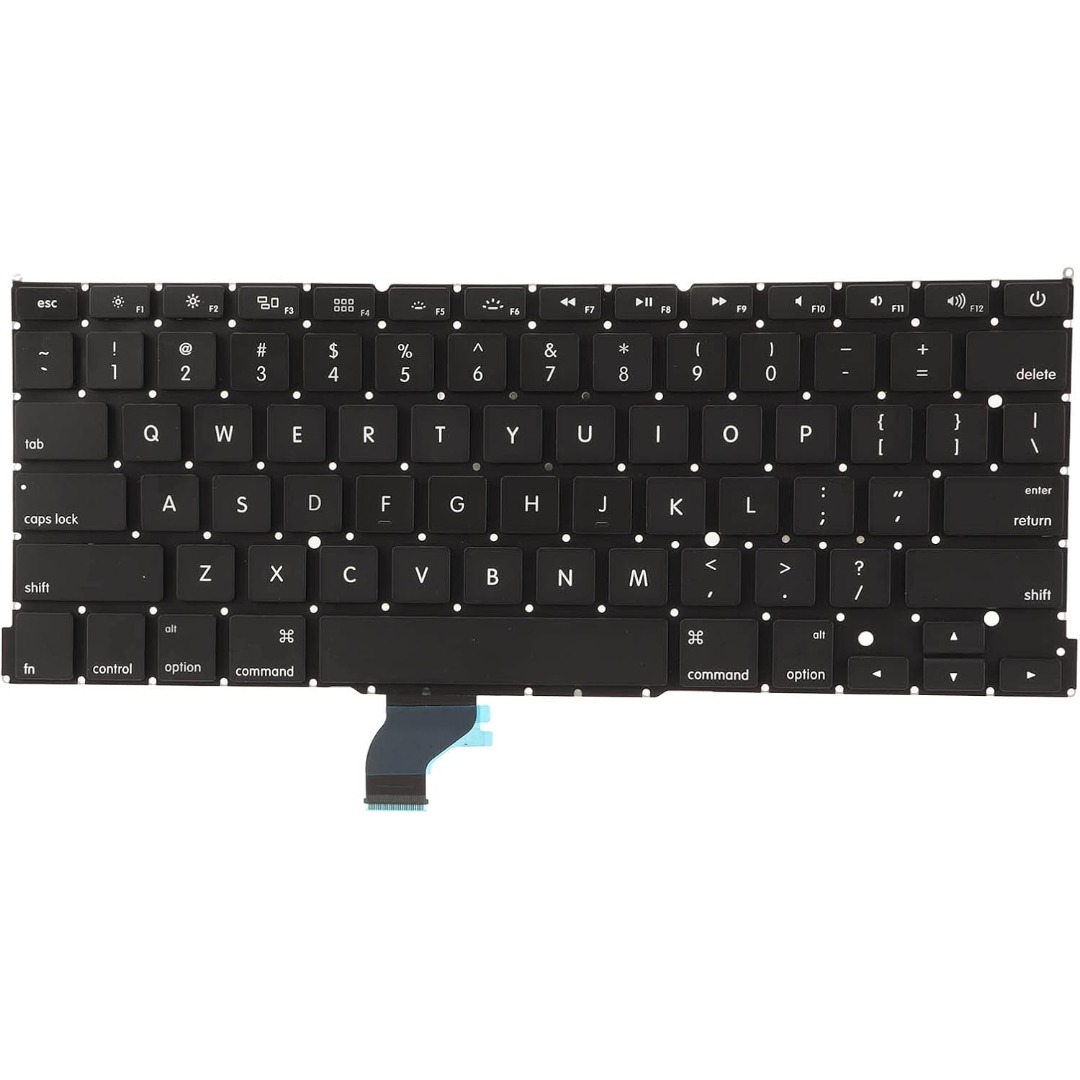

Digital Device Laptop Keyboard Compatible for MacBook AIR 13″ A1369 A1466 (MID 2011- MID 2017) US Layout 【Unique】Pls see detail compatible models in description below. 【Safe】Easy for you replace your faulty, cracked or broken keyboard ,seller remind that you should replace the keyboard in the off state. All pictures are taken from the real item, please check carefully before bidding, Replacement and high quality, Replace your faulty, cracked or broken keyboard. Each keyboard is tested before shipping Compatibility: MacBook Air 13″ A1369 Mid 2011: MC965LL/A (1.7 GHz Core i5) Mid 2011: MC966LL/A (1.7 GHz Core i5) Mid 2011: MD226LL/A (1.8 GHz Core i7) Compatibility: MacBook Air 13″ A1466 Mid 2012: MD231LL/A (1.8 GHz Core i5) Mid 2012: MD232LL/A (1.8 GHz Core i5) Mid 2012: MD232LL/A (2.0 GHz Core i7) Mid 2013: MD760LL/A (1.3 GHz Core i5) Mid 2013: MD761LL/A (1.3 GHz Core i5) Mid 2013: MD761LL/A (1.7 GHz Core i7) Early 2014: MD760LL/B (1.4 GHz Core i5) Early 2014: MD761LL/B (1.4 GHz Core i5) Early 2014: MD761LL/B (1.7 GHz Core i7) Compatibility: Early 2015: MJVE2LL/A (1.6 GHz Core i5 or 2.2 GHz Core i7) Early 2015: MJVG2LL/A (1.6 GHz Core i5 or 2.2 GHz Core i7) Identifying Numbers APN #: 661-6059, 661-6635, 661-7480

WiWU WI‑C052 Converter – Compact aluminum adapter enables OTG and fast PD-style charging (≈27 W) with USB‑C/Lightning on USB‑A ports.Supports high-speed 10 Gbps data transfer, is plug‑and‑play, and works across phones, tablets, and laptops. Functionality: OTG-capable USB-A to USB-C (A→C) Data Transfer: Supports USB 3.2 (up to 10 Gbps) and backward compatible with USB 3.0/2.0 Fast Charging: Supports PD profile fast charging (up to ~27W Apple PD equivalent) without triggering charge pop-ups Build: Durable aluminum-alloy shell with silicone lanyard design for portability and heat dissipation Compatibility: Works with smartphones, tablets, laptops—enabling USB-A peripherals, USB-C or Lightning cables Plug & Play: No drivers required; reversible connector design Portability: Lightweight, compact—easy to carry

Specifications Input/Output USB Sound Mode Live Sound Mode, Standard Mode Category Speakers Use HOME Bluetooth Version 5.0 Input Power (W) <25 W Active Noise-Cancellation PASSIVE Wi-Fi Music Apple Music Voice Control No Frequency Range 100Hz-20kHz Output Power 35W Display Screen No Waterproof No Support APP Yes Support Memory Card Yes Material Plastic Playback Function MP3 Remote Control No Support Apt-x No Intelligent Personal Assistant None Display Screen No Built-in Microphone No Audio Crossover Full-Range Number of Loudspeaker Enclosure 1 Power Source Battery PMPO 25W Channels 2 (2.0) Feature Play Video, Wireless Subwoofer, Wireless Rear Speakers Battery Yes Communication AUX, USB, Bluetooth Speaker Type Portable Cabinet Material Plastic Brand Name SwYiSm Origin Mainland China Certification CE Function 1 Wireless Bluetooth Function 2 Originality Function 3 Vintage Kerosene Lamp Function 4 Decorative Lamp

Experience fluid motion and edge-to-edge clarity with this ultra-smooth 100Hz Full HD display. Featuring a frameless IPS panel and a modern minimalist design, it’s the perfect upgrade for smooth office workflows and casual gaming. Model: Buerotika B24M1 Primary Specs: 23.8-inch (24″ class) Display/Performance: IPS (In-Plane Switching) for superior color accuracy Visual/Build Quality: 1920 x 1080 (Full HD) Resolution Aesthetic: Frameless “Zero-Bezel” design for immersive viewing and seamless multi-monitor setups Build: Ultra-slim profile with a sturdy, modern base Adjustability: Tilt-adjustable stand for ergonomic positioning Input/Output: HDMI and VGA ports for universal compatibility with PCs and laptops Compatibility: Plug-and-play support for Windows and macOS Smooth Motion: 100Hz Refresh Rate (provides significantly smoother scrolling and video compared to standard 60Hz) Eye Care: Low Blue Light technology and Flicker-Free backlight to reduce eye fatigue during long sessions Response Time: 14ms (typical) – optimized for stable, everyday professional use Home & Office: Enhancing productivity with smooth window transitions. Content Consumption: Watching movies and streaming with vibrant IPS colors. Multi-Monitor Arrays: The frameless edges make it ideal for side-by-side configurations. Casual Gaming: A budget-friendly entry into high-refresh-rate smoothness.

Samsung Lebanon 32″ Flat The Samsung Lebanon 32″ Flat Everything you need is right in your screen. Watch, work and chat – all without connecting a separate PC – with Smart Monitor. Your favorite content, productivity and video call apps are built-in. for a simpler and more stylish desk setup that’s a joy to use every time. Smart TV Experience Effortless entertainment. Enjoy Netflix, YouTube and other streaming services by simply connecting the monitor to WiFi. Samsung TV Plus also offers free live and on-demand content with no downloads or sign-up needed. while Universal Guide provides personalized content recommendations. Workspace Experience PC-less. Browse the web, edit documents and work on projects, all without the need for a separate PC. With new Workmode, you can also remotely access another PC, use Microsoft 365 programs . and even connect to Samsung mobile devices with Samsung DeX for seamless working. SlimFit camera Jump into any conversation. The SlimFit camera with tilt functionality allows you to create the perfect angle while using. your favorite video call apps like Google Duo, which can be accessed directly through the monitor. Plus, the camera cover and option to fully detach always protect your privacy. IoT Hub Turn your Smart Monitor into a control center for the home by connecting it to your IoT home products with SmartThings. Relax by turning off the lights, pulling down the blinds and setting the thermostat. to the perfect temperature all with the Smart Monitor for a perfectly relaxed evening. Mobile connectivity Convenient connectivity. With AirPlay integration, you can wirelessly connect Apple devices to the Smart Monitor and view on a bigger screen. Enjoy your favorite content from an iPhone, iPad, and Mac on the Smart Monitor and even mirror apps, documents, and websites. Adaptive Picture Sensational picture, day or night. Surrounding light is detected by a sensor to adjust brightness automatically with Adaptive Picture. Even in broad daylight, watch dark, gritty dramas without squinting and straining your eyes to see the picture. Specifications: Specifications Aspect Ratio16:9 Brightness (Typical)250 cd/㎡ Contrast Ratio Static3,000:1 (Typ.) Resolution1,920 x 1,080 Response Time4ms (GTG) Viewing Angle (H/V)178°/178° 3 year warranty Manufacturer Link

Genuine-spec touchpad flex cable for MacBook Air 13.6″ (Model A2681, 2022, M2)—essential for restoring full Force Touch functionality, haptic feedback, and multi-touch gesture support when replacing or repairing the trackpad assembly. Compatible With: MacBook Air 13.6-inch (2022, Model A2681) with Apple M2 chip (all colors: Silver, Space Gray, Starlight, Midnight). Part Type: Touchpad flex cable only—does not include the trackpad, Taptic Engine, or mounting hardware. This is the ribbon cable assembly that connects the trackpad to the logic board. Function: Transmits touch input, Force Touch pressure data, and haptic feedback signals between the trackpad and logic board—critical for macOS gesture recognition and Taptic Engine operation. OEM-Quality Construction: Matches Apple’s original flex circuit in length, connector type, shielding, and bend radius—ensures reliable signal integrity and long-term durability. Common Use Cases: Replacing a torn, frayed, or damaged original flex cable Completing a trackpad replacement when the original cable was compromised Repairing unresponsive or erratic trackpad behavior caused by cable failure Replacing a torn, frayed, or damaged original flex cable Completing a trackpad replacement when the original cable was compromised Repairing unresponsive or erratic trackpad behavior caused by cable failure Installation Note: Requires full bottom case disassembly and careful routing under the battery and logic board. Connectors use ZIF (Zero Insertion Force) sockets—do not force. Recommended for experienced or certified technicians only.

Razer DeathAdder Essential – Ergonomic wired gaming mouse with 6,400 DPI sensor and 5 programmable buttons.Trusted for its comfort, precision, and durable build—perfect for casual and competitive gaming. Model: Razer DeathAdder Essential (Black) Sensor Type: Optical DPI: Up to 6,400 DPI (adjustable) Buttons: 5 independently programmable Hyperesponse buttons Switches: Razer Mechanical Switches rated for up to 10 million clicks Tracking Speed: Up to 220 inches per second (IPS) Acceleration: 30G Design: Ergonomic right-handed design Grip Style: Palm grip (with textured side grips) Lighting: Single-color green backlight (Razer logo) Polling Rate: 1000 Hz Cable: Standard USB wired, 1.8 meters (rubber cable) Compatibility: Windows 7, 8, 10, 11 (Razer Synapse support) Weight: Approx. 96g (excluding cable) Software Support: Razer Synapse (for customization & macros)

The ViewSonic VA2405-H 24″ FHD 75Hz Monitor delivers clear and smooth visuals for daily work and home use. Its Full HD resolution shows sharp text and clean image details. The 24-inch screen offers a balanced size for comfort and productivity. This makes it ideal for office desks and study spaces. Moreover, the ViewSonic VA2405-H 24″ FHD 75Hz Monitor features a smooth 75 Hz refresh rate. This makes scrolling softer and screen motion more natural. Video playback looks cleaner with less blur. As a result, long viewing sessions feel more comfortable. In addition, the monitor uses an IPS panel for wide viewing angles. Colors stay accurate even when viewed from the side. This helps during meetings, teamwork, and shared viewing. The image remains bright and clear from many angles. Furthermore, the ViewSonic VA2405-H 24″ FHD 75Hz Monitor includes eye comfort features for daily protection. The low blue light mode helps reduce eye strain. The flicker-free design supports longer use without discomfort. These features improve viewing comfort throughout the day. Also, the monitor supports modern connection options for easy setup. It includes HDMI and VGA for wide device compatibility. You can connect laptops, desktops, and media devices with ease. Switching between sources becomes fast and simple. In addition, the slim bezel design gives a clean and modern look. It fits well in both home and office spaces. The stand supports tilt adjustment for basic viewing comfort. Wall mounting is also supported for flexible desk setups. Moreover, the display works well for documents, web browsing, and video watching. Text appears clear and easy to read. Daily tasks feel more organized and productive. The monitor blends smoothly into any workspace style. Overall, the ViewSonic VA2405-H 24″ FHD 75Hz Monitor delivers reliable performance, clean visuals, and daily comfort. It supports work, study, and entertainment with ease. This monitor is a smart choice for users who want smooth and simple screen performance. Specifications: Display : 24″ VA Resolution : FHD 1920 x 1080 Refresh Rate : 75Hz Response Time : 4ms

The ViewSonic VG2455 24″ FHD 100Hz Monitor delivers clear visuals for office work and daily use. Its Full HD resolution shows sharp text and smooth image detail. The 24-inch screen offers a balanced size for most desks. This makes it ideal for home and professional setups. Moreover, the ViewSonic VG2455 24″ FHD 100Hz Monitor features a smooth 100 Hz refresh rate. This makes scrolling smoother and video playback more fluid. Motion looks cleaner during fast content. In addition, the monitor uses an IPS panel for wide viewing angles. Colors stay accurate even when viewed from the sides. This helps during team work and shared screen tasks. The image remains stable and clear. Furthermore, the ViewSonic VG2455 24″ FHD 100Hz Monitor includes built-in eye care features. Low blue light mode helps reduce eye strain. The flicker-free design supports long viewing without discomfort. This helps protect your eyes every day. Also, the monitor offers flexible connection options. It supports HDMI, DisplayPort, and USB-C in one display. In addition, the stand supports height, tilt, swivel, and pivot adjustment. You can set the screen for full comfort. Vertical mode helps with coding and reading. This improves posture and daily comfort. Moreover, the slim bezel design gives a clean and modern look. It fits well into any professional workspace. The simple design keeps your desk neat and organized. The monitor blends easily with other screens. Overall, the ViewSonic VG2455 24″ FHD 100Hz Monitor delivers comfort, clarity, and smooth daily performance. It improves workflow and reduces eye strain. This monitor is perfect for office users, students, and home professionals needing a reliable display. Specifications: Display : 24″ IPS Resolution : FHD 1920 x 1080 Refresh Rate : 100Hz Response Time : 5ms

BenQ Board Essential RE7504N 75” 4K UHD Interactive Flat Panel is a large interactive display designed for education and business collaboration. It supports touch input, built-in Android system, and 4K resolution for presentations and group work. It features a 75-inch IPS panel with 3840 × 2160 4K UHD resolution. Therefore, it delivers sharp visuals and wide viewing angles. In addition, it supports up to 40-point multi-touch for group interaction. Moreover, it runs Android (EDLA-supported system depending on region). As a result, users can run apps, whiteboard tools, and content directly on the display without a PC. The screen includes anti-glare coating. Therefore, it stays readable in bright rooms. In addition, it supports 4K 60Hz output for smooth visuals. Furthermore, it includes HDMI, USB, LAN, and OPS slot connectivity. As a result, it works with laptops, external PCs, and modular systems. It also includes built-in speakers for basic audio output. Therefore, it supports lessons and meetings without external speakers. Finally, the BenQ RE7504N provides a large interactive 4K workspace for classrooms and business collaboration. Specifications: Display: 75-inch IPS panel with 3840×2160 4K UHD resolution Touch: Up to 40-point multi-touch support System: Android-based interactive platform (EDLA support depending on region) Connectivity: HDMI, USB, LAN, and OPS slot support Display: Anti-glare screen with 4K 60Hz output for smooth visuals

HP 5 Pro 524pf Monitor Overview The HP 5 Pro 524pf is a 24-inch Full HD monitor designed for daily productivity. It delivers clear visuals and a clean modern design. As a result, it fits offices, students, and home workspaces. 24-Inch Full HD Display This monitor features a 24-inch Full HD resolution. Therefore, text appears sharp and easy to read. Moreover, images look clear and balanced. Because of this, it supports long working sessions without fatigue. In addition, wide viewing angles improve visibility. As a result, content stays clear from different positions. Smooth Performance for Daily Tasks The HP 5 Pro 524pf provides smooth visuals for everyday use. As a result, scrolling and browsing feel natural. Furthermore, the display maintains consistent brightness. This improves overall viewing comfort. Eye Comfort and Anti-Glare Screen This monitor includes eye comfort features. Therefore, it helps reduce eye strain during extended use. In addition, the anti-glare coating limits reflections. As a result, the screen stays clear in bright environments. Connectivity and Easy Setup The HP 5 Pro 524pf includes HDMI connectivity. As a result, it connects easily to laptops and desktops. Moreover, setup is quick and simple. Therefore, users can start working immediately. Sleek Design and Mounting Options The monitor features a slim and modern design. In addition, it supports VESA mounting. As a result, users can customize their workspace layout. Ideal for Work and Home Use This monitor focuses on clarity and reliability. Moreover, it suits office work, studying, and media viewing. In conclusion, the HP 5 Pro 524pf is a practical Full HD monitor for everyday use. Specifications: Display: 23.8-inch diagonal, IPS panel, 16:9 aspect ratio, 93 PPI, anti-glare. Performance: 100Hz refresh rate (50-100Hz range), 5ms GtG response time, 350 nits brightness. Connectivity: HDMI 1.4, DisplayPort 1.2, and a USB hub.

The MSI Pro MP272 E14C is a 27‑inch FHD monitor built for business and productivity. It delivers clear Full HD visuals with a fast 144 Hz refresh rate. Furthermore, its IPS panel provides wide viewing angles and accurate colors, making work and multimedia more enjoyable. It supports a 1 ms (MPRT) response time, which reduces motion blur in videos and fast‑moving content. In addition, Adaptive‑Sync technology helps smooth gameplay and reduce screen tearing. The monitor also includes HDR Ready support for improved contrast and detail. Moreover, the design features a four‑side slim bezel for a clean look and immersive viewing experience. It offers anti‑glare treatment and built‑in speakers for convenient multimedia use. As a result, the MSI Pro MP272 E14C enhances productivity and comfort whether you work, create, or play. . Specifications: 27‑inch FHD (1920 × 1080) IPS panel with wide viewing angles 144 Hz refresh rate with 1 ms (MPRT) response time Adaptive‑Sync support and HDR Ready for smooth visuals HDMI 2.0 and USB‑C (DP Alt Mode with 15 W PD) connectivity Built‑in speakers, anti‑glare surface, and slim bezel design

Logic Board 2.2GHz i7 Integrated Graphics, 16GB Replacement for Apple MacBook Pro 15" Retina A1398 (Mid 2015) Logic Board 2.2GHz i7 Integrated Graphics, 16GB Replacement for Apple MacBook Pro 15″ Retina A1398 (Mid 2015)

Genuine-spec touchpad flex cable for MacBook Pro 14″ (Model A2442, 2021, M1 Pro/Max)—essential for restoring full Force Touch functionality, haptic feedback, and precise multi-touch gesture control. Compatible With: MacBook Pro 14-inch (2021, Model A2442) with Apple M1 Pro or M1 Max chip (Model Identifiers: MacBookPro18,3 / MacBookPro18,4). Part Type: Touchpad flex cable only—does not include the trackpad, Taptic Engine, or mounting brackets. This is the OEM-style ribbon cable that connects the trackpad to the logic board. Function: Carries touch input, Force Touch pressure data, and haptic feedback signals—critical for macOS trackpad gestures, Force Click, and Taptic Engine responsiveness. OEM-Quality Build: Matches Apple’s original flex circuit in length, connector pitch, shielding, and bend geometry—ensures reliable signal transmission and durability under repeated use. Common Use Cases: Replacing a damaged, torn, or corroded original flex cable Completing a trackpad replacement when the original cable is unusable Fixing intermittent trackpad issues, unresponsiveness, or loss of Force Touch Replacing a damaged, torn, or corroded original flex cable Completing a trackpad replacement when the original cable is unusable Fixing intermittent trackpad issues, unresponsiveness, or loss of Force Touch Installation Note: Requires full bottom case removal and careful routing beneath internal components. Connectors use ZIF (Zero Insertion Force) sockets—must be seated properly without force. Recommended for certified or highly experienced technicians only.

Genuine-spec touchpad flex cable for MacBook Pro 13″ (Model A2289, 2020, Intel)—restores full Force Touch functionality, haptic feedback, and preci multi-touch gesture control. OEM-quality replacement for damaged or faulty original cables. Compatible With: MacBook Pro 13-inch (2020, Four Thunderbolt Ports, Model A2289, Model Identifier MacBookPro16,2) with Intel Core i5/i7 processors. Part Type: Touchpad flex cable only — does not include the trackpad housing, Taptic Engine, or mounting hardware. This is the OEM-style ribbon cable that connects the trackpad to the logic board. Function: Transmits: Touch input coordinates Force Touch pressure data Haptic feedback signals to the Taptic Engine Enables full macOS gesture support: Force Click, three-finger lookup, swipe navigation, pinch-to-zoom, and smooth cursor tracking. Touch input coordinates Force Touch pressure data Haptic feedback signals to the Taptic Engine Enables full macOS gesture support: Force Click, three-finger lookup, swipe navigation, pinch-to-zoom, and smooth cursor tracking. OEM-Quality Build: Matches Apple’s original specifications in: Cable length and routing path Connector pitch and ZIF latch design EMI shielding and flex durability Cable length and routing path Connector pitch and ZIF latch design EMI shielding and flex durability Common Use Cases: Replacing a torn, creased, or liquid-damaged original flex cable Completing a trackpad replacement when the original cable is unusable Fixing: Intermittent or erratic trackpad behavior Loss of Force Touch or haptic feedback Complete trackpad unresponsiveness Replacing a torn, creased, or liquid-damaged original flex cable Completing a trackpad replacement when the original cable is unusable Fixing: Intermittent or erratic trackpad behavior Loss of Force Touch or haptic feedback Complete trackpad unresponsiveness Intermittent or erratic trackpad behavior Loss of Force Touch or haptic feedback Complete trackpad unresponsiveness Installation Note: Requires full bottom case removal and battery disconnection. Cable routes under internal components (speaker, logic board)—must follow original path. Connects via ZIF (Zero Insertion Force) socket—align carefully, never force. Recommended for experienced or certified technicians only. Requires full bottom case removal and battery disconnection. Cable routes under internal components (speaker, logic board)—must follow original path. Connects via ZIF (Zero Insertion Force) socket—align carefully, never force. Recommended for experienced or certified technicians only. Important Compatibility Notes: ✅ Only for A2289 (13″, 4 Thunderbolt ports, 2020, Intel) ❌ Not compatible with: A2251 (2 Thunderbolt ports, 2020) A2338 (M1 MacBook Pro, 2020) Any MacBook Air or 14″/16″ MacBook Pro ✅ Only for A2289 (13″, 4 Thunderbolt ports, 2020, Intel) ❌ Not compatible with: A2251 (2 Thunderbolt ports, 2020) A2338 (M1 MacBook Pro, 2020) Any MacBook Air or 14″/16″ MacBook Pro A2251 (2 Thunderbolt ports, 2020) A2338 (M1 MacBook Pro, 2020) Any MacBook Air or 14″/16″ MacBook Pro

AOC Screen 23.8″ VA Panel Model name 24B2XHM Panel 23.8″ (VA) Pixel Pitch (mm) 0.2745 (H) × 0.2745 (V) Effective Viewing Area (mm) 527.04 (H) × 296.46 (V) Brightness (typical) 250 cd/m² Contrast Ratio 3000 : 1 (Typical) 20 Million : 1 (DCR) Response Time 6ms (GtG (BW)) Viewing Angle 178° (H) / 178° (V) (CR > 10) Color Gamut NTSC 80% (CIE1976) / sRGB 101% (CIE1931) Color Accuracy – Optimum Resolution 1920 × 1080 @ 75Hz – HDMI 1920 × 1080 @ 60Hz – VGA Display Colors 16.7 Million Signal Input VGA × 1, HDMI 1.4 × 1 HDCP Version – USB Hub no Power Supply 19V DC, 1.31A Power Consumption (typical) 21W Speakers no Line in & Earphone – Wall-Mount 100mm × 100mm Adjustable Stand Tilt: -5° ~ 20° Product without Stand (mm) 320.94 (H) × 539.47 (W) × 37.6 (D) Product with Stand (mm) 418.35 (H) × 539.47 (W) × 170.94 (D) Product without Stand (kg) 2.41 Product with Stand (kg) 2.73 Cabinet Color Black Regulatory Approvals CE / FCC Specifications: AOC Screen 23.8″ VA Model name 24B2XHM Panel 23.8″ (VA) Pixel Pitch (mm) 0.2745 (H) × 0.2745 (V) Effective Viewing Area (mm) 527.04 (H) × 296.46 (V) 1 Year Warranty Manufacturer Link

WiWU Skin Zero Sleeve – Ultra-thin Lycra laptop case with faux-fur lining and scratch-resistant protection, available in multiple sizes.Sleek, featherlight, and travel-ready for everyday carry without the bulk. Model: WiWU Skin Zero Sleeve Sizes: Available for 13″, 14″, and 16″ laptops Material: Eco-friendly water-resistant Lycra exterior Interior: Faux-fur lining to protect against scratches and minor bumps Design: Ultra-slim profile that fits easily into backpacks or briefcases Weight: Approximately 280–330 g, depending on size Colors: Black, Gray, Purple, Burgundy Closure: Secure magnetic or zipper closure (varies by version) Features: Lightweight, minimal branding, soft internal cushioning, stylish and durable build

The Lenovo Legion R45w-30 44.5″ Dual QHD Gaming Monitor gives you a massive, ultra-wide screen for gaming, work, and media. Its 44.5-inch curved panel wraps around your view for full immersion. The Dual QHD resolution (5120 × 1440) delivers sharp, detailed images and wide viewing space. This helps games and content feel vivid and real. Moreover, the Lenovo Legion R45w-30 44.5″ Dual QHD Gaming Monitor uses a fast 165 Hz refresh rate — and can overclock up to 170 Hz for ultra-smoother motion. Fast movements and animations appear smooth and fluid. In addition, the monitor features a VA panel with strong contrast (3000:1), deep colors, and wide viewing angles. Colors stay rich and natural even from side angles. It supports 99% sRGB and wide-gamut coverage, ideal for gaming, creative work, and media editing. The 1500R curve and anti-glare surface improve comfort and immersion. Furthermore, the Lenovo Legion R45w-30 44.5″ Dual QHD Gaming Monitor includes modern connectivity. It offers HDMI 2.1, DisplayPort 1.4, USB-C (with power delivery and data), USB hub ports, and even Ethernet. Also, the monitor adds useful features like built-in speakers, adaptive sync (AMD FreeSync Premium Pro), HDR support (DisplayHDR 400), and ergonomic stand adjustments. The stand allows height, tilt, and swivel changes for comfortable setup. Its curved, wide display boosts productivity, creativity, and gaming immersion. Overall, the Lenovo Legion R45w-30 44.5″ Dual QHD Gaming Monitor blends size, speed, clarity, and flexibility into one powerful screen. It transforms your PC into a wide, immersive workstation or gaming setup. This monitor is perfect for gamers, creators, and multitaskers who want maximum space and smooth performance. Specifications: Display : 44.5″ VA Resolution : 5120×1440 Refresh Rate : 165Hz Response Time : 1ms Curvature : 1500R

WiWU Ora Laptop Sleeve Size: 14" and 16" Color: Black/Grey/Ivory Extra Storage Space - Two pockets in front, enough space to keep mouse, cable, cellphone, memory cards, external hard drive, pens, etc. Ultra-slim & Lightweight - Slim, portable, and lightweight to take alone, or slide into your briefcase, backpack, or any other bag, perfect for business, school, or travel. Shockproof - Multiple Layers Protection, polyester foam padding layer, and nylon fabric lining for bump and shock absorption, protect your computer from accidental scratches. Excellent Detail: Use an Exquisite zipper and reinforced stitching on all stress points, ensuring the bag does not fall apart when carrying heavy goods. The first verticle-designed laptop bag, you will feel the beauty of simple and good texture. WiWU Ora Laptop Sleeve Size: 14″ and 16″ Color: Black/Grey/Ivory Extra Storage Space – Two pockets in front, enough space to keep mouse, cable, cellphone, memory cards, external hard drive, pens, etc. Ultra-slim & Lightweight – Slim, portable, and lightweight to take alone, or slide into your briefcase, backpack, or any other bag, perfect for business, school, or travel. Shockproof – Multiple Layers Protection, polyester foam padding layer, and nylon fabric lining for bump and shock absorption, protect your computer from accidental scratches. Excellent Detail: Use an Exquisite zipper and reinforced stitching on all stress points, ensuring the bag does not fall apart when carrying heavy goods. The first verticle-designed laptop bag, you will feel the beauty of simple and good texture.

PCE M8-700 UPS (line-interactive) — 700 VA / 360 W backup unit for 220–240 V input. Protects PCs, routers, small electronics from outages and voltage swings. The PCE M8-700 is a line-interactive UPS designed for home or small office use. It provides backup power, voltage regulation (AVR), surge protection, and supports automatic switching during outages. Ideal for desktop PCs, network gear, monitors, or point-of-sale systems. Features & Capabilities Line-interactive topology: regulates input voltage without switching to battery when voltage fluctuates mildly. Automatic Voltage Regulation (AVR) to correct undervolt/overvolt conditions. Simulated (stepped) sine wave output in battery mode. Surge, overload, short circuit, discharge protections built in. Cold start capability (ability to power on from battery with no mains) LED + audible alarms for status (battery mode, overload, fault) USB / RS232 interface in some variants for power management (shutdown, monitoring) Technical Specifications What “Input 220–240 VAC, 50/60 Hz, 3.7 A” Means (and Caveats) If the specification you’re giving is “3.7 A” at input, that corresponds to a maximum input current draw when the UPS is handling a heavy load or during charging cycles. At 230 V × 3.7 A ≈ 850 W of input capacity. The unit’s 360 W output means there’s overhead for losses, inverter inefficiency, battery charging, etc. The UPS must operate within the stated voltage and frequency ranges — if input is too low or too high, it may switch to battery or go into protection mode.
