
The 60W MagSafe 2 Power Adapter features a magnetic DC connector so if someone should trip over it, the cord disconnects harmlessly and your MacBook Pro stays put safely. It also helps prevent fraying or weakening of the cables over time. In addition, the magnetic DC helps guide the plug into the system for a quick and secure connection. The 60W MagSafe 2 Power Adapter features a magnetic DC connector so if someone should trip over it, the cord disconnects harmlessly and your MacBook Pro stays put safely. It also helps prevent fraying or weakening of the cables over time. In addition, the magnetic DC helps guide the plug into the system for a quick and secure connection. When the connection is secure, an LED located at the head of the DC connector lights up; an amber light lets you know that your notebook is charging, while a green light tells you that you have a full charge. An AC cord is provided with the adapter for maximum cord length, while the AC wall adapter (also provided) gives you an even easier and more compact way to travel. Designed to be the perfect traveling companion, the adapter has a clever design which allows the DC cable to be wound neatly around itself for easy cable storage. Compatible with MacBook Pro with 13-inch Retina display. See this article for more details about choosing the right one. Knowing which specific Mac model you have is important. If you are running OS X Lion (10.7) or later go to the “” menu at the top left of your screen, choose “About this Mac” then click the “More Info…” button. Your Mac model and generation will be displayed. If you are running an earlier version of OS X, you can enter your serial number here to find out which model you have. COMPATIBILITY Mac Models: MacBook Pro (Retina, 13-inch, Late 2012 – 2015)

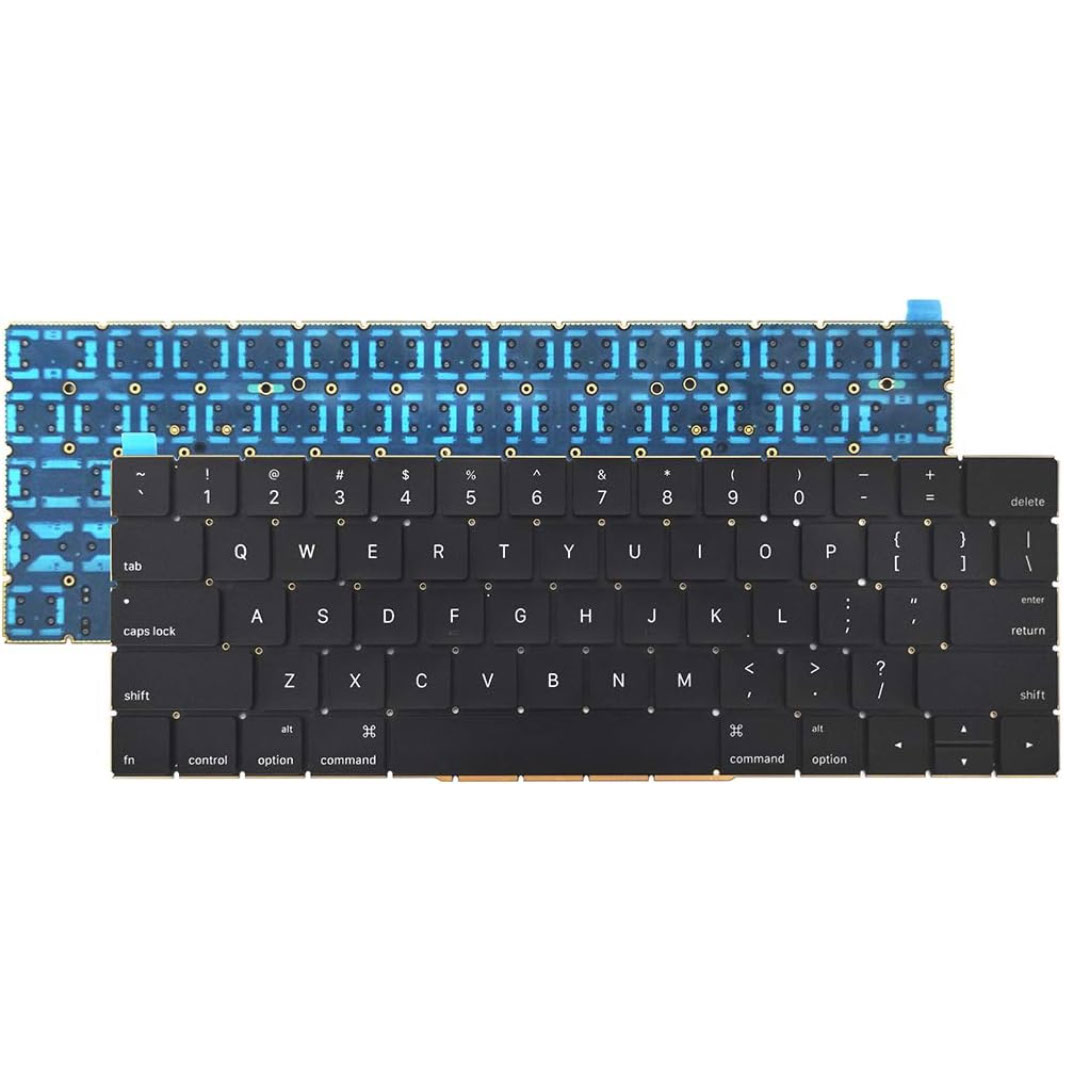
Genuine-spec keyboard replacement for MacBook Pro 13″ (Model A2251, 2020) — choose US QWERTY or UK QWERTY (with £ symbol). Features Apple’s reliable Magic Keyboard with scissor-switch mechanism, backlighting, and precise OEM fit. Compatible With: MacBook Pro 13-inch (2020, Two Thunderbolt Ports, Model A2251, Model Identifier MacBookPro16,1) with Intel Core i5/i7 processors. Layout Options (select at purchase): US Layout: Standard QWERTY with wide Enter key, @ above 2, # above 3, and full function row. UK Layout: QWERTY with £ symbol, tall vertical Enter key, @ accessed via right Alt, and UK-specific punctuation. US Layout: Standard QWERTY with wide Enter key, @ above 2, # above 3, and full function row. UK Layout: QWERTY with £ symbol, tall vertical Enter key, @ accessed via right Alt, and UK-specific punctuation. Keyboard Type: Apple’s Magic Keyboard with scissor-switch mechanism—offering improved durability, quieter typing, and 1mm key travel compared to Butterfly keyboards. Integrated Features: Full backlit keys for low-light environments Ambient light sensor support OEM-style flex cable pre-attached for direct connection to the logic board Full backlit keys for low-light environments Ambient light sensor support OEM-style flex cable pre-attached for direct connection to the logic board Precision Build: Engineered to match Apple’s exact dimensions, key spacing, and top-case curvature—ensures seamless visual and functional integration. Installation Note: The keyboard is factory-glued into the top case. Replacement requires full disassembly, careful adhesive removal, and professional re-adhesion. Recommended for experienced or certified repair technicians only.

Used OEM Original Apple Logic Board Working, 2018 Model 2.7Ghz I7 251gb 16gb (A1989) + Original Touch ID, Tested using latest industry hardware diagnostic software, Fresh pull from fully Working nearly new unit. SPECIFICATION:

POUT E3 Angle - Adjustable Angled Ergonomic Laptop Stand Riser - Notebook Computer Holder Compatible w/MacBook Air Pro Dell HP & More 11"-17" Laptops - Foldable & Portable w/ 5 Angles (Silver) POUT E3 Angle – Adjustable Angled Ergonomic Laptop Stand Riser – Notebook Computer Holder Compatible w/MacBook Air Pro Dell HP & More 11″-17″ Laptops – Foldable & Portable w/ 5 Angles (Silver)

Genuine-spec touchpad flex cable for MacBook Pro 15″ (Model A1990, 2018–2019, Intel)—essential for restoring full Force Touch functionality, haptic feedback, and precise multi-touch gesture control during trackpad repair or replacement. Compatible With: MacBook Pro 15-inch (2018 & 2019, Model A1990, Model Identifiers MacBookPro15,2) with Intel Core i7/i9 processors. Part Type: Touchpad flex cable only — does not include the trackpad housing, Taptic Engine, or mounting hardware. This is the OEM-style ribbon cable that connects the trackpad to the logic board. Function: Transmits: Touch input coordinates Force Touch pressure data Haptic feedback signals to the Taptic Engine Enables full macOS gesture support: Force Click, three-finger lookup, swipe navigation, pinch-to-zoom, and smooth cursor tracking. Touch input coordinates Force Touch pressure data Haptic feedback signals to the Taptic Engine Enables full macOS gesture support: Force Click, three-finger lookup, swipe navigation, pinch-to-zoom, and smooth cursor tracking. OEM-Quality Build: Matches Apple’s original specifications in: Cable length and routing path Connector pitch and ZIF latch design EMI shielding and flex durability Cable length and routing path Connector pitch and ZIF latch design EMI shielding and flex durability Common Use Cases: Replacing a torn, creased, or liquid-damaged original flex cable Completing a trackpad replacement when the original cable is unusable Fixing intermittent trackpad behavior, loss of Force Touch, or complete unresponsiveness Replacing a torn, creased, or liquid-damaged original flex cable Completing a trackpad replacement when the original cable is unusable Fixing intermittent trackpad behavior, loss of Force Touch, or complete unresponsiveness Installation Note: Requires full bottom case removal and battery disconnection. Cable routes under internal components near the right speaker and logic board. Connects via a ZIF (Zero Insertion Force) socket—must be aligned carefully and latched gently. Recommended for experienced or certified technicians only. Requires full bottom case removal and battery disconnection. Cable routes under internal components near the right speaker and logic board. Connects via a ZIF (Zero Insertion Force) socket—must be aligned carefully and latched gently. Recommended for experienced or certified technicians only.

Experience elite performance with the Lenovo ThinkPad E14 Gen 3, powered by the AMD Ryzen 7 5700U 8-core processor. Featuring 16GB RAM, a lightning-fast 512GB NVMe SSD, and a professional 14-inch FHD display, this laptop is engineered for high-level productivity and military-grade durability.

A versatile pre-owned Lenovo ThinkPad L13 Yoga Gen 1 with 13.3" touchscreen, 360° hinge, 10th Gen Core i7, 16GB RAM, and 512GB SSD—perfect for professionals who need flexibility, performance, and portability.

WIWU S400 Aluminum Laptop Stand Portable, Adjustable and Foldable - Silver WIWU S400 Aluminum Laptop Stand Portable, Adjustable and Foldable – Silver

A high-performance pre-owned MacBook Pro 15" (2015) with a stunning Retina display, upgraded 16GB RAM, 128GB SSD, and powerful 2GB dedicated graphics—ideal for developers, creatives, and power users seeking reliable Apple performance.

New A1932 A2179 A2337 DC in Power Jack Connector for Macbook Air 13" Type-C USB-C Power 821-01658-A 2018 2019 2020 Year New A1932 A2179 A2337 DC in Power Jack Connector for Macbook Air 13″ Type-C USB-C Power 821-01658-A 2018 2019 2020 Year About this item New A1932 A2179 A2337 DC Jack Power DC-in Board for MacBook Retina 13″ DC Power Jack Board We have good after-sales services. We share the latest information on laptop spare parts in the Chinese market with all our customers. This is NOT an easy job for someone with no technical skills in Disassembling or Assembling a laptop, So only purchase this item if you know how to install it. Each DC Board is tested before shipping and working.

90W Adapter Laptop Charger for Toshiba Satellite L305 L305D L455 L505 L505D L635 L645 L655 L655D L745 L755 L775 L855 L875 A105 A135 C655 C675 C850 C855; PA3714U-1ACA PA5035U-1ACA Power Cord

128GB SSD Apple Macbook Pro Air 2013 2014 2015 A1502 A1398 A1466 A1465 | Samsung MZ-JPU512T/A06 | 655-1805D ORIGINAL APPLE PART (Apple sources their SSD’s for MacBooks from Samsung) A1502 – A1398 – A1465 – A1466 100% TESTED WORKING Please check compatibility below before you make your purchase: COMPATIBILITY: MacBook Pro Retina Late 2013 – Mid-2015 MacBookPro11,1 (A1502) – ME864LL/A, ME866LL/A, ME867LL/A, MGX72LL/A, MGX92LL/A, & MGXD2LL/A MacBookPro11,2 (A1398) – ME293LL/A & MGXA2LL/A MacBookPro11,3 (A1398) – ME294LL/A, ME874LL/A, MGXC2LL/A, & MGXG2LL/A MacBookPro11,4 (A1398) – MJLQ2LL/A MacBookPro11,5 (A1398) – MJLT2LL/A & MJLU2LL/A MacBookPro12,1 (A1502) – MF839LL/A, MF841LL/A, & MF843LL/A MacBook Air Mid-2013 – Late 2015 MacBookAir6,1 (A1465) – MD711LL/A, MD760LL/A, MD711LL/B, & MF067LL/A MacBookAir6,2 (A1466) – MD760LL/A, MD760LL/B, & MF068LL/A MacBookAir7,1 (A1465) – MJMVM2LL/A MacBookAir7,2 (A1466) – MJVE2LL/A Model Identifier: Samsung Manufacturer Part# MZ-JPU512T/A06

TT03XL Laptop Battery Compatible with Hp EliteBook 850 G5 850 G6 ZBook 15U G5 15U G6 Series Notebook 932824-2C1 933322-855 932824-421 HSTNN-LB8H HSTNN-DB8K 11.55V 56Wh 4610mAh About this item 【Battery type】Li-ion. Voltage: 11.55V. Capacity: 56Wh 4610mAh. 【Replacement For Laptop】Hp EliteBook 850 G5 G6, ZBook 15U G5 G6 Series . 【Compatible Part Number】TT03XL 932824-2C1 933322-855 932824-421 HSTNN-LB8H HSTNN-DB8K TTO3XL. 【Connector】Before placing your order, Please refer to the picture and check it. Because the products produced by different factories will have differences in size, cable length, interface, etc. 【Use Skills】If the new battery is not recognized during the initial installation, please reinstall and check if the interface is fully connected. Discharge the new battery to 5% (not 0%), then charge and cycle 3-4 times to wake up the new battery.

Led Desk Lamp REMAX RT-E815 ReSee Series Smart Eye-Caring 1500mAh RT-E815 With Container · Eye-caring lightning · Large-area lighting · 1500mAh · Delayed light-off · Soft lighting · Stepless dimming · Pen/phone holder · With rechargeable battery · Plug and use · A soft hose of 360-degree adjustment.

The Apple Magic Mouse (USB-C version) is a sleek, minimalist multi-touch wireless mouse built for Mac users. It offers smooth gesture support, Bluetooth connectivity and a built-in rechargeable battery — a great choice if you prefer a clean desk setup and full compatibility with macOS and iPadOS. General Name: Magic Mouse (USB-C) — part of Apple’s pointing-device lineup. Wireless connectivity: Bluetooth. Rechargeable battery: built-in, no disposable AA cells. Charging / port: USB-C port (bottom of mouse) for pairing and charging. Compatibility: Requires a Mac with macOS 15.1 or later, or an iPad with iPadOS 18.1 or later. Size & Weight Height: ~0.85 inch (2.16 cm) Width: ~2.25 inch (5.71 cm) Depth: ~4.47 inch (11.35 cm) Weight: ~0.22 pound (0.099 kg) (varies slightly by manufacturing) Features Multi-Touch surface: supports gestures such as swiping between pages, scrolling through documents, zooming. Glide / foot design: optimized for smooth movement across desktop surfaces. Rechargeable battery life: about a month or more between charges (typical use) per Apple spec. Used Condition ConsiderationsSince you’re specifying a used unit: Check for wear on the bottom feet / skates — these degrade and affect glide. Verify battery capacity / health (rechargeable batteries age). Confirm the port is functioning (USB-C) and Bluetooth connectivity is stable. Look for signs of excessive surface scratches on the multi-touch top — may impair gestures. Ensure the firmware / Mac recognizes it fully (gestures working). Upgradability / Limitations Not user-upgradable: You cannot replace the internal battery or change internals easily. Design limitation: The USB-C port remains on the bottom of the mouse, meaning you cannot use it while charging unless you flip it. This design is still criticized. Ergonomics: The flat, low-profile design is stylish but may not suit extended-use comfort for some users.

OEM-quality left and right loudspeaker replacement pair for MacBook Pro 14″ (Model A2442, 2021, M1 Pro/Max)—restores Apple’s high-fidelity six-speaker audio system with precise sound staging, rich bass, and clear highs. Compatible With: MacBook Pro 14-inch (2021, Model A2442) with Apple M1 Pro or M1 Max chip (Model Identifier: MacBookPro18,3 or MacBookPro18,4). Includes: Complete left and right speaker assemblies, each containing: Dual-driver units (force-cancelling woofers + tweeters) Pre-attached flex cables with OEM connectors Mounting brackets and acoustic seals Dual-driver units (force-cancelling woofers + tweeters) Pre-attached flex cables with OEM connectors Mounting brackets and acoustic seals Audio Performance: Matches Apple’s advanced six-speaker sound system with: Wide stereo separation High dynamic range Spatial audio and Dolby Atmos support (when paired with original logic board and firmware) Wide stereo separation High dynamic range Spatial audio and Dolby Atmos support (when paired with original logic board and firmware) OEM Build Quality: Precision-engineered housings with exact acoustic chambers, grille alignment, and cable routing—ensures zero rattling and full macOS audio calibration compatibility. Common Use Cases: Replaces speakers damaged by liquid ingress, physical impact, or internal failure (e.g., no sound, distorted audio, or imbalance between channels). Installation Note: Requires full bottom case and logic board disassembly. Speakers are secured with screws and acoustic adhesive. Highly recommended for certified Apple technicians or experienced professionals only due to complex internal layout and sensitivity of audio components. Important: This speaker pair is exclusive to A2442 (14″, 2021, M1 Pro/Max). Not compatible with 16″ MacBook Pro (A2485), 13″ models, or Intel-based MacBooks. This speaker pair is exclusive to A2442 (14″, 2021, M1 Pro/Max). Not compatible with 16″ MacBook Pro (A2485), 13″ models, or Intel-based MacBooks. Model Verification: Confirm your device via > About This Mac > Model Identifier (must be MacBookPro18,3 or MacBookPro18,4).

Xprinter XP-80T 80mm Thermal Receipt Printer Press to download driver: XPrinter Driver Setup V7.77 Press to download driver: XPrinter Driver Setup V7.77

A robust Beurotika cash drawer featuring a 450mm metal body, secure 3-position lock, and compatibility with most POS systems—ideal for retail, restaurants, and small businesses. Secure 3-position key lock: Open, locked, and release-to-print modes for controlled access 6 coin slots + 4 bill compartments: Organized layout for efficient cash handling Heavy-duty steel construction: Reinforced frame and smooth slide rails for daily reliability Standard RJ12 interface: Compatible with most POS systems (e.g., Epson, HP, Bixolon, and Beurotika receipt printers) Auto-open trigger: Automatically opens when connected to a compatible receipt printer during transactions Bottom cable entry: Keeps wiring neat and protected

Apple MacBook Pro 13” (2015) — reliable performance and classic MacBook design.• Intel Core i5 • 8 GB RAM • 128 GB SSD • Retina DisplaymacOS | Backlit Keyboard

OEM-quality trackpad replacement (without flex cable) for MacBook Pro 14″ (Model A2442, 2021, M1 Pro/Max) in Silver finish—designed for precise Force Touch performance, seamless gesture control, and perfect visual integration with the original chassis. Compatible With: MacBook Pro 14-inch (2021, Model A2442) with Apple M1 Pro or M1 Max chip. Part Type: Trackpad only—does not include the flex cable, Taptic Engine, or mounting hardware. Intended for professional technicians who will reuse the original internal components. Finish: Silver—matches the Silver and Space Gray top/bottom case (Apple uses the same trackpad finish across both color variants for this model). Force Touch Capable: Fully supports pressure-sensitive input and haptic feedback when paired with the original Taptic Engine and logic board—ensuring full macOS gesture and functionality support. OEM Precision: Features the same glass surface, curvature, and micro-click mechanism as Apple’s original—delivering consistent tracking accuracy and tactile response. Installation Requirements: Requires complete bottom case removal and careful transfer of the original flex cable and Taptic Engine. Adhesive must be applied precisely to maintain structural integrity and sensor alignment. Recommended for certified or experienced repair professionals only.
