

The MSI MAG 272F X24 is a 27‑inch FHD gaming monitor made for fast and fluid gameplay. It delivers vibrant Full HD visuals with a rapid 240 Hz refresh rate. Furthermore, its fast 0.5 ms response time helps reduce motion blur and ghosting for clearer action. This monitor uses Adaptive‑Sync technology, which improves smoothness and reduces tearing during high‑speed gaming. In addition, its panel offers wide viewing angles and consistent color performance, helping players see details clearly from different positions. Moreover, the display includes multiple connectivity options such as DisplayPort and HDMI, allowing easy setup with gaming PCs and consoles. Ergonomic adjustments support tilt and height changes for comfortable long sessions. As a result, the MSI MAG 272F X24 enhances both competitive play and casual gaming experiences. Specifications: 27‑inch FHD (1920 × 1080) display with 240 Hz refresh rate 0.5 ms response time for reduced motion blur Adaptive‑Sync for smooth gaming performance Multiple connectivity options including DisplayPort and HDMI Ergonomic tilt and height adjustment for comfortable use

The Cudy AC1200 dual band WiFi extender boosts and extends your wireless coverage with speeds up to 1200Mbps across 2.4GHz and 5GHz bands. Ideal for eliminating dead zones, it provides stronger and more stable WiFi for streaming, gaming, and online work in every corner of your home or office. The Cudy AC1200 Dual Band WiFi Extender is designed to expand your existing WiFi network and deliver stronger coverage where your router signal is weak. With support for both 2.4GHz and 5GHz frequencies, it provides balanced performance for browsing, streaming, video calls, and gaming. Easy to set up and compatible with most routers, this extender is the perfect solution for improving WiFi connectivity in homes, offices, and multi-room spaces. AC1200 Dual Band Speed: Up to 1200Mbps total for smooth browsing and streaming 2.4GHz + 5GHz Support: Better performance and reduced interference Eliminates WiFi Dead Zones: Extends coverage to hard-to-reach rooms Stable Connection: Ideal for HD streaming, gaming, and online meetings Universal Compatibility: Works with most WiFi routers and access points Easy Setup: Simple installation with WPS / web configuration (model dependent) Compact Plug-In Design: Saves space and fits easily in any outlet Multiple Modes: Extender / Access Point (depending on model) Perfect for homes, offices, cafés, and apartments needing stronger WiFi coverage. Works with most routers and improves signal strength for devices like smartphones, laptops, smart TVs, consoles, and IP cameras.

Compatible With: MacBook Pro 15.4-inch (Mid 2012, Model A1398, Model Identifier MacBookPro10,1) — the first Retina MacBook Pro. Includes: Complete left and right speaker units with pre-attached connector cables and mounting brackets, ready for direct installation. Audio Performance: Engineered to match Apple’s original acoustic design—delivers clear mid-range, balanced stereo separation, and consistent volume levels across system audio, video calls, and media playback. OEM Build Quality: Precision-molded housing, original grille pattern, and correct wiring length ensure seamless integration into the MacBook’s chassis without rattling or interference. Common Use Cases: Replaces speakers damaged by liquid spills, physical impact, or aging (e.g., crackling, no sound, or distorted audio). Installation Note: Requires full bottom case and logic board access. Speakers are secured with screws and adhesive tape. Recommended for experienced technicians due to tight internal layout and delicate connectors.

WiWU Factory Customize Eco-friendly Laptop Handbag Laptop bag for Macbook Air Pro

A4Tech Wireless Keyboard & Mouse Combo USB | 3000N

Genuine-spec touchpad flex cable for MacBook Pro 13″ with Touch Bar (Model A1708, 2016–2017)—restores full Force Touch functionality, haptic feedback, and precise multi-touch gesture control during trackpad repair or replacement. Compatible With: MacBook Pro 13″ (2016) – Model A1708 (Model Identifier: MacBookPro13,1) MacBook Pro 13″ (2017) – Model A1708 (Model Identifier: MacBookPro14,1) (Both years share the same internal trackpad assembly and flex cable.) MacBook Pro 13″ (2016) – Model A1708 (Model Identifier: MacBookPro13,1) MacBook Pro 13″ (2017) – Model A1708 (Model Identifier: MacBookPro14,1) (Both years share the same internal trackpad assembly and flex cable.) Part Type: Touchpad flex cable only — does not include the trackpad housing, Taptic Engine, or mounting hardware. This is the OEM-style ribbon cable that connects the trackpad to the logic board. Function: Transmits: Touch input coordinates Force Touch pressure data Haptic feedback signals to the Taptic Engine Enables full macOS gesture support: Force Click, three-finger lookup, swipe navigation, pinch-to-zoom, and smooth cursor tracking. Touch input coordinates Force Touch pressure data Haptic feedback signals to the Taptic Engine Enables full macOS gesture support: Force Click, three-finger lookup, swipe navigation, pinch-to-zoom, and smooth cursor tracking. OEM-Quality Build: Matches Apple’s original specifications in: Cable length and routing path Connector pitch and ZIF latch design EMI shielding and flex durability Cable length and routing path Connector pitch and ZIF latch design EMI shielding and flex durability Common Use Cases: Replacing a torn, creased, or liquid-damaged original flex cable Completing a trackpad replacement when the original cable is compromised Fixing intermittent trackpad behavior, loss of Force Touch, or complete unresponsiveness Replacing a torn, creased, or liquid-damaged original flex cable Completing a trackpad replacement when the original cable is compromised Fixing intermittent trackpad behavior, loss of Force Touch, or complete unresponsiveness Installation Note: Requires full bottom case removal and battery disconnection. Cable routes under internal components near the right speaker and logic board. Connects via a ZIF (Zero Insertion Force) socket—must be aligned carefully and latched gently. Recommended for experienced or certified technicians only. Requires full bottom case removal and battery disconnection. Cable routes under internal components near the right speaker and logic board. Connects via a ZIF (Zero Insertion Force) socket—must be aligned carefully and latched gently. Recommended for experienced or certified technicians only.

Genuine-spec touchpad flex cable for MacBook Pro 13″ (Model A1502, Mid 2014)—restores full trackpad functionality, including precise cursor control and physical click response. Essential for repairing unresponsive or erratic trackpad behavior. Compatible With: MacBook Pro 13-inch (Mid 2014, Model A1502, Model Identifier MacBookPro11,1) with Intel Core i5/i7 processors and Retina display. Part Type: Touchpad flex cable only — does not include the trackpad housing, button mechanism, or mounting hardware. This is the ribbon cable that connects the trackpad to the logic board. Function: Transmits cursor movement and click signals (left/right physical clicks) Supports standard multi-touch gestures (two-finger scroll, tap-to-click, pinch-to-zoom) ⚠️ Note: This model uses a physical click mechanism—not Force Touch (no haptic feedback or pressure sensitivity). Transmits cursor movement and click signals (left/right physical clicks) Supports standard multi-touch gestures (two-finger scroll, tap-to-click, pinch-to-zoom) ⚠️ Note: This model uses a physical click mechanism—not Force Touch (no haptic feedback or pressure sensitivity). OEM-Quality Build: Matches Apple’s original in: Cable length and routing path Connector type and pin alignment Insulation and flexibility for long-term reliability Cable length and routing path Connector type and pin alignment Insulation and flexibility for long-term reliability Common Use Cases: Replacing a torn, frayed, or corroded original flex cable Fixing: Unresponsive or intermittent trackpad Cursor jumping or drifting Click function failure (left or right) Complete trackpad disconnect Replacing a torn, frayed, or corroded original flex cable Fixing: Unresponsive or intermittent trackpad Cursor jumping or drifting Click function failure (left or right) Complete trackpad disconnect Unresponsive or intermittent trackpad Cursor jumping or drifting Click function failure (left or right) Complete trackpad disconnect Installation Note: Requires bottom case removal and battery disconnect. Connects via a ZIF (Zero Insertion Force) socket on the logic board—do not force. Cable routes under the battery; handle with care to avoid strain. Suitable for intermediate to advanced DIYers or technicians. Requires bottom case removal and battery disconnect. Connects via a ZIF (Zero Insertion Force) socket on the logic board—do not force. Cable routes under the battery; handle with care to avoid strain. Suitable for intermediate to advanced DIYers or technicians.

Philips 27E1N1800A is a 27-inch 4K Ultra HD IPS monitor designed for sharp image clarity and wide viewing angles. It delivers a 3840 × 2160 resolution with IPS technology for consistent color performance and detailed visuals. Additionally, it supports HDR for improved brightness and contrast in compatible content. Moreover, Adaptive Sync helps reduce screen tearing for smoother visuals. It also includes Flicker-Free technology and LowBlue Mode to improve eye comfort during long use. Built-in SmartImage optimizes display settings based on content type for better viewing experience. The Philips 27E1N1800A monitor provides crisp 4K IPS clarity for productivity, media, and general everyday use. Specifications: 27-inch IPS panel with 4K Ultra HD 3840 × 2160 resolution HDR support for enhanced contrast and brightness Adaptive Sync for smoother visuals with reduced tearing Flicker-Free technology for reduced eye strain LowBlue Mode for improved viewing comfort

Genuine-spec touchpad flex cable compatible with both MacBook Air A2179 (Intel, 2020) and A2337 (M1, 2020)—restores full Force Touch functionality, haptic feedback, and precise multi-touch gesture control during trackpad repair or replacement. Compatible With: MacBook Air 13″ (2020, Intel) – Model A2179 (Model Identifier: MacBookAir9,1) MacBook Air 13″ (2020, Apple M1) – Model A2337 (Model Identifier: MacBookAir10,1) MacBook Air 13″ (2020, Intel) – Model A2179 (Model Identifier: MacBookAir9,1) MacBook Air 13″ (2020, Apple M1) – Model A2337 (Model Identifier: MacBookAir10,1) ✅ Important Note: Despite different processors (Intel vs. M1), Apple used the same trackpad assembly and flex cable in both A2179 and A2337. This makes the flex cable fully interchangeable between the two models. Part Type: Touchpad flex cable only — does not include the trackpad housing, Taptic Engine, or mounting hardware. This is the OEM-style ribbon cable that connects the trackpad to the logic board. Function: Transmits: Touch input coordinates Force Touch pressure data Haptic feedback signals to the Taptic Engine Enables full macOS gesture support: Force Click, three-finger lookup, swipe navigation, pinch-to-zoom, and smooth cursor tracking. Touch input coordinates Force Touch pressure data Haptic feedback signals to the Taptic Engine Enables full macOS gesture support: Force Click, three-finger lookup, swipe navigation, pinch-to-zoom, and smooth cursor tracking. OEM-Quality Build: Matches Apple’s original specifications in: Cable length and routing path Connector pitch and ZIF latch design EMI shielding and flex durability Cable length and routing path Connector pitch and ZIF latch design EMI shielding and flex durability Common Use Cases: Replacing a torn, creased, or liquid-damaged original flex cable Completing a trackpad replacement when the original cable is compromised Fixing intermittent trackpad behavior, loss of Force Touch, or complete unresponsiveness Replacing a torn, creased, or liquid-damaged original flex cable Completing a trackpad replacement when the original cable is compromised Fixing intermittent trackpad behavior, loss of Force Touch, or complete unresponsiveness Installation Note: Requires full bottom case removal and battery disconnection. Cable routes under the right side of the battery and logic board. Connects via a ZIF (Zero Insertion Force) socket—align carefully and latch gently. Recommended for experienced or certified technicians only. Requires full bottom case removal and battery disconnection. Cable routes under the right side of the battery and logic board. Connects via a ZIF (Zero Insertion Force) socket—align carefully and latch gently. Recommended for experienced or certified technicians only.

The AOC Q27G3ZN 27″ 2K 260Hz Gaming Monitor delivers sharp visuals and ultra-smooth performance for gaming and media. Its 2K resolution shows crisp detail in games, videos, and creative work. The 27-inch panel gives you wide viewing space. This helps improve focus and immersion during gameplay. Moreover, the AOC Q27G3ZN 27″ 2K 260Hz Gaming Monitor features an ultra-fast 260 Hz refresh rate. Motion looks fluid and clear during fast action. This reduces blur and improves responsiveness. Every movement feels smooth and precise. In addition, the monitor offers a quick response time for accurate control. This helps reduce ghosting and keeps motion crisp. Gameplay feels responsive in competitive matches. This improves performance when you need speed. Furthermore, the AOC Q27G3ZN 27″ 2K 260Hz Gaming Monitor uses a high-quality panel with rich, vibrant colors. Images stay vivid and consistent from wide angles. This makes movies and games look more engaging. Visual quality stays impressive. Also, the monitor supports adaptive sync technology for tear-free gameplay. This keeps frames smooth when GPU frame rates fluctuate. Tearing and stutter decrease significantly. This improves the overall gaming experience. In addition, the AOC Q27G3ZN 27″ 2K 260Hz Gaming Monitor includes HDMI and DisplayPort connections for flexible setup. You can connect PC, consoles, and media devices easily. Setup stays simple and quick. Connectivity helps everyday use. Moreover, the design features slim bezels for a clean, modern look. The monitor fits well in gaming setups and multi-screen layouts. This saves desk space and improves style. Furthermore, the AOC Q27G3ZN 27″ 2K 260Hz Gaming Monitor offers adjustable stand settings for tilt, height, and comfort. You can set your view for long sessions. Comfort matters in extended gaming. Overall, the AOC Q27G3ZN 27″ 2K 260Hz Gaming Monitor delivers outstanding clarity, fast refresh, and smooth gameplay. It enhances competitive play and entertainment alike. This monitor is perfect for gamers and users who want speed, vivid visuals, and precise performance. Check out other option here! Specifications: Display : 27″ Fast IPS Resolution : 2560 x 1440 (QHD) Refresh Rate : 260Hz Response Rate : 0.5ms

Are you seeking a versatile solution for your presentation and collaboration needs? Look no further than the BenQ RE03A 75″ Board Essential. This cutting-edge interactive whiteboard redefines productivity and engagement in meeting rooms and classrooms alike. With its expansive 75-inch display, the BenQ RE03A offers ample space for showcasing your ideas and content. Whether you’re delivering a presentation, brainstorming with colleagues, or teaching a class, this interactive board provides a captivating canvas for your creativity. Transitioning to functionality, the BenQ RE03A boasts intuitive touch controls that make navigation and interaction effortless. Its responsive touch technology ensures smooth and precise input, allowing you to annotate, draw, and manipulate content with ease. Furthermore, the board’s seamless connectivity options enable seamless integration with your existing devices and software. Whether you’re using a laptop, tablet, or smartphone, the BenQ RE03A ensures compatibility and flexibility for all your presentation needs. In addition, collaboration features such as screen sharing and real-time annotation foster teamwork and idea exchange among participants. Break down communication barriers and enhance productivity with the BenQ RE03A’s collaborative tools. Moreover, the board’s durable construction and anti-glare surface ensure reliability and visibility even in brightly lit environments. Say goodbye to distractions and glare, and hello to clear, crisp visuals every time. In conclusion, the BenQ RE03A 75″ Board Essential is a game-changer for presentations and collaboration. With its large display, intuitive controls, and collaborative features, it empowers users to deliver impactful presentations and foster teamwork like never before. Upgrade your meeting room or classroom with the BenQ RE03A and unlock new possibilities for productivity and engagement. Specifications: Screen Size : 75″ Panel Type : IPS Resolution : UHD 3840×2160 Response Time : 8ms

Philips 241V8W/89 23.8-inch IPS Full HD monitor delivers clear visuals and reliable everyday performance. It focuses on wide viewing angles, smooth motion, and eye comfort for home and office use. Additionally, it features a 23.8-inch IPS panel with Full HD resolution (1920 × 1080). This provides sharp detail and consistent colors, so it improves viewing quality from different angles. Moreover, it supports a 75Hz refresh rate with Adaptive Sync. As a result, it delivers smoother motion and reduces screen tearing during video playback and casual use. The monitor includes a 4ms response time (GtG). Therefore, it handles everyday tasks smoothly with reduced motion blur. In addition, it uses an anti-glare coating with LowBlue Mode and Flicker-Free technology. So it reduces eye strain during long working sessions. Furthermore, it offers HDMI and VGA connectivity. This ensures compatibility with modern and older devices for flexible setups. Philips 241V8W/89 23.8-inch IPS monitor provides a balanced mix of clarity, comfort, and smooth performance for daily use. Specifications: 23.8-inch IPS panel with Full HD 1920 × 1080 resolution 75Hz refresh rate with Adaptive Sync support 4ms GtG response time for smooth visuals Anti-glare coating with wide 178° viewing angles LowBlue Mode and Flicker-Free eye comfort technology

Genuine-spec touchpad flex cable for MacBook Pro 13″ (Model A2251, 2020, Intel)—essential for restoring full Force Touch functionality, haptic feedback, and precise multi-touch gesture control during trackpad repair or replacement. Compatible With: MacBook Pro 13-inch (2020, Two Thunderbolt Ports, Model A2251, Model Identifier MacBookPro16,1) with Intel Core i5/i7 processors. Part Type: Touchpad flex cable only—does not include the trackpad housing, Taptic Engine, or mounting hardware. This is the OEM-style ribbon cable that connects the trackpad to the logic board. Function: Transmits: Precise touch coordinates Force Touch pressure data Haptic feedback signals to the Taptic Engine Enables full macOS gesture support including Force Click, three-finger lookup, swipe navigation, and inertial scrolling. Precise touch coordinates Force Touch pressure data Haptic feedback signals to the Taptic Engine Enables full macOS gesture support including Force Click, three-finger lookup, swipe navigation, and inertial scrolling. OEM-Quality Build: Matches Apple’s original specifications in: Cable length and routing Connector pitch and ZIF latch design EMI shielding and flex durability Cable length and routing Connector pitch and ZIF latch design EMI shielding and flex durability Common Use Cases: Replacing a torn, creased, or liquid-damaged original flex Completing a trackpad replacement when the original cable is compromised Fixing intermittent trackpad behavior, loss of Force Touch, or complete unresponsiveness Replacing a torn, creased, or liquid-damaged original flex Completing a trackpad replacement when the original cable is compromised Fixing intermittent trackpad behavior, loss of Force Touch, or complete unresponsiveness Installation Note: Requires full bottom case removal and partial disassembly (including battery disconnect). Cable routes under the right speaker and logic board—must be seated in original retention channels. Connects via ZIF (Zero Insertion Force) socket—align carefully and latch gently. Recommended for experienced or certified technicians only. Requires full bottom case removal and partial disassembly (including battery disconnect). Cable routes under the right speaker and logic board—must be seated in original retention channels. Connects via ZIF (Zero Insertion Force) socket—align carefully and latch gently. Recommended for experienced or certified technicians only.
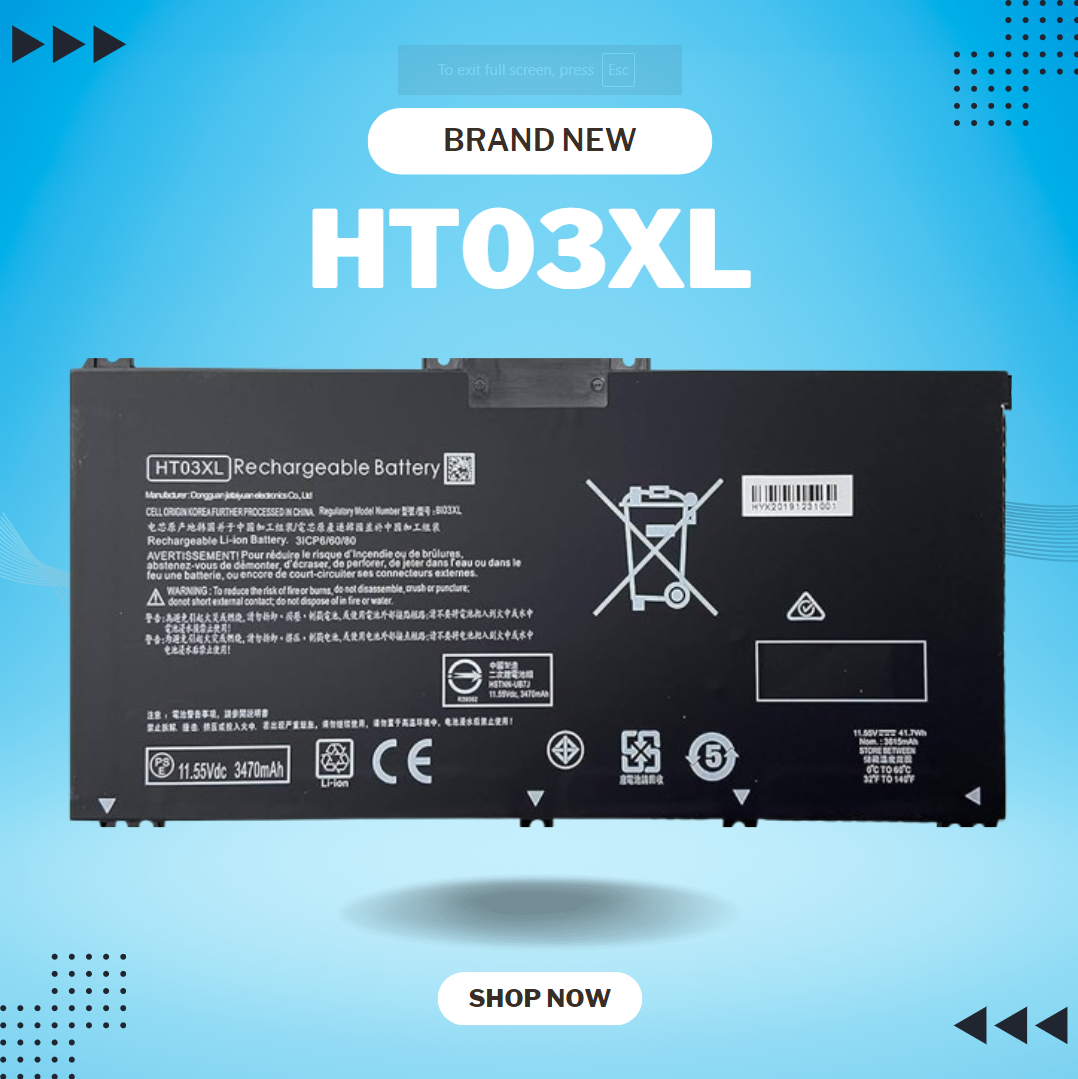
HT03XL L11119-855 Laptop Battery for HP Pavilion 14-CE 14-CF 14-DF 15-CS 15-DA 15-DB 15-DW 17-by 17-CA Series 15-CS0053CL 15-DW0033NR 15-DA0014DX L11421-542 L11421-2C2 HSTNN-UB7J HSTNN-DB8R HT03041XL About this item Compatible with: HP HT03XL Battery, for HP Pavilion 14-CE 14-CF 14-CK 14-cm 14-DF 14-MA 14Q-CS 14Q-CY 14S-CF 14S-CR 15-CS 15-CW 15-DA 15-DB 15G-DR 15T-DA 15T-DB 17-by 17-CA Series 14-CE0000 14-CE0020TX 14-CE0025TX 14-CE0027TU 14-CE0028TX 14-CE0029TX 14-CE0030TX 14-CE0034TX 14-CE1058WM 14-CE0068ST 14-CE1056WM 14-CE0064ST 14-CE0006DX 14-CF0000 14-CF0014DX 14-CF1015CL 14-CM0000 14-CM0020NR 14-CM0012NR 14Q-CS0000 14Q-CS0006TU 15-CR0000 15-CR0087CL 15-CR0052OD 15-CR0055OD 15-CR0037WM 15-CR0051CL 15-CR0091MS 15-CR0010NR Replacement Battery for HP Pavilion 15-CS0000 15-CS2010NR 15-CS025CL 15-CS2073CL 15-CS2079NR 15-CS1063CL 15-CS0072WM 15-CS0051WM 15-CS1065CL 15-CW0000 15-CW1063WM 15-DA0000 15-DA0066CL 15-DA0002DX 15-DA0079NR 15-DA1005DX 15-DA0032WM 15-DA0033WM 15-DA0073MS 15-DA0012DX 15-DA0071MS 15-DA0086OD 15-DB0000 15-DB0015DX 15-DB0031NR 15-DB0011DX 15-DB0066WM 15-DB0005DX 15-DB0048NR 15-DB0051OD 15-DB0048CA 17-BY0000 17-BY1053DX 17-BY1033DX 17-BY0060NR 17-BY0021DX 17-BY0053CL 17-BY0021CY 17-BY1055CL Laptop Compatible for HP Pavilion 240 G7, 245 G7, 250 G7, 255 G7, 340 G5, 348 G5 Series;P/N: HSTNN-DB8R HSTNN-DB8S HSTNN-IB80 HSTNN-IB8O HSTNN-LB8L HSTNN-LB8M HSTNN-UB7J HT03041XL HTO3XL HT03XL L11119-855 L11421-1C1 L11421-1C2 L11421-2C1 L11421-2C2 L11421 -2C3 L11421-2D1 L11421-2D2 L11421-421 L11421-422 L11421-423 L11421-542 L11421-544 L11421-545 TPN-C136 TPN-I130 TPN-I131 TPN-I132 TPN-I133 TPN-I134 TPN-Q207 TPN-Q208 TPN-Q209 TPN-Q210 Specifications: ht03xl battery for hp, Battery Type: Li-ion Voltage: 11.55V Capacity: 41.7WH 3470mAh;Cells: 3-cell; Color: Black Packages includes: l11119-855 hp battery, with Two Free Screwdrivers; HTO3XL Battery for hp model 15-cs0085cl 15-cs0073cl 15-cs3075cl 15-cs3073c 15t-cs300 15t-cs200 15-da0021cy 15-da0011la 15t-db000 14-cf0013dx 14-cf0051od 15-ef0023dx Compatible devices: HP HT03XL Rechargeable li-ion Battery, for HP Pavilion 14-CE 14-CF 14-CK 14-cm 14-DF 14-DH 14-MA 14Q-CS 14Q-CY 14S-CF 14S-CR 15-CS 15-CW 15-DA 15-DB 15G-DR 15T-DA 15T-DB 17-by 17-CA Series 15-cs0053cl 15-cs1063cl 15-cs2064st 15-cs3063cl 15-cs3075cl 15t-cs200 15-da0032wm 15-da0014dx 17-by0063cl 17-by2075cl 17-by0071cl 17-by1022cl 17-by0088cl 17-by0062st 17-by0020cy 17-by0017cy 17-by1003cy 17-ca1010ds 17-by0019ds 17-by2003ca 17-by3613dx 17-by1972cl 17-ca1031dx 17-ca1061nr 17-ca0054cl

Apple MacBook Pro 15” (2018) — professional-grade performance for creative power users.• Intel Core i9 • 32 GB RAM • 500 GB SSD • 4 GB Dedicated GraphicsRetina Display | macOS |

Huawei IdeaHub Board 2 86-inch display delivers an immersive teaching and collaboration experience with large 4K visuals. It helps teachers present clearly and engage students effectively. As a result, classrooms benefit from better interaction and visibility. The 86-inch screen features 4K UHD resolution with zero-gap laminated glass. Therefore, it reduces reflection and improves clarity. Moreover, the D-LED backlight and 60Hz refresh rate ensure stable and consistent visuals. It supports up to 20 touch points using infrared multi-touch technology. In addition, smart handwriting recognition and annotation allow natural writing. The low latency writing response improves accuracy during lessons. The system includes a quad-core processor with 4GB RAM and 32GB storage. Consequently, it runs applications smoothly. It supports Android, Windows, iOS, and macOS for flexible integration. It also includes key capabilities such as 4K UHD resolution, multi-touch interaction, smart annotation tools, wide connectivity options, and cross-platform support. Huawei IdeaHub Board 2 86-inch display is built to enhance collaboration and simplify teaching. Specifications: 86-inch 4K UHD display with 3840 × 2160 resolution Supports up to 20 touch points with infrared technology Zero-gap laminated glass with D-LED backlight Low latency writing with smart annotation support Quad-core CPU with 4GB RAM and 32GB storage

The Samsung Crystal UHD U8000F 50″ 4K Smart TV UA50U8000FUXTW uses a 50-inch LCD panel with 3840 × 2160 resolution. It delivers standard 4K output for everyday viewing, streaming, and console use. Samsung uses the Crystal Processor 4K for image processing and upscaling. As a result, lower-resolution content converts closer to 4K quality on the display. In addition, the TV supports HDR10 and HDR10+, which improve contrast between bright and dark areas for compatible content. The display runs at a 60 Hz refresh rate. Also, Motion Xcelerator reduces blur during fast motion scenes such as sports and action content. Samsung equips the TV with Tizen OS. Therefore, users access streaming apps, SmartThings integration, and smart features through a responsive interface. Connectivity includes HDMI ports, USB ports, Wi-Fi, Bluetooth, Ethernet LAN, and optical audio output. In addition, the TV supports ALLM for basic console gaming responsiveness. This model focuses on 4K resolution, standard HDR performance, and essential smart TV features without advanced gaming or local dimming technology. Specifications: 50-inch LCD panel with 3840 × 2160 4K UHD resolution Crystal Processor 4K with upscaling support HDR10 and HDR10+ compatibility 60 Hz refresh rate with Motion Xcelerator Tizen OS with HDMI, USB, Wi-Fi, Bluetooth, Ethernet connectivity

The LG UltraGear 24″ 180Hz Gaming Monitor delivers exceptional performance for gamers seeking speed and visual precision. Its 23.8-inch Full HD IPS display ensures sharp images and vibrant colors from wide viewing angles. With a rapid 180Hz refresh rate and 1ms (GtG) response time, this monitor minimizes motion blur, providing smooth gameplay even in fast-paced scenarios. These features give you a competitive edge by allowing quicker reactions during intense gaming sessions. The monitor supports HDR10 and covers 99% of the sRGB color spectrum, enhancing visual immersion with rich and accurate colors. This ensures that game environments appear more lifelike and engaging. Equipped with both NVIDIA G-SYNC and AMD FreeSync technologies, the UltraGear monitor reduces screen tearing and stuttering. This compatibility ensures a seamless gaming experience across various graphics cards. Its virtually borderless design on three sides offers an immersive viewing experience, making it ideal for multi-monitor setups. The sleek aesthetics complement any gaming or workstation setup. Additional gaming features like Black Stabilizer, Crosshair, and FPS Counter provide enhanced visibility and targeting precision. These tools assist in identifying enemies and maintaining focus during gameplay. The monitor includes both HDMI and DisplayPort inputs, offering flexibility in connectivity options for different devices. This ensures compatibility with various gaming consoles and PCs. In summary, the LG UltraGear 24″ 180Hz Gaming Monitor combines high-speed performance, vivid visuals, and gamer-centric features, making it a solid choice for both casual and competitive gamers. Specifications: Display : 24″ VA Resolution : FHD 1920 x 1080 Refresh Rate : 180Hz Response Rate : 5ms GTG

Aoc Agon 24-inch WQHD 165Hz Gaming Monitor Product Details Size: 23.8 inches. Panel Type: TN (16.7 Million Colours with 170/160 º viewing angles). Resolution: 2K / WQHD (2560x1440p). Refresh Rate: 165Hz. Respomse Time: 1 ms (GTG). Aspect Ratio: 16:9. Sync Technology: Nvidia G-Sync. Brightness: 350 cd/m2. Contrast Ratio: Static: 1000:1, Dynamic: 50M:1 Anti-Glare 3H hard coating with an Ultra Narrow bezel. Adjustable Height within a 13cm range. Tilt Adjustment: -3.5° ~ +21.5°. Swivel: -20° ~ +20°. Pivots up to 90°. VESA Wall Mounting : 100x100mm. (x2) 2W built-in speakers with microphone. Ports: (x1) HDMI 1.4 (x1) DisplayPort 1.2 (x4) USB-A 3.0 (x1) USB-B (x1) 3.5mm audio jack Dimensions (incl base): 55.5 x 21.3 x 49 cm. Lowblue Light mode: Protection from eye strain without sacrificing color composition. Specifications: Aoc Agon 24-inch WQHD 165Hz Gaming Monitor Size: 23.8 inches. Panel Type: TN (16.7 Million Colours with 170/160 º viewing angles). Resolution: 2K / WQHD (2560x1440p). Refresh Rate: 165Hz.

This 1.8-meter DisplayPort to HDMI cable lets you connect a DisplayPort-enabled PC or laptop to an HDMI monitor, TV, or projector. It delivers clear high-definition video and reliable signal transmission, making it perfect for office work, presentations, and home entertainment. The DisplayPort to HDMI cable (1.8M) is a simple and reliable solution for connecting modern computers and laptops with a DisplayPort output to HDMI displays. Ideal for upgrading your setup, it supports high-quality video output for monitors, HDTVs, and projectors. With plug-and-play functionality and a durable build, it ensures stable performance for both professional and home use. DisplayPort to HDMI Connection for easy compatibility with HDMI screens 1.8M Cable Length ideal for desk and office setups High-Definition Video Output for clear and sharp visuals Plug & Play no drivers required Durable Connectors & Cable Build for long-term reliability Perfect for Work & Entertainment supports monitors, TVs, and projectors Works with devices that have a DisplayPort output and displays with an HDMI input, including monitors, TVs, projectors, and display systems. Ideal for workstations, presentations, and dual-screen setups.
